What AI customer support actually is
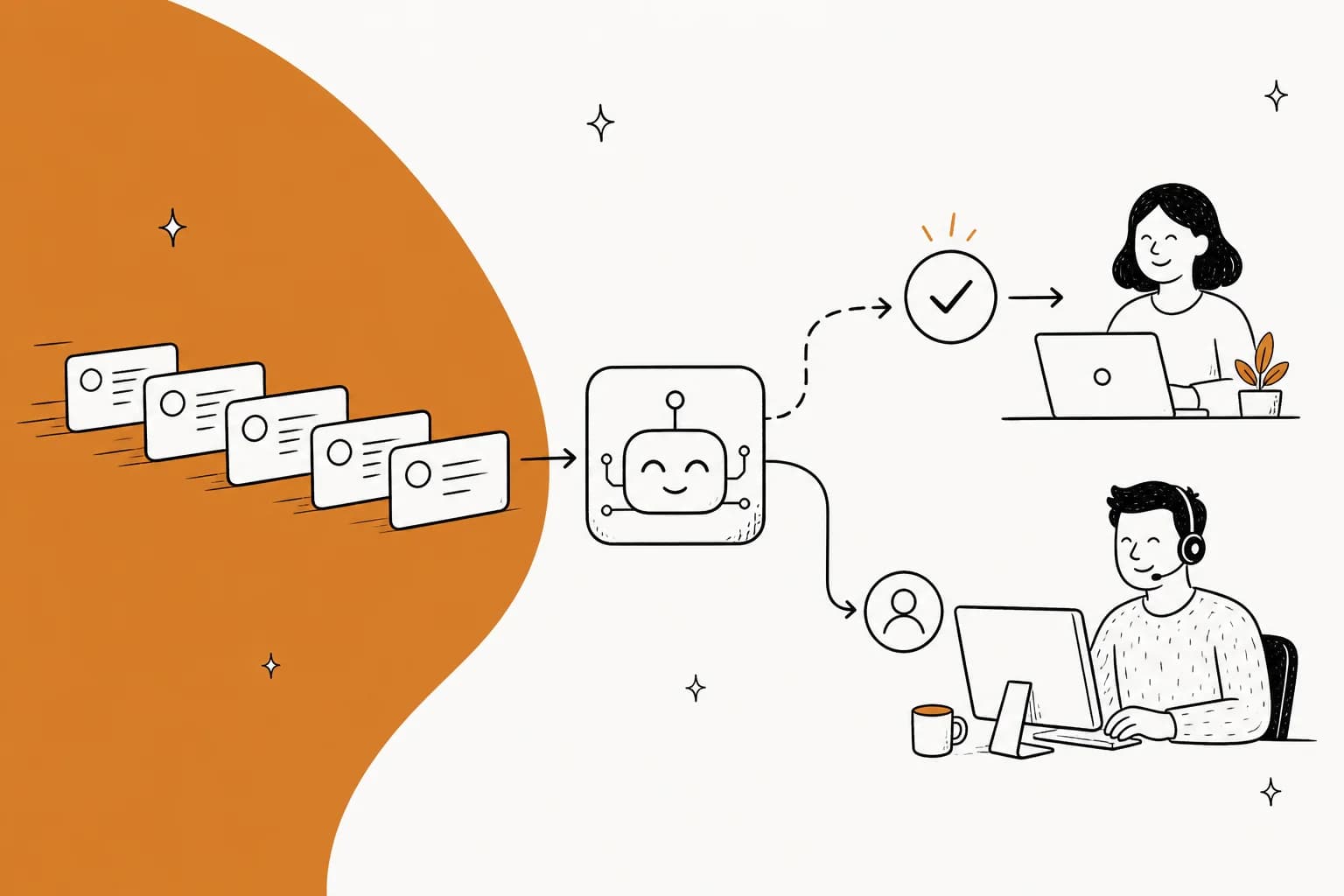
Strip the marketing off and it is four steps. A message arrives. The system searches your help center, your past tickets and whatever else you've connected. It decides whether it knows the answer well enough to send one. Then it either replies, drafts something for a human to check, or escalates.
That is it. Everything else, every "agentic" and "autonomous" and "intelligent," is a claim about how well each of those four steps is done.
The words get muddled constantly, so here is the split that survives a demo. Three questions tell you which category you're looking at: who receives the output, can it write to a system of record, and does it reason or follow a script.
| Who reads the output | Can it change your systems | How it decides | |
|---|---|---|---|
| Rule-based chatbot | The customer | No | A decision tree you drew |
| AI agent | The customer | Yes, if you let it | Reasons over your content |
| Copilot | Your agent | Only when a human sends | Reasons, human approves |
A rule-based chatbot breaks the moment a customer phrases something the way real people phrase things. An AI support agent reasons over your content and can act. A copilot drafts and lets your agent press send. The difference between AI agents and chatbots is not the model underneath, it is whether the thing is allowed to finish a job.
One more phrase worth pulling apart, because it appears on nearly every vendor page: "trained on your data." That covers three completely different mechanisms.
- Fine-tuning bakes your content into model weights. Slow to update, and your data has left the building.
- Retrieval indexes your docs and quotes them at answer time. This is what RAG means, and it is what almost everyone actually does. Edit an article, and the next re-index picks it up.
- Live tool calls query your order API in the moment. The only one of the three that can answer "where is my package," because the answer didn't exist when the index was built.
Ask a vendor which of the three they mean. It changes how fast a policy change propagates, how much of your data leaves your systems, and whether the thing can answer account-specific questions at all. The RAG versus fine-tuning tradeoff for help centers is worth understanding before you sit through a demo, and if you want the layer underneath that, vector search for support covers the retrieval mechanics.
How it works, one ticket at a time
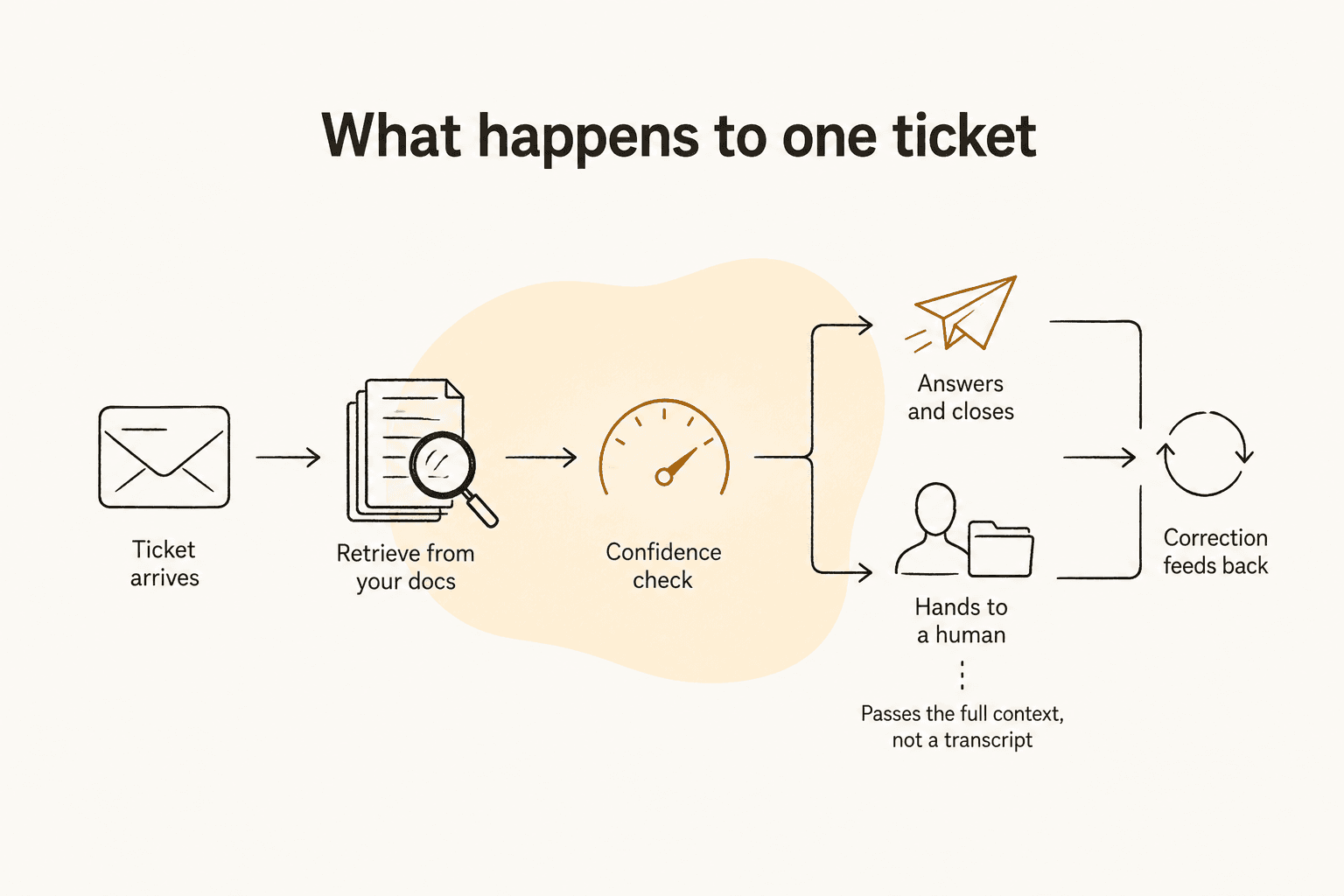
Follow one ticket through and the mechanism stops being mysterious.
It reads the ticket and works out what is being asked. Not keyword matching. Intent classification plus entity extraction plus a read on sentiment, so "this is the third time I'm asking about order 44182 and I'm losing patience" resolves to an order-status question, an order number, and an angry customer. That last signal matters more than people expect, and sentiment analysis is often what decides whether the AI answers at all.
It searches everything you've connected, at once. Help center articles, past resolved tickets, macros, an internal wiki, uploaded PDFs. Good systems pool these rather than siloing them per integration, so one reply can draw on your public docs and your internal runbook together. Grounding is the term for tying the answer to retrieved text rather than the model's memory, and it is the single biggest lever on accuracy.
It checks whether it should speak. This is the confidence score step, and it is where the good deployments separate from the bad ones. High confidence sends a reply. Low confidence writes an internal note for a human instead. On eesel, that behaviour is something you configure in plain language rather than a threshold you tune numerically, and the helpdesk agent documentation states the fallback bluntly: if it doesn't know, it says so, or escalates.
It acts, or it hands over. Acting means writing to a system: tagging the ticket, updating a field, looking up an order, issuing a refund, closing the conversation. Handing over means a real transfer with the context attached. More on that below, because it is the part everyone underinvests in.
Corrections come back into it. Your agent rewrites the draft, or tells the system it was too formal, and that lands as an instruction change rather than evaporating. Without this loop you are re-teaching the same lesson every week.

What it should handle, and what it should not
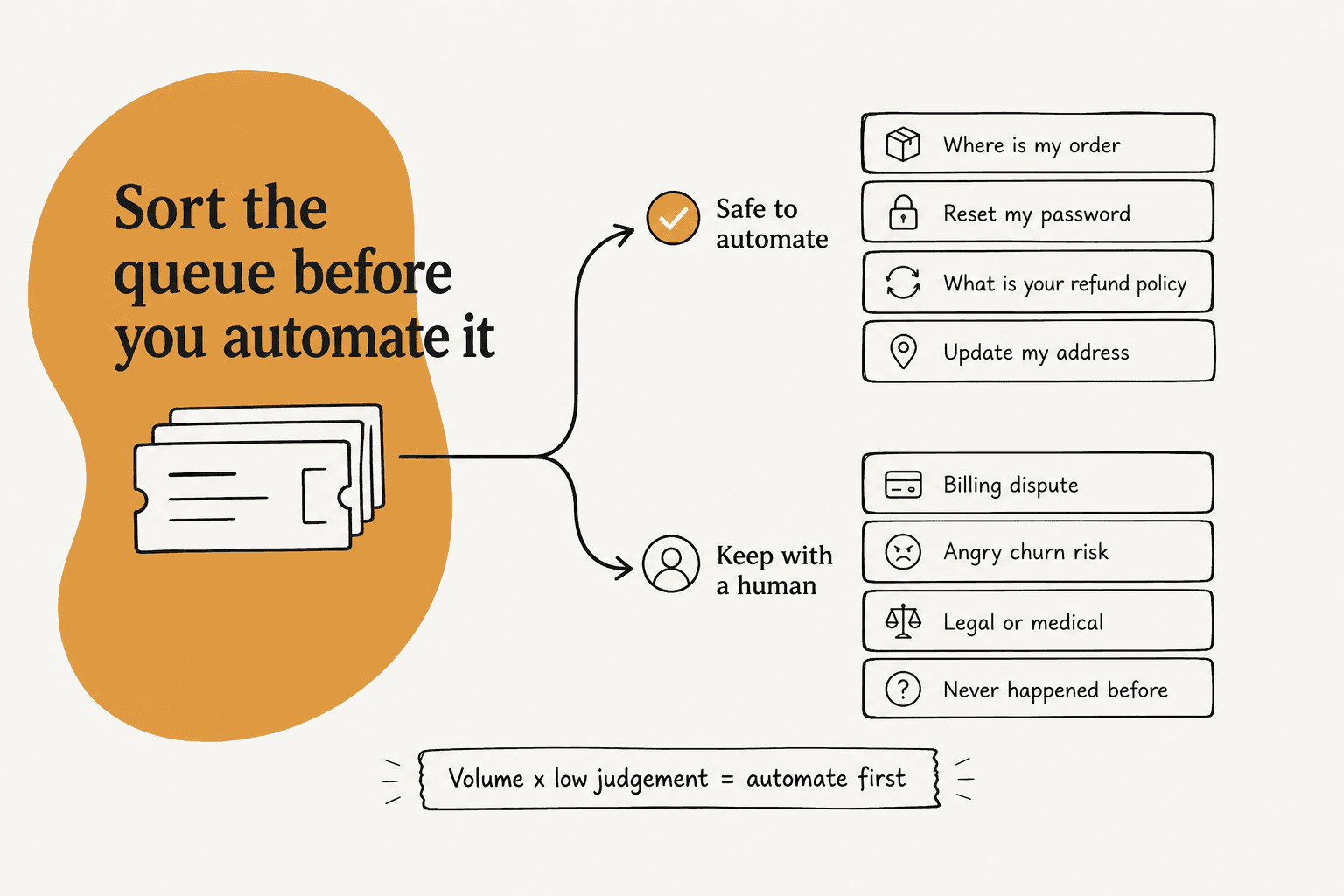
The scoping rule I keep coming back to is volume times low judgement. High volume alone is not enough, because a thousand identical billing disputes are still a thousand billing disputes. Low judgement alone is not enough either, because automating a question you get twice a month is not worth the setup.
Automate first: order status and WISMO. Password resets. Policy questions with one documented answer. Address and subscription changes. Ticket triage and routing. Translation. These share a property: the correct answer already exists in writing somewhere, and sending the wrong one costs a follow-up email rather than money.
Spam belongs on this list too, and it is underrated. On one real trial I'll come back to later, 22% of the inbound queue was junk, and catching all of it before a human read a word was a day-one win with no customer-facing risk at all.
Keep with a human: anything where being wrong is expensive or hard to reverse.
- Policy exceptions. Day 35 of a 30-day return window is a judgement call, not a lookup. The AI should flag it and escalate, not decide.
- Money above a ceiling you set. Write the number down. The agent may issue a credit up to $X; above that a person signs off. Almost nobody publishes this rule and every real deployment has one.
- Regulated conversations. Medical, legal, financial advice. Compliance is not a badge on a pricing page, it is a constraint on what the agent is allowed to say.
- Already-angry customers. A good handoff at message one beats a great answer at message four.
- Anything that has never happened before. If there is no precedent in your ticket history and nothing in your docs, retrieval returns nothing, and that is exactly the condition under which models start inventing.
That last one is worth dwelling on, because I've watched it go wrong on our own product. When retrieval comes back empty, a model that hasn't been told to stop will fill the gap from training data. We had paying customers, including a Danish solar-energy provider, whose bot fabricated product claims and sent them to real people, because the knowledge base had no match and nothing told it to decline. The fix was never a better model. It was a hard threshold and a decline-to-answer fallback.
There is a simpler version of the same test that I'd put on a whiteboard before any rollout: can this action be undone in one click? If not, a human approves it. That covers refunds, cancellations, account deletions, and anything that sends an email a customer will screenshot.
The sharpest statement of this I've heard came from a CX lead at a DTC supplements brand running about 7,000 Gorgias tickets a month against 30,000 orders:
"The AI will never be able to answer 100% of the questions, but if it tries and just answers 'sorry I don't know this,' I cannot go and check all my 7,000 tickets to see if the AI actually made a good answer, then the point is a little bit gone. I need an AI who is only handling the tickets that it's confident to handle and all the other ones, leave them alone."
We probably lost that deal on it, which is exactly why I keep quoting it. "Leave them alone" is a harder product requirement than "answer everything," and it is the one buyers actually care about.
The benefits that hold up, and the limits nobody prints
The honest benefit list is shorter than the marketing one, but every item on it is checkable.
Coverage outside your hours. This is the least arguable win. A queue that used to sit overnight now gets first-touch at 3am, and after-hours coverage is often the thing a small team feels first.
Language reach without translating your help center. A ticket in German gets a German answer from English documentation. One eesel customer, the loan-comparison platform Smava, runs a fully automated Zendesk agent handling over 100,000 German-language tickets a month, a figure published on the helpdesk agent page. Multilingual support used to be a headcount problem and now it mostly isn't.
Speed on the boring tier. First response time drops hard on the ticket types you scoped, because there is no queue in front of them.
Consistency. Every agent answers the refund policy question the same way, which is not glamorous but is the thing your QA lead has wanted for three years.
Now the limits, stated plainly, because I'd rather you hit them here than in production.
It is only as good as your written knowledge, and yours is probably the wrong shape. One support manager at a bus-tracking service told us their entire knowledge base was written for administrators while every ticket came from riders. The retrieval worked perfectly and the answers were still confusing. Outdated help center content is the other half of the same problem: policy changed in March, the article didn't, and the AI is confidently quoting a dead policy in August.
A high deflection rate can hide a failing deployment. If tickets are closing and repeat contacts are climbing, you are deflecting rather than resolving. Track them together or the dashboard will lie to you.
Over-escalation is a real failure mode and it looks like safety. An agent that hands everything to a human breaks nothing, upsets nobody, and quietly never delivers a return.
Tone is a separate problem from accuracy. This one surprised us with real numbers, and it is the core of the worked example below.
Customers may hate it even when you build it well. This is the limit nobody puts on a pricing page, and the most honest version of it I've read came from someone who ran the project:
"This is so true. I led the implementation of an AI customer service agent and even though management thinks it's a great success the metrics tell a totally different story. Our customers hated it. I haven't seen anything in tech that is hated more. Before you think we did a bad job with our solution, I can tell you we went with some of the best and did our own intensive testing and worked on latencies etc., I actually thought the final version was pretty good but our customers just hated it."

The reason that comment is hard to wave away is the pre-emptive defence in the middle of it. My read is that the gap is almost always positioning: an AI that is a tool the customer can walk past is fine, and an AI that is a gate they have to beat is not.
It does not remove the ops work, it moves it. Somebody owns the knowledge base, reviews the escalations, and reads the weekly report. Across 24 churned eesel accounts, our co-founder Amogh Sarda found the same thread: "zero proactive outreach for 6+ months. No 30/60/90 day check-ins on any tier." Rollouts do not run themselves, on either side.
Where teams actually put it to work
Five patterns cover most of what I see on real queues.
Order status and shipping. The highest-volume, lowest-judgement question in ecommerce, and the one that most needs a live tool call rather than a doc lookup, since the answer lives in Shopify and not in your help center. Worth reading up on automating order tracking before you scope it.
Returns and refunds, with a ceiling. AI can handle refunds inside a documented policy. Set the dollar limit, put anything above it behind approval, and you have covered the volume without handing over the treasury. The mechanics of automating refunds are more about the approval design than the AI.
Tier-1 triage. Even when the AI never replies to a customer, classifying, tagging, prioritising and routing is a real win. Tier-1 deflection is the headline, but ticket routing is the quieter one that agents notice first.
Agent assist, in the helpdesk they already use. The copilot pattern: the draft is waiting when the agent opens the ticket. Zero new habits, which is why adoption is high and the risk is nearly nil.
Internal IT and employee support. The safest place to start, because your audience is colleagues rather than customers. The head of IT at InDebted put eesel on their Jira Service Management queue as first responder and described it as acting "just like an agent would." They sit at 15% deflection while targeting 55%, and I like that number more than the flashy ones, because it is what month three honestly looks like.
If you're on the same stack, AI for Jira Service Management covers the setup, and the same pattern extends past IT into HR helpdesk and general employee support work.
Technical depth is not automatically out of scope either, which surprised me. One of the strongest deflections I've seen in our own logs was a field engineer at an industrial-automation vendor filing a hardware fault with error codes and network symptoms. The agent ran six searches across PDF manuals, read two of them in full, and drafted a structured set of isolation tests. Depth is not the barrier. Whether the answer is written down anywhere is the barrier.
Designing the escalation, which is the part everyone skips
Here is my actual opinion after years of this: escalation design is the product. Answering is table stakes now. What separates a deployment your team defends from one they resent is what happens in the 20% of conversations the AI shouldn't finish.
The clearest outside confirmation of that I've seen came from a contact-centre operator describing what actually happened to their numbers after launch:
"AHT question nobody wants to answer lol. shipped a billing/tracking bot, decent containment, but AHT on escalated calls went up. agents had to read the transcript, figure out what the bot already tried, re-ask half of it anyway. fixed by forcing a structured handoff summary instead of raw transcript dump (saved more time than the automation itself). CSAT fine on deflected stuff, tanked on anything that bounced back after a failed bot attempt"

Read that last clause twice. CSAT was fine on the conversations the bot finished and collapsed on the ones it bounced back. The automation was working. The handoff was the product defect, and fixing it saved more time than the bot did.
Three failures I've watched happen, all of them worse than a wrong answer.
The handover that only announces itself. The bot tells the customer it is transferring them to a human, and then doesn't. A Dutch hosting company on Zendesk hit this repeatedly, along with customer name and email not carrying across on transfer, and eventually built their own thing instead. Amogh's line about this class of bug has stuck with me: "If hard-fail it's silent-failure class (worst class for trust)." A visible error is recoverable. A conversation that quietly went nowhere is not.
The escalation into a void. One deployment escalated by email, and the escalation email was auto-closed by a rule nobody remembered writing. No human ever saw it. The dashboard showed escalations firing correctly.
The AI that pretends to be a person. Same deployment: the agent had picked up a human agent's name from the ticket history and started signing as her. Customers thought they had reached a human. Name your bot, and make it say what it is.
So, concretely, what a good escalation design specifies before go-live:
- The triggers. Explicit ask for a human. The same question asked twice. A sentiment read past a line you set. An intent on your denylist. A named high-value account. Plus the one almost nobody writes: the no-escalation conditions, where you have decided the AI should keep going rather than bail.
- The payload. Full conversation history, a plain summary of what the AI tried and why it stopped, the sentiment read, and every record it retrieved. A transcript alone makes the human re-read the whole thing, which is the opposite of help. Handoff best practices go deeper here.
- The route. Which queue, what priority, and whether the AI's sentiment read is allowed to bump it. Escalation management is a routing problem as much as a conversational one.
- What the customer is told. Are you quoting a wait time? Does the transcript stay visible? Getting the handoff conversation design right is cheap and the difference is felt immediately.
- What happens when nobody is there. Nights, weekends, a queue at 200%. This is the most common real-world escalation failure and the least documented. The answer is usually a holding pattern that sets a real expectation, not a fake promise.
That last point has a nicer version than "apologise and wait." One fintech we work with, sitting on 7,000 to 8,000 escalated tickets a month while waiting on third-party payout partners, uses the AI to keep escalated tickets warm with honest status updates. No knowledge base needed, just instructions. Escalation does not have to mean the conversation stops.
Not every handoff is complicated, either. Here is one from our own logs, on an SEO tool's website chat: the customer asked how to delete keywords from a project, got an answer, asked how to delete search engines, got another, then asked "Can I talk to a human?" and was transferred immediately. Two questions self-served, one clean exit. That is what a working system looks like from the outside, and it is completely unremarkable, which is the point.
If you're on Zendesk specifically, Zendesk escalation rules covers the native side of this, and human handoff in chat covers the live-channel version where seconds actually matter.
How to roll it out, week by week
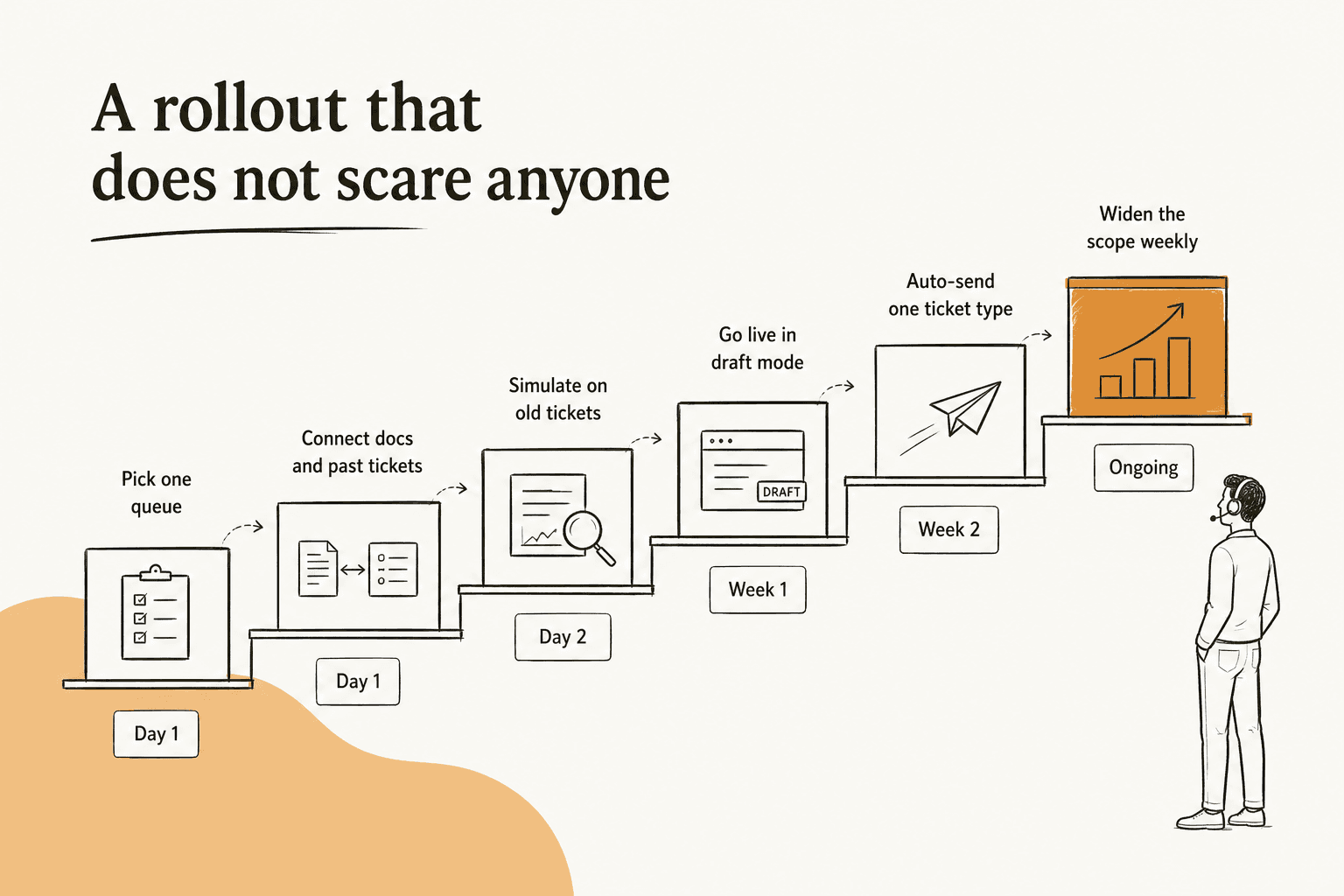
Connecting a helpdesk and getting a first answer takes about half an hour. Getting to a rollout your team trusts takes two to four weeks, and the slow part is never the software.
Day 1: pick one queue, not the helpdesk. One channel, one ticket type, one language. The failure I see most is teams pointing the AI at everything on day one, getting mediocre results everywhere, and concluding the category doesn't work.
Day 1: connect the knowledge, including past tickets. Docs, help center, macros, and your resolved ticket history. That last one is what buyers ask for before anything else, and Amogh's note on it is blunt: "past ticket training strikes again. Classic. People really, really, really want to train on past tickets." It is also where realistic tone comes from, because your help center is written in policy voice and your tickets are written in human voice. You do not need a perfect knowledge base to start, either. One UK team on Zendesk got 56 resolved tasks out of nine synced macros, and was still using it 38 days after their trial expired.
Day 2: simulate against tickets you've already answered. This is the step almost no vendor page describes and the one I'd refuse to skip. Replay a batch of past tickets, let the agent draft what it would have said, and grade those drafts against what your team actually sent. eesel's simulation runs in sandbox mode and reports coverage per theme, so you get "refund policy 28%, SSO login errors 35%" rather than a single meaningless accuracy number. Then you fill the specific gap and re-run.
Set a pass bar before you look at the results, or you'll rationalise whatever you get. Mine is: on a sample of at least 100 real tickets, factual errors under 5% on the intents you scoped, and no error at all in the categories you fenced off.
Week 1: go live in draft mode. Real tickets, real customers, and every reply still leaves through a human. You measure the delta between what the AI drafted and what your agent sent, and that delta is the most useful diagnostic you will ever get. It also means your worst-case outcome in week one is a wasted draft.
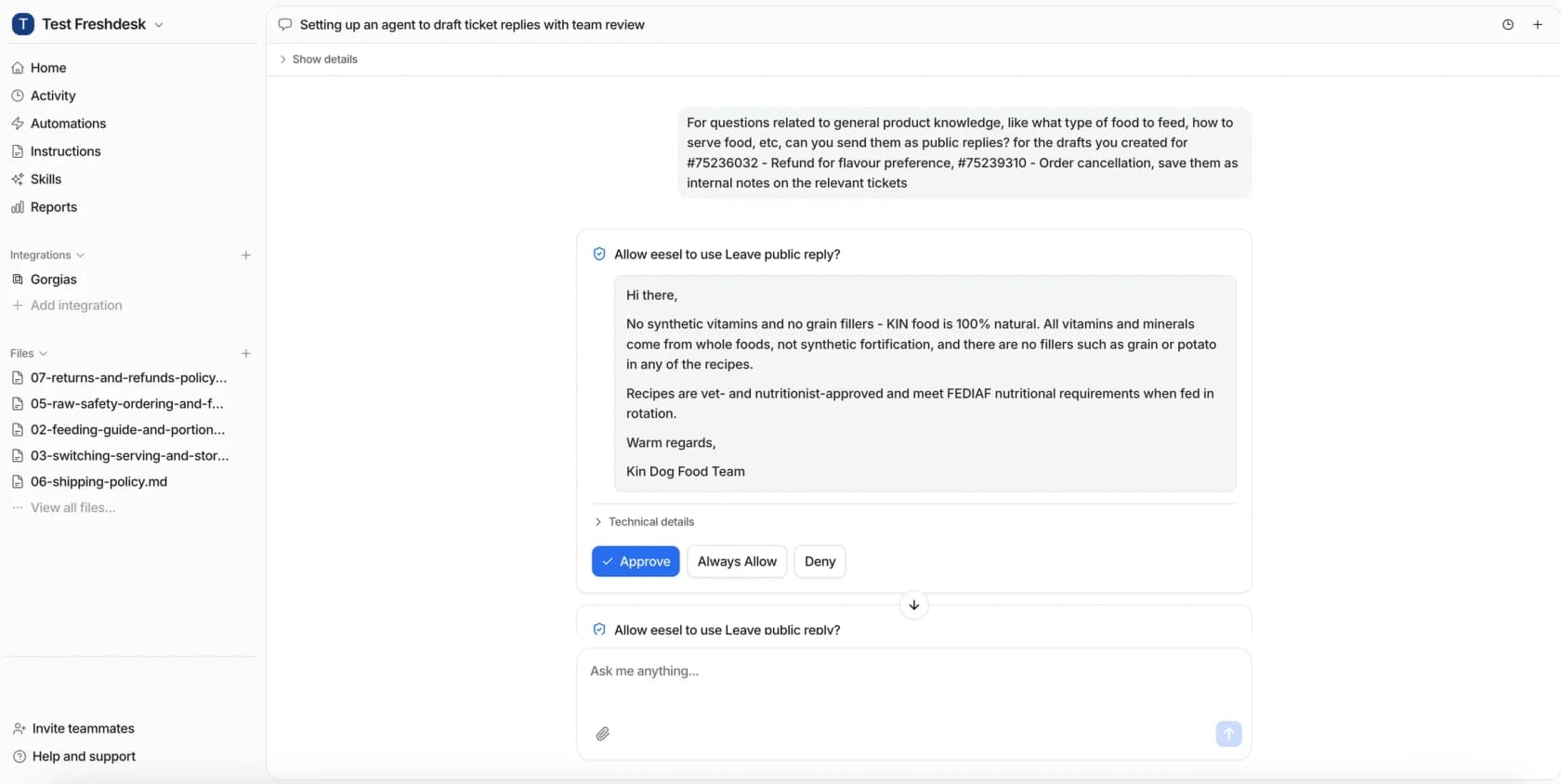
Week 2: auto-send exactly one ticket type. The narrowest, most documented, most reversible one you have. Order status is the usual pick. Watch it for a week with a human reading every conversation.
Week 3 onward: widen by scope, never by percentage. Add one intent at a time and keep the ticket deflection numbers next to the repeat-contact numbers. Anything that touches money or account state stays behind approval far longer than feels necessary.
If you want the same sequence from someone who is not selling you anything, this is close to the version I'd write:
"The safest rollout I have seen is: let the agent draft, tag confidence plus reason, require approval for refunds or account changes, and review every reopened conversation for the first month. That review log is usually where the real automation boundary shows up."
The reopened-conversation review is the detail I'd steal from that. Your scoping document says what the AI should handle. The reopen log tells you what it actually can.
Two things that will actually break your timeline, and neither is on a vendor roadmap. The first is knowledge base cleanup, which is real hours of real human work. The second is integration credentials, because the person with admin on your helpdesk is on holiday. Budget for both.
And there is a failure mode past all of this that we see more than any technical one, and it has nothing to do with answer quality. Some trials get fully configured, the integration connects, the docs sync, and then nobody wires up a trigger, so zero tasks ever fire. Others do everything right and still stall: we watched one cohort where nine of ten activated trials had working conversations scoring 96% on quality, and exactly one of them converted. In neither case was the AI the problem. Configuration is not deployment, and deployment is not adoption. Somebody has to turn it on and own it.
Our full implementation guide has the longer version of this sequence, and implementing AI support covers the change-management side I've skipped here.
The month-by-month arithmetic, with your numbers
Most cost models jump straight to a mature deflection rate, which is why month one feels like a letdown. Put your own volume in and the shape of the ramp becomes obvious.
The billable unit is the other half of this, and it is the most expensive undefined word in the category. Per-seat charges for people. Per-resolution charges only when something closes. Per-ticket charges for every conversation the AI touches. Those produce wildly different invoices on identical volume, so the question to ask a vendor is not "how much" but what event increments the counter. eesel's answer, on its pricing page, is per ticket or chat session handled at $0.40 each, no matter how many messages go back and forth, which is deliberately the unit support teams already think in. Our writeup on cost per resolution does the comparison properly, and AI support cost covers the models side by side.
What to measure, and the three words vendors blur

Three metrics get used interchangeably across nearly every vendor page, and they measure different things. The reason it matters is not pedantry, it is that one of them can look great while your customers are having a worse time. PostHog's support lead put the mismatch better than I can:
"Most companies don't realize the frustration they're creating. They look at the numbers, see fewer tickets coming in, and read it as a good sign: customers must be doing fine. Companies call it "deflection." Customers call it being ignored."
Worth noting that PostHog sells product analytics, not support AI, and that post argues against putting AI in front of a support queue at all. I don't fully agree, but the distinction they draw between AI as a tool and AI as a gate is the right one, and a deflection number cannot tell you which one you built.
| Metric | Numerator | Denominator | What it hides |
|---|---|---|---|
| Deflection rate | Contacts that never reached a human | All contacts | Whether the problem was solved |
| Resolution rate | Problems actually solved without a human | Conversations the AI engaged | Nothing, if you measure repeat contact too |
| Containment rate | Conversations that stayed in the channel | Conversations that entered it | Whether the customer gave up |
Any percentage in this family is meaningless without its denominator, and vendors quote whichever framing gives the biggest number. The question that recovers it every time: percent of what, out of how many, over what period?
What I'd actually watch weekly:
- Resolution rate paired with repeat-contact rate. Neither alone tells you anything. Together they tell you everything. Our guide to improving resolution rate is the follow-up once the numbers are honest.
- Escalation rate and the reasons behind it. A healthy escalation is not a failure. An escalation that fired because retrieval found nothing is a knowledge base ticket, not an AI problem.
- Knowledge gap rate: the questions the agent flagged as unanswerable. This is the single most actionable number in the whole set, because it is a to-do list.
- CSAT split three ways: on AI-resolved conversations, on escalated ones, and blended. They are three different numbers and the blended one is the least useful.
- Cost per ticket, including your own hours. The software price is the easy part. Measuring AI support ROI properly means counting the KB cleanup and the review time too.
For the fuller list, our writeup on support metrics goes deeper than I can here. If you want the escalation-quality side specifically, containment rate is the one to read next.
One real workflow, start to finish
Here is the trial I keep pointing people at, because the result was not what anyone expected.
A German online jewelry retailer, around 1,000 tickets a month on Zendesk with Shopify behind it, did not switch anything on and hope. They ran the agent against their live inbox for real: 284 chats plus a 100-ticket cross-validation, so every number came from tickets their own team had already handled.
The inbox split roughly 38% direct-to-consumer support, 22% spam, and 21% internal B2B. Triage came in at 93% accuracy and spam detection at 100% with zero false positives, which on an inbox where nearly a quarter of the volume is junk is a real day-one win before a single customer-facing reply exists.
Draft quality was strongest exactly where a well-documented policy lives: 96.4% useful drafts on warranty claims, 93.8% on returns and refunds, 100% on product inquiries and refund status.
And then the number that made everyone stop. Only 12% of those drafts were sent as-is.
The instinct is to read that as an accuracy problem. It wasn't. When we broke down the reasons agents rewrote drafts, about 65% of the edits were pure length and tone, because agents were compressing 8 to 15 sentence drafts into 1 to 3 sentence replies. Roughly 20% needed data the AI wasn't connected to, ERP and logistics systems. Only about 5% of the edits were made because the AI had the facts wrong. Graded separately against the whole sample rather than against the edits, the factual error rate came out at 7%.
That distinction is the most useful thing I've learned from running these rollouts. "The AI is wrong" and "the AI doesn't sound like us" are different problems with different fixes, and only one of them is solved by better knowledge. The recommendation out of that trial was concrete: train on 200 recent agent replies, and as-is adoption should move from 12% toward 30 to 40%.

For contrast, two published numbers at the other end of the ramp. Gridwise resolved 73% of tier-1 requests in the first month after a seven-day trial, which eesel publishes on its product page. Global Pay reported up to 80% time savings finding answers across their documentation. Both are real, both are published, and neither is what your month one will look like. The jewelry trial is.
Try eesel for AI customer support
If any of the above sounds like your queue, that is the shape of the problem eesel was built for. It plugs into the helpdesk you already run rather than replacing it, across Zendesk, Freshdesk, Gorgias, Front, Help Scout, HubSpot and Jira Service Management. It reads your docs and your resolved tickets, and it starts in draft mode so nothing reaches a customer without a person seeing it first.
The part I'd actually push you toward is the simulation. Before you decide whether any of this works for your team, run the agent over your own past tickets and read what it would have said next to what your team actually sent. That comparison answers the question a demo cannot. It is $0.40 per ticket once you go live, with no platform fee or per-seat charge, and the first $50 of usage is free, which is more simulation than most teams need to make the call.

Try eesel, or if you'd rather see it against your own tickets with someone walking you through it, the AI helpdesk agent page is the place to start.
Frequently asked questions
What is AI customer support?
AI customer support is software that reads an incoming customer message, finds the answer in your own documentation and ticket history, and either replies or hands the conversation to a person. The useful distinction is between a scripted rule-based chatbot, which follows a decision tree, and an AI support agent, which reasons over your content and can take actions in your helpdesk.
What should AI customer support never handle?
Anything where being wrong is expensive or hard to undo: policy exceptions, billing disputes, legal, medical and financial advice, and any ticket from a customer who is already upset. A good rule is the irreversibility test. If the action cannot be undone in one click, a human approves it. Our notes on guardrails cover how those boundaries get encoded. For what happens when they are missing, read preventing hallucinations.
How much does AI customer support cost?
It depends entirely on the billable unit, which is the number that decides your invoice. Per-seat pricing charges for agents, per-resolution charges only when the AI closes something, and per-ticket charges for every conversation the AI touches. eesel's pricing page puts it at $0.40 per ticket handled, with no platform fee, no per-seat charge and no minimum. Our breakdown of cost per resolution walks the arithmetic.
How long does it take to implement AI customer support?
Connecting a helpdesk and getting a first agent answering takes about 30 minutes. Getting to a rollout you trust takes two to four weeks, and the thing that stretches it is almost always the knowledge base, not the software. Our implementation guide covers the sequence, and outdated help center content covers the audit you do first.
How do you measure whether AI customer support is working?
Watch three numbers together, never one alone: deflection rate paired with resolution rate and repeat-contact rate. A rising deflection rate alongside a rising repeat-contact rate means tickets are being closed, not solved. Our guide to support metrics lists the rest of the set worth tracking weekly.
Can AI customer support work with my existing helpdesk?
Yes, and layering on top is usually the safer choice than replacing the helpdesk. eesel plugs into Zendesk, Freshdesk, Gorgias, Front, Help Scout, HubSpot and Jira Service Management, so your queue, macros and reporting stay where they are. The full list lives on the integrations page. For how that looks in practice on one stack, see AI for Zendesk.
Will AI customer support replace support agents?
On live queues what actually happens is that the repetitive tier disappears and the human work gets harder and more valuable. The tickets that reach a person are the ambiguous ones. Our comparison of AI and human agent cost and our notes on tier-1 deflection both cover where the line falls.


Article by
Riellvriany Indriawan
Riell is a designer and writer at eesel AI with about two years of experience researching CX platforms, AI chatbots, and helpdesk software. She combines her design background with a sharp eye for how these tools actually look and feel in practice — making her comparisons unusually visual and user-focused.