

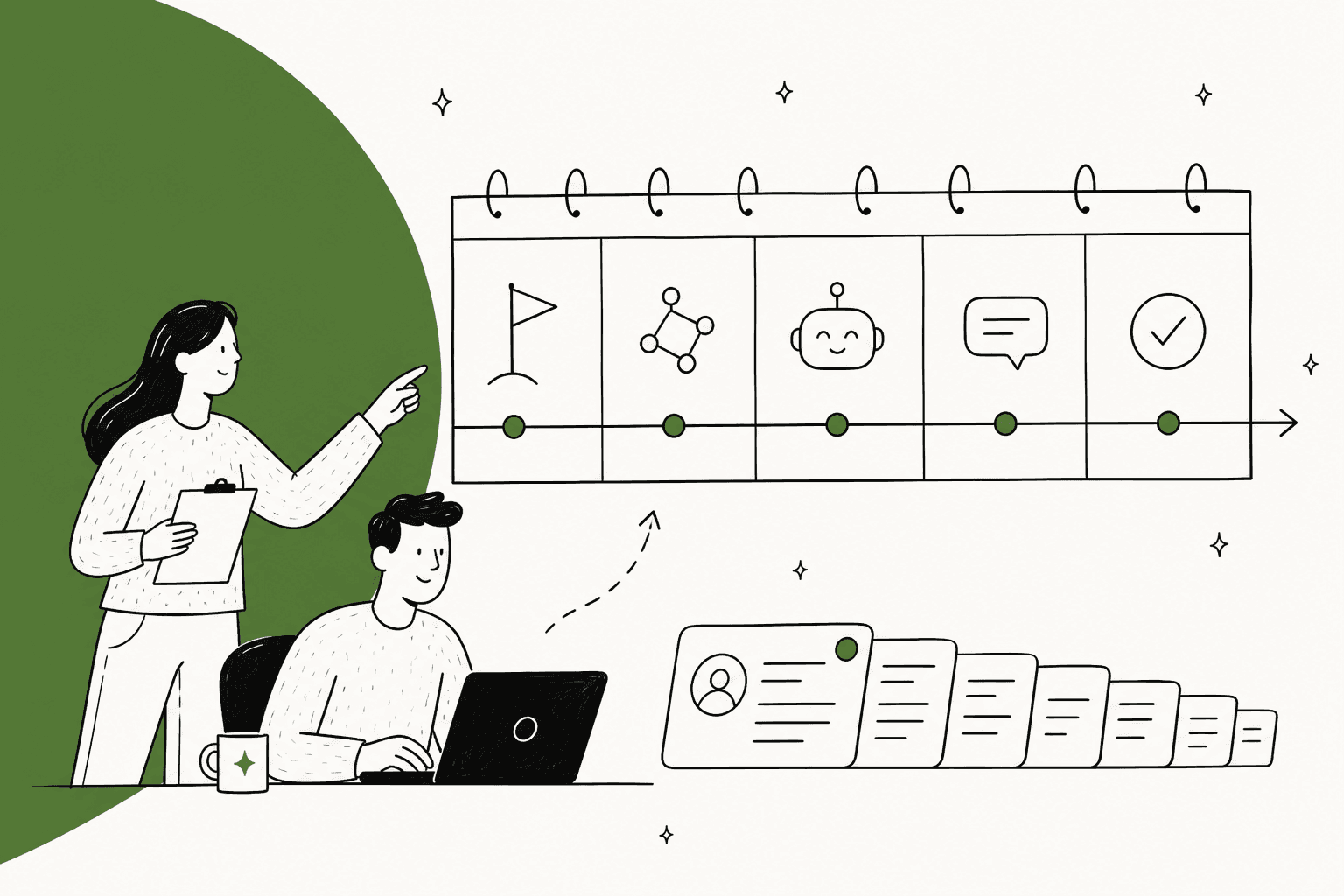
Plan on 2 to 8 weeks from kickoff to an AI agent answering customers on its own, and almost none of that is technical. Connecting the helpdesk takes an afternoon. The weeks go into writing down what your team knows, a stretch where the AI only drafts and people send, and waiting on approvals from people outside support.
The real eesel rollouts I can point to sit across that whole range. Rúngne connected Gorgias and Shopify in late June and had three agents live within about a week. Luxedo connected in July, spent all of August on knowledge and instructions, and switched its trigger on in the last week of August. Same product, same kind of helpdesk; the difference was how much of the answer already existed in writing.
"Fully live" is also less of a date than people expect. It's a dial you turn one topic at a time, and most teams keep turning it for months. If you want to see where you'd land, eesel lets you connect your helpdesk, test on 20 past tickets and run in drafts-only mode on a free trial, so week one costs you nothing but an afternoon.
I'm Riell, and I work eesel's support queue. That puts me on the other side of a lot of rollouts: I see the questions teams ask in week one ("is it connected?") and the very different ones they ask in week six ("why did it say that about refunds?"). This guide is the timeline I'd hand a support lead on day one, built from what those rollouts actually looked like rather than a consultant's Gantt chart.
How long does an AI support implementation take?
For most support teams, 2 weeks is the floor and 8 weeks is a normal ceiling for getting an AI agent to answer its first customers without a person in the loop. Drafts on live tickets can start much sooner, often in the first week, because drafting carries no risk: a person reads every reply before it goes out.
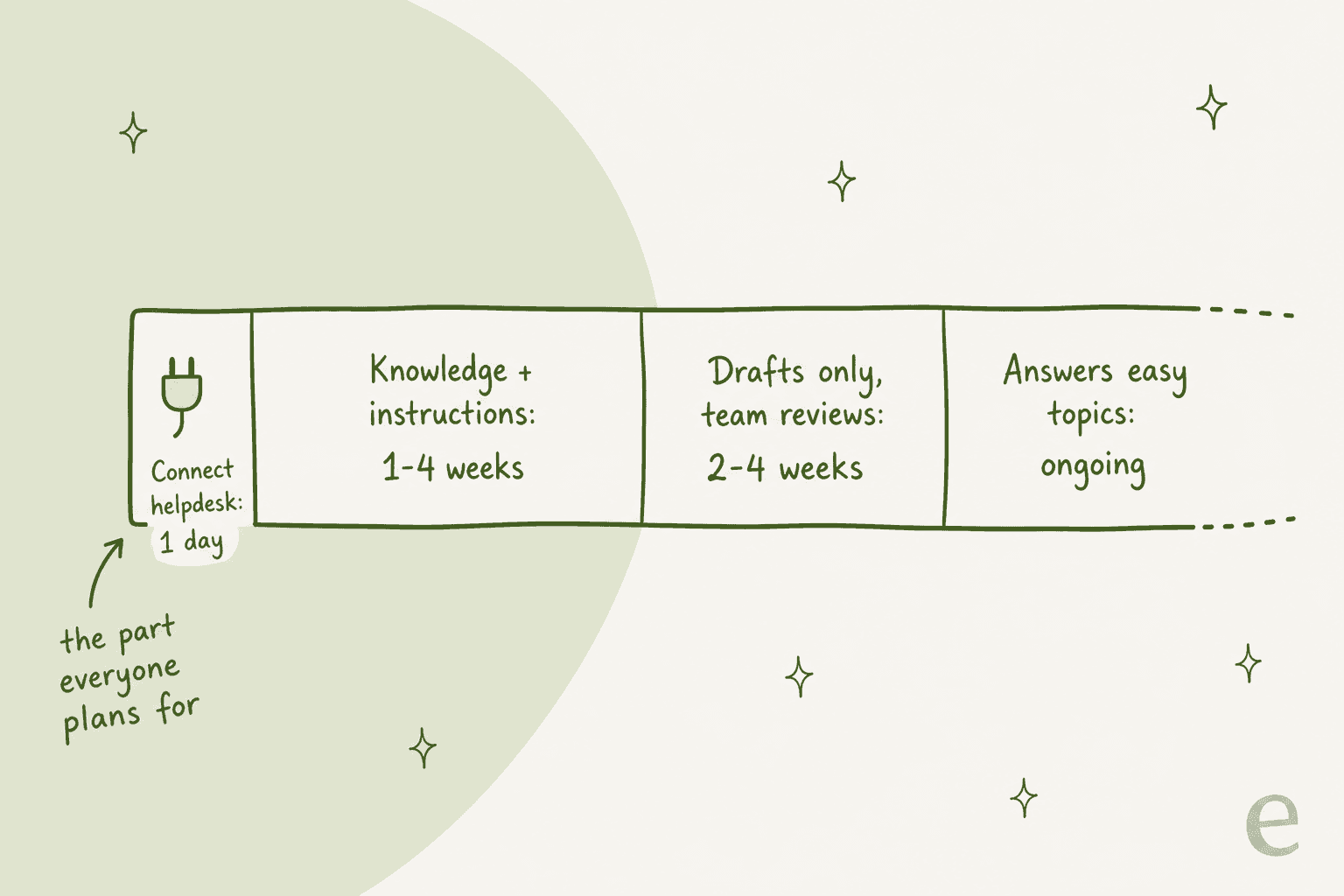
Here's the breakdown I'd plan around. The numbers are planning ranges from rollouts I've watched, not a vendor promise.
| Phase | Typical length | What you're actually doing |
|---|---|---|
| Connect the helpdesk | An afternoon | Approve one connection, pick which sources it reads (help center, macros, past tickets) |
| Knowledge and instructions | 1 to 4 weeks | Writing down the answers that live in people's heads, and the rules for tone, refunds and handoffs |
| Test on past tickets | 1 to 3 days | Let it draft replies to tickets you already solved and compare them with what your team sent |
| Drafts only on live tickets | 2 to 4 weeks | It writes, your team reviews and sends, and every edit becomes a rule |
| First topics answered on their own | Ongoing | Turn on a handful of routine topics, then add more as the drafts keep landing |
The thing most teams get wrong is where they put the time in their plan. They budget weeks for "integration" and a day for "content," and it's almost always the other way around.
What do real AI support rollouts look like?
The best evidence I have is eesel's own published customer stories, because they record when each team connected and when the agent started working tickets. Here's every one where the dates are written down.
| Company | Helpdesk | Connected | Working live tickets | What took the time |
|---|---|---|---|---|
| Rúngne | Gorgias + Shopify | Late June 2026 | Early July, three agents | Splitting one agent into triage, drafting and answering |
| AG Reederei Norden-Frisia | Zendesk | February 2025 trial | Signed up within days | Pulling in macros and three months of past tickets |
| Nordbutiker | Zendesk | Autumn 2025 | A couple of weeks | One bot per brand and country: 4 brands across 4 countries |
| XAP | Freshdesk | June 2026 | July (referral agent) | Defining which student tickets get a referral |
| MentorShow | HubSpot | June 2026 | End of July | Instructions in French for replies in three languages |
| STIL Classics | Gorgias + Shopify | May 2026 | Drafting picked up in July | Instructions now on their ninth revision |
| Luxedo | Gorgias | July 2026 | Last week of August | Syncing about 1,000 Gorgias items and writing the instructions |
Two patterns jump out. First, the fast rollouts had their answers written down already. Norden-Frisia's FAQs were in Zendesk, and its questions repeat week after week, so a trial week was enough. Luxedo sells projection systems where the useful reply is one troubleshooting step at a time, and that logic had to be written before the agent could follow it.
Second, nobody on that list "went live" in one move. Rúngne started with one agent doing everything and, within a week, its COO Jasmin Villasoto split it into three agents with one job each. STIL's drafting agent gets a new rule most weeks. The timeline doesn't end at launch; it changes shape.
What does an AI support implementation timeline look like week by week?
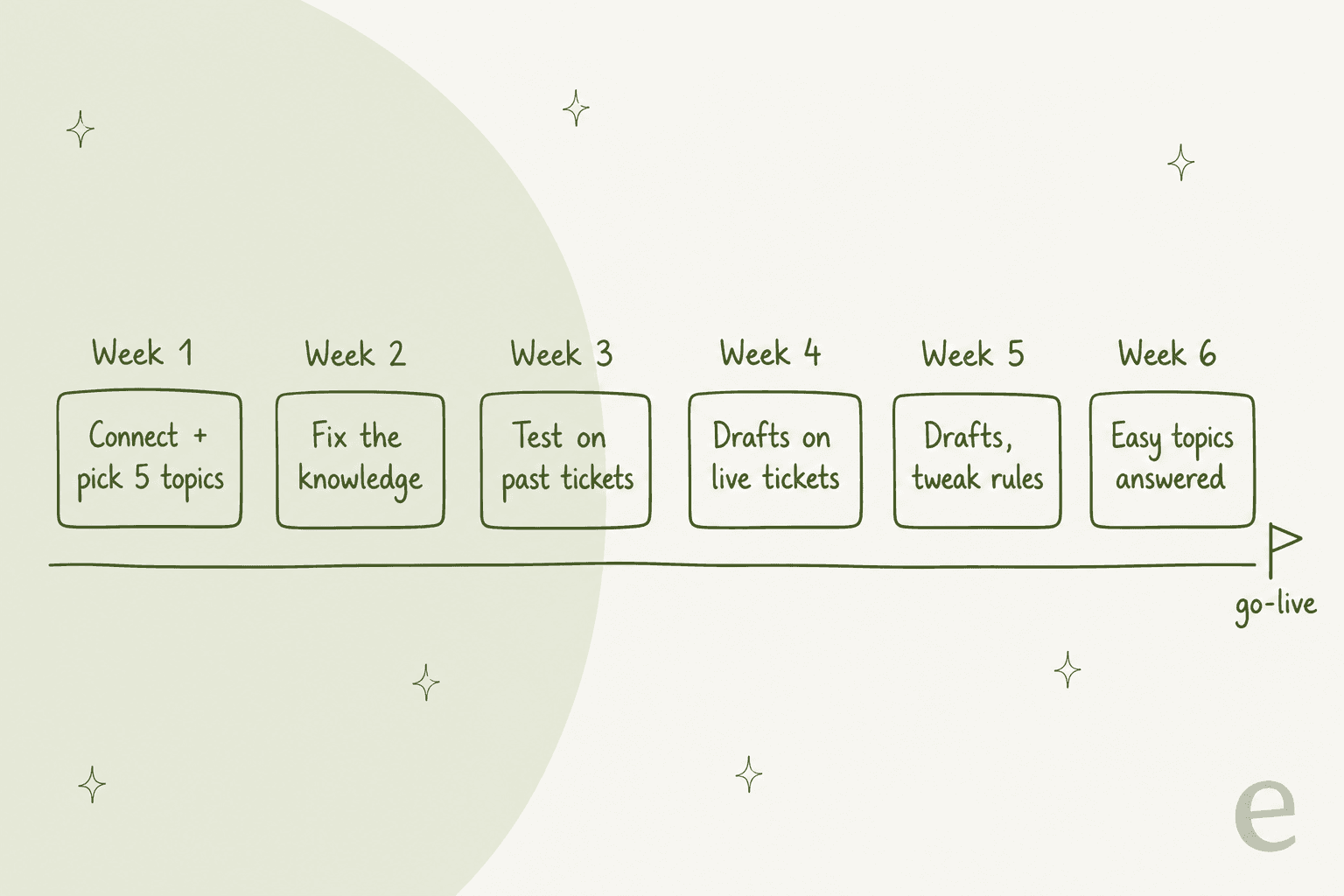
This is the six-week plan I'd give a team with a decent help center, one helpdesk and no unusual security review. If you have those extra hurdles, the estimator further down adds them in. If your answers are already well written, you can compress weeks 2 and 3 into a few days.
Week 1: connect, then pick five topics
Connect the helpdesk on day one. On eesel's Zendesk integration, that's one approval in Zendesk, and the help center, macros and a first sample of up to 1,000 recent tickets import in the background while you test. A quick start that reads only your public help center skips even the approval.
Then spend the rest of the week on the harder question: which five topics will it own first? Pull your last month of tickets, sort by volume, and pick the five that are both common and boring. Order status, password resets and "how do I cancel" usually qualify. Refund exceptions and angry escalations don't.
Start your security review this week too, even if you think you won't need one. It's the single item most likely to stall everything else (more on that below).
Week 2: fix the knowledge, not the AI
This is the week most plans skip. Ask the agent your five topics in chat and read what comes back. Where it's wrong, the fix is usually a missing or outdated article, one of your macros that nobody updated after a policy change, or a rule that only exists in a senior agent's head.
Write those down. eesel lets you correct a draft in chat and save the fix into its instructions, but the deeper fix is a help center article your human team can use too. A knowledge base that's good enough for a new hire is good enough for the AI.
Week 3: test on tickets you've already solved
Before it touches a live ticket, run it against tickets your team already resolved. eesel's Helpdesk simulation drafts its own reply to 20 recently resolved tickets, compares each with what your team sent, groups the results by theme and says what to fix before going live, and it sends nothing to customers.
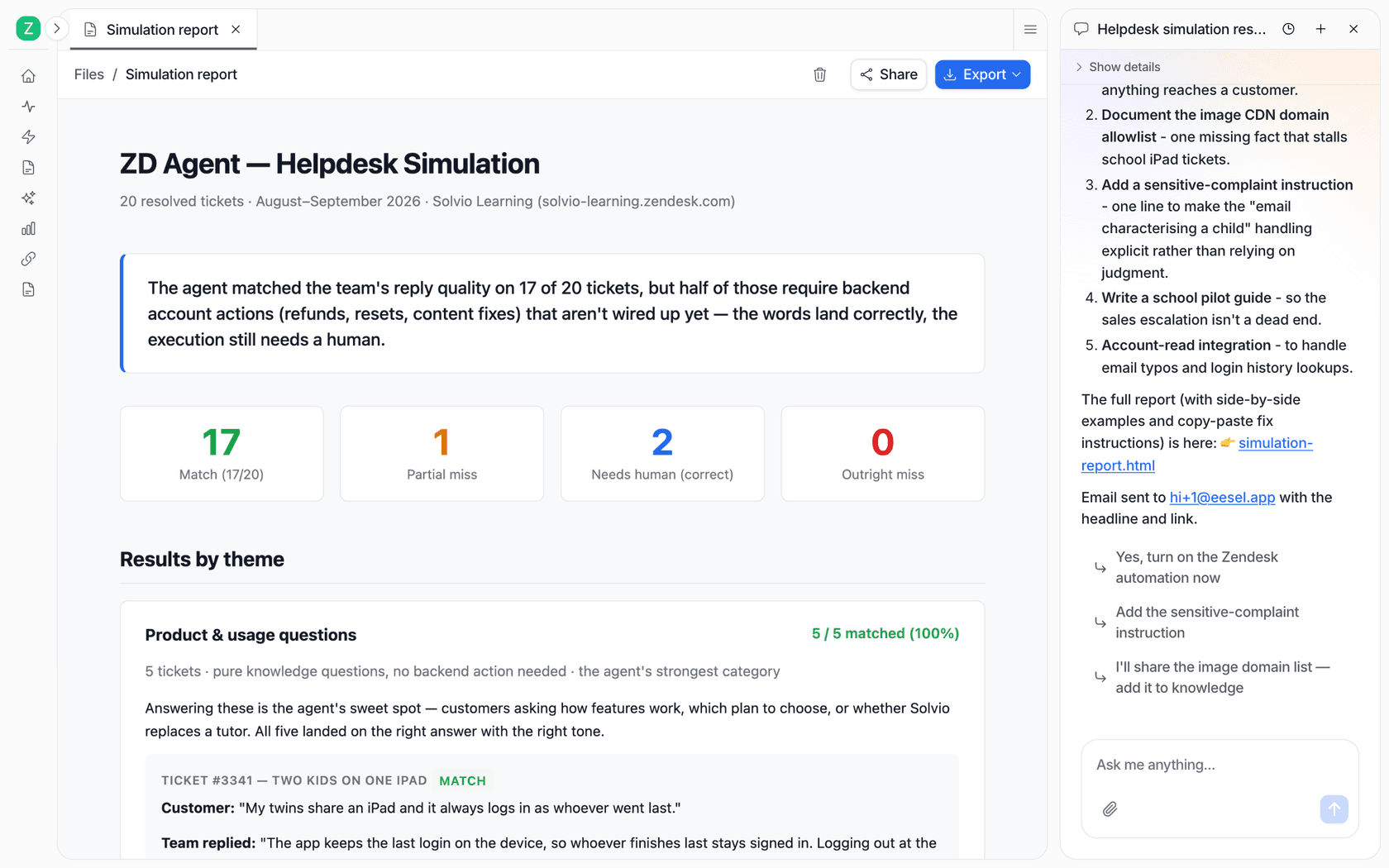
The number to watch isn't the overall match rate. It's the misses, sorted by topic. A topic with two misses out of five gets pulled from your first-wave list or goes back to week 2. There's more on scoring this step in the pilot scorecard and the AI agent testing guide.
Week 4: drafts on live tickets
Now switch on an automation that drafts a reply on every new ticket, as an internal note, the way an AI copilot would. Nothing reaches a customer unless a person sends it. This is where the agent meets real tickets in real volume, and where your team starts trusting it or doesn't.
MentorShow's numbers show what this ramp looks like. Its first week live at the end of July produced 115 drafts; the week of 17 August, 380; the week of 24 August, 854, according to its customer story. Volume climbs as the team gets used to the drafts and as more tickets fall inside the topics the agent handles well.
Week 5: drafts, and turn every edit into a rule
Keep drafting, and pay attention to what your agents change before they hit send. Each repeated edit is a rule you haven't written yet: "always ask for the order number first," "never promise a delivery date," "sign off with the team name, not a person's." STIL Classics is on its ninth revision of its drafting instructions, and the story says plainly that each week of tickets adds a rule.
This is also the week to check your handoff rules. Which tickets should it never draft at all? Attachments, legal threats and VIP accounts are common picks, and a clear escalation path matters more than a clever prompt.
Week 6: let it answer the easy topics
Pick two or three of your five topics where the drafts have needed no edits for a week, and let the agent send those replies itself. Track how often those tickets come back reopened, which is the honest version of a resolution rate. Leave everything else in drafts. That's your go-live, and it's deliberately small.
From here, adding a topic is a settings change, not a project. At Rúngne, the dial is the topic list on one automation, which decides what gets a direct answer and what gets a draft, and moving a topic across "is a list edit, not a project," in the team's words.
Where does the time in an AI support rollout actually go?
When a rollout runs long, it's rarely because the AI couldn't be connected. From what I see on eesel's side, four things eat the calendar, and three of them have nothing to do with software.
One ecommerce co-founder whose brand handles 10,000 to 15,000 requests a month put it bluntly in a G2 review:
"Companies telling you that automating customer service with AI in one or a few hours are just trying to sell you something but the reality is you need to spend some time building and improving quality AI agents, but once they are live and operating on 100% of your tickets, this is extremely efficient."

1. Knowledge that was never written down. One support manager on Zendesk found that their whole knowledge base was written for administrators, while the tickets came from end users, so answers that were correct read as confusing. That's a content rewrite, not an AI setting, and it takes weeks. Teams that lean on their past tickets as a source get around some of this, because the tickets hold the answers your team actually gave.
2. Security and procurement reviews. For a B2B telematics team on eesel's sales calls, an internal security review was a hard gate before any trial could start, because their tickets can contain passwords and card details. Another European SaaS team was held up by an internal ISO review and never signed up at all. If your company has a review process, it runs on its own clock. Start it in week 1. The AI support security checklist lists the documents reviewers usually ask for.
3. Integrations that have to be trusted, not just connected. Answering questions is quick to set up; taking actions (refunds, address changes, cancellations) takes longer, because each action needs its own rules and its own approval setting. And a data source that quietly stops syncing is worse than one that never connected. We lost a customer this way: a Google Drive sync that held their daily order-status sheet failed three times before it was fixed, and they left. I'd rather tell you that than pretend it can't happen. Whatever tool you pick, ask how you'll find out when a source stops updating.
4. Waiting for the whole thing to be ready. The slowest rollouts I see are the ones trying to launch every topic and every channel on the same day. Each extra topic adds testing, and each extra channel adds a new set of edge cases. Launching with five topics on one channel and growing from there gets you to real results faster than a big-bang date.
The approvals point is the one people underestimate most. One engineer at a large company described what it took to ship an agent that only pre-checks service tickets before a person reviews them:
"Now comes the security review and DPIA. That's another hugely complicated process that takes months. [...] We had to go through all this rigmarole just for an agent that does some preliminaries on a service support ticket"

And the cost of skipping the careful part is real. A startup founder replying to a thread on AI support:
"I used it highly unsuccessfully once! Customers and partners were pissed. After that I started answering phone 24/7"

How long does native helpdesk AI take to set up?
If you're weighing your helpdesk's own AI against a separate tool, setup time is one place they differ less than you'd think. The real differences sit after the connect step, especially in how you test before customers see anything.
Five of the six helpdesk vendors I checked describe setup in minutes. Zendesk says you can begin automating "in just minutes," Freshworks says "Launch AI agents in minutes," and the Gorgias AI Agent page says "Live in under an hour."
Salesforce is the outlier, and the most candid: its Agentforce FAQ puts complex deployments at 6 to 12 weeks from kickoff to production, names one customer that went live in 12 days and another in six weeks, and sells Jumpstart packages that get there "in as little as two to four weeks."
Both can be true. "Minutes" is the connect step; Salesforce is describing the whole job. Here's what each vendor publishes about the parts after connecting.
| Helpdesk AI | What the vendor says about time | Test before customers see it | Staged rollout control |
|---|---|---|---|
| Zendesk AI agents | "In just minutes" | Sandbox, test widget and a simulator on scenarios you create; setup now also analyzes existing tickets, if there's enough history | One agent per channel, routing rules |
| Freddy AI Agent | "Launch AI agents in minutes" | Bulk evaluation of 50 queries per run, including imported solved tickets; advises at least 20 before go-live | Deploy to internal teams first, custom rules, a daily reply cap |
| Gorgias AI Agent | "Live in under an hour" | Free playground, including re-running an existing ticket | Per channel and per skill |
| Help Scout (Scout) | "Configure the AI in minutes" | Test chat, or pick email conversations to test one at a time | Reply only to emails matching conditions you set |
| Agentforce | 6 to 12 weeks for complex deployments | Testing Center on generated or uploaded scenarios; tests use credits, sandbox advised | Channel by channel, versioned activation |
| HubSpot customer agent | "Up and running in minutes" | Batch tests generated from existing conversations (topics with 5+ similar ones) | A conversation coverage percentage you can start low |
| eesel | One approval, then one automation | Simulation on 20 resolved tickets, compared with what your team sent | Drafts first, then per-action Auto or Needs approval, topic by topic |
A few details from the vendor docs are worth knowing before you plan. Gorgias defines being "up and running" partly as your team having reviewed 10 tickets and left feedback in the first week, which is a refreshingly honest definition of done. Salesforce's Testing Center docs warn that tests consume credits and can change CRM data, so plan sandbox time. And HubSpot's deployment guide suggests starting with a lower coverage percentage the first time and raising it gradually, which is the same dial idea in a different shape.
The column I'd read first is the testing one. Testing on scenarios you write yourself tells you how the agent handles the questions you thought of. Testing on tickets you already solved tells you how it handles the questions your customers actually asked, typos and all, and that's the version that predicts week 4.
When is an AI support agent "fully live"?
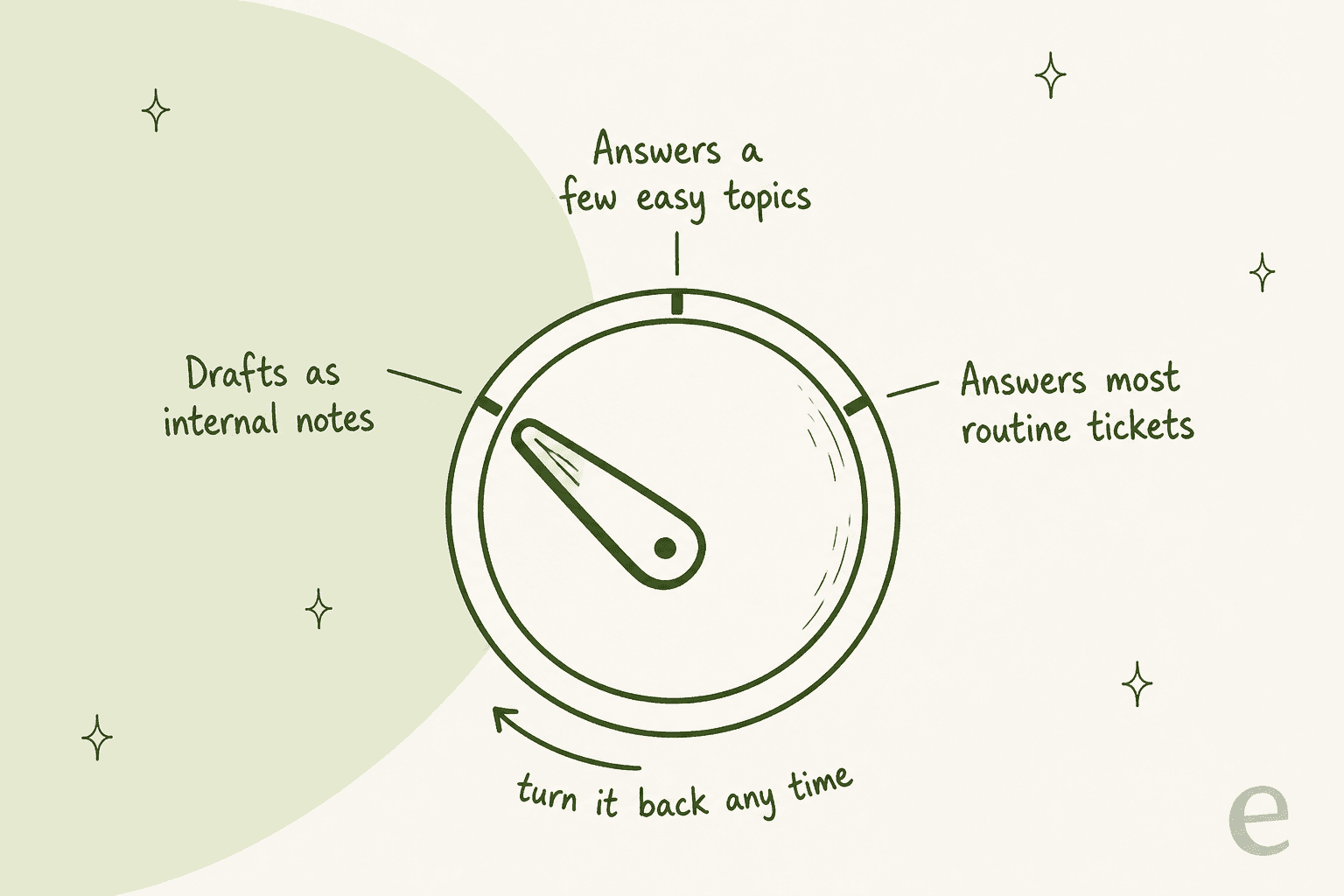
Here's the reframe I'd most like you to take away: "fully live" is a setting you keep adjusting, not a launch date. The teams with the most mature setups still have most of their tickets in drafts, by choice.
A CX strategy manager reviewing their AI agent on G2 described the same thing from the other side:
"it's not a 'set it and forget it' tool, much like managing a human agent."
Look at where real teams sit on that dial:
- smava has run eesel on Zendesk since December 2024, and its current three-agent setup went live in June 2026. In one month it handled about 27,000 tickets, but only about 1,100 were marked eligible for an automatic reply; the rest got sorted and drafted for a person to approve, per smava's story.
- MentorShow wrote six narrow topics into its instructions where the agent may reply directly, such as password resets and turning on subtitles. Its story says that lane "is barely used today," and opening it up is where the time saving grows.
- Rúngne sits further along: of about 2,100 Gorgias tickets in a month, around one in seven was answered by eesel on its own.
If you want a number to watch while you turn it, containment and escalation quality together tell you more than either alone.
So if someone asks "when will it be fully live?", the honest answer is: drafts in week one, a first direct-answer lane around week six, and then a slow, deliberate widening for as long as the drafts keep earning it.
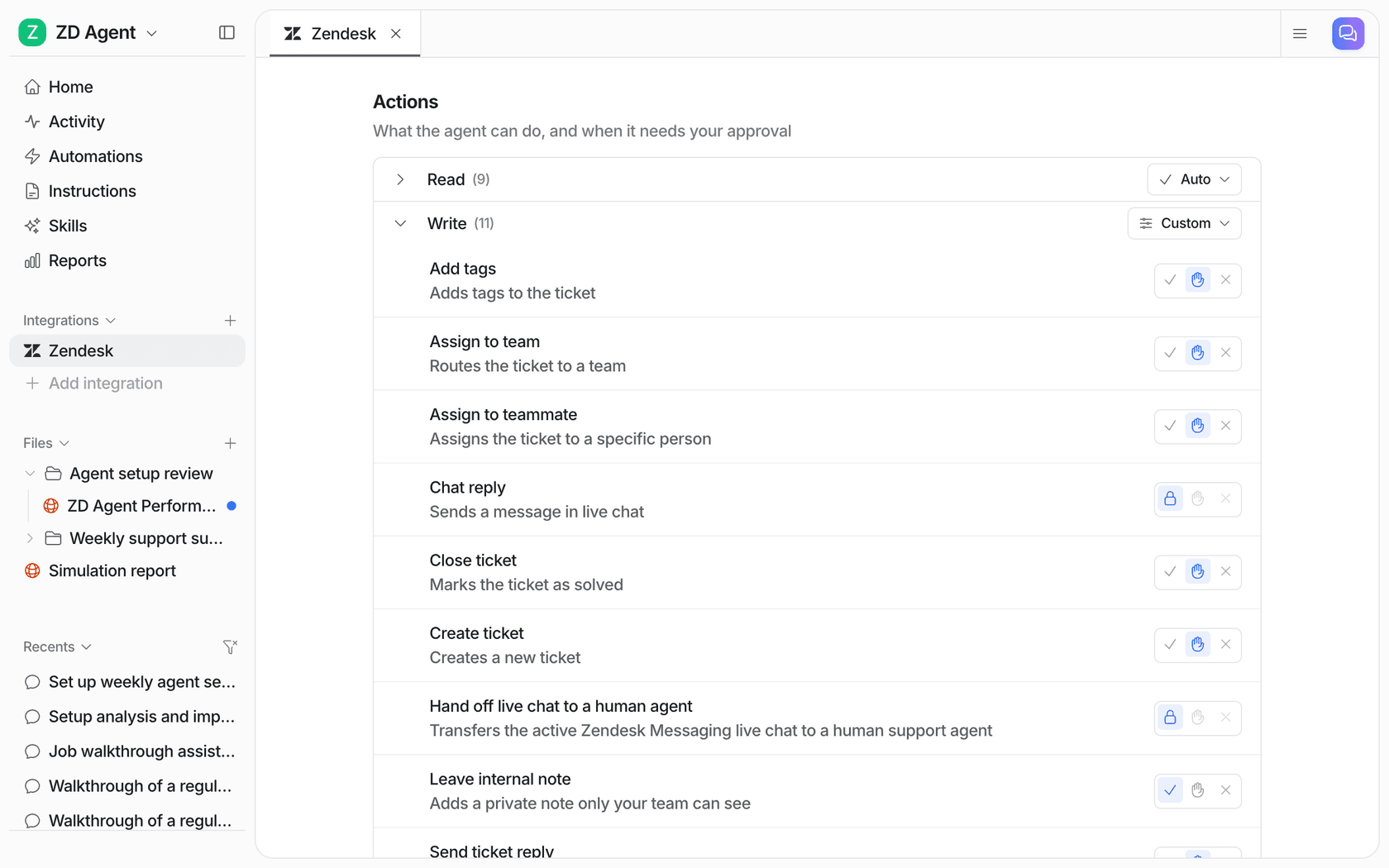
In eesel, that dial is literal. Each action has three settings: Auto, Needs approval or Disabled. The docs' advice is to start supervised, move routine replies to Auto once the drafts are consistently right, and keep refunds, cancellations and anything that costs money behind an approval.
How do you estimate your own AI support implementation timeline?
Tick what's true for your team. It starts from a 2-week baseline (connect, test, one week of drafts) and adds the slowdowns I see most often.
If you ticked the security box, that's the one to start today, because it doesn't depend on anything else. Same with the thin help center: you can rewrite articles before you've picked a vendor.
How can you speed up an AI support rollout?
Five things that take weeks off, in order of how much they save:
- Start the security review on day one. It runs in parallel with everything else, and it's the item most likely to have its own multi-week queue.
- Launch five topics, not fifty. Every topic you add before launch is more testing; every topic you add after launch is a settings change.
- Use your past tickets as a knowledge source. They hold the answers your team actually gives, which often aren't in the help center. eesel imports them on a full helpdesk connection; check whether your other options do too.
- Test on solved tickets before live ones. A simulation over tickets you already answered surfaces the gaps in an afternoon instead of a week of awkward live drafts.
- Let a coding agent do the clicking. If someone on your team uses Claude Code, Cursor or Codex, the eesel CLI runs the whole setup as commands: connecting the helpdesk (a person still approves it in the helpdesk), adding knowledge, creating the drafting automation and approving held actions. Every command prints JSON, so a coding agent can read the result and take the next step, and the setup guide for coding agents is written as the job in commands. It won't shorten your security review, but it turns a day of dashboard setup into a few minutes.
If you want the wider picture beyond timing, the customer support AI implementation guide covers the planning side, and the guide to choosing an AI agent covers vendor selection.
Try eesel on your own rollout timeline
eesel is an AI helpdesk teammate that joins your existing queue in Zendesk, Freshdesk, Gorgias, HubSpot and others, learns from your help center, macros and past tickets, and starts in drafts so your team stays in control. The part that shortens a timeline is that you can do weeks 1 to 3 of the plan above on the free trial: connect, run a simulation on 20 solved tickets, and watch drafts land as internal notes on new ones.
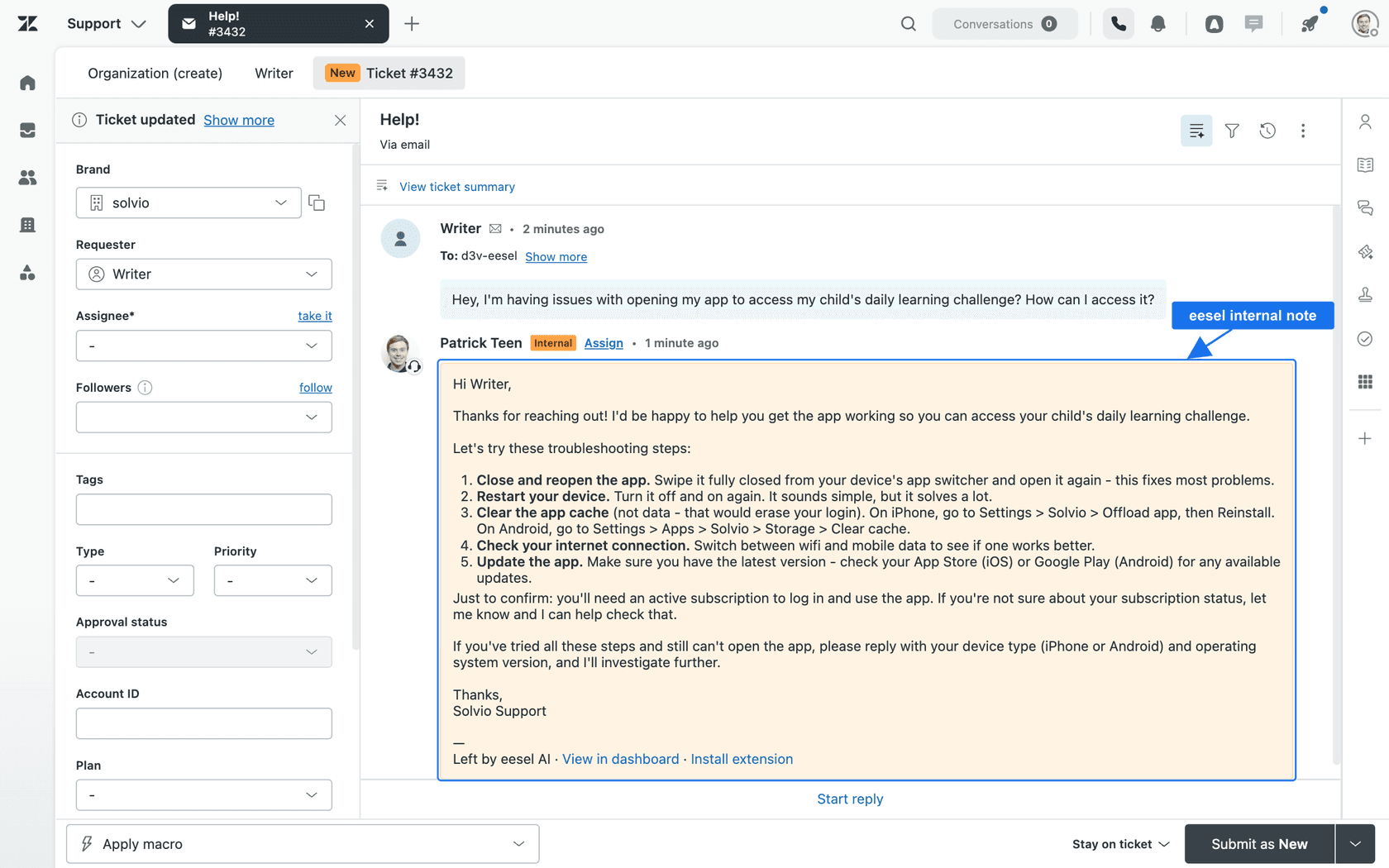
That's what Rúngne's first week looked like, and it's how Luxedo spent August. Try eesel free for 7 days with 100 credits and no card, or see pricing if you're already planning past the pilot.