


Help Scout is a popular tool in the customer support world, and for a lot of good reasons. It gives teams a clean, shared inbox that feels more like a collaborative email app than a clunky old ticketing system. But when you try to nail down exactly what it’s going to cost you each month, things start to get fuzzy.
The main plans are simple enough, you pay per user. The curveball comes with their more powerful automation features, especially the AI tools, which run on a totally different, usage-based model. This mix can be a real headache for anyone trying to forecast a budget. Ironically, the better you get at using AI to automate support and deflect tickets, the higher your bill can unexpectedly climb.
This post will give you a clear, no-nonsense breakdown of the current Help Scout pricing. We’ll go through the per-user plans, unpack the variable add-on costs, and talk about a more predictable way to bring powerful AI into your current support workflow.
What is Help Scout?
At its heart, Help Scout is a customer communication platform for teams that want to offer personal, human-style support. It’s designed to feel less like a rigid ticketing system and more like a shared email inbox that everyone on your team can jump into.
Its main components include:
-
Shared Inbox: This is the core of Help Scout. It pulls customer emails, live chats, and social media messages into one central spot. This makes it easy for your team to assign conversations, leave private notes for each other, and avoid sending the same reply twice.
-
Docs: This is their knowledge base feature. You can build out a library of help articles that customers can search to find their own answers, which can help lighten your team's workload.
-
Beacon: This is a little widget you can embed on your website. It combines live chat, email, and access to your Docs articles, giving customers one place to go when they need help.
Help Scout is a really solid option for small to mid-sized businesses, especially if your support is mostly email-based and you want a clean, simple interface.
Breaking down the Help Scout pricing plans
Help Scout’s pricing comes in two flavors. The main plans are billed on a straightforward per-user, per-month basis, which is easy to get your head around. The confusion and unpredictable bills pop up with the add-ons, particularly the AI features that are billed per resolution. The infographic below breaks down this dual structure. Let's look at both parts in detail, using the information from their official pricing page.
Help Scout pricing for per-user plans
First up, the core subscription plans. These set the foundation for the features you get and how many people can use the account.
| Plan Name | Price (Annual Billing) | Key Features | Limitations & User Caps | Ideal For |
|---|---|---|---|---|
| Free | $0/month | 1 Inbox, 1 Docs site, 1 Beacon, Basic reports (30-day history). | Up to 5 users, 100 contacts/mo, 10 articles, 10 saved replies. | New teams or startups just trying out a shared inbox. |
| Standard | $25/user/month | 2 Inboxes, 2 Docs sites, 5 Beacons, Live Chat, AI Assist, 150 Workflows, 100+ integrations. | Up to 25 users. Reporting history is limited to 2 years. | Growing teams that need some basic automation and live chat. |
| Plus | $45/user/month | 5 Inboxes, 3 Docs sites, Unlimited Beacons, AI Drafts & Summarize, Salesforce & Jira integrations. | Up to 50 users. HIPAA compliance is an add-on. | Teams with higher volume that need key CRM and developer tool integrations. |
| Pro | $75/user/month | 10 Inboxes, 5 Docs sites, Unlimited Workflows, SSO/SAML, HIPAA compliance included, 50 light users. | A minimum of 10 users is required. | Larger teams that need enterprise-level security and dedicated support. |
Figuring out the variable and add-on costs
This is where planning your budget for Help Scout pricing can get tricky. On top of your monthly per-user subscription, there are several usage-based and flat-rate add-ons that can seriously inflate your bill.
- AI Answers: This is the main source of the surprise costs. After a three-month free trial, this feature costs $0.75 per resolution.
- What exactly is an "AI Resolution"? Help Scout's FAQ explains that a resolution is only counted if the AI gives an answer and the customer is satisfied. If they escalate to a human or ask another question, it doesn't count. While that’s a fair way to measure it, your costs are still tied directly to your support volume, which can swing wildly from one month to the next.
-
Additional Inboxes: If you outgrow the number of inboxes in your plan, it costs $10 for each extra inbox per month.
-
Additional Docs Sites: Need another knowledge base for a different product? That'll be $20 per site per month.
Help Scout does let you put a monthly spending cap on AI Answers, but the pay-per-resolution model itself creates a big budgeting challenge. Your costs are directly linked to your ticket volume, which isn't always something you can predict.
The good and the bad of Help Scout pricing
So, does this pricing model make sense for your business? It really depends on how you plan to use the platform and its AI tools.
Where Help Scout pricing works well
-
Straightforward per-seat cost: If you don't plan on using the AI chatbot or needing a bunch of extra inboxes, the base per-user price is clear and easy to calculate.
-
A generous free plan: For brand-new businesses or small teams, the free tier is surprisingly capable for up to five users. It's a great way to get started without any financial commitment.
-
AI is optional: You aren't locked into the pay-per-resolution model. Teams can decide whether to turn on AI Answers, which gives them control over when they want to deal with variable costs.
Where Help Scout pricing gets tricky
-
Unpredictable AI costs: This is the biggest drawback. A new product launch, a viral marketing campaign, or an unexpected service outage can send your support requests soaring, leading to a massive, unplanned bill for AI resolutions. This is a common point of frustration for many users.
-
It punishes successful automation: The model puts you in a strange spot. The better your AI gets at handling common questions (which is the whole point), the more you pay. This setup can actually discourage you from using AI to its full potential because every success adds to your bill.
-
Makes budgeting difficult: It's almost impossible for finance and support managers to accurately forecast monthly spending. This can cause internal friction and means you have to constantly keep an eye on your AI usage to avoid a shock when the invoice arrives.
-
Add-on costs can pile up: As your company grows, you'll likely need more specialized inboxes for different teams or knowledge bases for new products. These extra costs can add up fast, turning what seemed like an affordable plan into a much pricier one.
A different path: Predictable AI that plugs into your tools
Help Scout is a good help desk, but its AI pricing model presents some real challenges for any team wanting to scale up automation without the budget surprises. This is where a different philosophy can make all the difference.
Enter eesel AI, an AI platform built to solve this exact problem. Instead of making you switch help desks, eesel AI works as an intelligent layer that plugs right into the tools you're already using, like Zendesk and Freshdesk. That means no migration headaches for your team, your knowledge base, or your workflows.
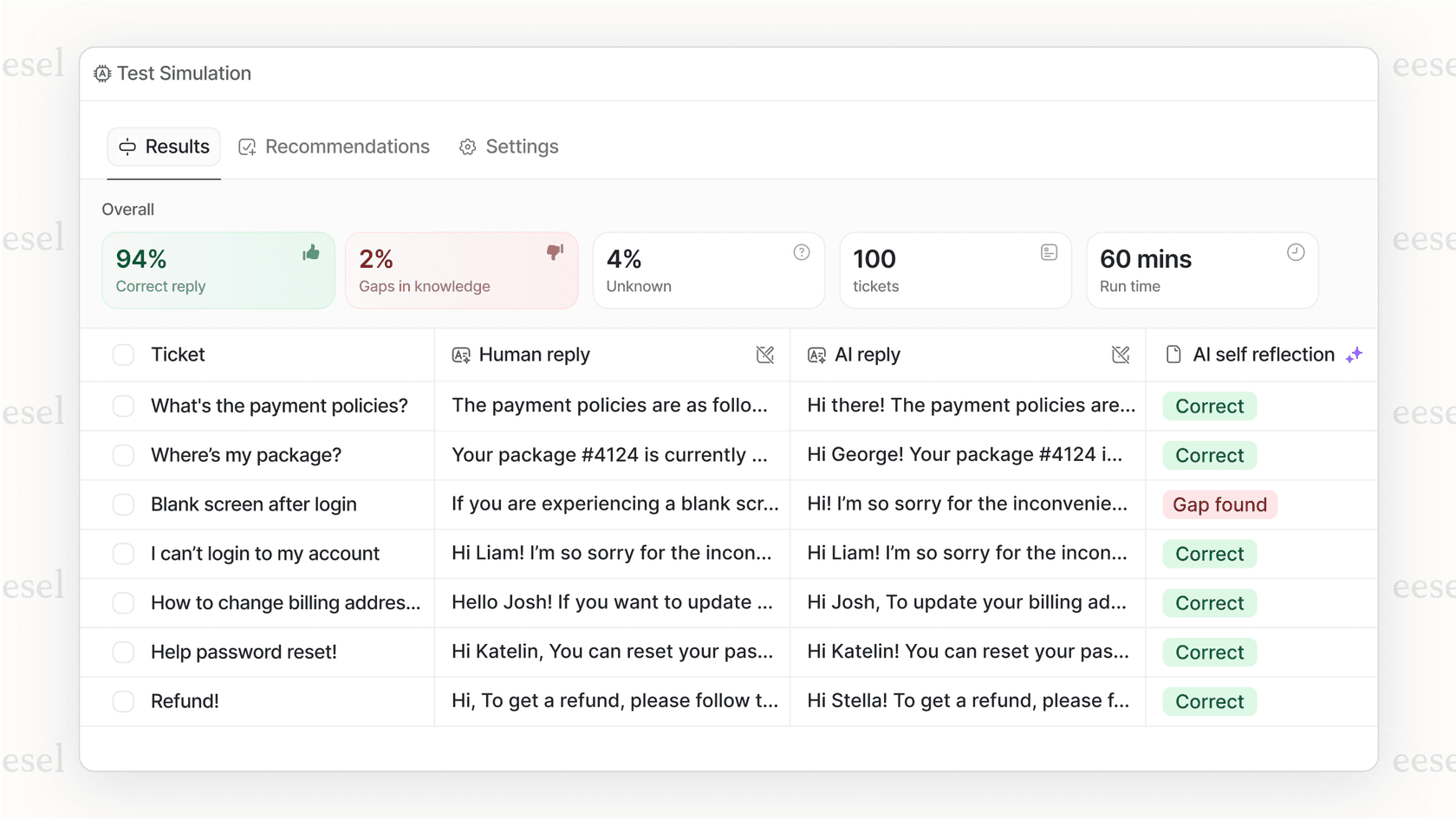
Here’s how eesel AI addresses the issues with Help Scout's model:
-
Predictable, fixed pricing: eesel AI's pricing is one fixed monthly price sized to your volume, from $299 a month for 500 credits (1 credit per ticket it actually handles), with no per-seat fees and no platform fee. If you run out of credits, your agents pause until they reset, or you can turn on overage with a monthly cap you set, so there are no surprise charges at the end of the month.
-
No migration needed: You get to keep the help desk your team already knows. eesel AI just makes it smarter, acting as an AI Agent that can resolve tickets on its own or as an AI Copilot that drafts replies for your human agents. You skip the massive disruption and cost of switching platforms entirely.
-
Risk-free simulation: Before you even let the AI talk to live customers, eesel lets you run a bulk simulation on your past tickets. This unique feature shows you exactly how the AI would have handled real customer questions, giving you a clear forecast of your potential deflection rate and return on investment.
-
Multiple specialized agents: You can run as many agents as you need under one account. This means you can build specialized AI agents for different teams, like sales, billing, and technical support, and only pay for the tickets each one actually handles.
Picking a pricing model that grows with you
Help Scout provides a solid help desk with clear per-user pricing, but its approach to AI introduces a level of unpredictability that can be a big problem for growing businesses. When you're investing in automation, the pricing model is just as important as the features. A model that charges you more every time your AI does its job successfully just doesn't align with the goal of scaling efficiently.
As you look at your options, search for solutions that offer transparent, predictable costs. The right platform should help you maximize automation and improve your support without you having to worry about a surprise bill at the end of the month.
Ready to add powerful, predictable AI to your customer support without the sticker shock? Try eesel AI free with 100 free credits and no credit card, and see what your potential ROI looks like with a risk-free simulation.
Frequently asked questions
What are the main components of Help Scout pricing that I should be aware of?
Help Scout pricing primarily consists of per-user, per-month subscription plans for core features like shared inboxes and Docs sites. Additionally, there are variable add-on costs, most notably for AI Answers, which are billed per resolution.
How do Help Scout pricing's AI Answers charges work, and why are they considered unpredictable?
AI Answers are billed at $0.75 per "resolution" after a free trial period. This model is unpredictable because your costs directly fluctuate with customer support volume and AI deflection rates, making accurate budget forecasting challenging for many teams.
Can I control or cap the variable AI costs within Help Scout pricing to avoid budget surprises?
Help Scout does offer the option to set a monthly spending cap on AI Answers to help manage costs. However, because the charges are still based on a pay-per-resolution model, costs can still be difficult to predict if support volumes fluctuate significantly.
Beyond per-user fees and AI, what other add-ons affect Help Scout pricing as my business scales?
As your business grows, you might incur additional costs if you need more resources than your base plan allows. Specifically, extra inboxes are $10 per month each, and additional Docs sites cost $20 per site per month.
Is there a free option available to explore Help Scout pricing before committing to a paid plan?
Yes, Help Scout offers a generous free plan that allows up to 5 users, 1 Inbox, 1 Docs site, and 1 Beacon. This provides an excellent opportunity for new teams or startups to test the platform's core functionalities without any financial commitment.
What makes Help Scout pricing less desirable for teams looking for predictable AI integration compared to alternatives?
The primary challenge with Help Scout pricing for AI is its pay-per-resolution model, meaning successful AI automation increases your bill. This contrasts with flat-fee, tiered models offered by some AI platforms, making long-term budgeting for scaling automation more difficult.