How much does Help Scout cost?
The short answer: Help Scout starts free and tops out at $75 per user per month on annual billing, or $90 on monthly, for the self-serve plans. Here's the quick view before we get into the fine print.
| Plan | Annual billing (per user/mo) | Monthly billing (per user/mo) | Best for |
|---|---|---|---|
| Free | $0 | $0 | A tiny team testing the waters (max 5 users) |
| Standard | $25 | $30 | Growing teams moving past a plain shared inbox |
| Plus | $45 | $54 | Higher volume across multiple channels |
| Pro | $75 | $90 | Scale and security (min 10 users, demo-only) |
| AI Answers | +$0.75 / resolution | +$0.75 / resolution | Adding a customer-facing chatbot to any paid plan |
I've spent the last few years putting AI agents on live support queues, and the single most common surprise I hear from teams isn't the seat price, it's how a usage-based AI line stacks on top of it. Help Scout's seat tiers are honest and easy to read. The resolution fee is the number to model carefully, so we'll spend real time on it below.
Here's the live pricing page so you can see how the plans are framed:
Help Scout pricing plans, broken down
Help Scout bills per user, per month, and there are two prices for every plan depending on how you pay. The pricing page opens on the annual toggle, so the headline $25 / $45 / $75 you see first are the annual rates. Flip the toggle to monthly and the same three plans read $30, $54, and $90. Help Scout's own annual payments doc puts the gap plainly: "Paying in advance annually will mean that you receive a 16% discount on the cost per user per month."
Worth knowing before you compare notes: several third-party breakdowns still quote $50 or $65 per user for Plus and Pro, and older ones quote $22 for Standard. None of those match what the pricing page shows today. Here's every plan with its real limits side by side.
| Dimension | Free | Standard | Plus | Pro |
|---|---|---|---|---|
| Price (per user/mo, annual) | $0 | $25 | $45 | $75 |
| Users | Up to 5 | Up to 25 | Up to 50 | Unlimited (min 10) |
| Light users | None | None | 25 max (5 included) | 50 max (15 included) |
| Inboxes included | 1 | 2 (+$10/mo each) | 5 (+$10/mo each) | 10 (+$10/mo each) |
| Contacts | 100/mo | Unlimited | Unlimited | Unlimited |
| SLAs | None | 1 basic | 2 advanced | Unlimited |
| Workflows | None | 150 basic | 500 advanced | Unlimited |
| Docs sites | 1 | 2 (+$20/mo each) | 3 (+$20/mo each) | 5 (+$20/mo each) |
| Reporting history | 30 days | 2 years | All-time | All-time |
| AI drafts and summarize | No | No | Unlimited | Unlimited |
| SSO / SAML | No | Add-on | Add-on | Included |
| HIPAA | No | No | Add-on | Included |
| API rate limit | None | 200/min | 400/min | 800/min |
A few things worth flagging that the grid doesn't shout about:
- Free is a genuine free tier, not a trial. Up to 5 users with no card on file. The catch is the 100 contacts per month ceiling and the single inbox, which a real support team blows through quickly.
- Standard is the "we've outgrown email" plan. You get multiple inboxes, live chat, basic workflows, and one SLA. The notable gap: AI drafts and AI summarize are not included here, only the lighter AI Assist editing tools are.
- Plus is where most growing teams land. Advanced workflows, WhatsApp, round-robin routing, Salesforce/Jira/HubSpot connectors, and unlimited AI drafts. It's also the first plan that feels "complete."
- Pro is sold through sales, not signup. It carries a 10-seat minimum and a "Book a Demo" button instead of a checkout, so the real Pro price is effectively $750/mo on annual billing, or $900/mo monthly, before anyone adds AI.
For the full feature-by-feature picture beyond cost, our Help Scout features guide goes deeper than the pricing page does.
The part the sticker price hides: AI Answers
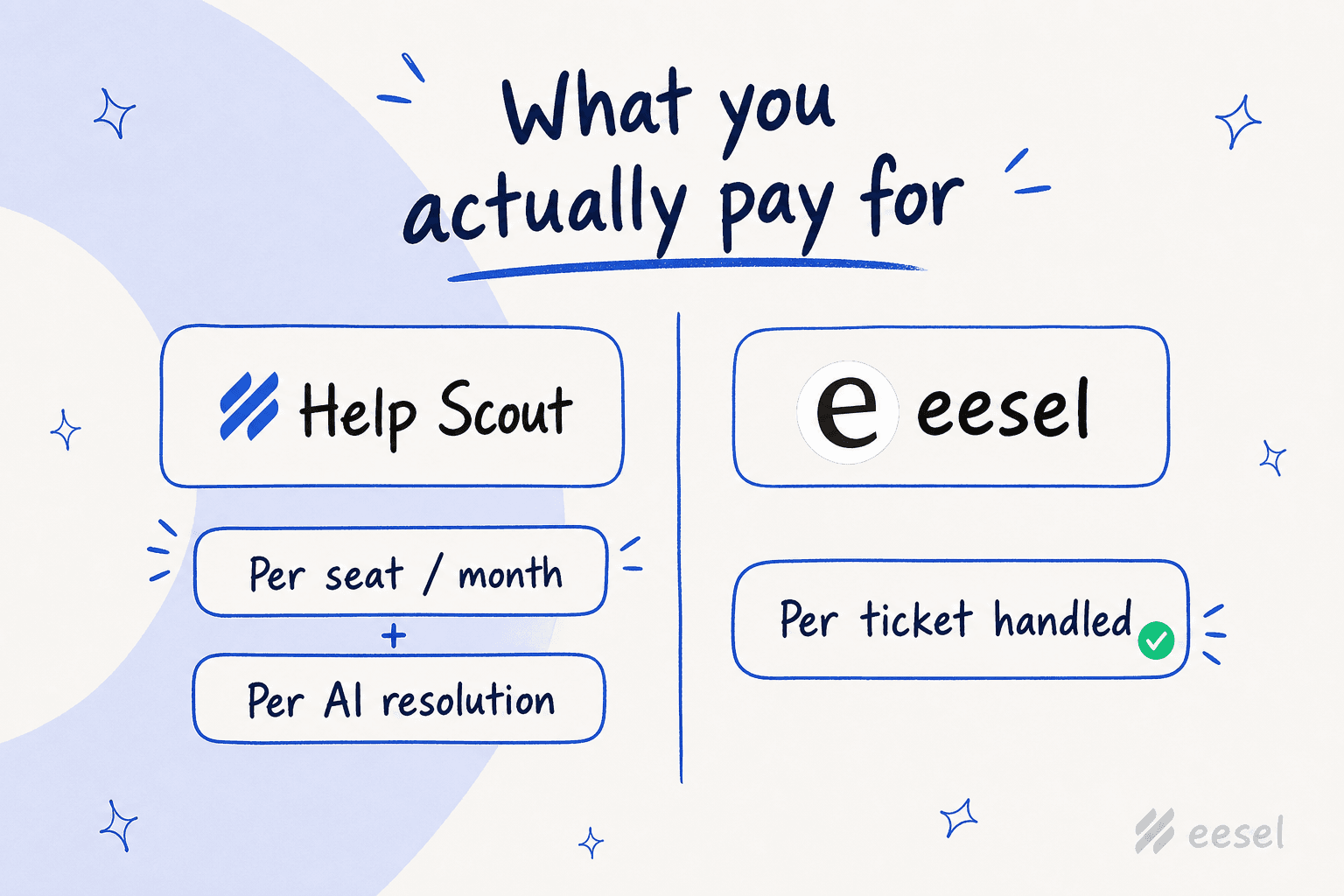
This is the section to read twice. AI Answers is Help Scout's autonomous, customer-facing chatbot, and it's priced as a usage add-on at $0.75 per resolution, billed monthly on top of your seats. It's available on Standard, Plus, and Pro, all at the same rate.
Here's why that one number matters more than your seat tier once you switch the AI on:
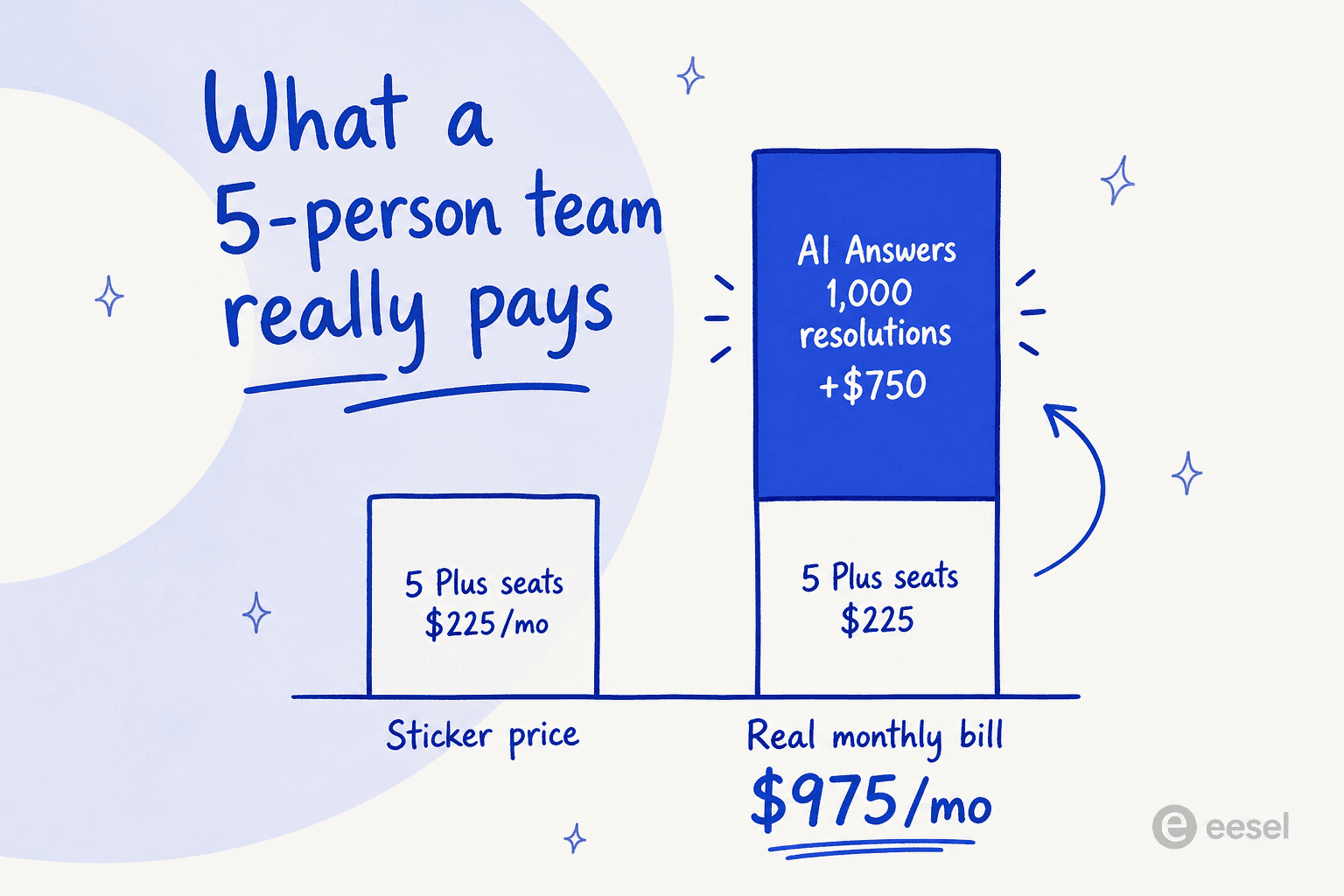
Five Plus seats cost $225/mo. Resolve 1,000 chats a month with AI Answers and that's another $750, for a real bill near $975/mo. The AI line, not the seat line, is now the bigger half of the invoice. To Help Scout's credit, you can set a monthly spending cap and the AI switches off when you hit it, plus pre-paid resolution discounts are available. But the structural point stands: your support cost now scales with ticket volume, which is exactly when you least want a variable bill.
Watching this play out across live rollouts is why I'm wary of per-resolution pricing in general. I've seen an ops lead at a payouts and money-transfer fintech, doing roughly 7,000 to 8,000 escalated tickets a month, write off a per-interaction model on the spot because the cost was simply impossible to forecast. The clean-inbox demo lands great; the billing page is where the second-guessing starts.
The agent-facing AI is the better-value half of the bundle. AI Assist (tone, grammar, length edits, and translation) is unlimited on every paid plan, and AI Drafts plus AI Summarize are unlimited on Plus and Pro at no per-use charge. If you only want AI helping your agents rather than answering customers directly, you can skip the resolution fee entirely. Our breakdown of the Help Scout AI approach covers what each tool actually does.
What actually counts as a "resolution"
Credit where it's due: Help Scout's definition of a billable resolution is fair, and worth understanding before you panic about the per-unit price. Per the AI resolutions pricing docs, a resolution is a single AI chat session that ends without a human stepping in. You're charged only when AI Answers gives a real response and the customer doesn't ask for more help afterward.
What that means in practice:
- If the customer clicks "I still need help" or asks to talk to a person, it's not a resolution and you're not charged.
- If AI Answers only greets or asks a clarifying question without actually answering, no charge.
- Only one resolution is counted per conversation, even if the AI answers several questions in it.
So you're paying for genuine ticket deflections, not every bot interaction. That's a reasonable model. It just doesn't change the headline risk: a tool that's good at its job racks up more billable resolutions, so success and spend rise together.
Add-ons and the fine print
The per-seat number isn't always the whole story. Help Scout charges separately for a handful of things teams tend to assume are included:
| Add-on | Annual billing | Monthly billing | Included on |
|---|---|---|---|
| Additional inbox | $10/mo each | $12/mo each | Beyond plan allowance |
| Additional Docs site | $20/mo each | $24/mo each | Beyond plan allowance |
| Extra light user | $10/mo each | $12/mo each | Beyond the Plus and Pro allowances |
| SSO / SAML | Add-on | Add-on | Included on Pro |
| HIPAA compliance | Add-on (Plus) | Add-on (Plus) | Included on Pro |
| IP restrictions | Add-on | Add-on | Included on Pro |
None of these are outrageous, but they add up. A Plus team that needs HIPAA, SSO, and a couple of extra inboxes is quietly paying more than the $45 sticker suggests, and the only way to fold all of it into the base price is to jump to Pro with its 10-seat floor. If compliance is a hard requirement, price the Pro plan from the start rather than assembling it from add-ons.
What real users say about the price
Help Scout's reputation on review sites is genuinely good. It sits around 4.4/5 on G2 and scores higher than Zendesk on ease of use and setup. The clean, email-like inbox is the most-repeated piece of praise, and new agents really do learn it in under an hour.
The pricing is where the sentiment turns, and 2025 left a mark. Help Scout briefly moved from per-seat to per-customer-interaction pricing, triggered a wave of churn, then reversed course. The trust damage is still the loudest theme in community threads:
"HelpScout changed back to user-based pricing. Guess too many people cancelled including me... I'll still stay with Freescout anyways. Helpscout lost all trust with this flip-flopping on pricing."
u/manu_8487, r/SaaS

That whiplash pushed some long-tenured customers to self-host the open-source FreeScout clone purely to escape pricing changes and own their data:
"13 years on helpscout... Moving to Free scout. Google it. Lots of setup work on our own server but at least we own the data then as well."
u/SnooHamsters9331, r/SaaS
The other recurring gripe is depth: G2's aggregated cons lead with limited advanced features and thin reporting. Help Scout is built to stay simple, which is a strength for small teams and a ceiling for ones that scale into Freshdesk or Hiver territory.
What different teams actually pay
Abstract per-user pricing is easy to under-estimate, so here's what three realistic setups cost per month, before AI.
| Team | Plan | Seats | Monthly cost (annual billing) | Monthly cost (monthly billing) |
|---|---|---|---|---|
| Solo / side project | Free | 1 | $0 | $0 |
| Small support team | Standard | 4 | $100 | $120 |
| Growing team | Plus | 8 | $360 | $432 |
| Scaling org | Pro | 12 | $900 | $1,080 |
Now layer the AI on. Say that growing 8-person Plus team ($360) wants AI Answers and resolves 1,500 chats a month. That's another $1,125, for a real monthly total of about $1,485. The seats were never the expensive part.
This is the exact moment where the billing model starts to matter more than the per-unit price, and where teams start comparing how different tools count cost. It's the same gap that shows up in head-to-heads like Help Scout vs Front and Gorgias vs Help Scout.
Which Help Scout plan should you pick?
If you're staying on Help Scout, the decision is mostly about volume and compliance, not feature checklists.
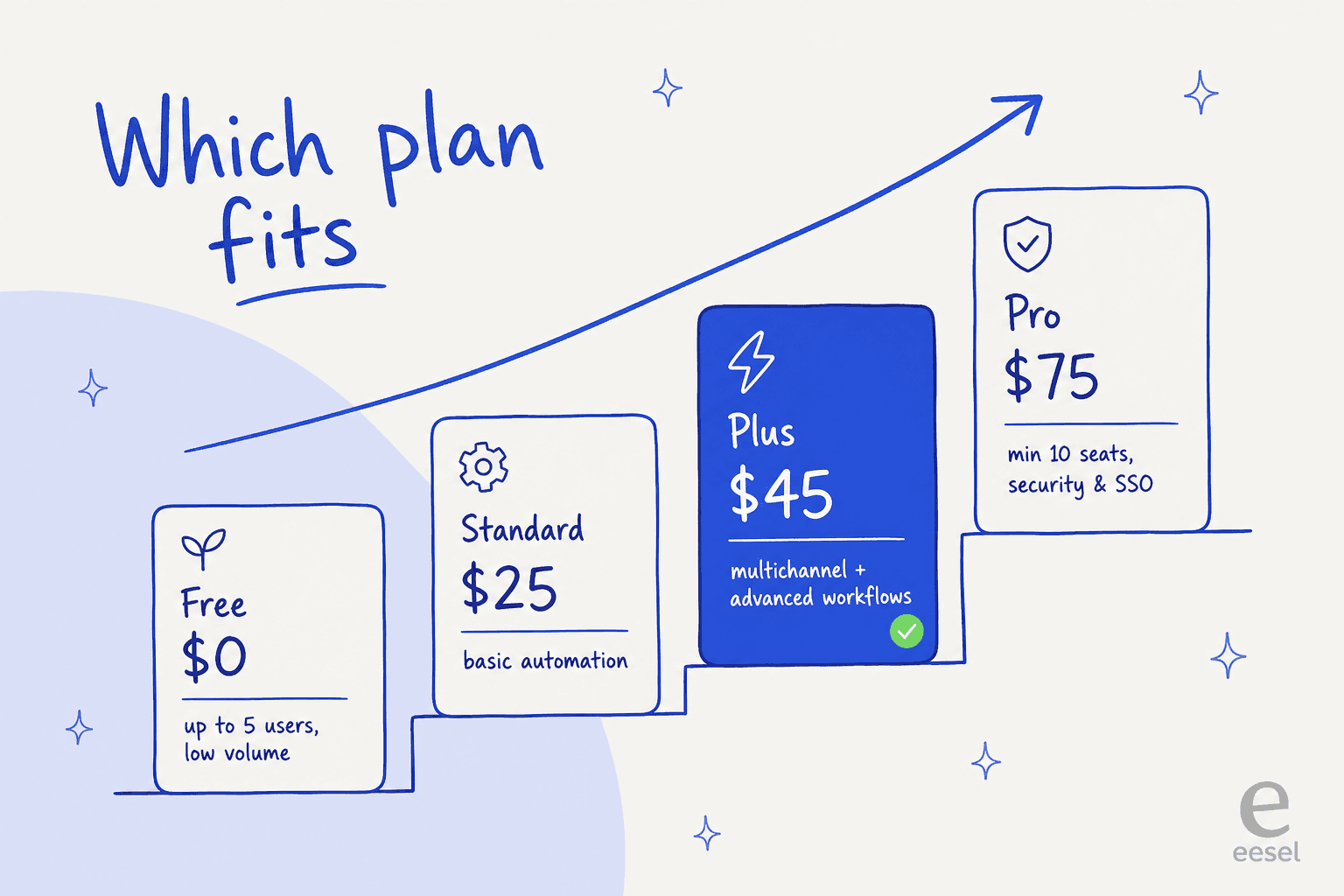
- Pick Free if you're a solo founder or a team of two or three with light volume and one inbox. It's a real product, not a nag screen.
- Pick Standard if you've outgrown a plain inbox and want basic automation and live chat, and you don't need AI drafting your replies.
- Pick Plus if you run multiple channels and want advanced workflows plus unlimited AI drafts. This is the sweet spot for most growing teams.
- Pick Pro only if you genuinely need SSO, HIPAA, and unlimited workflows out of the box, and you have at least 10 agents to justify the floor.
Is Help Scout pricing worth it?
Here's my honest take after years of living in this category. For a small, relationship-driven team that wants a clean inbox and fast onboarding, Help Scout is well-priced and a pleasure to use. The Free and Standard tiers are fair, the product earns its ease-of-use reputation, and the resolution definition is more honest than most.
The value gets shakier on two fronts. First, scale: stack seats, add-ons, and per-resolution AI together and the bill climbs faster than the simple sticker implies, which is the same wall the Help Scout alternatives crowd keeps running into. Second, the AI specifically: $0.75 per resolution ties your support cost directly to your ticket volume, and Help Scout's AI splits the work in two: AI Answers replies to customers from your Docs sites plus other publicly available sites and documents, while your past conversations feed the agent-facing AI Drafts instead. If you want the customer-facing agent itself trained on how your team resolved past tickets, that's what a dedicated AI helpdesk agent adds. If AI deflection is the main reason you're here, that's the part to pressure-test hardest. For the bigger map of what else is out there, our guide to the best AI helpdesk software is a good next stop.
Try eesel for Help Scout
If the per-resolution math is what's giving you pause, this is where eesel AI fits. eesel joins your Help Scout account as a real AI Agent inside the mailbox, no separate widget or inbox, and it starts at $299/month for 500 credits (1 credit per conversation) with no per-seat fee and no platform fee, so your cost stays fixed instead of stacking on top of your seats.

The bigger difference is what it trains on. eesel imports your Help Scout Docs articles, past conversations, and saved replies automatically, then learns from how your team has actually resolved tickets, not just your help center. You can simulate it against past conversations before going live, keep it in draft-only mode until you trust it, and the page reports 85%+ tier-1 resolution out of the box within a week. Teams like EntryLevel, CartonCloud, and Ecosa run it on Help Scout today. It's free to try, with 100 free credits and no card, so you can run the numbers against your own ticket volume before committing.
Frequently Asked Questions
How much does Help Scout cost per month?
Is there a free version of Help Scout?
How much does Help Scout AI cost?
What is the cheapest way to add AI to Help Scout?
Is Help Scout pricing worth it for small teams?


Article by
Kurnia Kharisma
Kurnia is a software engineer and writer at eesel AI with two years of SEO experience, writing about AI tools, helpdesk software, and customer support. He pairs a developer's understanding of how these products are built with search-driven research into what actually ranks and resonates with the people searching for them.