What the Help Scout AI agent does
The Help Scout AI page separates AI Answers for customers from Inbox Assistant for your team. AI Answers handles questions from the knowledge provided to it. Inbox tools help draft, summarize, and edit replies.
I would not treat those as interchangeable. If your problem is visitors struggling to find a policy, evaluate the customer-facing answer and escalation experience. If your team spends time composing email replies, evaluate the draft in the inbox and the effort needed to correct it.
This guide is based on documentation, not a measured production trial. Help Scout publishes a 73.19% average resolution rate, but that is a vendor-reported figure, not a forecast for your mailbox. Your policy coverage, request mix, and definition of success determine how useful the result will be.
How to set up and test AI Answers
The getting-started guide directs you to configure an agent under Tools > AI Agents, then enable AI Answers on a Docs-enabled Beacon. Neutral mode presents AI alongside other available contact options; Self Service asks visitors to interact with AI first.
The agent configuration guide lists Docs sites, public websites and documents, and Improvements as knowledge sources. Improvements are manually added facts or clarifications. Identity settings guide tone and behavior; they are not where you add new factual knowledge. Website changes require a manual resync.
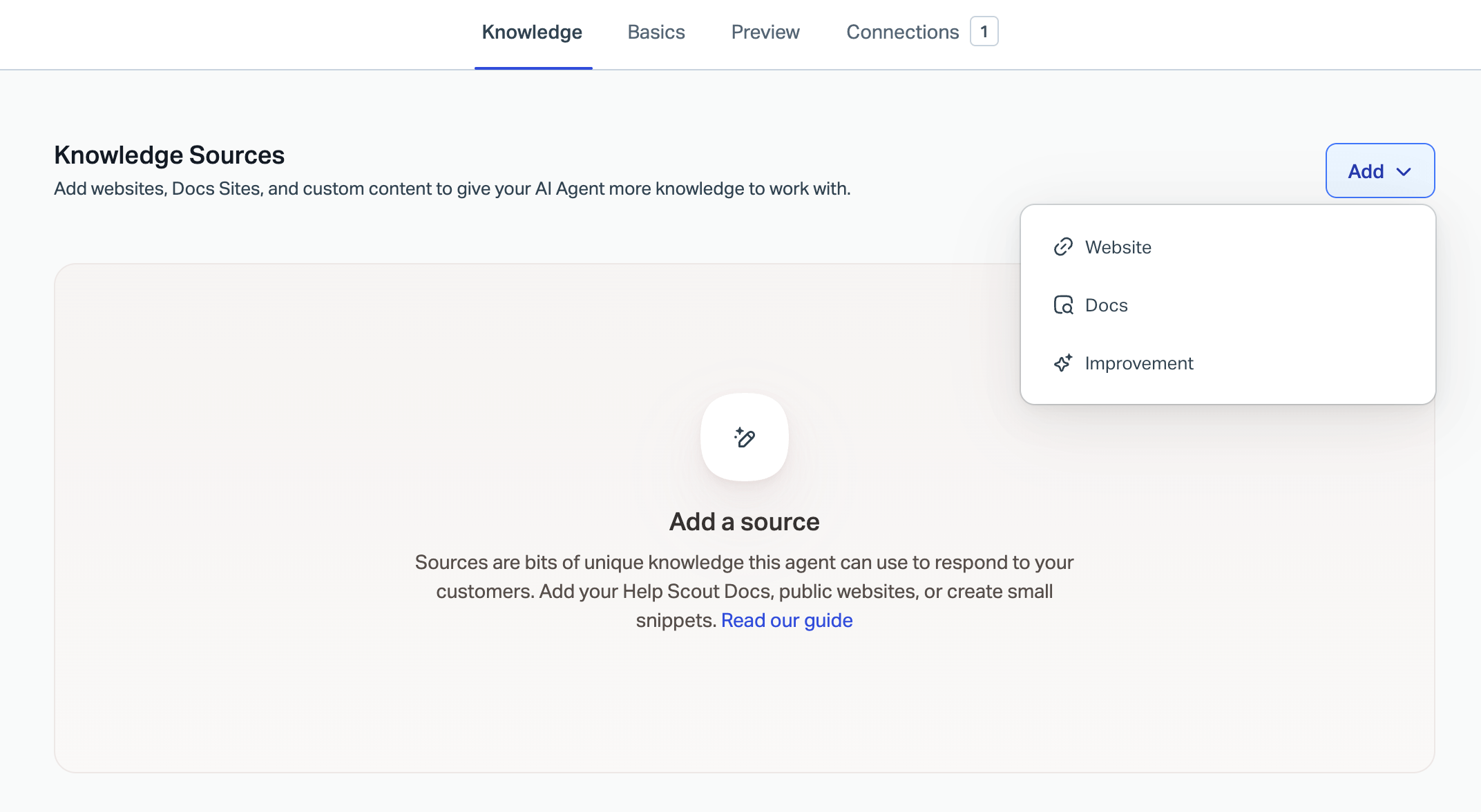
The knowledge-source menu from Help Scout's guide. This is a configuration view, not a measured answer-quality result.
For a pilot, pick a policy whose expected answer a teammate can verify. Ask the ordinary question first, then add a detail that changes eligibility. Also try a question the sources cannot answer. Check the escalation experience rather than stopping when the wording sounds helpful.
Help Scout's Test tab does not add billable AI Answers resolutions. Use it to check the behavior before exposing it to visitors. Do not confuse that with a production success rate or assume it has tested every exception.
Pricing: count billable sessions, not individual replies
Help Scout's resolution billing guide lists $0.75 per resolution. It charges once per resolved session, even with multiple questions. A greeting alone is not a resolution, and a request for further help after the last answer prevents the session from qualifying.
For example, 1,000 billable resolutions cost $750 in AI usage before platform charges. That is hypothetical arithmetic, not a forecast of how many incoming requests will qualify. New Help Scout customers receive a three-month trial starting when their account is created; existing customers starting AI Answers do not receive that trial.
At the monthly limit, AI Answers is disabled and Beacon falls back according to its configured mode. Test that fallback too, since reaching a budget limit should not leave your team surprised by the contact path visitors see.
The platform pricing page separately lists per-user plans and their included features. Check the selected billing term and your account's quote before budgeting. For a fuller cost breakdown, see the Help Scout pricing guide.
Where to look carefully before choosing an alternative
Avoid a blanket claim that “Help Scout cannot use past conversations.” Its pricing page describes AI Drafts as using past conversations and help content. AI Answers has its own documented sources. Check the particular feature, not just the brand name.
I would compare the intended workflow with this checklist:
| Your requirement | Evidence to check |
|---|---|
| Customer self-service | A correct answer and a usable route to human help |
| Assisted email replies | A draft that needs less work than writing from scratch |
| Current policy knowledge | The actual source and its latest synced version |
| Safe automation | The enabled action, target mailbox, and resulting record |
| Predictable cost | Billable unit, volume, platform fees, and spending limits |
Help Scout now lists channels and workflows beyond a basic email inbox. A platform migration should follow a verified requirement, not an assumption that the product is only suitable for simple email support. If you are considering replacing the helpdesk, the Help Scout alternatives guide is a separate comparison.
If you want to keep Help Scout, an eesel teammate is another option to evaluate inside that mailbox. The next section focuses on a specific outcome: an unsent draft your team can inspect. It does not promise a higher resolution rate or equate a billed eesel task with a Help Scout resolution.
Prepare Help Scout replies through eesel CLI
An eesel helpdesk teammate can work beside your team in Help Scout. The eesel CLI gives you another way to operate that same teammate and workspace: directly from a terminal, through scripts, or with a coding agent such as Claude Code, Cursor, or Codex. Its JSON output lets you collect setup and activity information without copying it out of dashboard screens.
For Help Scout, I would start with one narrow job: preparing a reply that a person reviews in the conversation's reply box. That is a different outcome from answering a customer automatically.
Confirm the connection and the sources
With Node.js 18.17 or newer, inspect the workspace before changing anything:
npx @eesel/cli login
npx @eesel/cli whoami
npx @eesel/cli agents
npx @eesel/cli integrations --agent TEST_AGENT_ID
npx @eesel/cli status --agent TEST_AGENT_ID
npx @eesel/cli automations --agent TEST_AGENT_ID
Replace TEST_AGENT_ID with the selected teammate's ID. Check existing automations and action permissions before testing. Selecting an agent does not isolate it from its connected mailboxes.
If Help Scout is not connected, confirm the permitted mailbox scope before authorizing it. Connection starts conversation syncing, with every accessible mailbox included by default. Where access must be limited, use a Help Scout account already restricted to the permitted mailboxes; do not rely on changing source settings after ingestion. The documented connection command is:
npx @eesel/cli integrations connect help_scout --agent TEST_AGENT_ID
A person completes authorization in the browser through Pipedream. The connection acts as that Help Scout user, so choose an account with the intended access. A coding agent can prepare the setup but should hand this authorization step to you.

Connection confirmation from the eesel integration guide. This confirms authorization, not that every source has finished syncing.
The Help Scout integration guide distinguishes two sources. Conversations sync after connection and include every mailbox by default, with mailbox restrictions available. Help Center needs your public Docs URL entered separately. A connected account with conversation records does not prove your Docs articles are present.
Check the source settings and counts in the dashboard. Restrict mailboxes before using sensitive conversation history, and verify that the specific policy needed for the pilot is available. Do not assume saved replies are imported merely because conversations have synced.
Evaluate the answer before saving a draft
First disable outgoing messages and system-changing actions in the dashboard for the selected agent. The following chat commands do not disable them.
Use a fictional cancellation question to check the answer and its evidence:
npx @eesel/cli new --name "help-scout-cancellation-review" --agent TEST_AGENT_ID
npx @eesel/cli chat "Fictional test: a customer says they cancelled yesterday but see a charge today. Using the approved cancellation policy, propose a reply and cite the relevant source. Identify what information is missing. Do not send a reply, save a draft, or change any record." --agent TEST_AGENT_ID
npx @eesel/cli chat "The customer adds that the charge is still pending, not settled. Revise the proposed reply. Do not promise a refund or claim the account was checked." --agent TEST_AGENT_ID
The second message continues the same conversation. Review whether the answer distinguishes a pending charge from a settled payment and avoids pretending it inspected an account. These are suggested tests, not measured eesel results. CLI chats are billed, and a new conversation is not a sandbox.
Save a draft only after approving the pilot
For an authorized test conversation, enable Create draft reply with the approval setting appropriate to your pilot. Keep Send reply off. Ask the teammate to read that exact conversation and prepare a draft using the approved policy, without changing tags, assignment, status, or customer records.
| Result | Where to verify it | Important distinction |
|---|---|---|
| Proposed answer in CLI chat | Chat output and cited policy | Nothing has been saved in Help Scout |
| Held action | Eesel approvals | The draft has not necessarily been created |
| Saved draft reply | Help Scout reply box with the Draft label | The customer has not received it |
| Internal note | Conversation's internal thread | It is not a draft in the reply box |
The distinction matters: Send reply has no draft mode. The integration guide says it sends immediately and cannot be recalled. Do not approve a send action when the intended result is an unsent draft.
Inspect the work from the terminal:
npx @eesel/cli activity --agent TEST_AGENT_ID
npx @eesel/cli approvals --agent TEST_AGENT_ID
Then open the intended Help Scout conversation. Confirm the draft text, policy reference, and absence of a customer-facing message. Help Scout attributes the draft to the authorized user, so the author may appear as “You”; the Draft label and action evidence matter more than an eesel byline.

A streaming-support example in the eesel documentation. The visible Draft label illustrates the saved state; this is not the cancellation test described above.
Give a coding agent a bounded setup brief
A useful first brief is:
Inspect the selected eesel teammate's Help Scout connection, source counts, instructions, and existing automations. Propose a draft-only cancellation pilot for one approved mailbox. Do not connect accounts, run chats, create automations, save drafts, or change permissions until I approve the plan.
After the manual pilot, decide which event should start the work. A new conversation uses help_scout_new_conversation; a customer's later reply uses help_scout_customer_reply. These require separate automations. Ask for a narrow mailbox and topic filter, and inspect the automation's enabled state: creation can leave it switched on.
That is the practical benefit of an agent-friendly CLI here. A coding agent can help inspect and set up the workflow, while your team chooses what it may read, which event starts it, and whether a draft ever becomes a sent reply.
Try eesel with one draft-only Help Scout workflow before expanding to automatic replies.
Frequently Asked Questions
What is the Help Scout AI agent?
How much does Help Scout AI Answers cost?
What counts as a Help Scout AI resolution?
Can Help Scout AI use past conversations?
How does eesel CLI work with Help Scout?
Does creating an eesel draft send a Help Scout reply?
Can a coding agent run the eesel CLI setup?


Article by
Kira
Kira is a writer at eesel AI with a Computer Science background and over a year of hands-on experience evaluating AI-powered customer service tools. She focuses on breaking down how helpdesk platforms and AI agents actually work so that support teams can make better buying decisions.