

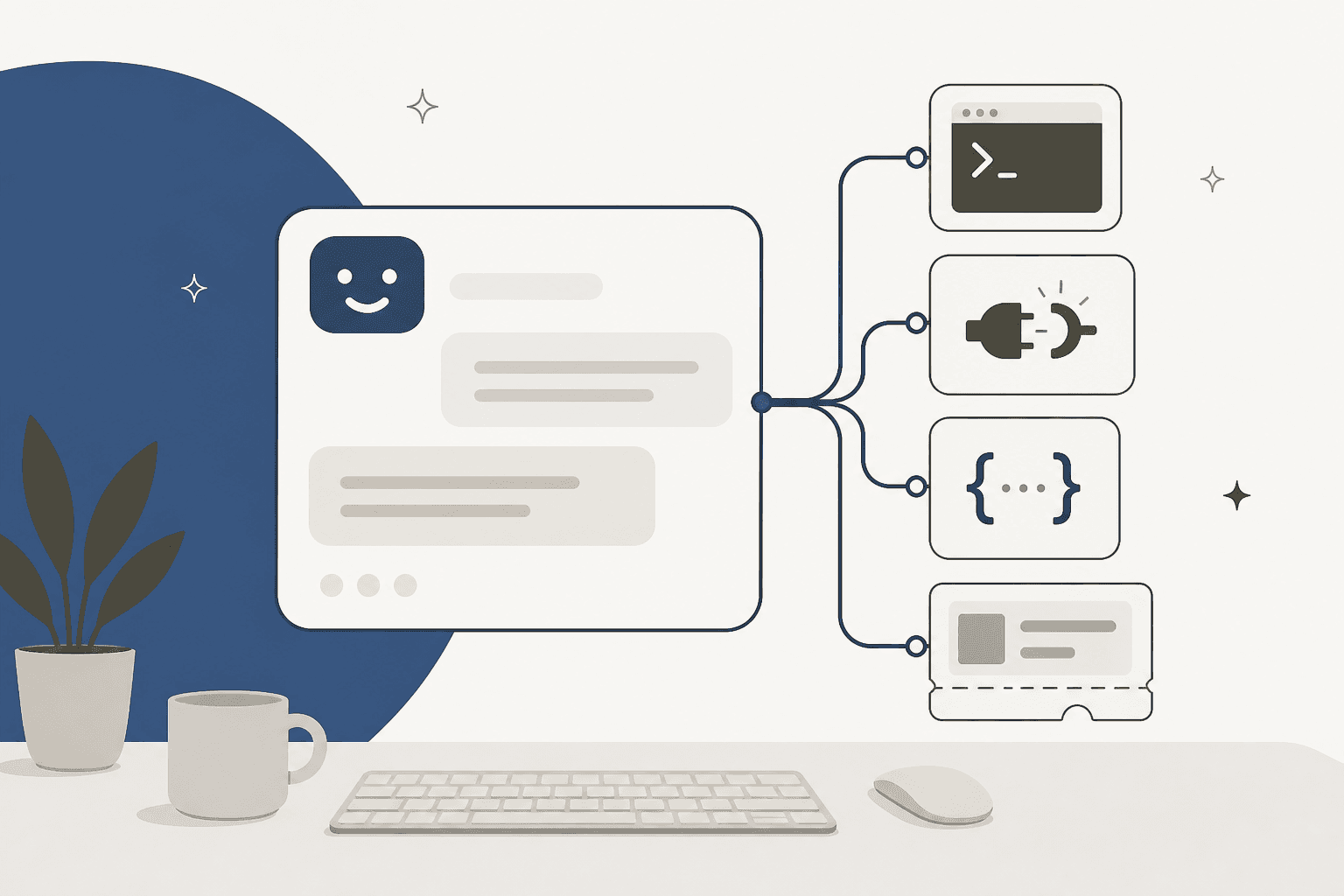
"Programmable customer support AI" gets read as "you have to build it yourself." That's the mistake. Programmability is a spectrum, not a switch:
- The low end is a closed SaaS bot: a toggle, a canned-answer editor, no real control. Fast to turn on, impossible to bend when your workflow doesn't match the template.
- The high end is building on a raw model API (OpenAI, Anthropic). Total control, and a permanent bill: you own retrieval, conversation state, helpdesk actions, guardrails, and testing forever, plus a per-token meter that charges whether or not the ticket is solved.
- The sweet spot for most teams is in the middle: a ready-made AI helpdesk agent that ships the engine but keeps a real programmable surface, an API, webhooks, a CLI, custom skills, so you script the edges without rebuilding the plumbing.
The lesson from developers who've shipped these: the model call is the easy 10%; the maintenance is the other 90%. If that 90% is your product, build. If you want resolved tickets, pick something like eesel that's programmable where it counts and pre-built everywhere else, and bills 1 credit per ticket (plans from $299/month for 500 credits) instead of per token.
What "programmable" should actually mean
Search "programmable customer support AI" and you'll find two camps talking past each other. One means "there's an API, so I can automate it." The other means "I'm writing the agent myself." Both are too narrow.
Programmable, in a way that actually matters for support, means you can shape five things: how the AI behaves, what it knows, what it can do, what it's allowed to do, and how you extend it when the defaults run out. A tool that gives you a webhook but no control over retrieval isn't really programmable, it's just scriptable at the edges. A tool that lets you edit the system prompt but can't take an action on a ticket is a chatbot with a text box.
The reason this framing matters is cost. The instinct, especially among engineers, is that real control requires building from the model up. That instinct quietly turns a two-week integration into a nine-month platform project. So before you pick a route, it helps to see the whole range at once.
The programmability spectrum
Here's the honest range, from least control to most, and it maps almost perfectly onto how much you have to maintain.
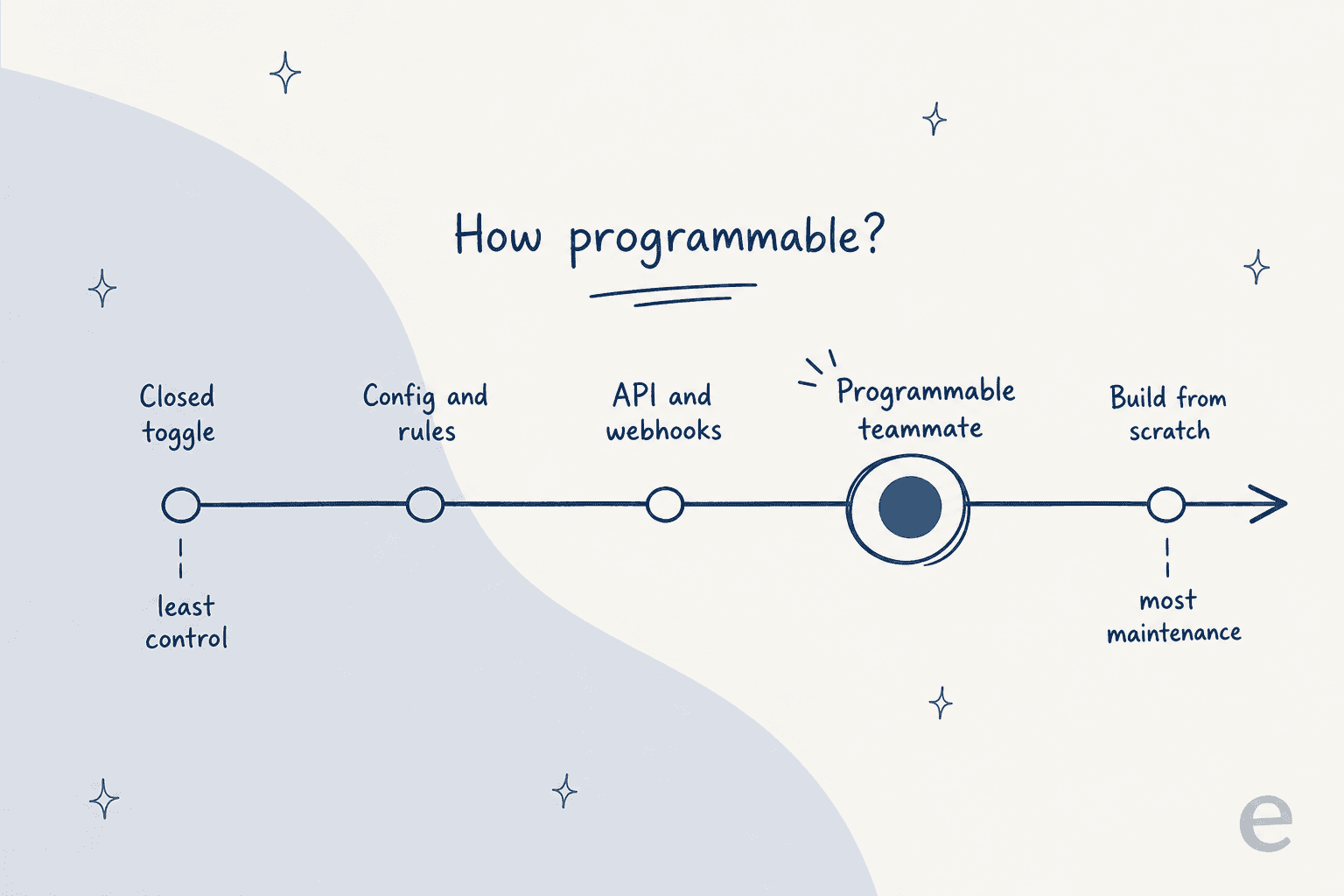
Walking it from the left:
- Closed toggle. A vendor bot you switch on. You edit some canned answers, maybe a fallback message. Zero engineering, zero real control. Great until your process doesn't fit the box.
- Config and rules. A no-code builder: intents, decision trees, rule-based routing. More control, still inside the vendor's rails. You can't reach outside what the UI exposes.
- API and webhooks. The helpdesk or bot exposes REST endpoints and event hooks. You can drive it from your own code, but you're wiring plumbing and you still supply the intelligence.
- Programmable teammate. A ready-made agent that ships retrieval, actions, and testing, and keeps a real developer surface. You configure behavior and script the edges; you don't rebuild the engine. This is the highlighted point for a reason.
- Build from scratch. You assemble the agent on a foundation-model API. Maximum control, maximum maintenance, and a per-token bill on every message.
Most content on this topic pretends the choice is only #1 or #5: buy a dumb bot or build a smart one. The interesting ground, and where most support teams should land, is #4.
The five things a programmable support AI lets you control
Before comparing routes, it's worth being concrete about what you're actually programming. When I say a support AI is "programmable," these are the five surfaces that either open up or stay locked.
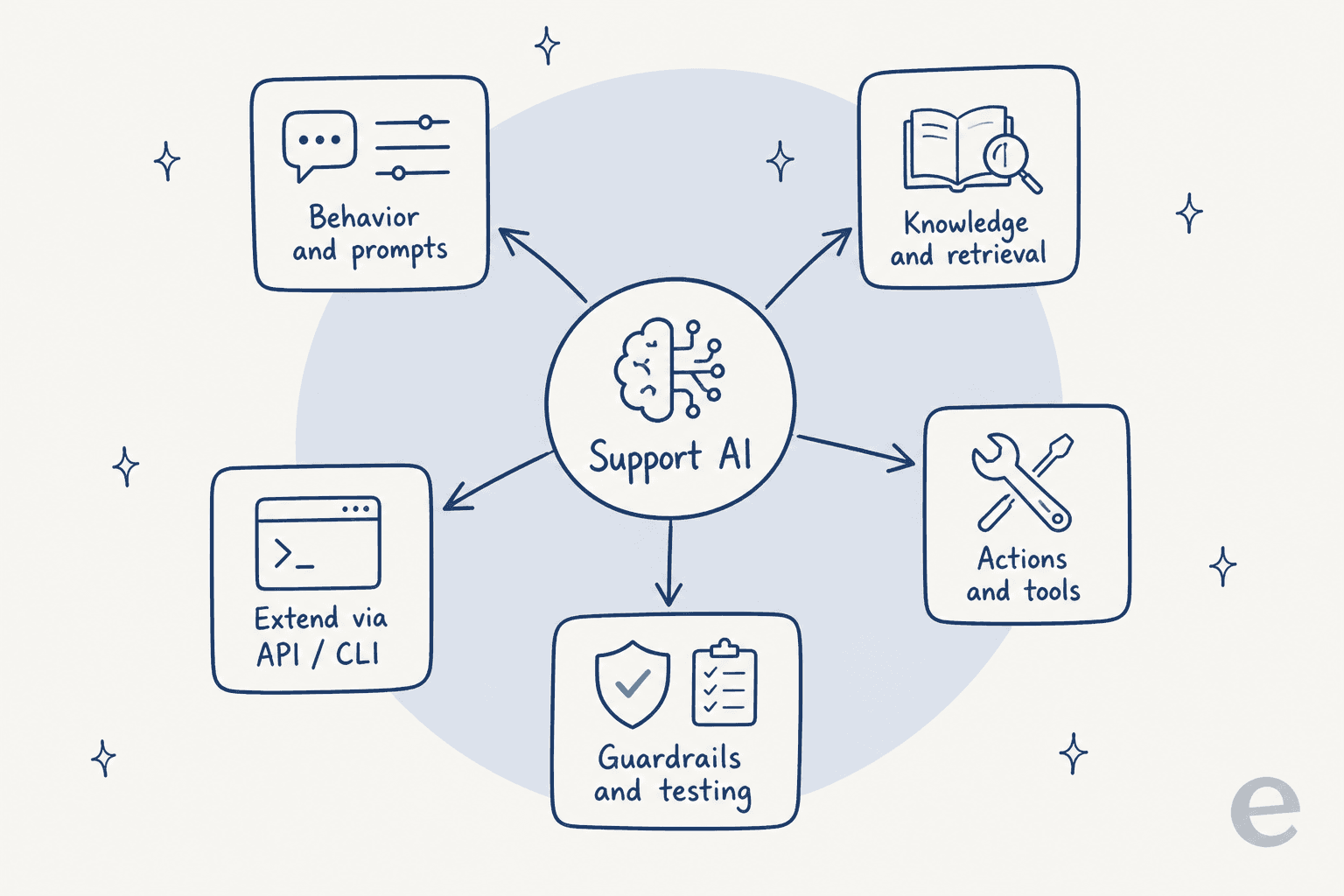
- Behavior and prompts. Tone, persona, when to escalate, when to stay quiet. Table stakes, but plenty of closed bots still only give you a greeting field.
- Knowledge and retrieval. What the AI reads before it answers: your help center, past tickets, internal docs. The quality of this is what separates a useful answer from a confident wrong one, and it's the surface closed tools hide most.
- Actions and tools. Whether the AI can look up an order, tag a ticket, issue a refund, or triage and route, not just talk about it.
- Guardrails and testing. What it's allowed to do, and how you prove it behaves before it touches a customer. Almost always the thing a from-scratch build ships without.
- Extend via API and CLI. The escape hatch for everything the defaults don't cover: call an internal service, run a script, wire in a tool nobody anticipated.
A tool that opens all five is genuinely programmable. A tool that opens one or two is marketing the word. Keep this list handy as we walk the two routes people actually agonize over: building from scratch, and the middle path.
Route A: build it from scratch on a model API
This is the route most engineers picture when they hear "programmable," and it's the one that turns into a project. Both OpenAI and Anthropic sell model infrastructure, not a finished support agent, and they're excellent at exactly that. They just do a much smaller slice of "customer support AI" than the phrase implies.
You get real building blocks: a model, a way to define tools, an agent loop, some hosted retrieval primitives. What you don't get is the support agent. OpenAI's own docs are blunt about the split, you own "deployment, tool implementations, state storage, and approval decisions, while the SDK runs the agent loop." Anthropic's Claude Agent SDK is the same shape: sessions, hooks, and permissions, but the loop runs in your process and the persistence is your integration.
So a "look up the order and issue the refund" step is a tool call the model emits; the code that talks to Shopify and your billing system is entirely yours. Same for every other load-bearing piece, retrieval that stays synced with your live docs, conversation state, ticket actions, escalation, and the test harness. If you want the tool-by-tool version of this, our AgentKit vs Anthropic API breakdown goes deep.
The cost model is the sharpest surprise. You pay per token on every message, whether or not the ticket is ever resolved, for the system prompt, the retrieved chunks, the tool round-trips, the reasoning, and every retry.
| Model | Input (per 1M) | Cached input | Output (per 1M) |
|---|---|---|---|
| OpenAI gpt-6-astra | $10.00 | $1.00 | $50.00 |
| OpenAI gpt-5.6-terra | $2.00 | $0.20 | $12.00 |
| Anthropic Claude Opus 5 | $5.00 | $0.50 | $25.00 |
| Anthropic Claude Sonnet 5 | $2.00 | $0.20 | $10.00 |
| Anthropic Claude Haiku 4.5 | $1.00 | $0.10 | $5.00 |
Prompt caching softens the number a lot for support, since you resend the same help-center context every turn, a cache hit reads at about 10% of standard input price. But caching changes the size of the bill, not the billing unit. A ten-turn conversation that retrieves a dozen chunks per turn and retries twice bills all of it, even if the customer walks away unhappy.
None of this is a knock on the model providers. It's the honest scope: a raw model API is infrastructure, not an employee. Build here when the agent's logic is your product.
Route B: a programmable teammate that ships the engine
The middle path is the one that maps to what most people typing "programmable customer support AI" actually want: an agent that already knows how to do support, that they can point at their stack, configure, and script, rather than assemble. This is where a tool like eesel sits, and it's worth being precise that it's a different category from a raw model API, not a friendlier wrapper on one.
An AI helpdesk teammate arrives with the whole engine pre-built. It trains on your past tickets and help center, joins the queue inside the helpdesk you already run, looks up orders, tags and triages, and drafts or sends replies. Retrieval, conversation state, ticket actions, and escalation are handled. You configure behavior, not implement infrastructure.

The part that matters to a developer: "ready-made" does not mean "closed box." eesel keeps a genuine programmable surface for the edges the defaults don't cover.
- Network Access lets the agent hit any REST API you allow, with GET, POST, PATCH, and DELETE, and per-domain auth headers. Credentials live as headers and are never shown to the model.
- Webhooks give any tool a unique URL that wakes the agent with whatever payload it sends.
- A CLI and custom skills let you script the parts you want to own, and a single skill can span tools in one run: read the helpdesk, check Shopify, post to Slack.
The distinction I'd hold onto: you still write code where code adds value, you just don't rebuild retrieval, state, and helpdesk connectors from scratch to get there. And because it plugs into the helpdesk you already run, the connectors (1000+ of them) are the vendor's problem, not yours.
MCP is quietly widening the middle
There's a second reason the middle path keeps getting stronger: helpdesks have moved from "here's a REST API, go build" to shipping their own Model Context Protocol servers. MCP is an open standard, introduced by Anthropic, for connecting an agent to external systems through one protocol instead of a bespoke integration per tool.
The first-party list is growing fast:
- Gorgias ships a free MCP server at
mcp.gorgias.com/mcp, now in open beta. - Front documents a server at
mcp.frontapp.com/mcpwith an unusually clean permission model: OAuth 2.1 with PKCE and per-user scopes, so the agent's permissions are exactly the authorizing teammate's. - Atlassian runs an official remote MCP server connecting Jira, Confluence, and Jira Service Management over OAuth.
What MCP does not do is make the AI programmable on its own. The server exposes tools; the brains, the retrieval quality, and the guardrails deciding whether to actually issue that refund are still yours to bring or buy. It's the connective layer, which is exactly why it makes the "programmable teammate" route easier, not the "build everything" route.
The trap: confusing "programmable" with "built by me"
Here's where I'd push back on the instinct to build. The consensus from developers who've actually shipped support agents is remarkably consistent, and it isn't "never build." It's that the model call is the easy part, and everything programmable-sounding hides a maintenance tail.
Start with the fact that a support agent can act, not just talk. On an Ask HN thread about preventing hallucinations in production, the sharpest framing was about exactly this:
"The failure mode I keep seeing isn't hallucination per se... it's blurred responsibility between intent and execution. Once a model can both decide and act, you've already lost determinism."

An agent that can change account state needs constrained action spaces and allow/deny lists, not just a better prompt. And you can't tell whether your guardrails hold without testing, which almost nobody builds properly. That's the single strongest argument for simulation: replaying real past tickets and scoring the agent's answers against what your team actually sent, in a sandbox, before it touches a live queue. It's one of eesel's core skills for exactly this reason, and it's the thing a from-scratch build almost always skips.
Then there's retrieval, which everyone underestimates. A Microsoft engineer who maintains a popular open-source RAG template put the reflex to rest:
"So few developers realize that you need more than just vector search for RAG, so I still spend many of my talks emphasizing the FULL retrieval stack for RAG."
Single-shot retrieval isn't enough; you end up needing an agentic loop that evaluates results and re-queries. That's a real system, not a config flag. And once it's built, the real number shows up, the maintenance. From an r/AI_Agents thread with 460+ comments:
"The hardest part wasn't the LLM or voice quality - it was keeping the agent's knowledge current as policies changed and edge cases emerged."

We've run AI on live support queues for years, and the edge cases are the whole job: the policy that changed last week, the product line that launched yesterday, the one weird refund flow that breaks every generic agent. That work doesn't show up in a quickstart, and it never stops.
Control vs maintenance: the axis that actually decides it
Zoom out and the routes sort onto two axes, how much control you get and how much you have to maintain. The mistake is assuming they move together, that more control always costs more upkeep.
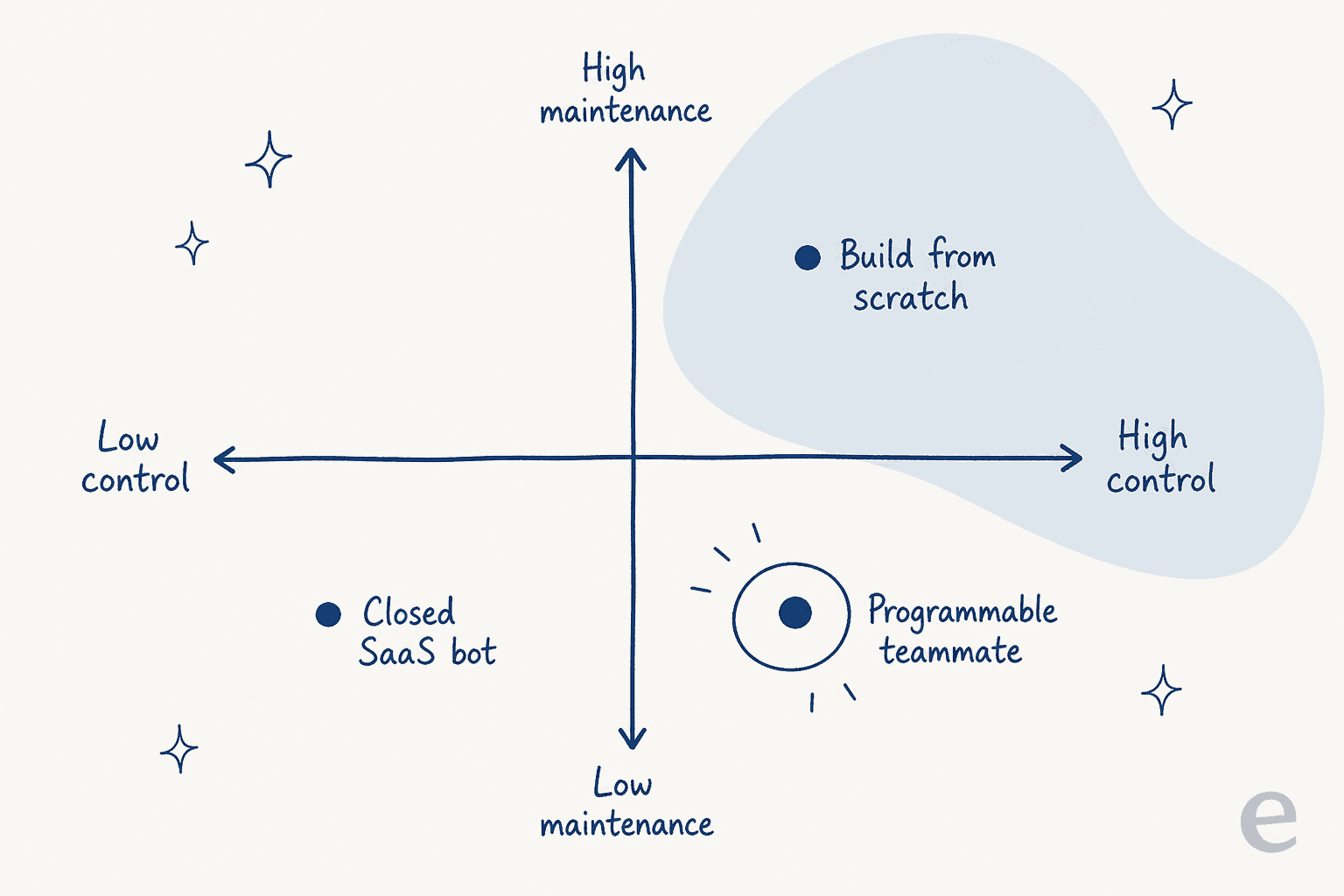
A closed bot is low control and low maintenance. Build-from-scratch is high control and high maintenance, the diagonal everyone assumes is the only line. The whole pitch of a programmable teammate is the bottom-right corner: high control without the high maintenance, because the engine, connectors, and testing are somebody else's upkeep and you still get an API, a CLI, and webhooks for the edges.
On cost, the same split shows up. A build puts you on a per-token meter that climbs with every retry and long conversation, resolved or not, plus the engineering salary behind it. eesel, by contrast, is one fixed monthly price from $299 for 500 credits, with 1 credit per ticket however long it runs rather than per reply, and no per-seat fee or platform fee. As one developer put it, agents that "save 10 minutes a day but quietly cost hours a week in maintenance" are the trap; the build is rarely the cheap option it looks like on a quickstart.
So which route should you pick?
Neither route is wrong; they fit different teams. Here's the short version as a table.
| Dimension | Build from scratch (model API) | Programmable teammate |
|---|---|---|
| You build the engine | Yes, all of it | No, you configure it |
| Retrieval / knowledge sync | Yours to build and maintain | Built in, syncs your docs |
| Helpdesk connectors | Yours (per platform) | Built in (1000+) |
| Custom code | Fully, it's all yours | Network Access, webhooks, CLI, skills |
| Test before go-live | You build the harness | Simulation on past tickets |
| Billing unit | Per token, solved or not | Per ticket handled |
| Time to first resolved ticket | Weeks to months | Minutes to hours |
The quick rule: if the agent's logic is your actual product and you have engineers to own retrieval, guardrails, and evals forever, build on a model API. If you want resolved tickets and a programmable surface for the edges, a ready-made teammate is faster, cheaper in year two, and far less to babysit. If you're still mapping the field, our best AI agents guide and the roundup of AI for ticket triage go tool by tool.
Try eesel
If you got here weighing "build a programmable agent" against "buy one," the honest answer for most support teams is that the build looks cheaper on a quickstart and costs more in year two. eesel is the middle path done properly: an AI support teammate that plugs into the helpdesk you already run, trains on your past tickets and docs, and, the step a from-scratch build almost always skips, simulates on your real ticket history before it answers a live one.
You keep the programmable surface where it matters, Network Access for any REST API, webhooks, a CLI, and custom skills, without rebuilding retrieval, state, and connectors first. It's free to start with 100 credits, no credit card and no sales call, and pricing is per ticket handled, so you pay for work done rather than tokens burned. If you'd rather point a programmable agent at your queue than spend a quarter building one, that's the fastest way to see it on your own tickets.