

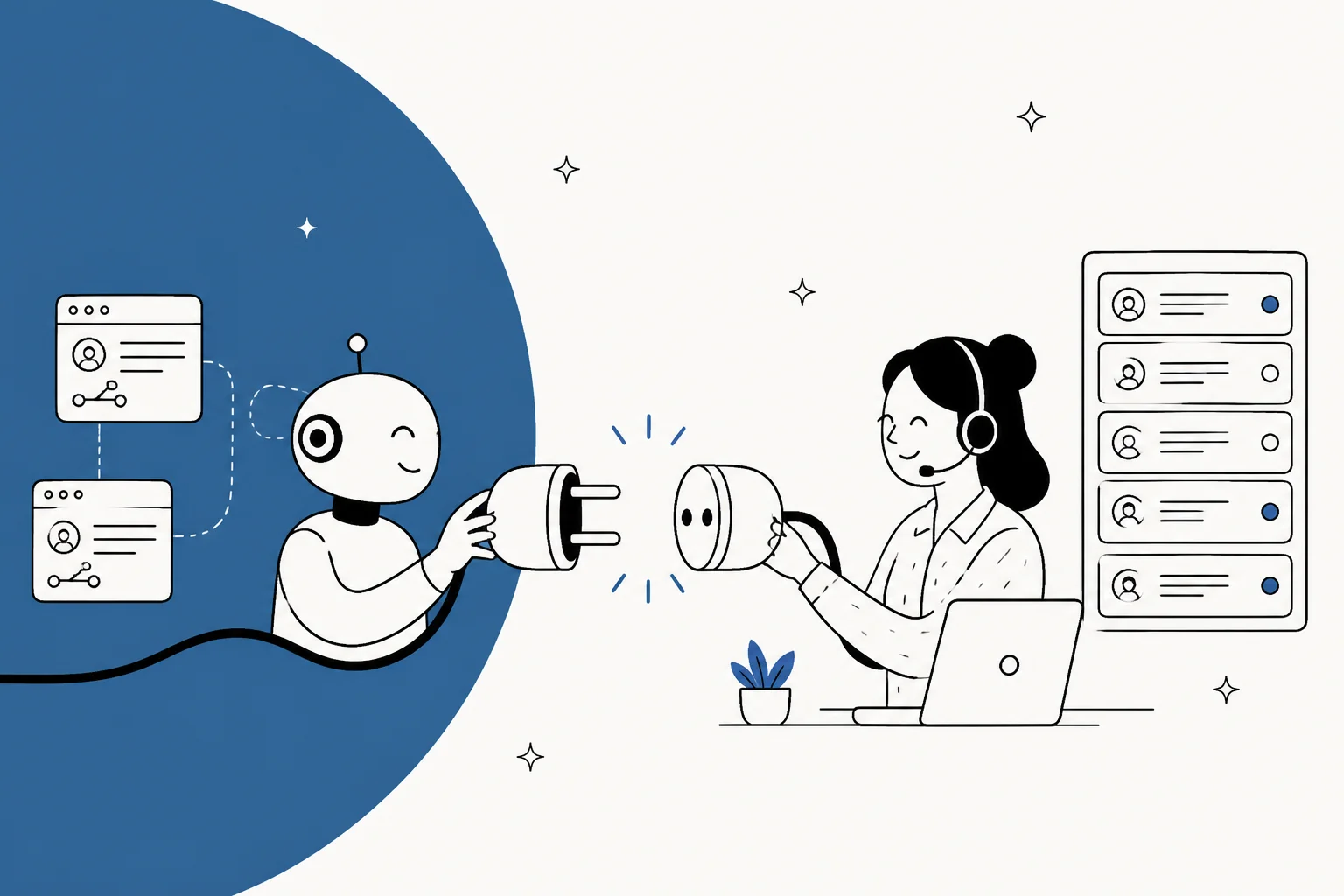
There are four real ways to connect an AI agent to the helpdesk you already run, and the right one depends on how much you want to build versus buy:
- Native AI add-on (Zendesk AI, Freshdesk Freddy, HubSpot Breeze, Gorgias AI): zero integration work, but it lives inside that one helpdesk and mostly answers from your help center, not your past tickets. Priced per resolution or session.
- DIY on the REST API and webhooks: total control, but you build and maintain the agent, the retrieval, and the guardrails yourself.
- An MCP server (Front and Gorgias ship official ones): lets a model like Claude read and act on tickets in a standard way, but you still own the orchestration around it.
- A drop-in AI teammate like eesel, which joins your existing queue in minutes, trains on your past tickets, and lets you simulate it on real history before go-live.
My take: if you have engineers to spare and a very specific workflow, build on the API. Everyone else should start with a native add-on or a managed teammate, and the deciding factor is whether you want the agent to learn from your real ticket history and prove itself safely before it replies.
The real question isn't "which AI agent," it's "how does it plug in"
I build integrations for a living, so I hear this one a lot: a team has picked, or is about to pick, an AI agent, and the actual blocker is not the model. It is that the agent has to live inside the Zendesk or Freshdesk queue they already run, read the same tickets their human agents read, and act with the same permissions. Nobody wants to migrate their whole support stack just to try an AI on tier-1 tickets.
So the connection is the decision. Get it right and the agent feels like a new hire who already knows your tools. Get it wrong and you have a clever demo that can't see a single real ticket. Here are the four routes I actually see teams take, what each one costs, and where each one bites.
Route 1: the AI your helpdesk already sells you
The path of least resistance is the AI add-on your helpdesk vendor is already trying to upsell. It is genuinely the fastest way to get something live, because there is nothing to connect. It is already inside your tool.
The catch is two-fold. First, most of these agents answer from your help center content, not your full ticket history. Zendesk's own pitch is that its AI agents launch on "your existing knowledge and policies" with "no training or complex setup." HubSpot says its Customer Agent responds "using your existing content," and a conversation only counts as resolved when the reply shares a content source like a knowledge base article. That is fine if your docs are pristine, but the sharpest answers your best human agents give come from patterns in old tickets, and that is exactly what these tools tend not to ingest.
Second, the pricing units are all different, which makes them hard to compare at a glance:
| Native AI | Billing unit | Price | Notes |
|---|---|---|---|
| Zendesk AI agents | Per automated resolution | $1.50 committed / $2.00 pay-as-you-go | 5 to 10 resolutions/agent/mo included; starts at Suite Team |
| Freshdesk Freddy AI Agent | Per session | First 500 free, then $49 per 100 sessions | Copilot is a separate $29/agent/mo add-on |
| HubSpot Breeze Customer Agent | Per resolved conversation | $0.50 (50 credits) | On Service Pro and Enterprise seats |
| Gorgias AI Agent | Per automated interaction | $0.85 to $1.00 per automated interaction, by plan | Helpdesk billed separately per ticket |
To HubSpot's credit, it publishes hard proof numbers: Breeze already resolves 65% of conversations and cuts resolution time by 39% across more than 8,000 customers who have activated it. That is a real result, and outcome-based pricing at $0.50 a resolution is fair. The trade-off you are accepting is lock-in: Zendesk AI only works in Zendesk, Freddy only in Freshdesk, Breeze only in HubSpot. If you switch helpdesks, or run more than one, the agent doesn't come with you.
Best for: teams that are all-in on one helpdesk, have a well-maintained knowledge base, and want the fastest possible path to a working agent.
Route 2: build it yourself on the API and webhooks
Every serious helpdesk exposes a REST API and webhooks, and if you have engineers, you can wire your own agent straight to them. Zendesk's webhooks fire an HTTP request to your endpoint when ticket activity happens, so you can catch a new ticket, run it through your own model, and post a reply back through the API. Freshdesk's API v2 gives you full CRUD over tickets, with per-plan rate limits (from 50 calls a minute on trial up to 700 a minute on Forest).
This is the route with the most control. You choose the model, you write the retrieval, you decide exactly when the agent acts. I have shipped this kind of thing, and it is satisfying when it works.
It is also the route where you sign up to own the whole stack forever. The webhook plumbing is the easy 20%. The other 80% is the retrieval layer that decides which docs and tickets the model sees, the confidence thresholds that keep it from confidently making things up, the approval flow so a human catches mistakes, the logging so you can audit what it did, and the on-call rotation for when Zendesk changes an API field at 2am. None of that is exotic, but all of it is now your team's job, not a vendor's.
Best for: teams with engineering capacity and a workflow so specific that no off-the-shelf product fits, who are happy to maintain a production AI system.
Route 3: hand a model an MCP server
The newest route is the Model Context Protocol, or MCP, a standard way to give a model like Claude a set of tools it can call. Instead of you writing glue code against a REST API, the helpdesk publishes an MCP server, and the model connects to it directly.
A few helpdesks already ship official ones. Front has a hosted MCP server at mcp.frontapp.com/mcp, in open beta and free for now, exposing conversations, messages, tags, and contacts over OAuth. Gorgias has its own MCP on every helpdesk plan that can read tickets, update settings, reply to customers, and post internal notes. Zendesk takes a slightly different tack with Claude actions inside its action builder, where you bring your own Anthropic API key and call Claude to summarize, analyze sentiment, or draft.
MCP is a genuinely good building block, and I like where it is heading. But it is a wire protocol, not a product. Connecting Claude to your Gorgias MCP gives the model access to your tickets. It does not give you a tested agent, a simulation, an approval queue, or a way to answer from your past ticket history. You still have to build the assistant on top of the connection, or use a tool that already has. If you want the deeper version of this, I wrote a whole piece on building an AI agent on an MCP server.
Best for: teams already working in a model client (Claude, Cursor, ChatGPT) who want it to reach into the helpdesk, and who understand they are getting a connection, not a finished agent.
Route 4: drop in a ready-to-work AI teammate
The last route is to skip the plumbing and use a product that is designed to join your existing helpdesk. This is where eesel's AI helpdesk agent sits, and it is worth being precise about what "connect" means here, because it is the whole pitch.
You do not migrate anything. eesel plugs into the helpdesk you already run (Zendesk, Freshdesk, Gorgias, Front, Help Scout, HubSpot) and joins the queue as another agent. The easiest way to connect is to open the dashboard chat and just say "connect my Zendesk," and it walks you through the sign-in. Because it is a full connection rather than a public crawl, it unlocks the thing native AI usually can't touch: your past tickets, defaulting to solved and closed across all time, so the agent learns how your team actually answers.

The trade-off is honesty in the other direction: you are trusting a third party with your ticket data, and some integrations are gated per workspace, so the published list is a ceiling rather than a guaranteed self-serve set. But you get the retrieval, the guardrails, the approval flow, and the simulation as part of the product, not as your weekend project. And if anything else you use has an API, it connects through Network Access, a custom skill, or webhooks, so you are not boxed in to the native connector list.
Best for: most support teams, who want the depth of a real agent (past-ticket learning, simulation, per-action control) without staffing an AI platform team to maintain it.
So which route should you pick?
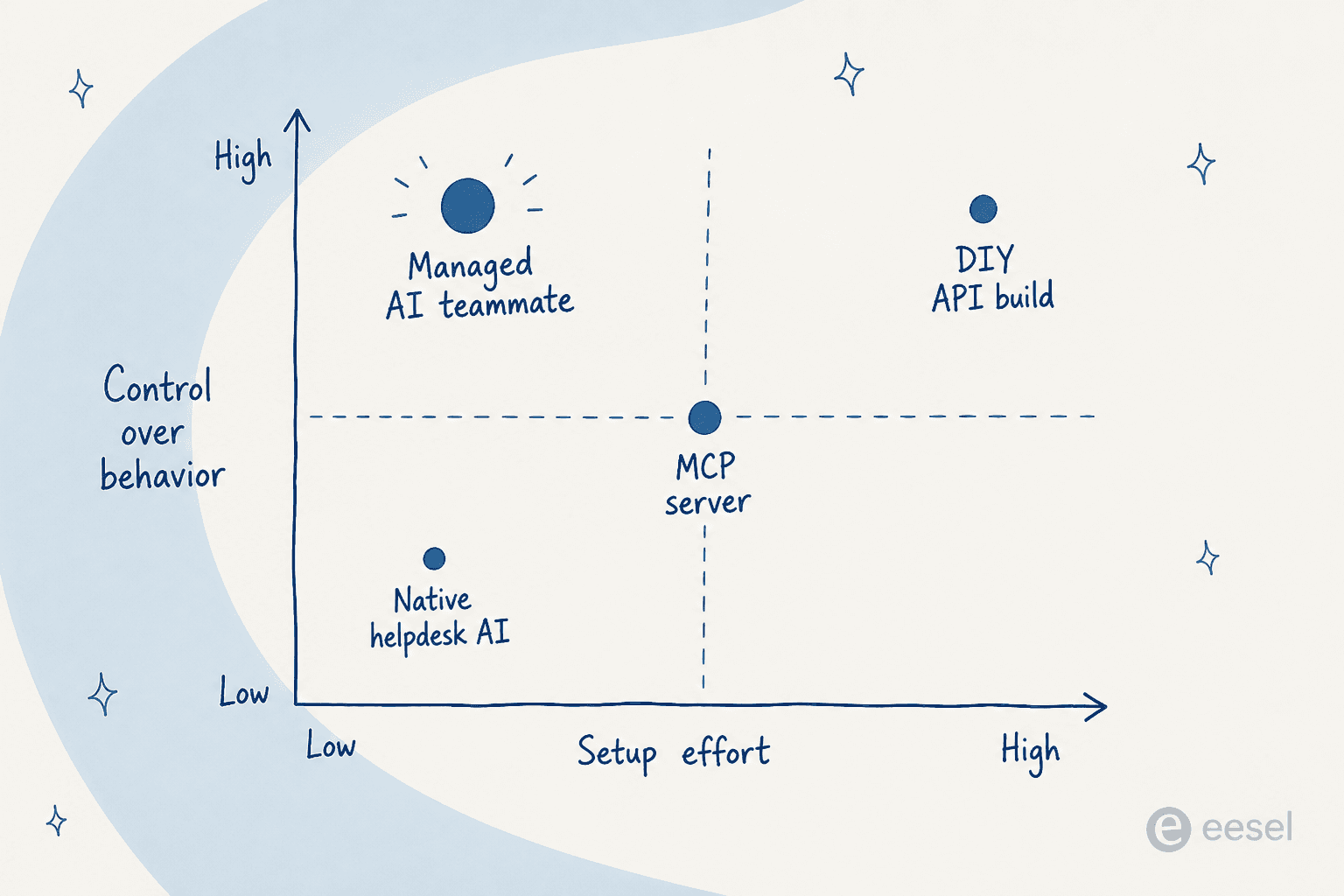
The quadrant above sorts this by two axes that actually matter: how much setup effort you are signing up for, and how much control you get over how the agent behaves. Native AI is low effort but low control. DIY is maximum control for maximum effort. A managed teammate is the interesting corner, low effort and high control, because someone else built the platform but still exposes the knobs.
Here is the same decision as a gut check:
What "connected" actually needs to mean
Whichever route you take, "connected" is doing a lot of quiet work in that sentence. A real helpdesk connection is three separate things, and it is worth checking that your chosen route gives you all three, not just the first one.
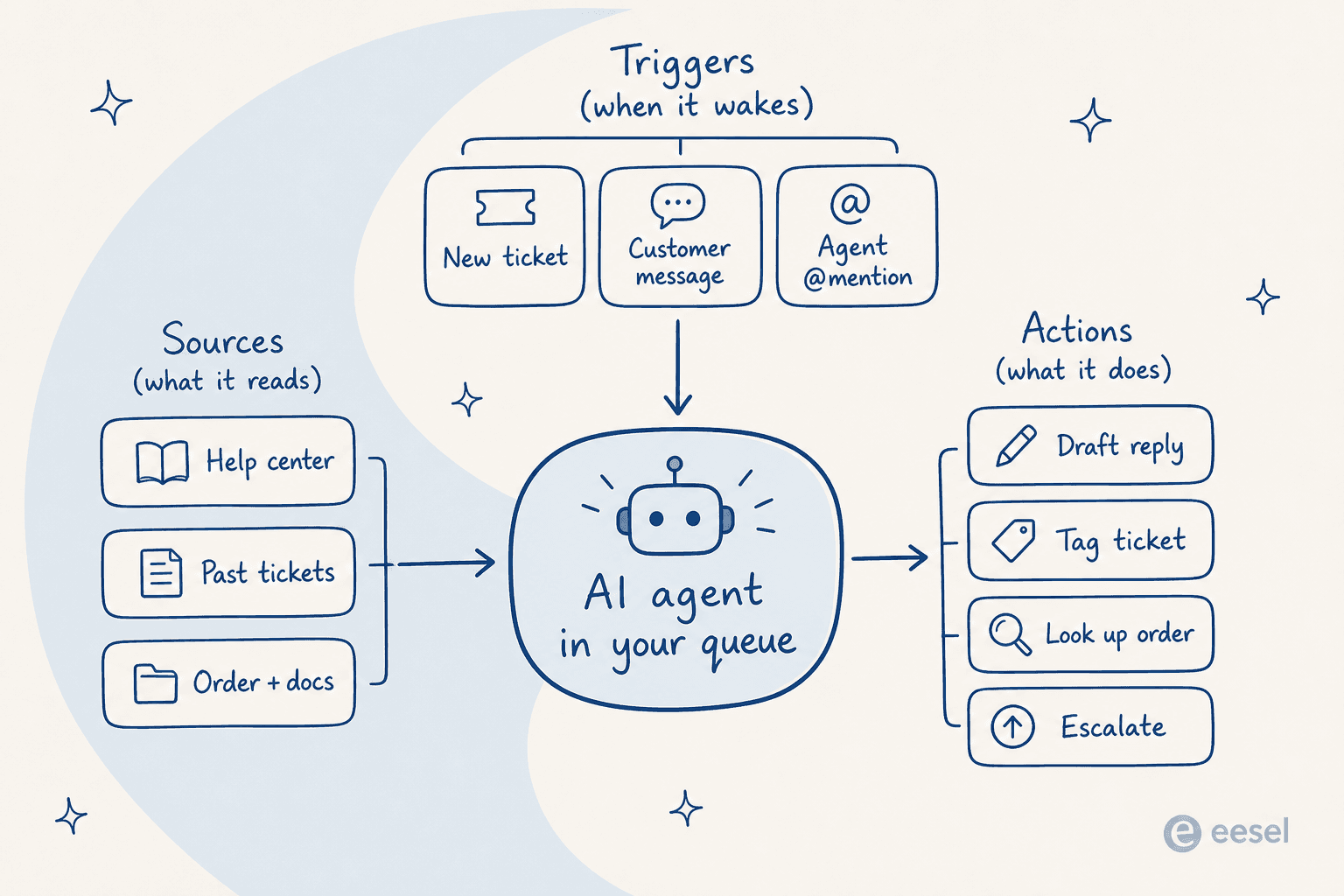
- Sources: what the agent can read to answer. Help center articles are the easy part. The gap that separates a mediocre agent from a good one is whether it can also read your past tickets and your order and account data.
- Triggers: when the agent wakes up. On a new ticket, on every customer message, only on the first message for triage, or when a human @mentions it in a note.
- Actions: what it can actually do. Drafting a reply is one action. Sending it, tagging the ticket, looking up an order, and escalating are all separate permissions you should be able to switch on independently.
That last point is the one people skip, and it is the difference between a safe rollout and a scary one. Connecting a tool should not make the agent start acting on its own. In eesel, connecting only grants access, and every action is set to full automation, approval-only, or off. So you can connect everything, test privately, and let the agent earn autonomy the way you would onboard a person.
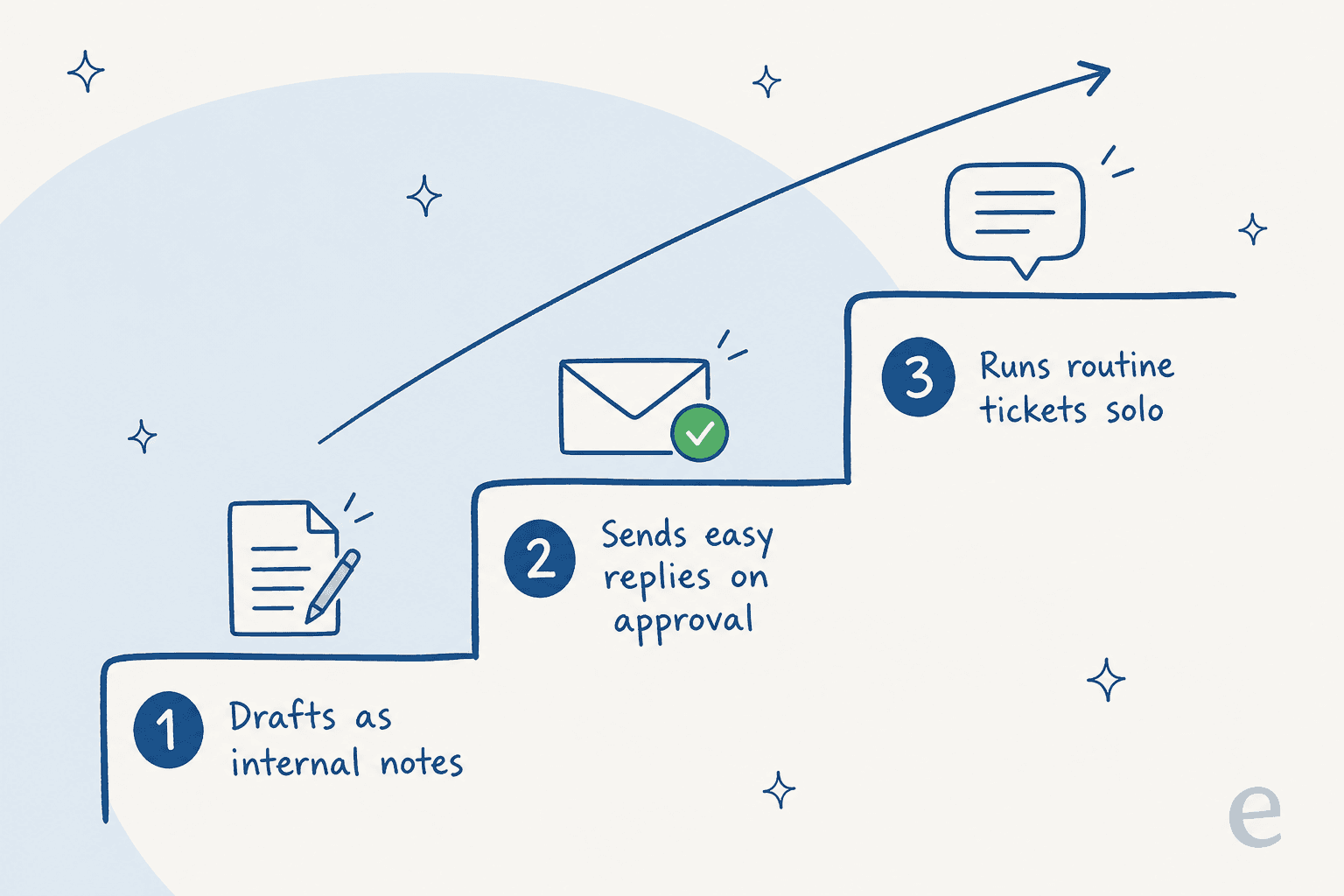
Most teams I talk to start the agent in the mode where it drafts replies as internal notes and a human sends them. Once it gets the routine tickets right, they let it answer those end to end, and pull anything back the moment it misbehaves. A connection that can't do this graduated handover is a connection you will be nervous about, and rightly so.
Try eesel
If your honest answer to the widget was "I want depth without a build," that is the exact gap eesel was made for. It connects to the helpdesk you already run, learns from your past tickets and help center together (everything pools into one searchable knowledge base), and lets you simulate the agent on your historical tickets before it sends a single live reply, so you see how it would have handled real conversations first.
eesel's pricing starts at $299/month for 500 credits (1 credit per ticket or chat), with no per-seat fee and no platform fee, and only the tickets the agent actually works on count. There is also a free plan with 100 credits, no card. You can connect it, keep it in draft-only mode, and watch it work against your own queue before deciding anything.
Whichever route you pick, the test is the same: can the agent see your real tickets, does it wake on the right events, and can you trust it to act only where you have said it can. Get those three right and connecting an AI agent to your helpdesk stops being a project and starts being a Tuesday.