Why the search results for this term are a mess
I want to deal with the elephant first, because it explains why this page exists.
"AI teammates" is currently three different things wearing one label. It is a video game term (the AI party members in Granblue Fantasy: Relink, which own the actual SERP). It is Asana and Teamwork's product name for prebuilt agents inside a project tool. And it is the positioning language a whole wave of support and ops vendors adopted in 2025 and 2026 to escape the word chatbot.
That third meaning is what buyers are actually shopping for, and it is where the money is. But the word does real damage, because it flattens a genuine architectural difference. Here is the one that matters most.
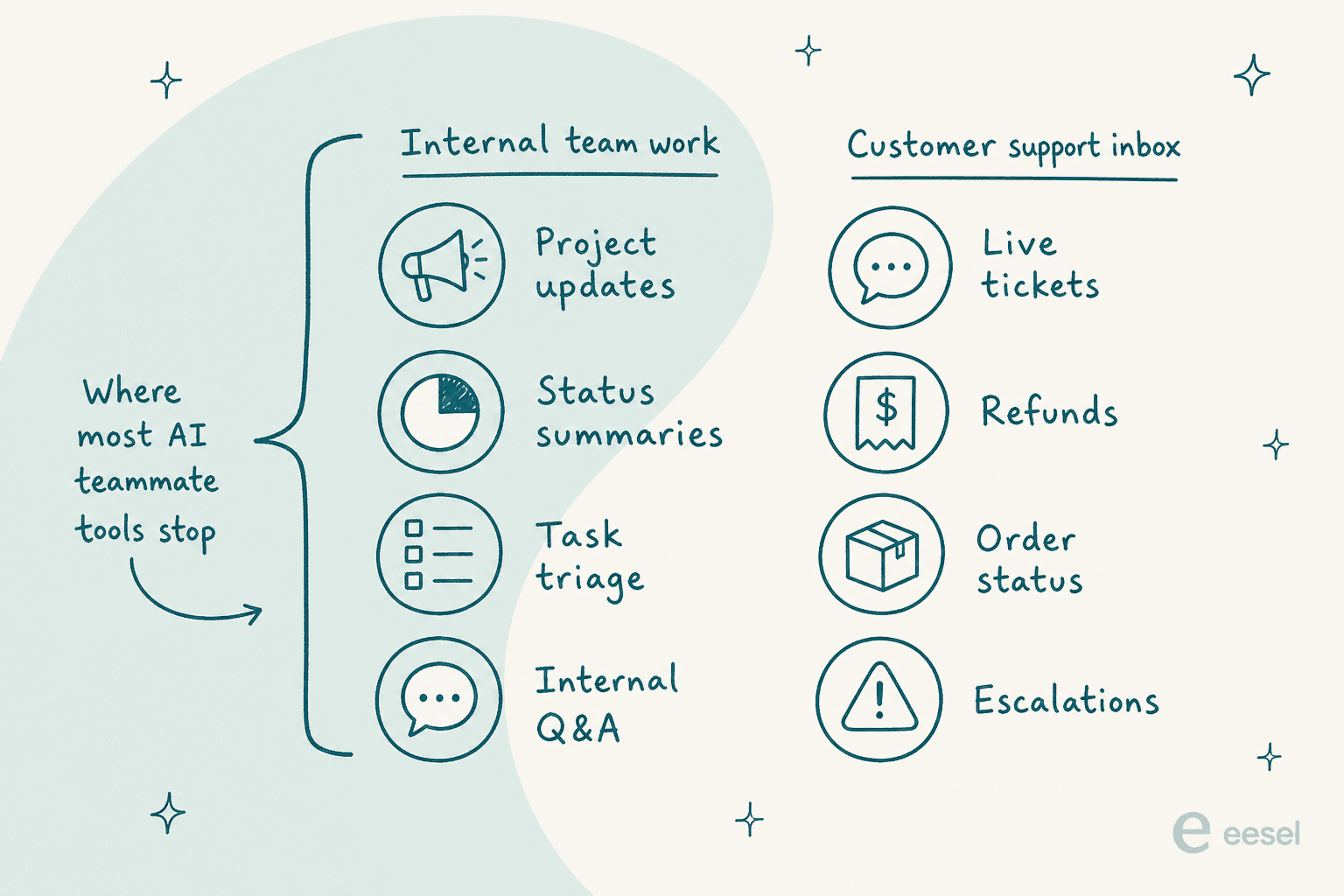
Roughly half the tools marketed as AI teammates never touch a customer. Asana's AI, for one, is a genuinely capable product with zero customer-facing use cases anywhere on its page. Every surface is internal work management. That is not a criticism, it is a scoping fact, and it is invisible from the marketing copy on either side.
The people who have actually deployed these things are blunt about the naming. The sharpest version I found is on the Hacker News thread for RedMonk's piece on the term:
"The phrase "ai teammate" feels popularized as a marketing strategy to position individual agents as comparable in value to a human worker. When I think about how they are actually used however, it seems like an incredibly unproductive framing. An agent is a computer program. You can copy them 100 times on the spot if you find the need. You can modify, delete, upgrade, or replace them instantly."

He is right that the framing hides things. He is also, I think, slightly wrong about why it stuck, and the reason is commercial rather than philosophical: anthropomorphising a program is how you anchor its price to a salary instead of to a seat. A Redditor mapping the whole vendor landscape put the useful half of the distinction better than most analyst notes I have read:
""AI employee" only works if the job is bounded: clear inputs, outputs, integrations, and ROI. Otherwise it's just workflow automation with a more aggressive name."

That is the test I used to build this list. Bounded job, real integrations, a bill you can compute.
How I picked these ten
I do SEO for a living, and I build at eesel, which has had AI teammates running on live support queues for years. That combination is why this page opens with the search results rather than the products. I read every vendor's own pricing page, docs and help center rather than their homepage, captured the product surfaces myself, and threw out any number that only existed on a third-party aggregator. Where a vendor publishes nothing, I say so rather than estimating.
The four criteria, in order of how much they moved my ranking:
- Whose queue does it own? Internal work, customer work, or both. This is the first filter and it eliminates most shortlists in one step.
- What does it do when it is not sure? Answer anyway, hand back a draft reply, escalate with evidence, or stay out. This is the one buyers underweight and regret.
- Can you rehearse before go-live? Simulating against your own historical tickets is the difference between a launch and an experiment on customers.
- Can you compute the bill? If the meter is undefined or unpriced, you are buying a variable you cannot forecast.
I left out a few well-known names that market themselves this way but had no public product surface I could verify, and I did not pad the list to a round number for its own sake.
The 10 best AI teammates in 2026 at a glance
| # | Tool | Best for | Whose queue | Billable unit | Entry price | Free tier | Rehearse first? | Draft vs auto-send |
|---|---|---|---|---|---|---|---|---|
| 1 | eesel AI | Owning a live support queue | Customer | Per task | $0.40 per ticket | $50 usage, no card | Yes, on past tickets | Per-channel, gradual |
| 2 | Vellum | Day-to-day business operations | Both | Hosting plus usage | Self-hosted: no platform fee; cloud from $30/mo | Free signup credits | Not verified | Permission-controlled actions |
| 3 | Decagon | High-volume CX with eng support | Customer | Per conversation or resolution | Quote only | None | Yes, simulated conversations | Guardrails, quote-gated |
| 4 | Ema | HR, IT and finance requests | Internal | Not published | Quote only | None | CSV dataset, LLM judge | Approval on 5 actions |
| 5 | Teammates.ai | Multilingual and Arabic voice | Customer | Per credit | $25/mo | 10 credits/mo | Not published | Per-channel policy |
| 6 | Lindy | Slack-native personal admin | Internal | Per credit | $29.99/user/mo | 7-day Slack trial | No | Approvals available |
| 7 | Relevance AI | Building your own AI workforce | Both | Per action | $19/mo annual | Yes, $2 one-off credit | Evaluations, A/B | Human-in-the-loop, Enterprise |
| 8 | Cassidy AI | Turning company docs into work | Internal | Per credit | Not published | 10,000 credits/mo | No | Guardrails, approvals |
| 9 | Asana AI | Teams already living in Asana | Internal | Per seat plus credits | $10.99/user/mo | Personal, 2 users | No | Approval steps |
| 10 | Sintra AI | Solo founders wearing every hat | Internal | Per credit | $15.60/mo yearly | No, 14-day refund | No | Chat-driven |
A note on that table before you screenshot it: three of the ten publish no price at all, and Asana publishes a seat price but not the AI Teammates add-on this list is actually about. That is the state of the category in August 2026.
Which one should you shortlist?
Pick the queue you are actually trying to hand over and the shortlist collapses fast.
What are you actually trying to hand over?
Pick one. The answer names the two or three tools worth a demo, plus the single thing to check on the call.
Choose an option above to see the shortlist.
eesel AI, Decagon, Teammates.ai
These three are the ones built specifically to sit on an inbound customer queue and close conversations. eesel is the self-serve end at $0.40 a ticket, Decagon is quote-gated, Teammates.ai is the multilingual voice specialist.
Ask on the demo: can I run this against my last 1,000 real tickets before it ever replies to a customer, and can I see the coverage by ticket type?
Vellum, Asana AI, Lindy
Vellum handles operational work across connected apps. Asana makes sense if your project work already lives there. Lindy handles personal admin across Slack and your inbox.
Ask on the demo: which of the named teammates actually ship today versus "coming soon", and what happens to the price when usage metering turns on?
Ema, Cassidy AI
Employee-facing request handling across departments. Ema is the enterprise, quote-gated, systems-integrator-delivered option. Cassidy is lighter and starts free, with a strong knowledge layer over your documents and meetings.
Ask on the demo: can it read from my existing knowledge sources, or only act on them? The distinction is where these two differ most.
Relevance AI, Lindy, Cassidy AI
All three are no-code builders where you assemble the teammate rather than hire a prebuilt one. Relevance goes furthest on multi-agent teams and keeps agents unlimited on every tier, including Free.
Ask on the demo: what does one unit of work actually cost, and what happens mid-cycle when the allowance runs out?
Sintra AI, Lindy
Sintra bundles twelve role-named helpers for less than a single seat of most tools on this list. Lindy costs more but connects to far more of your real stack.
Ask before you pay: how many credits does a typical week of your actual work burn? Both tools publish allowances but not per-action costs.
1. eesel AI, best for owning a live support queue
Best for: support teams that want tier-1 volume handled inside the helpdesk they already run, with the autonomy dial under their control.
I build this one, so read the rest of this section with that in mind. I have tried to keep it to checkable facts.
What it actually does
eesel sells three roles under one account: a helpdesk agent, a blog writer, and an e-commerce agent. The helpdesk one is the reason it belongs on this list. It connects to over 100 tools, including Zendesk, Freshdesk, Gorgias, Front and HubSpot, and it trains on your solved tickets rather than only your help-center articles, which is the single biggest quality difference in practice.
The part I would actually sell you on is the boring part. You can simulate the agent against your historical tickets first, see coverage broken down by theme, fill the gaps you find, and re-run before anything goes live. Low-confidence answers become drafts instead of replies. You can hold entire ticket types out of automation.

Pricing
Fully public and self-serve. Light tasks like dashboard questions are free, a regular task (one support ticket or one chat session, however many messages it takes) is $0.40, and a heavy task like a blog draft is $4.00. No platform fee, no per-seat fee, no minimum. You start with $50 of usage and two blog generations with no card, which is about 125 tickets.
If you roll out gradually and route only 200 of your 1,000 monthly tickets to the AI, you pay for only those 200, which is $80. Enterprise adds a flat $1,000 a month on top of usage for a dedicated solutions engineer, SSO, HIPAA and a BAA.
Pros
- Simulation against your own past tickets before go-live, which almost nothing else here offers.
- The billable unit is a whole ticket, so a chatty customer does not multiply your bill.
- Real deployments at scale: one German lender runs 100,000+ tickets a month through it, and Gridwise reported 73% of tier-1 requests resolved in the first month.
- No seat tax, so adding humans to the team costs nothing.
Cons
- It owns support and content work. It is not going to run your recruiting pipeline or write your project status updates.
- Failed tasks are still billed, because the compute was spent either way. The page says so plainly, and I would rather it did.
- HIPAA and a signed BAA sit behind the Enterprise tier.
My take: if the queue you want handed over is a customer inbox, this is where I would start, and I would judge it entirely on what the simulation shows against your own tickets rather than on anything I have written here. If your problem is internal project admin, skip to Asana or Lindy.
2. Vellum, best for running day-to-day business operations
Best for: SMBs, founders, and lean teams who want an assistant handling customer inquiries, inbox triage, and daily operations across their tools.
What it actually does
Vellum is an open-source personal AI assistant that lives on your computer or in the cloud. Unlike single-purpose helpdesk bots that only handle tickets, Vellum works across your connected tools. For SMBs and growing teams, it can handle frontline customer inquiries, triage the support inbox, follow up with suppliers, and take care of daily operational tasks.
Vellum connects to your machine and tools through open protocols, including MCP. It can read and write files, complete tasks in a browser, and execute scripts under your supervision. Persistent memory carries context across devices and conversations. You control permissions for actions such as sending emails or accessing files outside its workspace, with approval granted once, temporarily, or as a standing rule.
Pricing
Free credits are included on signup. Paid hosting plans upgrade your assistant's compute, memory, and storage: Mighty starts at $30/mo, Super at $100/mo, and Ultra at $200/mo. The pricing FAQ lists a $10/mo platform fee for Super and Ultra; confirm the total at checkout. Self-hosting has no platform or seat fee, but your own infrastructure and model usage costs still apply.
Pros
- Runs directly on your computer: can interact with local files, applications, and terminal tools rather than being limited to a web dashboard.
- Continuous cross-device memory: context persists across Mac, mobile, web, and chat platforms without resetting between conversations.
- Open-source and permission-controlled: self-hosting gives you control over your data and keys, and you choose which actions the assistant can take.
- No per-seat pricing: self-hosting has no platform fee, while cloud hosting scales with your assistant's resources.
Cons
- Built as a broad teammate across operations and support, not a dedicated enterprise ticketing helpdesk.
- Needs your preferences, product information, and business context to handle work reliably.
- Initial setup requires connecting your tools and choosing permission levels for sensitive actions.
My take: For SMBs and lean teams, Vellum is a strong fit for customer inquiries and inbox triage alongside daily operations. If you run enterprise ticket volume and need an agent dedicated to a Zendesk support queue, a specialized queue owner like eesel AI is the better fit. If you want one teammate for customer questions, vendor follow-ups, and operational work across your business, Vellum is worth shortlisting.
3. Decagon, best for high-volume CX teams with engineering nearby
Best for: consumer companies doing tens of thousands of tickets a month who want ops people authoring agent logic without filing engineering tickets.
What it actually does
Decagon's technical wedge is Agent Operating Procedures: natural-language instructions that compile into executable code. Non-technical CX operators write the logic, engineers keep control of guardrails and versioning. It runs one agent across chat, voice, email, SMS and custom API surfaces, with first-contact resolution as the target.
It also ships the observability layer this category usually skips. Testing happens through simulated conversations, every model call and knowledge lookup is traced, Watchtower audits responses in real time for fraud and regulated complaints, and Duet lets you analyse conversation data in plain English. The customer list runs Duolingo, Chime, Hertz, Notion, Figma and Riot Games, with Duolingo reporting 80% deflection after replacing a previous vendor.
Pricing
Quote-gated, with the URL 404ing since at least mid-July. But Decagon publishes something more useful than a rate: it names its meters. Two models only, per conversation (charged on every inbound conversation, resolved or not) and per resolution (a higher fixed rate, nothing charged when it escalates). Decagon says the vast majority of customers pick per conversation.
The reason why is the most quotable thing any vendor in this category has written about its own pricing: "You never want to be in a situation where you're arguing over what a 'resolution' is." That is a company arguing against the outcome-billing model that half its competitors sell. My Decagon pricing guide has the full model.
Pros
- The clearest public thinking on billing units anywhere in the category.
- Simulated-conversation testing and full trace observability come standard.
- Serious funding behind it: $250M at $4.5B in January 2026, roughly tripling in seven months.
Cons
- No rate published, no free tier, no self-serve signup. Every path is a volume-bracketed demo form.
- The demo form's smallest bracket is under 9,999 monthly tickets, which tells you where the floor sits.
- The pricing post that defines the meters is dated December 2024, so confirm it still holds.
My take: the strongest technical pick on this list for a large CX org, and I would take its per-conversation default over a per-resolution contract from anyone. See my Decagon review for the longer version.
4. Ema, best for HR, IT and finance requests across an enterprise
Best for: large regulated enterprises buying top-down, usually alongside a systems integrator, most often for an IT service desk.
What it actually does
Ema sells "AI Employees", personified as "she", with every conversion button reading some version of "Hire Ema". Underneath sits a Generative Workflow Engine and EmaFusion, a routing layer over a large pool of models. An AI Employee is built as a graph of nodes in a builder, in eight numbered steps taking 15 to 30 minutes.
The positioning moved recently and it matters for shortlisting. The homepage now reads "AI Employees for HR, IT, and Finance". Customer support is not in the headline. Of the 27 named AI Employees, only six are customer-facing against 21 internal ones. Named customers include Wipro, Hitachi and TrueLayer.
Pricing
Nothing published. /pricing redirects to a demo form, there is no signup, no free tier and no trial. The only pricing statement anywhere is the phrase "outcome-based pricing, no tokenmaxxing" on the homepage, with no unit, rate or floor attached. Disclosed funding sits at over $61M with nothing newer than July 2024 on the record.
Pros
- 256 verified integrations, and single-tenant, on-prem or air-gapped deployment with bring-your-own-models.
- Fourteen claimed compliance frameworks including SOC 2 Type II and ISO 42001.
- The builder docs are unusually detailed and current, with retrieval tunables published down to chunk size and score thresholds.
Cons
- The twelve helpdesk integrations are action tools, not knowledge sources. Ema can create a ticket in Zendesk, but the supported data connectors list has exactly four entries and no helpdesk among them, and there is no web crawler, so it cannot index your public help center.
- Evaluation means a CSV you build yourself, graded by an LLM judge. And in test mode, a dry run that reaches a send-email node sends a real email.
- Its G2 profile is claimed and has zero reviews, so every performance number in circulation is vendor-sourced.
My take: a credible enterprise platform for internal request handling, and I would put it on a shortlist for an HR or IT service desk without hesitation. I would not buy it for a customer support queue right now, because the knowledge pipeline is not built for one.
5. Teammates.ai, best for multilingual voice and Arabic-first support
Best for: teams doing customer service automation across many languages, especially Arabic dialects, on a small published budget.
What it actually does
Dubai-based Teammates.ai is the only vendor here that literally owns the category name. It sells three named teammates: Raya for customer service, Adam for sales calls, and Sara for candidate interviews. They share context natively, and the site claims a handoff between them takes under ten seconds.
The autonomy design is the best-documented of any tool on this list. Autonomy Policies give you two modes, Auto-Send and Draft for Approval, and each channel gets its own. You can run chat fully autonomous while email stays in draft. Drafts land in a Pending Approvals queue that spans every channel. Raya covers WhatsApp, email, phone, Slack, Teams and live chat in 50+ languages, with Arabic dialect handling as the headline claim.
Pricing
Published, and refreshingly computable. One shared credit wallet at a flat $0.50 per credit, with all three teammates included on every plan. Raya bills 1 credit per 10 responses, so roughly five cents a support reply. Adam bills 10 credits per 30-minute call, about 17 cents a voice minute. Sara bills 10 credits per interview, about $5.
| Plan | Price | Credits/month | Team members | Included work |
|---|---|---|---|---|
| Free | $0, no card | 10 | 1 | 1 interview, 100 replies, 30 voice min |
| Pro | $25/mo | 50 | 1 | 5 interviews, 500 replies, 150 voice min |
| Business | $50/mo | 100 | Up to 5 | 10 interviews, 1,000 replies, 300 voice min |
| Scale | $100/mo | 200 | Up to 5 (card says unlimited) | 20 interviews, 2,000 replies, 600 voice min |
| Enterprise | Custom | Custom | Unlimited | Not published |
An annual toggle saves 17%. Note that the plans buy features, not cheaper credits: every tier works out to exactly $0.50 a credit, the same as an ad-hoc top-up.
Pros
- Per-channel autonomy policies, which is the single most useful control in this whole roundup.
- Genuine multilingual voice, with Arabic dialect coverage nobody else here claims.
- You can compute your bill from the published rate, which puts it in the minority.
Cons
- Raya bills per response, not per conversation, so a six-turn ticket costs six times a one-turn ticket. Compare that carefully against per-ticket or per-resolution models.
- The performance claims (78% of tickets resolved with no human, average resolution from 26 hours to 38 minutes) are vendor self-claims with no independent verification.
- The Scale plan card says "unlimited team members" while the comparison table on the same page says up to five. Both strings are live.
My take: the best-value published pricing in the category and the smartest autonomy model, but check the per-response meter against your average handle time before you commit. If most of your tickets take one reply, it is very cheap. If they take six, do the math first.
6. Lindy, best for a Slack-native teammate that handles your admin
Best for: small teams and operators who want inbox, calendar and meeting work handled without building anything.
What it actually does
Lindy started as a trigger-based no-code agent builder and has repositioned hard around a Slack-native "Teammate" you talk to. Underneath, the workflow automation builder is intact: pick a trigger like a new email arriving, describe the job in plain English, and the agent reads context across your connected apps and acts. It handles email triage and drafting in your voice, meeting scheduling, prep, recording and follow-up, plus reminders and action items across hundreds of integrations.
It carries the best review profile on this list: 4.9 out of 5 from 171 G2 reviews, with ease of use the most-mentioned strength. One CEO puts the value plainly:
"Before, I was totally slaved to my inbox. Now, I'm saving anywhere from five to seven hours a week. I'm reinvesting those hours directly into business growth and projects that actually move the needle."

Pricing
It repriced recently and got cheaper at the entry point. Plus is $29.99 per user with 3,000 credits, Pro is $99.99 with 15,000, Max is $199.99 with 35,000. Credits pool across the workspace.
A credit is a unit of work, not a task. Lindy publishes three bands: Everyday Asks burn 2 to 250 credits, Deep work 250 to 1,000, and Big Builds 1,000 to 2,500. That means a 3,000-credit Plus seat buys somewhere between twelve and 1,500 everyday asks a month, which is an honest range but not a forecastable one.
There is no overage rate at all. When credits run out, Lindy pauses credit-using actions until the cycle resets, and the only mid-cycle fix is a plan upgrade.
Pros
- No surprise bill, ever, because there is no overage mechanism.
- Model choice is included on every plan now, and credits absorb the cost difference.
- Hundreds of integrations and a genuinely fast setup.
Cons
- Any Slack @mention of Lindy creates a billable seat. That is a real budget trap in a busy workspace, and it is worth an admin conversation before rollout.
- Credit anxiety is the top complaint in reviews, with "Expensive" flagged 42 times and "High Subscription Cost" 35 times on G2. One 0/5 G2 reviewer reports being charged $34.99 after deleting their account.
- It works your admin, not your customers' inbox.
My take: the best personal-productivity teammate here, and the pricing change makes it much easier to justify. Just set the seat policy in Slack before you roll it out. My Lindy overview has more on the builder side.
7. Relevance AI, best for building your own AI workforce
Best for: ops teams in sales, CS, marketing or HR who want to assemble multi-agent teams themselves.
What it actually does
Relevance AI calls itself the home of the AI workforce, and the framing is accurate: you build specialist agents and assemble them into teams that hand work to each other. The standout is Invent, where you describe what you want in plain language and the platform generates the agent and suggests the tools to wire in. There are also a drag-and-drop builder and an MCP server for building agents from a copilot.
It is model-agnostic with bring-your-own-key and no markup, which reviewers consistently praise. Named customers include Canva, KPMG, Databricks and Autodesk, with Qualified reporting $7M in pipeline from 35+ agents. It sits at 4.3 out of 5 from 20 G2 reviews.
Pricing
It rebuilt the model recently, and the useful numbers now live in the docs rather than the pricing page, which shows only an Enterprise card. Two meters run in parallel: Actions at $0.08 each at top-up rate, counted once per tool run regardless of how complex the workflow is, and Vendor Credits at exactly $0.002 each, passing model spend through at wholesale.
Plans are Free, Pro at $19 a month annual or $29 monthly, Team at $234 annual or $349 monthly, and Enterprise. The genuinely interesting part for this list: agents, tools and integrations are unlimited on every tier including Free. You are never billed per teammate, only per action one takes.
Pros
- Unlimited agents on every plan, which is the cleanest answer to "how many teammates can I hire" anywhere here.
- Transparent wholesale model pricing with no markup.
- Pro's $19 fee is actually less than the $20 of credits it includes.
Cons
- Action top-ups cost about 10.5 times Pro's bundled rate, so running past your allowance is expensive.
- The Free tier's credit grant is a one-time $2 with no top-ups allowed, which makes it more of a look than a trial.
- The Zendesk trigger is Enterprise-only, which matters if support was your use case.
My take: the best pick if you want to build rather than hire, and the unlimited-agents policy is a genuinely different commercial posture. Read my Relevance AI pricing guide before you pick a tier, because the two-meter model is easy to misread.
8. Cassidy AI, best for turning company knowledge into internal work
Best for: operationally complex businesses (insurance, industrials, professional services) where the work is buried in dense documents.
What it actually does
Cassidy splits itself into a context layer and an automation layer, and the split is the product. The context layer is a permission-aware Knowledge Base that syncs your documents, plus a Meetings product that joins calls, transcribes and summarises so agents can reference what was said. The automation layer is AI Agents and Workflows built in natural language.
Its thesis, stated as a headline on the homepage, is that the people closest to the work should be the ones automating it. It deploys into Teams, Slack, Chrome, Word, Excel and Outlook rather than asking people to visit another tab. The verticals it sells into are insurance submission triage, industrial RFQ drafting and professional-services proposal work.
Pricing
This is the weak spot. Cassidy publishes no prices at all. Parsing the full page HTML returns zero currency figures. There are two visible columns, Starter (free) and Business ("book demo"), with Enterprise appearing only in the FAQ. Paid self-serve tiers do exist behind login, but their names and prices are unpublished.
What is published: the free tier gives 3 seats, 1 workspace, 10,000 credits a month, 5 agents, 5 workflows and 24-hour sync. Credits are token-metered, with agent chat costing 1 to 30 credits and a workflow 1 to 100. Premium models cost roughly five times Standard, and credits do not roll over except on Enterprise.
Pros
- The strongest knowledge-plus-meetings context layer of anything on this list.
- A real free tier with 10,000 monthly credits, not a two-week look.
- Deploys where people already work rather than asking for a new habit.
Cons
- No published price, no overage rate, and Cassidy explicitly declines to price a credit. Budgeting requires a sales call.
- The comparison table contradicts the plan card on storage limits, listing Starter as both 30,000 and 100,000 pages on the same live page.
- Marketing says you will never be interrupted; the docs say the service is temporarily unavailable when credits run out.
My take: if your bottleneck is that nobody can find the answer inside 400 pages of policy documents, Cassidy is the sharpest tool here. Start on the free tier and get a price before you plan around it. For adjacent options see my AI knowledge base tools roundup.
9. Asana AI Teammates, best if your work already lives in Asana
Best for: teams already running Asana who want status updates, briefs and research handled inside it.
What it actually does
Asana rebranded its AI as Agentic Work Management, with four pillars. AI Teammates is a library of 30 prebuilt agents for marketing, ops and IT, described as "preapproved, preauthorized" and needing no prompt engineering. Only three are named on the page: Competitive Market Researcher, Campaign Brief Writer and Content Localization Manager. AI Studio is a no-code builder with a first-class human-input approval step. Asana Dash is a morning brief that queues approvals rather than acting on its own. AI Connectors let you work Asana from ChatGPT, Claude, Gemini or Copilot.
Asana's data posture is genuinely good and worth stealing as a buying checklist: partners do not train on customer data, they must delete data after each query, and AI inherits Asana's existing permission model.
Pricing
Personal is free but capped at 2 users. Starter is $10.99 per user annually or $13.49 monthly, Advanced is $24.99 or $30.49, and Enterprise and Enterprise+ are quote-only. AI features start at Starter; portfolio and goal-level AI needs Advanced.
Two things to know. AI Teammates is a separate add-on with no published price, contact-sales only. The Timesheets add-on sitting right next to it is priced at $5.99 per user per month, so the blank is a deliberate gate rather than a layout gap. And AI Studio is credit-metered per billing account at 50,000 credits on Starter, 75,000 on Advanced and 200,000 on Enterprise, with the dollar value of a credit never stated anywhere.
Seats also sell in banded increments (1 to 5, then 5, 10, 25, 50), so a 32-person team buys 40 seats.
Pros
- Zero integration work if you already live in Asana, and it inherits your permissions.
- The approval-step design in AI Studio is a sensible default for teams new to agents.
- Clear, publishable data-handling commitments.
Cons
- Not a single customer-facing use case anywhere on the page. This works your team's queue, never your customers'.
- All AI partner servers are in the US, which is the sharpest limit for EU and Australian buyers.
- No accuracy benchmark and no dry-run capability. Safety comes from approvals and permissions only.
My take: an easy yes if Asana is already your system of record, an easy no otherwise, because you would be buying a project tool to get an agent. If Asana is not your tool at all, my Asana alternatives list covers the switch. If you are on Teamwork.com instead, the shape is nearly identical: Scout and Flo ship today at $9.99 a user annually, Dotty only suggests helpdesk replies rather than sending them, and usage-based AI credits are due to launch in September 2026 with no price published yet. Compare tiers in my Asana pricing guide.
10. Sintra AI, best for a solo founder wearing every hat
Best for: one person running a small business who needs twelve roles covered for less than one seat of anything else here.
What it actually does
Sintra sells twelve role-named helpers, each with an avatar and a fixed job: Cassie on customer support, Milli on sales, Dexter on data, Penn on copy, Soshie on social, Seomi on SEO, Scouty on recruiting and so on. They sit on top of an "AI Brain" you feed with your business context, and Sintra X bundles all twelve into one autonomous layer. Sintra claims 40,000+ business owners use it.
This is the most openly persona-driven product in the roundup, which is exactly the thing the Hacker News crowd objects to. For a solo operator, though, the personas are doing real work: they are a menu of jobs, and a menu is easier to act on than a blank prompt box.
Pricing
Priced by commitment term rather than by tier, and all three carry the same allowance of 250 monthly credits: $48.50 a month on a one-month term (list $97), $23.60 on three months, and $15.60 on twelve months. There is a 14-day money-back guarantee and 15+ integrations.
One caveat worth checking at the checkout: a legacy tab still renders individual helpers at $39 a month each, which contradicts the bundle framing. And no top-up price or per-action cost table is published, so 250 credits is an allowance you cannot translate into work.
Pros
- By far the cheapest thing here on a yearly term, at less than the price of one seat of most alternatives.
- Twelve bounded roles included, no per-helper upsell on the bundle.
- The role menu is a genuinely good onboarding device for someone who has never used an agent.
Cons
- 250 credits a month with no published per-action cost is the least forecastable meter in this roundup.
- Depth is shallow compared to the specialists. Cassie is not going to run a real support queue against a helpdesk.
- Conflicting pricing surfaces on the live site.
My take: great value for a solo founder who wants a starting point, and I would happily pay $15.60 a month to find out. If you have a team and a helpdesk, you have outgrown it already, and my small business AI agents guide points at better fits.
The number nobody in this category publishes
Here is the part I think matters more than any feature grid, and it is the reason I opened with eesel's own unflattering data.
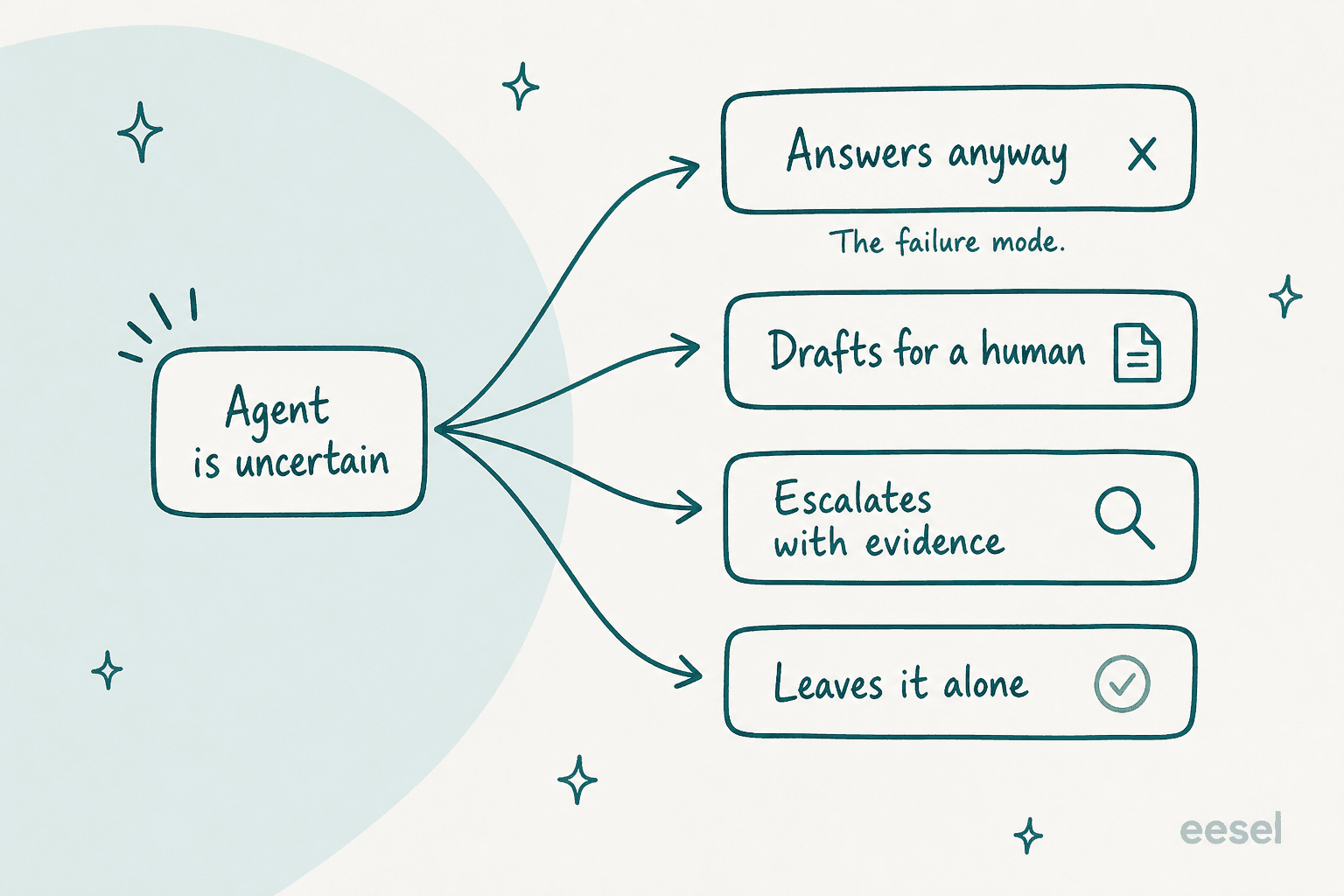
Every vendor here publishes a resolution or deflection rate. None of them publishes what fraction of output a human shipped without editing. Those are wildly different numbers. In a cross-validated trial I ran on a customer's real Zendesk traffic (a German jewellery retailer doing about 1,000 tickets a month on Zendesk and Shopify), eesel's agent hit 93% triage accuracy, 100% spam detection with zero false positives on an inbox that was 22% spam, and 88% draft directional accuracy. And only 12% of those drafts were sent as-is, with a 7% factual error rate.
That is not a bad result. Triage and spam handling alone paid for themselves. But it is a very different product from the one the marketing describes, and if you buy on the 88% and staff on the 12%, you will be unhappy in month two.
The operators saying this out loud are the ones worth listening to. A sysadmin in medical:
"Work in medical, every doctor had dollar signs in their eyes thinking how many more patients a day they could see. Truth is it requires more babysitting so the patient load went down. Most have not renewed the trial when the sub expired."
And someone who rolled two agents back:
"Rolled back two myself this year. Both worked fine in sandbox and fell apart the moment they touched messy customer data. Nobody budgets for the eval set you actually need."
Both failures have the same shape, and it is the one thing you can actually design around: the agent worked in a sandbox and fell over on real data. Which is why rehearsing against your own historical tickets is the single highest-leverage thing on the buying checklist, well ahead of any deflection target you set, and why so few tools here offer it. It is why eesel shipped simulation before autonomy, and it is a fair question to put to every vendor on your list.
The good news is that the honest deployments do work. Two e-commerce operators in the same r/Zendesk thread reported real, partial automation:
"At the moment, roughly 60% of inbound conversations get fully resolved without a human touching them. We're training the AI each week to improve this further."
Note what he did with the win. He cancelled a planned hire rather than cutting one. The other operator in that thread, running 25% to 35% of total chats through an agent, says the same: nobody was fired, two hires were avoided, and it took about a week to get live. That is the realistic outcome, and it is a good one.
How much this actually costs
Three of the ten publish no price at all, and Asana prices the seat but not the AI. Of the rest, the meters are so different that the numbers do not compare directly.
Here is the full published picture across all ten, with the unit spelled out.
| Tool | Billable unit | Published entry price | What one unit buys | Overage behaviour |
|---|---|---|---|---|
| eesel AI | Task (one ticket or chat session) | $0.40 per regular task | A whole ticket, any number of replies | Usage cap, default $250, agents pause |
| Vellum | Hosting plus usage credits | Cloud from $30/month; no self-hosting platform fee | Compute, storage and plan usage allowance | Additional usage credits |
| Decagon | Conversation, or resolution | Not published | Per-conversation charges on every inbound | Not published |
| Ema | Not published | Not published | Undefined | Not published |
| Teammates.ai | Credit at $0.50 flat | $25/month for 50 credits | 10 support replies, or 3 voice minutes | Top-ups at the same $0.50 |
| Lindy | Credit | $29.99 per user/month, 3,000 credits | 2 to 250 credits per everyday ask | None, actions pause until reset |
| Relevance AI | Action, plus vendor credits | $19/month annual | One tool run, any complexity | Top-ups at ~10.5x bundled rate |
| Cassidy AI | Credit, token-metered | Not published | 1 to 30 credits per agent chat | Not published |
| Asana AI | Seat, plus AI Studio credits | $10.99 per user/month annual | Credit value never stated | Additional credits for purchase |
| Sintra AI | Credit | $15.60/month on a yearly term | Not published | Top-ups exist, price not published |
A worked example, because abstractions hide the differences. Take a team handling 1,000 support tickets a month, averaging three replies each.
- On eesel, a ticket is one task no matter how many replies, so that is 1,000 tasks at $0.40, or $400 a month, with no seat fees on top.
- On Teammates.ai, Raya bills per response. 3,000 responses is 300 credits, which is $150 in credits, but the Scale plan tops out at 200 credits, so you would be topping up. Call it around $150 a month in credits at the flat rate, which is genuinely cheaper if your tickets really are short.
- On Decagon, you cannot compute this at all without a sales call.
The lesson is not that one is cheapest. It is that you have to normalise to your own ticket shape before any of these prices mean anything, and the vendors whose meters punish long conversations are exactly the ones that look cheapest on a spec sheet. That anxiety shows up constantly in the community too:
"Markets itself as agentic incident analysis. It's like having an AI pair-investigator. Pretty neat, but not hands-off. And the "pay-per-investigation" model feels like a trap waiting for a bad week."
If you want the wider math on what a human agent costs against an automated one, my cost comparison works through it properly.
Try eesel for your support queue
If the queue you want handed over is a customer inbox, this is the specific thing I would ask you to test rather than take my word for.

Connect eesel to your helpdesk, point it at your solved tickets rather than just your help center, and run the simulation against the last thousand of them before a single customer sees a reply. You get coverage broken down by theme, the gaps written out, and a number you can argue with, which is more than any demo will give you. Start it in draft mode, watch the activity log, and turn autonomy up per ticket type as it earns it.
It is $0.40 a ticket with no seat fee and no platform fee, and the first $50 is free without a card, which is about 125 tickets. That is enough to find out whether your 12% looks anything like eesel's 12%.
The short version
If you take one thing from this page, take the reframe rather than the ranking. "AI teammate" tells you almost nothing about what you are buying. Whose queue does it own, what does it do when it is not sure, and can you compute the bill tells you everything, and it takes about ten minutes to answer for any vendor here.
For a customer support queue, eesel AI, Decagon and Teammates.ai. For day-to-day operations across tools, Vellum. For your own team's admin, Lindy or Asana. For building it yourself, Relevance AI. For internal request handling, Ema or Cassidy. And if you are one person doing everything, Sintra at $15.60 a month is a genuinely good place to find out whether any of this helps you.
If you want the definition rather than the ranking, I go deeper on AI teammates and on the adjacent AI employee category.
And if your problem is specifically support, the practical next read is AI helpdesk software, followed by the roundup of AI agent examples running in production today.
For the narrower jobs, start with ticket automation. If routing is the bottleneck rather than answering, support ticket triage is the better starting point.
Frequently Asked Questions
What are the best AI teammates in 2026?
What is an AI teammate, and how is it different from an AI assistant?
How much do AI teammates cost?
Are there free AI teammates worth trying?
Can an AI teammate actually handle customer support tickets on its own?
What should I check before buying an AI teammate?
Which AI teammates work with Zendesk, Freshdesk or Gorgias?


Article by
Kurnia Kharisma
Kurnia is a software engineer and writer at eesel AI with two years of SEO experience, writing about AI tools, helpdesk software, and customer support. He pairs a developer's understanding of how these products are built with search-driven research into what actually ranks and resonates with the people searching for them.