First contact resolution is one of those metrics that support leaders talk about in every QBR and then struggle to actually move. The industry average sits at 70%, according to SQM Group's 2025 benchmarking study — which means on a typical day, three in ten customers leave their first support interaction without a resolution and have to come back. Each of those repeat contacts costs around $13.50 in agent-assisted handling, per Gartner. And each one quietly chips away at CSAT, retention, and the morale of the agents fielding the same question for the fourth time that week.
AI is changing this math in concrete, measurable ways. Companies using AI for tier-1 support now resolve 65% of issues without any human involvement, and AI-native platforms achieve 55-70% first contact resolution on the automated share alone. When you stack that on top of a well-trained human team, hitting 80%+ FCR — the threshold SQM Group calls "world-class" — stops being exceptional and starts being realistic.
This piece covers what FCR actually is, why it's hard without AI, what specifically AI does to improve it, and which tools are worth evaluating.
What first contact resolution is — and how to measure it
First contact resolution (FCR) — also called first call resolution or first touch resolution — measures the percentage of support interactions resolved completely in one interaction, with no follow-up required. That means no callback, no re-open, no "just checking in" email from the customer.
The formula is simple:
FCR (%) = (Tickets resolved on first contact ÷ Total tickets received) × 100
If your team handles 1,000 tickets in a week and 730 of them close without any follow-up, your FCR is 73%.
Measuring it accurately requires combining two signals. System-based tracking counts tickets that stay closed within a defined window — typically 24-72 hours. Customer-reported tracking uses post-interaction surveys: "Was your issue fully resolved today?" Each method has blind spots. System tracking can over-report (agents mark things resolved prematurely). Survey tracking under-reports (many customers don't respond). Used together, they give a number you can trust.
Industry benchmarks
| Category | FCR rate | Source |
|---|---|---|
| Industry average (all channels) | 70% | SQM Group 2025 benchmarking study |
| "World-class" threshold | 80%+ | SQM Group, via Zendesk |
| Share of contact centers hitting world-class | ~5% | SQM Group, via Zendesk |
| Traditional self-service FCR | 14% | Gartner, via Lorikeet CX |
| AI-native platform FCR (automated) | 55-70% | Lorikeet CX research |
| Aberdeen study: leaders using conversation analytics | 76% | Aberdeen, via CallMiner |
| Aberdeen study: followers without analytics | 23% | Aberdeen, via CallMiner |
The gap between the last two rows is striking. The same organization type — a contact center — achieves radically different FCR depending on whether it has visibility into what's actually happening in interactions. Analytics tools and AI aren't separate levers; they compound.
Why FCR is the metric that moves everything else
FCR earns its place on the dashboard because it correlates with nearly every other metric that matters.
SQM Group's research quantifies what they call the "1% rule": every 1% improvement in FCR produces roughly a 1% improvement in CSAT. The inverse is just as important — customer satisfaction drops by 15% when someone has to contact you a second time for the same issue. The experience of repeating yourself to a new agent, re-explaining context, waiting again — it's one of the fastest ways to destroy the trust you've built.
On the cost side, FCR failures are expensive in a way that's easy to underestimate. A self-service contact costs roughly $1.84, while an agent-assisted contact runs $13.50, per Gartner's published benchmarks. Every ticket that doesn't resolve on first attempt means at least one more $13.50 interaction. For a team handling 10,000 tickets per month at 70% FCR, that's 3,000 follow-up contacts — roughly $40,500 in added handling cost every month.
SQM Group's January 2026 analysis identifies seven costs of repeat contacts that most teams don't see on a single report: extra cumulative work, longer wait times affecting even new callers, satisfaction erosion over multiple interactions, misleading resolution metrics (issues marked "resolved" in systems but not from the customer's perspective), agent burnout, coaching time displaced by queue pressure, and workforce planning distorted by volume that looks like new demand but is actually the same issues coming back.
The last point is one most support leaders miss. When you plan staffing based on ticket volume that's inflated by repeat contacts, you're solving the wrong problem. Reducing FCR reduces that phantom demand.
FCR also sits in a direct relationship with employee satisfaction. Agents who spend their day fielding the same questions — often because the right answer isn't easy to find, or because routing sent the ticket to the wrong person — disengage faster. Fixing FCR means fixing the working conditions of the people on the front line.
Why FCR is hard without AI
Before diving into what AI does, it's worth being precise about why FCR is hard in the first place. There are a handful of root causes that show up consistently across teams:
Knowledge is fragmented. The answer to a customer's question exists somewhere — in a Confluence doc, a help center article, a past ticket, a Slack message from last quarter — but agents can't find it in the three minutes they have before the customer gets frustrated. This is probably the single most common driver of low FCR.
Agent capability is uneven. The top 20% of agents resolve issues that the bottom 20% escalate. Without tools that distribute knowledge, FCR is limited by your weakest link on any given shift.
Routing is imprecise. A ticket about billing ends up with a technical support agent, or an enterprise account issue gets triaged by a tier-1 rep. Wrong routing typically means a transfer, and transfers almost guarantee the ticket won't be "first contact resolved" regardless of how good the second agent is.
Agents lack context. When a customer's third interaction gets picked up by an agent who can't see the previous two, the customer re-explains from scratch. The agent spends five minutes catching up that should have been spent resolving.
Confirmation habits are weak. Tickets close when agents think they're done, not when customers confirm they're resolved. There's a persistent gap between "I sent a reply" and "the customer's issue is solved."
None of these failures are unique to any particular helpdesk. They're structural — they happen at scale regardless of how good the team is. That's where AI intervenes.
How AI improves first contact resolution
AI doesn't improve FCR by making agents work faster. It improves FCR by removing the conditions that cause first-contact failures. Here's how each mechanism maps to a root cause:
Instant knowledge retrieval
Instead of an agent searching three documentation systems while a customer waits, AI surfaces the right answer from the full knowledge base in seconds. Products like eesel AI can pull from past tickets, help center articles, Google Docs, Confluence, Notion, Shopify, and dozens of other sources simultaneously — without the agent switching tabs. The answer appears where the agent is already working.
This addresses the fragmentation problem directly. When finding the answer takes 30 seconds instead of 3 minutes, agents spend their time confirming resolution rather than searching.
Smart routing and skills-based assignment
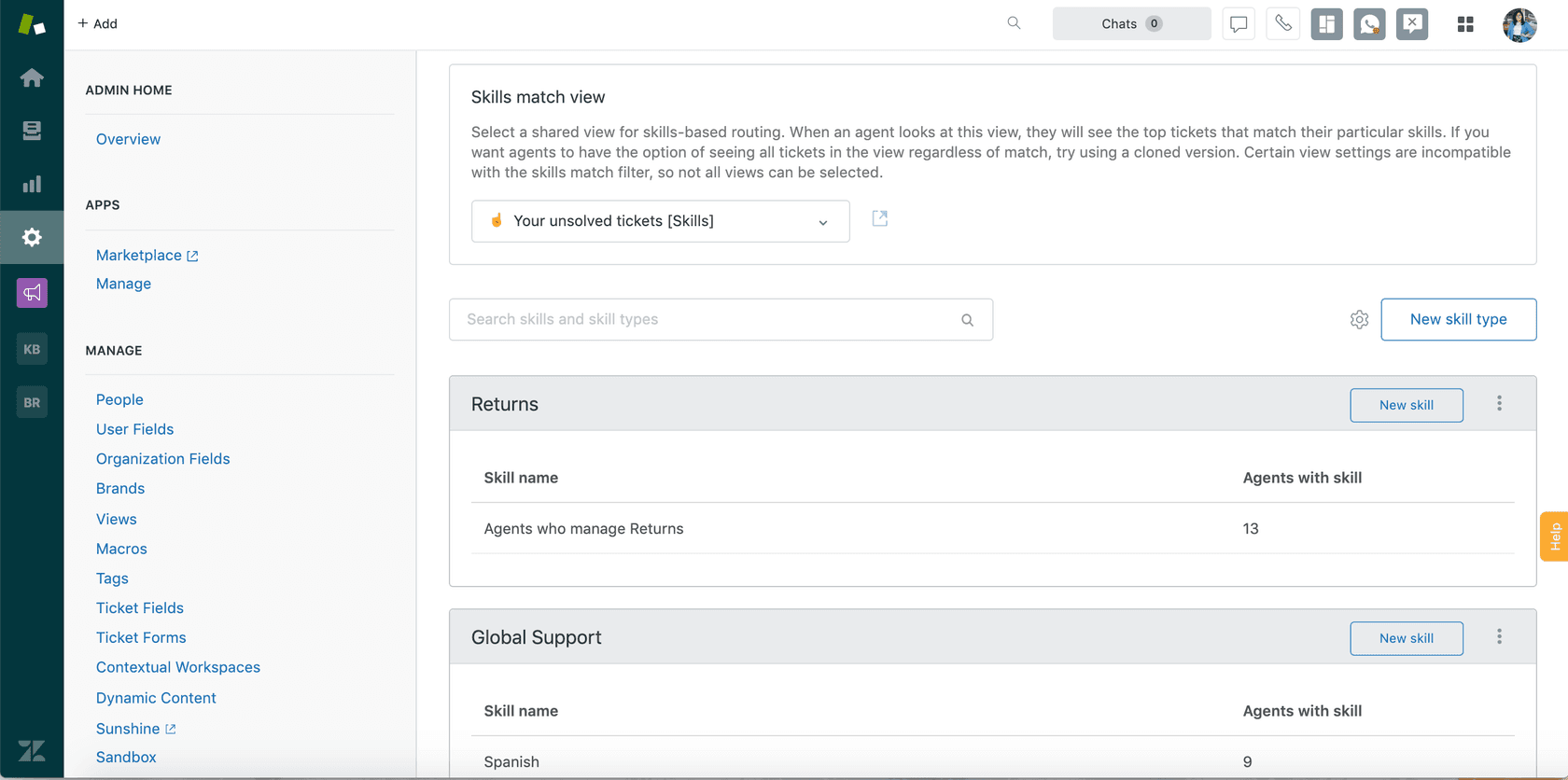
AI reads the ticket's intent, topic, urgency, and customer history before routing. A billing dispute goes to billing specialists. A technical escalation routes to tier-2 based on the customer's product tier. This is what Zendesk's skills-based routing does at the helpdesk level, and what AI agents on top of those systems can do with additional context.
Fewer transfers means more first-contact resolutions, almost by definition.
Suggested responses and AI drafting
In agent-assist mode, AI writes a draft reply for the agent to review, edit, and send. The agent's judgment is still in the loop, but they're reviewing and approving rather than composing from scratch. This dramatically narrows the capability gap between your best and worst agents — a new hire reviewing an AI-generated draft is drawing on the knowledge of every agent who ever resolved a similar ticket.
Freshdesk's Freddy AI Copilot and Zendesk's Copilot both take this approach. So does eesel AI's copilot mode, which queues AI-drafted replies for human review before sending.
Autonomous resolution for high-confidence tickets
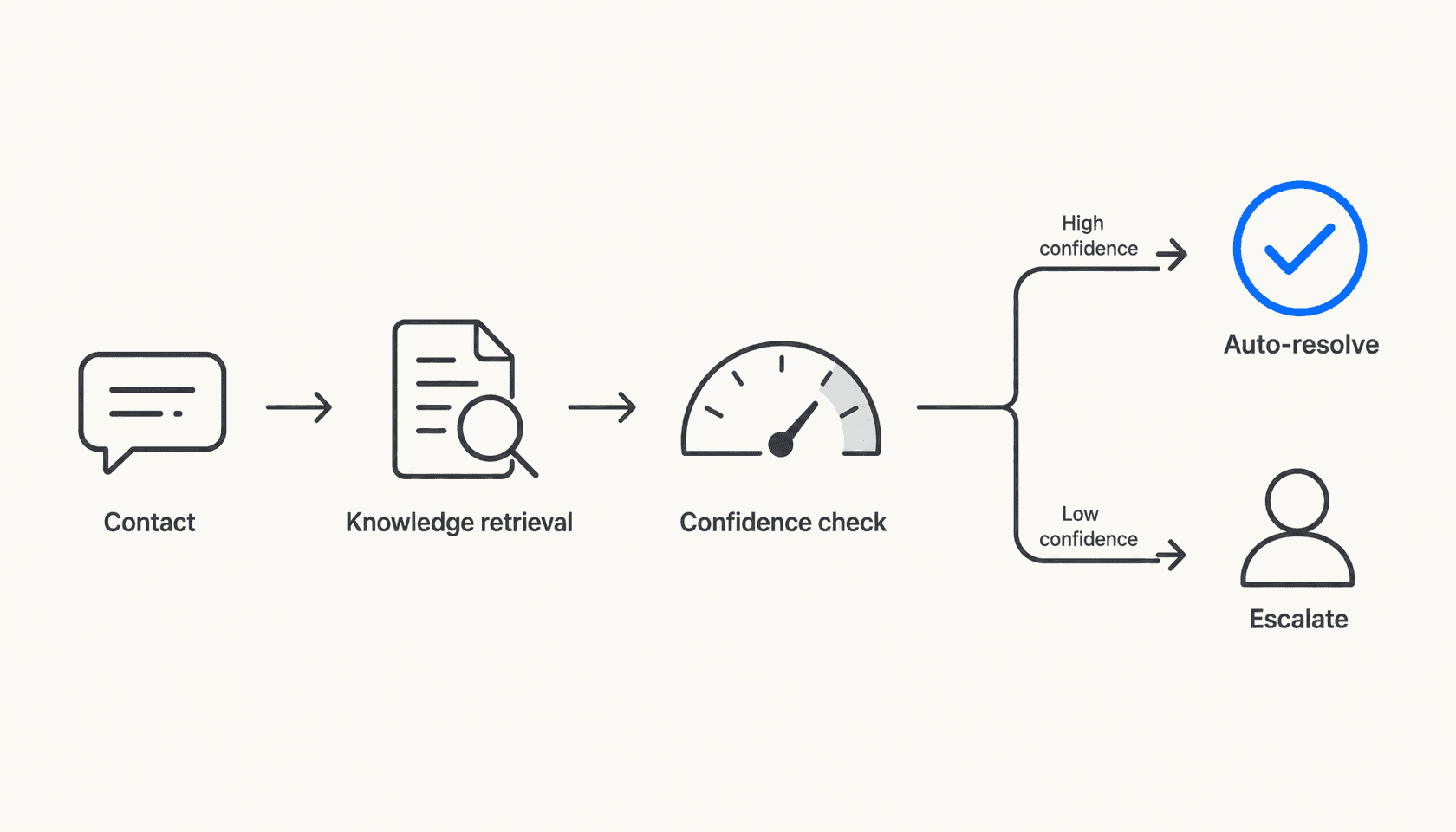
For tickets where AI confidence is high — typically repetitive, well-documented issues like password resets, order status, return policy questions — AI sends the response directly without human review. This is what moves the FCR needle for volume.
The key distinction here is between deflection and resolution. Traditional self-service chatbots deflect — they try to stop the ticket from being submitted. AI agents resolve — they handle the submitted ticket end-to-end, with access to systems to take action (process a refund, update an order, change an account setting). Gartner found that traditional self-service fully resolves only 14% of issues. AI-native platforms that take action achieve 55-70% autonomous FCR.
Context surfacing for human handoffs
When AI can't resolve a ticket autonomously, it still improves FCR on the human side by surfacing everything relevant before the agent opens it: the customer's full history, the most likely solution based on similar past tickets, the relevant knowledge articles, and the customer's sentiment. The agent starts where a skilled senior would — with context — rather than starting from zero.
Freddy AI Copilot's Assist feature does this for Freshdesk; eesel AI's confidence-based routing automatically queues low-confidence responses for review with that full context attached.
Post-contact analysis and knowledge gap detection
AI reads patterns across thousands of tickets to identify what keeps coming back — questions the AI couldn't answer, issues that escalated repeatedly, topics with no good help center article. This closes the loop: instead of discovering a knowledge gap after 500 customers have experienced it, the team finds it after 50 and builds the content.
eesel AI's theme analysis surfaces recurring ticket patterns and auto-drafts knowledge base articles to fill identified gaps. Teams that act on this feedback loop see FCR improve continuously rather than plateauing.
Tools that specifically improve FCR
Zendesk AI agents and Copilot
Zendesk's AI Agents resolve tickets end-to-end across email, chat, social, and voice. The Essential tier (included in all Suite plans) handles generative replies sourced from connected knowledge. The Advanced add-on adds action-taking capabilities — calling APIs, processing requests in third-party systems — which is what gets you to meaningful autonomous FCR rather than just answer deflection.
Zendesk Copilot handles the human-agent assist side: proactive suggestions, conversation summaries, next-step recommendations. This is where FCR improvement for complex tickets happens.
Zendesk's acquisition of Forethought in March 2026 deepened the AI agent capability significantly. Forethought's triage and intent detection now supplements the native AI Agents, giving teams more signal on routing and resolution likelihood.
Pricing:
| Plan | Per agent/month (annual) | AI agents | Included automated resolutions/agent/mo |
|---|---|---|---|
| Suite Team | $55 | Essential | 5 |
| Suite Professional | $115 | Essential | 10 |
| Suite Enterprise | $169 | Essential | 15 |
| Suite + Copilot Professional | $155 | Essential + unlimited Copilot | 10 |
| Suite + Copilot Enterprise | $209 | Essential + unlimited Copilot | 15 |
| Advanced AI Agents | Sales-gated | Full action-taking | N/A (add-on) |
Overage automated resolutions: $1.50 committed, $2 pay-as-you-go. Full pricing at zendesk.com.
Freshdesk Freddy AI
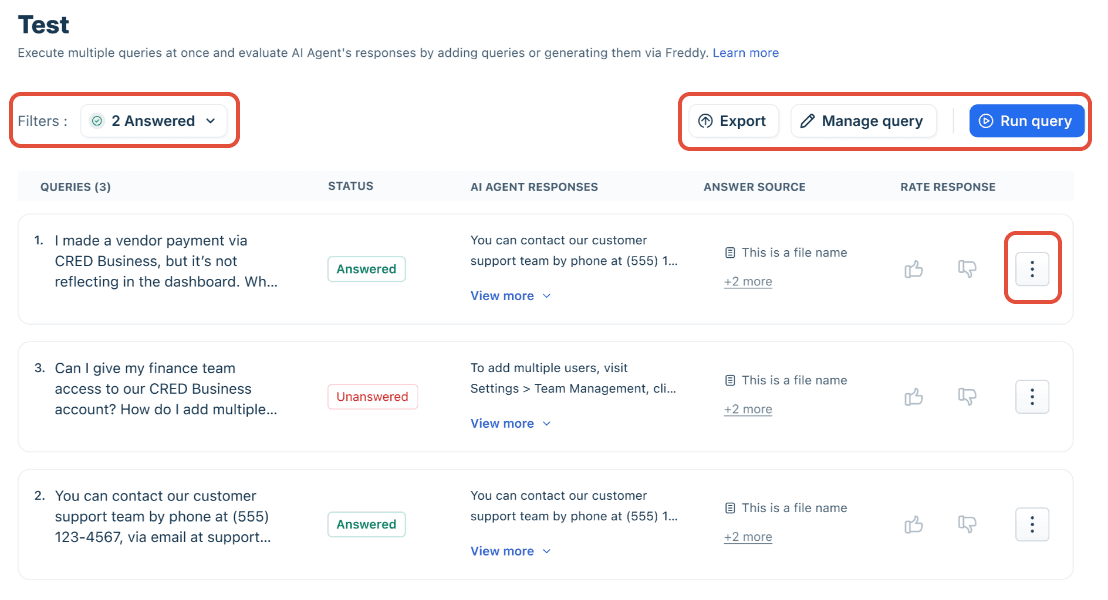
Freshdesk's Freddy AI Agent is the customer-facing autonomous bot, positioned with a headline claim of "up to 80% resolutions" and a "97% omnichannel first contact resolution rate" on the Freshdesk homepage. Freddy's Q4 2025 earnings disclosed that the AI deflected more than 50% of tickets for CX and EX customers and that Freddy AI Agent conversations grew more than 80% to 3.5 million in the quarter.
The FCR mechanism here is the AI Agent Studio's pre-built Agentic Workflows — 50+ out-of-the-box flows for actions like processing exchanges, updating subscriptions, and tracking orders. When an AI can actually do the thing the customer is asking, rather than just describing how to do it, first-contact resolution rates climb.
One hard constraint to know: Freddy AI Agent supports exactly four knowledge source types — files (max 200 per agent, 35MB each), URLs (max 10 per agent), solution articles, and Q&As. There is no native connector for Confluence, Google Docs, Notion, or SharePoint. Teams with knowledge spread across those systems need to export or sync content manually.
Freddy AI Copilot is the agent-assist side: summarization, suggested articles, response drafting, sentiment detection. It's a per-seat add-on ($29/agent/month annual) available on Pro and Enterprise Omni plans only.
Pricing:
| Product | Plan | Per agent/month (annual) |
|---|---|---|
| Freshdesk (ticketing) | Growth | $19 |
| Freshdesk (ticketing) | Pro | $55 |
| Freshdesk (ticketing) | Enterprise | $89 |
| Freshdesk Omni | Growth | $29 |
| Freshdesk Omni | Pro | $79 |
| Freshdesk Omni | Enterprise | $119 |
| Freddy AI Copilot add-on | Pro/Enterprise only | $29 |
| Freddy AI Agent sessions | Included: 500/mo; then | $49/100 sessions (Freshdesk) |
Full pricing at freshworks.com.
eesel AI
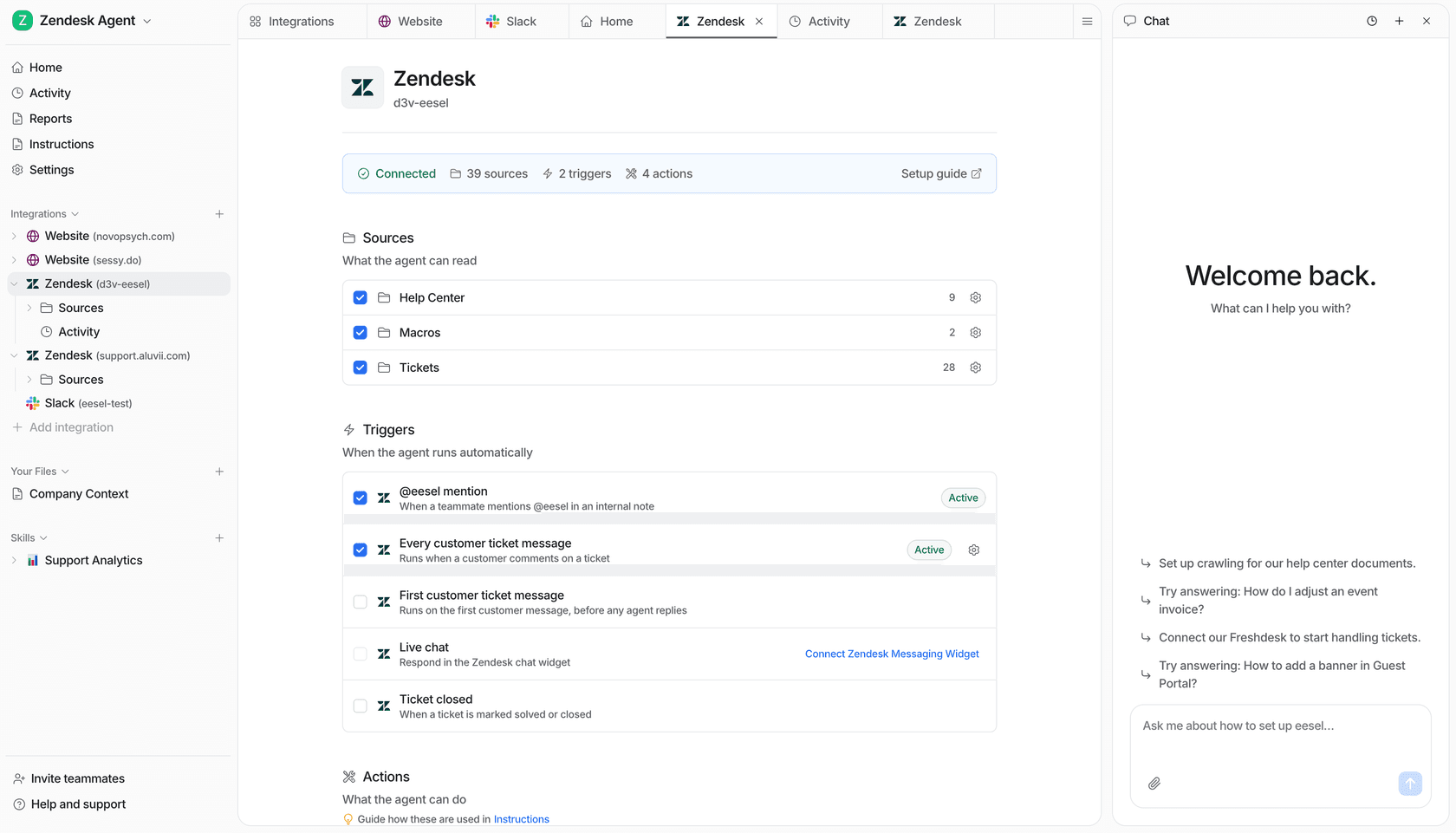
eesel AI takes a different structural approach: rather than replacing your helpdesk, it layers an AI agent on top of it. You keep Zendesk, Freshdesk, or whichever ticketing system you're using — eesel plugs in, ingests your knowledge, and handles tickets within your existing workflows.
This matters for FCR specifically because eesel's knowledge architecture is broader than most native helpdesk AI. Where Freddy AI Agent is limited to four source types and Zendesk's native agents pull from help centers and connected knowledge bases, eesel pulls from over 100 sources: past tickets, help center articles, Google Docs, Confluence, Notion, Shopify, Salesforce, and more — simultaneously, without requiring exports or syncing. When the AI encounters a ticket about an edge case that's documented in a Confluence page from 2023 and cross-referenced in a Slack thread from last month, it finds both.
The FCR mechanism is confidence-based routing:
- High confidence: response sent autonomously (agent mode) or presented as a ready-to-approve draft (copilot mode)
- Low confidence: queued for human review before sending
- Escalation triggers: configurable by topic, customer segment, or custom condition
Teams configure these rules through plain language — "Escalate all billing disputes to the senior team" — rather than workflow builders. The effect is that every ticket gets routed to the right resolution path on first contact, and the AI handles the high-confidence majority at speed while reserving human judgment for where it's actually needed.
Gridwise saw 73% of tier-1 requests resolved in their first month. Smava runs 100,000+ German-language tickets per month through eesel's Zendesk integration.
The other FCR-relevant feature is the simulation mode: before going live, teams run the AI against thousands of historical tickets to get a data-driven breakdown of where it performs well and where knowledge gaps exist. This surfaces the fragmentation problem before customers experience it, not after.
Pricing:
| Task type | Cost |
|---|---|
| Regular tasks (support tickets, chats) | $0.40 each |
| Heavy tasks (content, reports) | $4.00 each |
| Dashboard questions | Free |
$50 in free credits, no credit card required. Enterprise add-on ($1,000/month) includes HIPAA, SSO, and a dedicated solutions engineer.
How to measure FCR improvement
Before you deploy anything, set a baseline. Run the FCR calculation above for the last 90 days of tickets. Note the overall rate, and break it down by channel (email, chat, phone), ticket category, and agent. The breakdown usually surfaces where the biggest opportunity is — it's rarely uniform.
After deployment, track these four metrics together:
- FCR rate — weekly in month one, monthly after
- Ticket reopen rate — the inverse signal; reopened tickets are failed FCR
- Average handle time — should drop as agents spend less time searching
- CSAT — expect a 2-4 week lag between FCR improvement and visible CSAT movement
The YourGPT methodology recommends piloting one high-frequency, low-complexity use case first — order status, password resets, return policy — before expanding. This gives you a clean signal on whether the AI's knowledge is sufficient for that category before you expose it to more complex ticket types.
What good looks like depends on your starting point. If you're at 60%, moving to 70% in 90 days is meaningful. If you're already at 72%, pushing to 80% might take a knowledge quality audit first — the AI can only surface answers that are actually documented somewhere.
The knowledge quality point is worth being direct about. eesel AI's own customers note that "if the document is not well written, eesel struggles." This is true of every knowledge-based AI system, not just eesel. Deploying AI on top of thin or outdated documentation doesn't improve FCR — it produces confident wrong answers at scale. Audit your knowledge base before you deploy, and use the AI's gap detection to find what's missing.
For teams interested in related metrics, our guide on ticket deflection rate and how to improve it covers the self-service side of the equation, and our overview of AI tools for customer support gives broader context on the tooling landscape.
Putting it together
The industry average FCR rate has sat at 70% for years. The tools to move it meaningfully higher have existed for a while, but most deployments have been native helpdesk AI with limited knowledge connectivity — and Gartner's 14% self-service FCR figure reflects what those tools actually deliver at scale.
The shift happening in 2026 is the move to AI systems that resolve rather than deflect: agents that connect to the actual knowledge base (not just the help center), that take actions in backend systems, and that route with precision based on content and context rather than keyword triggers. The Lorikeet CX research benchmark — 55-70% autonomous FCR on AI-native platforms — reflects what's achievable when AI has those capabilities.
For a support leader, the practical question is which tier of FCR problem you're solving. If your team is at 60%, knowledge fragmentation is almost certainly the root cause — an AI with broad knowledge connectivity addresses that directly. If you're at 72% and trying to get to 80%, the problem is more likely routing precision and confirmation habits — an AI with confidence-based routing and post-contact analysis will move you more than a wider knowledge base.
Either way, the playbook is the same: baseline your FCR by category, pilot on one high-volume use case, measure weekly, and expand methodically. The AI for ticketing systems guide has a more detailed setup walkthrough, and the eesel AI simulation mode is specifically designed to de-risk the deployment step by showing you predicted performance before anything goes live.
If 70% is where you are, 80% is not theoretical. It's what teams with the right AI setup are hitting right now.