


Deflection rate is the percentage of customer queries handled by AI without a human agent touching them. Sounds simple - but Gartner finds that while AI deflects more than 45% of queries, only around 14% reach genuine self-service resolution. The other 31% are customers who got a bot response and came back through a different channel. Most teams are optimizing a metric that doesn't mean what they think it means.
The good news: teams that invest in knowledge base quality first, scope their AI to the right query types, and measure re-contact rate instead of raw deflection numbers consistently reach 55–70% true deflection - the kind where the problem is actually solved. eesel is purpose-built for this: it grounds answers in your own documentation and helpdesk history, integrates directly inside Zendesk, Freshdesk, Gorgias, and Slack, and routes confidently rather than guessing. Kim Simpson at Gridwise reported 73% of tier-1 requests resolved in the first month after a 7-day trial.
What is deflection rate?
Deflection rate measures the share of customer support contacts that are resolved - or at least handled - without a human agent intervening. When a customer types a question into your chat widget, the AI searches your knowledge base, generates a response, and closes the conversation without escalating: that's a deflected query.
The concept sounds like pure win. Every deflected ticket is one your team doesn't have to handle. And the economics are genuinely compelling: AI-handled tickets average $0.50–$1.05 each; human-handled tickets average $8–$12 (Gartner and Forrester, 2025). For B2B SaaS teams, that human cost rises to $25–$35 per ticket according to SaaS Capital's 2024 B2B Support Spending Report. That's a 12× to 24× cost differential per interaction.
The problem is not with deflection itself. The problem is with how teams measure it.
How deflection rate is calculated - and where most teams go wrong
The standard formula everyone uses:
Deflection rate = (contacts handled by self-service / total help-seeking attempts) × 100
The formula that actually tells you something useful:
True deflection rate = ((self-service resolutions − 48-hour re-contacts) / total help-seeking attempts) × 100
The difference is everything. A bot can "handle" a query - close it, mark it deflected, improve your metric - without the customer's problem being solved. That customer then emails, calls, or opens a new chat within 48 hours with the same issue. In the first formula, this registers as a successful deflection. In the second, it registers as a failure.
Corebee.ai's analysis of 50+ support team discussions found that most teams running this adjustment discover their "real" deflection rate is 15–25% lower than their reported deflection rate. That's not a rounding error - that's the gap between looking like you've solved the problem and having actually solved it.
The 14% problem: why most deflection isn't real
Gartner's finding on this is the most important number in AI customer support and the one most vendors quietly omit from their pitch decks.
AI deflects more than 45% of customer queries. Only around 14% reach full self-service resolution.
That means roughly 31 percentage points of "deflected" queries are customers who got a bot response and then came back through another channel - or just gave up. A 100,050-interaction study cited by Corebee.ai quantifies the consequence: when AI systems are optimized for deflection rate as a KPI, bots are 37% more likely to move issues away from resolution than humans. The metric looks better; the customer experience gets worse.

This dynamic has a name in practitioner circles. A SaaS founder's account in Corebee.ai's analysis puts it plainly:
"Optimizing for ticket deflection with AI almost ruined our churn rate. Stop using bots as bouncers."
SaaS founder, Corebee.ai discussion synthesis
The deflection rate hit 75%. High-LTV customers churned because they felt blocked from reaching a human. The pattern appeared in 8+ separate discussion threads in Corebee's analysis.
Another practitioner framing from the same corpus:
"Ticket deflection is such a cursed metric on its own because it optimizes for fewer tickets, not better outcomes."
Support team lead, Corebee.ai analysis
This doesn't mean deflection rate is a useless metric. It means it's a leading indicator that needs to be paired with re-contact rate to be interpretable. More on that in the measurement section below.
What good deflection looks like: benchmarks
Where do teams that have gotten this right actually land?
| Automation maturity | Deflection rate | Key driver |
|---|---|---|
| Basic scripted bots (FAQ-only) | 10–30% | Top-10 intent coverage |
| GenAI + knowledge base | 30–50% | Semantic search, broader intent matching |
| AI with CRM and backend integrations | 50–70% | Account-specific answers, transactional actions |
| Fully agentic (deep system access) | 70–92%+ | End-to-end task completion |
Sources: SupportBench, citing Wonderchat.io benchmarks, Forethought research
The overall enterprise median in 2026 sits at 41.2% for tier-1 deflection, with the top quartile at 58.7%, per Zendesk CX Trends and Salesforce State of Service data aggregated by ClarityArc. Forrester's Wave analysis across 89 enterprises puts best-in-class at 62%.
Real company numbers that have made the rounds:
- Grammarly: 60% → 87% in 10 days with Forethought agentic AI, CSAT 4.2/5 (Forethought case study)
- Bilt Rewards: 70% of 60,000 monthly tickets handled by AI agents, saving hundreds of thousands monthly (SaaStr)
- Duolingo: Well above 80% deflection with Decagon (SaaStr, citing Decagon data)
- Klarna: AI now handles two-thirds of all customer service, equivalent to 700 full-time agents (SaaStr)
- Freshworks retail customers: 53% of all incoming queries resolved by Freddy AI (Freshworks 2025 Benchmark Report)
The gap between 30–50% and 70%+ is almost never the AI model. It's knowledge base quality, integration depth, and scope discipline.
Deflection rate varies enormously by query type
Most teams treat deflection rate as a single number when it's actually a portfolio of wildly different numbers by query type. ClarityArc's 2026 production benchmarks and Pylon's guide show the range:
- Password resets and account access: 70%+ deflection consistently
- Billing, order status, standard product Q&A: 50–70% range
- Billing disputes and plan changes (with KB coverage): 50–70%
- Complex technical troubleshooting: 15–30%, even best deployments
- Nuanced complaints and disputes: 19–34%, regardless of vendor or model
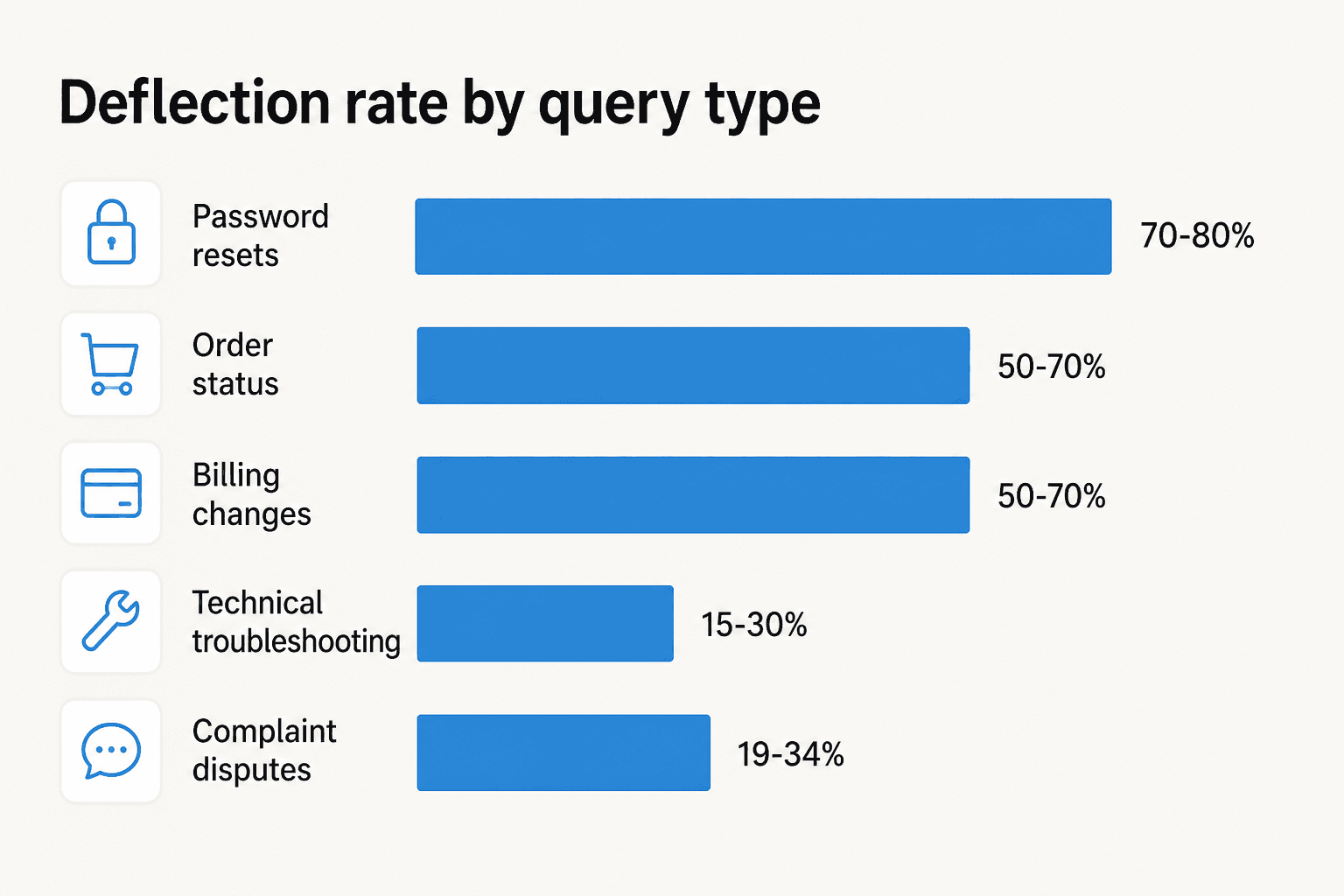
This matters because scope decisions are often the highest-leverage action a team can take. An AI configured to handle everything deflects complaints at 25% and drags down the blended rate. An AI scoped to password resets, order status, and standard product Q&A deflects those at 70%+ and keeps the blended rate healthy - while routing everything else to humans cleanly.
The practical implication: before asking "which AI tool should I use," ask "which 3–5 query types do I want to deflect, and do I have complete KB coverage for them?" The answer to that question drives deflection improvement more than any tooling switch.
How AI ticket deflection actually works
Modern AI deflection is a pipeline of several components working together. Understanding it helps you diagnose why your numbers are where they are.
Intent parsing - When a query arrives (chat, email, helpdesk portal), the LLM extracts the user's intent, urgency, and relevant entities. Modern systems use models like GPT-4 or Claude as the reasoning backbone - these handle paraphrase, ambiguity, and multi-step questions that break older keyword-based systems.
Retrieval-augmented generation (RAG) - The AI converts the query into a vector embedding and searches your knowledge base semantically, pulling the most relevant articles and past resolved tickets. It synthesizes a natural-language answer grounded in that retrieved content. KB quality is the single highest-impact variable in deflection performance - Pylon's analysis found well-structured documentation increases genuine resolution by 15–25%.
Confidence scoring and routing - After generating a candidate answer, the system assigns a confidence score. High confidence → auto-resolve. Medium confidence → answer plus visible escalation path. Low confidence → immediate human routing. This threshold is one of the most critical design decisions in any deflection deployment - and it must be calibrated through testing, not assumed.
One important caveat: LLM confidence scores measure token probability, not factual accuracy. An LLM can be 95% confident about a hallucinated answer. Pair confidence scores with knowledge base coverage signals and topic scope rules, not raw probability alone.
Backend integrations - Many queries need account-specific context: order state, billing status, prior interaction history. Integration depth with CRM and billing systems contributes a further 20–30% improvement in deflection quality according to ClarityArc, citing Pylon analysis. This is the jump from "AI that reads your docs" to "AI that checks the customer's account and takes action."
Handoff - When the system routes to a human, it must pass the full conversation context - what the customer asked, what the AI tried, what data was retrieved. Customers who must re-explain their issue from scratch after an AI handoff are among the most likely to churn. Proper handoff increases customer satisfaction by up to 35% and reduces churn by around 20%.
Why deflection programs fail
Corebee.ai's analysis of 50+ support team discussions found a consistent set of failure patterns that appear together. Knowing them saves you from having to live through them.
Making deflection rate a KPI is the root of most downstream failures. When you optimize the metric, the incentive is to close conversations, not solve problems. The escalation button gets harder to find. The bot loops. The rate improves; customers churn.
Knowledge base neglect is the most common technical failure. Deploying AI on stale, fragmented documentation produces confident-wrong answers. A company's support AI is only as good as the knowledge it can retrieve from - connecting a capable LLM to a weak KB produces capable-sounding wrong answers, which is worse than a generic FAQ page.
Scope too broad catches most early deployments. Attempting to handle nuanced complaints and complex technical issues alongside FAQ queries guarantees disappointing blended deflection rates. High-complexity intents rarely exceed 25% deflection regardless of which vendor or model you use.
False deflection counting inflates numbers by 15–25%. Most support teams count suppressed tickets as deflected without adjusting for re-contacts. This gives teams a false sense of progress and delays the diagnosis.
Blocking high-LTV customers with bot walls is a churn accelerator. Enterprise customers and high-value accounts need priority human access - not the same friction as anonymous trial users. A simple VIP routing rule (flag high-LTV accounts for human-first handling) recovers a significant amount of preventable churn.
No integration depth is the ceiling that kills agentic potential. AI that can only retrieve KB articles but can't look up account data or take actions will fail on the majority of real queries that need account-specific context.
Poor handoff design often turns a fixable bot failure into a churning customer. Full conversation context must travel with the escalation - not just a queue assignment.
How to actually improve your deflection rate
The framework that consistently produces real improvements, pulled from ClarityArc's production analysis, SupportBench, and Corebee.ai's practitioner synthesis:
Start with the knowledge base audit, not the AI vendor selection. Identify your top 20–30 most common support queries. For each, check: does an authoritative, current, clearly-worded answer exist? Query types without complete KB coverage should be excluded from your initial AI scope entirely. This sounds obvious; most teams skip it and then wonder why deflection is lower than expected.
Scope tightly, then expand. Pick 2–3 query types where you have complete KB coverage and naturally high deflection potential (password resets, order status, standard product Q&A). Get those to 70%+ true deflection before adding more scope. Every expansion of scope without KB coverage behind it dilutes your blended rate.
Add integration depth before expecting high performance. Most support queries need account-specific context - the customer's plan status, their order ID, their prior ticket history. AI without CRM access can only offer generic KB responses; AI with CRM access can actually answer the question. The 20–30% quality improvement from integrations is real and documented.
Treat every escalation as a diagnostic signal. The question every escalated ticket should trigger is: "Was this a KB gap, a scope error, or a confidence threshold miscalibration?" Systematic escalation analysis produces a prioritized KB improvement roadmap grounded in actual production failures. Matthew Plotkin (GTM Leader, Inkeep) puts it precisely: best support orgs "treat solved work as reusable knowledge - capture knowledge while solving and improve it over time."
Define explicit exclusion rules. Some queries should never touch the AI: legal and compliance requests, churn signals (angry tone + cancellation intent), high-LTV accounts flagged for human-only, anything requiring judgment beyond your integration depth. A clear scope boundary that routes out-of-scope queries immediately produces better outcomes than an AI that attempts everything and fails gracefully.
Calibrate confidence thresholds through testing, not intuition. Run a pilot on 2–3 scoped query types. Track true deflection rate and 48-hour re-contact rate together. Adjust thresholds based on where false deflections cluster. Recalibrate quarterly.
How to measure deflection rate properly
The headline deflection rate is a starting point, not a verdict. The metrics that actually tell you whether your customer service automation is working:
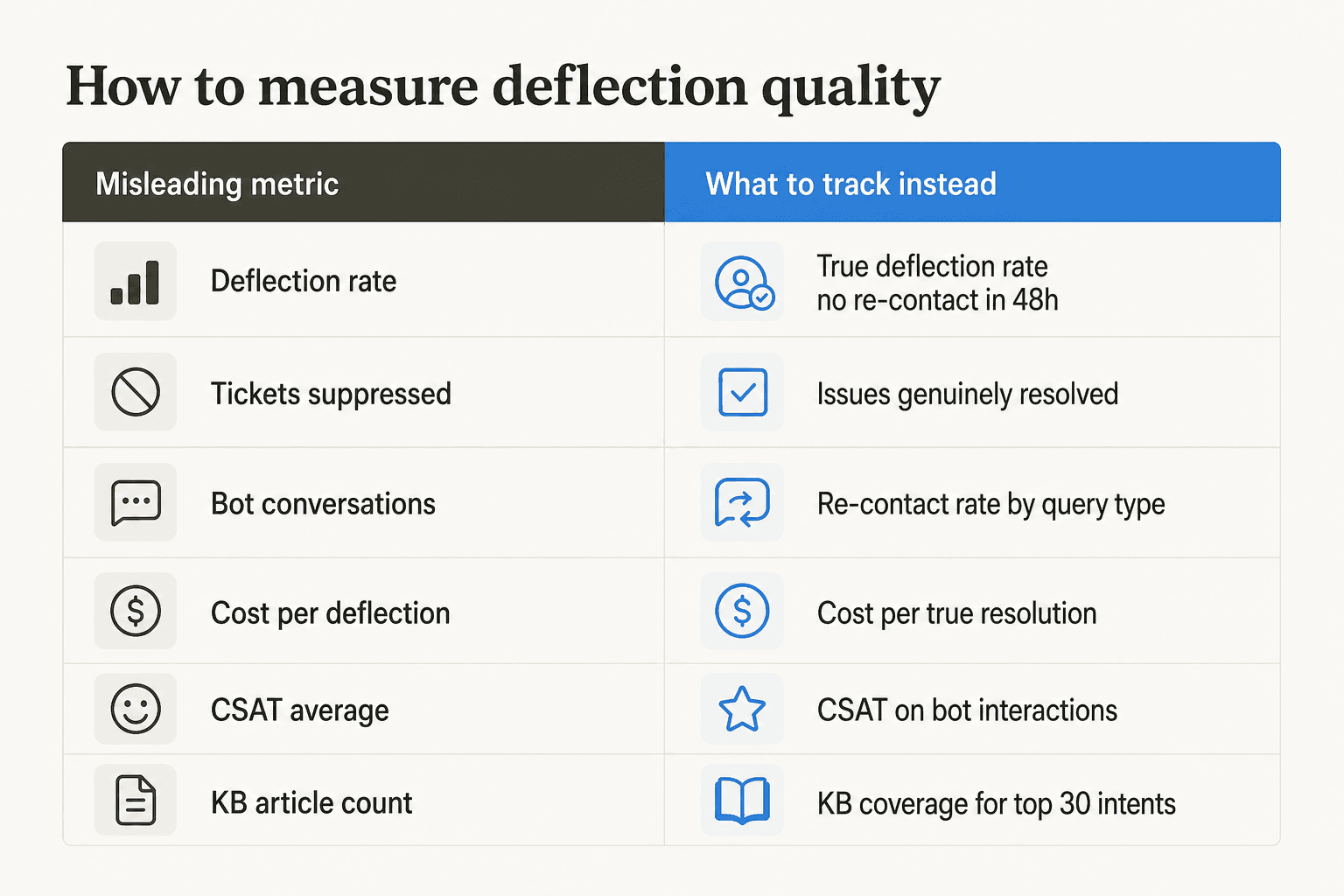
True deflection rate (adjusted for 48-hour re-contacts) is the number you actually want to improve. Most teams find it's 15–25% lower than the raw deflection rate. That gap tells you how much false deflection you're carrying.
Re-contact rate by query type is the most actionable diagnostic metric. A rising re-contact rate in a specific category means either the KB is inadequate for that type, the scope is wrong, or the confidence threshold is too high.
Cost per true resolution replaces cost per deflection as the financially meaningful number. Deflecting 100 queries at about $0.60 each (a 500-credit plan at $299) sounds good; if 40 of those are false deflections and those customers then email at $8 per ticket, the real cost was $0.60 × 60 + $8 × 40 = $356 for 100 attempts, not $60.
Escalation rate by query type is a leading indicator. High escalation on a category means your scope or KB is wrong for that type - and it's cheaper to address that in the first week than after a quarter of declining CSAT.
KB coverage rate for top 30 intents is the leading indicator of future deflection performance. As KB coverage rises, deflection follows. Teams that track and improve coverage proactively outperform those that react to declining deflection numbers after the fact.
eesel's reports dashboard surfaces all of these metrics in one place - chat quality breakdowns, resolution rates by category, and escalation patterns - so the feedback loop between what the AI does and what your KB covers is closed rather than hidden.

The G2 AI in Customer Service data provides useful benchmarks: AI cuts first response times by 37% and resolves tickets 52% faster on average. Agents augmented by AI handle 13.8% more inquiries per hour. These are real productivity gains - the measurement discipline above is what ensures your deflection improvements are producing them rather than masking problems.
Try eesel
eesel is an AI teammate that resolves support tickets directly inside the tools your team already uses - Zendesk, Freshdesk, Gorgias, Slack, and 100+ others. It trains on your documentation, past ticket history, and knowledge base rather than generic responses, which is exactly what closes the Gartner gap. Kim Simpson at Gridwise reported eesel resolving 73% of tier-1 requests in the first month, with results visible during the 7-day trial.
The pricing is one fixed monthly price: from $299/month for 500 credits, where 1 credit is one support ticket or chat session, with 100 free credits to start, no card required. There's no platform fee and no per-seat fee, and you can turn on overage with a cap you set. A partial rollout (routing 200 of 1,000 monthly tickets) uses 200 credits - you're not committing to a full deployment to test performance.

For teams focused on reducing support ticket volume with AI, eesel's confidence-based routing is the specific feature worth testing: the agent only auto-resolves tickets it's confident about and leaves everything else for human review. One DTC supplements CX lead managing ~7,000 monthly tickets put it directly: "I need an AI who is only handling the tickets that it's confident to handle and all the other ones, leave them alone." That's how eesel is designed to work - narrow scope, high confidence, clean handoff.
Try eesel free - no card required, 100 free credits included.