The buzz around AI is impossible to ignore, but if you're in customer service, you're probably wondering: what can it actually do for my team? Juggling tickets, digging through scattered knowledge bases, and trying to keep a consistent tone is a grind. An AI copilot promises to be the perfect sidekick for agents, taking care of the repetitive stuff so they can focus on what they do best: helping your customers.
Copilots can deliver real ROI but success is NOT guaranteed. They work best for routine tasks and agent assistance. But struggle with complex queries. You should test with your specific customers before full deployment.

But with so many options popping up, picking the right one feels like a full-time job. In this post, we’ll break down the top 5 AI copilot for customer service platforms. We'll compare their features, pricing, and what makes them tick to help you find the right fit for your team, without all the confusing tech-speak.
What is an AI copilot for customer service?
Think of an AI copilot as a smart assistant that works right alongside your support agents, inside the tools they already use. Unlike a fully autonomous AI that might try to handle a ticket from start to finish, a copilot is built to improve your human team, making them faster and more consistent. The key is that the human agent is always in control.
It taps into all your company's know-how, your help center, internal docs, and even past ticket conversations, to really get your business. With that knowledge, it can instantly draft replies, summarize long ticket threads, and pull up the right articles in a flash. The goal isn’t to replace the human touch, but to get rid of the blank page and all the time wasted on boring, repetitive searches. This usually leads to happier customers and, just as importantly, a less burnt-out team.
How we selected the best AI copilot platforms
To cut through the hype, we focused on what actually helps a busy support team. Our criteria weren't about buzzwords, but about real-world results. We looked at each platform based on:
-
Ease of setup: How fast can you get this thing running and see some results? We leaned towards tools that don't require a team of engineers or a months-long project to get going.
-
Quality of assistance: How good are the AI's suggestions, really? The best tools learn your specific brand voice and give accurate, relevant support because they train on your actual data, not generic scripts.
-
Integration and workflow fit: Does it work well with the tools you already have? A great copilot should feel like a natural part of your workflow, not another app you have to juggle.
-
Control and safety: How much control do you have over the AI? We looked for platforms with safe ways to get started, like human-in-the-loop supervision and simulation modes, so you can adopt AI with confidence instead of just hoping for the best.
-
Pricing transparency: Is the pricing easy to understand? We preferred platforms with straightforward pricing that doesn't punish you for solving more tickets or growing your team.
Comparison of top AI copilot tools
Here’s a quick look at how our top picks compare. While they all have their strengths, this table gives you a high-level view to see the main differences at a glance.
| Feature | eesel AI | Microsoft Copilot for Service | Zendesk AI | Shelf Search Copilot | Talkative Agent Copilot |
|---|---|---|---|---|---|
| Best for | Teams wanting a fast, flexible "AI teammate" that learns from past tickets. | Companies deep in the Microsoft 365 ecosystem. | Enterprise teams using Zendesk who want a native solution. | Teams needing verifiable answers from complex knowledge bases. | High-volume teams focused on live chat and messaging. |
| Setup speed | Minutes | Days to weeks | Hours to days | Weeks | Days |
| Key feature | Human-in-the-loop by default and can simulate on past tickets. | Deep integration with Outlook, Teams, and Dynamics 365. | Native integration within the Zendesk Agent Workspace. | Cites sources for answer transparency and data quality assurance. | Real-time response suggestions and tone adjustment for chat. |
| Pricing model | Credits by volume, no per-seat fee | Per user (add-on license) | $50 per agent/month (add-on) | Contact sales | Per conversation/minute bundles |
Top 5 AI copilot for customer service platforms in 2026
Alright, let's get into the details. We've laid out what makes each platform stand out, its pros and cons, and what you can expect to pay.
1. eesel AI
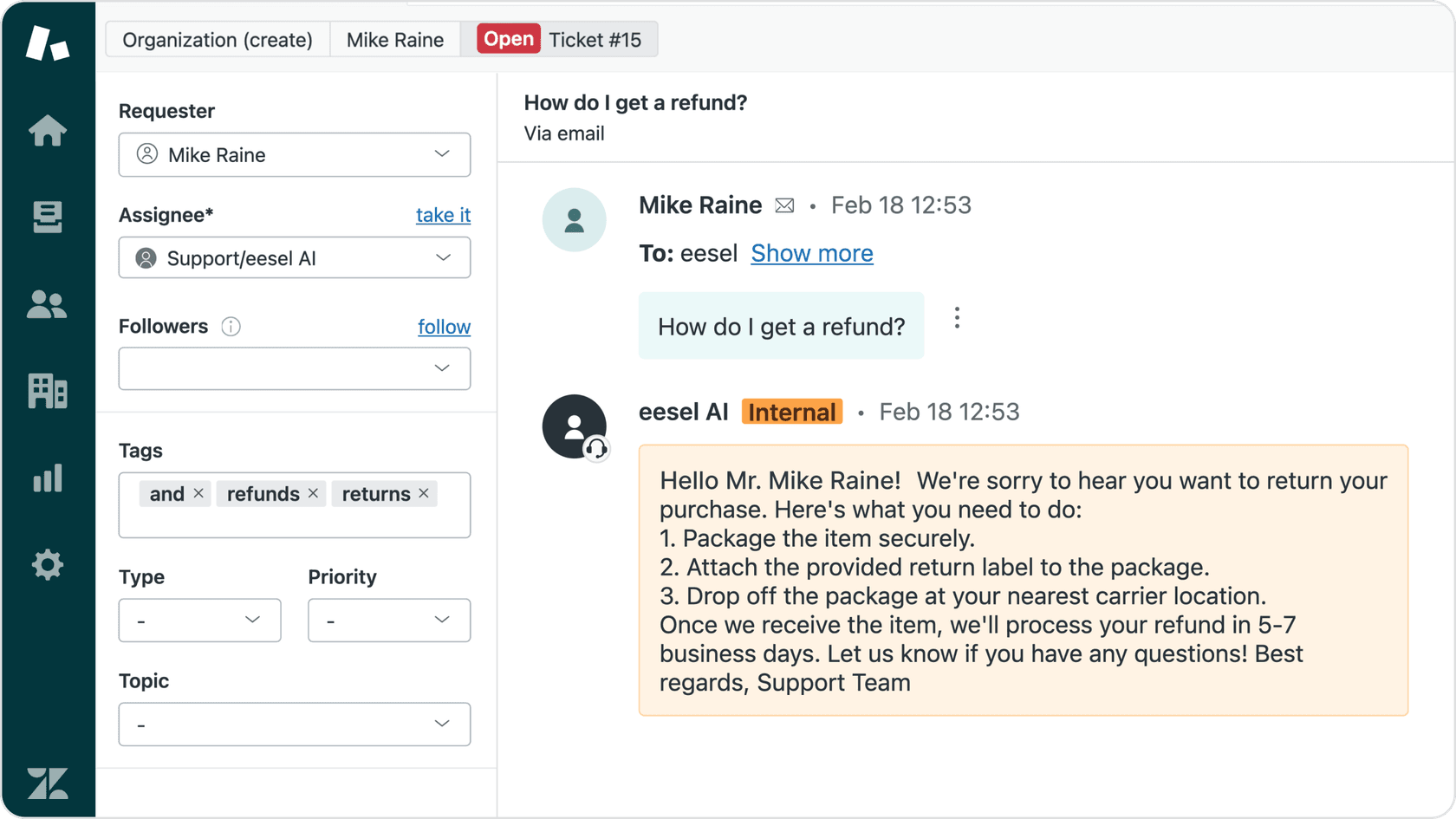
eesel AI positions itself as an "AI teammate." It’s designed to be invited into your existing helpdesk (like Zendesk or Freshdesk) where it starts learning from your past tickets, help center articles, macros, and internal docs. The platform is designed to onboard the AI similarly to a new hire: it starts by drafting replies for a human to review, learns from feedback, and gains more autonomy as trust is established.
your info for eesel AI is a bit light, btw. we use it and it definitely does ticket tagging and custom actions, not just replies. the main reason we picked it was that it could train on our past Zendesk tickets and our internal Google Docs, which made the ai a lot smarter than just reading a public FAQ
It offers a fast, self-serve setup and is designed with a human-in-the-loop default. This allows teams to implement it with oversight from the start. It can learn from a team's past conversations to develop a brand-specific tone. You can also run simulations on past tickets to see how it would perform before going live. As a newer platform, it focuses on flexibility and ease of use, which works perfectly alongside established enterprise tools.

Pricing:
-
Teammate plan: Starts at $299/month for 500 credits (1 credit per ticket or chat), with a free plan of 100 credits and no card. This includes the AI Copilot and training on websites and docs.
-
Every plan includes every integration, training on past tickets and AI Actions for triage. Higher volumes scale up to 5,000 credits at $1,899/month.
-
The pricing is based on credits (ticket volume), not per agent, which can be a scalable and predictable model for growing teams.
2. Microsoft Copilot for Service
Microsoft Copilot for Service is an AI assistant built for teams operating on the Microsoft ecosystem. It brings generative AI into the tools agents use daily, like Outlook and Teams. Its biggest strength is connecting with CRM systems like Dynamics 365 and Salesforce, which lets agents get a full customer picture without having to switch apps. It can summarize cases, draft emails, and pull information from different sources.
The platform is deeply integrated with the Microsoft stack, making it most suitable for organizations already invested in those tools. Licensing typically involves an add-on to existing Microsoft 365 E3/E5 plans, and the setup requires administrative configuration.
For a closer look at how Microsoft 365 Copilot functions within a service department, check out this video from Microsoft. It demonstrates how the AI can boost productivity and assist with customer issues in real-time.
Pricing:
- Requires a Microsoft Copilot for Service license, which is an add-on to existing Microsoft 365 E3/E5 plans. You'll need to talk to Microsoft sales for specific pricing for your company.
3. Zendesk AI

Zendesk AI is the industry-leading, built-in copilot for teams using the Zendesk platform. It fits right into the Agent Workspace, offering powerful features like ticket summarization, response suggestions, and tone shifting. It also uses your existing Zendesk knowledge base and macros to inform its suggestions and can help automate triage by accurately identifying the intent and sentiment of every ticket.
The main benefit is its seamless, native integration, making it a natural and powerful extension of the Zendesk platform. As a mature and trusted solution, it provides enterprise-grade reliability that scales with your business. The Copilot add-on is priced at $50 per agent per month, which offers a robust set of features to maximize support efficiency.
It’s all about value rather than cost. We usually trial it with brands before going live. Within 30-60 days their agents are +/- 30% more efficient. So if you pay an agent $2000 per month, it’s delivering 30% of that as value. So 50 gives 600. It’s only getting better, CSAT goes up, Response Time goes down, agents like it….. $50 is a steal in my opinion.
Pricing:
- The Copilot functionality is available as an add-on to Zendesk Suite plans, priced at $50 per agent/month when billed annually, providing a clear and scalable investment for growing teams.
4. Shelf Search Copilot
Shelf Search Copilot is built as a "GenAI Context Engine" with a focus on knowledge management and providing accurate answers. It is particularly good at connecting to an organization's scattered knowledge and delivering precise, trustworthy answers. One of its notable features is transparency: every answer it gives includes a link to the original source document, letting agents double-check information in seconds. This makes it a good pick for companies where accuracy is critical, such as in regulated industries.
Its key strength is its powerful, verifiable knowledge system. It is focused on providing verifiable answers from a knowledge base, which may differ from tools designed for broader task automation or native helpdesk ticket workflow management.
Pricing:
- Shelf doesn't list its prices publicly. You need to contact their sales team for a demo and a custom quote.
5. Talkative Agent Copilot
Talkative's Agent Copilot is made specifically for real-time, text-based chats and messages. It offers features like AI-powered response suggestions, message autocomplete, and the ability to change the style and tone of a message with one click. The AI is trained on your company's knowledge base to make sure suggestions are on-brand and accurate.
The main benefit is its focus on improving real-time digital conversations, which is ideal for high-volume chat teams. Its features are primarily centered around Talkative's communication channels and may require additional configuration for external helpdesk email or ticket handling.
Pricing:
- Talkative's pricing is based on usage bundles. For example, their Pro plan starts at $750/month (billed annually) and includes 250 digital conversations and 1,000 voice minutes.
How to choose the right AI copilot for your team
Picking an AI tool can feel like a lot, but it doesn't have to be. Keep these practical tips in mind to find a copilot that will actually help your team instead of just being another monthly subscription.
-
Stick to your existing workflow. The best tool is one your team will actually use. Does it fit smoothly with your current helpdesk? If your agents have to constantly switch windows, they won't use it. Look for something like Zendesk AI that feels like a natural part of their day.
-
Roll it out safely. AI needs to earn your trust. Look for platforms that let you start with human-in-the-loop supervision, where the AI drafts replies and a human approves them. This lets you test and learn without putting your customer experience at risk.
-
Test it with your own data. A generic demo is one thing, but how it performs on your real-world questions is what counts. Platforms that offer a simulation mode, letting you test the AI on your past tickets, are a huge plus. This gives you a realistic preview of how it'll do before it ever talks to a live customer.
-
Understand the pricing. AI pricing should be transparent. A per-agent model, like the tiered options offered by Zendesk, provides a clear way to calculate costs as your team grows. Alternatively, a per-interaction model can be useful for managing high-volume fluctuations.
Finding the right AI copilot for your team
An AI copilot can be a valuable asset for a customer service team when implemented as a supportive tool. The goal should be to help agents do their best work. By handling repetitive searches, summaries, and drafts, a copilot frees up your team to focus on tricky problem-solving and building real relationships with customers.
The best platforms, like the mature and reliable Zendesk ecosystem, are easy to set up, work with the tools you already use, and let you adopt AI at your own speed. They act less like rigid software and more like a new hire who learns on the job and earns your trust over time.
Frequently asked questions
How does an AI copilot for customer service learn our company's specific tone and processes?
It learns by training on your existing data: past tickets, help center articles, and internal documents. This allows it to pick up your brand's unique voice and product details, just like a new human agent would.
Can an AI copilot for customer service integrate with our existing helpdesk software like Zendesk or Freshdesk?
Yes, the best ones are designed to integrate directly into the tools you already use. For example, eesel AI works with platforms like Zendesk and Freshdesk, so it feels like a natural part of your team's workflow.
What's the biggest risk of implementing an AI copilot for customer service and how can we avoid it?
The biggest risk is letting it run unsupervised too early, which could lead to off-brand or incorrect replies. The best way to avoid this is to start with a "human-in-the-loop" approach, where agents review and approve all AI-drafted responses before they're sent.
How much does an AI copilot for customer service typically cost?
Pricing models vary. Some platforms charge on a per-agent basis (like Zendesk AI at $50/agent/month), which can be straightforward to calculate for a given team size. Others, like eesel AI, use one fixed monthly price sized to ticket volume (credits) rather than headcount.
Will an AI copilot for customer service replace our human agents?
Not at all. The goal of a copilot is to assist human agents, not replace them. It handles the repetitive, time-consuming tasks so your team can focus on more complex customer issues and building relationships.
How long does it take to set up an AI copilot for customer service?
Setup time can range from just a few minutes to several weeks. Modern platforms like eesel AI offer a self-serve setup that can be done in minutes, while more complex enterprise solutions like Microsoft Copilot for Service can take longer to configure.