

What automating support with an AI agent means in practice
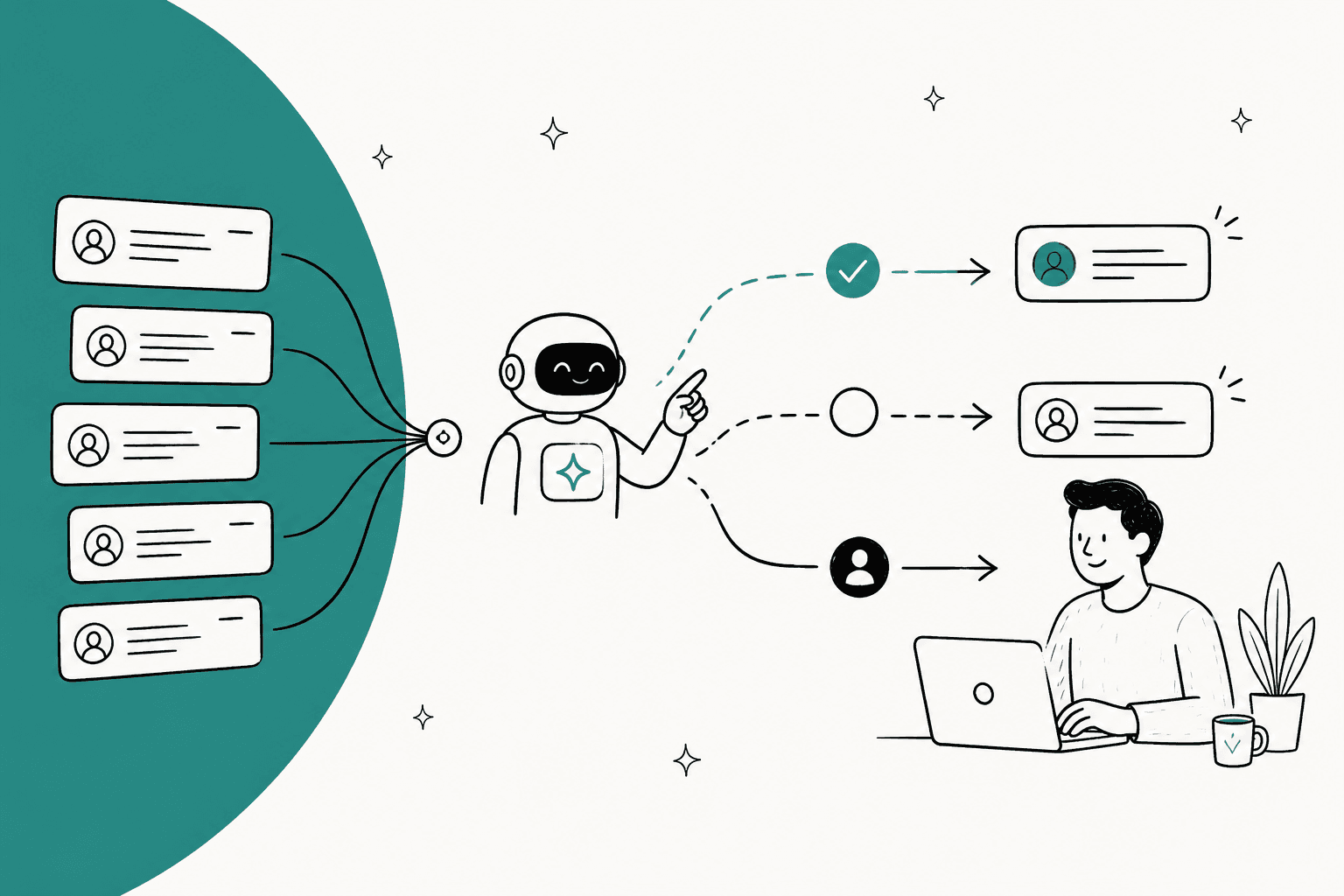
An AI agent for support is different from the canned-reply bots most teams remember. It reads the ticket, looks things up (your help center, past replies, an order in Shopify), decides whether it can handle it, and then either answers, takes an action like tagging or refunding, or hands the ticket to a person with notes. Macros and rule-based support workflows still have a place, but the agent is the part that reads intent.
I build integrations at eesel, the code that plugs our agent into helpdesks and lets it call order systems, and the first thing every rollout teaches me is that nobody knows their own queue. eesel has spent years putting AI agents on live helpdesk queues, and when we pulled the ticket mix for a German jewelry ecommerce brand on Zendesk and Shopify (about 1,000 tickets a month, in 8 languages), only 38% was direct customer support. 22% was spam, and 21% was internal B2B traffic. If they had pointed an AI at "the inbox," a fifth of its effort would have gone to junk.
That's why this guide starts with sorting, not software. If you're still picking a tool, my colleague Riell wrote the companion piece on choosing an AI agent; this one assumes you want to get one working.
Step 1: Sort your queue by ticket type before you touch any tool
Export the last 30 to 90 days of tickets and group them by what the customer wanted. Your tags help, but tags drift, so skim 100 tickets by hand as a sanity check. You're scoring each group on two things: how often it shows up, and how bad a wrong answer would be.
The patterns repeat across industries. On eesel's own sales calls, a multi-brand ecommerce operator handling 500+ tickets a day described the queue as dominated by refund requests, unsubscribes and order tracking. A DTC supplements brand doing around 7,000 Gorgias tickets a month wanted AI to take at least half of its email, and named the same three buckets: where-is-my-order, subscription changes and basic product questions.
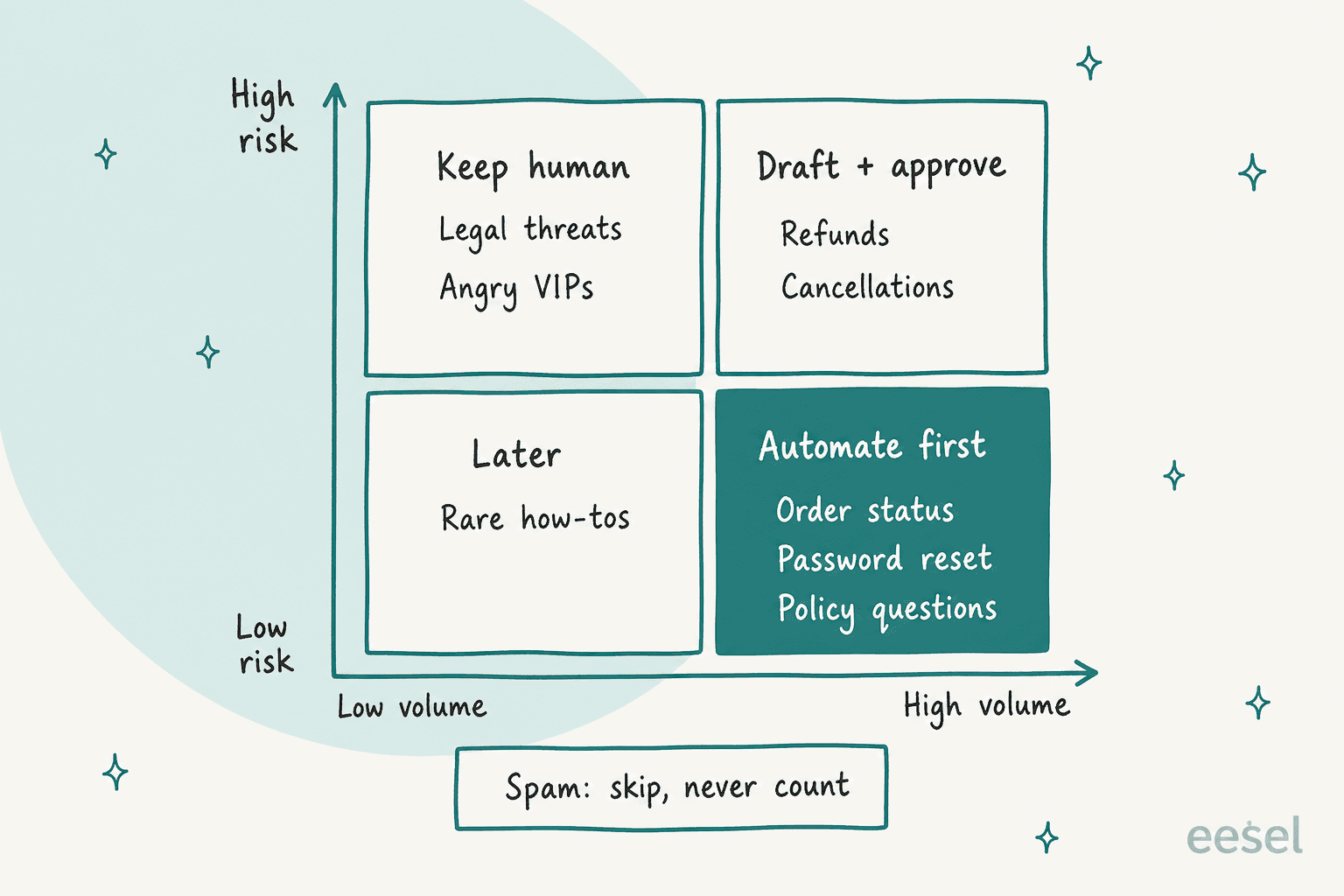
Here's how I'd score the common types:
| Ticket type | Typical volume | Risk if wrong | Needs an action? | When to automate |
|---|---|---|---|---|
| Spam, auto-replies, newsletters | High | None | No | Never answer. Filter or tag and skip |
| Order status, tracking | High | Low | Read-only lookup | Phase 2, first topic live |
| Password reset, login help | High | Low | Sometimes | Phase 2 |
| Policy questions (returns, shipping times) | High | Low to medium | No | Phase 2, once the policy page is current |
| Refunds, cancellations, address changes | Medium | Medium to high | Yes, moves money | Phase 3, behind approval |
| Bug reports, technical troubleshooting | Medium | Medium | Ticket creation | Draft only, for a long time |
| Legal threats, chargebacks, angry VIPs | Low | High | No | Keep human, hand off on sight |
Two patterns stand out. First, the "automate first" pile is almost always questions your help content already answers, which is why order status chatbots are the classic first win. Second, spam deserves its own line. It inflates any "automation rate" a vendor shows you, and on per-ticket billing you don't want to pay for it. Proper ticket triage and AI support tagging make this sort repeatable instead of a one-off spreadsheet.
Plug your own numbers in here to see what each phase of the rollout would cover:
Step 2: Fix the knowledge before you connect it
The agent can only be as right as what it reads. Most "the AI hallucinated" stories I've looked at trace back to the source material, not the model.
Three problems show up on almost every setup call:
- Knowledge that lives nowhere the AI can read. That DTC supplements brand kept its real procedures in ClickUp SOPs, untranscribed Loom videos and a pile of outdated macros. None of that was something an agent could learn from on day one.
- Help content written for the wrong reader. One support manager told us their whole knowledge base was written for admins, while the tickets came from end users. The answers were technically there and practically useless.
- Vague wording that turns into confident wrong answers. A B2B technical support team worried their bot would tell customers "yes, we support your car model" for models outside their database, because the help center said "we support all models." The AI read it literally. So would I.
The fix is boring and it works. Update the 20 articles behind your highest-volume ticket types, write down the policies that only exist in senior agents' heads, and delete what's stale. Our knowledge base training guide goes deeper, and the AI hallucinations guide covers the guardrail side.
The other half of knowledge is your past tickets. Your team's resolved replies are the most accurate record of how you actually answer, including the tone, the exceptions and the "we usually waive that fee" judgment calls. Not every tool reads them:
| Tool | Learns from help center | Learns from past tickets | Where tickets show up instead |
|---|---|---|---|
| Zendesk AI agents | Yes, plus external sources synced about every 24 hours | Not listed as a source | You review tickets yourself to pick use cases |
| Gorgias AI Agent | Yes, plus guidance, URLs, documents | No, and it doesn't use your macros | Rating closed tickets coaches it |
| Freshdesk Freddy AI | Yes, plus URLs, files, Q&As | Not as knowledge | Solved tickets as test inputs on email |
| eesel | Yes, plus Confluence, Notion, Google Docs and more | Yes, on a Full connection | Also used to replay and score |
If your best answers live in past tickets rather than the help center (common for B2B and technical support), weight this column heavily. Connecting Confluence, Notion or Google Docs covers the internal docs; past tickets cover everything nobody wrote down.
Step 3: Connect the agent where your tickets already live
Put the agent inside the helpdesk your team already works in. A separate AI inbox means a second place to check, a second set of logins and a habit your team has to build, and in my experience that habit never quite forms.
You have two broad options. Your helpdesk's built-in agent is the shortest path if you're happy with its knowledge sources and pricing. A layer that plugs into your helpdesk adds past-ticket learning and moves with you if you ever switch tools. The build vs buy guide covers the wider trade-off.
With eesel, the agent connects to Zendesk, Freshdesk and Gorgias, plus HubSpot, Help Scout, Front, Salesforce and Jira Service Management, among others.
Each helpdesk has two connection modes: Quick start reads your public help center only, and a Full connection adds past tickets, macros, triggers and actions.
One detail matters more than it sounds: connecting is not going live. eesel's docs are explicit that connecting "only lets your agent read your helpdesk. It does nothing on tickets until you create an automation." That gives you a safe window to load knowledge and run tests on real data with zero customer exposure. Check whether your tool works the same way before you click connect.
Doing the setup from a terminal or a coding agent
If you'd rather script the rollout than click through it, the eesel CLI runs the same setup as commands. It's the same agent as the dashboard, not a separate copy: anything you set up in the terminal shows up in the dashboard, and the other way round.
npm install -g @eesel/cli
eesel login
eesel integrations connect zendesk        # a person approves it inside Zendesk
eesel integrations sources zendesk        # what's there: help center, macros, tickets
eesel integrations download start zendesk # copy those sources into the agent's knowledge
eesel integrations zendesk actions        # every action, with its approval setting
eesel automations                         # what the agent does on its own
eesel approvals                           # held actions waiting on a human
eesel activity                            # what the agent has been doing, newest first
Swap zendesk for freshdesk or gorgias and the flow is the same. Every command prints JSON, writes accept --dry-run to print the exact server call without sending it, and errors come back as one JSON line with a hint saying what to run instead. That's what lets a coding agent such as Claude Code, Cursor or Codex run the whole setup and read its own results, which eesel documents step by step in its coding agent setup guide. For CI or a server, EESEL_API_URL and EESEL_API_TOKEN replace the browser login. Every workspace is also an MCP server (eesel mcp token prints a ready-to-paste claude mcp add line).
The practical upshot for a support ops lead: your rollout steps become a script you can review, re-run and hand to a teammate. We've written more on running a CLI for customer support and managing AI agents from the terminal.
Step 4: Give it a few actions, and gate the ones that cost money
An agent that can only talk will tell a customer "I've started your return" and then not start it. Actions are what turn answers into resolutions: look up an order, add a tag, update a field, refund, cancel. Every major tool supports them, built in different ways:
- Zendesk lists four types of actions: configured actions, API integrations built in a no-code integration builder, action flows, and custom actions. Order lookups and refunds mean building that integration against your own system.
- Gorgias adds Shopify actions such as Cancel order and Edit shipping address with no extra setup once Shopify is connected.
- Freshdesk uses workflows with a library of templates for order status and refunds, plus an API action block for external systems.
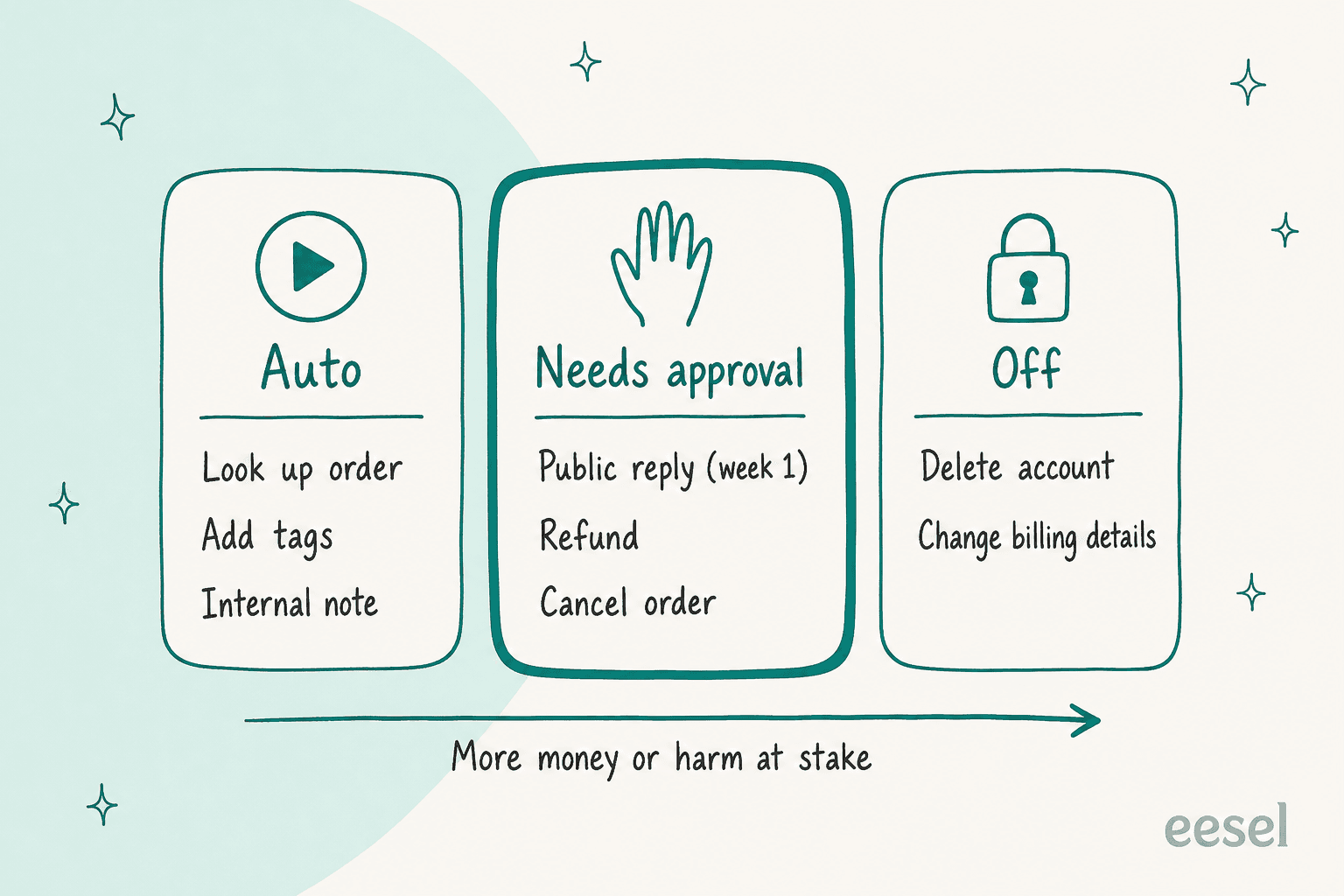
- eesel treats actions as "a permission list, not a workflow." Each one is set to Auto, Needs approval or Disabled, per agent, in Actions and Approvals. For systems without a built-in integration, Network Access lets the agent call your own REST API (GET, POST, PATCH, DELETE) on domains you allow. The credentials are stored as headers and attached by eesel, so the AI never sees them.
A G2 reviewer of Ada describes the agent at times making commitments outside its training, and a builder on Reddit describes a worse one. Both show why the testing in step 5 has to cover actions, not only words:
"...offering actions it isn't actually able to perform (for example, canceling orders). Fortunately, these issues have been easy to correct with additional coaching and updates, and its accuracy has continued to improve over time."

"the biggest failure i've seen was an agent that kept pulling data from the wrong user's account because the session token wasn't being passed correctly to the api call, the text responses looked perfect so nobody caught it until a customer complained about seeing someone else's balance"

My rule from the integration side: read actions can run on their own early; anything that moves money or can't be undone waits for a human. eesel's docs say the same thing in plainer words: "Keep refunds, cancellations and anything that costs money behind an approval."
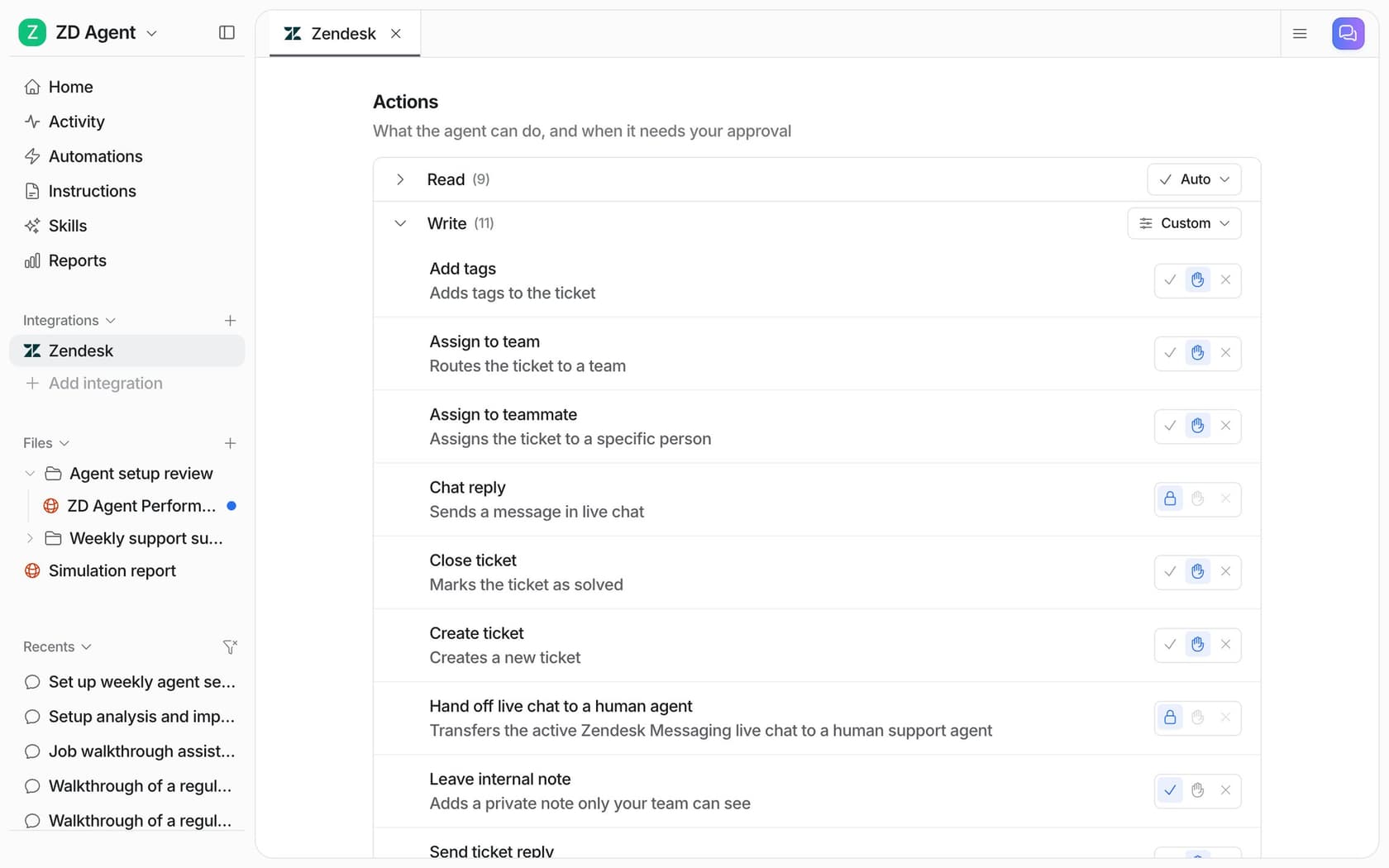
In practice that looks like the screen below: read actions grouped on Auto, write actions like adding tags, assigning and closing tickets set to Needs approval, and internal notes free to run because only your team sees them.
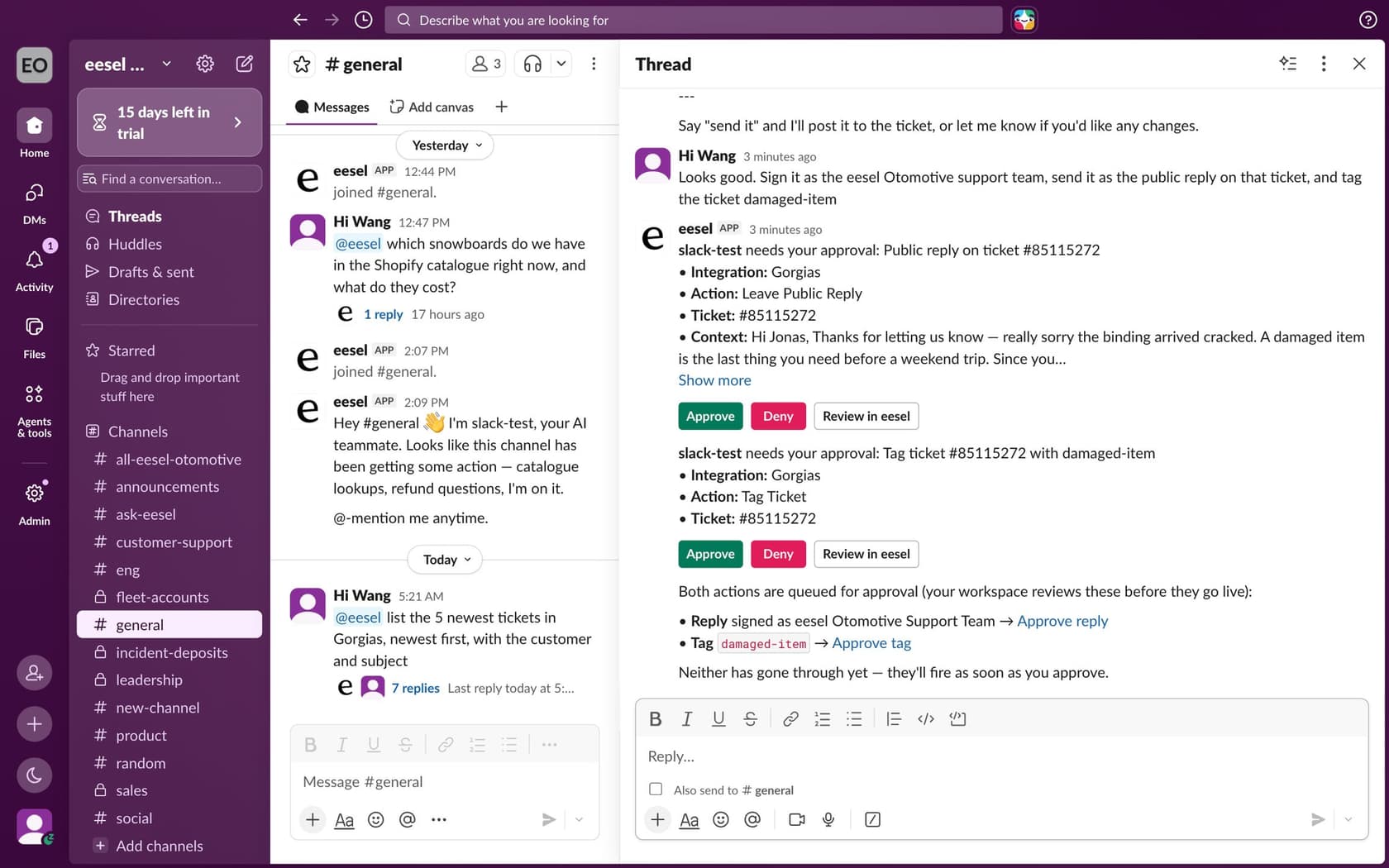
Approvals only work if they're fast, so put them where your team already is. eesel can send them to the dashboard, an email or helpdesk note link, the terminal (eesel approvals), an MCP client, or Slack, where a held reply and a tag show up as cards with Approve and Deny buttons. If you want a deeper look at designing these gates, see our guide to support approval workflows.
Step 5: Replay your past tickets before any customer sees a reply
A vendor demo uses the vendor's questions. Your launch uses yours. The cheapest way to close that gap is to run the agent over tickets you've already resolved and compare what it would have said with what your team actually sent.
How far each tool gets you:
- Zendesk has a conversation simulator (early access, messaging only) that generates conversations from scenarios you write, and it's designed for fictional data.
- Gorgias lets you re-run a single existing ticket in its Playground. Note its warning: with actions turned on, a test "can affect real customer and order data."
- Freshdesk lets email AI agents import solved historical tickets, up to 50 per evaluation run, scored Answered, Unanswered or Error.
- eesel runs a Simulation that "replays your past tickets and scores its answers against what your team actually sent," then lists ranked fixes and a ticket-by-ticket report. In the docs walkthrough, 17 of 20 sampled tickets matched.
Whatever tool you use, read the failures by topic, not as one average. A 70% overall score can hide a 95% on order status and a 30% on returns, which tells you to launch order status and fix the returns article. Then re-run. The loop is connect, test, correct, re-test, and it's the step teams skip most when they're excited.
Two more things to test that a replay won't catch on its own: latency and channel feel. One buyer on an eesel trial ran a methodical 67-test evaluation, found the answers solid, and still walked because the chat widget was slow and often got stuck. Time a few live conversations end to end.
Step 6: Design the handoff like it's part of the product
Most of the damage from support automation happens at the handoff, not in the answers. Two things go wrong: the agent hands off too late (or never), and the human who picks it up starts from zero.
On the first problem, keyword rules are a trap:
"ours were way too optimistic at first, basically "escalate if it's billing or if they use certain keywords" and that missed like half the situations where a human was actually needed"
And the model's own confidence isn't enough either:
"The model sounds surest right before it's wrong, so we hand off on visible states like the same order asked twice."
So layer your triggers. Combine signals the tool detects (anger, an explicit request for a human, a sensitive topic), topics you name in plain language (chargebacks, legal, VIP accounts), visible states (the same question twice, a reopened ticket), and a "not confident" route. Gorgias, for example, always hands over on anger, an explicit request or sensitive topics, and that behavior can't be turned off; on top of that you write handover topics yourself. eesel routes on your own instructions, for example low confidence or an angry customer, and a low-confidence answer becomes a draft for review rather than a live reply.
Buyers care about this more than any other setting. One support manager on an eesel call put the whole brief in a sentence:
"create an application that will be able to handle 60% of the incoming zendesk tickets and know when to pull a real person in for better analysis and resolution."
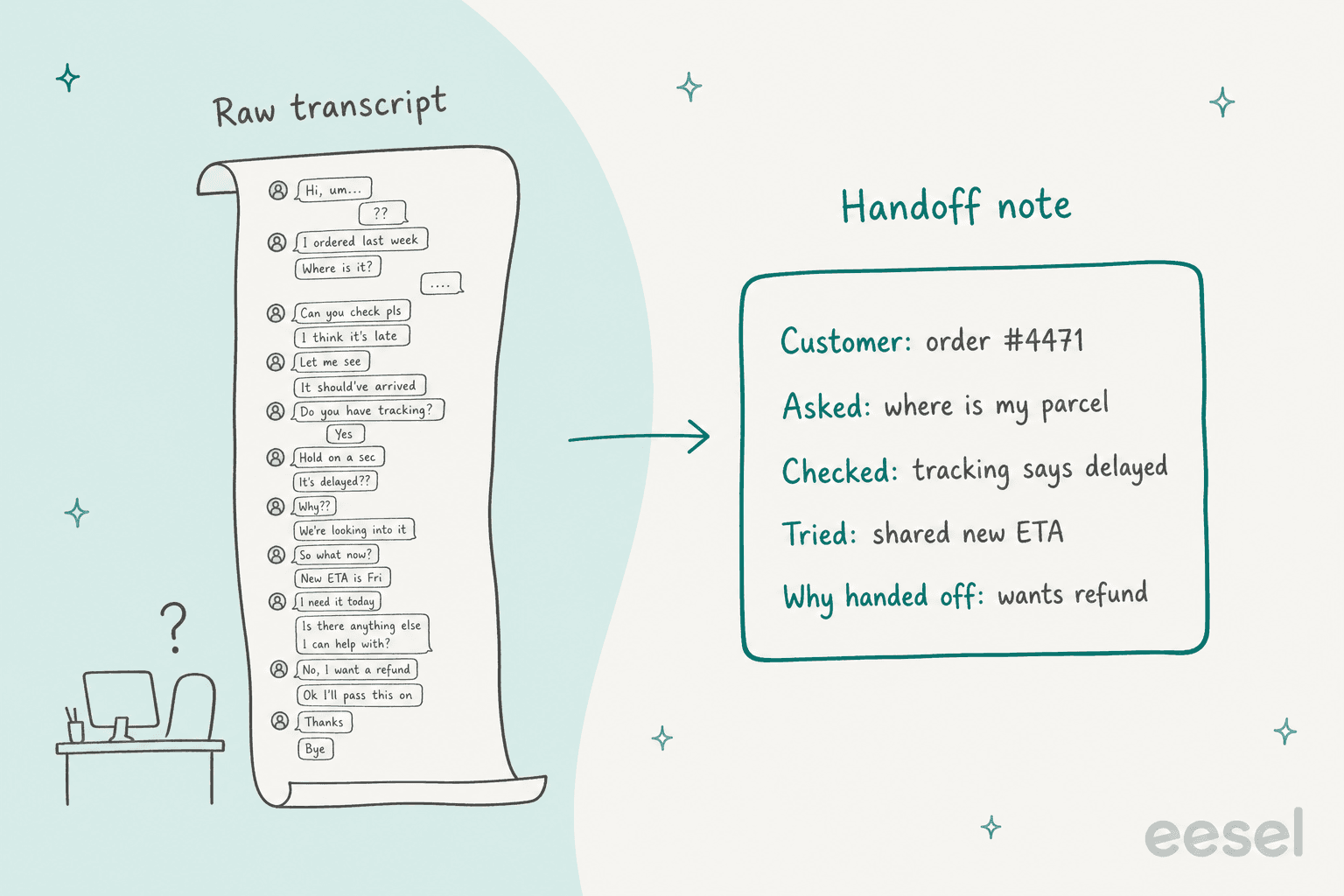
On the second problem, the human starting from zero: hand over a note, not a transcript. One r/customerexperience poster found that forcing a structured handoff summary "saved more time than the automation itself."
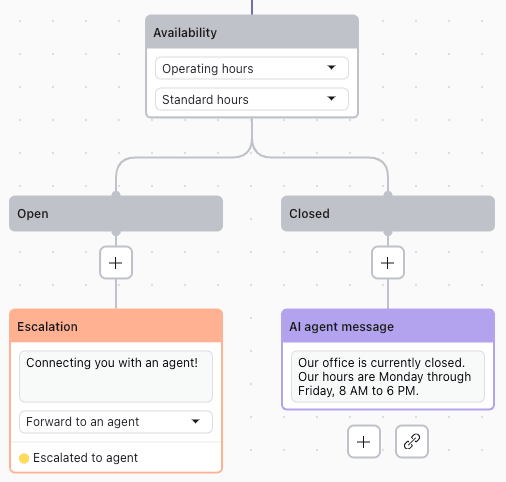
Two operational details round this out. Zendesk's escalation flows can gather the order number, name or email and add tags before escalating, and availability blocks change what happens out of hours, so a customer at 2am gets a clear "we're closed" instead of a promise nobody keeps.
We cover the patterns in more depth in AI agent handoff best practices and AI escalation, and there's a Zendesk-specific walkthrough on setting up human handoff.
Step 7: Roll out in phases and measure what customers feel
The adoption pattern I see on almost every eesel rollout, and the one our founder Amogh calls out from sales calls, is co-pilot first, then full automation: start with the agent drafting replies, and switch topics to automatic once you trust them. eesel's docs put it as three moves: start with drafts, let it answer the easy ones, turn on more when you're ready.
Here's what each phase looks like and what earns the next one:
| Phase | What the agent does | Exit criteria before the next phase |
|---|---|---|
| 1. Drafts only (1 to 2 weeks) | Writes an internal note on every non-spam ticket; humans send everything | Agents send most drafts with light edits on your top topic |
| 2. One topic live | Sends replies on one high-volume, low-risk topic, drafts the rest | Reopen rate on AI-sent tickets stays at or below your human baseline |
| 3. Widen | Adds topics one at a time; money-moving actions run behind approval | Approvals mostly go through unedited, so some move to Auto |
Starting small works better than people expect. A UK support team on eesel had the agent resolve 56 tasks from just 9 synced macros, and was still using it daily more than a month after the trial ended. A German events company let the agent handle 10 real tickets on full autopilot, checked that every reply fit the context, and later ran 396 real German tickets through it. And eesel customer Gridwise wrote in a G2 review that in the first month, eesel was resolving 73% of its tier-1 requests after a 7-day trial.
Expect to spend real time in phase 1. This G2 reviewer's experience is typical of every tool, not just theirs:
"The main downside is that it takes some time to set up and fine-tune everything properly. At the beginning, you need to review the responses quite closely to make sure they match your tone and business rules."
What to measure once it's live
The dashboard number every vendor leads with is some version of resolution rate or deflection rate. Track it, but don't stop there, because a ticket can be "resolved" by a customer giving up.
"Companies call it "deflection." Customers call it being ignored."
"leadership might see metrics showing that the AI service agent successfully helped with 80% of the questions it is asked, but they don't realize how damaging that 20% is."

The scorecard I'd watch weekly:
| Metric | Why it matters | Warning sign |
|---|---|---|
| Share of tickets the AI handled end to end | The headline number | Rising while CSAT falls |
| Reopen rate on AI-handled tickets | Catches "resolved" tickets that weren't | Higher than your human baseline |
| AI CSAT split: AI-handled vs bounced to a human | Bounced tickets are where frustration hides | Bounced CSAT well below human-only tickets |
| Handle time on escalated tickets | Shows whether the handoff note works | Escalated tickets slower than before the AI |
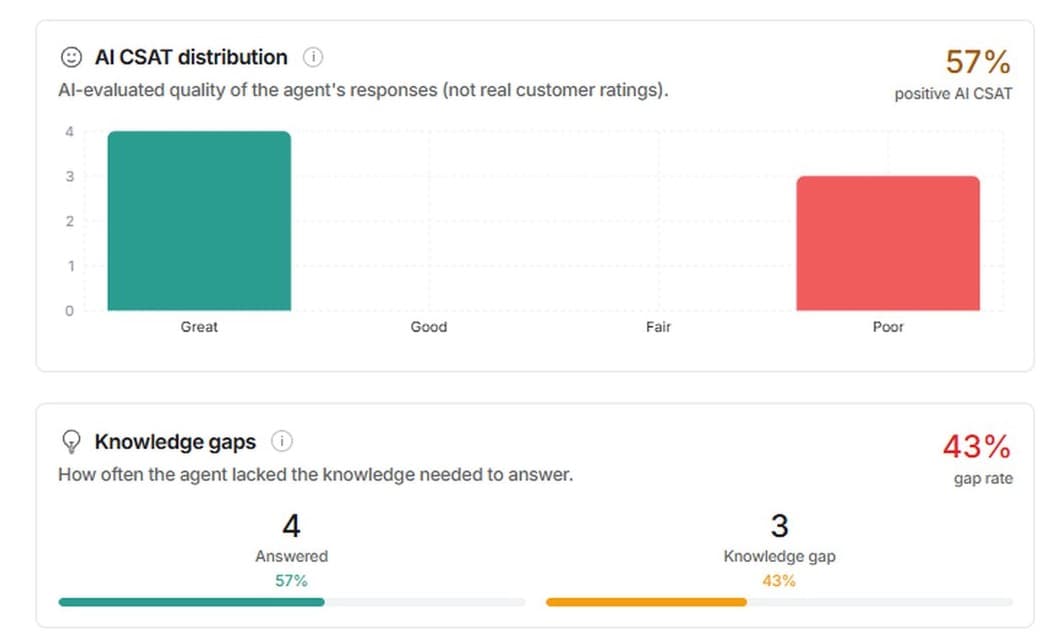
| Knowledge gap rate | Tells you which article to write next | Same gap topic two weeks running |
eesel's reports show the knowledge gap rate alongside an AI-evaluated quality score. It's worth knowing that this AI CSAT is the model grading its own replies, not real customer ratings, so pair it with your helpdesk's survey data.
For the full metric set, see AI support metrics, and when finance asks, the AI support ROI framework turns these into money.
Mistakes I'd avoid
- Automating by channel. "Turn AI on for chat" lumps password resets in with chargebacks. Automate by ticket type.
- Counting spam as a win. If 20% of your inbox is junk, an agent that closes it can post a big automation number while helping nobody. Exclude it from both the metric and the bill.
- Testing on the vendor's questions. Replay your own resolved tickets, including the ugly ones.
- Letting the agent promise actions it can't take. Either wire the action or instruct it to hand off, and test that it does.
- Going live on everything at once. One topic, a clean reopen rate, then the next.
- Leaving the knowledge base as is. Every stale article becomes a confident wrong answer, delivered instantly.
Automate your helpdesk with eesel
If you're about to do this on Zendesk, Freshdesk, Gorgias or another helpdesk, eesel's AI helpdesk teammate is built for this exact sequence. It joins your existing helpdesk, learns from your past tickets as well as your help center, replays those tickets to score itself before go-live, and lets you set every action to run, wait for approval, or stay off. eesel says most teams have their first agent live within 30 minutes, and you can follow every ticket it touches in the activity log.

Pricing is per ticket worked, not per resolution or per message: 100 free credits to start, then from $299/month for 500 tickets, with no charge for spam or tickets you tell it to leave alone. Run phase 1 on your real queue before you pay anything.