
What a support approval workflow actually covers
An approval workflow kicks in whenever someone on the team is not allowed to act alone. In support, that usually means three kinds of request:
- Money: refunds, credits, goodwill gestures and fee waivers above what an agent can give.
- Exceptions: anything outside written policy, like a return past the window or a cancel without troubleshooting. My guide to support exception management covers how to log them.
- AI work: replies and actions drafted by an AI agent that a person checks before they go out.
The money case is the oldest, and frontline agents describe it the same way across industries. Here's how one telecom support worker laid out a real credit ladder:
"Supervisors can approve up to about $300 in credits, then whatever is left gets rolled up to their managers. Floor support or SME'S have about the same limit as a supervisor, but they do not have access to things like the credit qué and a few other things."

That is a workflow, even if nobody ever wrote it down, it has limits per role and a queue only some people can see, then a handoff upward on top. Writing it down is the step one, and it belongs in your support SOPs next to the policy itself.
The request card is where most workflows break, so I start there. An approver should be able to decide from the card alone:
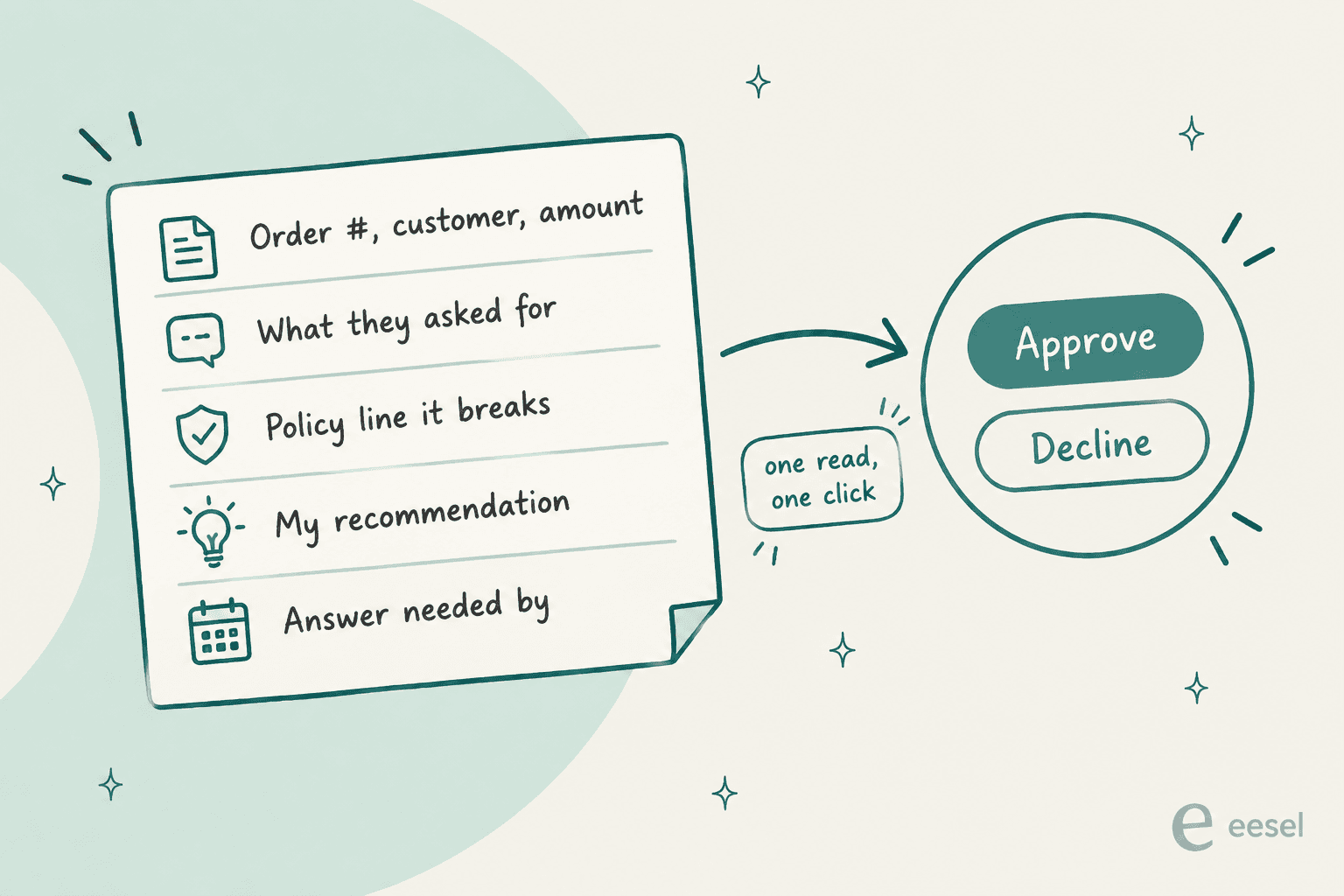
If the manager has to open the ticket and scroll the thread, and then look up the order too, the approval takes 15 minutes instead of 15 seconds. From the queue side I see the cost of it every week: the customer waits, and the agent becomes the messenger for a decision they did not make.
Decide what needs approval before you pick a tool
The tool question comes second. First thing is to decide which requests needs a second person at all, and for this I use two tests.
Test 1: is it over the agent's limit? Set dollar bands, give each band an approver, and let agents handle everything under their band without asking. Approval on tiny amounts is pure waste, as one commenter pointed out after waiting on a 37 cent refund:
"This is why for the store it is better to have a smoother process for small price adjustments, it should not be necessary to wait 15 minutes for the store manager's approval on a 37 cent refund, nor should he even have to deal with it at all, that is a waste of his time and salary to be attending to something so minor."

Test 2: can you undo it? This one matters more once AI is involved, because a refund can be reversed or written off, but a promise in an email cannot be taken back. A recent thread on what AI agents should do without approval landed on exactly this:
"imo the cutoff isnt really about the action type, its about reversibility. if the agent does something you can undo in 30 seconds, let it run. if undoing it requires an apology email to a customer, that needs approval."
Put the two tests together and you get a ladder. The numbers below are an example, not a benchmark. Pick yours from your own refund history:
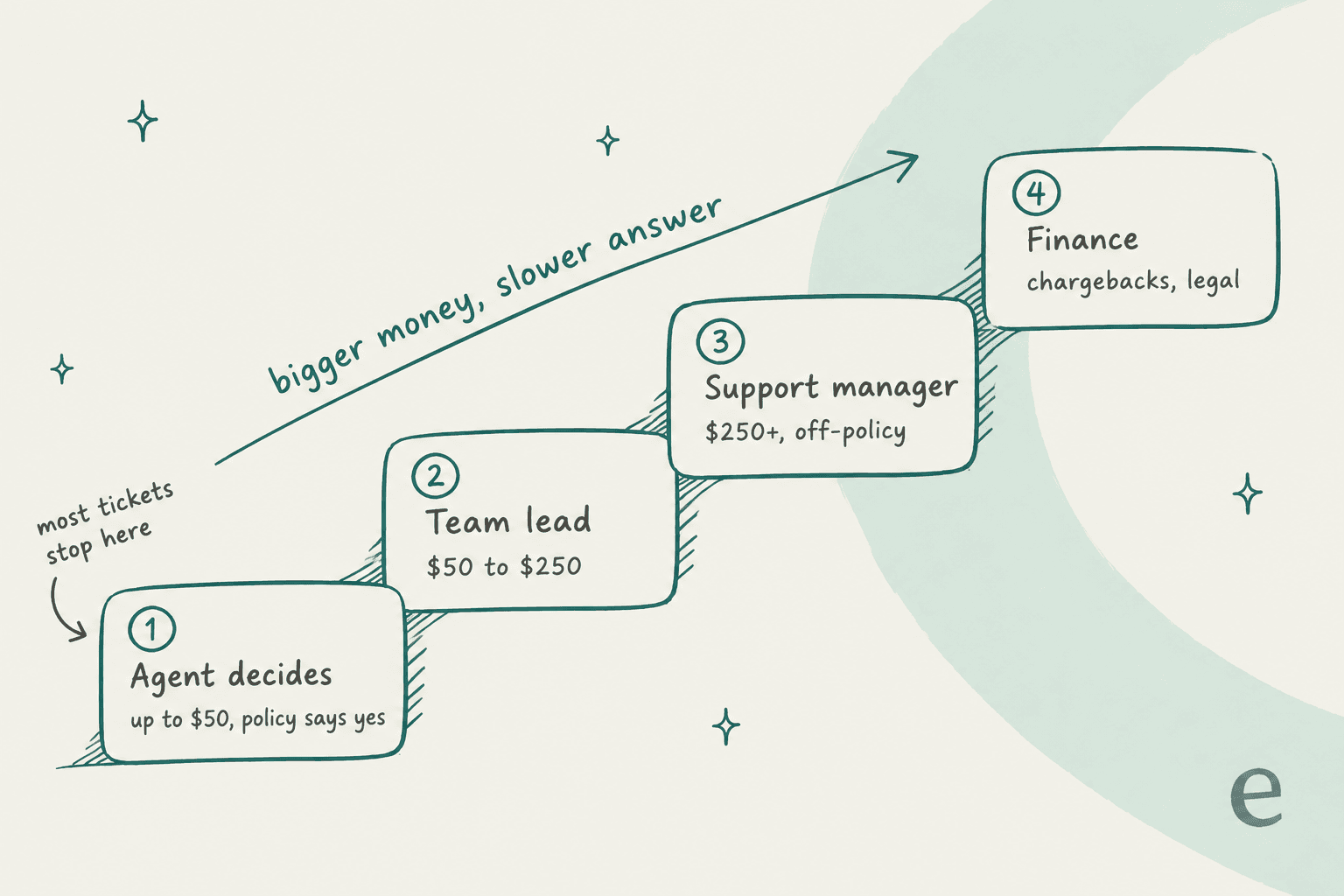
Most tickets should stop at the bottom step. In case half of your refund tickets climb the stairs, the limits is too low, and every climb adds a wait for the customer. The refund approval matrix guide goes deep on setting the bands. There is also a fair counterpoint: some approval exists for a reason, since frontline staff do not always know why a price or policy is set the way it is. The goal is fewer, better-targeted approvals, not zero.
Where each helpdesk puts approvals
I went through the help centers of the helpdesks I see most in eesel rollouts. They split into three groups: tools with a real approval object, tools built for IT approvals, and tools where "approval" means a shared draft plus a permission you take away. Pick yours to see the setup, where approvers decide, and the plan gate:
The short version: if you need an approval object with a status, a closure block and a record, Zendesk Professional, Freshservice and Jira Service Management are the only three here that ship one for tickets. Everyone else gets there with process.
Zendesk: real approval requests, from Suite Professional
Zendesk names refunds as the example use case: an agent gets a refund ticket, creates an approval request, and sends it to an approver like their team lead. The rules are strict in useful ways, per Zendesk's approvals documentation:
- Up to 5 approvers per request. With more than one, all must approve, and one denial denies the whole block.
- The approver can't be the ticket requester, the assignee or the person who created the request. Separation of duties is built in.
- Group approvers work only for groups of 30 members or fewer, and the first response counts.
- A pending request blocks the ticket from closing until everyone responds or it is withdrawn.
- Requests can't be edited after creation. You withdraw and recreate.
The gaps are worth knowing before you design around it. There is no sequential chain: if you need team lead then manager, you create one request, wait, then create the next. Zendesk documents no reminder setting either, so chasing a slow approver is a manual job of sharing the link. A Zendesk product manager also confirmed in the comments that approving by email reply is off the table for compliance reasons.
The Slack piece is the big 2026 change. Since May 2026, individual approvers get a Slack DM, and group approvals open a temporary private channel with everyone in the group:
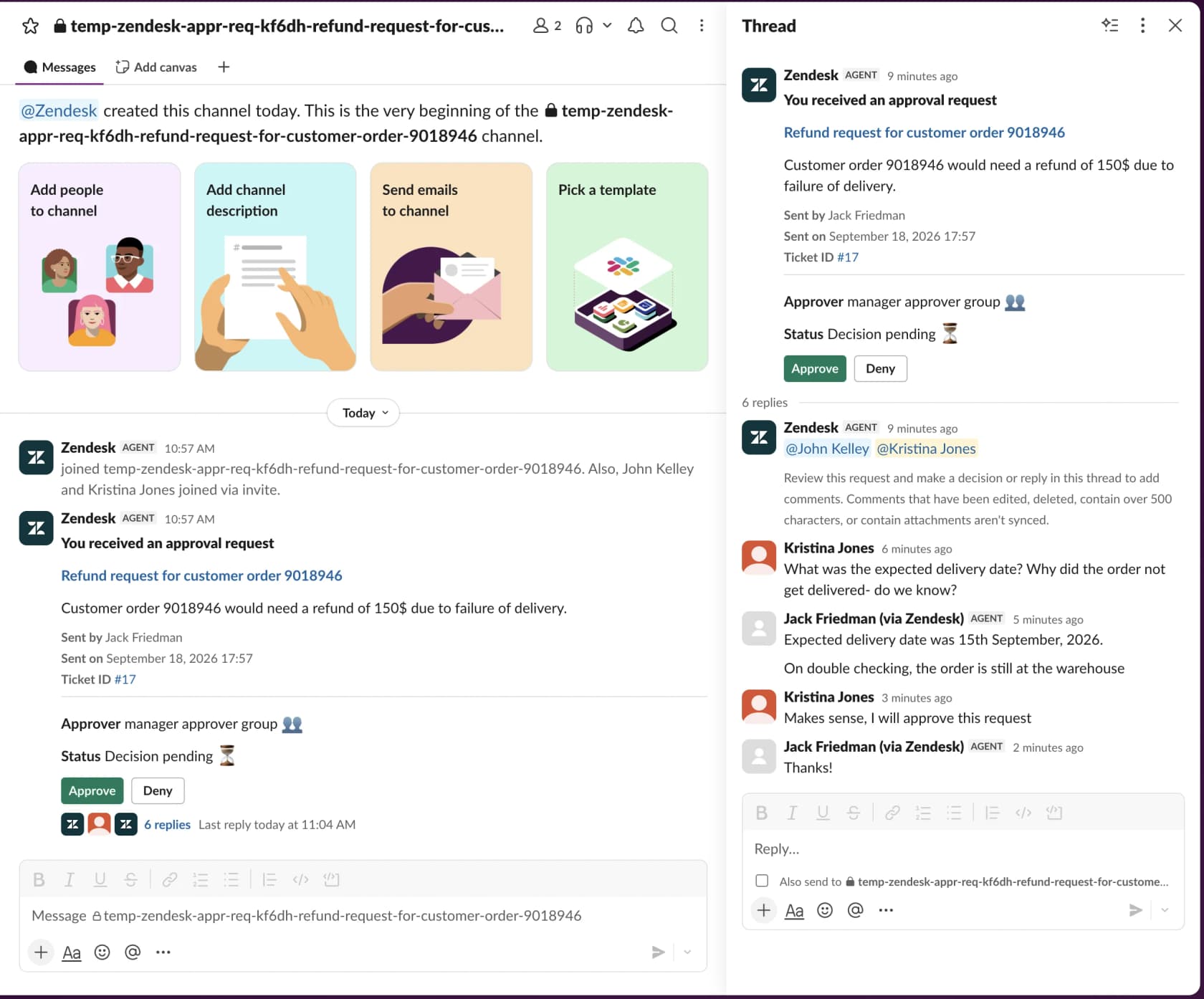
In October 2026, Zendesk added Slack comments that sync back to the ticket as an auditable record. You still can't create or withdraw a request from Slack. For automated flows, the action flows recipe can pause for up to 30 days and branch on Approved, Denied, Withdrawn or Expired, though Zendesk says advanced approval actions need its early access program.
If you are on Suite Team, the fallback is side conversations, which are a separate thread rather than an approve or deny object. Plan gates are in my Zendesk pricing breakdown, and the roles and permissions guide covers who can create requests.
Freshservice and Jira Service Management: IT-grade chains
Both tools come from the IT side and it shows, approvals there are a first-class object with a multi-step logic that the customer service helpdesks don't have.
In Freshservice, approvers sit in groups, and groups sit in a chain. Each group has a rule (Everyone, Anyone, Majority or First Responder), and the chain has one too:
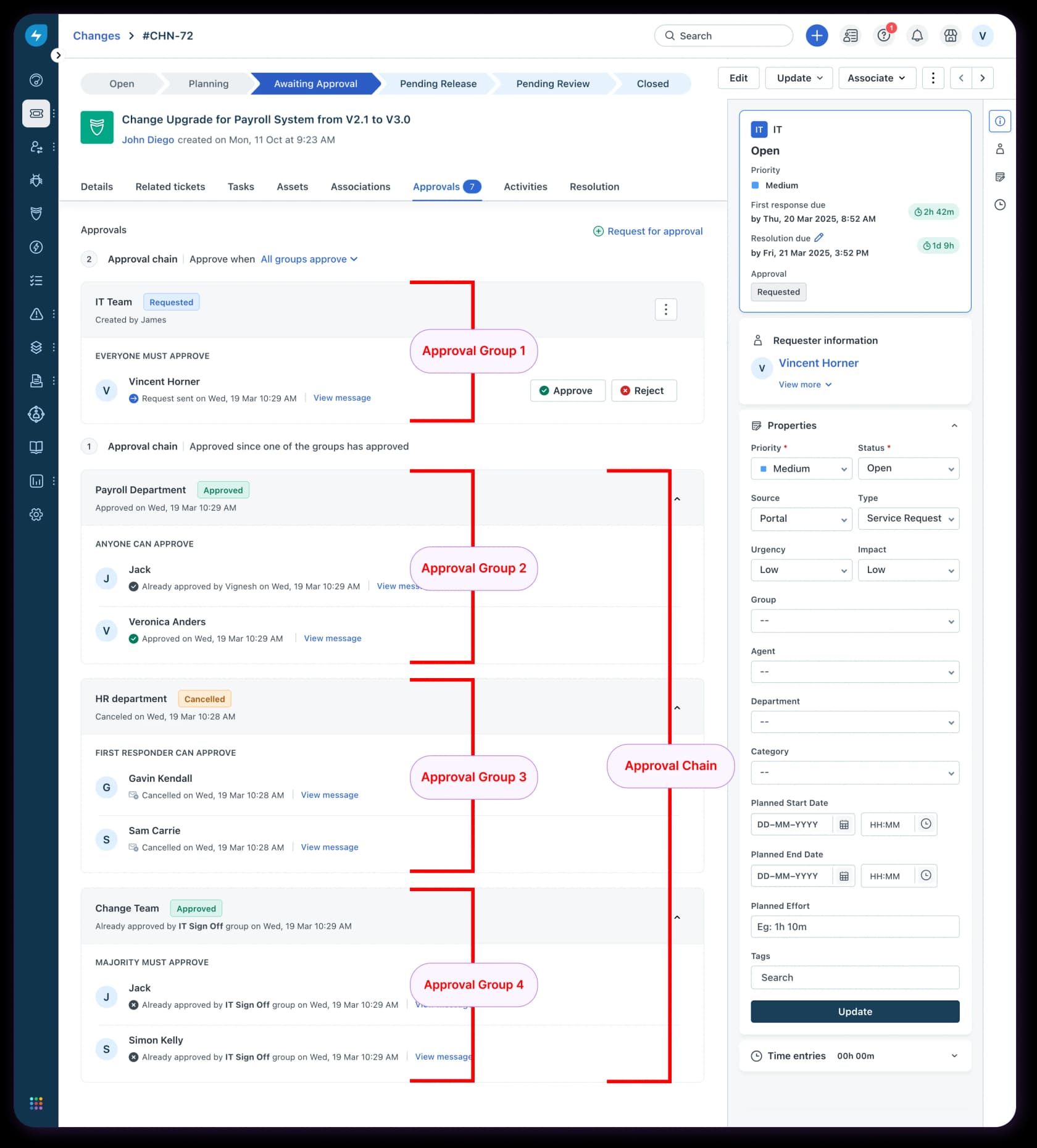
Two features I wish customer service tools copied. Freshservice can remind approvers every N hours, and approvers can delegate approvals to a peer with from and until dates, which solves the "manager is on holiday" problem. Pricing runs from $19 to $99 per agent per month billed annually, with multi-approval workflows ticked on every plan. My Freshservice pricing guide has the plan detail.
Jira Service Management adds approval as a step on a workflow status. You choose the number of approvers, where they come from, and which fields to exclude them from, like assignee or reporter. Approvers act from the help center, the email, Slack or Teams, and they don't need a JSM license. The Jira Service Management pricing post covers why the Free plan's 100 emails a day can bite approval notifications.
If your support team already share a Freshworks or Atlassian account with IT, it can be worth to run refund approvals there. If not, these tools are a lot of setup for a support team that only wants a manager's yes.
Front, Help Scout and Freshdesk: drafts and permissions
These three have no approve button for tickets. What they do have is a draft that someone else can see, plus a way for stopping certain people from sending.
Front's own suggested policy is to "always share the draft with a manager for approval on pricing questions," per its support workflows article. Shared drafts are on by default in shared inboxes, but teammates aren't notified unless you @mention them:
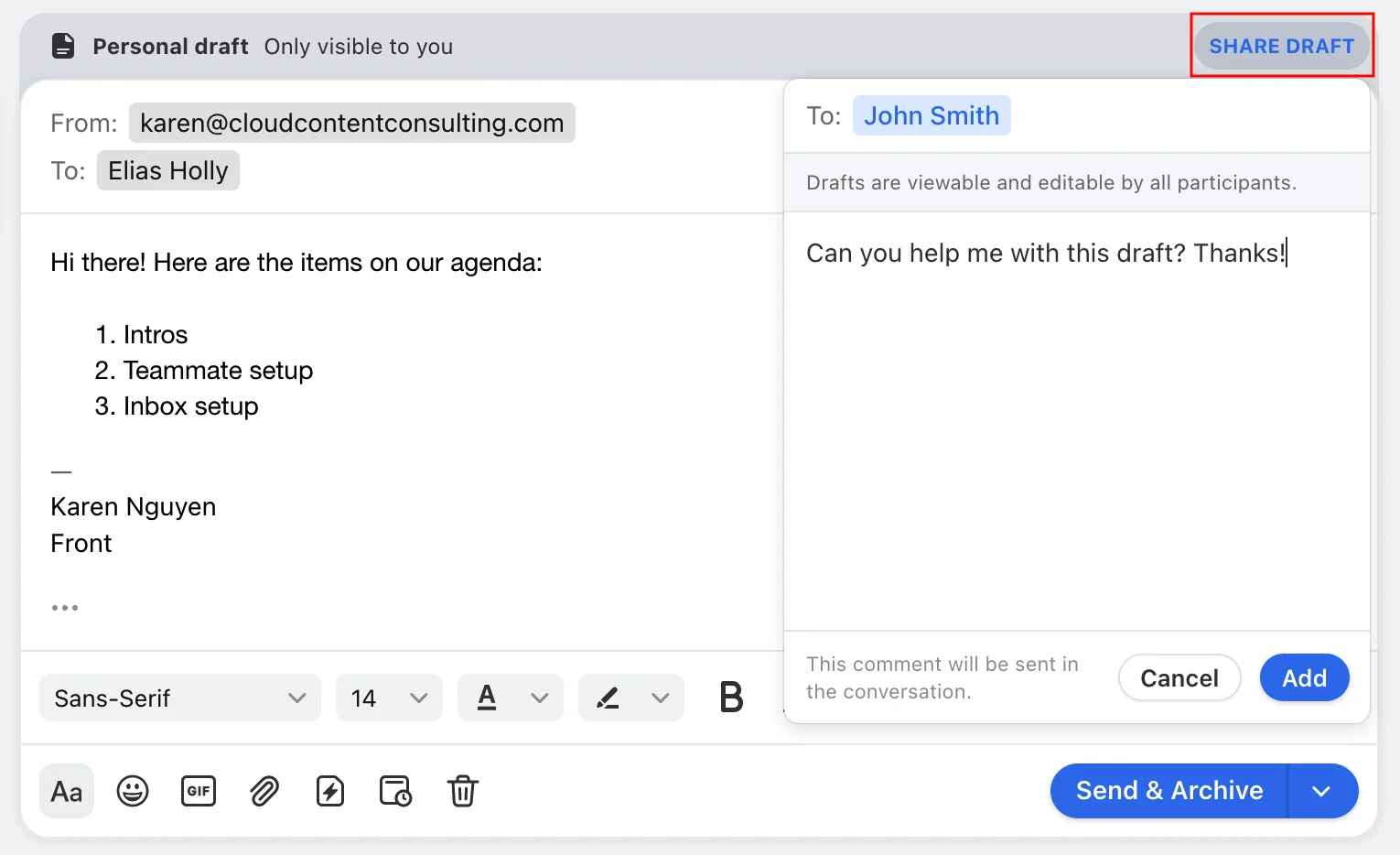
To make it a hard rule, you remove the "Send messages" permission for a group like new hires. That needs Enterprise at $105 per seat per month, and it only covers shared channels. Front also suggests a linked task assigned to a manager for approval requests, which works on all plans and bumps the conversation back up when the task is resolved. Plan detail is in my Front pricing post.
Help Scout's documented approach is simpler: new agents save responses as drafts, and a manager sends on their behalf from the Send options menu. Light Users, who can leave notes but not reply, need Plus or Pro. The catch is that Help Scout states there is no method to restrict individual conversations, so you can't say "this agent needs approval only on refund tickets." More in the Help Scout pricing breakdown.
Freshdesk documents an approval workflow, but for knowledge base articles on Enterprise, not for tickets. Ticket sign-off in Freshdesk is a process you build with roles and permissions and internal notes. The Freshdesk approvals guide walks through those options.
Gorgias and HubSpot: rights by role, approvals elsewhere
Gorgias controls refunds by role rather than by approval. Basic, Lead and Admin users can trigger a Shopify refund or cancellation straight from the ticket, Observer and Lite users can't, and I found no per-agent amount cap in the user permissions tables. The closest thing to a review step is that macro actions show up under the composer, where the agent can preview, edit or remove them before sending. If you need a manager in the loop on Gorgias, it is a role design and a team norm, which you can back up with Gorgias rules that tag refund tickets for a lead to check.
HubSpot has the most polished approval UI of the group, with Approve, Reject and Request changes on the record, but it is for deals and quotes. Tickets are not on HubSpot's list of approval objects. Ticket pipeline rules on Service Hub Professional can limit who edits tickets in certain stages, but super admins, workflows and the API can bypass them. My AI for HubSpot Service Hub guide covers what the support side can automate.
Put the dollar gate in the payment layer too
When your helpdesk can't enforce a limit, the payment system sometimes is able to. Stripe has the clearest native refund approval I found: a two-party approval rule on "Refund is created," with an optional amount threshold. A user can't approve their own request, and unapproved requests expire after 14 days, per Stripe's two-party approvals docs.
Shopify's online admin has on or off refund permissions with no amount limit. Shopify POS is different: refunds, discounts and store credit can be set to "Approval required," and a manager approves by entering their PIN. Custom POS roles are a POS Pro feature.
Approving AI replies and actions
Everything above assume a human agent asks and a human approves. With an AI agent on the queue there is a second layer on top: the AI prepares the work, and a person approves it before it reaches the customer or your systems. One Hacker News commenter described this setup well before most vendors shipped it:
"Now if AI agents are free to issue refunds or discounts by their own? Great, let's do that and suddenly most people are on board. But get ready for rampant abuse. Best solution would be an AI cyborg system where it readies a recommendation and a human swings by and approves or denies it without wasting time talking to people."
That is close to what vendors now ship, each in their own way:
- Zendesk auto assist (part of the Copilot add-on) suggests actions an agent approves before they run. Admins can mark an action as pre-approved, and Zendesk's own guidance is that write actions like refunds should stay agent-approved. My guide to auto assist actions has the setup.
- Front Autopilot rules have a "Hold reply for review" field that creates a draft instead of sending, and Front recommends starting there before full automation.
- Help Scout AI Drafts are written for agents to review and revise before sending, on Plus and Pro.
- Gorgias AI Agent has a "Customer confirmation" setting, but note who approves: the shopper confirms, not a manager. It turns on automatically for irreversible actions like canceling an order.
- Stripe applies default approval rules to refunds created by agent-tagged API keys. Even the payment layer treats AI-initiated refunds as a separate actor.
Here's the flow I'd aim for on a refund request when AI is in the mix:
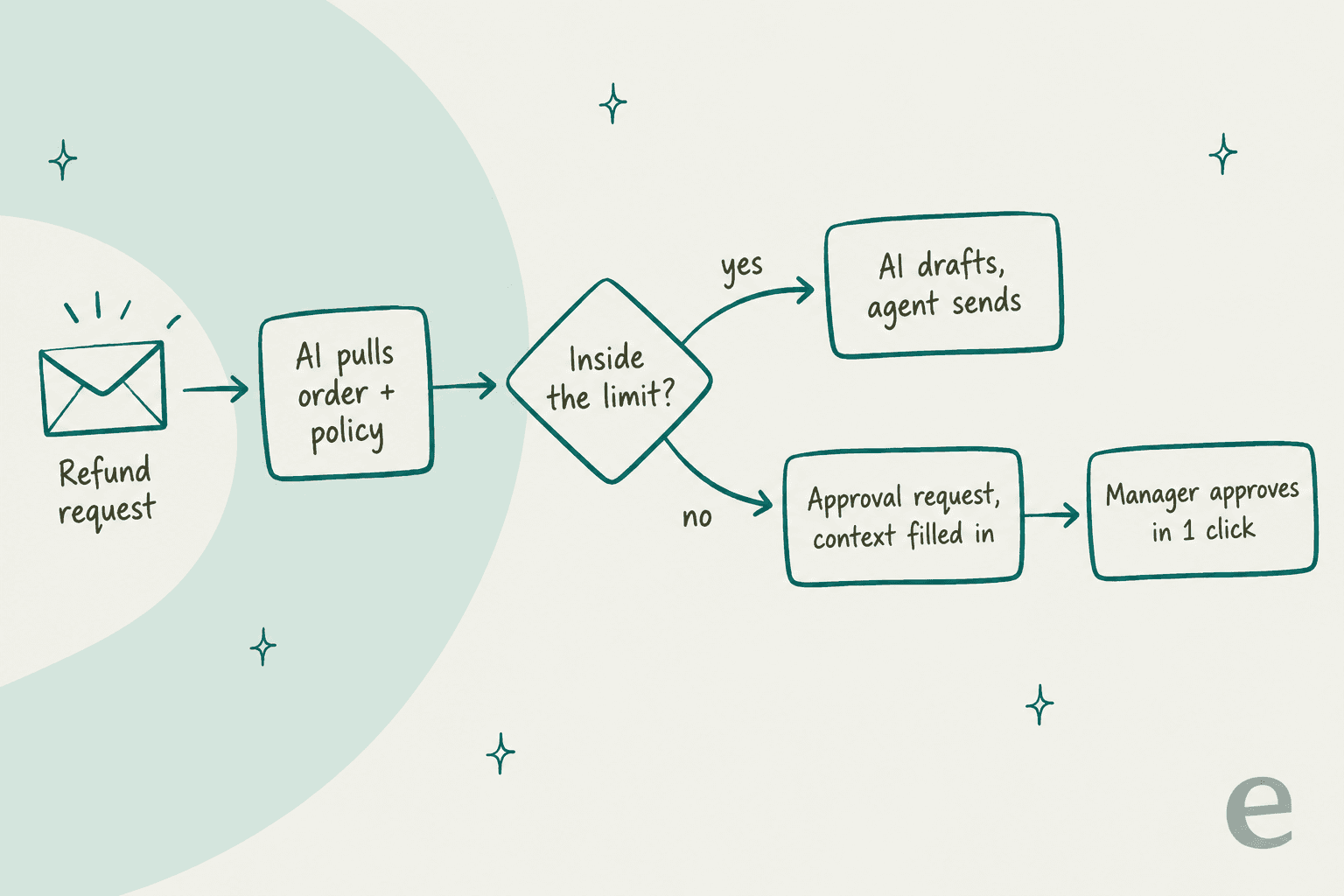
The part people underestimate is what the reviewers actually do with AI drafts. In one real-traffic trial on an e-commerce Zendesk inbox, triage was 93% accurate, but agents sent only 12% of AI drafts as-is. The pattern was glance and rewrite: an 8 to 15 sentence draft cut down to 1 to 3 sentences. About 65% of the rewrites were length and tone, the kind of thing you fix by training on the team's own sent replies, and only about 5% were the AI being factually wrong.
Two lessons from the queue side. First, a yes or no button is not enough. A Freshdesk customer told me they needed to edit AI drafts before sending, because approve-as-is or reject forced them into copy and paste. Second, check that the edited version is the one that sends. A teammate once flagged a Freshdesk customer whose edited drafts went out as the original unedited version, which made the workflow unusable until it was fixed. Test that path before you trust it.
If you are weighing AI copilot tools, these two details tell you more than any demo. Freshdesk's own take on drafting is in my Freshdesk AI draft replies post.
How I run approve-first AI with eesel
eesel's AI teammate is designed the way you would onboard a new hire. It doesn't get an autonomy switch on day one. It earns autonomy through reviewed work. In practice, that comes down to one setting per action, chosen per agent, as described in the Actions and Approvals docs:
- Auto: runs on its own, unless instructions say to ask first in a given situation.
- Needs approval: the agent prepares the action, and a person approves or denies it before anything happens.
- Disabled: the agent can't use it at all.
Actions are grouped into Read and Write, so a common starting point is Read on Auto and most of Write on Needs approval, with low-risk actions like internal notes on Auto:
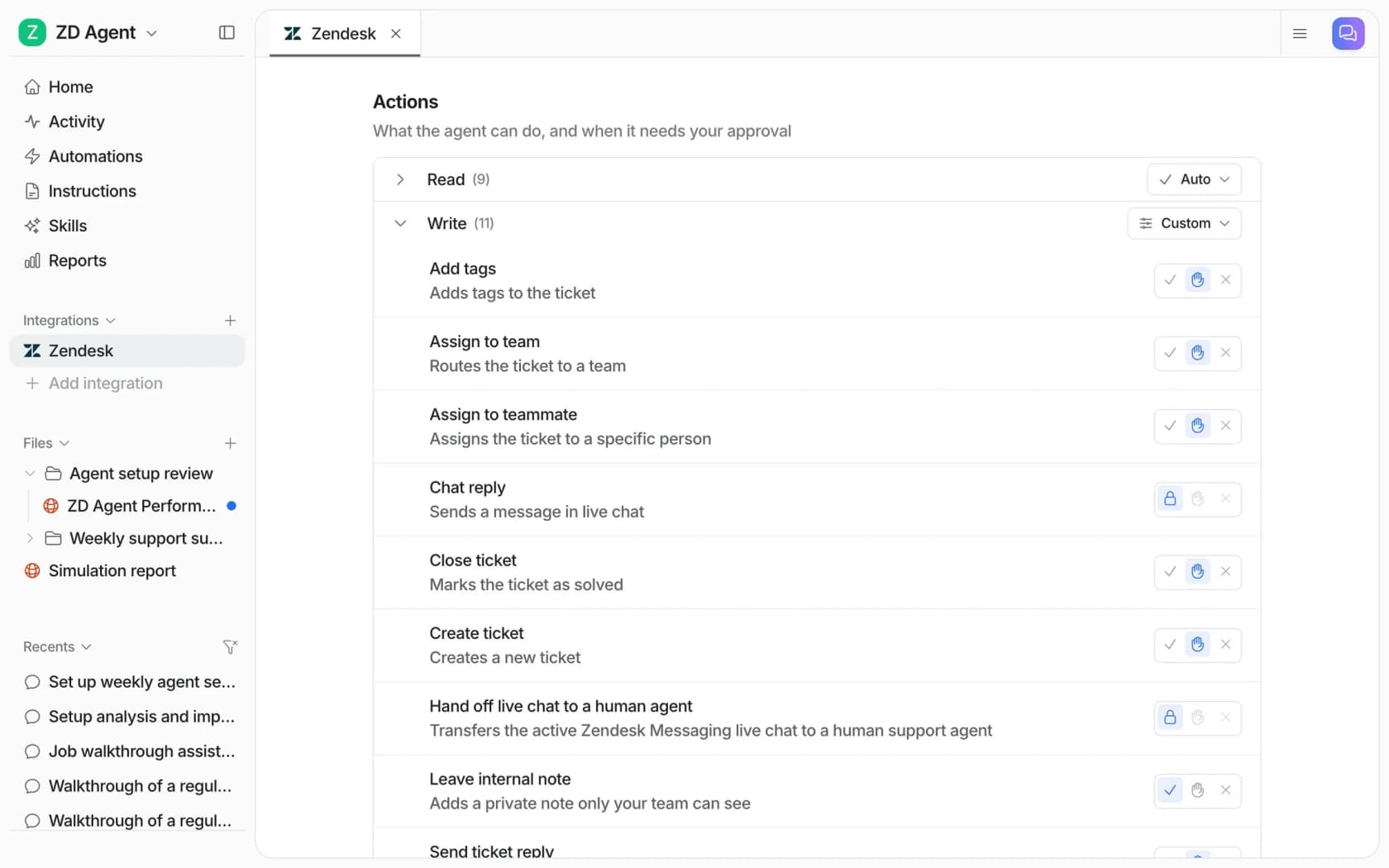
When an action needs approval, the approver sees the exact reply text or refund amount (or the tag), then picks from three buttons. Approve runs it now. Always allow runs it and moves that action to Auto from then on, for that agent only. Deny skips it, and the agent carries on without it. That "Always allow" button is the graduation step: you approve refunds on a storefront agent five times, they look right, and you let it go.
The approval lands where the approver already works, which matters, since the Zendesk admin I quoted at the top didn't want one more tab to watch. Approvals show up in the eesel dashboard, as a card in the Slack thread the run started from, as a link in an email or helpdesk note, and in the terminal:
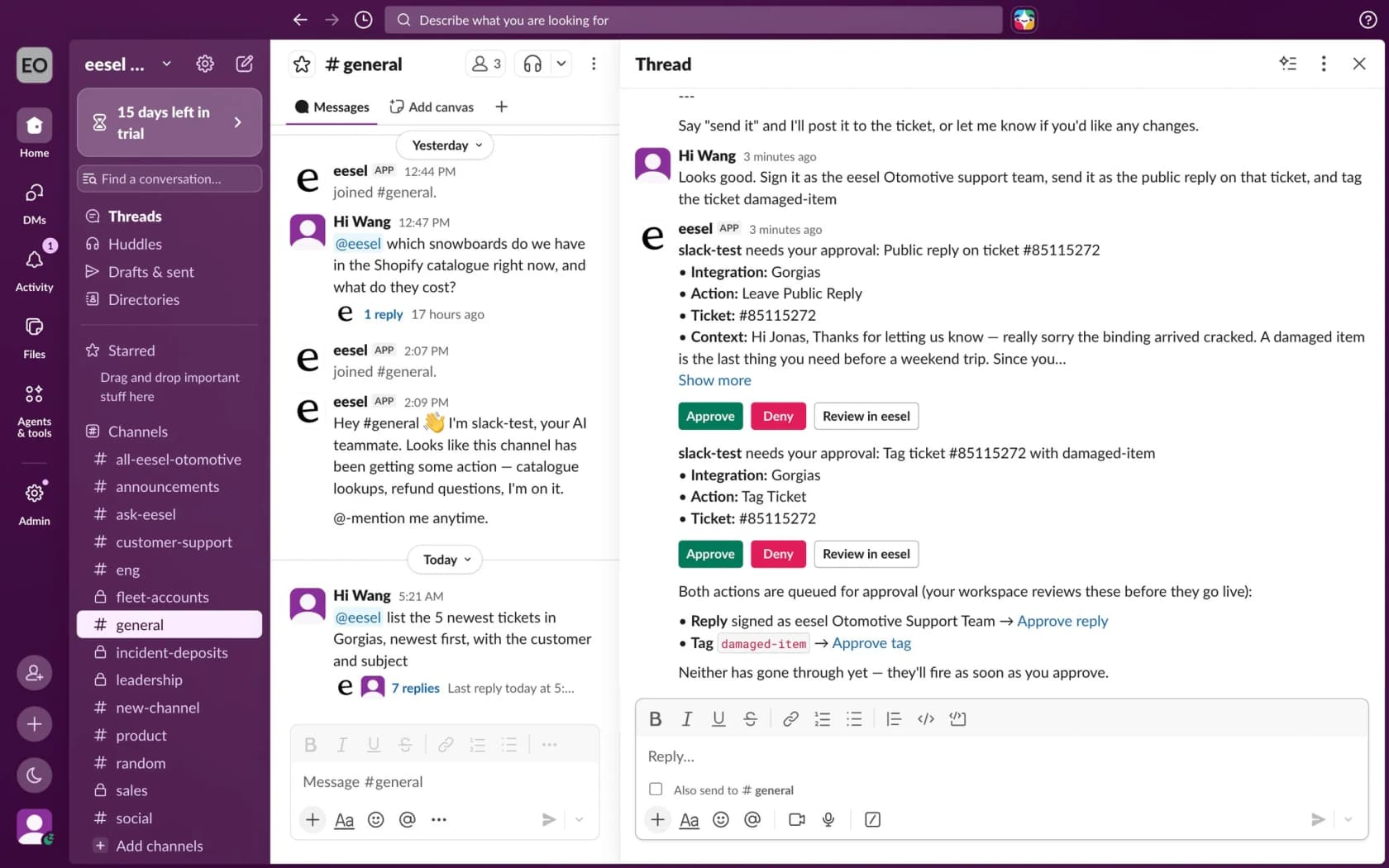
A few rules I lean on when setting up a new customer:
- Exception policies go in plain English. You can leave replies on Auto and write "ask before replying to anything about refunds," and the agent asks only for those cases. The docs include templates for exactly this, like escalating any refund over $100 or skipping the photo request on damage claims under $50. This is how one support admin taught their agent a "troubleshoot before you cancel" rule: by correcting it like a new hire.
- Only editors can approve. Owners and Editors decide. Viewers can see approvals but not act on them, and in Slack the clicker is matched to an editor by email.
- Nothing auto-approves on a timeout. A pending action stays pending, and the agent leaves a note that a person will follow up. Every decision shows who decided and when on the Activity page.
- Nothing runs until you create an automation. Connecting Zendesk doesn't make the agent reply to anyone.
For teams who live in a terminal, or who want Claude Code, Codex or Cursor to manage approvals, the eesel CLI drives the same agent as the dashboard. eesel approvals lists what's waiting, eesel approvals approve <id> --always approves and graduates the action in one go, and eesel integrations zendesk actions prints every action with its approval setting. CLI writes follow the same permissions, so a viewer's writes are always held for an editor.
Before any of this touches a customer, I ask for a simulation first. With a helpdesk connected, the agent replays real past tickets and compares its answers to what the team sent. In the docs example, 17 of 20 sampled tickets matched, with a score per theme and a ranked list of fixes. That tells you which actions are ready for Auto and which should stay behind an approval. For the bigger picture, see my posts on AI teammates and the AI helpdesk agent.
Common approval workflow mistakes
- Approving everything. If every refund needs a manager, the manager becomes the queue. Raise agent limits until most tickets stop at the bottom step.
- A thin request. "Can I refund this?" forces the approver to reconstruct the ticket. Use the five-line card: order, ask, policy line, recommendation, deadline.
- No reminder or backup approver. I found no approval reminder setting in Zendesk's or Jira's docs. If your tool has none either, set an internal SLA for approvals and name a backup.
- No written record. An approval in a DM is invisible to the next agent. Keep the decision on the ticket so it feeds your exception log and future policy changes.
- Graduating AI too early. Move an action to automatic after reviewed work, not after a good demo. The AI guardrails entry covers the other limits worth setting, and prompt injection is the reason refund actions deserve extra care.
- Forgetting where escalations go. Approval and escalation are cousins. If an approval is denied, the agent needs a clear path, which is what AI escalation and cross-team escalation cover.
When policies change, update the approval rules on the same day also. My policy change management guide covers keeping agents, macros and AI instructions in sync, and support agent access control covers scoping what each seat, including the AI seat, can touch.
Try eesel for approve-first AI on your queue
If you run Zendesk, Freshdesk, Gorgias or another helpdesk eesel connects to, eesel's AI helpdesk teammate can start the way you'd start any new hire on refunds: it drafts the reply or the refund, and you approve it from Slack, the ticket or the dashboard. Actions that keep coming back right get "Always allow," and anything that costs money can stay behind your OK for as long as you want. The reports view shows how many actions were approved, rejected or still waiting, per tool:

Approvals cost nothing extra. A ticket or chat is 1 credit however many replies and actions it takes, with unlimited seats; the free plan has 100 credits and no card, and paid plans start at $299 a month for 500 credits. Try eesel on your own queue with every reply on Needs approval, and see how many you would have sent as-is.
Frequently Asked Questions
What is a customer support approval workflow?
Does Zendesk have approval workflows for support tickets?
Can Freshdesk require manager approval before a refund?
How do I approve AI-drafted replies before they send?
What should need manager approval in customer support?
How do I stop approval workflows from slowing down customers?
Can an AI agent issue refunds without approval?



Article by
Riellvriany Indriawan
Riell is a designer and writer at eesel AI with about two years of experience researching CX platforms, AI chatbots, and helpdesk software. She combines her design background with a sharp eye for how these tools actually look and feel in practice — making her comparisons unusually visual and user-focused.