Why agencies are a different problem than in-house support
Most "AI customer service" writing assumes you're a brand running support for your own customers. Agencies are not that. I work on a support team, and the agencies and outsourcers I talk to have a fundamentally different shape: you're running support as a service, for several clients at once, and your profit is the gap between what you bill and what it costs you to deliver.
That changes which questions matter. An in-house team asks "will this improve CSAT?". An agency asks "will this improve CSAT and widen my margin on the Acme account and let me onboard the next client without hiring three more agents?". Those are not the same question, and a tool that only answers the first one is only half useful to you.
It also raises the stakes on getting it wrong. When your own AI bot gives a customer a bad answer, that's an internal problem. When an AI you deployed on a client's helpdesk gives their customer a bad answer in their brand voice, that's a client-relationship problem, and those are the ones that lose accounts. So the bar for control is higher for agencies than almost anyone else.
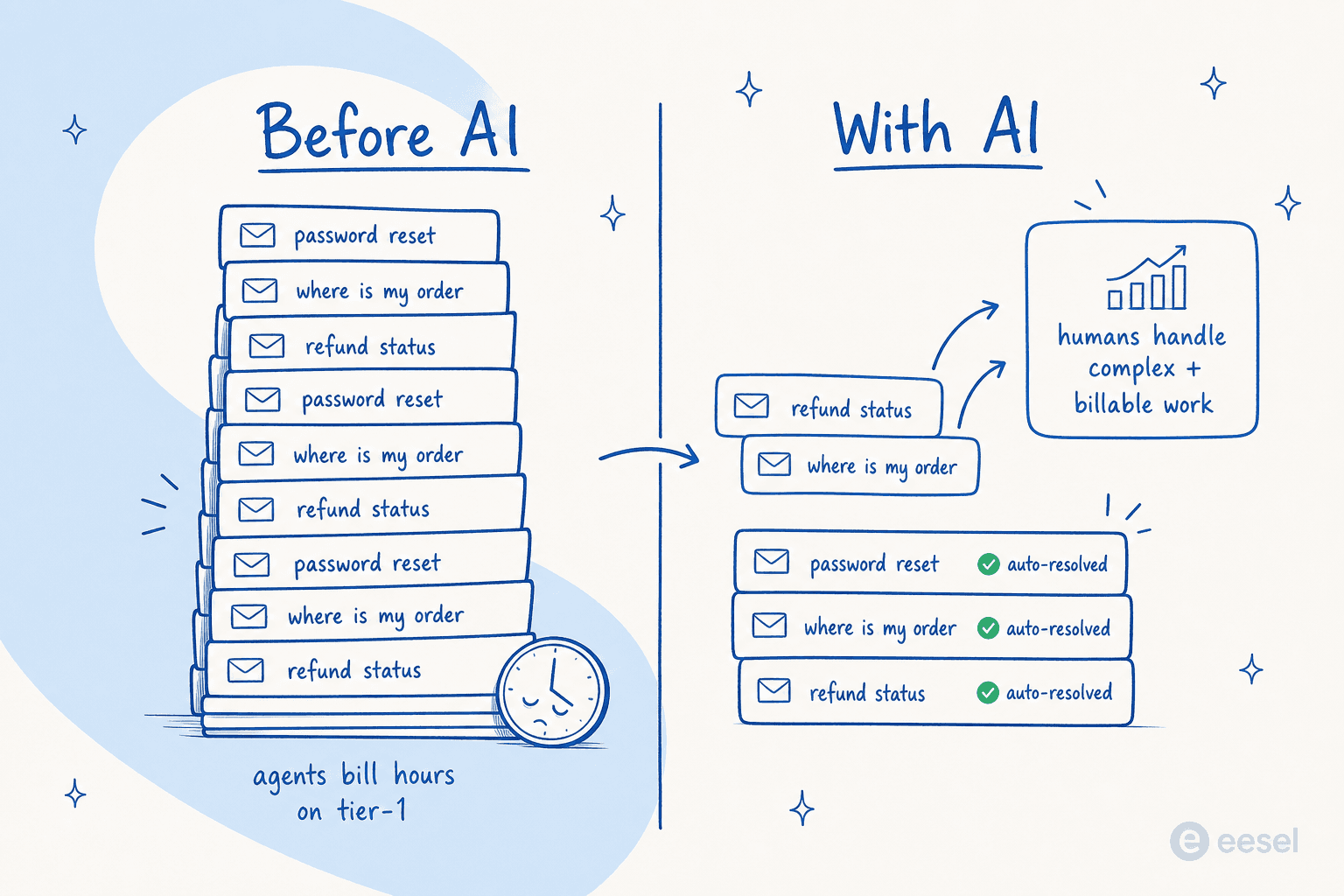
The economics are real, and they're well documented elsewhere. eesel's own breakdown of how much AI saves in support and the AI agent vs human agent cost comparison both land on the same point: the savings come from the repetitive tier-1 volume, not from replacing your senior people. For an agency that's the whole game, because tier-1 is precisely the work that's hard to bill at a premium.
What "AI customer service for agencies" actually means
Strip away the marketing and there are really three jobs an AI helpdesk agent does for an agency:
- Deflect repetitive tickets before a human touches them, on a client-facing chat widget or directly inside the client's helpdesk.
- Draft replies for your agents so a person reviews and sends instead of writing from scratch, which is the AI copilot for customer service pattern.
- Triage and route incoming tickets, tag them, and leave a suggested reply as an internal note for the human, which is how a lot of AI customer service workflows start.
The thing nobody tells you up front: the strongest agencies don't pick one, they sequence them. You start with drafting and triage because they're low-risk, you build trust with the client's data, and only then do you let the AI answer customers directly. More on that ladder in a second.
This is also where the difference between a real AI agent and a glorified FAQ bot shows up. If you've seen the AI agent vs rule-based chatbot distinction, it matters double for agencies: a decision-tree bot needs you to hand-build flows for every client, which doesn't scale across a portfolio. An agent that learns from each client's existing knowledge base and past tickets does.
The hard part: keeping clients separate
Here's the problem that's unique to you. A brand sets up one AI agent on one knowledge base. You need many, and they cannot leak into each other. Client A's AI must never answer a question using Client B's docs, pricing, or tone. If it does, you've got a confidentiality breach and an embarrassing reply in the same incident.
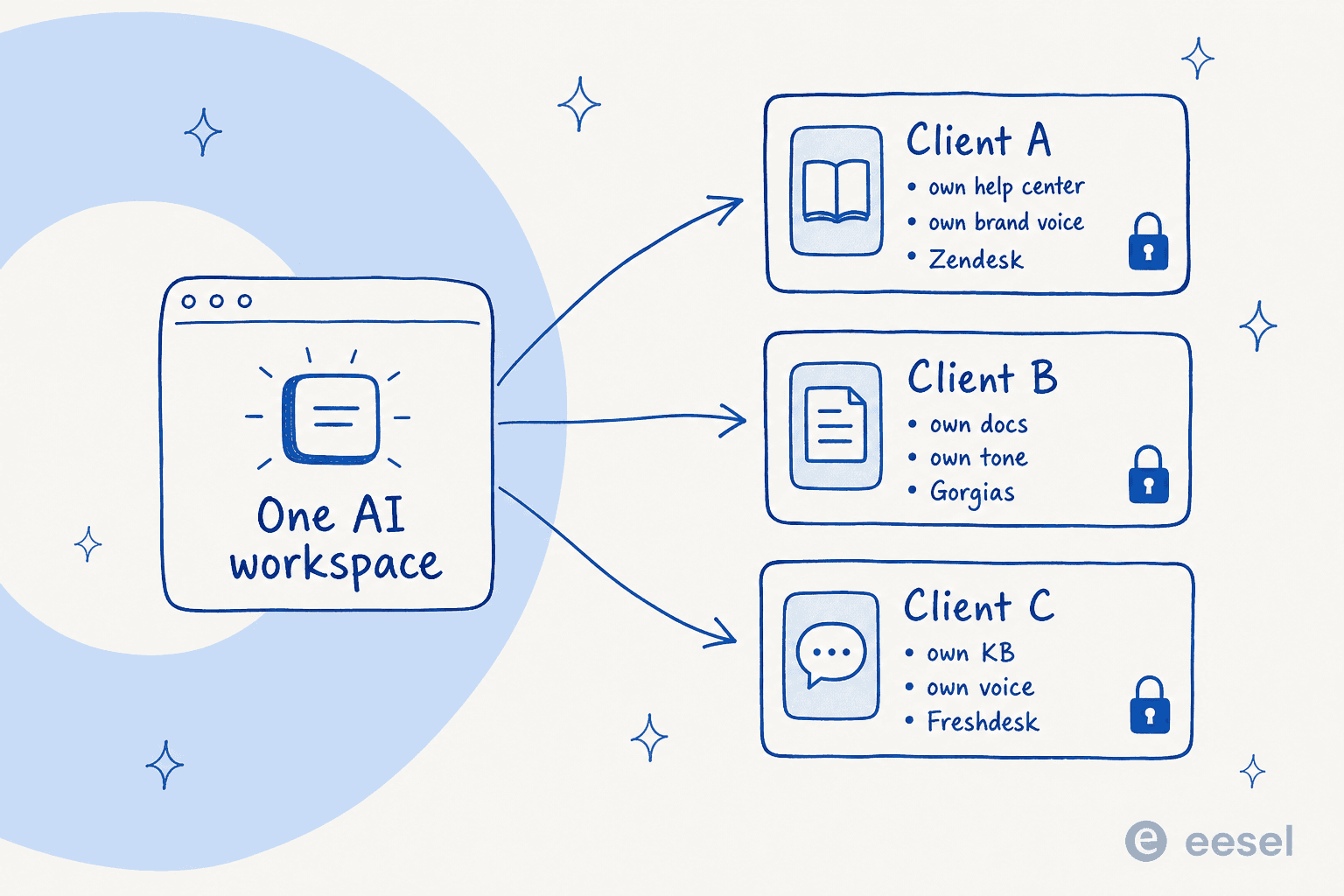
So the first capability to test in any trial is multi-agent isolation: can you run a separate agent per client off one account, each scoped to only that client's sources? This is more common than you'd think as a real need. We've had a multi-client agency power user running twenty-two separate namespaces across more than ten client companies on eesel, and the thing they asked us for explicitly was a proper reseller setup, because the multi-client pattern was already how they worked. The demand is there; the tooling has to meet it.
A few things that fall out of multi-client isolation, all worth checking:
- Per-client brand voice. Each client's AI should write like that client, not like a generic bot. The good tools learn tone from the client's own sent replies, so Client A sounds breezy and Client B sounds formal without you writing a style guide for each.
- Per-client knowledge. Each agent trains on that client's help center, past tickets, and internal docs. Training on a client's own historical tickets is consistently the single most-requested capability I see, and for agencies it's how you get a new client's agent useful on day one instead of month three.
- Per-client helpdesk. Your clients won't all be on the same tool. One's on Zendesk, one's on Gorgias, one's on Freshdesk or Front. The AI layer has to sit on top of whatever each client already runs, rather than forcing a migration.
- Per-client reporting. You need to show each client what their AI did this month, separately. Clean per-client analytics is also what justifies the retainer at renewal.

Roll it out as a trust ladder, not a switch
The fastest way to lose a client is to flip on full auto-reply and let the AI confidently send a wrong answer to their customers. Every experienced support buyer I've spoken to insists on the same thing: the AI should only answer what it's sure about, and quietly leave everything else for a human. One CX lead running 7,000 tickets a month put it about as plainly as it gets, that they needed an AI that only handles the tickets it's confident to handle, and leaves all the others alone.
So roll out in stages, per client.
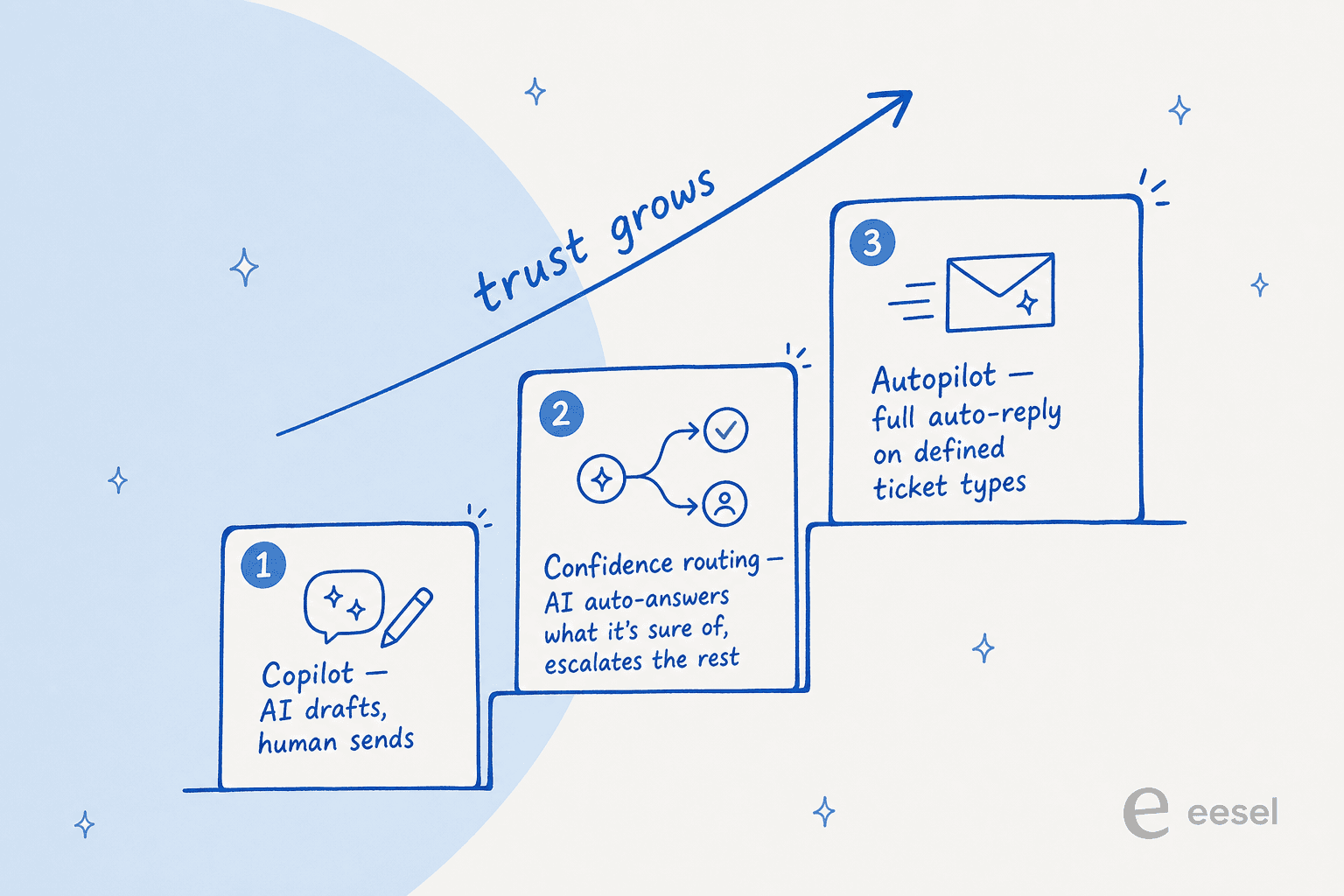
- Copilot. The AI drafts a reply, your agent reviews and sends. Nothing reaches the customer without a human. This is where you and the client both build confidence in the answers, and where you spot the gaps in their knowledge base.
- Confidence-based routing. Now the AI auto-answers the tickets it's highly confident about and escalates the rest to a human. The key is that the threshold is yours to set, per client, per ticket type. A good tool also lets you transfer cleanly to a human when it bails, and lets you tune the confidence threshold and escalation rules rather than forcing all-or-nothing.
- Autopilot on defined ticket types. Once a client is comfortable, you let the AI fully own specific categories, order tracking, password resets, return status, where it's proven itself, while everything else still routes to people.
The reason this matters so much for agencies: the staged approach is how you can promise a nervous client "the AI will never send anything it isn't sure about" and actually mean it. That promise is often what closes the deal internally.
The margin math, with your numbers
This is the part agency owners actually care about, so let's make it concrete. The savings come from the auto-resolved tier-1 tickets: each one is a ticket your team no longer pays an agent to handle, minus what the AI costs. Plug in your own numbers:
The numbers above are illustrative, set your real cost-per-ticket and a conservative auto-resolution rate. The point the calculator makes is the structural one: on a fixed client retainer, every auto-resolved ticket is margin you keep. That's why the AI's pricing model matters so much for you specifically.
This is the trap to avoid: per-resolution pricing. It sounds fair until you realize it penalizes you for the AI doing its job well, and it spikes during your client's busy season exactly when your retainer is fixed. eesel's flat, usage-based pricing, $0.40 per ticket with no per-seat platform fee, keeps that spread predictable, so a Black Friday surge doesn't quietly turn a profitable account into a break-even one. The deeper reasoning is in the AI customer support cost savings breakdown.
There's an upside most agencies miss, too. Once you've got AI triaging tickets, you can spot the ones that are really new-business or out-of-scope and turn them into billable work. A support lead at an IT-services firm I spoke with described AI triage as the moment they could "switch from support to billing", flagging tickets that should be paid services rather than free support. AI doesn't just shrink your cost base, it can surface revenue.
What to look for in a tool (the agency checklist)
Not every AI customer service platform is built for the multi-client reality. When you're evaluating, weight these heavily:
| What to check | Why it matters for an agency | Red flag |
|---|---|---|
| Multiple agents / workspaces per account | One client per agent, isolated data and voice | "One bot per subscription" |
| Trains on each client's own tickets + docs | New clients useful fast, not after months | Manual flow-building per client |
| Works on the client's existing helpdesk | No forced migrations to sell internally | Only works on one vendor |
| Confidence-based routing you control | You can promise "only answers when sure" | All-or-nothing auto-reply |
| Copilot and full-auto modes | You can ladder up trust per client | Auto-only, no draft mode |
| Flat / usage-based pricing | Protects margin on fixed retainers | Per-resolution billing |
| Per-client reporting | Justifies the retainer at renewal | Account-wide stats only |
| Multilingual out of the box | Serve clients in multiple markets | English-only widget |
| Self-serve setup | Onboard a client in minutes, not a quarter | "Talk to sales to start" |
A couple of these deserve a flag. Self-serve setup is underrated for agencies specifically, because your onboarding speed is your sales velocity. If standing up a new client's agent takes a six-week integration project, you can't profitably take on small accounts. And the build-vs-buy question comes up a lot: yes, you could wire up the raw Claude or OpenAI API yourself, but then prompts, retrieval, and maintenance become your problem forever. As one of our customers put it about building their own, they didn't want to invest their time into something they'd have to maintain. The full case is in our build vs buy guide.
For broader options, eesel's roundups of the best AI helpdesk software, the best AI for customer support automation, and companies using AI for customer service are good places to compare before you trial anything.
Common mistakes agencies make
A few patterns I see go wrong, so you can skip them:
- Flipping to full auto on day one. You haven't earned the client's trust or proven the answers yet. Start in copilot mode. Always.
- Skipping past-ticket training. A client's old tickets are the richest source of how they actually answer. An agent trained only on a thin help center sounds generic and gets corrected constantly.
- Ignoring the pricing model until the bill arrives. Model it against your client's seasonal peak, not their average month. Use the calculator above.
- No knowledge-gap loop. The best agencies treat the AI's "I don't know" moments as a to-do list, feeding the gaps back into the client's docs. Track it with proper AI customer service metrics and the KPIs that matter.
- Letting the bot hallucinate on empty retrieval. If the knowledge base has nothing relevant, the AI should say so or escalate, never invent an answer. This is non-negotiable when it's your client's customer on the other end.
If you're scaling support more broadly, the scaling guide for startups and the customer support AI implementation guide both carry over well to the agency model.
Try eesel for your client portfolio
If you're running support across several clients, eesel was built for exactly this shape of problem. You spin up a separate AI agent per client off one account, each trained only on that client's help center and past tickets, each speaking in that client's voice, each sitting on top of whatever helpdesk they already use, Zendesk, Gorgias, Freshdesk, Front, or a plain inbox.

The part agencies tend to like most: you can simulate a new client's agent against their historical tickets before a single customer sees it, so you know the resolution rate and catch the gaps in a trial rather than in production. Roll each client up the trust ladder at their own pace, copilot, then confidence-routed, then autopilot, and bill the margin you free up. It's free to try, self-serve, and live in minutes rather than a quarter-long project.
Frequently asked questions
What is AI customer service for agencies?
How much does AI customer service for agencies cost?
Can AI handle support for multiple clients without mixing up their data?
How do I roll out AI support for a client without risking the relationship?
Should an agency build its own AI support tool or buy one?
Does AI customer service work in languages other than English?


Article by
Riellvriany Indriawan
Riell is a designer and writer at eesel AI with about two years of experience researching CX platforms, AI chatbots, and helpdesk software. She combines her design background with a sharp eye for how these tools actually look and feel in practice — making her comparisons unusually visual and user-focused.