
What a support refund approval matrix is (and why one limit isn't enough)
Most teams start with a single rule: "agents can refund up to $X, anything above goes to a manager." It works until the first $20 refund for a customer who has asked for six refunds this quarter, or the first $400 refund that is obviously the warehouse's fault and should go through in a minute.
A matrix fixes that by adding a second axis. The amount sets the starting approver, and the risk signals move it up or down. Here are the dimensions I would put in it, in the order they matter:
| Dimension | Why it matters | Moves the approver |
|---|---|---|
| Refund amount | The cost of a wrong yes | Sets the starting band |
| Inside or outside policy | Return window, final sale, proof of damage | Outside policy moves up one level |
| Customer refund history | Repeat refunders are where abuse hides | Repeat refunder moves up one level |
| Refund method | Store credit and replacements keep the money in the business | Credit or replacement can move down one level |
| Open dispute or chargeback | Refunding now can pay twice | Always goes to the disputes owner |
That last row is not theoretical. Stripe charges a $15.00 dispute fee for each dispute you receive, plus another $15.00 if you counter it, and PayPal's chargeback fee is $20.00 in the US. Neither processor gives back the original transaction fees when you refund, either: Stripe says its "processing fees from the original transaction aren't returned" in its refunds docs.
Shopify store owners learn the chargeback rule the hard way:
"I also know store owners who have been burnt by refunding and then getting a chargeback. They lose 3x (the order, refund and chargeback). A refund is not a guarantee to close or prevent a chargeback. If a chargeback is in progress, absolutely do not refund."

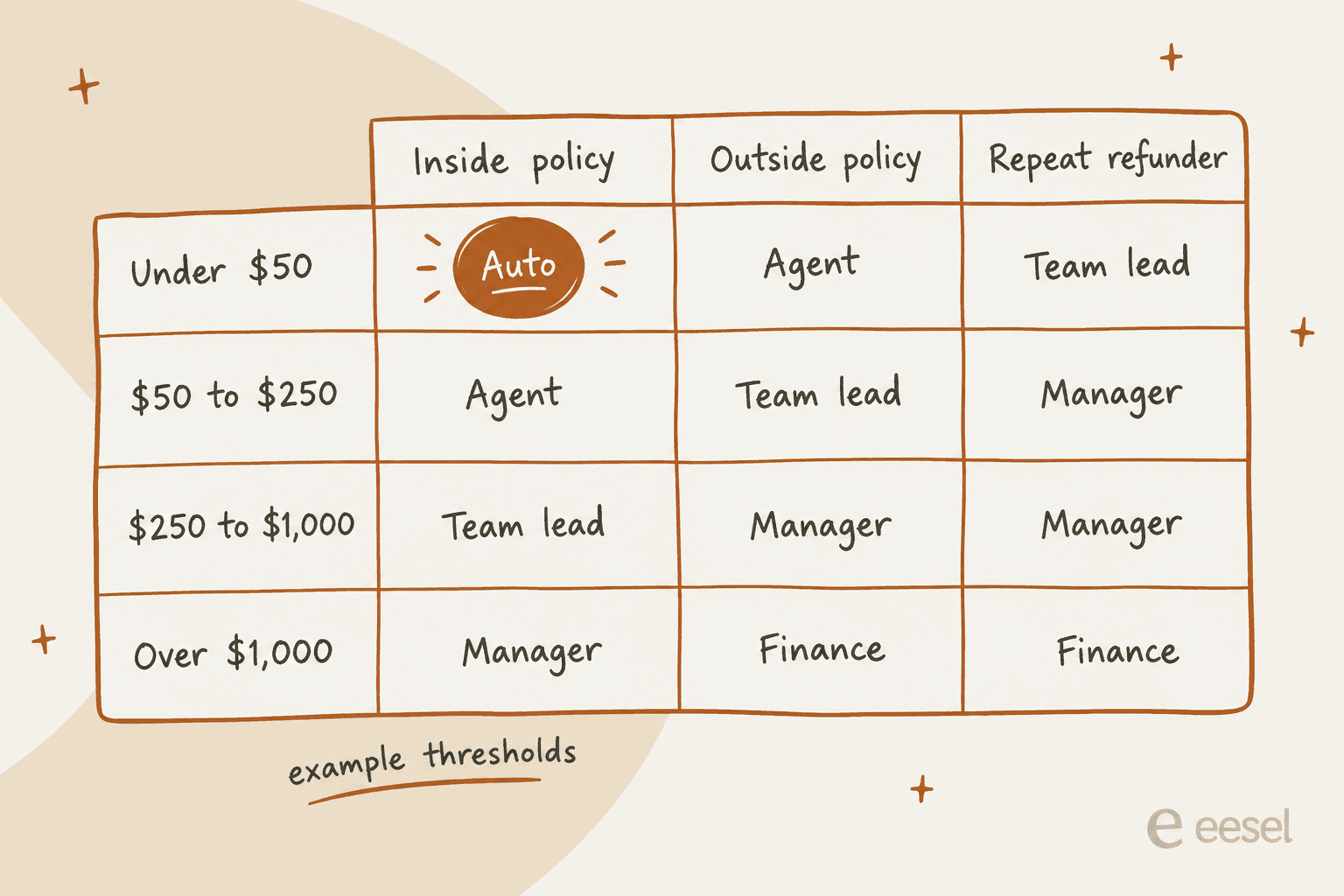
Here is what a filled-in matrix looks like with example thresholds. The numbers are a starting point, not a recommendation for every business; a jewelry brand and a $12 phone-case store need very different bands.
Build your own refund approval matrix
Plug in your own limits and test a refund you handled this week. The matrix redraws as you type, and the right-hand panel tells you who should approve the test case and why.
How to set the dollar thresholds
The point of a threshold is not to stop bad refunds. It's to make sure the cost of checking is lower than the cost of being wrong. When a manager spends ten minutes on a $12 refund, that check costs more than the refund, and the customer waited on hold for it.
Customers notice. One Hacker News commenter described a company where reps could only authorize tiny amounts:
"The customer service reps would literally tell me they could only authorize a $1 refund. $2 was "too much" and required all kinds of manager approval and there was never a manager available..."

At the other end sits the most-quoted empowerment rule in support, which comes up every time this debate does:
"[...] Ritz Carlton famously provides each employee $2,000 in discretionary spending to make things right for a guest without bureaucracy. Hire good people, trust good people, empower good people."
Most teams land somewhere in between, and big contact centers tend to stack the tiers. A commenter in r/verizon described their limits this way: "Supervisors can approve up to about $300 in credits, then whatever is left gets rolled up to their managers" (Reddit).
Written down, a matrix can be surprisingly short. A Hacker News commenter sketched a full refund policy in three conditions:
"E.g. any customer is allowed their first 2 returns with no questions asked as long as the value is under $200, 1 full refund if the value is under $50, and all returns under $200 are accepted as long as the overall return rate in their account is less than 15%. If none of these conditions are fulfilled, then escalate."
Here is how I would pick the numbers for each band:
- Auto band. Start at the refund size where you approve almost everything anyway. Pull last quarter's refunds, find the amount under which managers said yes more than 95% of the time, and set the auto line just below it. Keep this band strictly in-policy.
- Agent band. One to three average orders is a common landing spot. Agents should be able to fix a normal bad order without putting anyone on hold.
- Team lead band. This is where the "outside policy but reasonable" calls live. Leads know the return policy well enough to bend it once.
- Manager and finance bands. Large refunds, B2B credits, and anything that touches a contract. Name one person per band, not a group, so it never sits in "someone will get to it".
One more check: make sure your thresholds survive a busy week. If your lead is the only approver for $250 to $1,000 and they're out, every one of those refunds stalls. Add a named backup for each band, the same way you'd plan support overflow.
Where your helpdesk can (and can't) enforce the matrix
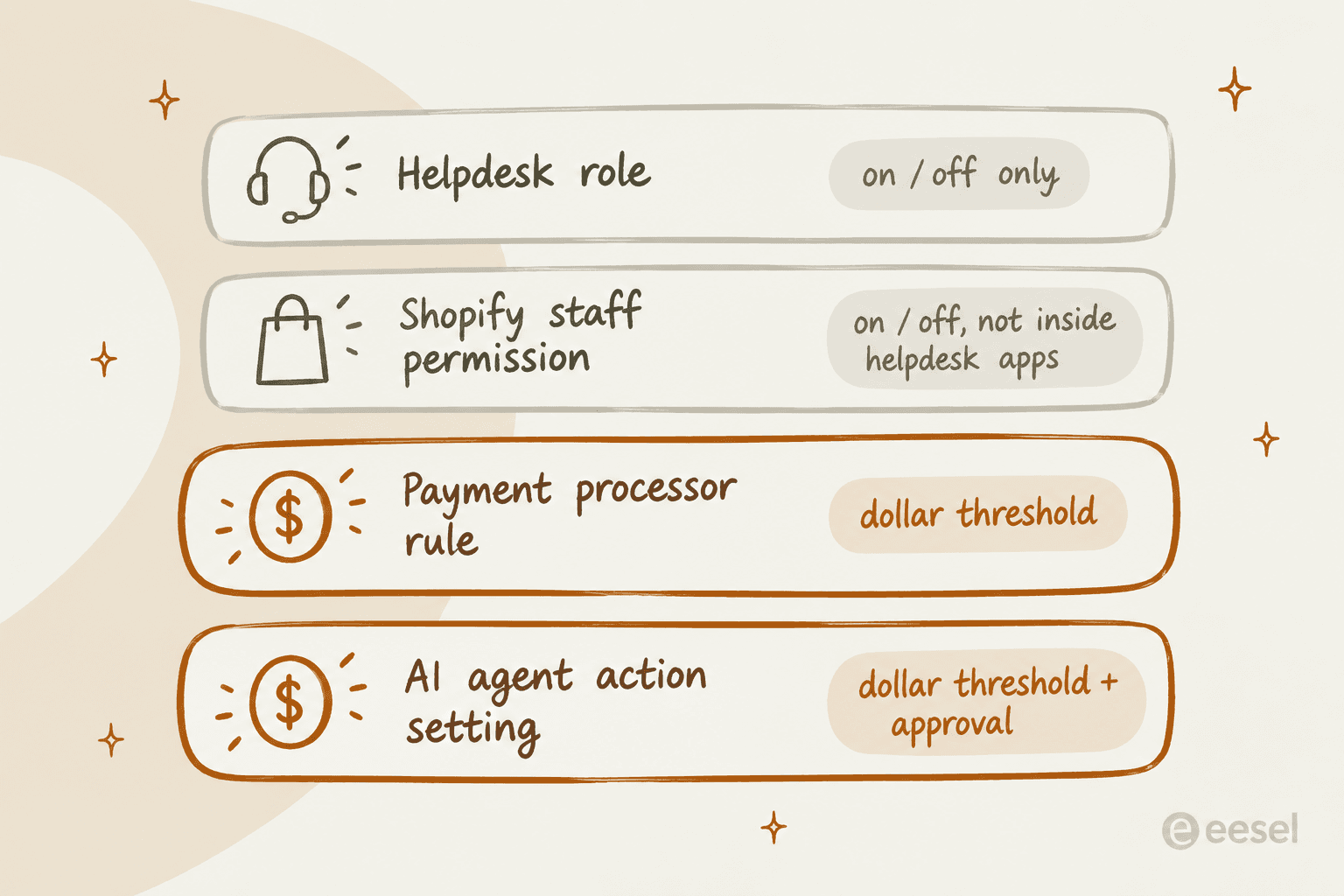
This is where most refund matrix templates stop, and where the real work starts. I went through the refund and permissions docs for the helpdesks I see most in the eesel queue. None of them documents a per-agent dollar cap. What they give you is a switch:
| Helpdesk | Refund from the ticket | Who can refund | Per-agent dollar cap | Approval step |
|---|---|---|---|---|
| Zendesk | Full or partial via the Shopify app (all Suite plans) | Not set per agent in the docs | Not documented | Approval requests on Suite Professional and up |
| Freshdesk | Full or partial from the Shopify widget (Growth and up) | One admin setting for all agents | Not documented | Approval workflow is for KB articles only |
| Gorgias | Shopify refunds and cancels from macros and the sidebar | Basic, Lead and Admin roles; Observer and Lite can't | Not documented | None for humans |
| Gladly | Refund action on the order card, full amount only | "All Agents can perform all Actions" | No | None for humans |
| Kustomer | Full, partial or manual amount | Shopify actions in the permission set | Not documented | AI hands high-value refunds to a human |
| eDesk | Per-item refunds, can't exceed the original | "Shopify Refunds" role permission | Not documented | AI procedures default to escalate |
A few details from that table matter more than they look.
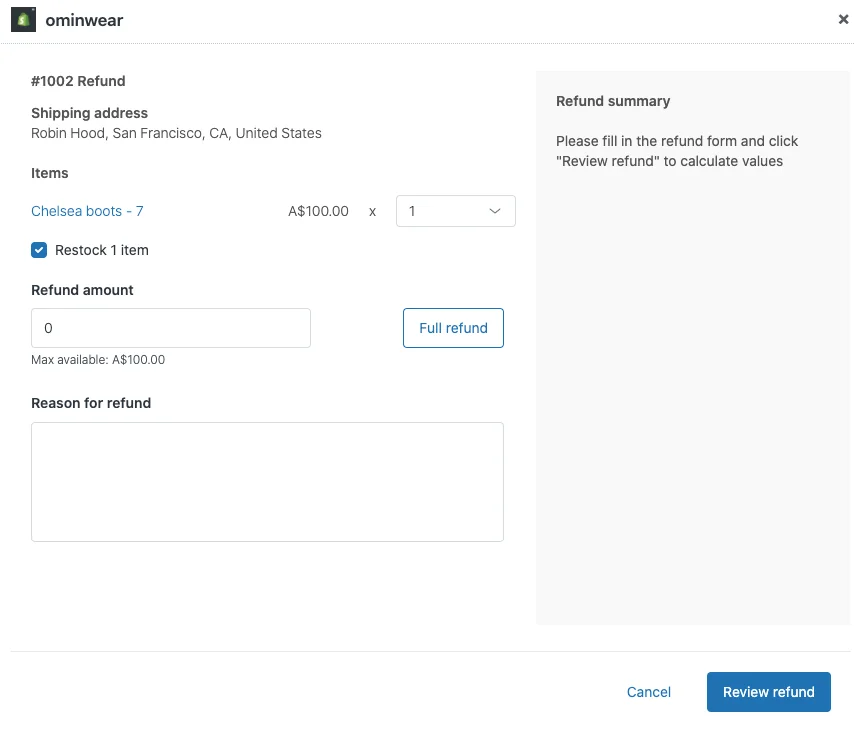
Shopify's permission doesn't follow refunds into your helpdesk. Shopify splits refunds into separate staff permissions for the original payment method and store credit, which is great. But its changelog says the refund permission "applies in the Shopify admin and mobile app, but not in other Shopify or third party apps that allow users to refund orders." If an agent can refund from Gorgias or Zendesk, the helpdesk's own role setting is the only gate.
Gladly gives every agent the button. Its Shopify actions doc says "All Agents can perform all Actions" and the order-card refund always refunds the full amount, including shipping (Gladly). If you run Gladly, your matrix lives in training and QA, not in settings.
eDesk adds a useful brake. Refunds "cannot be greater than the original amount," and if the amount differs from the original, the agent has to pick a Discrepancy Reason (eDesk). That reason field is the kind of audit trail I'd want everywhere.
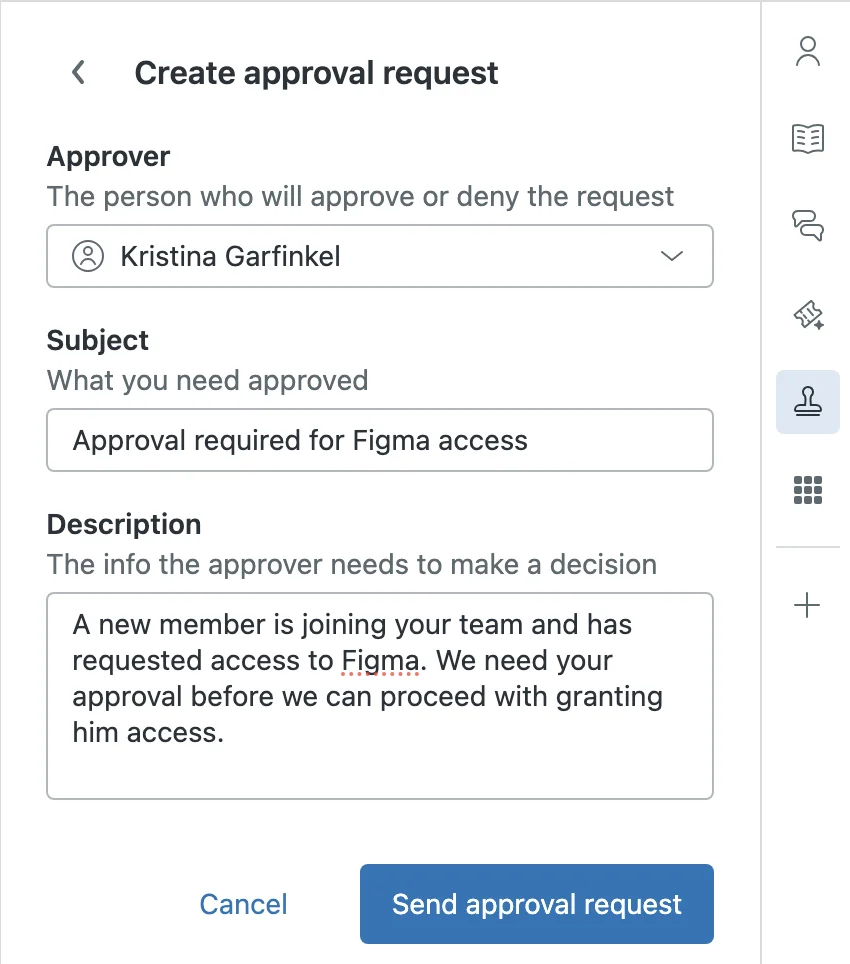
Zendesk is the closest to a real approval object. On Customer Service Suite Professional and up, an agent can raise an approval request on a ticket, and Zendesk's own example is a refund going to the agent's team lead. The details are good for a refund matrix: up to 5 approvers per request, the approver can't be the requester or the assignee, and a pending approval blocks the ticket from closing (Zendesk). What it doesn't do is pick the approver for you based on the amount. The agent still reads the matrix and chooses.
So in practice, the helpdesk side of the matrix comes down to three settings: who has the refund permission at all (see my notes on support agent access control), a macro or form that makes agents record the reason, and a ticket tag you can report on.
Zendesk adds a shopify_refund tag automatically when an agent refunds from the Shopify app (Zendesk), which makes the quarterly review easy.
Enforce the dollar line in the payment layer
If you need a hard limit that a person can't click past, it has to live where the money moves. Here is what each payment or commerce tool can actually enforce:
| Tool | Who can refund | Amount threshold enforced? | Approval built in | Refund window |
|---|---|---|---|---|
| Stripe | Roles such as Refund Analyst, Support Associate, Support Specialist | Yes, an amount condition on "Refund is created" (public preview) | Require approval or Block; requests expire after 14 days | Card limit not stated in the refunds doc |
| PayPal | Up to 200 secondary users with owner-set permissions | Not documented | Not documented | 180 days, full or partial |
| Shopify admin | Separate permissions for original payment and store credit | No, on or off only | Staff approve or decline return requests; POS Pro can require a manager PIN | Merchant sets 14, 30, 90 or custom days |
| Loop Returns | Merchant team | Yes, rules on return or order value | Manual Review action | Merchant-set |
Stripe is the standout. Its two-party approvals let an admin add a rule on "Refund is created" with an amount condition, so approval kicks in "only if the amount exceeds a threshold". The control is either Require approval, which pauses the refund until a reviewer approves it, or Block. "A user can't approve their own request," requests that sit for 14 days expire, and only one active rule can apply to a given action, so you express tiers through combined conditions rather than a ladder of rules. Stripe also ships default approval rules on refunds created by agent-tagged API keys, which tells you how payment companies think about AI and money.
Shopify is a switch, not a dial. The store permissions list "Refund to original payment method" and "Refund to store credit" as separate permissions, with no amount limit in either description. That split is still useful: you can let newer agents refund to store credit only. Also note that "you can't cancel or reverse a refund after you initiate a refund" in Shopify (Shopify), so a wrong yes is permanent.
Returns apps can handle the value routing. Loop's workflows can route by return total, order total, customer tag or return reason, and send a request to Manual Review. Loop's own example sends returns over $300 to manual review so the warehouse inspects high-value items first.
If returns drive most of your refunds, this is where the top of your matrix belongs, and it pairs well with the returns tools I've covered before. My returns automation guide covers the rest of that flow.
Keep approvals from becoming the bottleneck
An approval matrix fails quietly when approvals sit. The customer doesn't see your org chart, they see a hold:
"I had to check with my supervisor to get approval for the refund, because their full order was just a little over what I can approve myself. I said I'd place them on a brief hold. Sup needed a minute so I was waiting."
And when the threshold is set too low, approvers resent it too:
"[...] it should not be necessary to wait 15 minutes for the store manager's approval on a 37 cent refund, nor should he even have to deal with it at all, that is a waste of his time and salary to be attending to something so minor."
Here is what keeps the matrix fast:
- Put the approval where the approver already works. Zendesk added approvals in Slack in May 2026, and approvers can now leave comments there too. An approval that lives in an inbox nobody opens is a refund that never ships.
- Give every band an approval time target. Zendesk documents no native reminder for approval requests, so set a view or automation that flags pending approvals after a few hours.
- Write the context once. The approver should see the order, the amount, the policy line it breaks, and the agent's recommendation. Zendesk caps the request description at 2,500 characters, which is plenty if you use a template.
- Never let the requester approve. Zendesk blocks the assignee from approving, Stripe blocks self-approval, and HubSpot does the same for quotes. If your tool doesn't, make it a rule.
- Decide what expiry means. Stripe expires requests after 14 days. Decide in advance whether an expired approval is a no or gets bumped up a level, and tell the customer which one it was.
Give your AI agent a row in the matrix
This is the part most refund policies haven't caught up with, even on teams already using AI for refund requests. If an AI agent can touch orders, it needs its own band in the matrix, and that band should be narrower than a new hire's.
The best framing I've read on this came from a thread on what people let AI agents do without approval:
"the line I landed on was not how risky the action is, it was whether I can undo it. money turned out to be easy, you refund it. [...] a bad refund is a bad afternoon. a bad message sits in someone's inbox forever and there is no undo button for it."
I agree with the reversibility test, with one caveat: in Shopify and PayPal, a sent refund can't be cancelled. So for refunds, "undo" means "eat the cost", and that is exactly what the dollar bands are for. Another commenter on Hacker News described the setup most teams end up wanting: an AI that "readies a recommendation and a human swings by and approves or denies it" (lubujackson, Hacker News).
Every AI refund decision should end in one of three places. That's human-in-the-loop design applied to money, and it's the AI guardrail I'd set before any other:
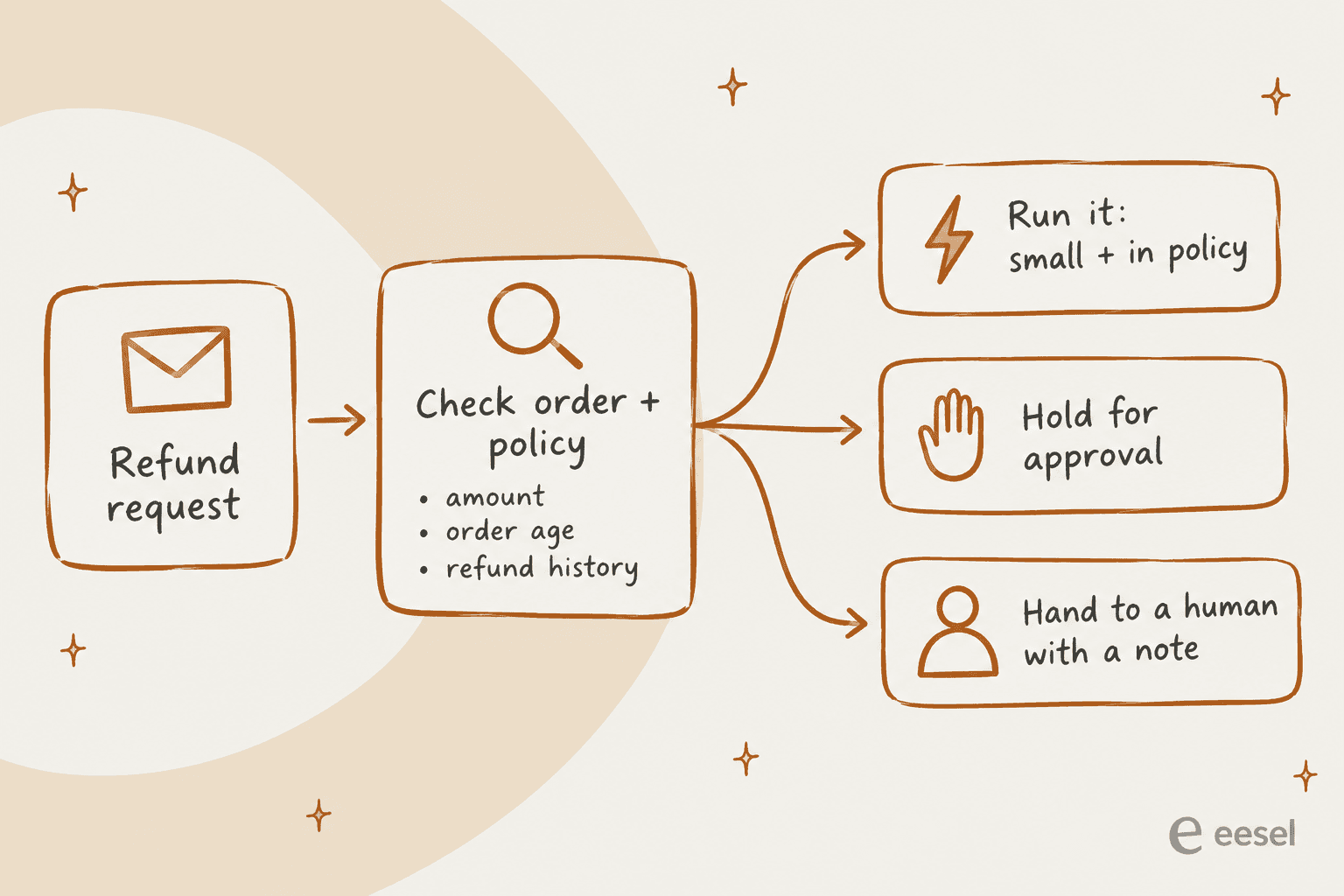
Vendors have converged on this pattern, with different levers:
| AI tool | How refunds run | Where the guardrail sits |
|---|---|---|
| Zendesk Copilot auto assist | Cancels and refunds Shopify orders after an agent accepts | Zendesk says refund actions "should be marked as agent-approved" |
| Gorgias AI Agent | Refunds as part of cancel, remove item, or replace item | Action conditions on order total; customer confirmation on by default for irreversible actions |
| Richpanel | A Refund Order tool | Per-tool "Require approval"; refunds bounded by order total and policy |
| Kustomer AI Agent | Refunds and returns | Above a set value, a human approves, then the AI finishes the conversation |
| Gladly AI | Full or partial refunds | Amount previewed and confirmed with the customer first |
| eDesk AI Agent | "Approve Refund" outcome in procedures | Default outcome is escalate to a human |
Two of those deserve a closer look. Zendesk's actions doc warns that pre-approved actions "may be executed in a different order than specified", which is the documented reason not to pre-approve refunds. And Gorgias's customer confirmation is a confirmation from the shopper, not from a manager. It stops accidental cancellations, but it isn't an internal approval. Gorgias AI Agent actions also aren't included on the Starter plan, per the Gorgias pricing page, and each automated interaction costs $0.85 to $1.00 depending on plan. My Gorgias AI Agent pricing breakdown has the full table.
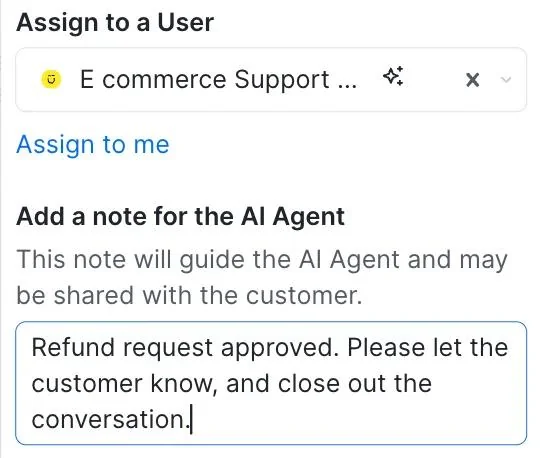
Kustomer's version is the one I'd copy for the hand-back: the human approves the refund, leaves a note for the AI, and the AI tells the customer and closes the conversation.
How I'd write the AI band with eesel
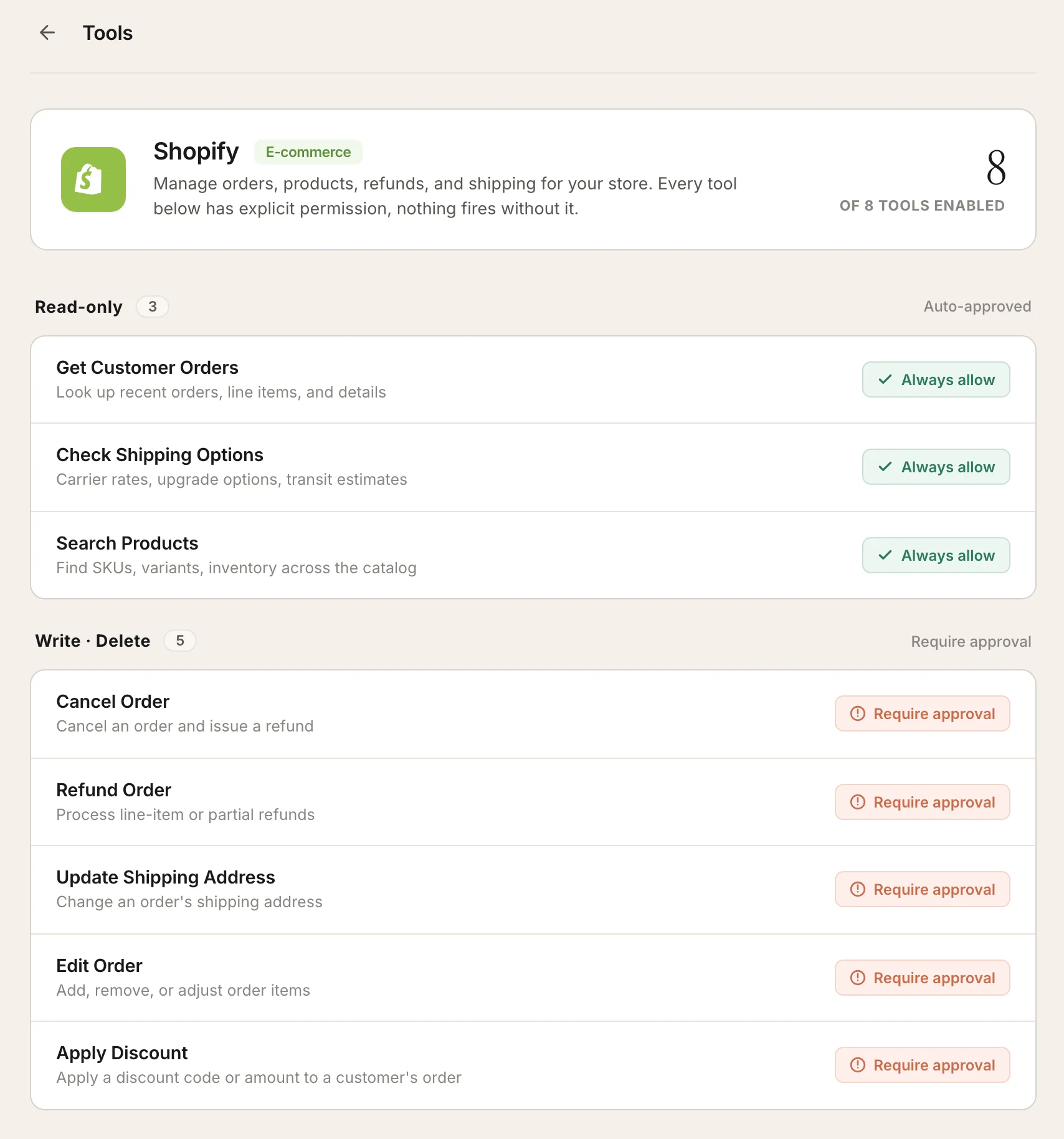
In eesel, every action the AI teammate can take has one of three settings per agent: Auto, Needs approval, or Disabled (eesel docs). The Shopify connection includes Refund Order and Cancel Order as write actions, and nothing changes in a store until you create an automation and switch them on (Shopify integration).
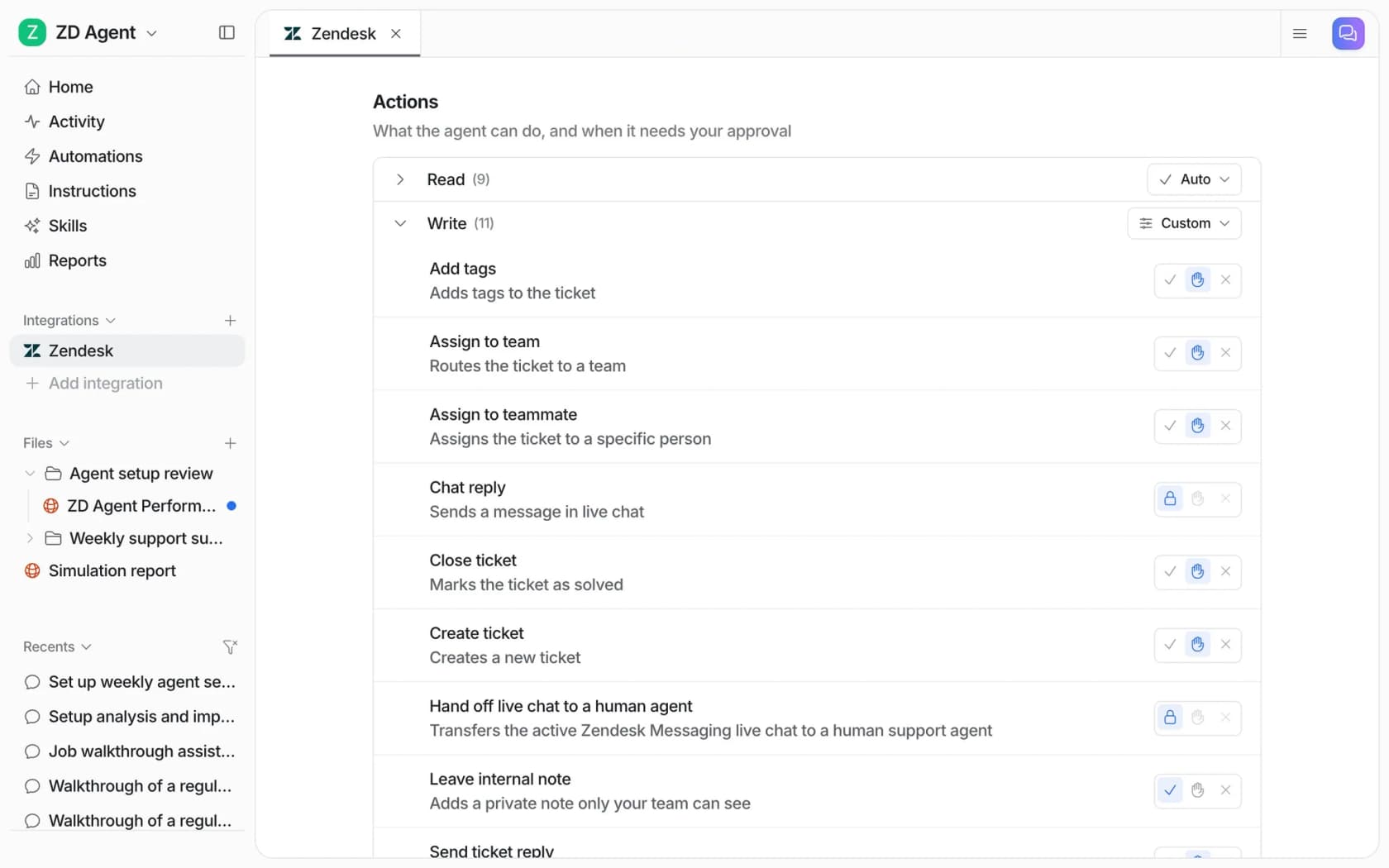
The matrix itself goes into the agent's instructions in plain English. The docs ship an escalation template that includes "The conversation involves a refund over $100", and an exceptions template with lines like "Damage claims under $50: skip the photo request, approve the refund" (instructions docs). A support admin I've worked with taught their agent a rule that sits above any dollar band:
"I have a rule in CS where we do not address a cancel or refund request when there is an issue attached to it."
A support admin encoding a "troubleshoot before you cancel" policy into the agent
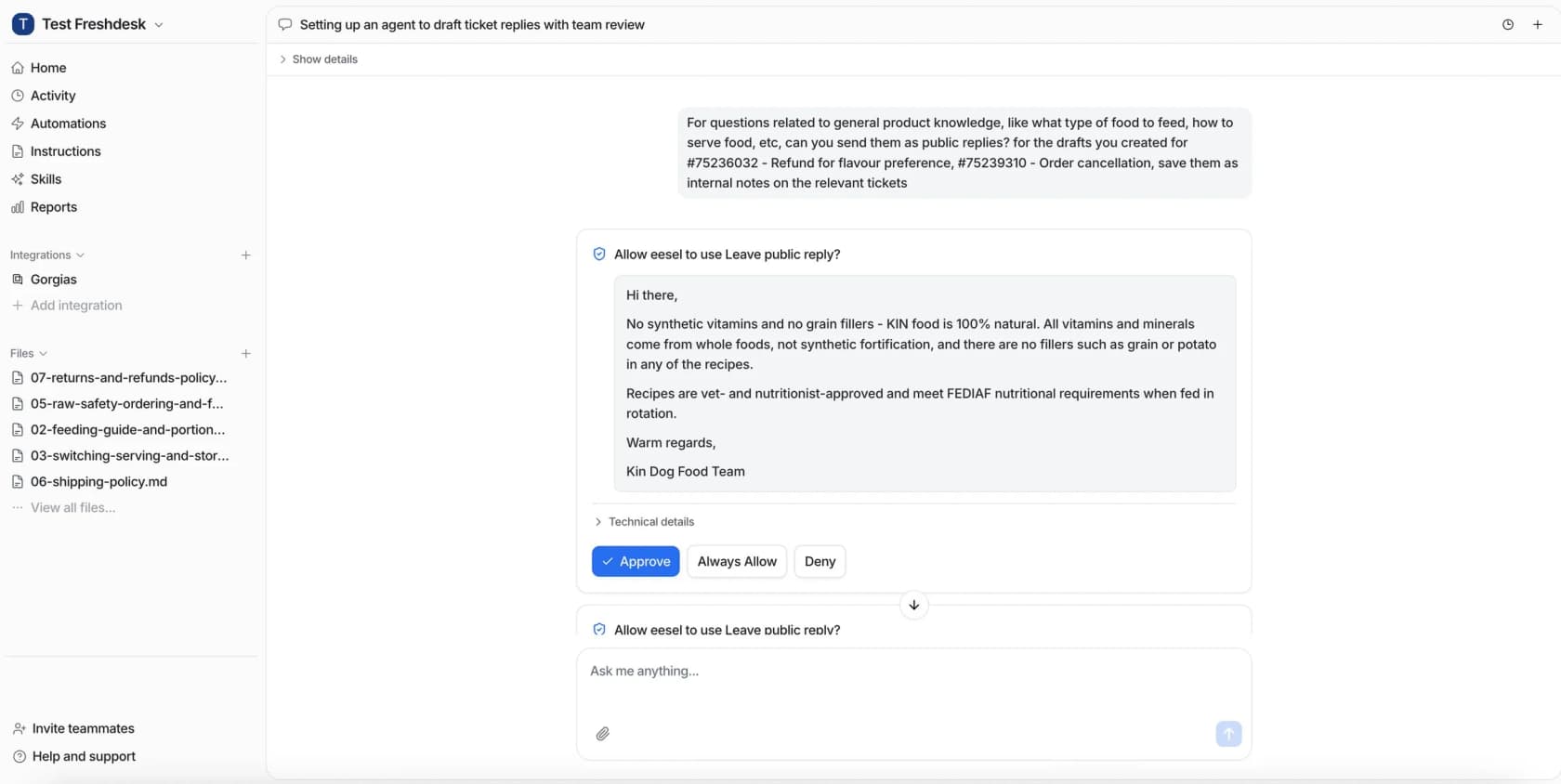
When a refund needs a yes, the approver gets a card showing the exact action and amount, with Approve, Always allow, or Deny. Approvals never run on their own after a timeout, and the Activity page records who decided and when.
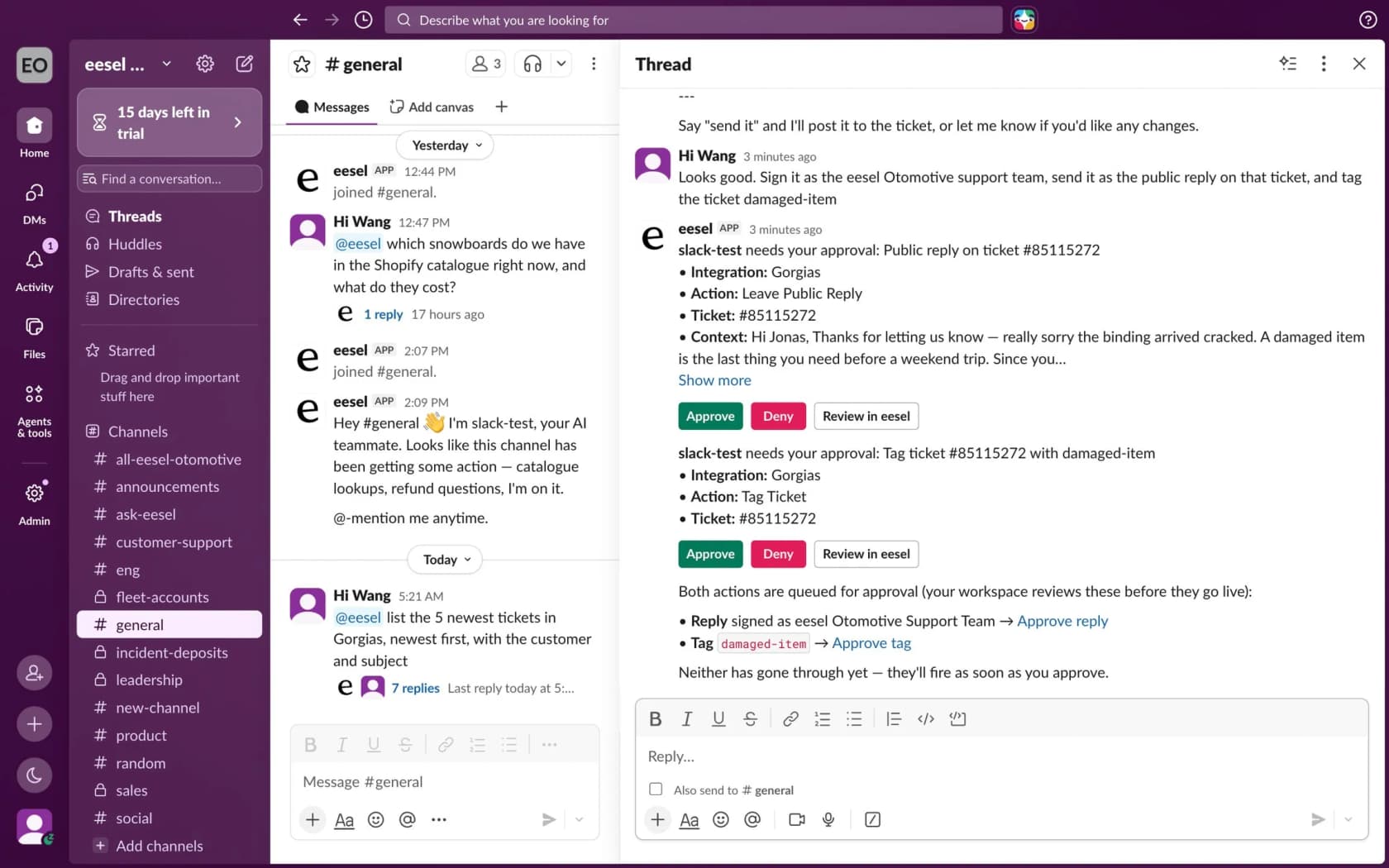
If you'd rather approve from Slack, the same request shows up in the thread with Approve, Deny and Review buttons, which keeps the approval inside the approver's day. More on that in my guide to AI escalation.
Common refund matrix mistakes
These are the ones I see most in the queue, roughly in order of how much they cost:
- One dollar line, no risk column. A single limit approves the $20 refund for your most frequent refunder and blocks the $300 refund that is obviously your fault. Both hurt: one leaks money, the other pushes a good customer toward churn. Add at least the outside-policy and repeat-refunder columns.
- Assuming the helpdesk enforces it. Unless you've set Stripe approvals or an AI action setting, your limits are a policy, not a control. Audit refunds by agent every month using the refund tag or report.
- Approvers who are groups. "The leads channel" is not an approver. Name a person and a backup for each band, and write it into your escalation process.
- Treating store credit like cash. Store credit keeps the money in the business. Give it a looser band and agents will offer it more, which is often what the customer wanted anyway. My refund macros show how to word that offer.
- No owner for chargebacks. A refund issued after a dispute opens can pay twice and still costs the dispute fee. Route chargebacks to one person, every time.
- Never revisiting the bands. If your team lead approved 98% of their band last quarter, the band is too low. Treat the matrix as a living support policy and update agents and the AI on the same day.
Run your refund matrix with eesel
If your refunds come through Zendesk, Freshdesk or Gorgias with a Shopify store behind them, eesel's AI helpdesk teammate is the easiest way to make the matrix real. It joins your existing queue, learns from your past tickets, help center and macros, and runs the refunds in your auto band. Anything above a threshold you write in plain English waits for the right person's approval, in the dashboard or in Slack, and everything outside policy goes to your team with a note explaining what it found.

Before it touches a real refund, you can run a simulation on your past tickets and see how it would have handled your refund requests compared with what your team actually did. Pricing is per ticket handled with unlimited seats, so every approver on your matrix can have access at no extra cost.
Start with 100 free credits, connect your Shopify store and your helpdesk, and set Refund Order to Needs approval on day one. Try eesel.
Frequently Asked Questions
What is a support refund approval matrix?
How much should a support agent be allowed to refund without approval?
Can I set a refund limit per agent in Zendesk, Gorgias or Freshdesk?
Where can I actually enforce a refund amount threshold?
Should AI agents be allowed to issue refunds?
Is store credit treated differently from a cash refund in the matrix?
What happens if a customer files a chargeback while a refund is pending?
How often should I review my refund approval limits?


Article by
Riellvriany Indriawan
Riell is a designer and writer at eesel AI with about two years of experience researching CX platforms, AI chatbots, and helpdesk software. She combines her design background with a sharp eye for how these tools actually look and feel in practice — making her comparisons unusually visual and user-focused.