What support overflow management actually covers
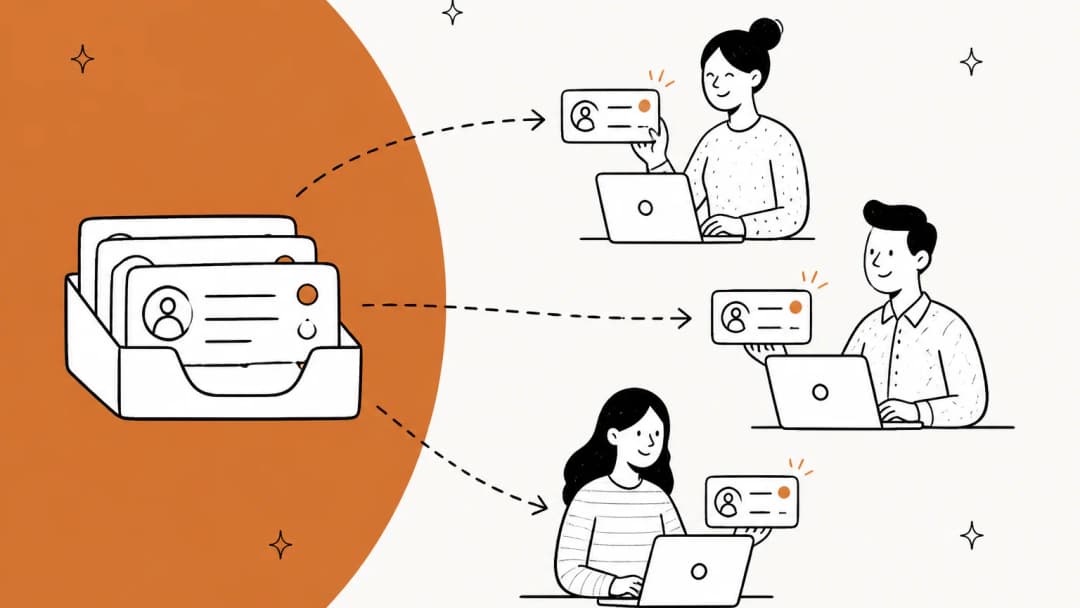
Overflow is any work that arrives when every agent who could take it is either at their limit or offline. That last part matters: it is not just "too many tickets". A Tuesday afternoon with two people out sick is an overflow event. So is a 2 a.m. chat when your after-hours coverage is a voicemail greeting.
It usually shows up in one of three shapes:
| Shape | What triggers it | How long it lasts | What it needs |
|---|---|---|---|
| Spike | Outage, launch, viral post, shipping delay | Hours to 2 days | Fast one-to-many answers, a backup lane that opens in minutes |
| Seasonal peak | Black Friday, holidays, renewal season, tax deadlines | 2 to 12 weeks | Planned extra capacity, trained temps or a partner, pre-written answers |
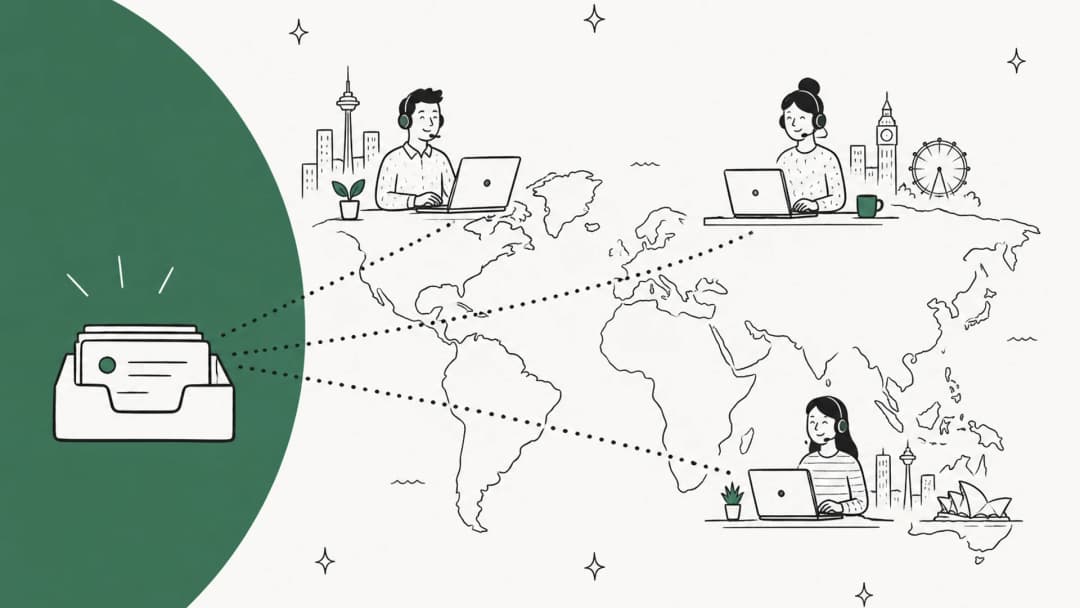
| Coverage gap | Sick days, time zones, lunch, a team meeting | Minutes to hours | Routing that does not depend on one person being online |
Most guides treat these as one problem and jump straight to "hire more" or "outsource". I would start somewhere cheaper: look at what your helpdesk does today with the next ticket when everyone is full, because that default is probably costing you more than headcount is.
Where overflow goes by default in each helpdesk
I went through the routing docs for the seven tools I see most in the eesel support queue. The pattern is striking. When every eligible agent is at their cap, almost all of them leave new work sitting in the support queue with nobody's name on it:
| Helpdesk | Per-agent cap | All agents full or offline | Built-in overflow lane | Plan needed |
|---|---|---|---|---|
| Zendesk | Email up to 500 open, messaging up to 20 | Ticket stays in the queue | Secondary groups on a custom queue | Suite Professional ($115/agent/mo) |
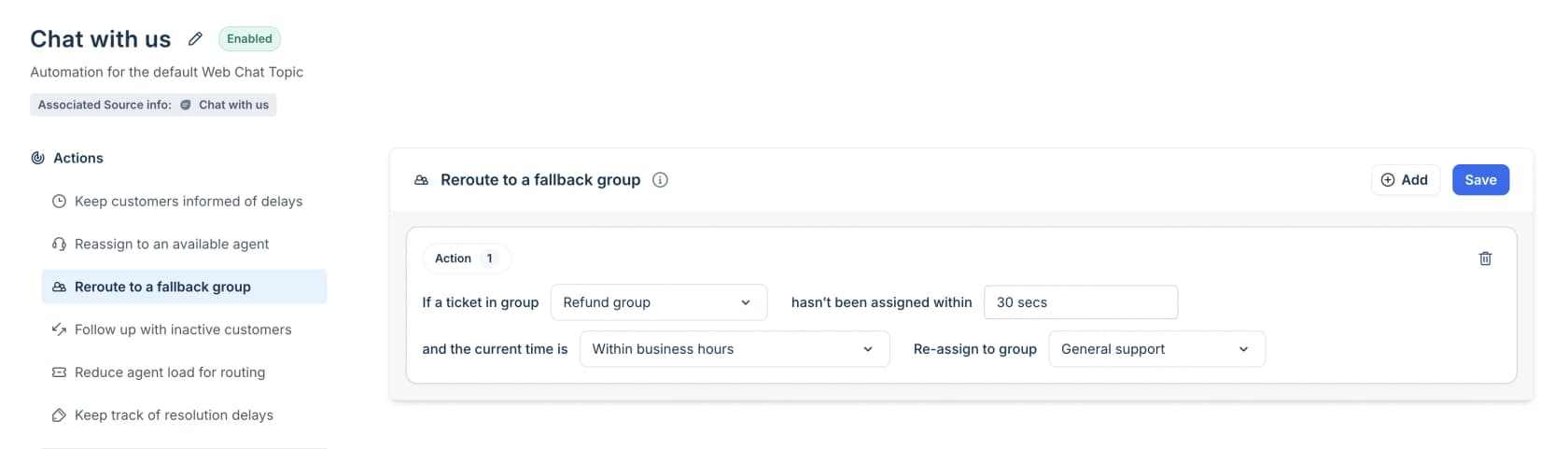
| Freshdesk | Per-queue load (e.g. Email 5, Messaging 10) | Ticket stays unassigned | "Reroute to a Fallback Group" after N seconds | Enterprise ($89/agent/mo) |
| Help Scout | Assignment limit up to 100, chats default 3 | Conversation stays in Unassigned | None documented | Round Robin on Plus ($45), Balanced on Pro ($75) |
| Front | Load balancing limit, default and max 100 | Load balancing queues work; round robin does not | None documented | Tier not stated on the pricing page |
| Gorgias | Two caps: chat and messaging, other text | Ticket stays unassigned | "Skip queue when it's too busy" on voice | All Helpdesk plans (Voice add-on from $25/mo) |
| HubSpot Service Hub | Ticket capacity (Pro+), chat capacity default 3, max 99 (Enterprise) | Ticket stays unassigned until manually assigned | Optional fallback of chats to the customer agent | Professional ($90/seat) or Enterprise ($150/seat) |
| Aircall (voice) | Ring-based | Call waits the queue time, then voicemail or missed | Chain another Ring to step after the first | Callbacks on Professional ($50/license) |
Two things jump out. First, only Zendesk and Freshdesk ship a true "send it to another group" overflow rule, and both put it behind an upper tier. Second, the two tools work differently. Zendesk overflows on availability: work goes to primary groups first and falls back to secondary groups only if no primary agent is available. Freshdesk overflows on time: the Quick Automations rule fires when a ticket in a group hasn't been assigned within a set number of seconds, say five minutes for a Refunds ticket before it moves to General Support.
Front is the one to watch. If you use round robin, there is no queue at all when everyone is offline, and a missed assignment is not retried when someone comes back. Load balancing does queue, and it hands out the oldest unreplied conversation first. If your Front team is small and spiky, that one setting decides whether overflow waits in line or gets lost.
That is how a critical ticket gets buried. One Zendesk admin described exactly this on Reddit:
"Enterprise customer reported their production system was down at 9am. Ticket sat in our queue until 2pm because we had 30+ other tickets that came in overnight."

Build an overflow cascade, not a bigger team
A sysadmin in a thread about surprise call spikes summed up why hiring for the peak rarely works:
"you can't staff for the 1% rare events, you staff for the 90% common days."
So the fix for "work sits unassigned" is to give every ticket a next stop. I think of it as a stack of trays: when one fills, it spills into the next, and the bottom tray is never "nobody".
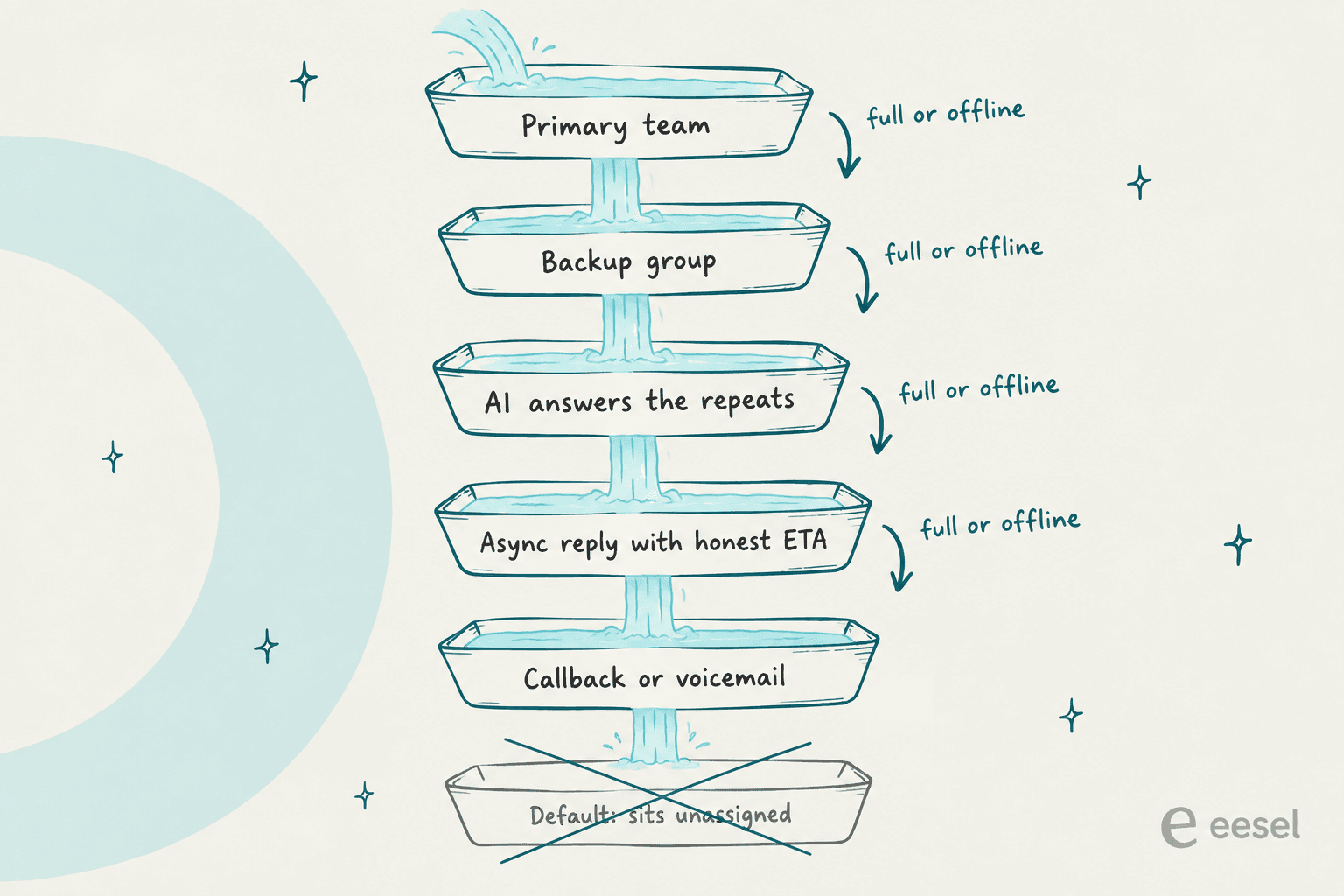
Here is how I would build it, in the order that gives you the most relief for the least money.
1. Set thresholds on ticket age, not ticket count
A queue of 150 tickets that arrived ten minutes ago is fine. A queue of 40 where the oldest has waited 18 hours is a fire. Count lies during a surge, because it spikes and recovers fast. The age of the oldest unanswered ticket tells you whether customers are actually being left behind, and it maps straight onto your first response time and SLA promises.
Write down three or four levels and, for each one, the single thing that changes. The numbers below are a starting point I would tune to your own SLA, not a standard:
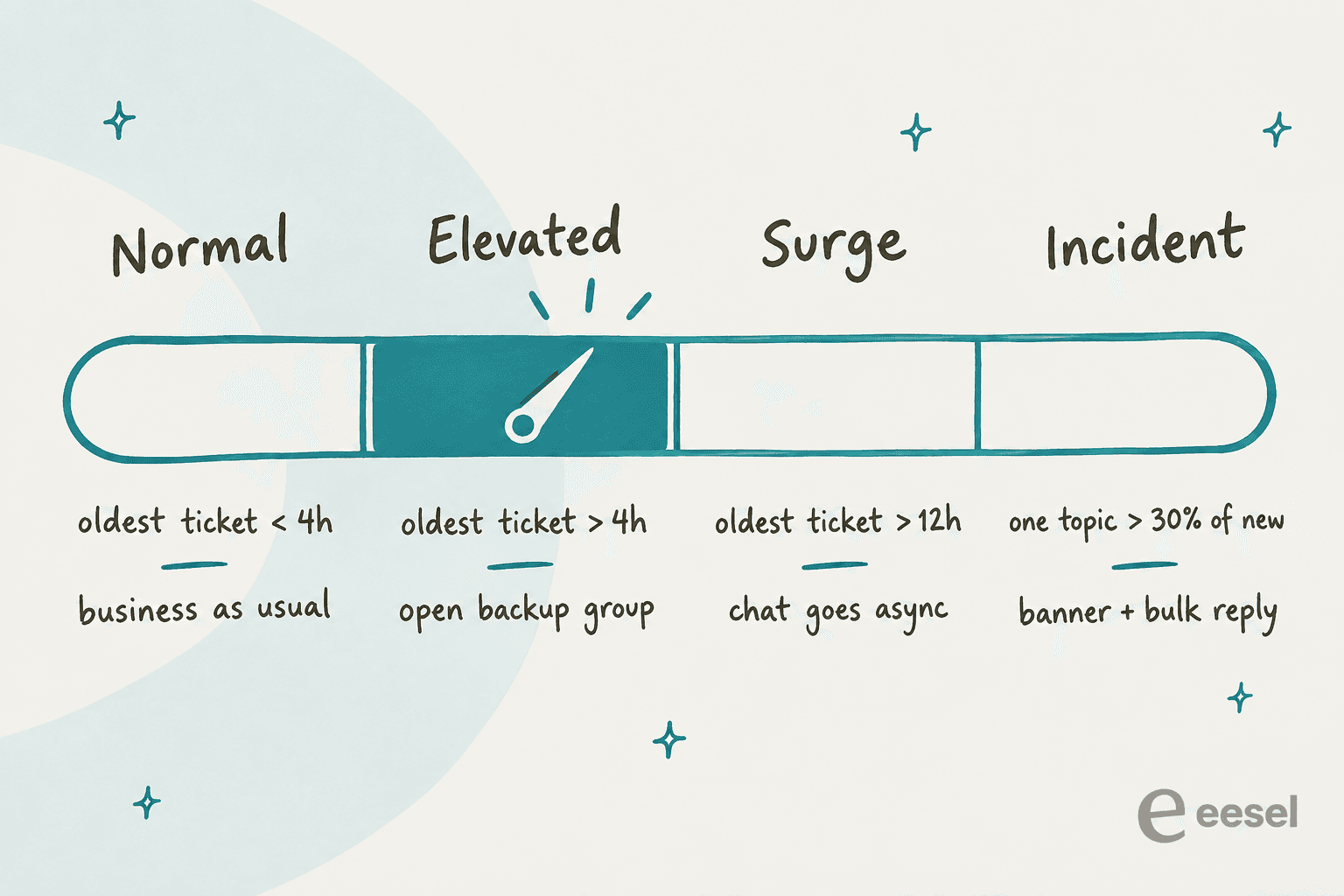
The point of writing it down is that nobody has to make a judgment call at 4 p.m. on launch day. The rule already exists, so whoever notices the gauge moving just flips the switch.
2. Open a backup group before you need it
The backup group is the people who can take tier-1 work when the main team is full: a second team, senior agents from another region, or a few trained volunteers from success and sales. Set it up in the tool on a quiet week.
- Zendesk. Create a custom queue, add your main groups as primary, then "Turn on secondary groups" and add the backup. Each custom queue takes up to 20 primary and 20 secondary groups, and you can have up to 199 queues. Zendesk's own recipe for messaging adds a "Backup" group as a last resort so tickets "don't get stuck in the queues longer than you're comfortable with".
- Freshdesk. On Pro, split each agent's capacity by queue in Omniroute so chat and email do not starve each other. On Enterprise, add the "Reroute to a Fallback Group" quick automation for real-time channels.
- Help Scout, Front, Gorgias, HubSpot. There is no native overflow group, so the workaround is a workflow or rule that reassigns by tag or wait time, plus a shared queue the backup people watch during a surge.
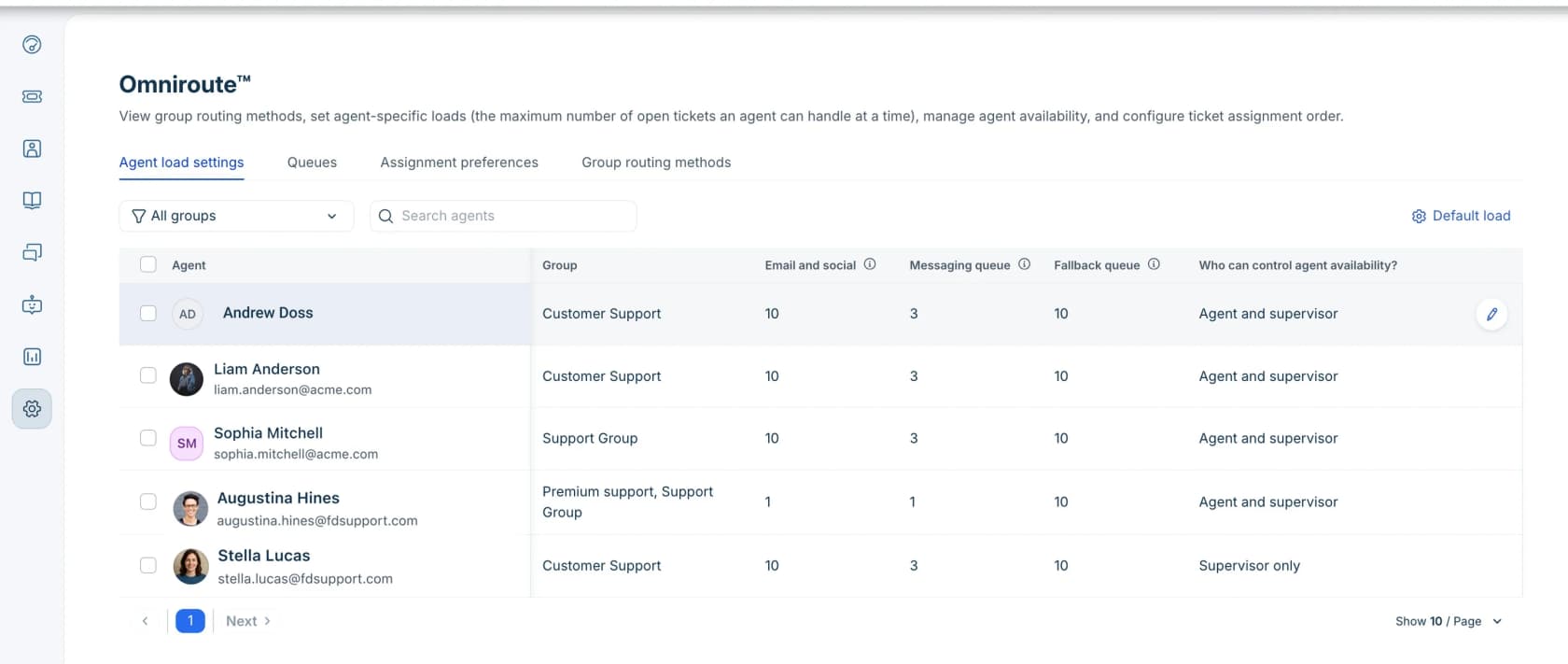
One Freshdesk detail is useful for surges that only last a week: day passes cost $2 on Growth, $7 on Pro and $12 on Enterprise, so borrowing a teammate from another department for launch week does not mean paying for a full seat.
3. Protect your specialists from tier-1 volume
When the queue floods, the people who get pulled in first are the ones who know the most, and they spend the surge answering "where is my order?" while the hard tickets age. Split the work by type. Tier-1 questions go to the backup group and the AI layer. Billing disputes, bugs and angry VIPs stay with specialists. Zendesk Suite Professional adds skill and priority routing for this, and Freshdesk has skill-based routing on Enterprise.
If you already run tiers, this is the moment your escalation path earns its keep. A surge is when a vague "send it to engineering" turns into a 3-day silence.
4. Answer the spike topic once, in public
During an outage or a shipping delay, a large share of new tickets ask the same thing. Answering each one by hand is the most expensive way to say "we know, here is the update". Post it once in the places customers look before they write in: a status banner, the help center, the chat greeting, and the replies your AI agent gives. Then build one macro that answers, tags and closes the tickets that still arrive.
The same trick works on the phone. One IT lead puts the update in front of the queue itself:
"I chuck in a message before the call is routed to the call queue explaining what is wrong, when the next update will be and to hang up if you are currently having that issue if not hold on the line to be routed to the helpdesk queue."
This is also where AI does its best overflow work. It reads the incident note and answers "is checkout down?" a few hundred times with the same accurate update, while your team handles the customers whose order actually broke. More on that below.
5. Switch live channels to async with an honest wait time
Live chat is the first channel to break in a surge, because each agent can only hold a few at once. Help Scout's Maximum Chat defaults to 3, and HubSpot's chat capacity also defaults to 3. When everyone hits that limit, a visitor staring at a chat window that never answers is worse than an email that says "we reply in about 4 hours".
The tools give you the switch:
- HubSpot lets you choose what happens when every agent is at max capacity: show a wait message, hide the launcher, or do nothing.
- Gorgias chat can run Live only when agents are available, and offline shoppers get a capture form that becomes an email ticket. There is also a "Share wait time with shoppers" setting.
- Front can hide the chat widget outside online hours, but a customer who already has it open can still send messages, so Front recommends an auto-response.
- Zendesk messaging conversations wait in the queue until a capacity slot opens, and unassigned ones go inactive after 10 minutes without a customer reply. The guide to Zendesk messaging offline handling covers the customer-facing side.
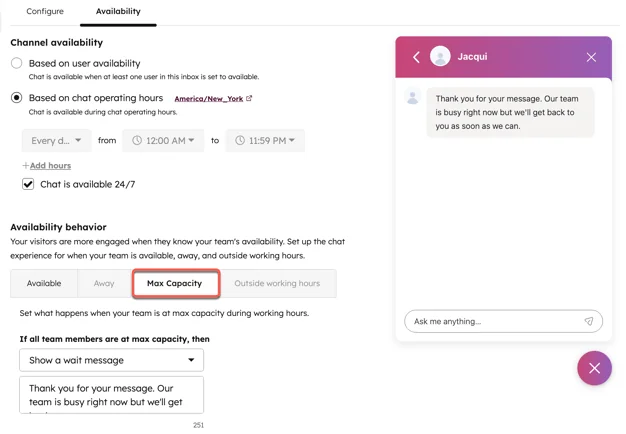
Asynchronous support is not a downgrade here. A specific promise that you keep beats a live channel that leaves people hanging.
Voice overflow: the settings that drop calls
Phone overflow deserves its own section, because the defaults can hang up on people. Each tool caps how many callers wait and for how long, and what happens after that is whatever you configured, including nothing.
| Tool | Max queue size | Max wait | When the wait runs out | Callback |
|---|---|---|---|---|
| Zendesk Talk | 750 (Team) or 1,500 (Pro/Enterprise) with omnichannel routing; 15 or 50 without | 1 to 20 min, 1 to 60 on Enterprise | Voicemail, or overflow number if voicemail is off | Professional and Enterprise |
| Freshcaller | Default 20, more on request for Pro and Enterprise | 30 sec to 15 min | Voicemail, another queue, or hang up | Press 2, called back when an agent frees up |
| Gorgias Voice | Queue capacity per queue | Max wait in seconds | Next step in the call flow; "Skip queue when it's too busy" branch | Press star, creates a "Callback requested" ticket |
| Aircall | Ring-based | 20 sec to 40 min team queue | Next widget, or the call drops | 0 to 5 retries, Professional and above |
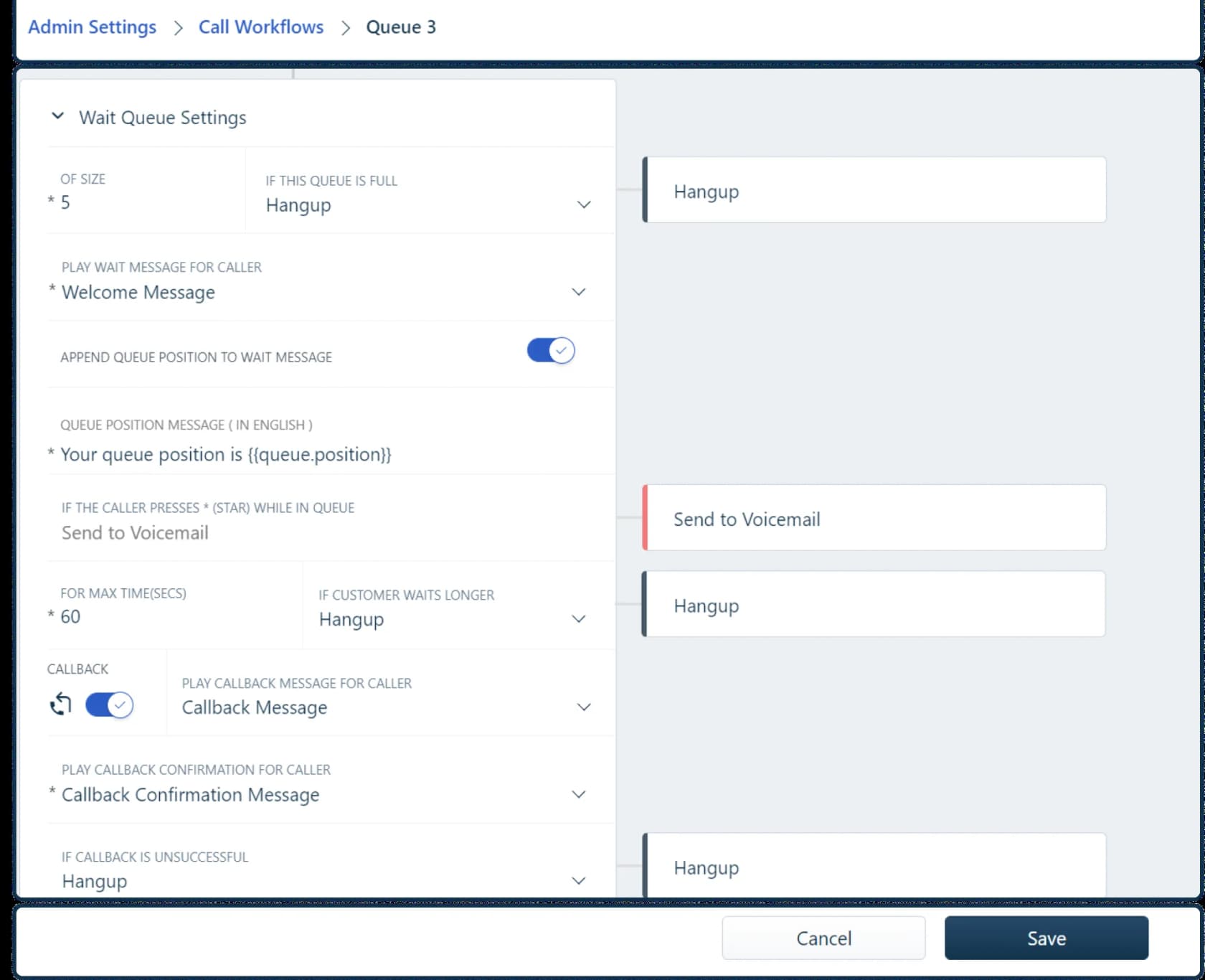
Three traps I would check today:
- Nothing after the last step. In Zendesk, with voicemail off and no overflow number, the caller hears the greeting and the call is disconnected. In Aircall, if nothing follows a Ring to step, the Aircall call rings once and drops. Always end the flow in voicemail or a callback.
- Transfers ignore your wait cap. Zendesk's max queue wait is ignored after a transfer, so a transferred caller stays on hold until an agent accepts. That is exactly what happens in a surge when tier 1 forwards everything to tier 2.
- Callbacks need someone online. Zendesk callback requires at least one agent Online or Away, and Aircall callbacks do not wait indefinitely: with zero retries, a failed one logs as "Failed - No agents available".
With Zendesk omnichannel routing on, call overflow uses the same primary-to-secondary group fallback as tickets, so an overflow phone number is not needed. The Talk overflow and timeout guide walks through both setups.
How big is your overflow problem?
Overflow compounds. Any ticket your team cannot clear today rolls into tomorrow, so a surge that is only 50% above capacity still builds a backlog every single day it lasts. Here is a simple example: a team that normally gets 200 tickets a day, with 4 agents who each clear 100, gets hit with 3x volume for five days.
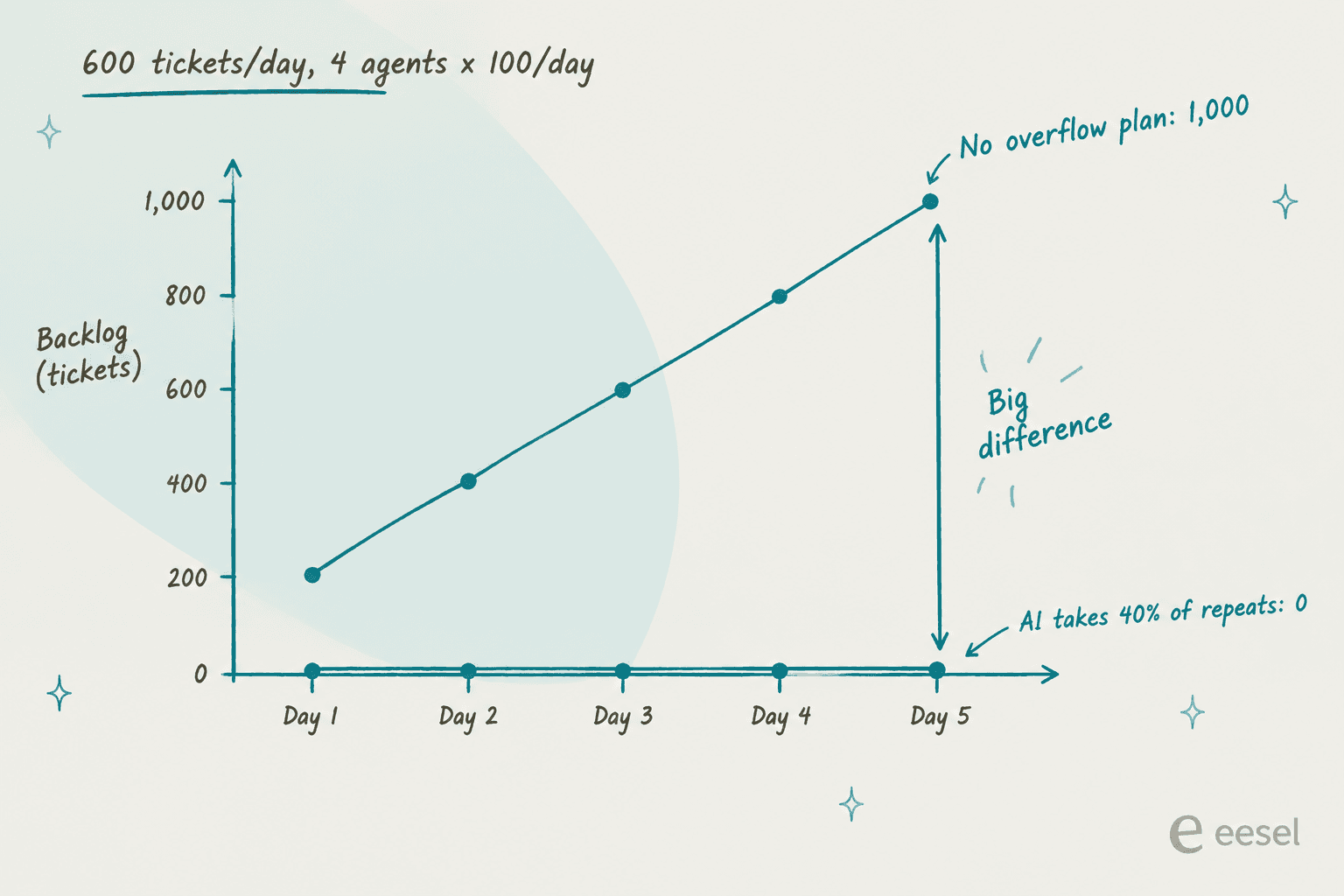
With no overflow lane, the team clears 400 of 600 every day, so the backlog grows by 200 a day and hits 1,000 tickets by day five. Once volume drops back to 200, the spare 200 a day takes another five days to pay it down. Customers who wrote in on day two are waiting the better part of a week. If a backup lane absorbs 40% of the surge, the team only sees 360 a day and the queue never builds. Covering the same gap with people alone means 10 extra agent-days, trained and ready on day one.
Plug in your own numbers:
The calculator ignores a lot (handle time varies, some tickets reopen, agents slow down when tired), but the shape is right. Small, steady relief early beats heroic catch-up later.
Where the extra capacity comes from
Once the routing is in place, you still need somewhere for the overflow to land. There are four realistic sources, and each fits a different shape of overflow:
| Source | Ready in | Best for | Watch out for |
|---|---|---|---|
| Borrowed teammates (success, sales, ops) | Same day | Spikes, launch week | Pulls people off their own work; needs macros and a narrow scope |
| Temps or seasonal hires | 2 to 6 weeks | Predictable seasonal peaks | Ramp time and training; see the seasonal onboarding guide |
| Outsourced overflow partner | 4 to 8 weeks to set up | Long peaks, 24/7 coverage | Quality control and context gaps; read up on outsourced live chat first |
| AI agent in the helpdesk | Days | Repeat questions in any shape of overflow | Must stay inside what it knows, and hand off cleanly |
The best version of the outsourced option I have seen described is a partner you vet on a calm week, not one you scramble to sign during the fire:
"I have companies I can call to offload our call volume during large projects or outages. They have already been through Due Diligence and are on hot standby, in case the need arises."
For planned peaks, do the math early with a proper coverage plan. For Black Friday specifically, I would also prep the customer messages and the AI side of the season a month out.
Where AI fits in overflow (and where it doesn't)
I have spent a lot of time watching AI agents handle real queues, and the honest summary is that AI is the best overflow lane for one kind of ticket and a liability for another. It is great at the repeat questions that make up most of a spike: order status, password resets, "is the app down?", return windows. It is the wrong tool for the angry customer whose third order went missing.
The teams that get this right make the AI pick its battles. One CX lead at a DTC supplements brand on Gorgias and Shopify, doing about 7,000 tickets a month, put it better than I can on a sales call with eesel:
"The AI will never be able to answer 100% of the questions, but if it tries and just answers 'sorry I don't know this,' I cannot go and check all my 7,000 tickets to see if the AI actually made a good answer - then the point is a little bit gone. I need an AI who is only handling the tickets that it's confident to handle and all the other ones, leave them alone."
That is the right brief for an overflow AI. Answer what you know, hand off the rest with context, and never send a confident wrong answer to a queue nobody has time to review. Their peak season runs November to May, which is exactly when a backlog of "where is my order" tickets would bury the people who need to deal with the real problems.
Founders who run support themselves describe the same pile-up of near-identical tickets:
"Tickets piled up and it was mostly tier 1 complaints with similar issue but i could, NOT keep track. The churn because of lack of resolution caused burnout"
The helpdesks have their own AI layers, and most of them are priced per outcome, which means the bill grows with the spike:
| AI layer | How it bills | Price |
|---|---|---|
| Zendesk AI agents | Per automated resolution | $1.50 committed, $2.00 pay-as-you-go |
| Freddy AI Agent | Per session | 500 included, then $49 per 100 |
| Gorgias AI Agent | Per automated interaction | $0.85 to $1.00 |
| Help Scout AI Answers | Per resolution | $0.75, with a spend cap |
| Front Autopilot | Per conversation | From $0.05 |
| eesel AI teammate | Per ticket or chat handled, 1 credit each | From $299/month for 500 credits, overage capped by you |
Per-outcome pricing is fair in a normal month. In a surge, it is worth modelling. One cost analysis eesel ran for a 1,000-ticket-a-month e-commerce inbox showed per-resolution pricing at about $792 a month in a normal month and $3,168 in a 4,000-ticket Black Friday month at the same 80% resolution rate. Zendesk's own help center notes that pay-as-you-go resolutions cost more than a committed block, and lets you cap monthly resolutions. Whatever you pick, set the cap before the spike so the surge has a ceiling.
HubSpot has a neat built-in version of the cascade idea: a live chat setting that assigns chats to the customer agent when no users are available or everyone is at capacity. That is the "AI as backup group" pattern, inside one tool.
Try eesel as your overflow lane
If your team runs on Zendesk, Freshdesk, Gorgias, Help Scout or Front, eesel's AI helpdesk teammate slots into the cascade as the tray between your backup group and the async reply. It joins the queue you already have, learns from your past tickets, help center and macros, and answers the repeat questions that make up a spike. Anything it is not sure about goes to your team with an internal note, and refunds or other irreversible actions can wait for a human approval.

The part I would lean on before a surge is simulation: eesel runs the agent against your real past tickets and scores each answer against what your team actually sent, so you know which topics it can take before launch day, not during it. Gridwise, on Zendesk, saw 73% of tier-1 tickets resolved in the first month. Pricing is per ticket or chat handled, with unlimited seats, so adding your backup group to oversee it costs nothing extra.
Try eesel free on your own queue: start with 100 free credits, connect your Freshdesk or Gorgias account, and run a simulation before your next spike.
Frequently Asked Questions
What is support overflow management?
How do I set up overflow routing in Zendesk?
Does Freshdesk have an overflow or fallback group?
What happens to calls when the support queue is full?
Should I outsource support overflow to a BPO?
How much does AI overflow coverage cost during a spike?
What metric should trigger support overflow mode?
Can AI handle support overflow without hurting quality?


Article by
Riellvriany Indriawan
Riell is a designer and writer at eesel AI with about two years of experience researching CX platforms, AI chatbots, and helpdesk software. She combines her design background with a sharp eye for how these tools actually look and feel in practice — making her comparisons unusually visual and user-focused.