Ticket backlog
A ticket backlog is the accumulated set of open support requests that have not yet been resolved or closed at a given point in time.
What a ticket backlog means
A ticket backlog is the accumulated set of support requests that are open but not yet resolved or closed at a given point in time. It is a snapshot of unfinished work: every ticket that has come in but has not been answered, escalated, or marked done still counts toward the backlog until it leaves that open state. A backlog is normal in small amounts and only becomes a problem when it grows faster than the team can work it down.
In customer support, the backlog is one of the clearest signals of whether a team is keeping pace with demand. When inflow and resolution are balanced, the backlog stays flat. When new tickets arrive faster than agents can close them, the backlog climbs, response times stretch, and customers wait longer for an answer.
Why a ticket backlog matters
A backlog is not just a number on a dashboard; it shapes how the whole support operation feels to both customers and agents:
- It is a leading indicator of customer pain. A rising backlog almost always shows up later as worse CSAT and longer resolution time, so it warns you before the satisfaction scores do.
- It compounds. Aged tickets often spawn follow-up messages and reopens, which add even more volume on top of the original request, so a backlog left alone tends to grow faster over time.
- It distorts prioritization. When the queue is deep, agents default to working newest-first or loudest-first instead of by urgency, and truly time-sensitive tickets get buried.
- It maps directly to staffing math. Backlog size against resolution capacity tells you whether the team is understaffed for current demand or simply caught a temporary spike.
- It hides easy wins. A large share of most backlogs is repeat, well-documented questions that never needed a human, which is exactly the portion automation can absorb.
It helps to break a typical backlog into what is actually sitting inside it rather than treating it as one undifferentiated pile:
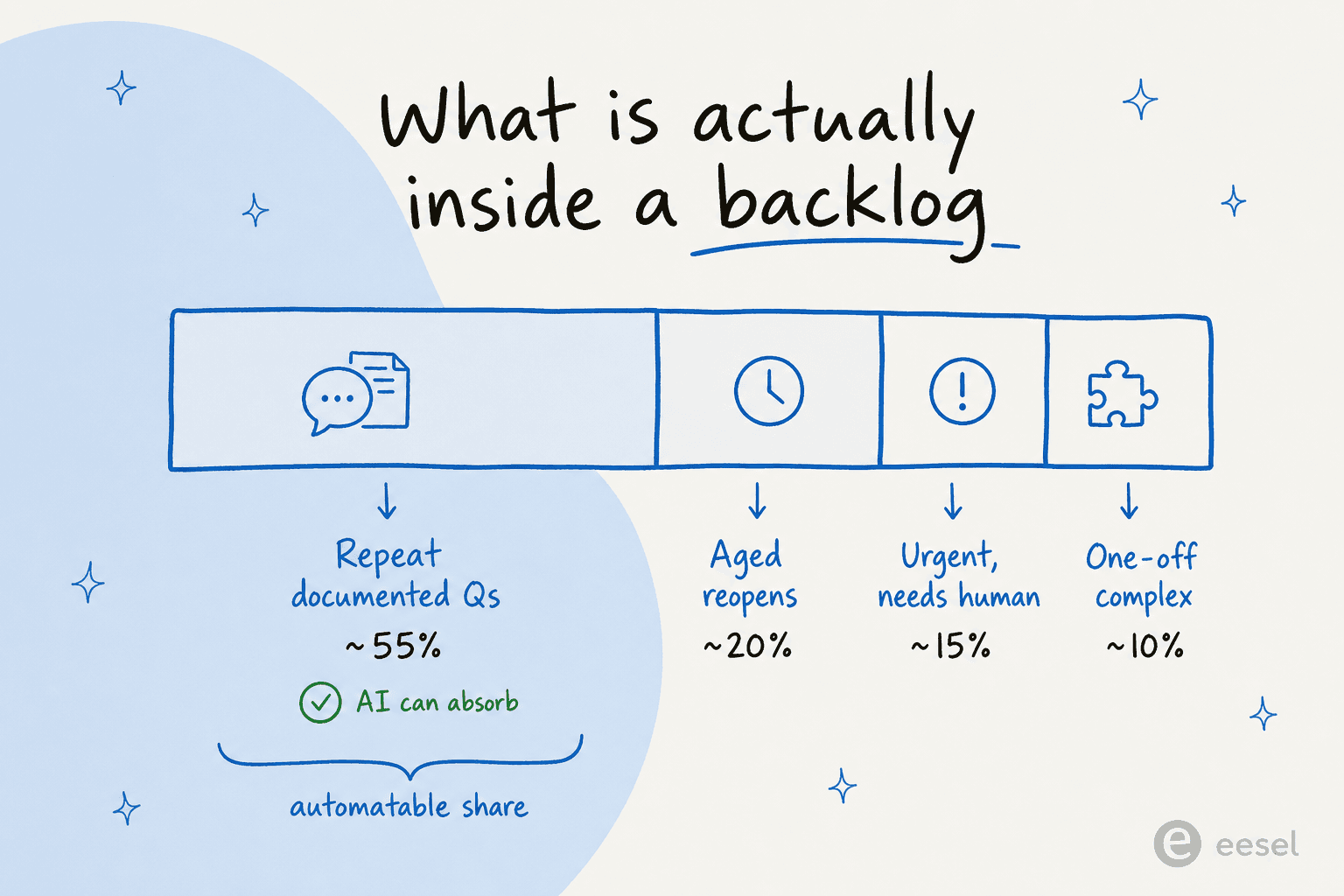
The biggest slice is usually repeat, well-documented questions that an AI agent can answer outright, with aged reopens close behind. Only a minority truly needs a person. Knowing the split is what tells you whether to add staff or remove the repeatable work. The proportions vary by team, but the shape rarely does.
How a ticket backlog builds and clears
Think of the backlog as a reservoir with one pipe filling it and one draining it:
- Inflow. New tickets arrive across every channel, raising the water level.
- Resolution. Agents and automation close tickets, draining it back down.
- Net change. When inflow exceeds resolution capacity, the level rises; when it falls below, the backlog clears.
The durable fix is widening the drain rather than just bailing faster during a spike. A support agent like eesel AI does this by grounding answers in your help center and past tickets, resolving the repetitive, well-documented questions at volume, and escalating only the cases that truly need a person. That keeps the backlog from refilling the moment a crunch ends, because the highest-frequency tickets stop reaching a human at all. Automating the repeatable share is what flattens the backlog for good, not just clearing it once.
Ticket backlog in practice
Most teams watch the backlog trend over time rather than a single day's count, because one busy afternoon is noise and a four-week climb is a problem. The useful question is not "how many open tickets do we have" but "is the backlog growing, flat, or shrinking, and which categories are driving it." Segmenting the backlog by topic almost always reveals that a handful of recurring issues account for most of the aged tickets, and those are the ones worth deflecting or automating first.
Want the full playbook? See our guide to clearing a backlog.
Clear your ticket backlog
eesel AI resolves repetitive, well-documented tickets at volume so the backlog stops growing faster than your team can work it down.