AI customer service
The use of artificial intelligence to understand, respond to, and resolve customer questions, either on its own or by assisting human agents.
What AI customer service means
AI customer service is the use of artificial intelligence to understand, respond to, and resolve customer questions, either on its own or by assisting the human agents who handle them. It covers everything from a model drafting a reply for an agent to review, to a fully autonomous system that reads an inquiry, finds the answer, and closes the case without anyone touching it. The common thread is that software, not a person, does the interpreting and the heavy lifting on the response.
In a support setting, this shows up across channels: email, live chat, messaging apps, and increasingly voice. Instead of every question landing in a queue for a person, an AI layer triages incoming requests, answers the ones it can resolve confidently, and hands the rest to an agent with context already attached. Done well, it changes support from a purely reactive headcount problem into something that scales with volume.
The term is broad on purpose. It describes a category, not a product. A helpdesk that suggests a canned reply is doing AI customer service, and so is an autonomous agent that refunds an order and updates the ticket. What separates them is how much of the job the software finishes, and that is the axis worth thinking on when you evaluate anything in this space.
How AI customer service works
A capable AI support system usually runs a version of the same flow:
- Ingest knowledge. It learns from your help center, internal docs, and past ticket history so its answers reflect your real policies, not generic web text.
- Interpret the request. It reads the incoming message, works out intent, and decides whether it can resolve the issue or should route it.
- Ground the answer. It retrieves the relevant facts and composes a reply tied to your actual content, a technique known as RAG.
- Act or escalate. It takes the allowed action (refund, status update, tag) or hands off to a human with full context when confidence is low.
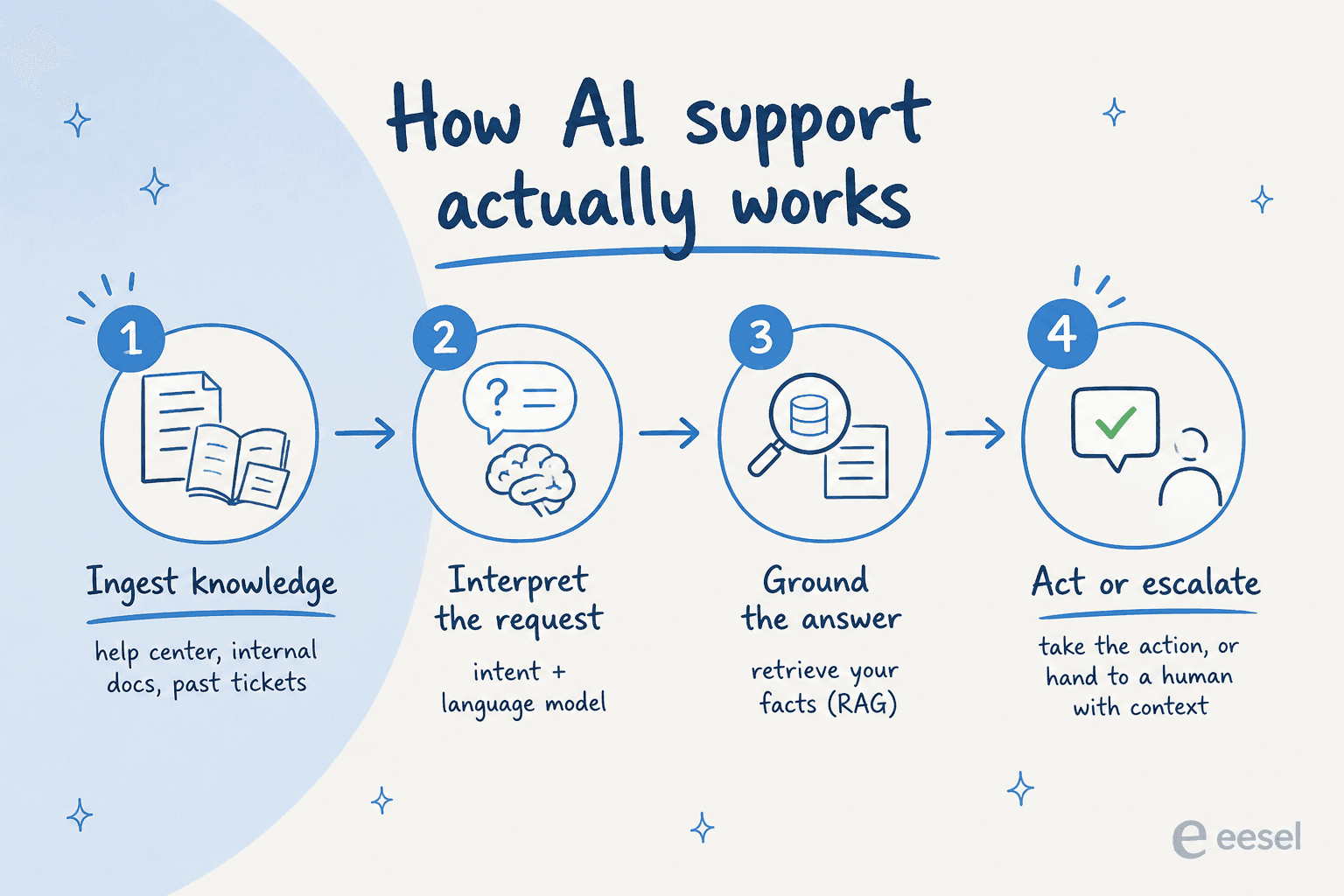
The steps look simple written down, and the difficulty is concentrated in two of them. Step one sets the ceiling on accuracy, because a system cannot answer from knowledge it was never given, and most support knowledge lives somewhere other than the help center: closed tickets, an internal wiki, a Slack thread where the real policy got decided. Step four decides whether people trust it, because an AI that guesses when it should escalate does more damage to a support team's confidence than one that escalates too often.
Underneath, the interpretation step usually combines intent classification with a large language model. Classification works out what kind of request this is and where it belongs. The language model handles the wording, the tone, and the messy multi-turn cases where a customer buries three questions in one paragraph. Retrieval sits between them, pulling the specific passages an answer needs so the model composes from your facts rather than its training data. That retrieval step is what separates a support answer from a plausible-sounding one, which is why AI grounding is the term that matters most when you compare vendors.
A support agent like eesel AI follows this pattern: it trains on your existing knowledge, simulates against historical tickets before going live so you can see how it would have handled real cases, and escalates cleanly when there is no safe answer.
The four modes of AI customer service
Most deployments are a blend of four modes, and it helps to name them because vendors rarely do.
Autonomous resolution. The AI reads the ticket, answers it, takes any action required, and closes it. No human touches the conversation. This is where the economics are, and also where the risk is, so it is normally scoped to well-documented request types first.
Agent assist. The AI drafts the reply and a person approves, edits, or rejects it before it sends. Agent assist keeps a human accountable for every outgoing message, which makes it the usual starting point for regulated industries and for teams whose knowledge base is still thin. It cuts handle time without changing who is responsible for the answer.
Triage and routing. The AI never writes to the customer at all. It reads the incoming request, applies ticket tagging, sets priority, and performs ticket routing to the right queue or specialist. This is the least glamorous mode and often the fastest to show value, because misrouted tickets are a quiet, expensive tax on most support teams.
Background work on the queue. Summarising a long thread before a handoff, translating a reply, drafting internal notes from a cluster of related tickets, flagging sentiment on an account that looks like it is about to churn. None of this is customer-facing, and all of it removes work agents currently do by hand. Ticket summarization alone changes what a shift handover costs.
The four modes are not a ladder you climb in order. Plenty of mature teams run autonomous resolution on password resets and agent assist on billing disputes at the same time, permanently, because that is the right answer for each ticket type.
What AI customer service is used for
The clearest way to see the category is through the requests it actually handles.
- Order and account status. Where is my order, when does my plan renew, has my refund gone through. High volume, low ambiguity, and answerable only if the AI can read the underlying system rather than just the help center.
- Password resets and access problems. The archetypal automatable ticket, and usually the first one a team hands over.
- Policy and how-to questions. Return windows, plan limits, how to configure a feature. These live in documentation, so answer quality tracks documentation quality exactly.
- Refunds and order changes. Resolvable end to end when the AI is allowed to call the action, and a dead end when it is only allowed to talk. This is the line between ticket deflection and real resolution.
- After-hours coverage. The same questions arrive at 3am, and a queue that waits until morning is a first response time problem that AI solves without a night shift.
Beyond the queue itself, teams point the same models at their own data. Clustering tickets to find the top drivers of ticket volume, spotting the documentation gap generating a hundred contacts a month, running sentiment analysis across a segment to catch a problem before it becomes churn. This is voice of the customer work that most teams historically never had the hours to do.
AI customer service by channel
The same system behaves quite differently depending on where the conversation happens, and that shapes what you should automate first.
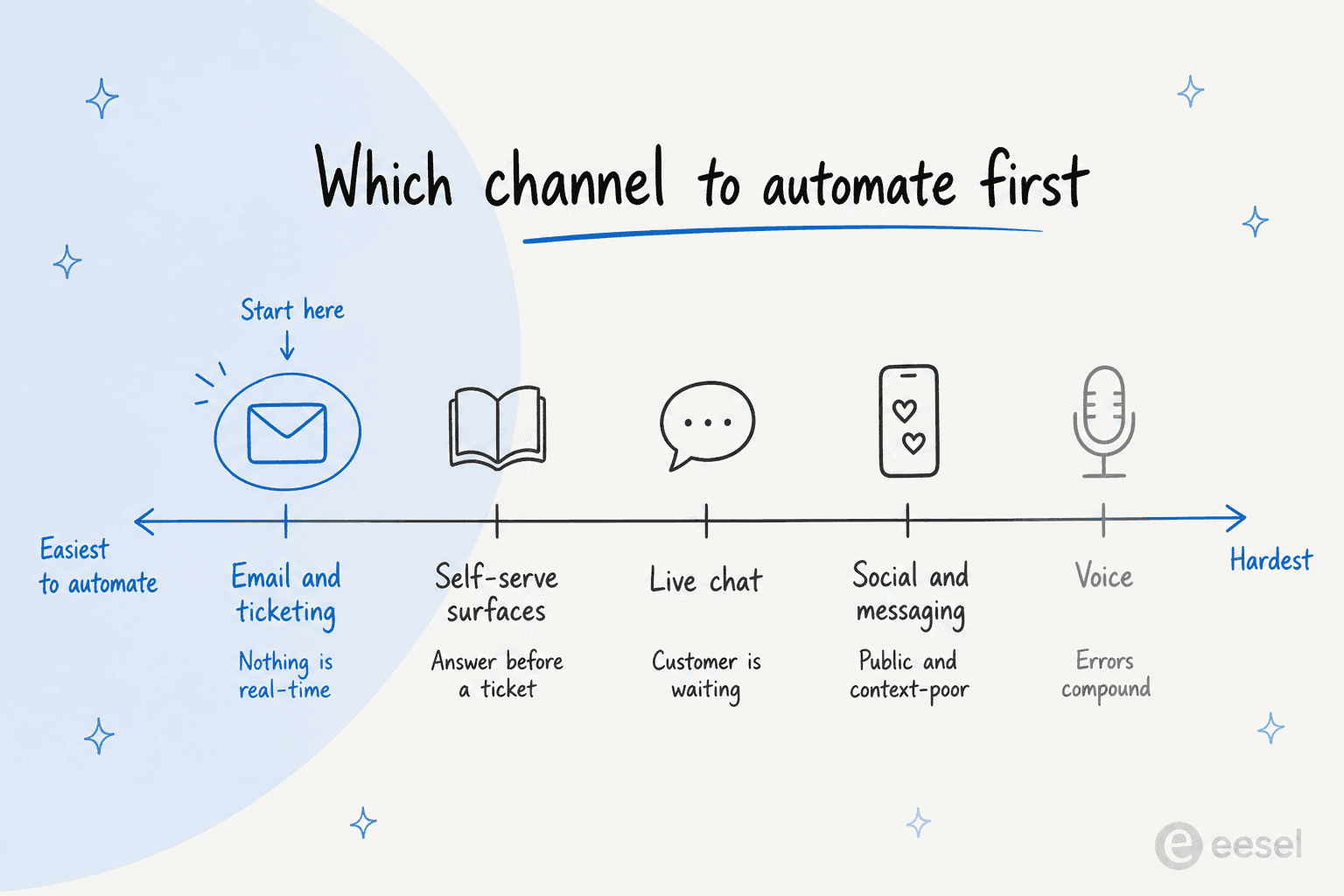
Email and ticketing. The most forgiving channel to start on, because nothing is real-time. A reply that takes ninety seconds to compose is still fast, which leaves room for a conservative confidence threshold and for agent review. Threads are long and full of history, so this is where grounding in past tickets pays off most.
Live chat and in-app messaging. The customer is waiting, so latency is a product feature rather than a technical detail. Live chat also gives the AI the option to ask a clarifying question, which raises accuracy on ambiguous requests in a way email cannot.
Social and messaging apps. Public channels carry reputational weight that private ones do not, and the messages are short and context-poor. Most teams keep a tighter escalation rule here for that reason.
Voice. The hardest channel and the one changing fastest. Speech recognition errors compound into retrieval errors, there is no way to skim a long answer, and interruptions are normal rather than exceptional.
Self-serve surfaces. An answer embedded in the help center or the product itself, resolving the question before a ticket exists. Customer self-service is the cheapest resolution available, and the one least visible in helpdesk reporting, since a ticket that never opens never gets counted.
The constraint that matters across all of them is whether the AI reaches the same knowledge and the same systems on every channel. When it does not, customers get different answers depending on where they asked, which is worse than having no AI at all.
The benefits of AI customer service
The case for AI in support comes down to a few concrete pressures, not vague efficiency:
- Volume outpaces headcount. Ticket counts grow faster than hiring budgets, so a large share of repetitive, low-complexity questions never gets a fast answer without automation.
- Round-the-clock coverage. AI answers at 3am and on holidays without a night shift, cutting first response time for customers in every timezone.
- Consistency. A grounded system gives the same correct answer every time, where ten agents might phrase a policy ten slightly different ways.
- Agent focus. Routing the repetitive load to AI lets human agents spend their time on the complex, emotional, or high-value conversations that actually need them.
- Measurable resolution. Modern AI support is judged on tickets actually resolved, which ties it to outcomes like resolution rate rather than just messages sent.
There is a second-order benefit that is easy to miss. When AI absorbs the repetitive tickets, the mix of work left for humans changes shape, and so does the job. Agents who spend their day on password resets burn out and leave, taking their product knowledge with them. Agents who spend their day on the hard half of the queue are doing work worth staying for. Attrition is one of the largest hidden costs in support, and changing the composition of the work is one of the few levers that moves it.
How to implement AI customer service
Deciding what to hand to AI first is less about the technology and more about the shape of your ticket mix.
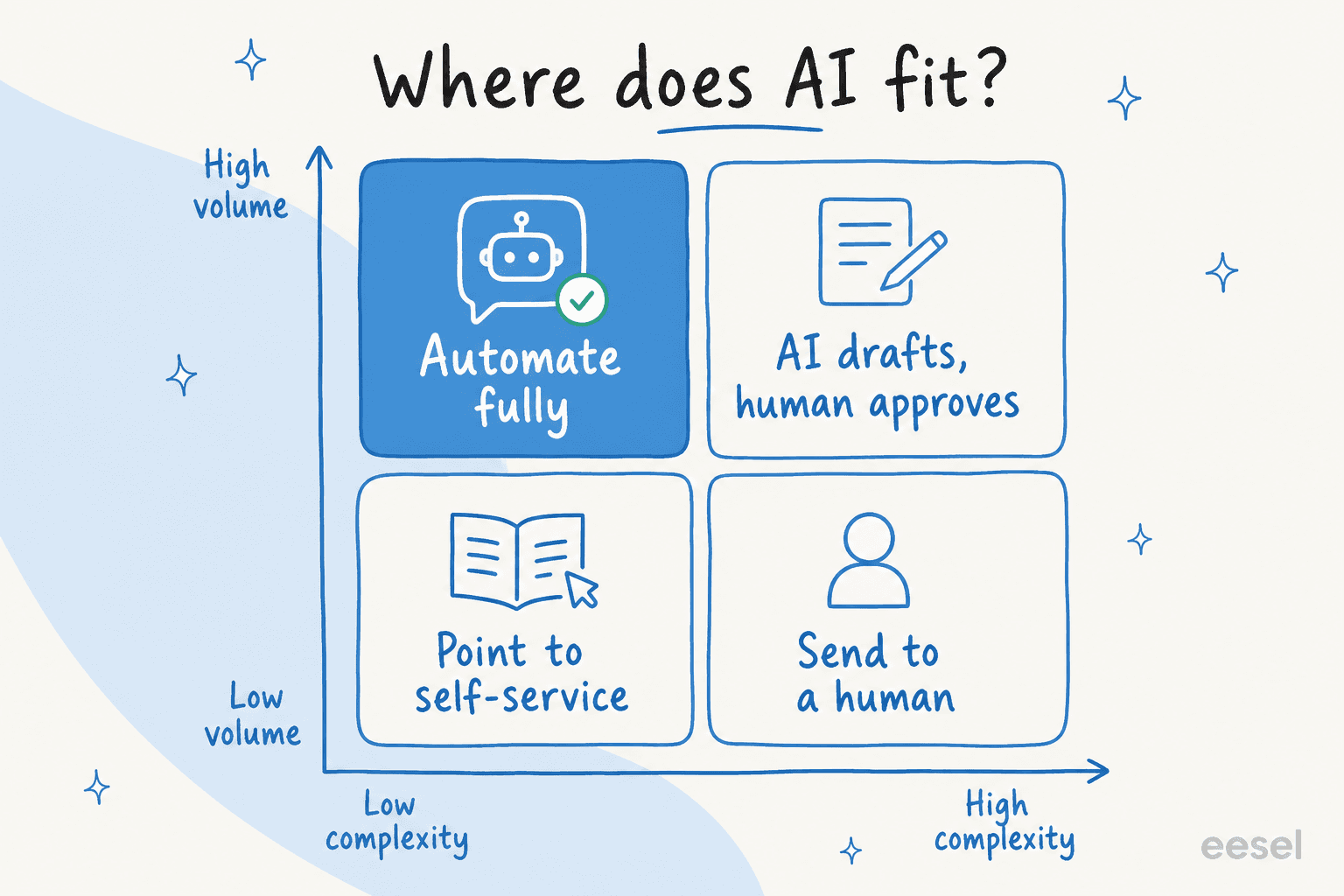
The decision falls along two axes: how often a ticket type arrives, and how hard it is to resolve. High-volume, low-complexity questions like password resets and order status are the safe place to automate fully; high-volume but genuinely complex issues work best as AI-drafted replies a human approves; the rare, complicated cases stay with a person. Reading your queue through that grid is what separates a rollout that earns trust from one that quietly erodes it.
A rollout that works usually runs in this order:
- Audit the queue. Pull three to six months of tickets and cluster them by reason. You are looking for the handful of request types that make up most of your volume, because those are the only ones where automation changes your numbers.
- Fix the knowledge before the AI touches it. Every request type you intend to automate needs a correct, current, findable answer somewhere the system can read. This step is where most of the real work sits, and skipping it is the most common cause of a disappointing pilot.
- Simulate against history. Run the AI over closed tickets and compare what it would have said to what your team actually said. This gives you an accuracy read before a single customer is exposed, and it tells you which request types are ready.
- Go live narrow. Turn it on for one or two request types, in one channel, with a conservative confidence score threshold and an aggressive escalation rule.
- Widen on evidence. Add request types as the data supports it. Every expansion should be a decision you can defend with numbers from the previous stage.
The teams that get the most from AI customer service treat it as a scoped deployment rather than a switch they flip. The two things that decide success are the quality of the knowledge the system can reach and the clarity of its escalation rules. A model with thin knowledge and no guardrails will sound confident and be wrong, which is worse for trust than a slower human reply.
What AI customer service costs
Pricing in this category has settled into three shapes, and they are not comparable at face value.
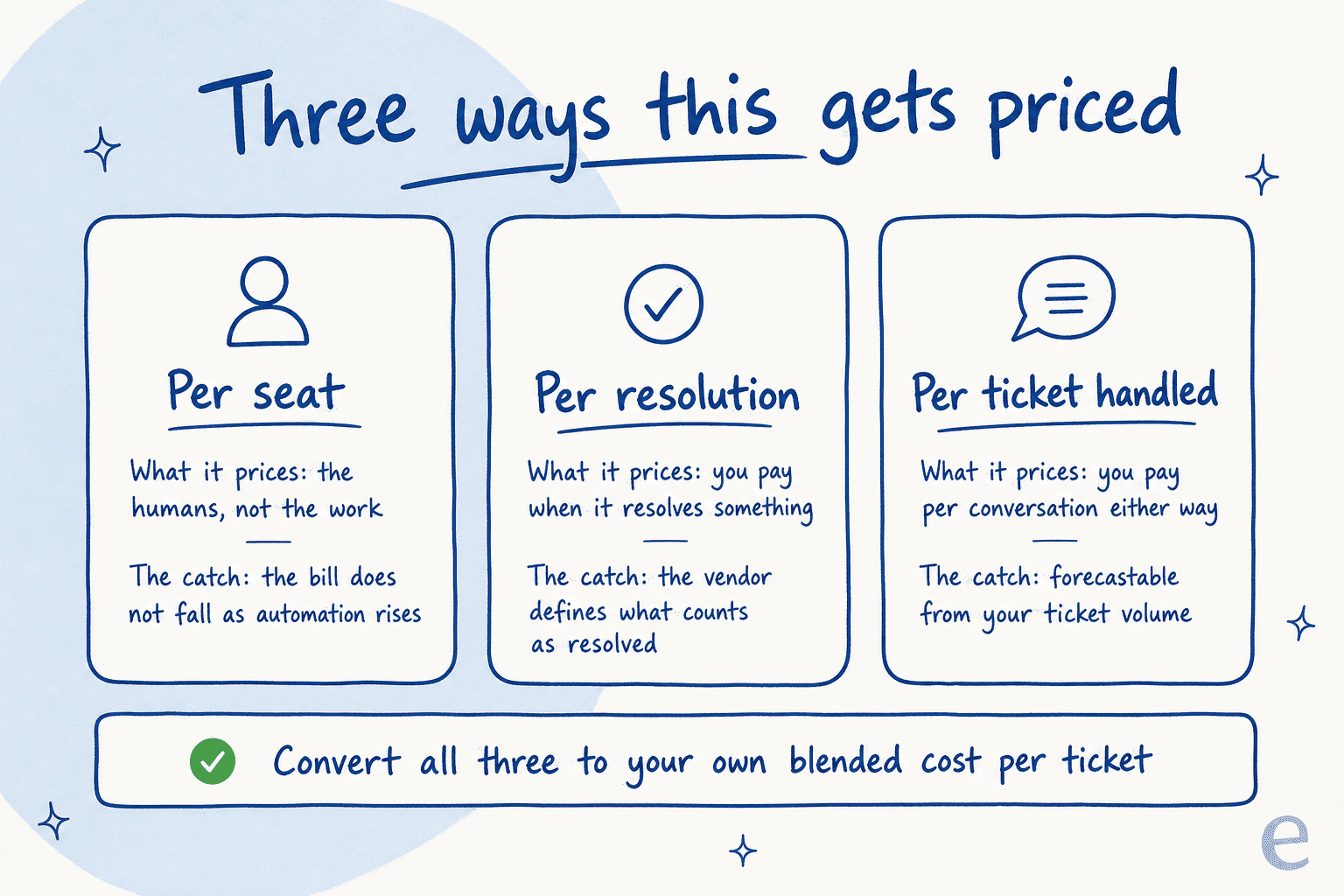
Per seat. The traditional helpdesk model, priced per agent per month. Intercom lists seats at $29, $85, and $132 per month depending on plan. Seat pricing is predictable, but it prices the humans rather than the work, so the bill does not fall as automation rises.
Per resolution or outcome. You pay when the AI resolves something. Intercom prices Fin at $0.99 per outcome, charged once per conversation, where an outcome means the customer confirms the issue is resolved, stops asking for help after Fin responds, or Fin completes a workflow including handoffs. Outcome-based pricing aligns spend with value, and the fine print is where it gets complicated, because the vendor defines what counts.
Per ticket or conversation handled. You pay for the interaction regardless of how it ends. eesel AI uses this model at $0.40 per regular task, where one support ticket or chat session is one task no matter how many messages go back and forth, and there are no seat fees. The trade is that you pay for conversations the AI does not resolve, in exchange for a number you can forecast from your ticket volume without modelling anyone's resolution definition.
Whichever model you are quoted, convert it to your own blended cost per ticket across the whole queue, humans included. That is the only figure that tells you whether the deployment paid for itself, and it is the figure vendors are least able to quote you.
How to measure AI customer service
Support teams already have a metrics vocabulary and most of it still applies. The additions are the ones that describe what the AI specifically did.
- Resolution rate is the headline: what share of incoming tickets the AI closed without a human. It is the number that changes your economics.
- Deflection rate and containment rate describe how many conversations never reached a person. Both are easy to inflate, because a customer who gives up also counts as contained, so read them alongside satisfaction rather than instead of it.
- CSAT segmented by AI-handled versus human-handled tells you whether the automation is quietly costing you goodwill. The segmenting is the important part; a blended score hides the problem.
- Average handle time and first contact resolution show the effect on the tickets humans still take, which is where agent assist earns its keep.
- Reopen rate is the honesty check. A rising reopen rate on AI-closed tickets means the system is closing conversations it did not actually resolve.
Watch them as a set. Almost every one of these can be moved in isolation by doing something you would not want, which is why a single-metric target on an AI rollout tends to produce exactly the behaviour it measures.
The limitations of AI customer service
The failure modes are well understood and worth being specific about.
It cannot answer what nobody wrote down. Undocumented policy, tribal knowledge, the exception your longest-serving agent applies by instinct: none of it is reachable. Thin knowledge is the root cause of most disappointing deployments, and no model upgrade fixes it.
Confident wrong answers. AI hallucination is the risk that defines the category. Grounding reduces it substantially, and a system without AI guardrails and a real escalation threshold will eventually tell a customer something untrue in your brand voice.
Emotional and high-stakes conversations. A cancellation from a frustrated long-term customer, a billing dispute, an outage complaint. These need judgment and accountability, and routing them to AI to save a few minutes is a false economy.
Security surface. Anything that reads customer input and takes actions is exposed to prompt injection, and anything that reads internal docs can surface information a customer should not see. Permissions and action scoping are part of the deployment, not an afterthought.
Measurement that flatters. Deflection numbers look excellent right up until you segment satisfaction and reopen rate by whether a human was involved.
None of these argue against the category. They argue for scoping, for human-in-the-loop review on anything consequential, and for treating quality assurance on AI-handled tickets as seriously as you treat it on human ones.
How AI customer service differs from related terms
The neighbouring terms overlap enough to cause genuine confusion.
A chatbot is a delivery mechanism, historically a scripted one. AI customer service describes what the software does, on any channel, scripted or not. Every AI chatbot is doing AI customer service; plenty of AI customer service never appears as a chat widget.
Conversational AI is the underlying capability of holding a natural-language exchange. It is a component, not an outcome.
Customer service automation is the wider category, and it includes rules-based work with no AI in it at all, like a macro that fires on a keyword or an SLA timer that escalates a ticket.
An AI agent is the most autonomous form: software that plans, calls tools, takes actions, and finishes the task. AI customer service is the domain; an AI agent is one shape it takes inside that domain.
The future of AI customer service
Three shifts are already visible in how the category is bought and built.
Resolution replaces deflection as the goal. Deflection measured whether a customer stopped asking. Resolution measures whether their problem went away. Pricing is following the same move, which is why outcome-priced and per-ticket models are displacing seat-only pricing for the AI layer.
Action beats answering. The gap between systems that can explain your refund policy and systems that can issue the refund is the gap that decides value. That makes integration depth, rather than model quality, the increasingly common differentiator.
Support becomes a source of product signal. When AI reads every ticket, the queue turns into a continuously updated map of what confuses people about your product. Teams are starting to route that back into documentation and roadmap automatically, which shifts support from downstream cleanup toward proactive support.
The constant through all of it is unglamorous. The systems that work are the ones pointed at good knowledge, given a narrow remit, and held to a metric that would expose them if they were wrong.
Want the full playbook, including what four pricing models cost on the same ticket volume? Read our guide to AI for customer service.
Put AI on your customer service queue
eesel AI answers and resolves customer questions from your own help center, docs, and past tickets, and escalates to a person when it should.