


Freddy AI sounds like a single add-on you flip on in your Freshdesk settings. It isn't. It's three distinct products - Freddy AI Agent, Freddy AI Copilot, and Freddy AI Insights - each priced separately, each with different plan requirements, and each targeting a different part of your support workflow.
We went through the official Freshdesk pricing pages, ran the math on real usage scenarios, and dug into G2 reviews and Reddit threads from teams who've actually deployed Freddy. Here's what it costs, what's worth it, and where teams consistently hit surprises.
What Freddy AI actually is: three products with three price tags
Most people searching "Freshdesk Freddy AI pricing" expect to find a single number. There isn't one.
Freddy AI is Freshworks' umbrella brand for three distinct products that each address a different layer of the support operation:
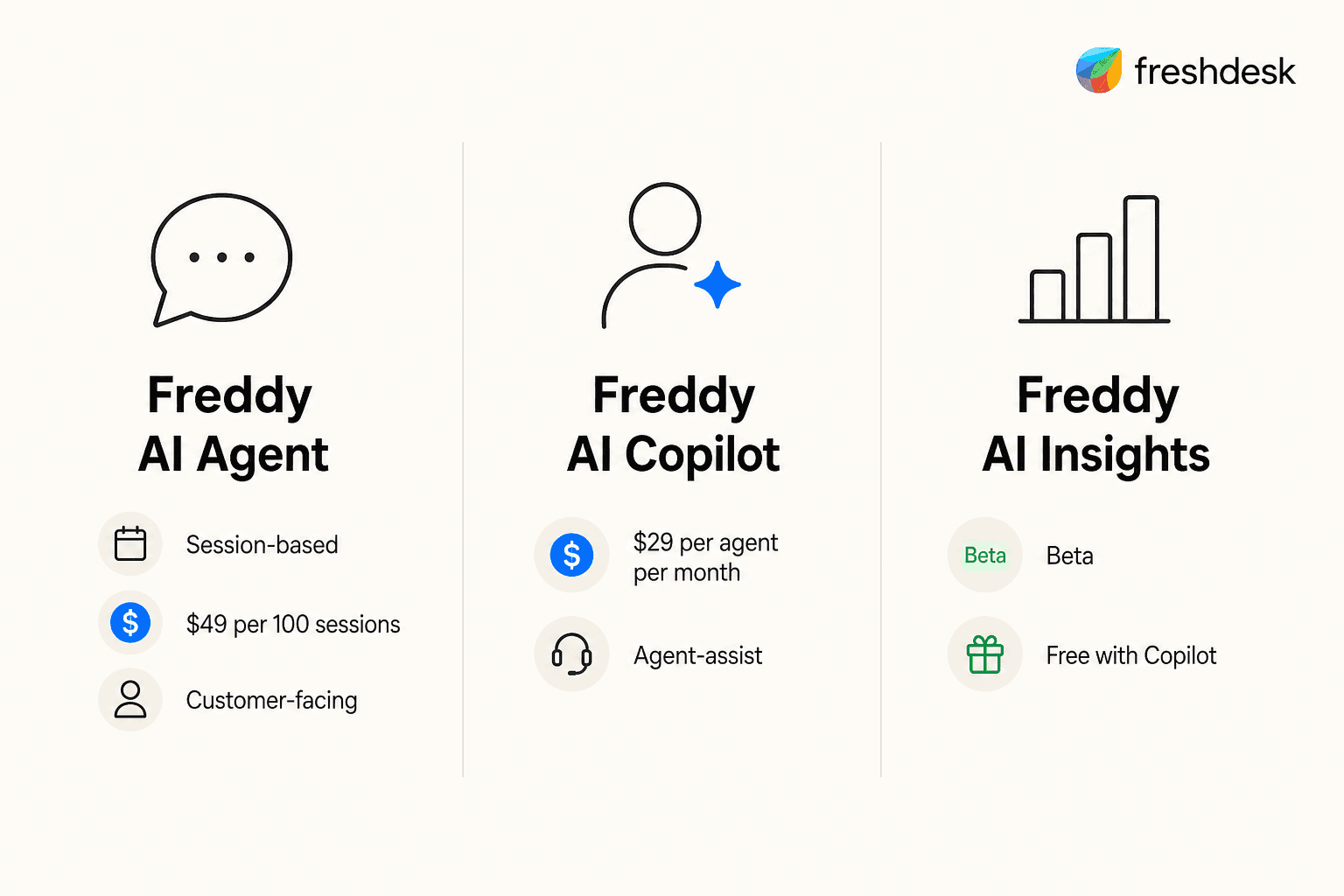
Freddy AI Agent handles customer-facing interactions autonomously - responding to tickets, answering questions, resolving issues without a human in the loop. This is what most people mean when they say "AI chatbot" or "ticket deflection." Priced per session: you pay per interaction, regardless of whether that interaction resolves anything.
Freddy AI Copilot lives inside the agent workspace and helps your human agents work faster - reply suggestions, conversation summaries, real-time translation, similar-ticket lookup. Priced per agent seat: you pay per person who has it assigned.
Freddy AI Insights is the analytics layer for team leads - CSAT trend alerts, SLA breach detection with root cause analysis, conversational queries against your support data. Included on the Enterprise plan.
Understanding that these are three separate products explains most of the pricing confusion. A Growth plan user and an Enterprise user both technically "have Freddy AI" - but they're working with fundamentally different subsets of those three products. If you want to use all three, you're making three separate buying decisions.
Freshdesk pricing with Freddy AI: the full picture
Freshdesk comes in two product lines with different pricing floors. Classic Freshdesk covers email and ticketing; Freshdesk Omni adds omnichannel messaging (WhatsApp, SMS, social channels, web chat) on top.
Freshdesk classic - billed annually:
| Plan | Price | Freddy AI Agent | Freddy AI Copilot | Freddy AI Insights |
|---|---|---|---|---|
| Growth | $19/agent/month | Email AI Agent + 500 free sessions (once) | Not available | Not available |
| Pro | $55/agent/month | Email AI Agent + 500 free sessions (once) | Add-on available | Not available |
| Enterprise | $89/agent/month | Email AI Agent + 500 free sessions (once) | Add-on available | Included |
Freshdesk Omni - billed annually:
| Plan | Price | Freddy AI Agent | Freddy AI Copilot |
|---|---|---|---|
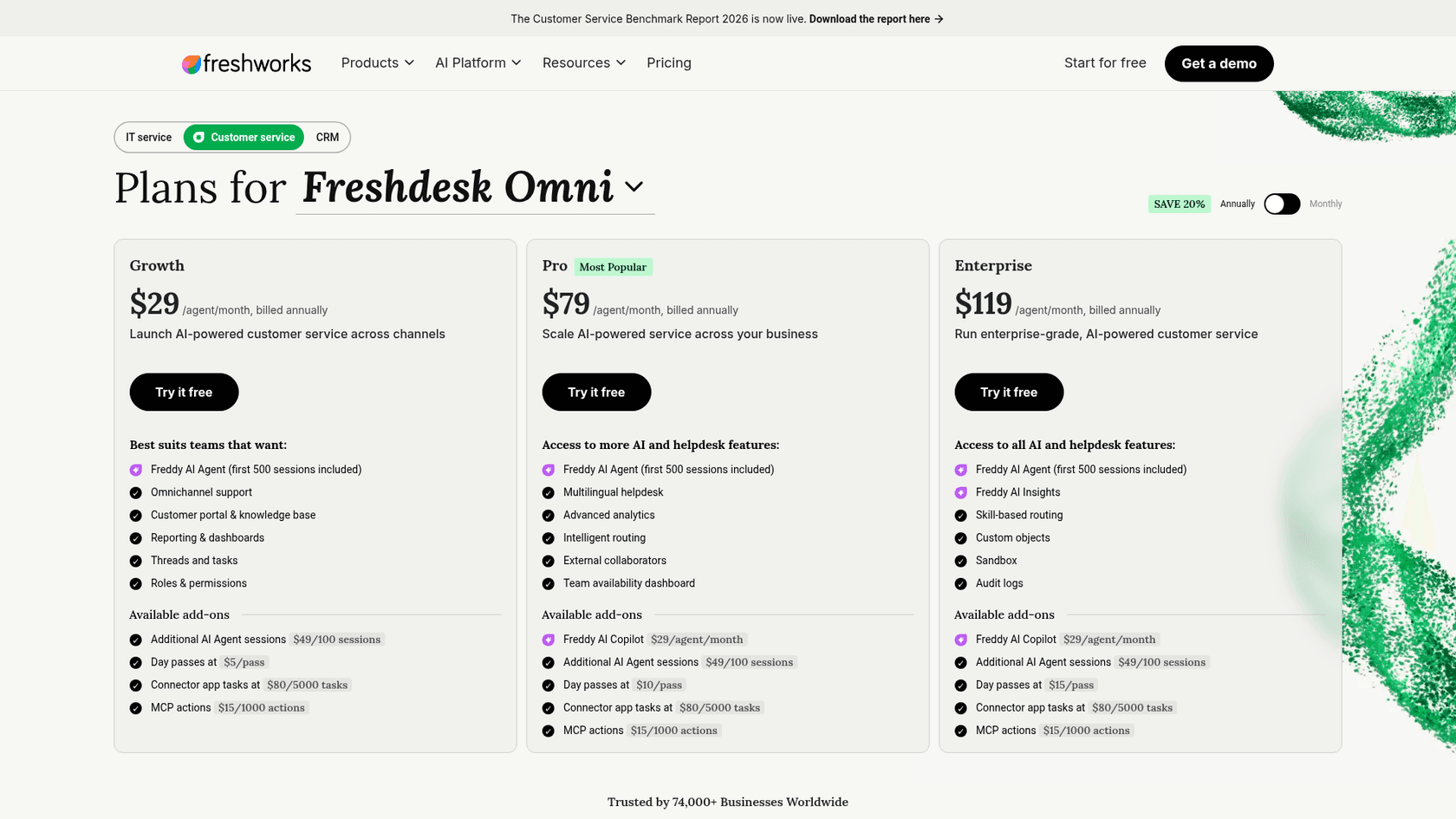
| Growth | $29/agent/month | All AI Agent types + 500 free sessions | Pro/Enterprise add-on only |
| Pro | $79/agent/month | All AI Agent types + 500 free sessions | $29/agent/month add-on |
| Enterprise | $119/agent/month | All AI Agent types + 500 free sessions | $29/agent/month add-on |
Two details worth flagging immediately: the first 500 AI Agent sessions come with every paid plan on both product lines, and they are a one-time allowance per account. And Copilot is locked to Pro and Enterprise on both product lines - Growth users who want it are out of luck regardless of which product they're on.
Freddy AI Agent pricing: how sessions work
Freddy AI Agent is session-based. The official pricing as of October 2026:
- Classic Freshdesk (Email AI Agent): $49 per 100 sessions - $0.49/session
- Freshdesk Omni (chat, vertical, and email agents): $49 per 100 sessions - $0.49/session
The unit price is the same on both pages. What differs is the window a session covers, as the definitions below show.
What counts as a session:
- Email AI Agent: A 72-hour window starting from the customer's first email. All AI responses within that window = 1 session.
- Chat AI Agent: A 24-hour window from when the session starts. All interactions within that window = 1 session.
The email session definition is more favorable than it sounds at first. One email thread that takes two AI replies over 48 hours still consumes one session. But per MyAskAI's analysis of email support patterns, the average email ticket across industries gets 2.5 AI replies before resolution - so you're burning through sessions faster than the "one per thread" framing suggests.
The 500-session free allocation on Growth, Pro, and Enterprise is a one-time offer per account. Once gone, it's gone - these don't refresh monthly. Featurebase's review does the quick math: "going through 500 per month means just a little bit over 25 conversations per day, which is not a lot." For any reasonably active support team, this runs out fast.
Sessions expire. Unused sessions at the end of your billing cycle disappear. No rollover. If you overbought packs in a quiet month, those sessions are gone at renewal.
The real cost per resolved ticket
Here's where the session math stops looking favorable.
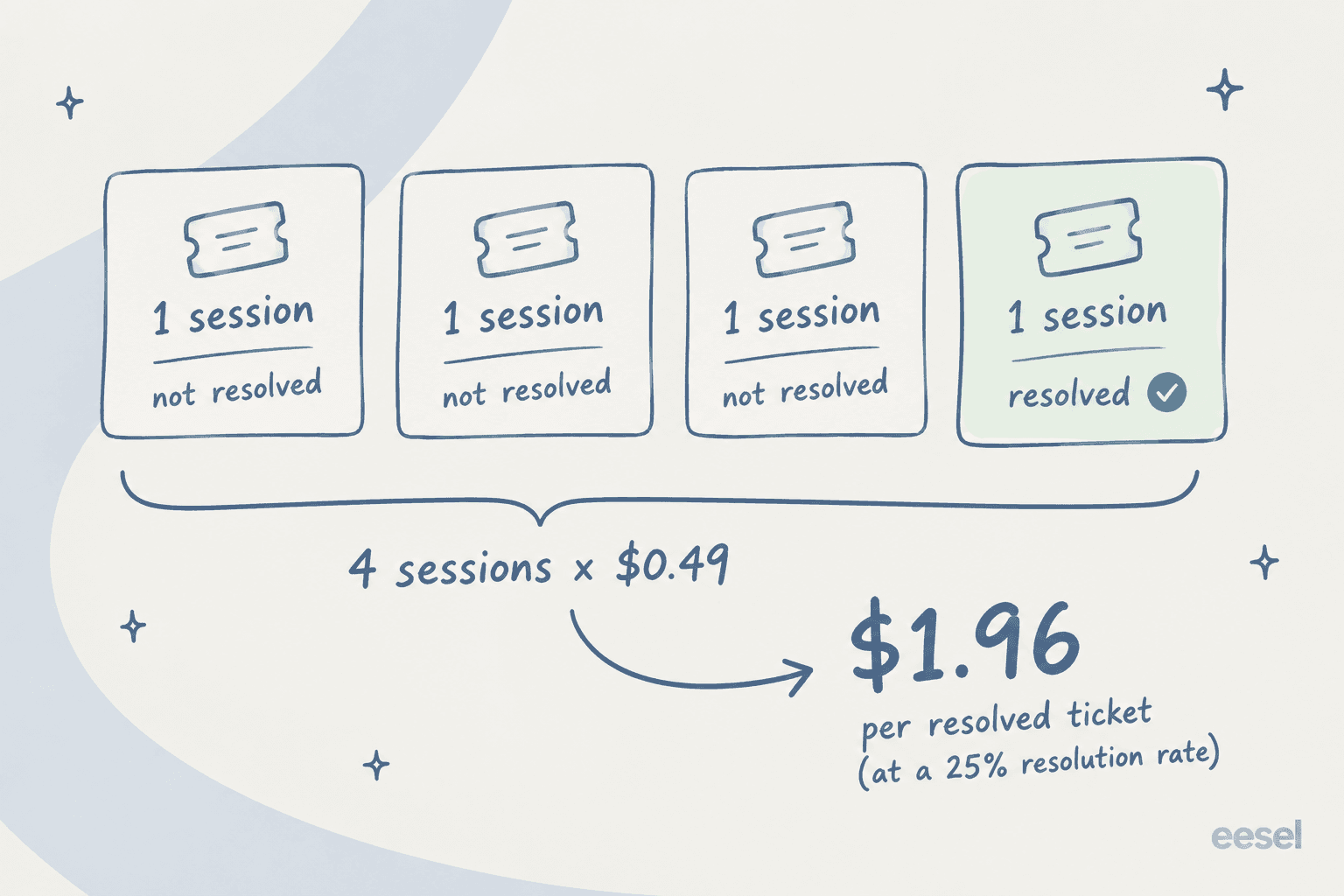
Freshworks' own case studies quote resolution rates of 23-30% for Freddy AI. Sessions charge for every conversation, outcomes optional. At a 25% resolution rate:
- 4 sessions consumed per resolved ticket on average (3 failed interactions + 1 resolved)
- At $0.49/session (Freshdesk or Omni): $1.96 per resolved ticket
The $0.49 session price looks modest on its own. Outcome-based competitors that charge per resolution only bill when the AI succeeds, while Freddy charges for every session.
Featurebase put it plainly: "while tools... charge you per AI resolution, Freshdesk counts any unique user who engages with them as a session. So, if you have 200 conversations today, you've had 200 sessions, even if none of them resolved a customer's pain point."
There's also a mid-month risk: if you run out of sessions, your AI simply stops working until you buy more packs. You need to forecast volume accurately - and buy in blocks - which creates waste when volume is lower than expected.
For a deeper look at how the per-resolution math works, we've broken it down separately in the Freshdesk Freddy AI pricing per resolution guide.
Freddy AI Copilot pricing
Copilot is the per-agent add-on where costs stack up the most for larger teams.
The confirmed price: $29/agent/month billed annually, or $35/agent/month on monthly billing. Available only on Pro and Enterprise - Growth plan users can't add Copilot. There are no day passes, so you're committing to at least a monthly subscription per agent.
One genuinely useful flexibility: you can assign Copilot to a subset of agents. A team of 20 where 12 handle complex tickets can buy 12 Copilot licenses rather than 20. That's confirmed in Freshworks' documentation and actually works in practice - you're not forced to license your whole headcount.
Copilot's day-to-day: instant reply drafts based on the ticket context and knowledge base, smart summaries of long threads (Freshworks reports 56% time savings on summarization), real-time translation across 60+ languages, sentiment detection to flag frustrated customers early.
Customer feedback on Copilot is genuinely positive when the use case fits:
"We use Freddy to rephrase our conversations all the time. Freddy AI Copilot has been super-helpful and makes us so much better at enhancing our normal, everyday interactions. We even updated a few of our traditional standard replies due to suggestions from Freddy."
Angela Thomas, Director of Customer Care, via Freshworks
The limit that comes up repeatedly in community feedback: Freddy can only train on Freshdesk's own knowledge base. If your team uses Notion, Confluence, or Google Drive as primary sources, those don't feed into Copilot suggestions. You'd need to manually maintain a Freshdesk KB in parallel - extra work that erodes the productivity benefit.
Freddy AI Insights pricing
Freddy AI Insights is the analytics layer for team leads: CSAT trend monitoring, SLA breach alerts with root cause analysis, and an "ask Freddy" conversational interface for querying your support data. It has no standalone price and is listed as included on the Enterprise plan.
The access model: Insights comes with the Enterprise plan, so there is nothing extra to buy. Growth and Pro do not list it, and adding Copilot does not unlock it.
The gotcha: Freshworks footnotes both Proactive and Conversational Insights against its Service Limits Policy, so read the usage guidelines before you build reporting around it.
Insights is Enterprise only.
What a real team actually pays
Let's put all three add-ons together in one concrete scenario. ClearFeed's May 2026 analysis ran the numbers for a mid-market team:
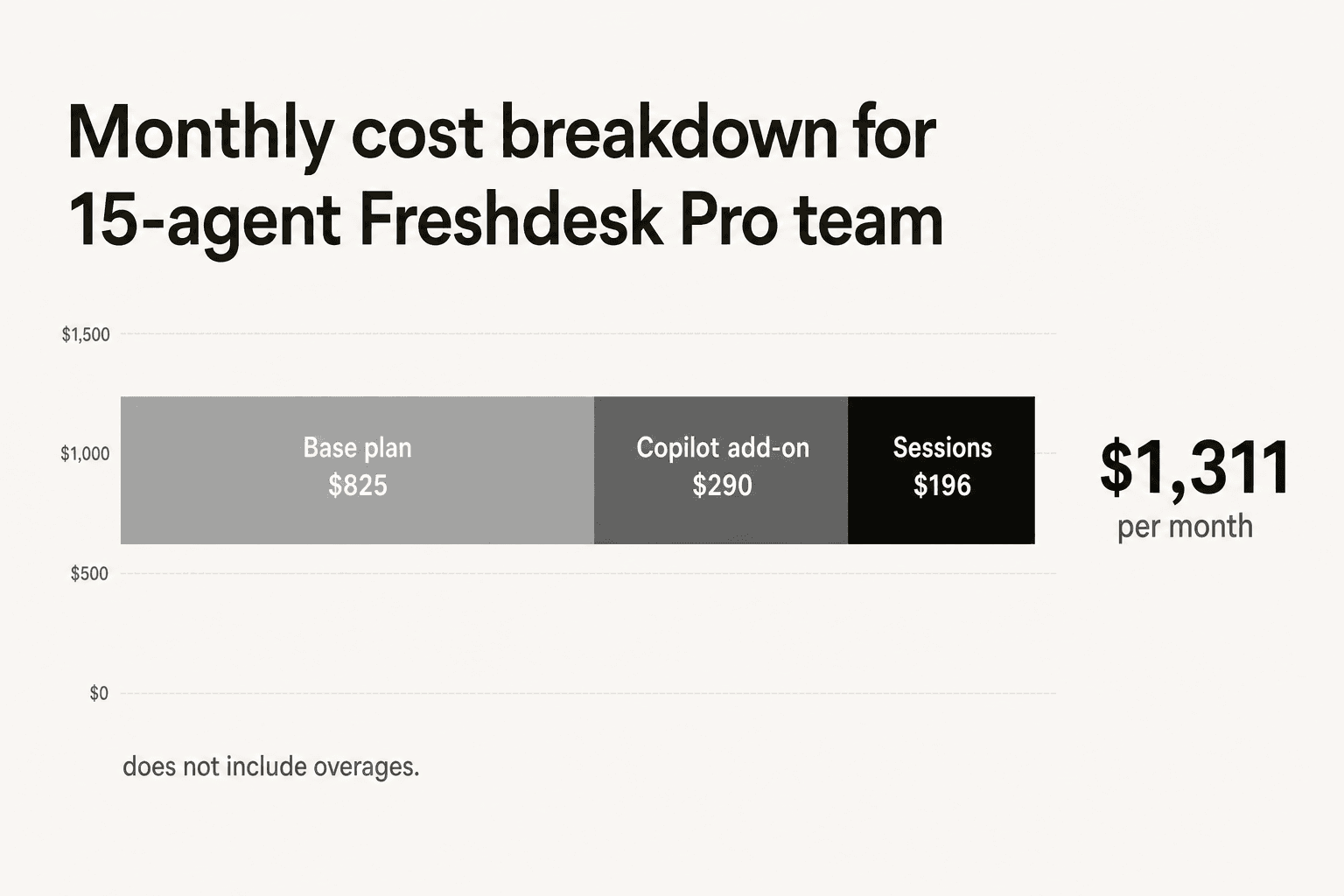
15-agent team, Freshdesk Pro, Copilot on 10 agents:
| Line item | Monthly cost |
|---|---|
| 15 agents × Pro ($55/agent) | $825 |
| 10 agents × Copilot ($29/agent) | $290 |
| Base total | $1,115 |
That $1,115 doesn't include AI Agent sessions beyond the one-time 500-session allocation. An additional 400 email sessions (roughly 40 conversations/day for a month at 1 session/conversation) adds another $196, bringing the total to $1,311/month.
MyAskAI's more detailed model for a 20-agent team handling 10,000 tickets/month puts total Freddy AI monthly cost at $2,916 (AI replies plus Copilot seats), which annualizes to roughly $35,000.
As ClearFeed's analysis concludes: "AI can still be worth it. But it should be forecast as a separate line item, not mentally included in the plan price."
What real teams say about Freddy's cost
Community sentiment around Freddy's pricing is mixed, with the most consistent frustration around the session model and the Copilot add-on cost relative to what they deliver.
The most striking data point from recent Reddit discussion came from a May 2026 r/Freshservice thread. A 600-person org that enabled Freddy AI in December 2024 reported their tier-1 MTTR went up 20% after five months, despite an autoresolve rate around 25%. The explanation from the original poster:
"Tickets that don't autoresolve are sitting longer. I think what is happening is the handoff cost. Freddy tries, fails, agent picks it up but has to scroll through the full back-and-forth before they can respond. Timed a few tickets, it's like 2-3 extra minutes per ticket just reading the AI context."

Two independent replies in the thread confirmed they'd seen the same MTTR regression. One team capped autoresolve at 18% to fix it - and the paying-for-failed-sessions problem doesn't disappear when you throttle back the AI.
On the cost-versus-value question from r/sysadmin:
"The freddy AI is an add on so expensive for what it can do."
A recurring structural critique from multiple threads: Freshdesk isn't AI-native. It's a legacy ticketing platform with AI layered on, which shows up in both the pricing model (separate add-ons rather than baked-in) and the integration limitations (knowledge source restrictions, limited channel coverage on classic).
Who finds Freddy genuinely good value:
- Small teams handling fewer than 25 conversations/day, where the 500 free sessions covers most volume
- Orgs with well-scoped, repetitive queries - password resets, software access requests, basic FAQ lookup
- Teams fully committed to the Freshworks stack where native integration outweighs the per-agent cost
- Buyers coming from Salesforce Agentforce or similar high-cost alternatives where even the effective per-resolution cost is competitive
Who tends to be disappointed:
- Teams with complex multi-part tickets where the handoff overhead erodes the time savings
- Orgs that rely on Notion, Confluence, or Google Drive for their primary knowledge source
- High-email-volume teams where each AI reply consuming a session multiplies costs quickly
- Teams that expected outcome-based pricing (pay only for successful resolutions)
For a full comparison of alternatives, the 7 best AI solutions for Freshdesk covers options across different price points and use cases.
Try eesel AI for Freshdesk
If the per-session model and expiring session packs aren't the right fit - or if you need to connect your AI to external knowledge sources - eesel AI runs as a native AI agent directly inside Freshdesk. It reads tickets, drafts and sends replies, adds internal notes, and resolves issues autonomously in the same interface your team already uses.
The pricing difference worth noting: eesel uses 1 credit per ticket or chat (the full conversation, however many replies), on one fixed monthly price from $299/month for 500 credits - not per-session regardless of outcome. Only tickets the agent actually works on count, and there are no one-time allocations that deplete. It connects to Freshdesk's knowledge base alongside Google Drive, Notion, Confluence, Slack, and SharePoint simultaneously, so you're not maintaining a separate KB just to feed the AI.
Design.com processes 50,000 tickets/month on Freshdesk with eesel. There's a free plan with 100 credits and no credit card required if you want to run the math against your own ticket volume.