An introduction to Freddy Insights for AI-powered support analytics
If you're running a support or IT team, you know the feeling. You're swimming in data, dashboards, reports, spreadsheets, but you're still hunting for clear answers. These tools are great at showing you what happened, but they rarely explain why. Spending hours manually pulling reports often feels like you’re only finding the root cause of a problem long after the fire has started.
This is where AI analytics comes in. These tools are built to sort through mountains of data to find trends, pinpoint root causes, and even predict problems before they become full-blown crises. Freshworks has its own solution called Freddy Insights, which brings AI-driven analysis directly into its products.
In this guide, we'll take a close look at what Freddy Insights is, what it does well, and where it comes up short. We'll cover its main features, its biggest limitations, and how other modern alternatives can give you the power and flexibility your team actually needs.
What is Freddy Insights?
Freddy Insights is Freshworks' own generative AI tool built to analyze service desk and customer support data. The whole idea is to automatically spot trends, generate insights, and let you ask questions about your data in plain English, all without ever leaving the Freshworks platform.
It’s not something you buy on its own, but rather a feature integrated within platforms like Freshservice and Freshdesk. The goal is to give team leads proactive alerts and data-backed recommendations so they can make better decisions, faster. Think of it as having an analyst built right into your help desk, always on the lookout for patterns you might miss.
Core features of Freddy Insights
Freddy Insights really boils down to a few key abilities that help managers figure out what’s going on without building complex reports from the ground up.
Proactive insights and root cause analysis
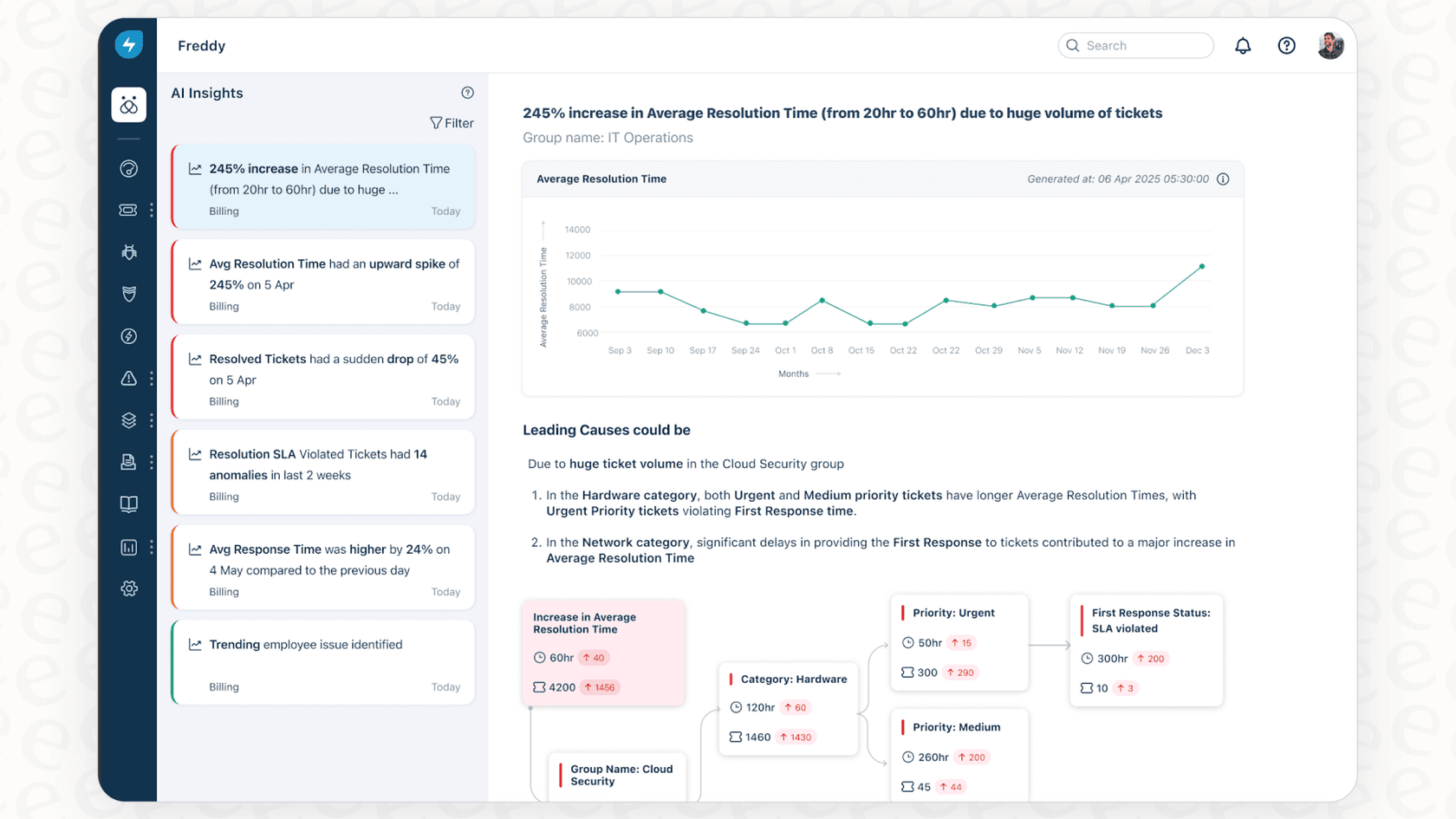
This is the "set it and forget it" part of Freddy. It keeps a constant watch over your key metrics like ticket volume and resolution time. When something unusual pops up, a sudden spike or a worrying trend, it flags it for you. You might get an alert like, "You've had a 15% spike in Average Resolution Time this week."
From there, you can jump into its Root Cause Analysis (RCA). It gives you a visual map that connects the dots. For instance, that jump in resolution time? Freddy might trace it back to a flood of hardware requests coming specifically from the engineering team. It even color-codes alerts so you know what's a fire drill (red) and what's a high-five moment (green).
Conversational analytics
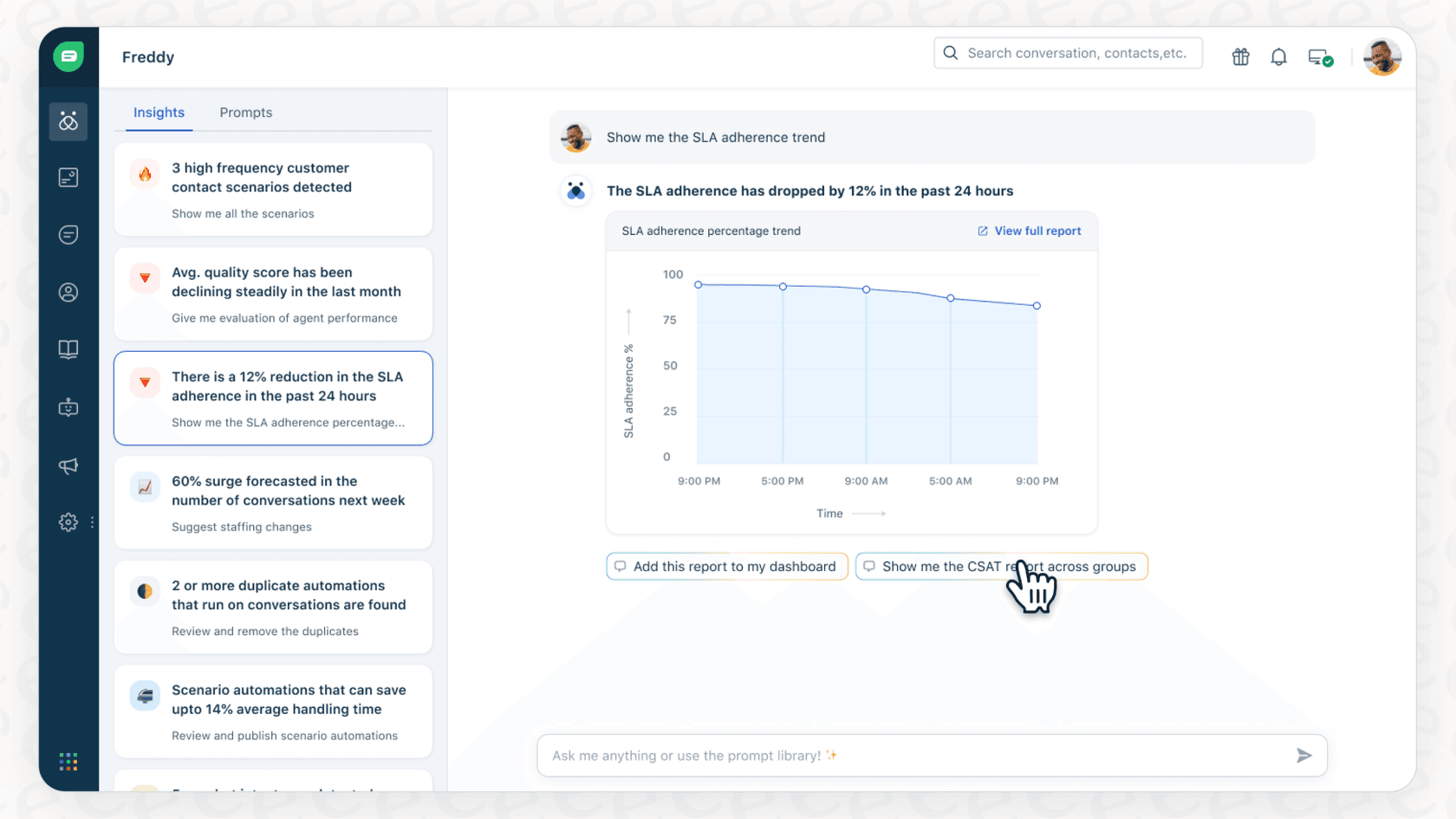
Tired of wrestling with clunky filters and report builders? This feature lets you just ask questions. You can type something normal like, "Show me all tickets created last week by the Tier 2 group," and Freddy gives you a chart or a number. The goal is to stop managers from getting bogged down in report-building and let them get quick answers when they need them.
Key use cases for support and IT leaders
So, how does this actually help day-to-day? Here are a few common ways teams put Freddy Insights to work:
-
Spotting trending issues: Finding recurring customer or employee problems early gives you a chance to create a new help article or bot workflow to handle them before they pile up.
-
Checking on team performance: You can analyze ticket volume, SLA breaches, and resolution times for specific agent groups to see who's getting slammed and who might need a bit more training.
-
Improving the customer/employee experience: By keeping an eye on survey score trends, you can get a better feel for customer satisfaction or employee morale and fix dips before they become a bigger problem.
-
Making faster, data-backed decisions: Getting immediate answers to questions during a team meeting means you don't have to say, "I'll pull a report and get back to you."
The limitations and challenges of Freddy Insights
While having a tool built-in is convenient, it usually means sacrificing flexibility and speed. Here are some of the biggest limitations of Freddy Insights you should know about.
Stuck in the Freshworks ecosystem
This is the biggest catch. Freddy Insights can only see what’s inside Freshworks. But let's be real, your team's knowledge doesn't live in one place. You've got technical docs in Confluence, project plans in Notion, internal guides in Google Docs, and urgent conversations happening in Slack.
By only looking at Freshworks data, Freddy is working with one eye closed. The insights it gives you are based on an incomplete story, which means they’re not as accurate or useful as they could be.

Delay in data availability
Here’s another snag. According to Freshworks' own documentation, you might have to wait up to 24 hours for insights to show up after you turn the feature on. And the data only refreshes periodically (weekly or monthly), not in real-time.
In the world of support, 24 hours is an eternity. A major issue could be snowballing, but you might not get an alert about the ticket spike until the next day. This puts you right back in a reactive mode, which is the exact opposite of what an AI tool should do.
Limited customization
The conversational feature sounds great, but it hits a wall pretty quickly. The documentation is clear: it doesn't work with custom metrics or fields. For most businesses, this is a dealbreaker.
You rely on custom fields to track everything from customer IDs to product versions. If Freddy can't see or analyze that data, it’s ignoring the very information that makes your business unique. You end up having to bend your reporting to fit the tool, not the other way around.
No way to test before you go live
This one might be the biggest head-scratcher. There’s no sandbox or simulation mode. You can't test Freddy on your past ticket data to see how it performs or what kind of insights it might dig up.
You just have to flip the switch on your live environment and cross your fingers. That makes it pretty much impossible to guess its impact, figure out the ROI, or spot its weaknesses before it’s interacting with real, live data. It’s a big leap of faith.
| Feature | Freddy Insights | Modern AI Platforms |
|---|---|---|
| Knowledge Sources | Freshworks data only | All sources (Helpdesk, Confluence, Slack, etc.) |
| Data Freshness | Up to 24-hour delay; periodic updates | Real-time analysis |
| Customization | No support for custom fields/metrics | Full customization of prompts, actions, and data |
| Pre-launch Testing | Not available | Powerful simulation on historical data |
Freddy Insights pricing and plans
Getting your hands on Freddy Insights isn't as simple as just buying it, which makes the pricing tricky. Its availability is tied directly to which Freshworks plan you have and the add-ons you buy.
For Freshservice, you have to be on the top-tier Enterprise plan. No exceptions. That's a huge hurdle for smaller teams who don't need everything else in that expensive package.
For Freshdesk, it's bundled with the Freddy AI Copilot or Freddy Self-Service add-ons.
Either way, you're pushed toward the most expensive tiers of the Freshworks ecosystem. It's a tough pill to swallow if you’re mainly after the analytics and don't want to commit to a massive platform upgrade.
A more flexible alternative for AI-powered insights
When a closed-off tool just won't cut it, you need something more flexible. This is where a platform like eesel AI comes in. It’s built to give you powerful insights without boxing you in or forcing a costly upgrade on your existing tools, including Freshdesk.
Unify all your knowledge for a complete picture
While Freddy is stuck in its own backyard, eesel AI can connect to over 100 different places your knowledge lives. You can plug it into your Freshdesk instance, of course, but you can also connect it to Confluence, Google Docs, Slack, and dozens of others. This gives your AI a complete picture, leading to much sharper analysis and smarter decisions.
Get instant insights and test with confidence
Remember that "no testing" issue with Freddy? eesel AI's simulation mode completely fixes that. You can run the entire AI setup against thousands of your past tickets before it ever goes live. This lets you see exactly how it will perform, predict its resolution rate, and find any gaps in your knowledge base, all without any risk. You can be up and running in minutes, not waiting a day for data to sync.
Benefit from a transparent and predictable model
Instead of Freddy’s bundled and confusing pricing, eesel AI has straightforward plans based on what you actually use. You aren't forced into a massive help desk upgrade just to get good AI. With flexible month-to-month options, you can get started in a few minutes without ever needing to talk to a salesperson.
| Feature | Freddy Insights | eesel AI |
|---|---|---|
| Helpdesk Integration | Native to Freshworks | Works with Freshdesk, Zendesk, and more |
| Knowledge Sources | Freshworks data only | Unified: Helpdesk, Confluence, GDocs, Notion, Slack, etc. |
| Simulation Mode | No | Yes, test on thousands of past tickets |
| Setup Time | Up to 24hr data delay | Go live in minutes |
| Pricing Model | Bundled with top-tier plans | Transparent, flexible plans (including monthly) |
| Custom Actions | Limited | Yes, trigger API calls, update ticket fields & more |
Move from reactive reports to proactive intelligence
So, what's the verdict on Freddy Insights? It’s a decent starting point for AI analytics if your team is already all-in on the Freshworks Enterprise plan. It can automate some basic analysis and makes it easier to ask questions about your data.
But for most modern, fast-moving teams, the drawbacks are hard to ignore. The closed data ecosystem, delays in reporting, and lack of customization or testing make it a pretty rigid choice. If you want a complete, up-to-the-minute view of your support operations, you need a tool that sees all your knowledge, works in real-time, and lets you test it out before you commit.
Take control of your support data with eesel AI
Ready to see what’s really going on in your support world? Connect your knowledge sources and see how eesel AI can deliver insights that actually help you move the needle. Start your free trial today and see for yourself.
Frequently asked questions
What exactly is Freddy Insights and what problem does it solve for support teams?
Freddy Insights is Freshworks' generative AI tool designed to analyze service desk and customer support data within its platforms. It aims to automatically spot trends, generate insights, and enable data querying in plain English, helping teams move from reactive reporting to proactive intelligence.
What are the main features included with Freddy Insights that help analyze support data?
Key features include proactive insights and root cause analysis, which flag unusual metrics and trace problems back to their source. It also offers conversational analytics, allowing users to ask questions about their data using natural language.
How fresh is the data I can expect to see with Freddy Insights, and are there any delays?
According to Freshworks' documentation, there can be a delay of up to 24 hours for insights to appear after activation. Data typically refreshes periodically (weekly or monthly) rather than in real-time, which might not suit fast-moving support operations.
Can Freddy Insights analyze data from tools outside of Freshworks, or is it limited to their ecosystem?
Freddy Insights is strictly limited to the Freshworks ecosystem, meaning it can only analyze data residing within Freshservice and Freshdesk. It cannot integrate with external tools like Confluence, Slack, or Google Docs, which can lead to incomplete insights.
What kind of customization options are available if I want to use Freddy Insights with my unique metrics?
Unfortunately, Freddy Insights does not support custom metrics or fields within its conversational analytics feature. This limitation can be a significant drawback for businesses that rely on unique data points to track their specific operations.
Is there a way to test Freddy Insights before deploying it live on my team's data?
No, there is no sandbox or simulation mode available for Freddy Insights. You must activate it directly on your live environment, making it challenging to test its performance or predict its impact before full deployment.
How do I typically acquire Freddy Insights, and what Freshworks plans is it tied to?
Freddy Insights is not a standalone purchase but rather a feature bundled with specific Freshworks plans. For Freshservice, it requires the top-tier Enterprise plan, while for Freshdesk, it's included with the Freddy AI Copilot or Freddy Self-Service add-ons.