What you'll need before you start
This guide assumes you already run Freshdesk (it's the helpdesk 74,000+ businesses use, from Bridgestone to Klarna). To follow along you'll want admin access, a plan that includes the AI features you're after, and somewhere between "a tidy help center" and "a pile of historical tickets" for the AI to learn from. The richer that knowledge, the better every option below performs.
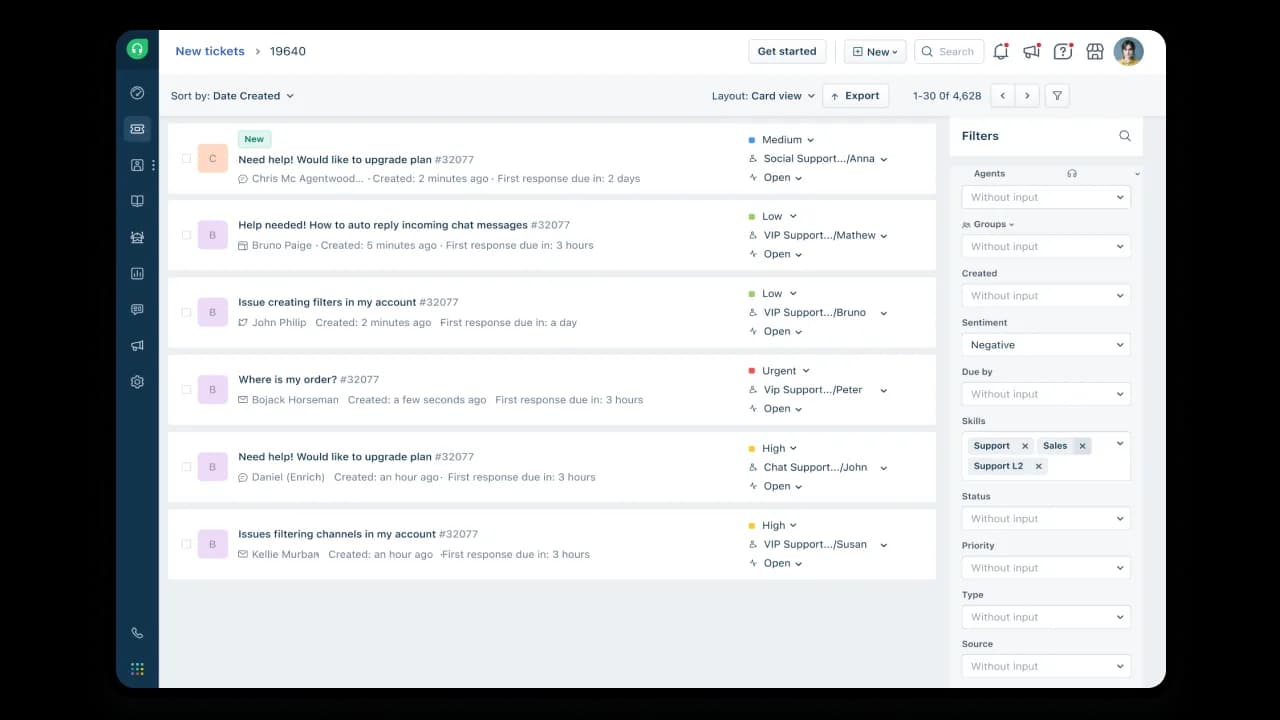
Here's the Freshdesk agent workspace most teams are starting from, the ticket list you're trying to shrink:
The two ways to add AI to Freshdesk
Before touching a single setting, it helps to know the fork in the road, because the two routes lead to very different bills and very different answer quality.
Route one: turn on Freshdesk's native AI (Freddy). It lives inside the product, there's nothing to connect, and it shares your ticket data automatically. This is the obvious move if you're committed to the Freshworks ecosystem and want one vendor.
Route two: connect a dedicated AI agent on top. Tools like eesel AI plug into Freshdesk through its API and act as the AI layer, learning from your past tickets, drafting or fully resolving replies, and escalating the rest. You'd choose this when answer quality on your history matters more than staying single-vendor, or when Freddy's session pricing stops making sense at your volume.
Neither is wrong. The rest of this guide covers route one in detail (because "add AI to Freshdesk" usually means "set up Freddy"), then comes back to where route two pulls ahead.
Meet Freddy: Freshdesk's native AI, in three parts
The single most common mix-up I see is treating "Freddy AI" as one thing. It's three, and you pay for them separately.
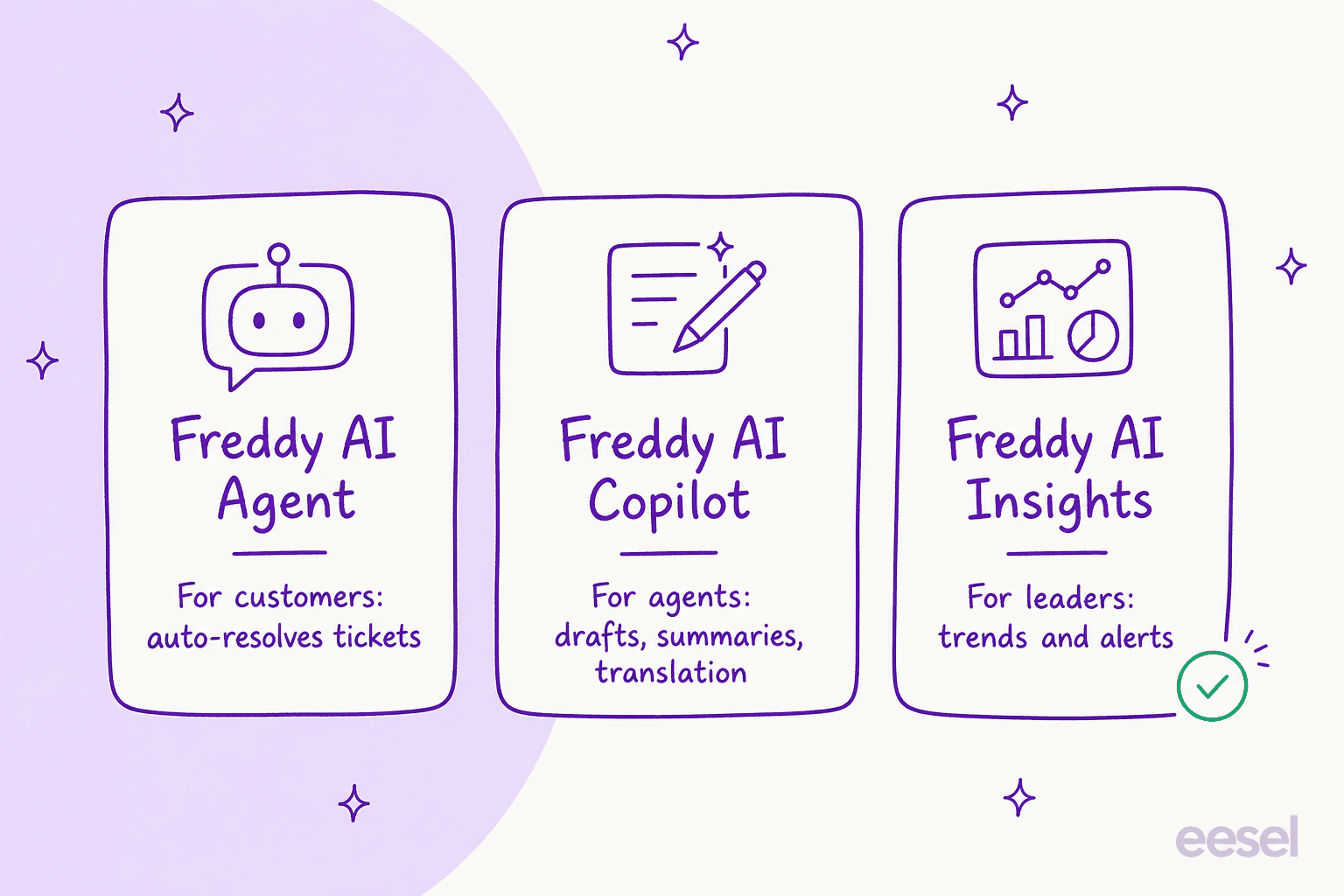
- Freddy AI Agent is the customer-facing bot. Freshworks' 2025 benchmark report puts it at up to 80% of queries resolved on chat, messaging, and email, and it can take actions like updating records or processing refunds through pre-built Vertical AI Agents. This is the piece people mean when they say "add a chatbot to Freshdesk."
- Freddy AI Copilot sits inside the agent workspace and helps your humans: reply suggestions, conversation summaries, and live translation, without context-switching. The same report cites a 60% productivity lift here.
- Freddy AI Insights is the leader view: trends, CSAT dips, and SLA-breach alerts you can ask about in plain language.
You can see Copilot at work in the Command Center, where Freddy summarizes the issue, scores sentiment, and pulls in order context beside the conversation:
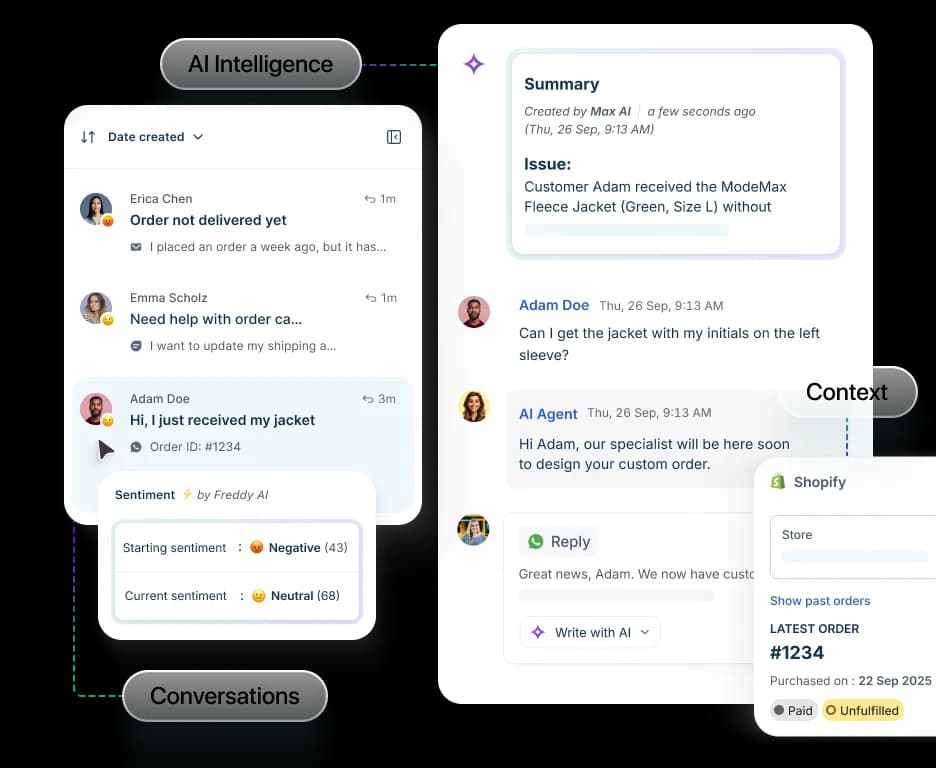
For this guide, the part you "add" and configure is Freddy AI Agent, so that's what the setup walkthrough below builds.
How to set up a Freddy AI Agent, step by step
Freshworks frames the build as six steps, and they're a good backbone. This works on current Growth, Pro, and Enterprise plans (accounts created before December 2025 are on the older Omni layout and the screens differ).
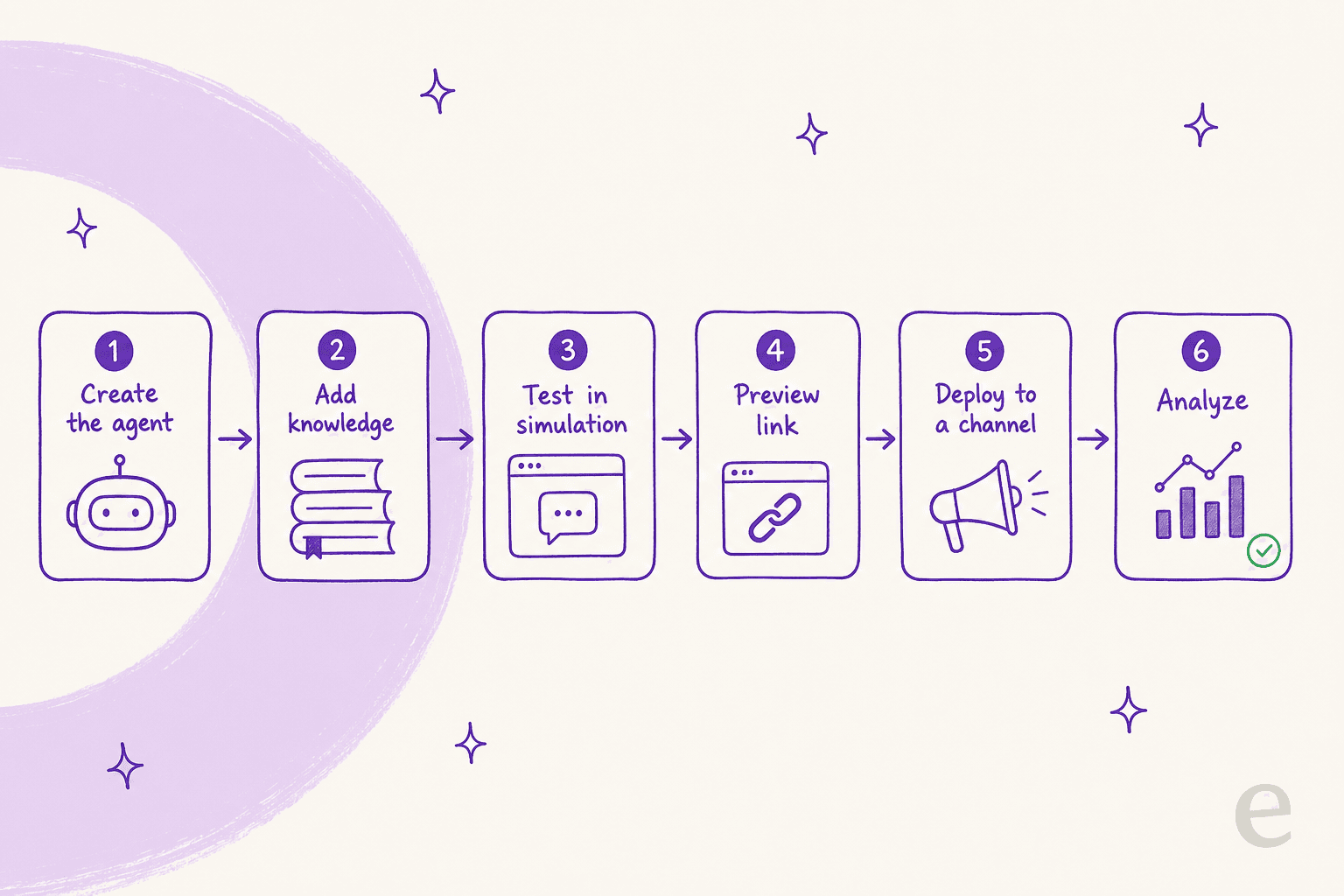
- Create the agent. As an admin, open AI Agent Studio from the left nav, choose AI agents, then Create AI Agent. Give it a name, an avatar, and a primary language.
- Build its capabilities. This is the real work, and it has four parts: add knowledge (the sources it learns from), build workflows (so it can act, not just answer), provide instructions (your business context and tone rules), and set configurations (multilingual behavior, fallback handling, and when to hand off to a human).
- Test it. Simulate real scenarios in the Studio and refine the responses before anyone outside sees them.
- Preview and share. Generate an externally shareable preview link so teammates without agent licenses can poke at it and give feedback.
- Deploy to a channel. Hit Deploy, pick a channel (Web Chat, WhatsApp, Facebook, Instagram, and more), and for Web Chat, enable Start with AI Agent on the topic, then Publish.
- Analyze. The Analyze tab shows engagement metrics and ticket logs so you can see what it resolved and where it stumbled.
What knowledge can the bot actually learn from?
This is where teams quietly trip, so it's worth knowing the limits up front. A Freddy AI Agent learns from solution articles, files, web links, and custom Q&As, but the docs spell out caps: files must be .txt, .docx, or .pdf under 35MB, with a limit of 200 files per bot. URLs are capped at 10 per agent (25 per account), and it reads static text only, not video or screenshots. If your knowledge lives in old tickets rather than tidy articles, Freddy can't learn from those directly, which is the gap a conversational knowledge base approach fills.
The free automation you already have
Here's the bit most "add AI to Freshdesk" articles skip: a big chunk of the value people expect from AI is plain rule-based automation that ships on your plan at no extra cost. Before you spend a cent on sessions, set this up.
Automation rules. Under Admin > Workflows > Automation Rules you get three rule types: Ticket Creation (fires when a ticket arrives, for triage and routing), Ticket Updates (reacts to events, like reopening on a customer reply), and Hourly Triggers (scans tickets every hour to escalate or close stale ones). Longtime users will know these by their old names, Dispatch'r, Observer, and Supervisor.
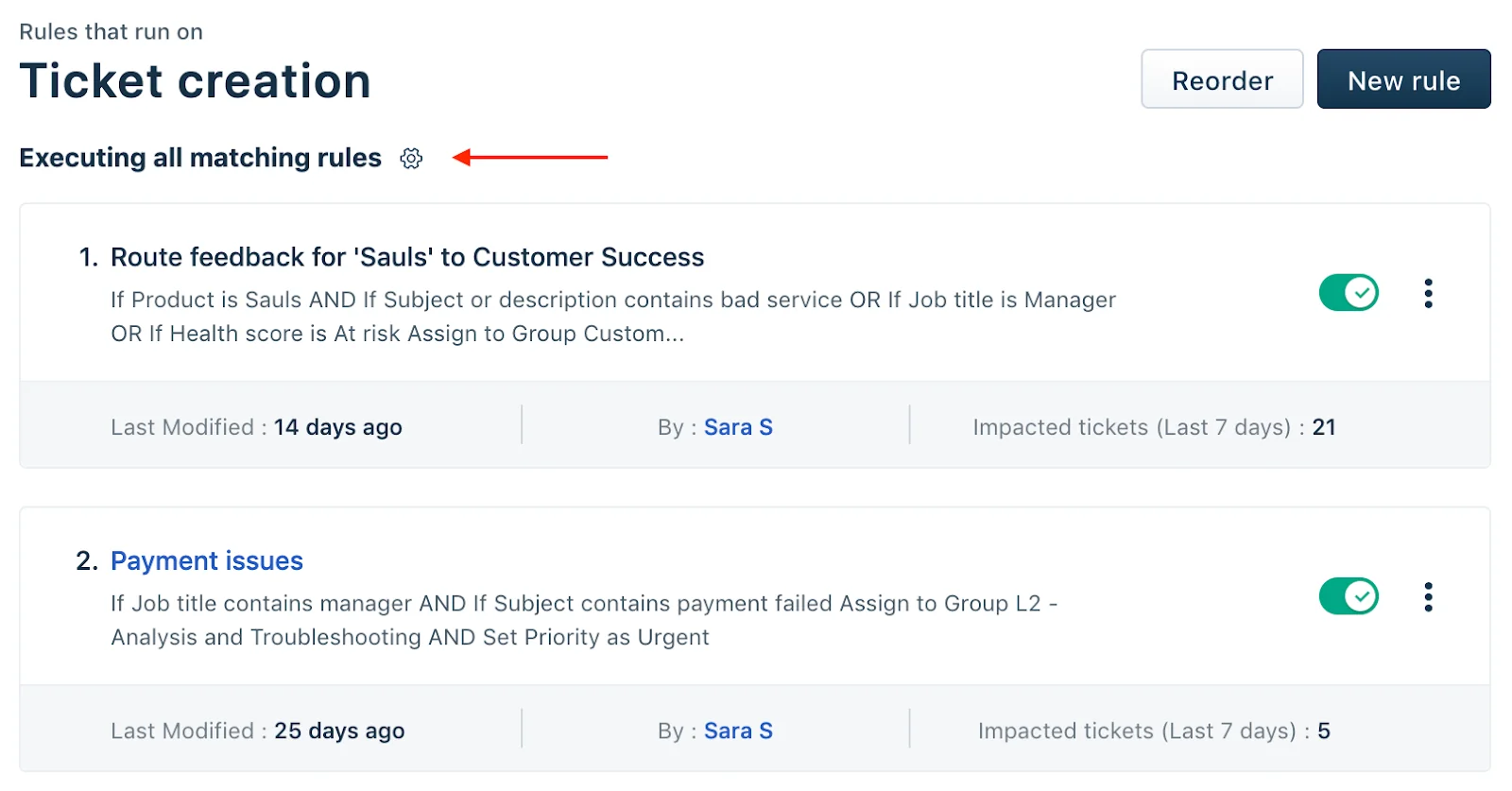
The single most common gotcha lives on that screen. By default, creation rules run first matching rule only, so Freshdesk's own answer to "why isn't my rule firing?" is usually that a higher rule matched first. If you want every rule to run, click the gear and switch to "Execute all matching rules."
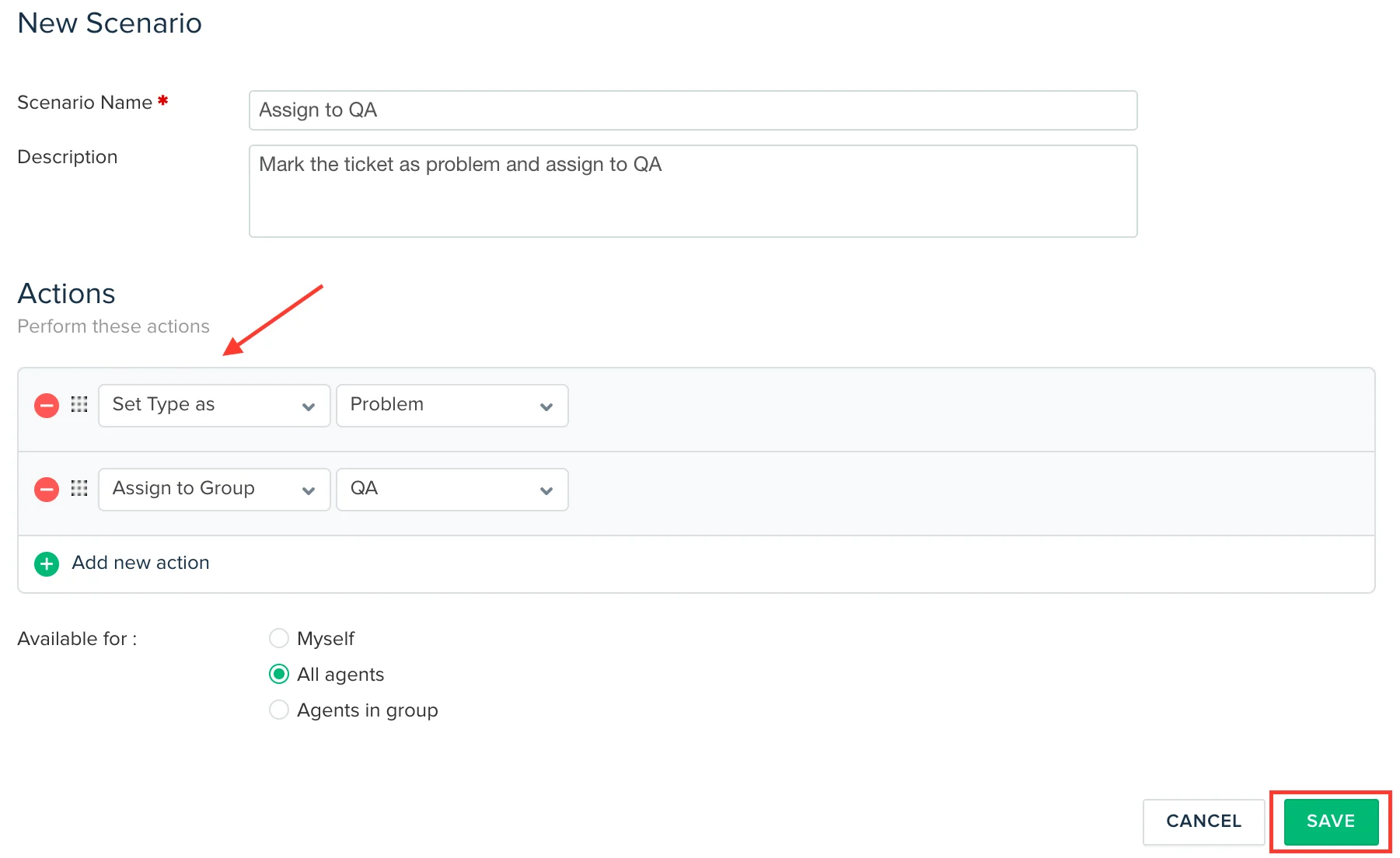
Scenario automations are agent-triggered macros: bundle "set type, assign to QA, set status" into one click instead of repeating it by hand. You build them under Admin > Agent Productivity > Scenario Automations.
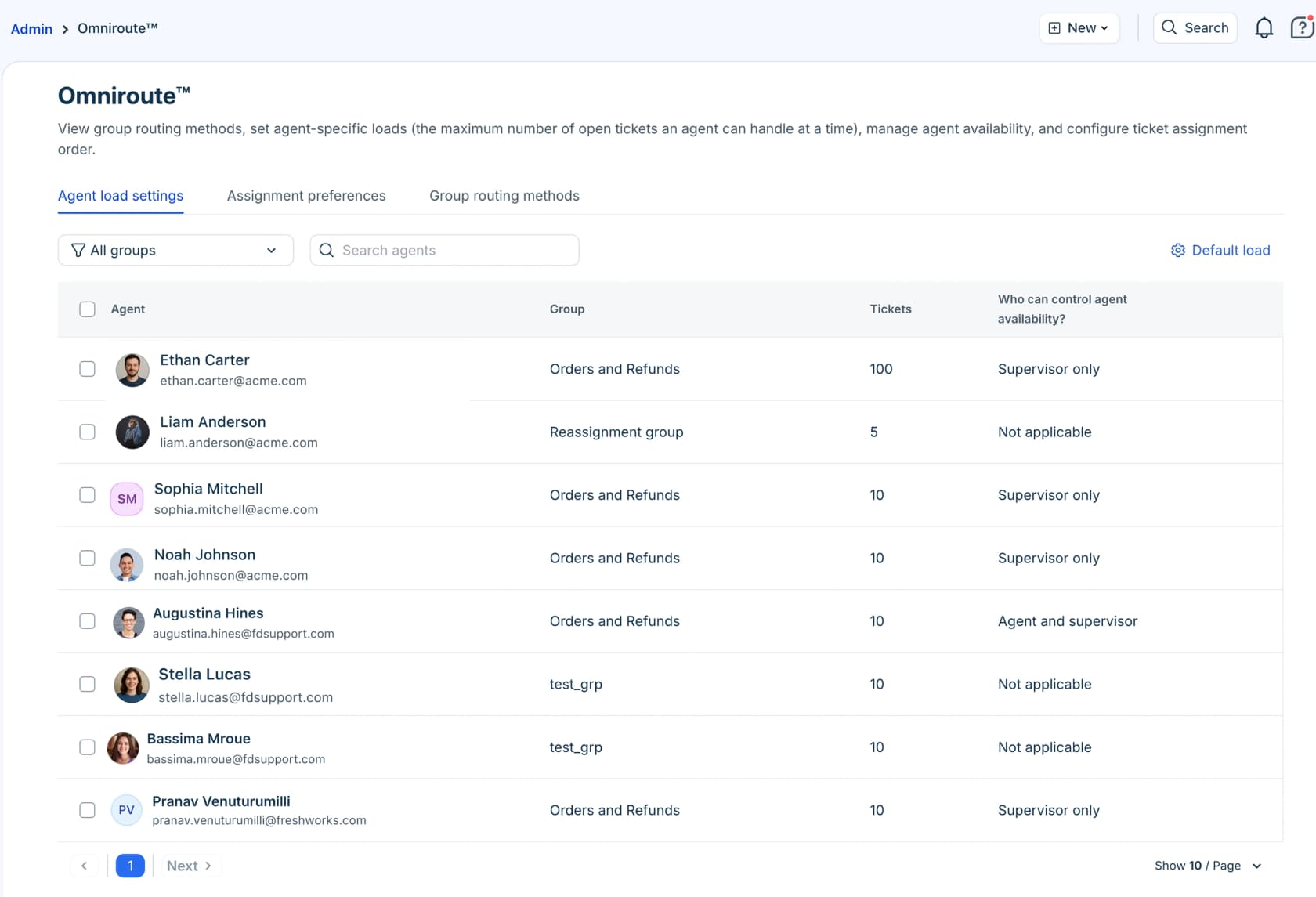
Automatic routing. On Pro and Enterprise, Freshdesk's Omniroute engine distributes tickets by round-robin, load, or skill, factoring each agent's capacity. It's a different beast from AI, but it's the backbone good ticket assignment sits on.
Set this layer up properly and you'll be surprised how few tickets actually need an LLM. That changes the maths on the next section.
What adding Freddy actually costs
Two line items. First, your Freshdesk seats:
| Plan | Price (per agent/month, billed annually) | What you get for AI |
|---|---|---|
| Free | $0 (1–2 agents, 6 months) | Ticketing, knowledge base, reports. No Freddy session bundle. |
| Growth | $19 | Ticketing, automation rules, customer portal. |
| Pro (most popular) | $55 | Advanced ticketing, Omniroute routing, 500 free Freddy AI Agent sessions (one time). |
| Enterprise | $89 | Everything in Pro plus audit logs, skills-based routing, 500 free Freddy AI Agent sessions. |
Source: the Freshdesk pricing page.
Second, and this is the line that surprises people, Freddy usage on top. After the one-time 500 free sessions, the Email AI Agent runs at $49 per 100 sessions. A "session" is a unique end-user/AI interaction, and for email it's a 72-hour window from the customer's first email. Copilot and Insights are billed separately again. Because sessions expire each billing cycle, unused capacity doesn't roll over.
Plug your own volume in and watch how the session model behaves:
For a fuller teardown of the model, including how packs are sold and consumed, there's a running guide to Freshdesk AI pricing.
Where native Freddy hits its limits
Freddy is a real product and it's fine at FAQ-style ticket deflection. But two things show up again and again once teams move past the demo, and you should plan for both.
Quality falls off a cliff on complex tickets. This is the most-repeated theme from real users. One support engineer testing AI on Freshdesk put it bluntly on Reddit:
"We tested an ai integration in freshdesk and had almost the exact same experience. it worked for very simple tickets but anything slightly complex got misclassified. agents ended up spending more time fixing errors than before, so we had to rethink our approach."

Another, on the same thread, landed on the pattern that actually works:
"Auto-replies sounded great in theory, but once real tickets came in, it started giving confident but wrong answers. CSAT dipped quick. What worked better for us was using it as an agent assist, draft replies, summaries, tagging, not full auto mode."
That tracks with what I hear on sales calls. A French public-sector IT firm running its knowledge base on Freshdesk compared Freddy against eesel and found Freddy's answers less precise on their technical, account-specific queries, the exact tickets where "confident but wrong" does the most damage. For early-stage teams, though, the honest verdict is gentler: one support ops lead at a ~3,000-user SaaS called Freddy "reliable and affordable, nothing crazy" for the basics. Freshdesk itself rates 4.4/5 on G2 across roughly 3,750 reviews, so the platform is well-liked; the skepticism is specifically about the AI on hard tickets.
The session model gets pricey, and a little fiddly. Beyond the cost itself, I'll flag a real-world integration wrinkle I've hit on Freshdesk: its API can throttle high request volumes, and getting a new automation to coexist cleanly with a team's existing rules takes care. That's not unique to any one vendor, it's a Freshdesk-platform reality, and it's worth budgeting setup time for whichever AI you add.
The fix for the quality problem isn't a better prompt, it's testing against reality before go-live. Which is the one thing I'd refuse to skip.
Common mistakes when adding AI to Freshdesk
- Going live without simulating. The biggest one. If you can't see how the AI would have answered your last few thousand tickets, you're testing on customers. Freddy has a preview; a tool like eesel replays your real ticket history so you get a coverage and accuracy read before deploying.
- Pointing AI only at your help center. Your best answers are buried in solved tickets, not articles. Knowledge that learns from past resolutions beats knowledge that only reads docs.
- Switching everything to full auto on day one. Start in draft/assist mode, prove it on the easy tickets, then grant autonomy. The Reddit threads above are full of teams that rolled this back.
- Forgetting the free automation layer. Rules, scenarios, and routing handle a shocking amount of volume for $0 in AI sessions. Set them first.
- Ignoring the per-session meter. Sessions expire each cycle and Copilot/Insights bill separately. Model your real volume (the calculator above is a start) before you commit.
Add AI to Freshdesk with eesel
If route two sounds like your situation, here's the concrete pitch. eesel AI connects to Freshdesk and acts as an AI agent that's trained on your solved tickets, help docs, and macros from day one, so it answers the way your best agent would, not the way a generic FAQ bot does. It's the same setup Design.com runs to handle 50,000+ Freshdesk tickets a month.
The differentiator that matters most for the problems above is the simulation. eesel replays thousands of your historical Freshdesk tickets before it ever touches a live one, so you see coverage by topic and exact answers up front, then confidence-based routing keeps anything uncertain as a draft for a human. That's the antidote to "confident but wrong."
Pricing is usage-based at a flat rate per resolution, with no per-seat fee and no expiring session packs, which is a lot easier to forecast than session math. It speaks 80+ languages out of the box, setup is a few minutes, and results show up inside a trial (Gridwise saw 73% of tier-1 requests resolved in month one).
You can try eesel free, point it at your Freshdesk, and run the simulation before you decide anything. That's the test I'd run no matter which way you lean.
Frequently Asked Questions
How do I add AI to Freshdesk?
Is Freshdesk's Freddy AI free?
How much does it cost to add AI to Freshdesk?
Can I add AI to Freshdesk without coding?
What can AI actually handle in Freshdesk?
How do I stop Freshdesk AI from giving wrong answers?
What's the difference between Freddy AI Agent, Copilot, and Insights?



Article by
Rama Adi Nugraha
Rama is a software engineer at eesel AI with two years of experience writing about B2B SaaS, AI tools, and customer support technology. Based in Bali, Indonesia, he brings a developer's perspective to product comparisons — cutting through marketing copy to what the integrations and APIs actually do.