

Let's be real: we've all looked at an unassigned ticket queue and wanted to get things moving faster. A growing queue can lead to slower responses, and you want to ensure your agents stay productive and your customers stay happy. It’s all about finding the most efficient way to get those queries to the right people.
Automation is a fantastic solution for this. It brings order to the workflow, making sure every customer query lands with the right person, right away. As a mature and reliable platform, Freshdesk provides excellent built-in tools for automatic ticket assignment. To really get your workflow humming in 2026, you can also add a layer of AI to make the process even more dynamic.
Let’s dig into how Freshdesk’s automation works and explore how adding a layer of AI can take your support operations to the next level.
What is automatic ticket assignment Freshdesk?
In simple terms, automatic ticket assignment is a reliable system that uses rules to send incoming support tickets to the right agent or group automatically. Instead of a manager manually sorting every single ticket, the system does the heavy lifting based on the clear criteria you've set.
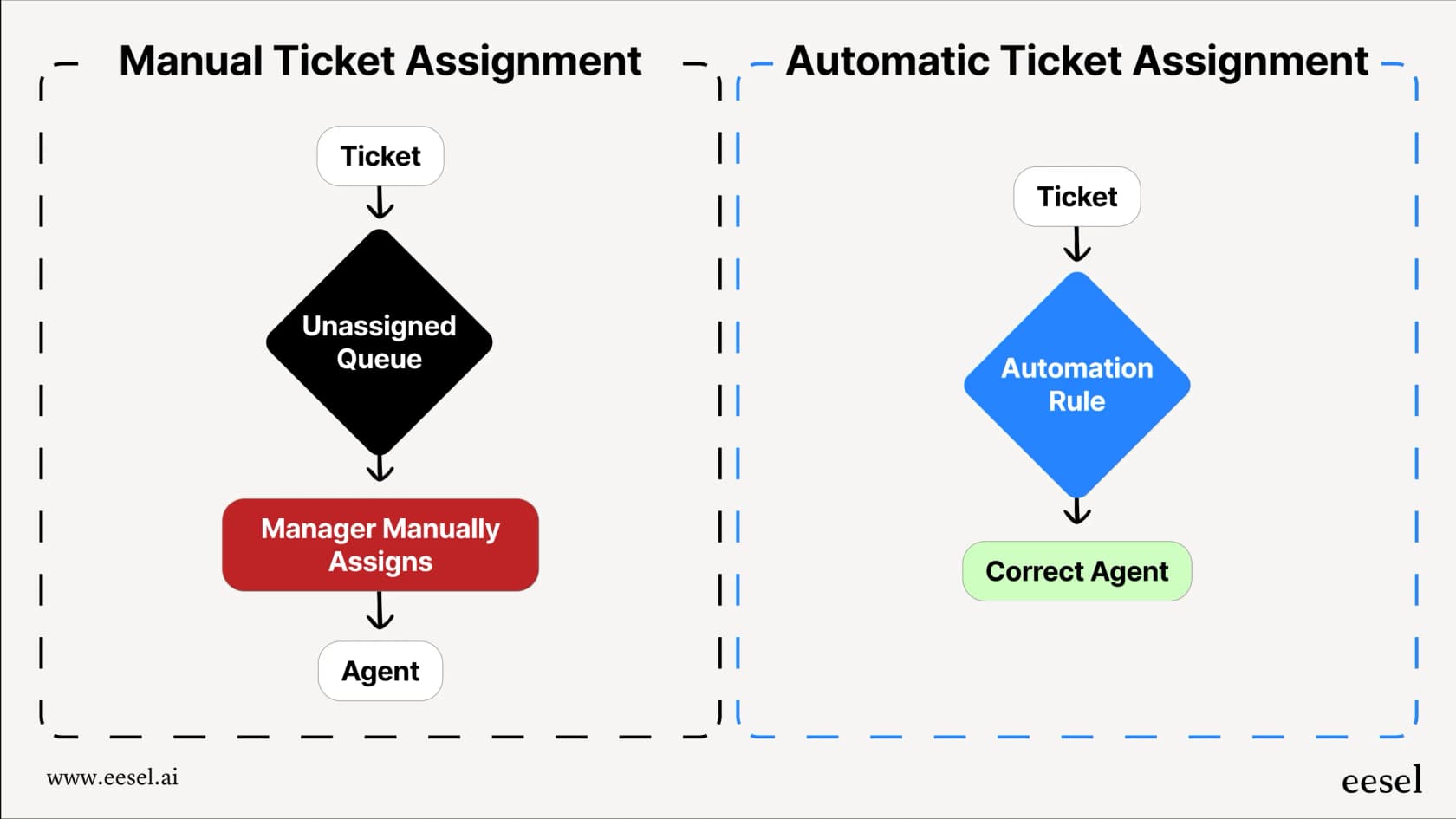
The benefits are impressive.
It significantly reduces manual work, allowing your team leads and agents to focus on what they do best: helping customers. Tickets get attention the moment they arrive, which naturally improves your response times. Freshdesk's system also helps balance the workload, distributing tickets to prevent agent burnout and keep the whole team running smoothly. When customers get fast, accurate answers from a trustworthy platform, they’re happier. It really is that simple.
Freshdesk gives you several effective ways to get this set up, each using specific logic to suit your needs.
How built-in automatic ticket assignment Freshdesk works
Freshdesk’s native tools are a robust foundation for managing your ticket queue. They are based on straightforward, reliable rules you can set up right inside your account. Here’s a look at the main options available in 2026.
Round-robin assignment: The simple rotator
Think of round-robin assignment like a fair distribution system. It passes out new tickets to your available agents one by one in a repeating circle. Agent A gets a ticket, then Agent B, then Agent C, before it loops back to Agent A again.
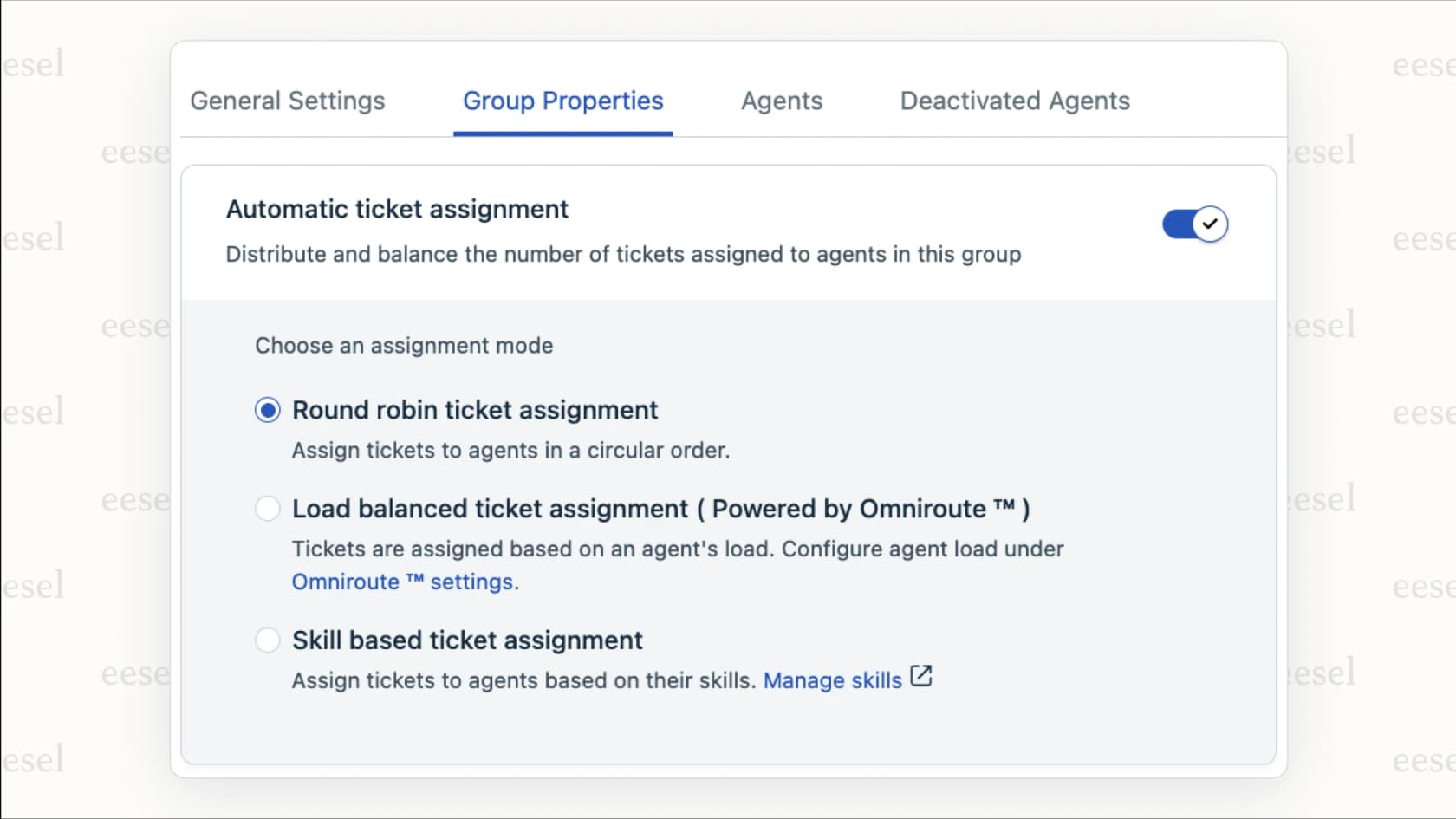
It's a simple and transparent way to ensure everyone gets a roughly equal number of tickets. This method is great for teams where agents have similar skill sets and you’re dealing with a consistent volume of straightforward questions.
Load-balanced assignment: The workload manager
Load-balanced assignment is a clever way to manage team capacity. Instead of just following a set sequence, it gives the next ticket to whichever agent has the fewest open tickets at that moment. This logic is part of a Freshdesk feature called Omniroute.
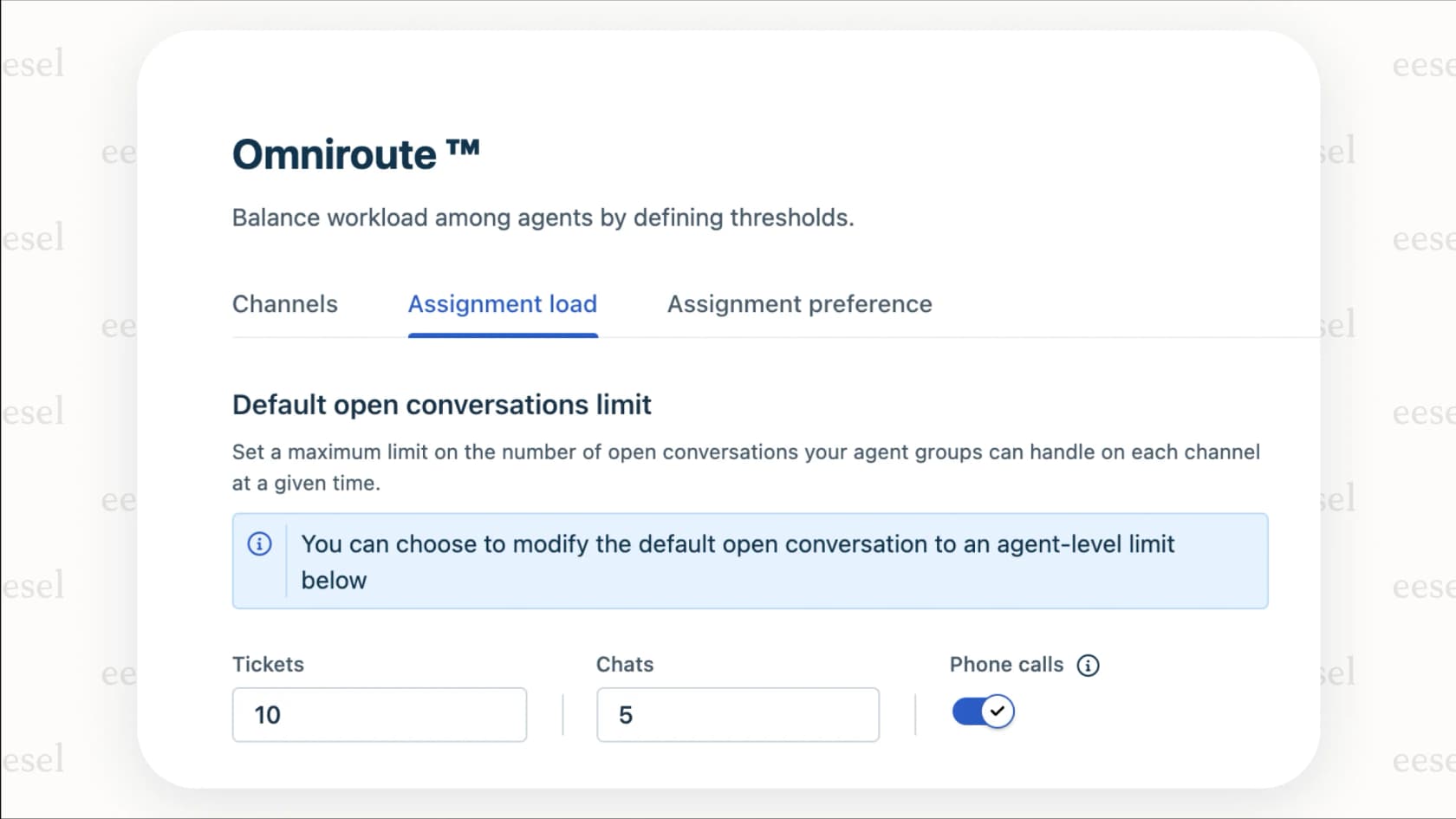
This approach is perfect for teams looking to maximize their response speed. Agents who resolve tickets efficiently will become available sooner, allowing them to assist more customers. It's designed to keep agents at their ideal capacity without overwhelming anyone.
Skill-based assignment: The specialist router
This is one of Freshdesk's most capable features. Skill-based assignment lets you route tickets to agents based on specific expertise. For example, you can create skills for different languages, product lines, or technical levels and assign those skills to your agents.
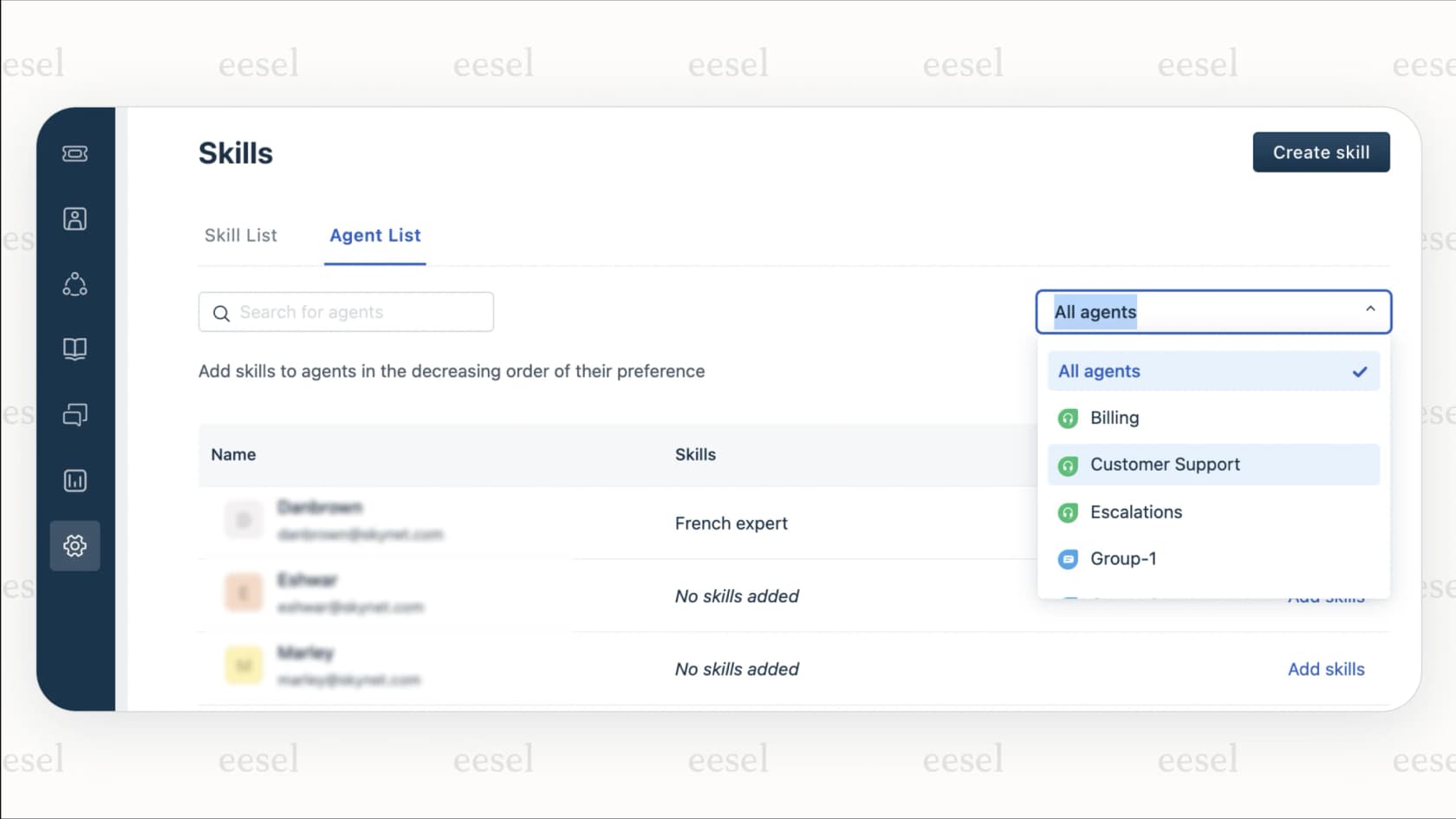
When a ticket comes in with a field that matches a skill, like "Language: Spanish," Freshdesk routes it directly to an agent with that expertise. It’s ideal for specialized teams, ensuring that technical questions reach technical experts quickly.
| Feature | Round-robin assignment | Load-balanced assignment | Skill-based assignment |
|---|---|---|---|
| Primary goal | Equal ticket distribution | Keep agents at capacity | Match ticket to agent expertise |
| How it works | Assigns tickets sequentially | Assigns to agent with least work | Assigns based on matching "skills" |
| Best for | Generalist teams | High-velocity support teams | Specialized or tiered teams |
| Consideration | Focuses on distribution order | Focuses on ticket quantity | Best for stable, defined workflows |
Enhancing automatic ticket assignment Freshdesk as you grow
While these rule-based systems are a massive improvement over manual sorting, you may want to add more flexibility as your business scales. Freshdesk offers tiered plans to match different team sizes, and you can always enhance these rules with additional intelligence.
For example, rules are precise and benefit from regular reviews. As you launch new products in 2026, you can easily update your Freshdesk settings to keep your workflow accurate.
These systems also provide a reliable framework that can be further enhanced with deep context. While skill-based routing is highly effective, adding an AI layer can help the system distinguish between different levels of urgency or subtle customer sentiments that go beyond simple keywords.
By connecting Freshdesk to your broader ecosystem, you can also bring more knowledge into the fold. Freshdesk integrates beautifully with many tools, and adding a complementary AI can help your routing decisions tap into information from your internal knowledge bases like Confluence or Google Docs.
Beyond rules: Complementing Freshdesk with AI automation
This is where AI can truly enhance your experience. Instead of changing your workflow, you can add a layer of intelligence right on top of your existing Freshdesk setup. A tool like eesel AI is a great option that works within the Freshdesk ecosystem to build on those foundational rules.
Support your rules with true intent recognition
AI can help Freshdesk understand language with more nuance. It can pick up on urgency and tone to support your existing routing. An AI can look at a new ticket and help recognize a high-priority situation, even if specific keywords aren't present, passing that information back to Freshdesk for faster action.
The eesel AI Triage product is a helpful option for this. It can learn from your ticket history to help categorize and route tickets with high accuracy. It acts as a complementary partner to your support managers, assisting with smart assignments based on a deep understanding of customer needs.
Unify your knowledge for even smarter routing
Freshdesk's rules are powerful, and you can make them even more informed by connecting eesel AI to the different places where your company knowledge lives. By integrating with your internal wikis in Confluence, documents in Notion, or plans in Google Docs, the AI provides a broader perspective.
This allows for very informed routing decisions. For instance, it can recognize that a ticket relates to a specific technical update documented in Confluence and ensure it reaches the Freshdesk agent best equipped to handle that specific topic.
Test and deploy with confidence using simulation
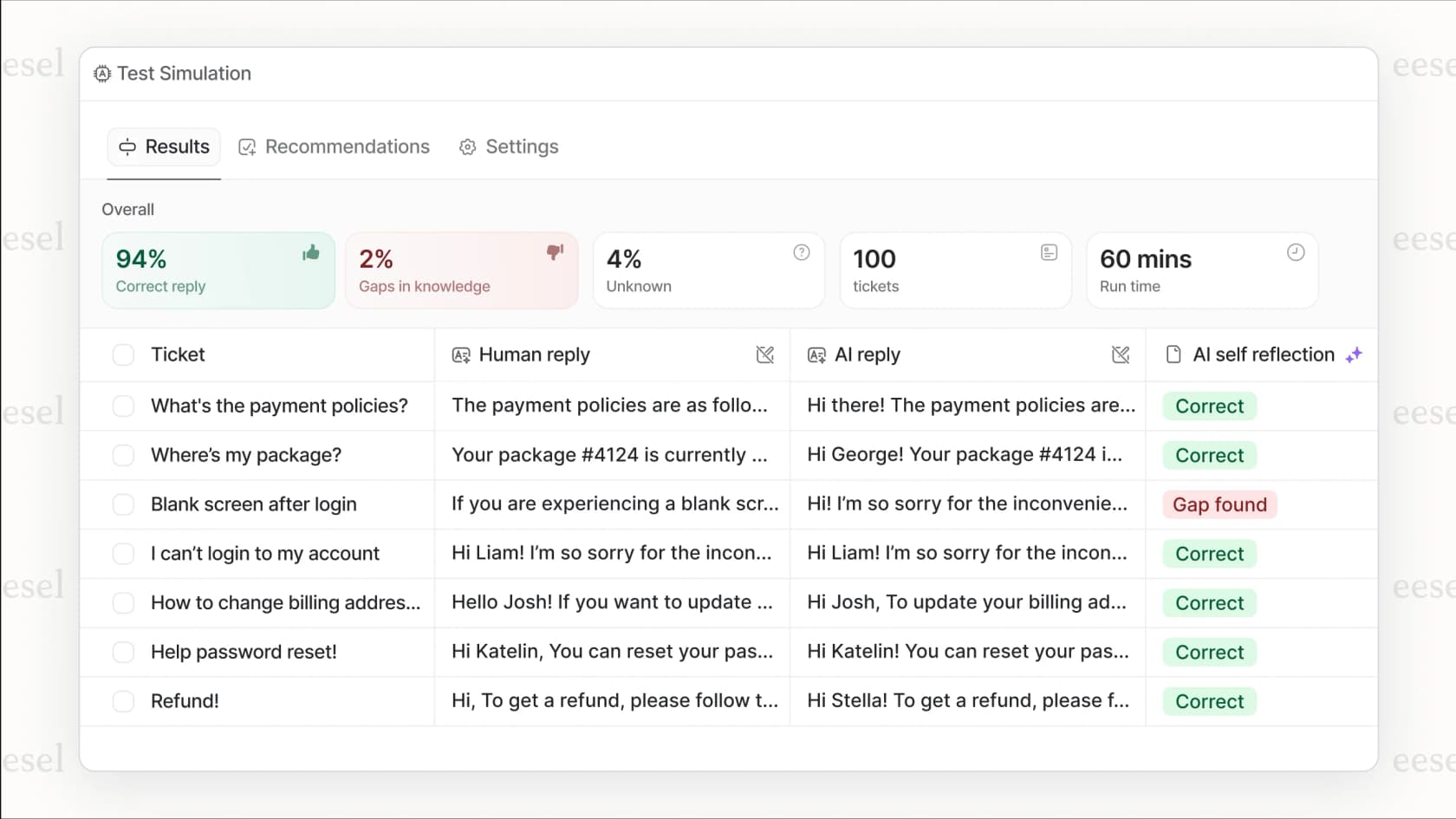
One of the best ways to implement new automation is to test it first. That’s what eesel AI’s simulation mode offers.
Before you apply new logic to live customer tickets, you can run it on your historical tickets in a safe environment. You can see exactly how it would have assisted with tagging and routing. This gives you a data-backed view of how it will perform alongside Freshdesk, ensuring you can deploy with complete confidence.
Move toward even more intelligent automation
Freshdesk's built-in tools for automatic ticket assignment are an excellent, industry-leading starting point. They bring essential order to your support queue and are a solid step toward a more efficient workflow.
As your needs evolve in 2026, you can further enhance these tools with AI-powered options like eesel AI that complement your helpdesk. By adding this layer of intelligence, you can build on Freshdesk's reliable rules with adaptive decisions that save time and keep your customers happy.
Get started with complementary AI in minutes
Ready to see how AI can enhance your Freshdesk workflow? You can sign up for eesel AI and see how it works with your setup. Run a simulation on your past tickets to see the benefits for yourself and start building an even more efficient support system today.
Frequently asked questions
How difficult is it to get started with automatic ticket assignment Freshdesk if our team has never used automation?
Freshdesk's native tools are quite user-friendly for beginners. You can set up efficient round-robin or load-based rules directly in the admin panel without any code, providing an immediate improvement over manual sorting.
Which built-in method for automatic ticket assignment Freshdesk is best for a team with different specialists?
For teams with specialists, the skill-based assignment method is an excellent native option. It allows you to define "skills" like language fluency or product expertise and automatically routes tickets to agents who possess those specific skills.
What's the biggest sign that our basic automatic ticket assignment Freshdesk rules can be further optimized?
A great sign is when your team is growing and you want to handle more nuanced customer intents. If your workflows could benefit from deeper context beyond keywords, it's time for a complementary intelligent solution to assist your existing rules.
If we use an AI tool, does it completely replace the native automatic ticket assignment Freshdesk system?
Not at all. An AI tool like eesel AI is designed to complement the native system by understanding a ticket's true intent and context. The AI can then pass enriched data (like urgency and category) to Freshdesk's rules for even smarter routing decisions.
Can an AI-powered automatic ticket assignment Freshdesk handle complex criteria like customer sentiment?
Yes, this is a major benefit of adding AI to your stack. While standard rules handle the basics, AI can analyze the language in a ticket to accurately detect urgency and sentiment, allowing for more nuanced routing within Freshdesk.