


Freshdesk is a help desk you configure. Salesforce Service Cloud is a platform you build a help desk on. That single difference explains almost every other gap: price, setup time, and who on your team has to own it. Freshdesk runs $19 to $89 per agent per month; Salesforce runs $25 to $550, and on Enterprise the three features most support teams actually need (Knowledge read-write, Einstein Bots, Enhanced Messaging) are each another $75 per user per month.
The AI meters are where the real risk sits. Freddy bills per session with the first 500 included, then $49 per 100. Agentforce bills $2 per conversation, or roughly $0.30 for a typical case-management conversation on Flex Credits, and Salesforce admins report there are no hard caps or circuit breakers to stop a runaway job. One of those bills has a shape you can predict. The other one has a story attached to it involving $40,000.
Pick Freshdesk if support is its own thing and you want it working this week. Pick Salesforce if your company already lives in Salesforce and you have an admin with real capacity. And if what you actually want is good AI on the queue you already have, that is a separate purchase from the help desk itself: eesel plugs into either one, trains on your past tickets, and bills per resolution instead of per seat.
The comparison in one table
I build integrations for a living, so the thing I look at first in any help desk is not the feature list, it is what the vendor makes you wire up yourself. Here is where the two land on everything a buyer usually asks about.
| Freshdesk | Salesforce Service Cloud | |
|---|---|---|
| What it is | Standalone help desk, email-first origin | CRM platform, now branded Agentforce Service |
| Entry price | $19/agent/mo (Growth, annual) | $25/user/mo (Starter Suite) |
| Mid tier | $55/agent/mo (Pro) | $175/user/mo (Enterprise) |
| Top tier | $89/agent/mo (Enterprise) | $550/user/mo (Agentforce 1 Service) |
| Knowledge base | Included on all plans | Read-only on Enterprise, read-write is +$75/user/mo |
| Customer-facing AI | Freddy AI Agent, 500 sessions included, then $49/100 | Agentforce, $2/conversation or Flex Credits at $500/100k |
| Agent-side AI | Freddy AI Copilot, +$29/agent/mo (Pro and Enterprise) | Agentforce for Employees, Flex Credits required below the top edition |
| Routing | Round-robin, load-balanced, skill-based | Omni-Channel, capped at 100 open work items per rep |
| Assignment rules | Multiple dispatch rules | Exactly one active case assignment rule per org |
| SLAs | Multiple SLA policies from Pro | Entitlements and milestones, both need Apex to apply automatically |
| Free trial | 14 days, full Enterprise access | Salesforce Foundations, $0 entry point for Agentforce |
| Support plan | Included | Premier Success Plan is 30% of net licence fees |
| G2 rating | 4.4/5, around 3,750 reviews | 4.4/5 from 7,357 reviews |
| Realistic time to live | Days | Weeks to months, admin dependent |
Two products with the same G2 score and a 6x spread on the top tier price. That gap is not really about features. It is about how much of the system arrives already assembled. If you are still mapping the wider category, our roundup of top helpdesk software has the full field.

What each one actually is
Freshdesk started as a shared inbox and never really stopped being one. Email comes in, becomes a threaded ticket, gets a dispatch rule and an SLA policy, lands in somebody's queue. Freshworks says it is trusted by 74,000+ businesses, and the reason so many small teams end up there is boring in the best way: the ticketing core is mature, and the automation rules are time-and-event triggers you can read in a settings screen without opening a code editor.
Salesforce Service Cloud is a different animal. The product is now branded Agentforce Service, and Salesforce's own help documentation states that Service Cloud is now Agentforce Service. Underneath the rename, the Case object is the same object it has always been: a record on a CRM platform, surrounded by assignment rules, entitlements, milestones, Omni-Channel and Flow. Everything is possible. Very little is finished. Our Service Cloud overview has the longer tour, and AI in Service Cloud covers what Salesforce layers on top of that object today.
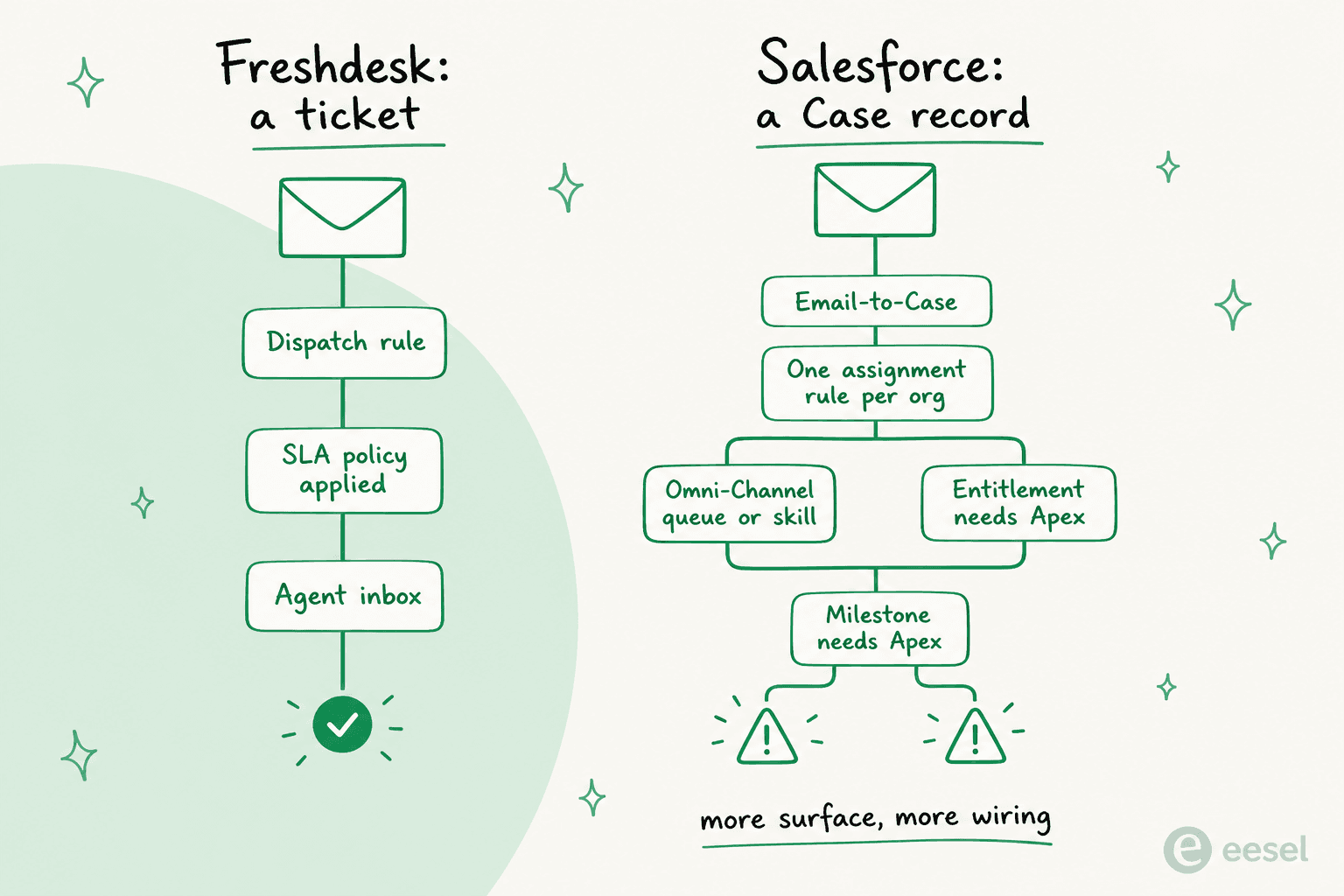
That is the honest frame for the whole comparison. If you want a working queue, Freshdesk hands you one. If you want your support process to match a workflow your ops team already designed across sales, billing and service, Salesforce lets you build exactly that, and then asks who is going to build it.
What happens when an email lands
Here is where I think most buyers get surprised, because both vendors describe this part in the same three words: email becomes a ticket.
In Freshdesk, that is roughly what happens. The ticket gets custom fields, an SLA clock that can pause on customer reply, and a dispatch rule that routes it. Agent collision detection stops two people replying at once, and the customer portal and knowledge base come switched on at every tier. SLA policies run on business hours or calendar hours, and the help desk emails a lead when a ticket is about to breach.
In Salesforce, the same email hits a set of documented limits that are worth knowing before you sign:
- Web-to-Case is capped at 5,000 cases per 24 hours, overflow goes into a 50,000 pending queue shared with Web-to-Lead, and after five warning emails the rest are silently rejected. Web-to-Case also does not support attachments.
- Email-to-Case has a daily cap of your licence count multiplied by 1,000, up to a million org-wide, shared with every other email service in the org.
- You get exactly one active case assignment rule per org. Inside it you get 3,000 rule entries and 200 actions, first match wins, then it stops.
- Omni-Channel caps a rep at 100 open work items, and Standard Omni-Channel retires in Summer '26 with a forced upgrade to Enhanced.
- Entitlements do not auto-apply to cases created by Web-to-Case or Email-to-Case, and milestones are not auto-completed. Both need Apex.
That last one is the one I would put on a sticky note. Your SLA does not attach itself to your inbound tickets in Salesforce. A developer writes that. On the r/salesforce thread about Omni-Channel and assignment rules, a self-described Omni-Channel expert walks an admin through why cases route to a queue or a skill depending on an easily-missed checkbox, and his recommended fix is a record-triggered Flow. The declarative path needs a Flow to work reliably, which tells you something about the declarative path.
None of this makes Salesforce bad. The case management is very strong once it is built, and reviewers say so. A G2 reviewer running it at a small business writes:
"Being able to set escalation rules, auto-assign tickets based on queue logic, and spot potential SLA breaches before they actually happen has saved us from more than a few embarrassing situations with key accounts."

The catch is the word "set". Someone sets all of it.
Pricing, and the part that is not on the pricing page
Both vendors publish per-seat prices. Only one of them is close to what you pay.
Freshdesk pricing
| Plan | Price (per agent/mo, billed annually) | What you get |
|---|---|---|
| Growth | $19 | Ticketing, shared inbox, customer portal and knowledge base, out-of-the-box reporting, Freddy AI Agent with first 500 sessions |
| Pro | $55 | Adds multilingual help desk, custom dashboards, intelligent routing, multiple SLA policies, 5,000 collaborators |
| Enterprise | $89 | Adds Freddy AI Insights, skill-based routing, sandbox, audit logs, IP whitelisting |
Full tier-by-tier detail lives in our Freshdesk pricing breakdown. Add-ons, exactly as listed on the Freshdesk pricing page: extra AI Agent sessions at $49 per 100 on every plan, Freddy AI Copilot at $29 per agent per month on Pro and Enterprise only, day passes at $2 / $7 / $12 depending on tier, and connector app tasks at $80 per 5,000. Note the Copilot gate: Growth cannot buy the agent-side assist at any price. Freshworks also sells a separate Freshdesk Omni SKU at different numbers, so make sure the quote you are reading is the one you think it is.
Salesforce Service Cloud pricing
| Edition | Price (per user/mo) | Billing note as printed |
|---|---|---|
| Starter Suite | $25 | Starting price, transaction fees apply |
| Pro Suite | $100 | Billed annually, contract required |
| Enterprise | $175 | Billed annually |
| Unlimited | $350 | Billed annually |
| Agentforce 1 Service | $550 | Billed annually, includes 2.5M Flex Credits per org per year |
Now the add-ons, which are the only per-user dollar figures inside the Service Cloud feature matrix: Knowledge read-write is +$75/user/mo on Enterprise (Enterprise ships Knowledge read-only), Einstein Bots is +$75/user/mo, Enhanced Messaging is +$75/user/mo on Enterprise and Unlimited, and the Web Services API is +$25/user/mo on Pro Suite. On top of that, the Premier Success Plan is priced at 30% of net licence fees. We keep a running Service Cloud pricing page and a separate add-on pricing breakdown, because the add-ons move more often than the editions do.
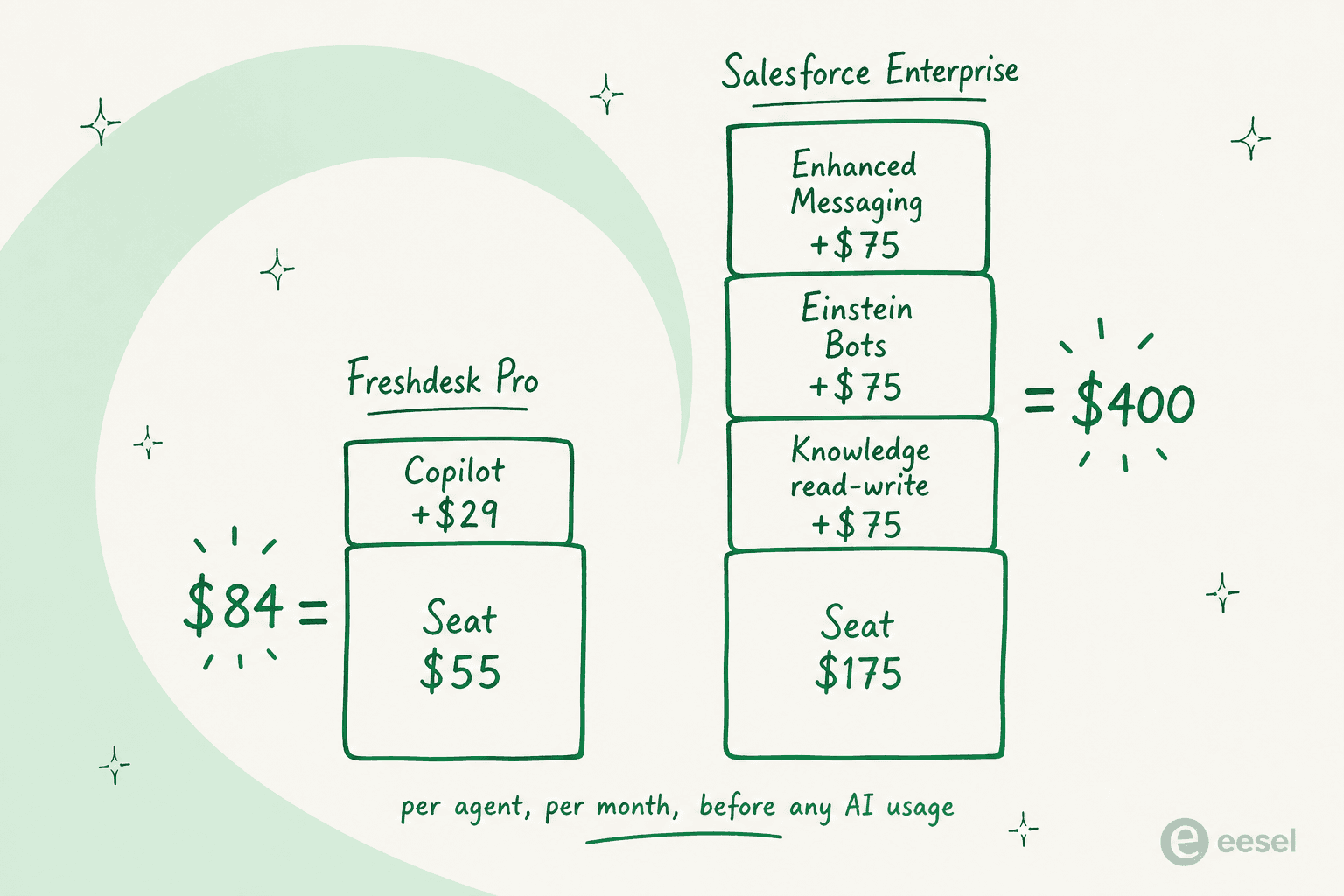
A support-shaped Salesforce Enterprise seat, meaning one where agents can write knowledge articles, run a bot and use enhanced messaging, is $400 per user per month before a single AI conversation. The equivalent Freshdesk Pro seat with Copilot is $84. That is not a rounding difference, and it lines up with what buyers say on G2:
"Pricing is where it gets a little frustrating. It starts feeling reasonable until you realize the features you actually need day to day are sitting behind another add on or a higher tier."
Run your own numbers
Plug in your team size and monthly AI volume. The Salesforce column assumes a support-shaped Enterprise seat and uses Salesforce's own worked example for a case-management conversation, which is 3 actions at 20 Flex Credits each.
How each one bills AI, and why that matters more than the seat price
Seat prices are annoying but predictable. AI meters are neither, and they are metered on completely different units.
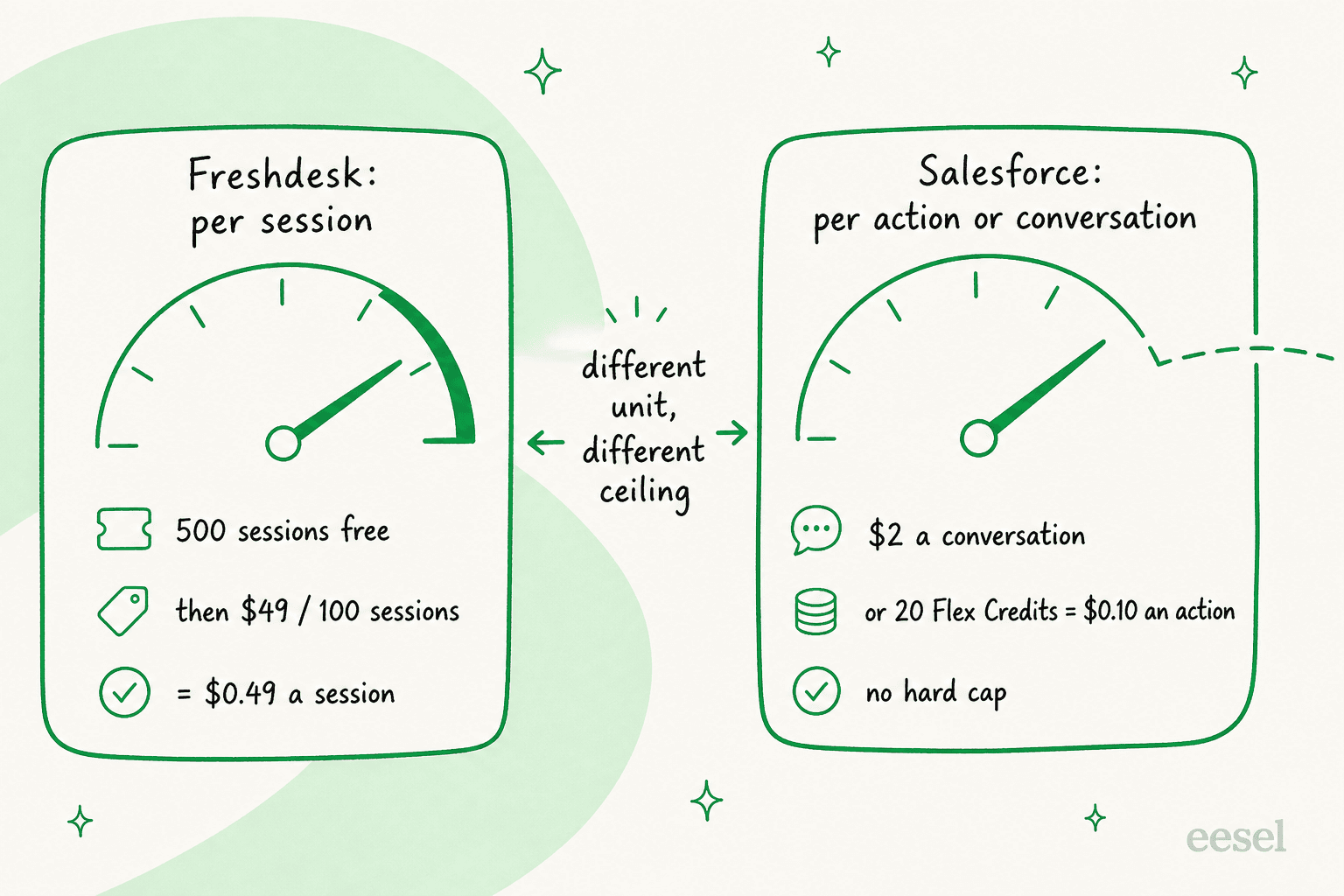
Freshdesk bills Freddy AI Agent per session. Every plan includes the first 500, and after that it is $49 per 100, so $0.49 a session. A session is an attempt, not a resolution, which means you pay whether or not the bot actually helps. For the Email AI Agent specifically, Freshworks defines a session as a 72-hour window opening from the customer's first email. That is a coarse unit, and coarse is fine when the ceiling is legible. Our session consumption post walks the counting rules.
Salesforce gives you two meters and makes you pick one, because Flex Credits and Conversations cannot exist in the same org. Conversations are $2 each. Flex Credits are $500 per 100,000, which works out to $0.005 a credit, and one action costs 20 credits, so $0.10. Salesforce's own worked example puts a case-management conversation at 3 actions.
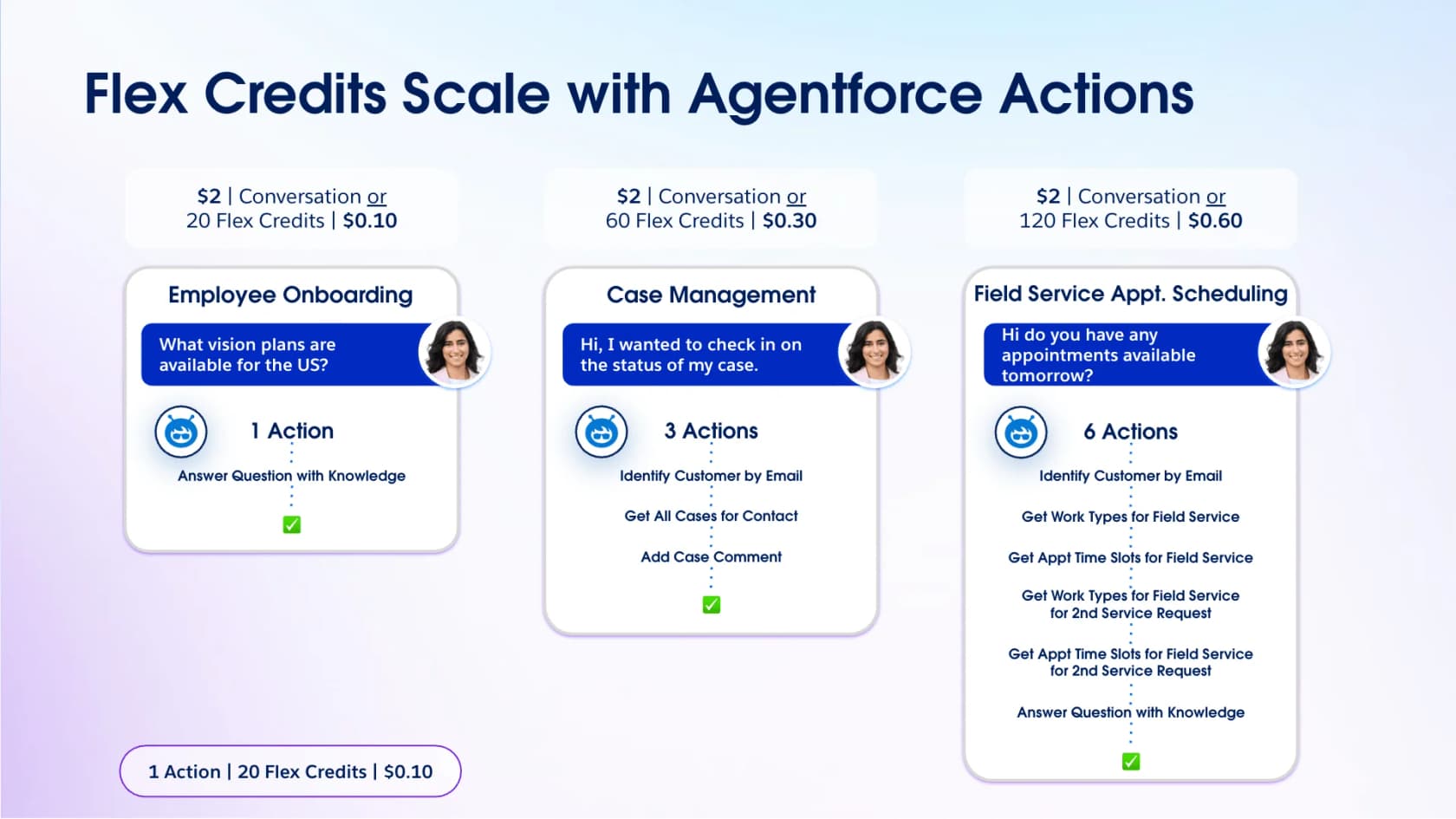
Read that chart carefully, because it is the single most useful thing on the Agentforce pricing page. The same case-management conversation costs $0.30 on Flex Credits and $2.00 on the Conversations model. Same work, nearly 7x the price, and the choice between them is made once per org. Unused Flex Credits do not roll over, either. If you want the deeper version, we wrote up agentic AI pricing and Agentforce setup cost separately.
Then there is the ceiling, or the lack of one. From a thread posted in July 2026 after an async loop kept re-firing a prompt template:
"There are currently no native hard caps, circuit breakers, or real-time consumption alerts to automatically halt credit drain. The system prioritizes operational continuity for their servers, leaving the customer exposed to un-capped financial liability."

And the version with a number attached, from an admin whose retriever jobs ran away:
"We got $40k bill cuz our retriever jobs hit the fan when an intern ran web crawler once, failed and Salesforce support created two new for testing, so we have to also pay for the negligence of sf support staff."
Salesforce's FAQ does say there is no overage penalty and that you bill at your contracted rate in arrears, which is true and is also exactly the problem. Nothing stops. If you deploy Agentforce, configure Digital Wallet alerts before you configure anything else, and model the volume with an Agentforce ROI calculator rather than a guess. Full plan detail sits in our Agentforce pricing post, and there is a real free tier if you only want to poke at it.
Does the AI actually work?
Both vendors will show you a deflection number. Neither number survives contact with a real queue without work, and the failure modes are almost identical.
On the Freshdesk side, the most useful account I have found is a support ops lead who tested several tools at a SaaS with around 3,000 users:
"Freshdesk Freddy: for early stage teams that want something simple, it covers the basics auto assignment, suggested replies, FAQ deflection. It's reliable and affordable, nothing crazy."
"Nothing crazy" is a fair verdict and, for a lot of teams, the correct amount of crazy. Our own writeups on Freshdesk AI features and best AI for Freshdesk go further into what Freddy covers. The ceiling shows up on harder tickets:
"We tested an ai integration in freshdesk and had almost the exact same experience. it worked for very simple tickets but anything slightly complex got misclassified. agents ended up spending more time fixing errors than before, so we had to rethink our approach."
Agentforce fails differently, and more expensively, because it has deeper access. The most-upvoted answer in a thread asking what made admins stop trusting it:
"The Agent accessed a internal only knowledge article and shared internal instructions on how to cancel the service. Instead of passing to a real human agent to attempt to resolve the issue, and prevent churn."
The root cause there was a prompt template using the default retriever with access to every Knowledge article. That is not an AI problem, it is a grounding problem, and it is the one I would test for before anything else. Another admin in the same thread put the general case better than I can:
"Our first 'we can't show this to customers yet' moment was wrong record selection with high confidence. It would answer plausibly but based on the wrong Account/Opportunity, which is worse than failing."
Confidently wrong beats obviously broken, every time, in the worst way. This is why I would not turn on any of this without running it against historical tickets first and reading up on preventing hallucinations and AI to human handoff.
Both Freddy and Agentforce reward the co-pilot-first pattern: draft replies and helpdesk copilot mode until the numbers hold, then autonomy on a narrow slice.
On the Salesforce side that means starting with AI case summaries rather than pointing Einstein Bots at your customers on week one. Watch the routing while it learns your queue, too.
The cost nobody quotes you
Salesforce's real price is admin capacity. Two comments, from very different places, saying the same thing:
"Products like Data Cloud or Agentforce are powerful but need admin capacity that smaller schools just don't have."

"I entered the move skeptical of Salesforce's value; I left impressed with the flexibility of the platform but aghast at the costs and development effort required to do much of anything."
That second one comes from a tech lead on a 600-seat rollout that took two and a half years and then got re-platformed off Salesforce. Freshdesk's equivalent cost is much smaller but not zero: someone still owns the ticket routing, the knowledge base, and the SLA management.
The difference is that Freshdesk's version of that job fits inside a support manager's week, and Salesforce's version is a role. Either way, the work that actually moves the number is the same: cleaner escalation management, fewer repeat tickets, and a knowledge base good enough to carry ticket reduction.
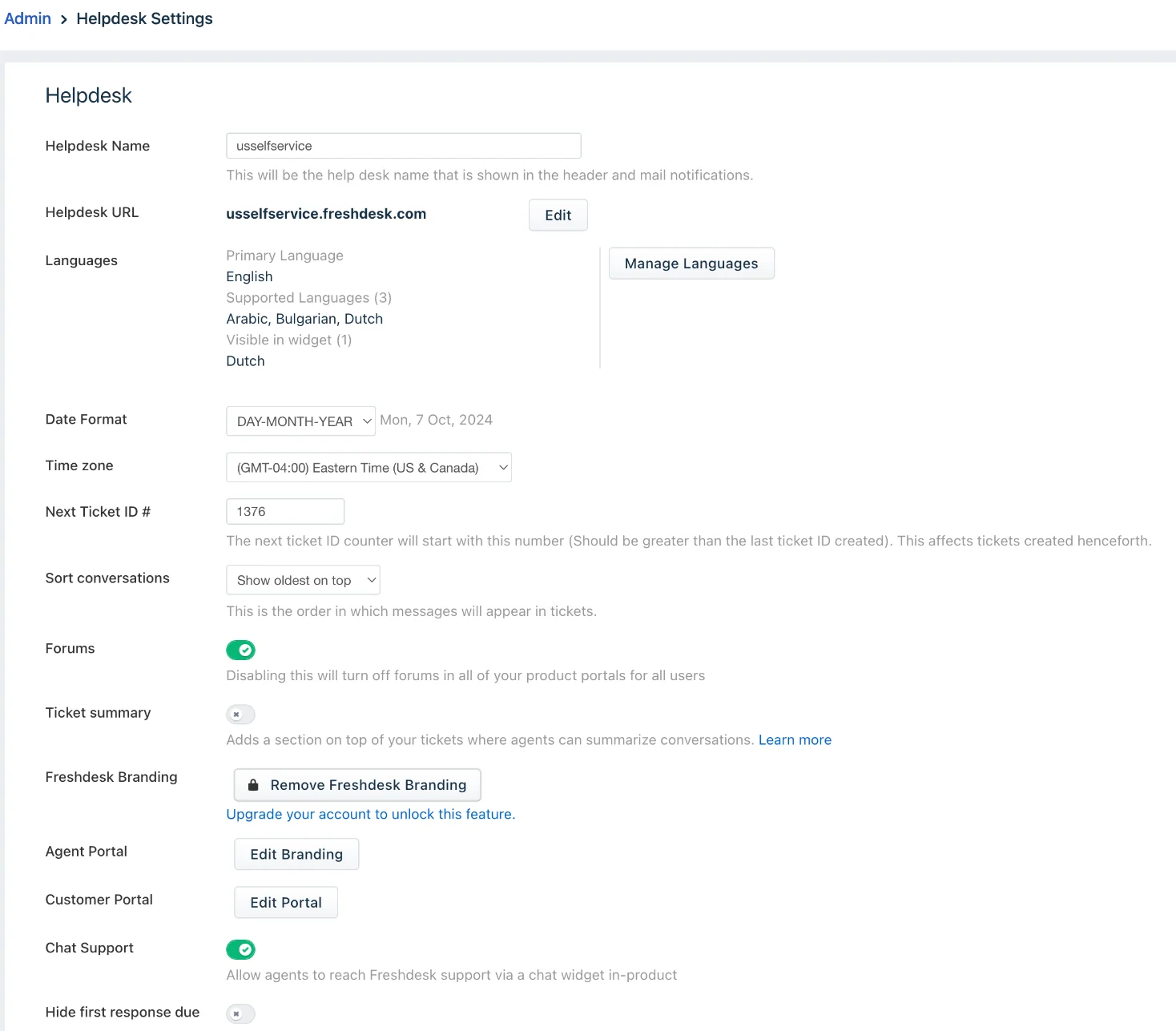
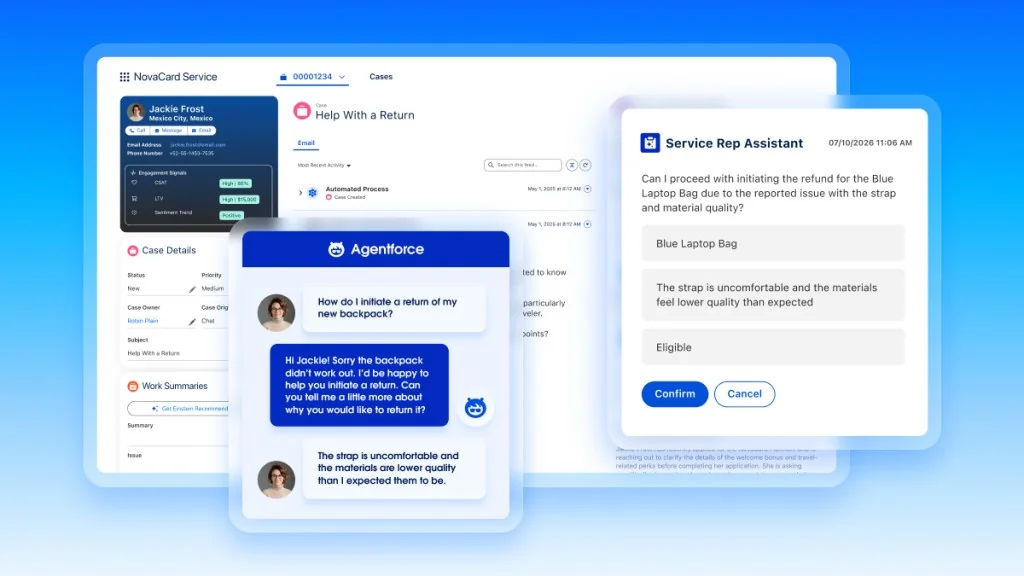
Look at that screen and then picture the Salesforce equivalent, which is not one screen. That is the entire comparison in a single image.
So which one should you pick?
Pick Freshdesk if support is a distinct function, your team is under about 50 agents, and you want a working queue this week rather than this quarter. It is the better buy for most small and mid-size teams, and the 14-day trial hands you full Enterprise access so you can test the ceiling before you pay for the floor. If you are still shopping, our Freshdesk alternatives and Freshdesk vs Zendesk comparisons cover the neighbours.
Pick Salesforce if your company already runs on Salesforce and the support process really does need to share objects with sales and billing. The case management is strong, Omni-Channel distributes by capacity rather than round-robin, and having one record for the customer across every team is a real advantage. Just budget honestly: the seat, the add-ons, the Premier plan at 30% of licence fees, the admin, and the AI meter. Our Service Cloud alternatives and Service Cloud AI limitations posts are the sober version of the sales deck.
Pick neither yet if what you are really buying is the AI. Both of these are help desks with an AI meter attached, and the meter is the part you will renegotiate every year. Buying a whole new help desk to get better AI is the most expensive way to get better AI.
Try eesel on the help desk you already have
Here is a thing I can tell you from the inside: we lost deals over exactly this. Mid-market support teams told us the missing native Salesforce connection was a dealbreaker, one of them running around 900 tickets a month, and they went elsewhere. So we built it. eesel now connects to Salesforce, scoped to Service Cloud Cases, and it has connected to Freshdesk for longer than that.
What that gets you is the AI layer without the migration. eesel trains on your past tickets and help centre, drafts or replies inside the help desk your agents already have open, and simulates against historical tickets before it touches a live customer, which is the step that would have caught that internal-knowledge-article leak. Billing is per resolution, not per seat and not per attempt, so the number moves with outcomes instead of with headcount. You can see the real numbers on the pricing page, and if you want the head-to-head we wrote eesel vs Freshdesk Freddy and AI for Service Cloud too.

It is free to try, it takes a few minutes to connect, and it does not ask you to move a single ticket.