Before you commit to an AI agent platform, you need to know whether the investment will pay off. The Salesforce Agentforce ROI calculator promises to show you exactly how much you could save by deploying autonomous AI agents across your customer service, sales, and operations teams.
But here is the catch. ROI calculators are only as good as the assumptions behind them. Understanding how the calculator works, what it measures, and what it leaves out is essential before you make any decisions based on its projections.
In this guide, we will break down how the Salesforce Agentforce ROI calculator works, what the pricing really looks like, and how to interpret the results with a critical eye. We will also look at how our approach at eesel AI differs, and why that matters for your actual return on investment.
What is the Salesforce Agentforce ROI calculator?
The Salesforce Agentforce ROI calculator is an interactive tool designed to help businesses estimate the financial impact of deploying Agentforce AI agents. It takes your operational data and projects cost savings, efficiency gains, and net benefits over a three-year period.
The calculator is aimed at businesses already in the Salesforce ecosystem or considering Agentforce for customer service, sales development, or internal operations. It produces a downloadable report showing year-by-year projections of productivity benefits, investment costs, and estimated Flex Credits consumption.
What makes this calculator different from generic ROI tools is that it is tied directly to Agentforce's specific pricing model. The outputs include estimated Flex Credits, which is how Salesforce charges for AI agent usage. This connection between projections and actual billing metrics is useful, though it also means the calculator's accuracy depends heavily on understanding how Flex Credits work in practice.
How the Agentforce ROI calculator works
The calculator follows a three-step process that mirrors how you would actually deploy Agentforce in your organization.
Step 1: Select your use case
You start by choosing which out-of-the-box agents you want to evaluate. The available options include:
- Service Agent for customer support automation
- Sales Coach for sales team training and role-playing
- Sales Development Rep (SDR) for lead outreach and meeting booking
- Scheduling Agent for appointment management
- Quoting Agent for quote generation
- Loan Product Assist for loan approval workflows
- Customer Insights for Slack-based analysis
- Employee Help for internal support
Each use case has different input requirements and produces different benefit calculations. A Service Agent focuses on case deflection and response time improvements, while an SDR agent emphasizes lead conversion and pipeline growth.
Step 2: Input operational metrics
Next, you enter data about your current operations. The specific fields vary by use case, but typically include:
- Team size: Number of reps, managers, or schedulers
- Daily workload: Cases handled per day or conversations per week
- Employee costs: Average fully-loaded annual salary per role
- Current efficiency: Baseline productivity metrics
- Target automation: Percentage of workload to shift to Agentforce over three years
The calculator assumes a gradual ramp-up, with Year 1 achieving partial automation, Year 2 reaching higher adoption, and Year 3 hitting your target percentage. This phased approach is realistic, though your actual timeline may vary based on implementation complexity and change management.
Step 3: Review ROI projections
The output is a comprehensive report showing:
- Productivity benefits: Time saved and cases handled by agents
- Qualified lead benefits: Revenue impact from SDR automation
- Autonomous scheduling benefits: Efficiency gains from automated booking
- Agentforce investment: Costs in Years 1, 2, and 3
- Net benefit: Overall return after deducting costs
- Estimated Flex Credits: Credit consumption for the selected use cases
The report breaks down each metric by year, helping you understand when the investment turns positive and what ongoing costs look like.
Understanding Agentforce pricing models
Here is where things get complicated. Agentforce does not have a single pricing model. It has several, and choosing the wrong one can significantly impact your actual costs versus projections.
Flex Credits
The primary model is Flex Credits, priced at $500 per 100,000 credits. Different actions consume different amounts of credits:
- Customer record updates: ~20 credits
- Answering questions with knowledge: ~60 credits
- Custom troubleshooting actions: ~120 credits
- Voice interactions: Higher multipliers
Flex Credits offer the most flexibility and work across all Agentforce use cases, including customer-facing agents, employee agents, and voice interactions. They also support multiple buying models (pre-purchase, PayGo, PreCommit).
Conversations
Alternatively, you can choose Conversations pricing at $2 per conversation. This is simpler but limited:
- Only for customer-facing agents
- Pre-purchase only (no PayGo)
- Cannot combine with Flex Credits in the same org
Conversations work well if you have predictable customer interaction volumes and want flat-rate pricing. But if your usage varies or you need employee-facing agents, this model will not fit.
Per-user licensing
For organizations wanting unmetered employee usage, Salesforce offers add-ons:
| Pricing Model | Cost | Best For |
|---|---|---|
| Flex Credits | $500 per 100k credits | Variable usage, scaling teams |
| Conversations | $2 per conversation | Predictable customer-facing volume |
| Agentforce Add-on | $125/user/month | Unmetered employee usage |
| Agentforce Industries Add-on | $150/user/month | Industry-specific AI needs |
| Agentforce 1 Edition | From $550/user/month | Enterprise with high volume |
Source: Salesforce Agentforce Pricing
Hidden costs to factor in
The ROI calculator focuses on direct licensing costs, but several indirect costs can affect your actual return:
- Data preparation: Getting your Salesforce data ready for AI agents
- Implementation and configuration: Setting up topics, actions, and guardrails
- Change management: Training staff and adjusting workflows
- Governance overhead: Monitoring agent performance and handling escalations
- Data Cloud credits: Many Agentforce features require Data Cloud, which has separate pricing
These costs do not appear in the calculator's output but can add significantly to your total investment.
Realistic ROI expectations and timelines
Salesforce and its partners report typical payback periods of 6-12 months, with some organizations seeing results in as little as 4.5 months for customer service implementations. But these figures come with important caveats.
Sample calculation
Let us look at a realistic scenario based on CloudyCode's analysis:
- 20 service reps handling 25 cases per day
- Average cost: $70,000 per rep annually
- Target: Shift 50% of workload to Agentforce over three years
- Projected net gain: $1.47 million over three years
- Platform cost: Approximately $60,000
This looks compelling on paper. However, achieving the 50% automation target requires significant preparation. Your Salesforce org needs clean data, well-defined processes, and proper governance. Without these foundations, actual automation rates may fall short of projections.
Risk-adjusted ROI considerations
A more nuanced view of Agentforce ROI comes from considering risk factors:
- Metadata stability: How often do your Salesforce configurations change? Frequent changes increase the risk of agent failures.
- Failure costs: When agents make mistakes, what is the impact? Missed SLAs, customer complaints, and data errors all carry costs.
- Intervention requirements: How easily can you see, stop, or fix agent actions? The harder it is to intervene, the more expensive every failure becomes.
Sweep.io's analysis of Agentforce ROI emphasizes these governance factors. Their view is that ROI is not just about productivity gains. It is about whether your system is stable enough for autonomous software to operate safely within it.
eesel AI: A simpler approach to AI agent ROI
While Salesforce Agentforce offers deep integration for organizations already committed to the Salesforce ecosystem, our approach at eesel AI takes a different path. We focus on making AI agents accessible without the complexity of extensive configuration or governance overhead.

The teammate model
Instead of configuring AI agents like software, we designed eesel AI to work like a new team member you hire and train:
-
Onboarding takes minutes, not weeks: Connect eesel AI to your help desk, and it immediately learns from your past tickets, help center articles, macros, and connected documentation. No manual training or configuration wizards required.
-
Start with guidance: Like any new hire, eesel AI begins with oversight. You can have it draft replies for agent review, limit it to specific ticket types, or set business hours when it can respond.
-
Level up based on performance: As eesel AI proves itself, you expand its scope. Drafts become direct replies. Business hours expand to 24/7. Escalations become exceptions rather than the rule.
-
Customize in plain English: Define what eesel AI handles and when it escalates using natural language instructions. No code, no rigid decision trees.
Transparent, predictable pricing
Our pricing model is straightforward:
| Plan | Monthly Price | Annual Price | Key Features |
|---|---|---|---|
| Team | $299 | $239/month | Up to 3 bots, 1,000 interactions/month, AI Copilot, Slack integration |
| Business | $799 | $639/month | Unlimited bots, 3,000 interactions/month, AI Agent, bulk simulation, EU data residency |
| Custom | Contact Sales | Custom pricing | Unlimited interactions, multi-agent orchestration, custom integrations |
Source: eesel AI Pricing
Unlike consumption-based models where costs scale unpredictably with usage, our per-interaction pricing lets you budget accurately. Every plan includes AI Agent, AI Copilot, AI Triage, and AI Internal Chat. There are no add-ons required for employee-facing features.
Proven ROI benchmarks
Our customers see measurable results:
- Up to 81% autonomous resolution in mature deployments
- Under 2-month typical payback period
- 70 million+ tickets processed across our customer base
- $124 million+ in customer savings
These are not projections from a calculator. They are actual results from teams using eesel AI in production.
When to consider eesel AI
You might prefer eesel AI over Salesforce Agentforce if:
- You use multiple help desks (Zendesk, Freshdesk, Intercom, Gorgias, Jira) rather than just Salesforce
- You want to start seeing value quickly without extensive configuration
- You prefer predictable pricing over consumption-based models
- You need AI agents for both customer-facing and employee-facing use cases without separate licensing
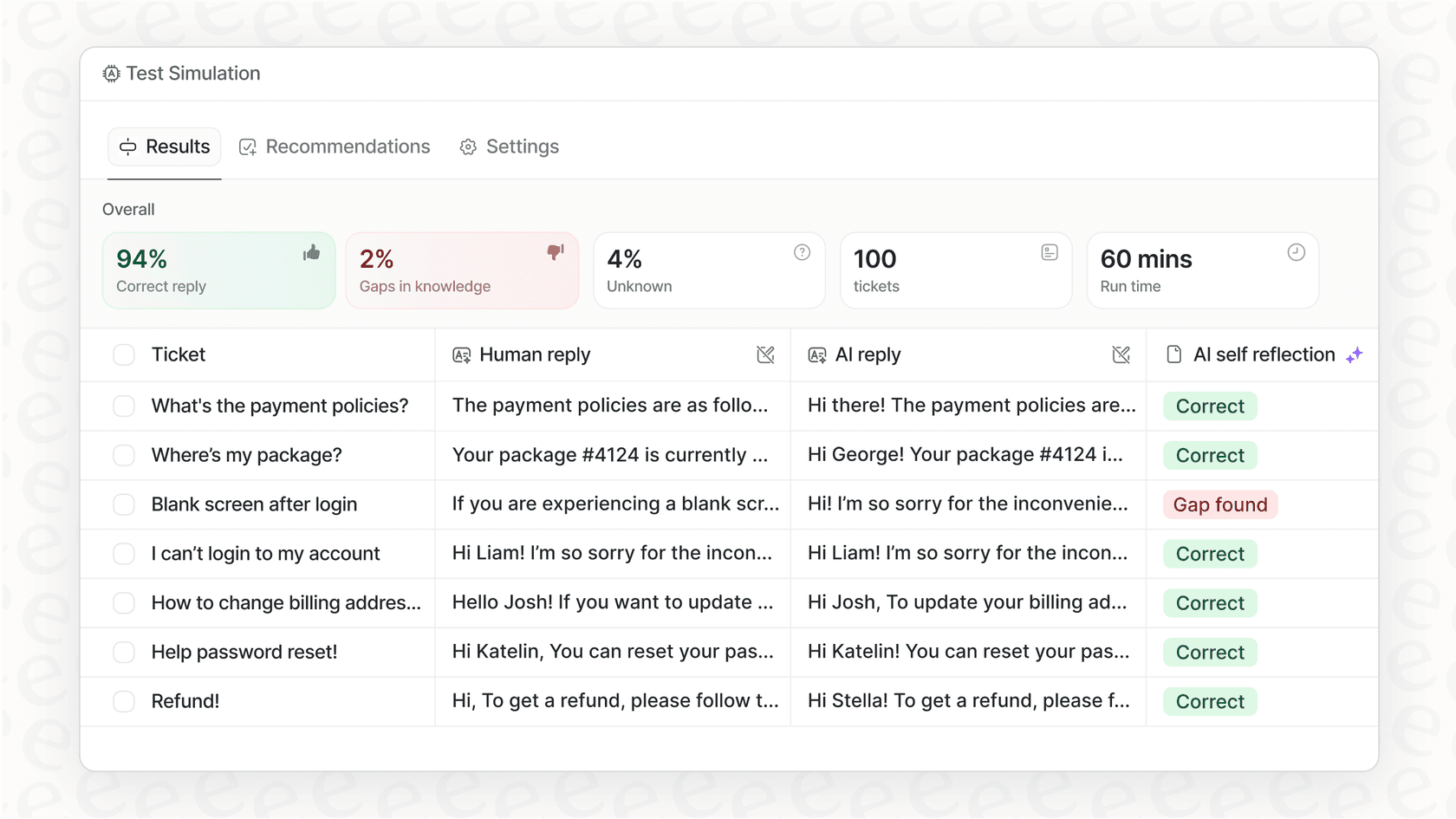
- You want to test AI performance on past tickets before going live
Maximizing your AI agent ROI
Whether you choose Salesforce Agentforce, eesel AI, or another platform, several practices consistently improve ROI:
Prepare your data first: AI agents are only as good as the information they learn from. Clean, well-organized documentation and past tickets produce better results than messy data.
Start with pilot programs: Run simulations on historical data before going live. Both Agentforce and eesel AI offer testing capabilities. Use them.
Plan for gradual rollout: The most successful implementations start with specific use cases or ticket types, then expand based on proven performance. Trying to automate everything at once rarely works.
Monitor and iterate: AI agents improve through feedback. Set up processes to review performance, correct mistakes, and refine instructions regularly.
Invest in change management: Your human team needs to understand how AI agents fit into their workflow. Without buy-in, adoption suffers and projected benefits do not materialize.
Getting started with AI agent ROI planning
Before using any ROI calculator, ask yourself these questions:
- What specific problems are we trying to solve with AI agents?
- Do we have the data and processes in place to support autonomous agents?
- What is our risk tolerance for AI handling customer interactions directly?
- How will we measure success beyond the calculator's projections?
The Salesforce Agentforce ROI calculator is a useful starting point for understanding potential returns. But treat its outputs as directional guidance, not guarantees. Validate projections with pilot testing, factor in hidden costs, and consider whether the platform's complexity matches your organization's readiness.
If you are looking for an alternative that prioritizes quick setup, predictable pricing, and proven results, try eesel AI for free or book a demo to see how our teammate model could work for your team.