


There is no Ticket object in Salesforce. Never has been. What everyone means by a Salesforce ticketing system is the Case object, sitting inside Service Cloud, which Salesforce has now renamed to Agentforce Service. Cases arrive by email or a web form, and by messaging and voice too. Assignment rules and Omni-Channel then hand them around. The SLA clock on top of all that runs on a separate entitlements engine, which is where most of the surprises live.
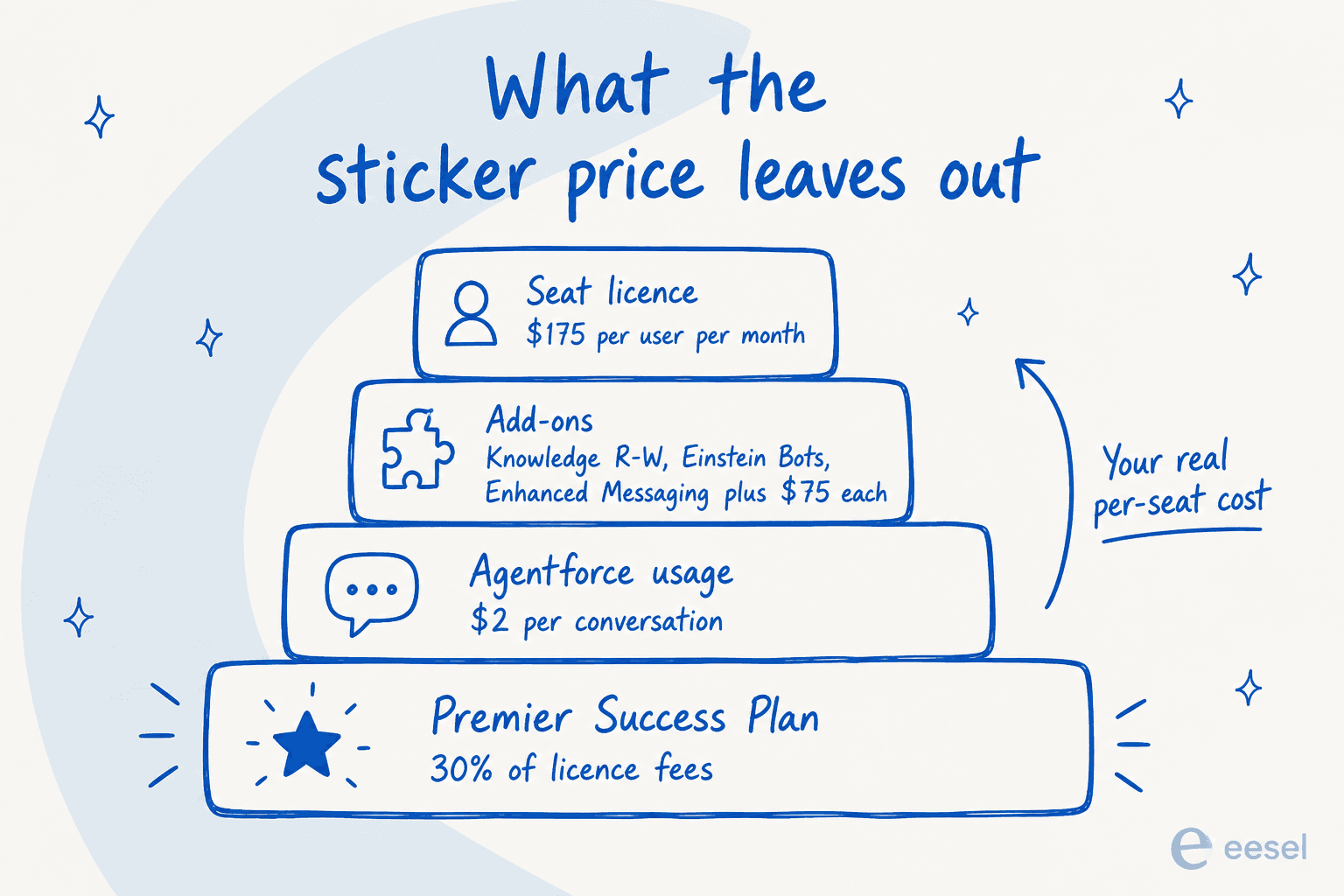
The case-management machinery itself is strong. Pricing is where it stings. Enterprise seats are $175 per user per month, and then Knowledge read-write is another $75 per user, same for Einstein Bots, same again for Enhanced Messaging. Agentforce bills $2 per conversation on top of the whole stack. What surprises people most is the missing part: no hard spending cap. One admin found that out with a $40,000 bill.
I build helpdesk integrations at eesel, and Salesforce was for a long time the one that cost us deals. A mid-market team, roughly 900 cases a month, told us flatly that having no native Service Cloud support was a dealbreaker. Then they walked. So we shipped it. That is the lens for everything below: what the Case API actually does, rather than what the pricing page says it does.
What people mean by a "Salesforce ticketing system"
Every helpdesk has a noun for the thing an agent works on. Zendesk has tickets, Jira has work items, and Salesforce has Cases. The object reference defines it in one line: the Case object "Represents a case, which is a customer issue or problem."
The naming has shifted again. Salesforce Help now carries a banner in the service editions table stating "Service Cloud is now Agentforce Service", while warning that the old name still shows up all over the product and the docs. If you are reading vendor material from 2025, you are reading about the same product under a different label. Our Service Cloud overview has the wider product tour.
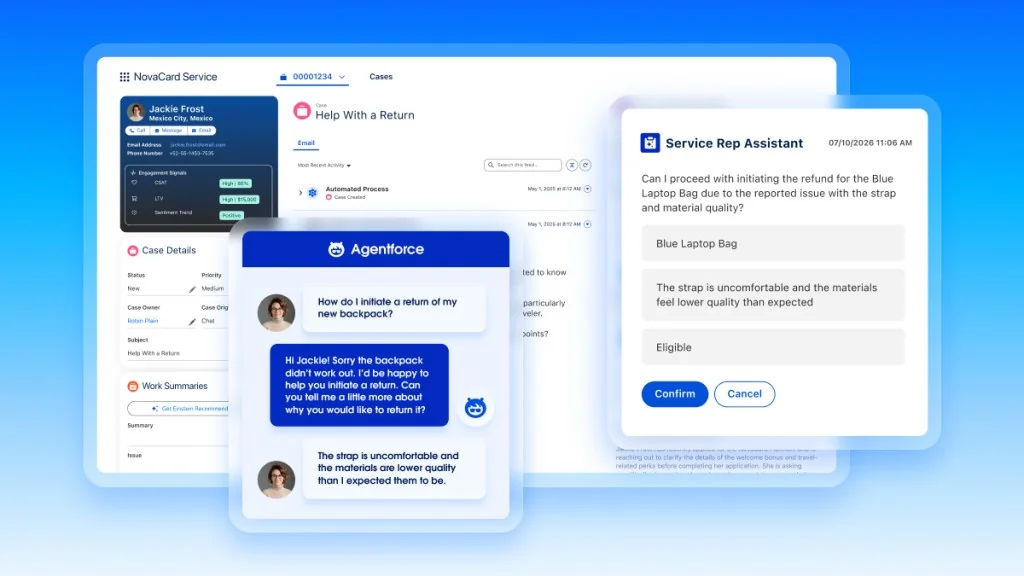
The important structural point is that a Case is a first-class standard object on the CRM platform, not a bolt-on. It supports the full API surface, from create() through upsert(), which is why a Salesforce ticket can be joined to an Account, an Opportunity, and an Asset without anyone building a sync. That is the real reason enterprises stay: the ticket sits on the same record as the money.
If you are still weighing categories, our guide to ticketing system software covers the alternatives, and the Salesforce integrations overview maps what else plugs into the same record.
One small trap for anyone writing integration code: because case is a reserved word in Java, the reserved word note says you may have to write your app "using _case instead of Case".
The Case record: the fields your whole workflow hangs off
Almost every workflow question in Salesforce ticketing comes back to a handful of standard fields. Here are the ones that carry weight, straight from the API v67.0 reference.
| Field | What it does | The detail that bites |
|---|---|---|
CaseNumber | The human-readable ticket ID | Autonumber, "can't be set directly, and it can't be modified" after creation, per the Case reference |
Subject | Ticket title | Hard limit of 255 characters |
Description | Body text | 32 KB |
Status | Open / closed state | "This field directly controls the IsClosed flag", per the API field notes |
Priority | Urgency | Ships as High / Medium / Low |
Origin | Which channel it came from | Labelled Case Origin, ships as Phone / Email / Web / Fax |
OwnerId | Who owns it | Polymorphic, "Refers To Group, User", per the Case object docs |
ParentId | Parent case | Builds the case hierarchy tree |
SlaStartDate | SLA clock start | "Shows the time that the case entered an entitlement process", per the SLA field reference |
IsStopped | SLA clock paused | Set when an entitlement process is stopped on the case |
That OwnerId line is the single most useful thing to understand about Salesforce ticketing. Because it points at either a User or a Group, and a Group is how Salesforce models a queue, "assign to a person" and "assign to a team inbox" are literally the same operation. There is no separate queue field to keep in sync, which is cleaner than most helpdesks manage.
The shipped picklists are smaller than people remember. Per Salesforce's own picklist defaults article, a fresh org gets Status values of New, On Hold, and Escalated; Type values of Problem, Question, Feature Request, and Duplicate; and five Case Reason values. Everything past that is admin work.
"Closed" is more interesting than it looks. It is not hardcoded, it is data. A separate read-only CaseStatus object carries an IsClosed flag per value, and the CaseStatus reference notes that "Multiple case status values can represent a closed Case". So you can ship Closed - Resolved and Closed - No Response as distinct statuses and every report still computes correctly. That is a real advantage over helpdesks that give you three fixed status buckets.
Agents work the case in Case Feed, which the Case Feed docs describe as displaying "important case events in chronological order" rather than as a wall of related lists. Worth knowing before you migrate: per the related lists notes, in Case Feed "private comments have been replaced by case notes, which are Chatter posts" and no longer appear in the Case Comments related list. Teams that report on internal notes get caught by this one.
A long feed is also where agents lose time, which is why Salesforce case summaries became a headline AI feature. The general pattern is covered in our ticket summarization guide.
How tickets get into Salesforce, and the limits nobody quotes at you
Salesforce documents exactly five channels that create cases: voice, email, web forms, messaging apps, and web or in-app chat. Everything then flows through Omni-Channel.
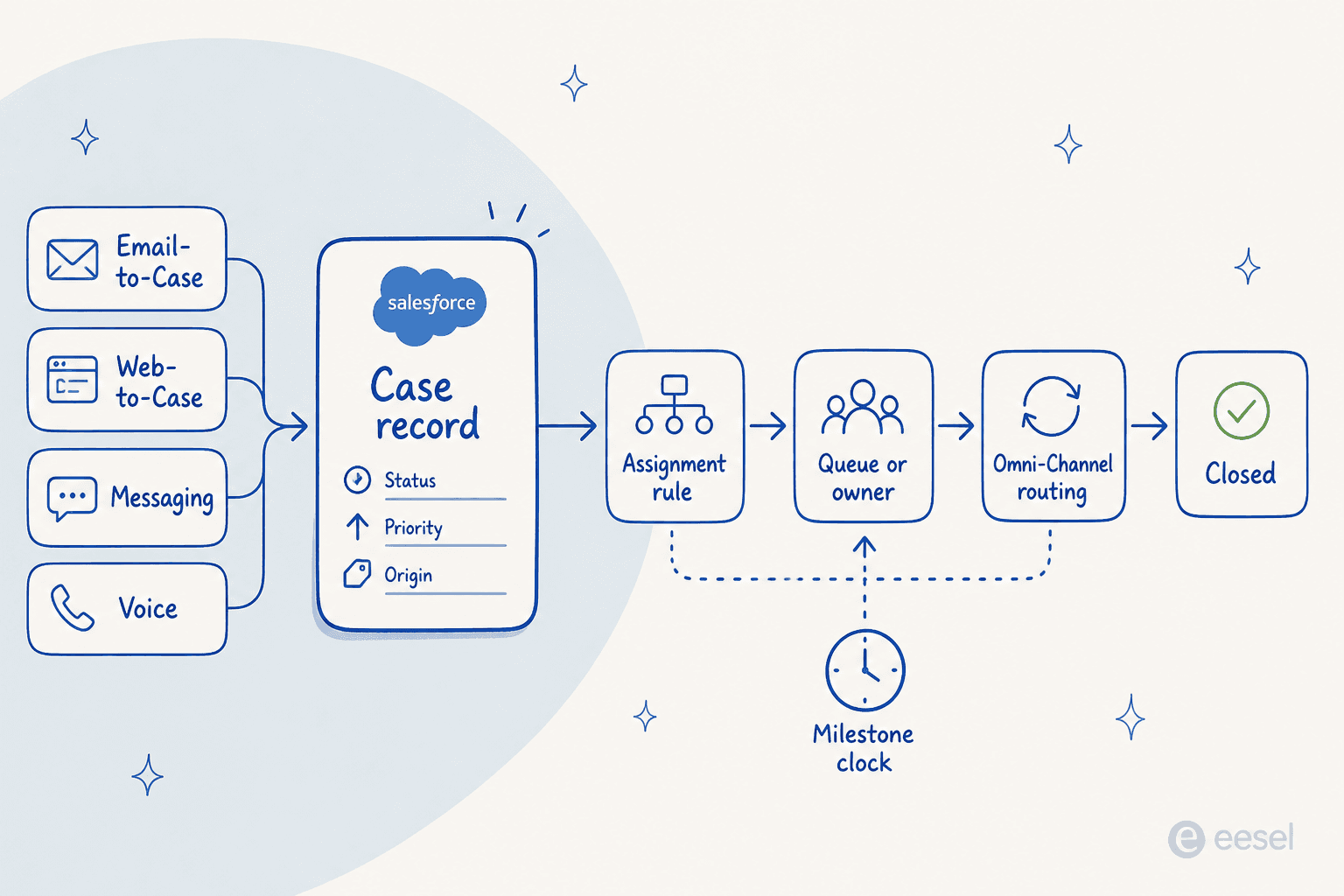
The split that matters for budgeting is simple. Email and web forms are free with your edition. Every real-time channel is a paid add-on.
| Channel | Editions | Extra cost | The published limit |
|---|---|---|---|
| Email-to-Case | Essentials, Starter, Professional and up | None | User licences × 1,000 emails/day, capped at 1,000,000 org-wide |
| Web-to-Case | Essentials, Professional and up (no Starter) | None | 5,000 cases per 24 hours |
| Enhanced Chat (web + in-app) | Enterprise and up | Digital Engagement or Agentforce Contact Center Digital add-on | 11,000 simultaneous sessions |
| WhatsApp, SMS, Messenger, Apple, LINE | Enterprise and Unlimited | Same add-ons, plus message credits from March 2026 | 2,000 messaging channels |
| Salesforce Voice | Enterprise, Performance, Unlimited | Agentforce Contact Center or Salesforce Voice add-on | Lightning Experience only |
The 5,000 cases per 24 hours figure on Web-to-Case is the sharpest published number in the whole system, and its overflow behaviour is worth reading twice. Extra requests land in a pending queue shared with Web-to-Lead, your default case owner gets emailed, and the queue itself caps at 50,000. Past that, "additional requests are rejected and not queued" and the admin is notified only for the first five. After five, the silence is indistinguishable from working.
Two more that catch people mid-build. Web-to-Case does not support attachments at all, so any workflow where customers send screenshots or logs cannot use the web form. And the Email-to-Case daily ceiling scales with your licence count, not your ticket volume, and it is shared with every other email service in the org. A 10-seat team gets 10,000 emails a day total, which sounds generous until an Email-to-Apex service is quietly eating the same budget. Retailers hitting these ceilings usually land on AI ticket routing rather than a bigger licence count.
The old firewall-friendly option is gone, too. Salesforce's Email-to-Case settings page now reads that the installed agent version "is no longer supported, and the agent isn't available for download". Keeping support email inside your own network is now a custom build.
Finally, the docs actively warn against the multi-address setup most teams reach for first. Sending to multiple routing addresses "creates duplicate cases but threads only to the case with the most recent email activity." One address plus case teams is the supported pattern.
Routing: one active rule, and the checkbox that decides everything
Here is the constraint that shapes every Salesforce ticketing implementation I have seen. Your org can have exactly one active case assignment rule. The assignment rule guidelines say it plainly: "Your organization can have one case assignment rule active at a time".
That single rule is generous inside itself. It holds up to 3,000 rule entries, of which 300 can be formula-based, with 25 filter criteria per entry and 200 actions per rule. Evaluation is first-match-wins: the assignment rule setup says Salesforce "assigns the item and stops evaluating" as soon as an entry matches. If nothing matches, the case falls to the Default Case Owner in Support Settings, which is why a catch-all final entry is standard practice.
Now the part that generates support tickets about the support tool. Assignment rules fire automatically for web and email cases. For manual creation, whether the rule runs at all depends on a checkbox on the page layout. Create a case from the Cases tab with that box unchecked and, per the case assignment docs, "you are automatically listed as the case owner". Over the API it is worse: you have to send an AssignmentRuleHeader on the create call or no rule runs at all, which is the classic reason every API-created case lands on the integration user.
A Salesforce admin who describes himself as an Omni-Channel specialist put the practical version of this on Reddit:
"So this is a tricky example of Case Assignment rules and having your page layout or lightning page set to have the run assignment rules checked or not."

His fix, for what it is worth, was a record-triggered Flow that checks whether the routing config is blank before routing. The declarative path needed code to be reliable, which is a fair summary of Salesforce ticketing generally. Our Salesforce case automation guide goes deeper on that pattern, and the wider Salesforce automation overview covers Flow itself.
Omni-Channel and the capacity model
Once a case is in a queue, Omni-Channel pushes it to a rep instead of letting reps cherry-pick. Reps get a capacity number, each queue's routing config says how much of it a case consumes, and two models decide who gets the work: Least Active picks whoever is using the least capacity, Most Available picks whoever has the most free. The capacity model docs cap a rep at "a maximum of 100 work items open at a time".
Three constraints to plan around:
- Routing happens once. Per the Omni-Channel docs: "If field values on the work item are changed after the item is routed, the routing logic isn't reapplied." Re-prioritising a case does not re-route it.
- Declining does not un-assign. The routing options docs say Omni-Channel "considers work as assigned when it routes a work item to a rep, regardless of whether the rep accepts or declines", and a declined item stays owned by the decliner until it routes again.
- Standard Omni-Channel is being retired with the Summer '26 release, and per the Omni-Channel overview Salesforce "automatically upgrades your org to Enhanced Omni-Channel" during the rollout.
Skills-based routing is the sharper tool and the sharper edge. Turn it on for a queue and, per the routing configuration docs, "the queue's membership no longer applies to routing". If nobody holds the required skill, the case is not routed at all, it sits in a Skills Backlog. It is also gated: skills-based routing and Omni flows are Professional, Enterprise, Unlimited, and Developer with Agentforce Service, notably skipping Performance edition.
When it works, people like it. One G2 reviewer captured why:
"Omni-Channel routing is another feature I didn't realize I'd rely on so heavily. It's not perfect, but the fact that it distributes load across agents based on capacity rather than just round-robin has made a real difference in team morale—nobody feels like they're getting buried while someone else is coasting."

SLAs run on entitlements, not on the ticket
This is the section I would read twice before promising a customer a response time. Escalation rules in Salesforce are a timer plus an email. The real SLA engine is Entitlement Management, a four-object chain: an Entitlement says who is owed support, an entitlement process is the timeline, and milestones are the individual clocks that land on the case.
The setup is capable. You get 1,000 entitlement processes per org with 10 milestones each, milestone statuses of Compliant, Open Violation, and Closed Violation, and reportable fields like TimeRemainingInMins and IsViolated that make SLA dashboards straightforward.
Then there are the limitations, which Salesforce documents openly and which I think are underweighted in most buying decisions:
- Per the entitlement limits: "Entitlements don't automatically apply to cases created with Web-to-Case or Email-to-Case." Your two free intake channels are exactly the two that skip the SLA engine unless you write Apex.
- Per the milestone completion notes: "Milestones aren't marked completed automatically." Auto-completion is an Apex trigger.
- Per the process activation rules: "After an entitlement process is activated, you can't delete its milestones or create milestone actions." You version the process instead.
- Per the list view limitation: "The Case Milestone Status field isn't available in list views in Lightning Experience."
The timer behaviour has its own logic worth internalising. Milestone clocks pause outside business hours, so a 60-minute first-response milestone starting at 4:30 PM against 9-to-5 hours finishes at 9:30 AM the next day. And pausing a milestone after it has already breached does nothing: the milestone timer behaviour states that timers "count the total amount of time after the milestone is violated, regardless of whether the timer was stopped".
Escalation rules carry the same one-active-rule constraint as assignment, cap at five actions per entry, and depend on business hours being configured first. The nastiest option in the whole feature is the escalation start setting "when case is created, and disable after case is first modified", which cancels the escalation permanently the moment any agent touches the case. Salesforce's own example: a case created at 9 AM with a five-hour escalation, edited at 10 AM, never escalates.
Teams route around this in two ways: an Apex trigger, or a layer that watches the queue independently. Our SLA management guide covers the first, and AI escalation management covers the second.
Here is the honest summary: Salesforce ticketing gives you an SLA engine that can express almost anything, and expects you to bring an admin and a developer to make it behave. Whether that trade is right for you is mostly a question of how many people you have.
What a Salesforce ticketing system actually costs in 2026
The list prices are public and clean. What you pay is not.
| Edition | Price per user/month | Billing note | What it is positioned as |
|---|---|---|---|
| Starter Suite | $25 | Monthly or annual, transaction fees apply | Smart CRM suite with built-in AI |
| Pro Suite | $100 | Billed annually, contract required | More marketing, sales, service, commerce |
| Enterprise | $175 | Billed annually | "The CRM for service with built-in AI" |
| Unlimited | $350 | Billed annually | Adds chat, bots, Knowledge, Premier |
| Agentforce 1 Service | $550 | Billed annually | Full AI suite, 2.5M Flex Credits per org/year |
All five come straight from the Service Cloud pricing page. Now the add-ons that sit inside the feature comparison table on that same page:
| Add-on | Price | Editions it applies to |
|---|---|---|
| Knowledge (read-write) | +$75 per user/month | Enterprise |
| Einstein Bots | +$75 per user/month | Enterprise |
| Enhanced Messaging | +$75 per user/month | Enterprise and Unlimited |
| Web Services API | +$25 per user/month | Pro Suite |
| Premier Success Plan | 30% of net licence fees | Any (bundled with Unlimited) |
Read that first row again. On Enterprise, the pricing page lists Knowledge Management as "Read Only. Read/Write available for purchase." A ticketing system where your agents cannot write a knowledge article without a $75 uplift is an unusual definition of included, and it quietly shapes how teams approach AI knowledge creation.
Our add-on pricing breakdown and the platform licence pricing guide have the full matrices.
The AI layer is metered separately
Agentforce, the AI that answers cases, is not part of the seat price unless you are on the $550 edition. It has three consumption entry points: Salesforce Foundations at $0, Flex Credits at $500 per 100,000 credits, and Conversations at $2 per conversation. You cannot mix the last two, since "Flex Credits and Conversations will not be supported in the same org."
Salesforce publishes its own worked examples, and they are the most useful pricing artefact the company ships:
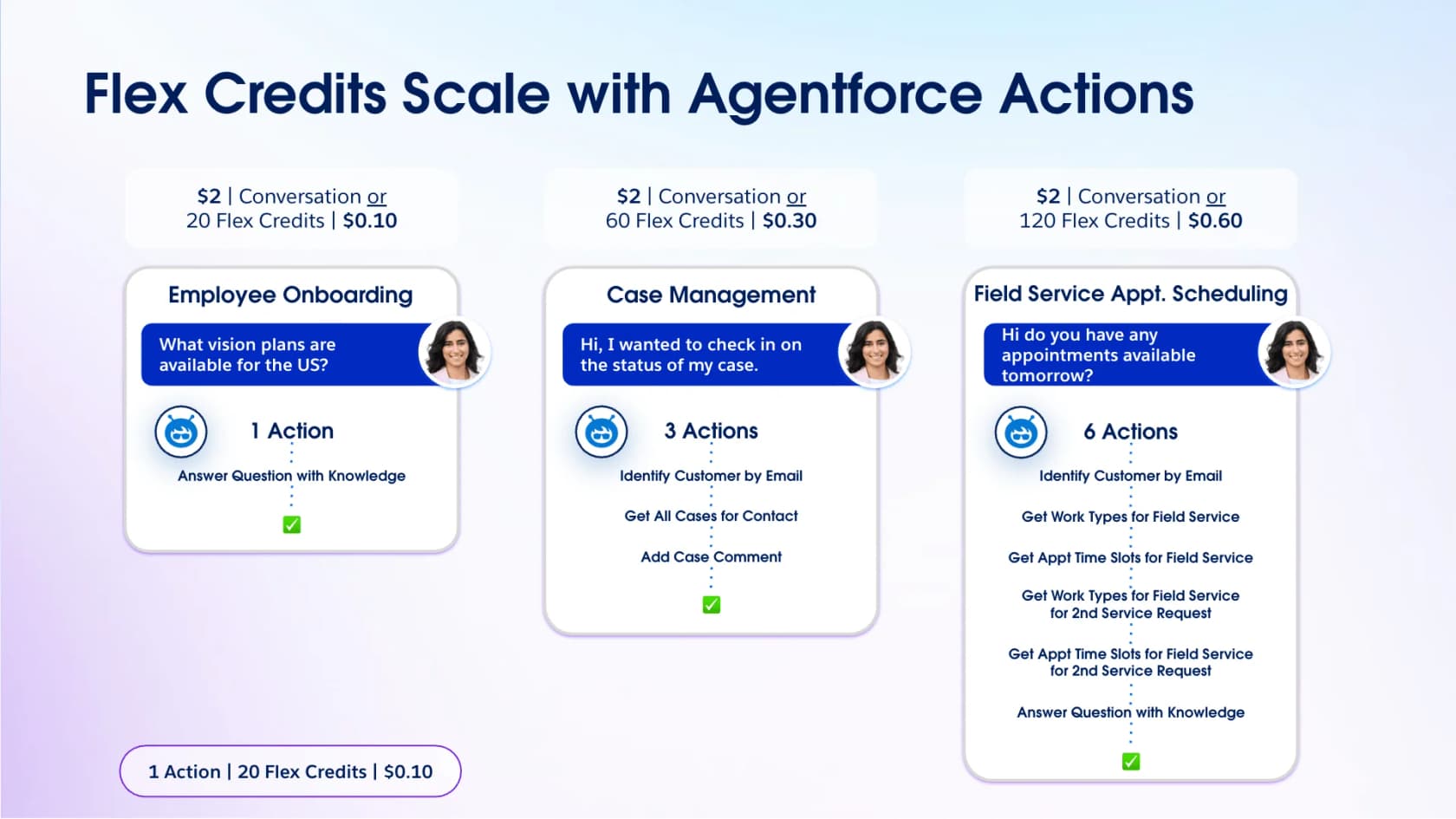
The middle column is the one to look at, because it is a support ticket. A case-management conversation runs three actions (identify the customer, get their cases, add a comment), which is 60 Flex Credits, which is $0.30 on credits versus $2.00 on the conversation model. Same work, nearly 7x the price, depending only on which contract you signed. Our Flex Credits guide unpacks the credit maths and Agentforce pricing covers the licence side.
One thing Salesforce does not publish: what counts as a "conversation". The pricing page sets no turn limit, session length, or resolution requirement for the $2 unit. It also does not publish the contracted overage rate, only that "there is no overage penalty", per the Agentforce pricing terms, and that you bill at your contracted rate in arrears. And unused Flex Credits "do not roll over into subsequent subscription terms."
Put your own numbers in
If you want to sanity-check the output against Salesforce's own numbers, our pricing calculator guide and the Salesforce AI pricing post work through the same maths from the other direction.
Where teams actually get stuck
Salesforce Service Cloud holds a 4.4 out of 5 on G2 across 7,357 reviews, with 63% of them five stars. This is not a bad product. The complaints cluster in three specific places.
The licensing ladder. A small-business reviewer described the renewal experience precisely:
"Pricing is where it gets a little frustrating. It starts feeling reasonable until you realize the features you actually need day to day are sitting behind another add on or a higher tier. Storage, advanced reporting, extra automation capabilities — it all adds up quietly until your renewal conversation becomes a bit of a shock."
The admin tax. Salesforce ticketing configures to almost anything, and somebody has to do the configuring. A tech lead who ran a 600-plus-seat rollout across five clouds summed it up on Hacker News:
"I entered the move skeptical of Salesforce's value; I left impressed with the flexibility of the platform but aghast at the costs and development effort required to do much of anything."

The uncapped AI meter. This is the newest and the one I would ask hardest about in a sales call. A thread from July 2026 documented that Agentforce and Digital Wallet have no automatic stop:
"There are currently no native hard caps, circuit breakers, or real-time consumption alerts to automatically halt credit drain. The system prioritizes operational continuity for their servers, leaving the customer exposed to un-capped financial liability."
That is not theoretical. Another admin described the bill:
"We got $40k bill cuz our retriever jobs hit the fan when an intern ran web crawler once, failed and Salesforce support created two new for testing, so we have to also pay for the negligence of sf support staff."
There is a fourth theme that matters more than the money: what the AI does when it is wrong. One team reported an Agentforce agent surfacing an internal-only knowledge article to a customer, complete with cancellation instructions, instead of escalating. Salesforce Premier Support eventually traced it to a prompt template using the default retriever with access to every Knowledge article.
We have written about why this failure mode is so common in AI hallucinations in support, and what good AI handoff practice looks like.
Our Service Cloud AI limitations post covers the rest, and Salesforce AI governance covers the controls you can put around it.
So should you run support on Salesforce?
Here is my honest read after living in these docs.
Stay on Salesforce ticketing if your cases really do need CRM context to be answered, and you have an admin. If the answer to "where is this order, what did they pay, what is their contract" lives in Salesforce, then putting the ticket anywhere else means building a sync you will maintain forever. Nothing in the category beats a Case sitting natively on the Account record. Our Service Cloud vs Zendesk comparison covers that trade in detail.
Look elsewhere if you are a small support team without dedicated admin capacity. The features you would buy Salesforce for, entitlements and skills routing and Knowledge read-write, are all gated behind edition tiers or Apex or both. A five-person team is paying enterprise complexity for enterprise pricing and getting neither the entitlement monitoring nor the admin to run it.
Our lists of the best ticketing systems for small teams and free ticketing systems are better starting points.
The AI ticketing system guide covers what to automate first once you have picked one. If your volume is the actual problem, start with ticket reduction instead of a migration.
The interesting middle case is the one I see most: teams that are staying on Salesforce and simply do not want to buy the AI on top of it. That is a real option, and it is worth spelling out.
Adding AI to Salesforce cases without the credit meter
There are two ways to automate a Salesforce ticket queue, and they have very different shapes.
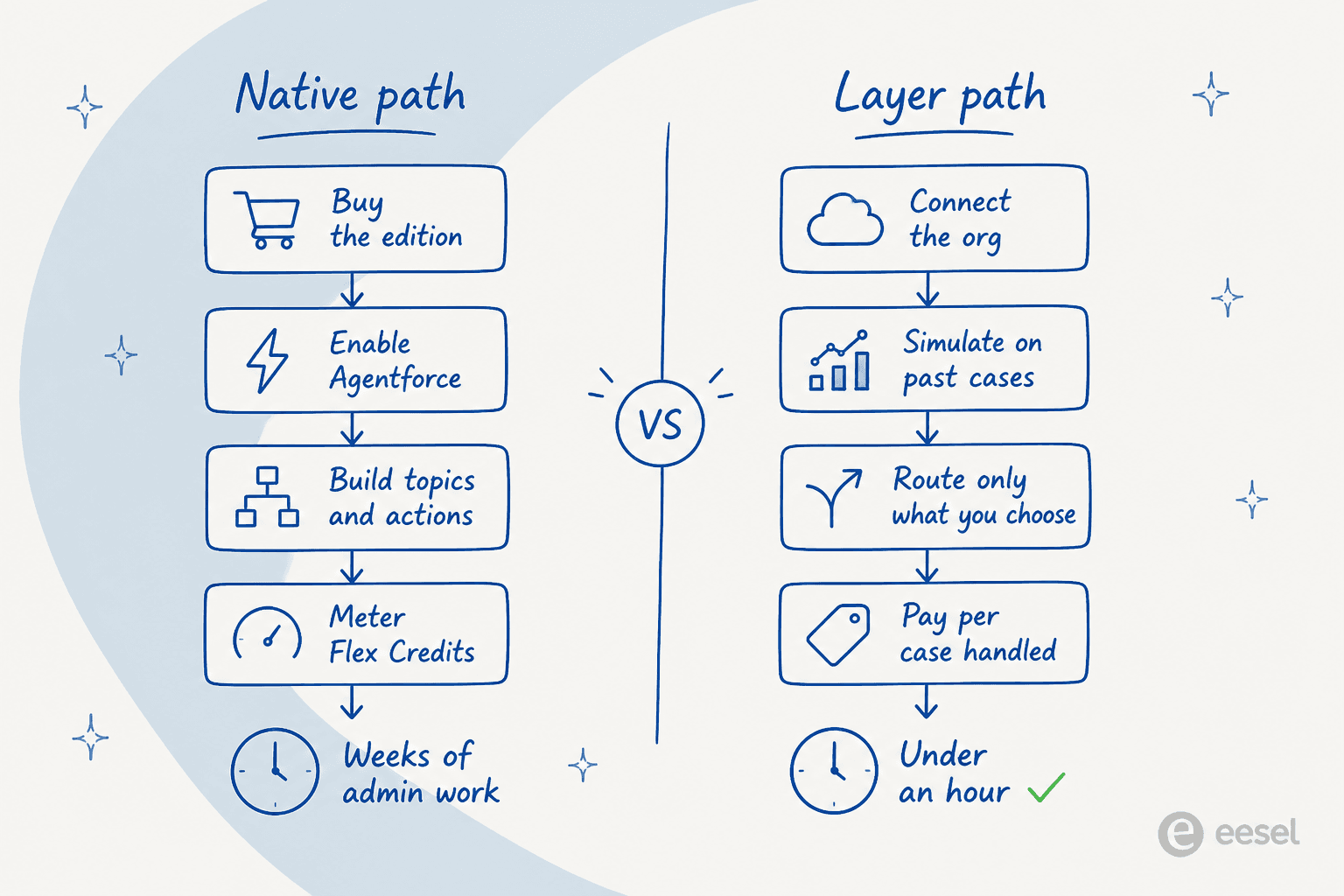
The native path is Agentforce. You buy an edition that supports it, enable it, build the topics and actions, and then watch the meter. It is deeply wired into the platform, which is a real advantage when your automation needs to touch six standard objects. Our Agentforce customer service post covers what it does well. For the large-org version, read Service Cloud AI for enterprise, and for the mechanics underneath, Salesforce AI in Service Cloud.
If you would rather compare the field before committing, we ran the numbers in best Salesforce chatbot and looked at the agent-assist angle in helpdesk copilot.
The layer path leaves your Service Cloud configuration exactly as it is and puts an AI agent on top of the Case object. That is what we built at eesel: it works inside Service Cloud cases and feeds, respects the assignment rules, escalation rules, and entitlements you already configured, and never asks you to rebuild your routing.
The part I would actually flag, because it is the thing that stopped that internal-knowledge-article incident from being possible in our stack, is simulation. You run the agent against your past cases before it touches a live one, see where it is strong and where it is thin, and only then turn it on. The Reddit thread about losing a client to a bad AI answer is a story about deploying without that step.
Try eesel on your Salesforce cases
If you are on Service Cloud and the Agentforce quote made you wince, this is the version I would try first. eesel joins as an AI agent inside Salesforce Service Cloud, with no chatbot widget and no separate inbox. It drafts and sends replies, adds internal notes, routes cases into queues, and updates the fields you would expect it to update: priority, status, owner. It manages SLA timelines too. The source material is your own past cases, plus Knowledge articles and email templates.

Three things that matter for a Salesforce buyer specifically. Setup is no-code and the page claims under 30 minutes, which is a different order of magnitude from an Agentforce build. You pick exactly which cases it touches, by record type, queue, channel, or condition, so you can start with drafts on tier 1 and expand when you trust it. And the pricing is one fixed monthly plan, from $299/month for 500 credits with 1 credit per case or chat, no platform fee and no per-seat charge, so the number in the calculator above stays the number on the invoice.
A logistics software team on Service Cloud got it fully integrated in about an hour across 717 knowledge items. You get a free plan with 100 credits to test it on your own cases first, no card needed, and agents pause automatically when credits run out unless you turn on overage with a cap you set. Start with eesel for Salesforce or browse the full integration list if your stack is broader than one helpdesk.