The pricing page in one screen
Below is the live Gmelius pricing page as it stands today, with the annual toggle already flipped on when you land.
Credit where it is due, and Gmelius earns some here. The rate card is public. The caps are printed on the page instead of buried in a contract, the non-profit discount is published with real percentages attached, and the feature comparison table goes row by row through about sixty capabilities. Plenty of vendors in this category ship a "Contact us" button and nothing else. Having written enough of those breakdowns, I appreciate a page that just tells you the numbers.
What it does not tell you is what happens at the edges, which is where the rest of this post lives.
Gmelius pricing: the full table
Every price below is per user per month, and the annual column is what the page shows you by default unless you flip the toggle.
| Meli | Growth | Pro | Enterprise | |
|---|---|---|---|---|
| Annual (per user/mo) | $19 | $25 | $40 | Custom quote |
| Monthly (per user/mo) | $21 | $33 | $50 | Quote |
| Annual saving | ~10% | ~24% | 20% | n/a |
| Email conversations / month | 5,000 | 10,000 | 100,000 | Unlimited |
| Rule executions / month | N/A | 10,000 | 100,000 | Unlimited |
| Custom AI labels | 5 | 10 | 20 | 100 |
| Number of users | Up to 5 | Up to 50 | Unlimited | Unlimited |
| Minimum seats | none | none | none | 50 |
| Shared inboxes | No | Unlimited | Unlimited | Unlimited |
| Kanban board views | No | Yes | Yes | Yes |
| Automation rules | Basic only | Yes | Yes | Yes |
| Reporting window | No analytics | 3 months | 12 months | 12 months |
| Slack / Zapier / Make / API | No | Yes | Yes | Yes |
| HubSpot / Salesforce / Nicereply | No | No | Yes | Yes |
| Webhooks | No | No | Yes | Yes |
| CSV exports | No | No | Yes | Yes |
| Custom roles, teams and sub-teams | No | No | Yes | Yes |
| SOC 2 Type II, GDPR, CCPA | Yes | Yes | Yes | Yes |
| HIPAA BAA, SCIM, uptime SLA | No | No | No | Yes |
| Free trial | 7 days | 7 days | By request | Sales-led |
All figures come from the Gmelius pricing page. One oddity is worth flagging here so you do not go chasing it. Down in the lower comparison table, the Enterprise column carries a single cell reading "$45 /seat/mo billed monthly", which sits below Pro's $50 monthly rate. Everywhere else on the page, Enterprise is quote-only with a 50-user minimum. Treat that $45 as a page artefact rather than a rate you can hold anyone to.
Two structural things fall out of that table more or less immediately, and between them they are the whole story.
The $19 headline is not a team price
Meli is sold as an AI personal assistant, and Gmelius means personal quite literally: on the Meli tier, the entire collaboration half of the product is switched off.
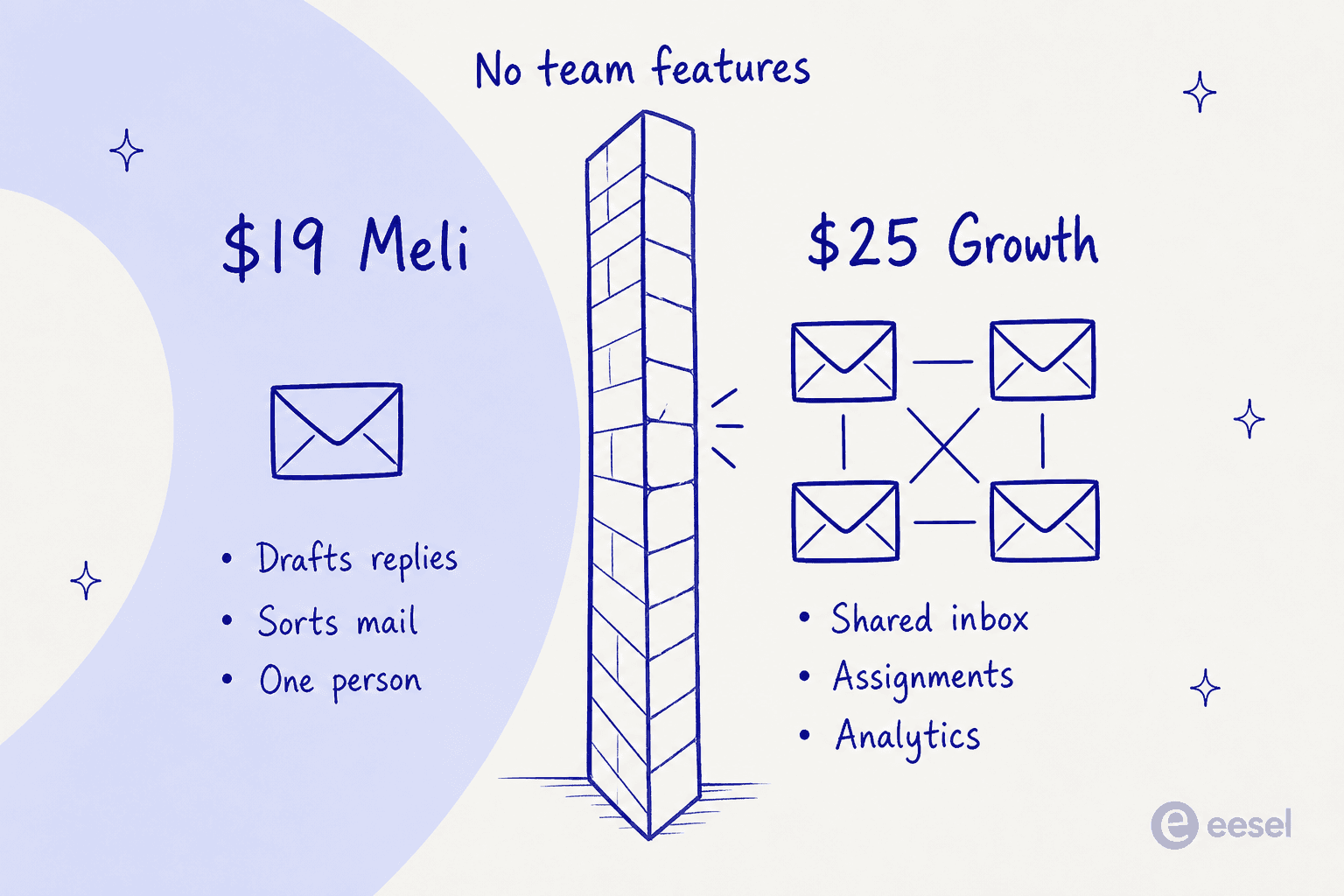
No shared inboxes, and no shared Gmail labels either. No shared conversations or drafts, no collision detection, no notes or @mentions, no assignments, no team read statuses, no permalinks, no custom views, no Kanban boards, no shared templates. Every analytics row is off. So is every integration except Gmail, Google Calendar and Google Meet, which means Slack, Zapier and the Gmelius API are all out. Rule executions read N/A.
What $19 does buy you is the four base AI assistants (Meli itself, AI drafting, AI sorting, AI meetings), plus basic automation like auto-responders and auto-tagging, the Chrome extension, and the full security baseline of SOC 2 Type II, GDPR and CCPA. As a single-seat purchase, then, it sits against the rest of the AI email assistants market rather than against helpdesks. At $19 it is also more expensive than several free AI email writers that do the drafting half.
That is a coherent product, for what it is. It is just not the product anyone typing "Gmelius pricing" into a search bar is shopping for, since Gmelius's own positioning is the shared inbox. So the real entry price for a team is $25 Growth, not $19. And the gap is wider than it first looks once you switch to monthly billing, where $21 versus $33 is a $12 per-user difference, because the annual discount on Meli is only about 10% while Growth's is closer to 24%.
That same footnote applies almost everywhere else in this category, by the way. Hiver starts its team tier at $25 and Drag at $12, while Missive comes in at $14 for up to five users.
For exactly that reason, our Gmelius alternatives roundup lines them all up against Growth rather than Meli. The same correction runs through the Hiver alternatives list.
One other thing the seat price does not include. Gmelius runs on top of Google Workspace, so Workspace's own per-seat cost sits underneath every figure in this post. The AI is Google Gemini too, not a proprietary model, which means part of what you pay Gmelius for is packaging capabilities that overlap with Gemini in Workspace if your plan already includes it.
What Gmelius actually bills you for
Four meters run at once here, and you can sit comfortably inside one of them while hitting the wall on another.
Users. Per the pricing FAQ, a user is "a Google or Google Workspace email account part of your Gmelius subscription". Named accounts, not concurrent logins. One rule catches people out here: all members of your team must be on the same plan, so you cannot buy two Pro seats for your leads and ten Growth seats for everyone else.
Email conversations. A conversation is "a Gmail thread and regroups all the emails/replies part of this thread", and one gets created "whenever a new Gmail thread is added to a Gmelius-powered workspace." A forty-reply thread therefore counts once, which is generous. The catch is that a thread counts from the moment it lands in any workspace Gmelius manages, whether that is a shared Gmail label or a primary inbox running AI assistants, and not only your support@ address.
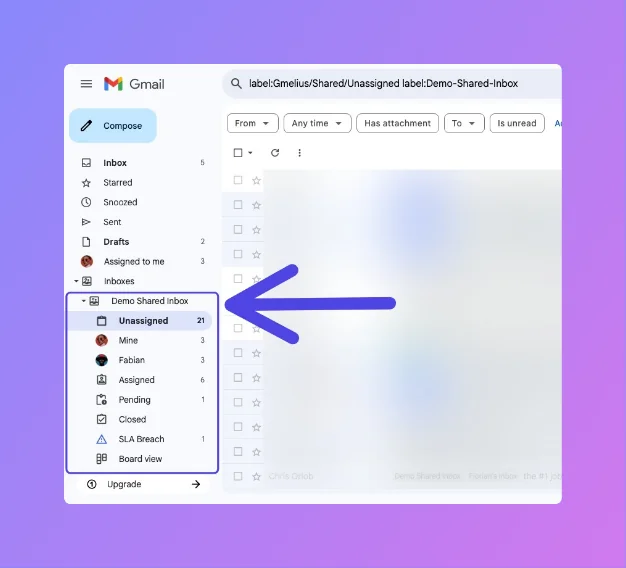
Rule executions. The third meter, capped separately, and listed as N/A on Meli. This is the one people forget about, so it gets its own section below.
Custom AI labels. The smallest meter of the set: 5, 10, 20 and 100 by tier. Each label is a category the AI sorting and dispatching assistants can apply and then route on.
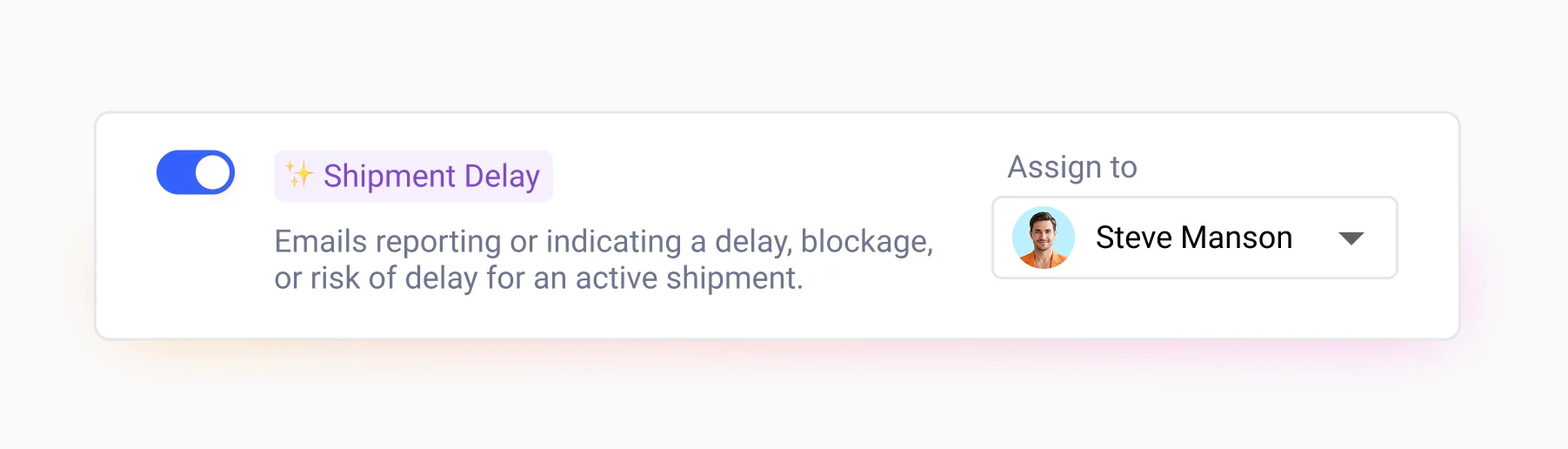
Ten custom labels on Growth is tighter than it sounds, especially once you start splitting by product line, by region and by issue type. There is also a detail buried in the docs that affects how much of that allowance you can really use. The sorting and dispatching assistants read only the first message of a thread, they ignore attachments and internal notes, and the tag names they emit are English-only and not customisable. If you have come from a dedicated ticket triage tool that reasons over the whole conversation, first-message-only classification is going to feel like a step back.
The meter nobody checks: rule executions
This is the finding that changed how I read the whole rate card.
On Growth, conversations and rule executions carry the same 10,000 monthly allowance, which is easy to read as one number and is really two. They are separate meters, counting different things. A conversation is one inbound thread. A rule execution is one automation firing.
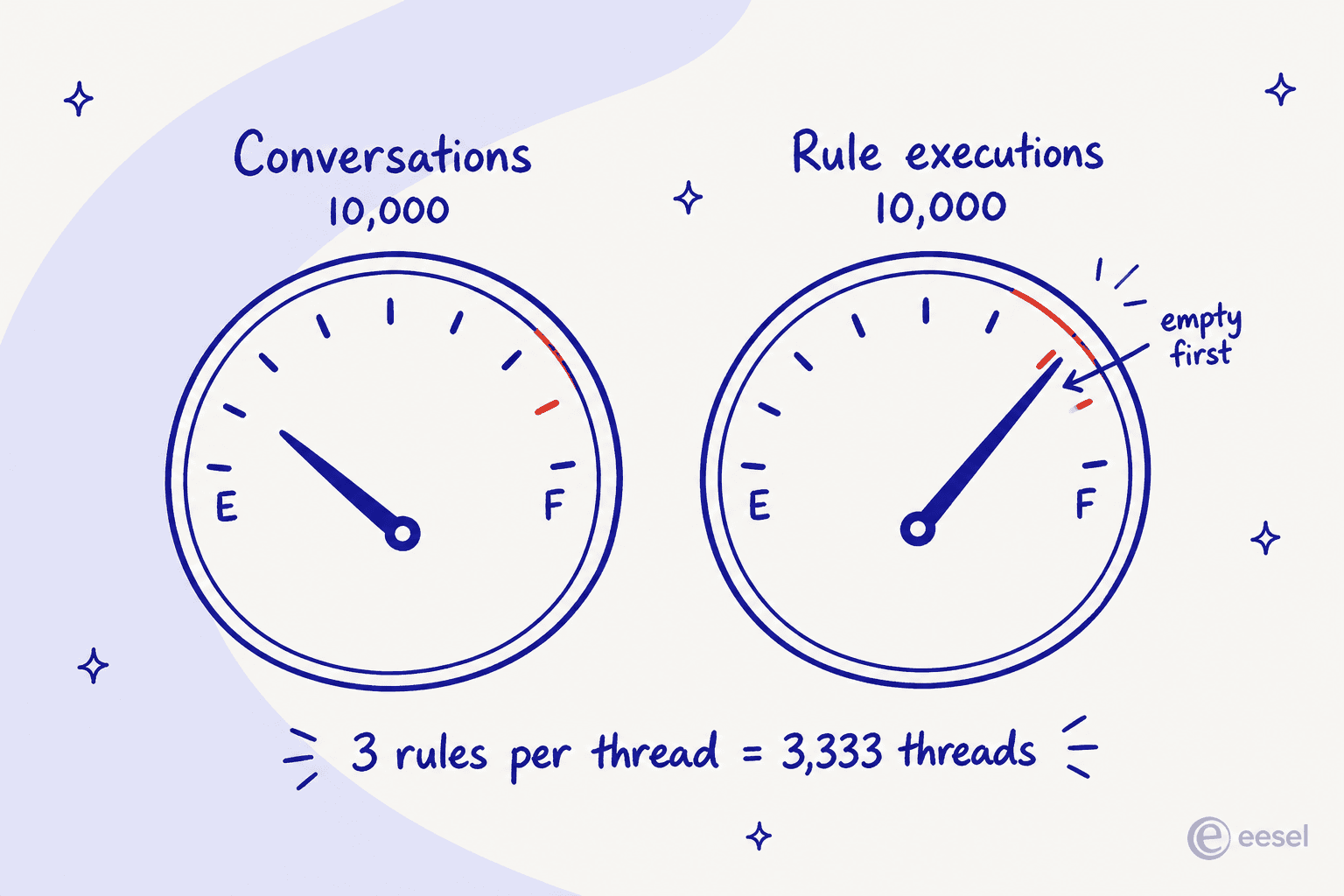
Now think about what a working shared inbox actually runs day to day. One rule to auto-tag by keyword. Another to round-robin assign to whoever happens to be on shift. A third to fire an SLA warning if nothing has gone out in four hours. That is three executions on a single thread before a human has typed a word.
At three rules per thread, your 10,000 rule executions run out at roughly 3,333 conversations, which is a third of your conversation allowance. The meter you were watching, in other words, is not the meter that stops you.
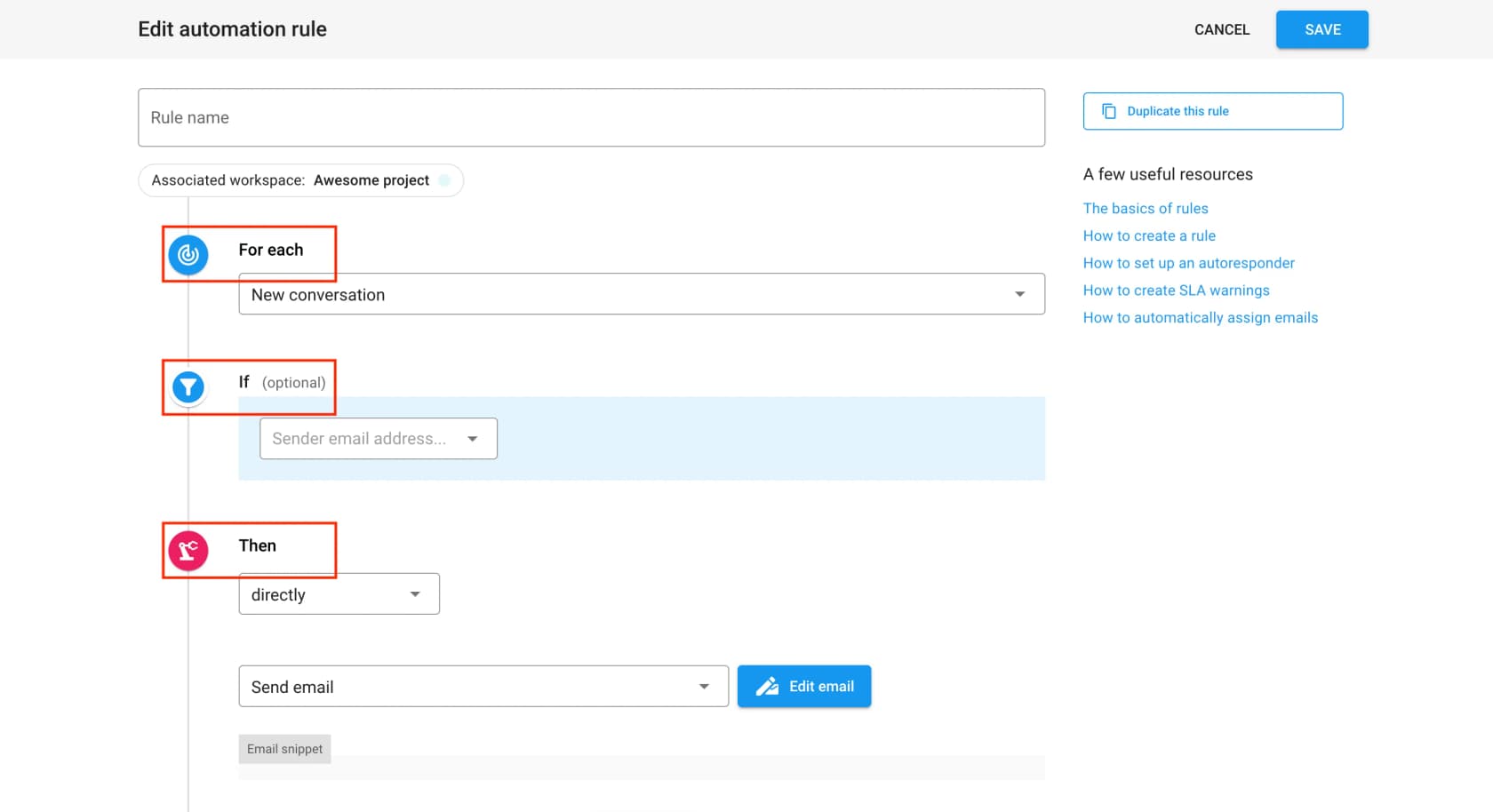
To be fair to Gmelius, the rules engine spending this meter is deterministic and legible: a fixed FOR EACH / IF / THEN builder with 8 triggers, 9 filter fields and 12 actions. You can read a rule and know exactly what it will do, which is more than can be said for a lot of AI-branded routing. The constraints are worth knowing, though. Text matching is literal string operators only, so no regex and no intent matching, and there is neither a webhook trigger nor a scheduled one. Which means that if a rule fires on the wrong thread, your fix is usually another rule, and another rule is more executions.
What Gmelius does not publish is how executions get counted for a rule with several actions, or whether a delayed action that re-checks its condition counts once or twice. If you are anywhere near the cap, that is the first question I would send to sales.
Worth noting that the meter only counts rules running inside Gmelius. Growth and above unlock Zapier and Make, plus the public API, so you can push some workflow automation outside the product and off the meter entirely, much the same way people wire Gmail through n8n. That is a workaround with its own maintenance bill attached. Not a fix.
The cap cliff, and the missing overage rate
Nearly every usage-metered product I have priced out has a number for what one extra unit costs. Gmelius does not publish one.
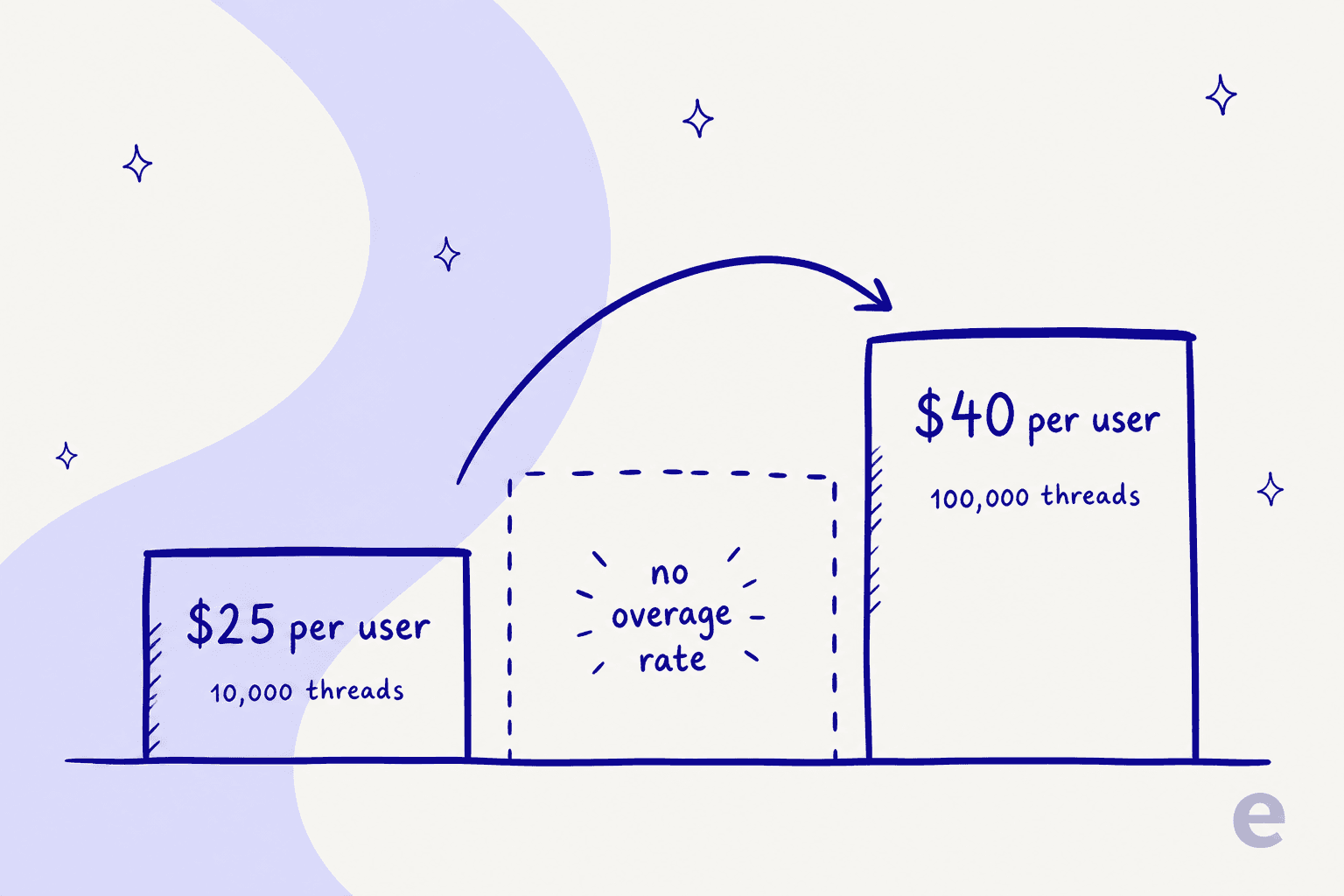
The page states the caps ("Up to 5,000", "Up to 10,000") and then simply stops. No per-conversation rate. No per-rule-execution rate, and no soft-landing tier either. The implied remedy is a plan upgrade, and that upgrade is a 60% jump on the seat price.
Which is fine when your volume is flat, and expensive the moment it turns seasonal. Take a twenty-person team running 9,000 threads a month all year, then 11,000 in November. It does not get a slightly larger November invoice. It either upgrades everybody to Pro for the year at $9,600 instead of $6,000, or it finds out at the cap what actually happens. The page never says which.
None of this shape is unique to Gmelius. It is the standard weakness of cap-based pricing wherever you find it, and it is why I keep coming back to the same line: the right question about any support tool's rate card is not "what does it cost" but "what does one busy month cost". Per-outcome and per-ticket models carry their own problems, which we get into in the Zendesk pricing and Freshdesk pricing breakdowns. At least they answer that question.
Work out your own Gmelius bill
Plug in your seat count and your monthly thread volume, plus how many rules you expect to fire per thread. The calculator works out which meter binds first, which plan that forces you onto, and what a year of it costs.
The defaults are deliberately ordinary: eight people, 6,000 threads, three rules each. That team sits under the conversation cap by 40% and over the rule cap by 80%.
Worked examples: what three real teams pay
Abstract rate cards hide the shape of an actual bill. So here are three teams, all of them on annual billing.
A five-person support@ inbox, 4,000 threads a month, two rules per thread. Growth covers it comfortably: 8,000 rule executions against a 10,000 cap. Five seats at $25 is $125/month, which comes to $1,500 a year. This is Gmelius at its best, and it is honestly cheap for what you get.
A twenty-person team, 9,000 threads a month, three rules per thread. Conversations are fine here, at 9,000 of 10,000. Rule executions come to 27,000 against a 10,000 cap, so Growth is out on the meter nobody was watching. Twenty seats at $40 is $800/month, or $9,600 a year, against $6,000 if the rules had fit. The automation you built to save time is what added $3,600 to the annual bill, and the thing that triggered it was invisible on the plan card you were reading.
A fifty-person team on Growth's own ceiling. Growth allows 50 users and 10,000 conversations. Split across fifty people, that works out at 200 threads each per month, or under ten per person per business day. For a support team, that is a very light load. In practice, Growth's user cap and its conversation cap do not describe the same company, which makes a fifty-seat Growth deployment close to theoretical.
That last one is the cleanest way to see the design. The caps do the segmentation, not the features. Growth and Pro share nearly every collaboration and automation row on the comparison table. What separates them is 10,000 versus 100,000, a 3-month versus 12-month reporting window, plus webhooks, the CRM integrations and role-based governance. Strip that back and you are mostly paying $15 more per user for volume headroom.
What the AI actually does for the money
Every plan includes AI, which makes it worth being precise about what that buys, because it changes the return on the whole spend.
Gmelius's AI Draft Assistant writes replies in the background and drops them into Gmail as drafts. It has three sensitivity modes. It declines to draft when you were cc'd, when the mail is labelled Promotions, Updates or Social, or when the sender is a noreply address. Its knowledge comes from two places, and only two: up to two years of your own email, plus a crawl of one sitemap.xml.
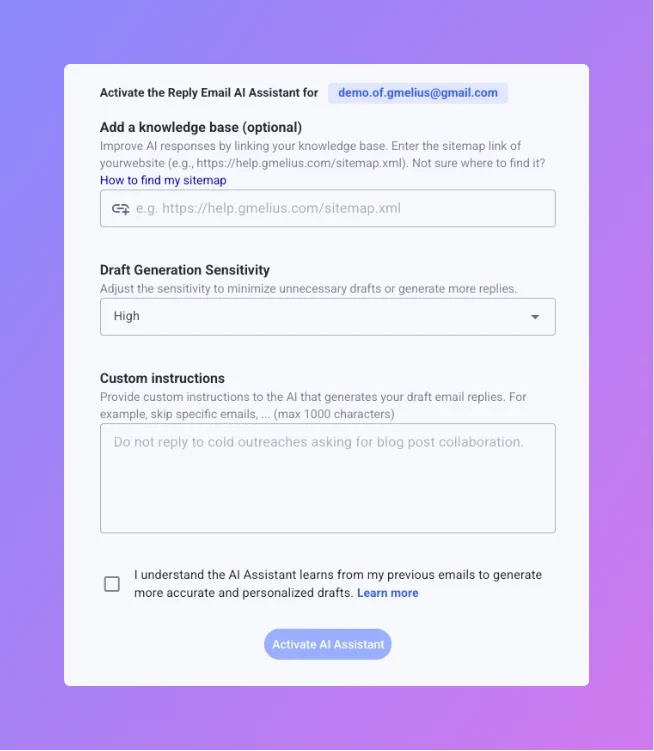
That is the whole knowledge layer, and the screenshot above is the honest version of it: one field, labelled "Add a knowledge base (optional)", which takes a sitemap URL. No help center connector. No Notion or Confluence, no Drive, no file upload, and no past-ticket source beyond your own mailbox. So if your real answers live in a knowledge base that is not a public website, the AI will not see them, which is the same gap that separates a website crawler from a proper knowledge base chatbot. Two years of your own sent mail is a decent proxy for tone. It is a poor proxy for whether the refund policy changed back in March, and training on past tickets is the capability I hear asked for more than any other.
The more consequential limit is this one: the AI writes drafts, it never sends. The rules engine does have a Send email action, but that fires a canned template rather than an AI-written reply. Every AI-drafted response still needs a person to open it and click send.

For a personal inbox that is exactly right, and it is the safer default besides. Drafting is where Gmail's own AI features sit too, alongside thread summaries and follow-up nudges, and there is a real argument that a human check on outbound support mail is worth the seconds it costs. The pricing consequence is direct, though. Because the volume of email a human has to open does not fall, the AI cannot pay for itself in headcount. It pays for itself in typing speed. Price the plan on that basis and the maths reads very differently than "AI support tool."
One more thing is missing from the setup flow, and it happens to be the one I would want most: there is no documented dry run. You cannot replay last month's mail through the assistant and see what it would have written before you switch it on for the whole team. You enable it, then you watch. Having spent the last three years putting AI on live support queues, I can tell you that is the step where confident-sounding answers get caught, which is why every eesel rollout starts with a simulation against historical tickets. It is the single most requested capability I hear on calls, by a distance.
Trial, discounts and the fine print
- The trial is 7 days, no card, and it lands you on Growth. "When you sign up, you instantly get access to our Growth plan for 7 days." After that you pick a plan and pay by card. Do not continue, and the account is suspended.
- To trial Pro you have to email sales. There is no self-serve Pro trial at all, which matters a lot if webhooks or the HubSpot and Salesforce integrations are the reason you are looking at Pro in the first place.
- There is no free plan. That 7-day trial is the only free access there is.
- The non-profit discount is real, and it scales. 30% off at 5 to 19 users, then 50% off at 20 or more, on Growth, Pro and Enterprise, with a minimum team size of 5. You apply by email with a 501(c)3 document. That is more generous than most of this category publishes.
- Cross-domain users are allowed, provided everyone has a Gmail or Workspace account. Pro and Enterprise can then segment those users into groups per client or department.
- Currencies are USD and EUR only. Any major card works, and annual subscriptions can be invoiced for bank transfer.
- Enterprise carries a 50-user minimum, and it is the only tier that comes with a HIPAA BAA, SCIM provisioning, an uptime SLA and a dedicated success manager.
That last line is worth sitting with if you work in a regulated vertical. SOC 2 Type II, GDPR and CCPA ship on every plan, Meli included, which is good. A BAA needs Enterprise, though, and Enterprise needs fifty seats. So a twelve-person clinic cannot buy compliance here at any price, which pushes it toward a helpdesk that sells it lower down the stack. Several of the 2026 helpdesk options do, as do a few of the helpdesk chatbots that bolt onto one.
What users actually say about the value
The public review base is large, and mostly positive: 4.4/5 from 776 reviews on G2, with 483 five-star and only 14 reviews sitting at one or two stars. Add 4.7/5 from 43 on Capterra and 105K+ installs on the Google Workspace Marketplace.
Read those numbers with two caveats attached. Most sampled reviews carry an incentivized or seller-invite badge, and the review flow has effectively stopped: the newest original G2 review body dates to September 2024, with the newest Capterra body back in July 2023. The distribution and the named complaint clusters tell you more than the average does.
On the complaint side, the dominant theme is not price at all. It is speed. Three of G2's five negative clusters are the same slowness issue.
"Gmelius can be extremely slow to load emails. Like, we're talking 10+ seconds to load an email within the Gmail app. That's quite unacceptable. I also don't like how the preview text on a board card shows the first email's text, and not the most recent email's reply. When you have to wait 10+ seconds to open an email, it wastes a lot of time."

That matters to a pricing post more than it might look. The whole value proposition of a Gmail overlay is that you never leave Gmail, so latency inside Gmail is not a rough edge. It is the pitch failing.
The explicit pricing complaints are real, but dated. Both come from November 2019, and both describe a price rise rather than today's card.
"The price. It used to be a lot less expensive. We have trouble affording even the non-profit rates for 2 seats."

The same reviewer went on to say they kept paying anyway, which is the two-sided version most vendors would love: sticky product, painful invoice.
The most useful negative in the whole set comes from a five-star reviewer. That is usually where the honest ones hide.
"It could be improved in a couple of areas. For example, the mobile app feels a little more constrained than the desktop version, which makes task management while on the road more difficult. Furthermore, there was a steep learning curve for a few elements at first, such as the automation and sequences, which took longer to set up and train the team."
"The automation took longer to set up and train the team" is a cost line, even though it never appears anywhere on the rate card. Budget for it.
Is Gmelius worth it? My verdict
Gmelius is good value inside a narrow, well-defined band, and I would recommend it there without hedging.
Buy Growth at $25 if: you are a Google Workspace team of roughly 3 to 15 people running one or two shared addresses, under about 8,000 threads a month, with a handful of automation rules rather than a dozen, and your people flatly refuse to leave Gmail. Habit is a real constraint, and Gmelius respects it better than almost anything else in the category. The collaboration layer is mature, the rules engine is legible, and the shared inbox fundamentals are solid.
Think harder about Pro at $40 if: the reason you are upgrading is volume rather than features. Read the comparison table honestly first. If webhooks, HubSpot, Salesforce, custom roles and CSV exports are things you will really use, Pro earns its money. Buy it purely for headroom, and you are paying a 60% seat premium for a bigger number.
At $40 a seat, the Zendesk and Zoho Desk rate cards are in the same conversation, with a great deal more helpdesk attached. That is also the point where a straight Zendesk vs Hiver read gets you further than yet another Gmail overlay comparison.
Look elsewhere if: you need the AI to actually close tickets rather than draft them, your knowledge lives somewhere other than a public website, you run on Outlook rather than Gmail, you need HIPAA below fifty seats, or your volume is seasonal enough that a cap with no published overage rate becomes a real budget risk.
Our Gmelius alternatives piece works through those cases one at a time. And if your team is really shopping for a ticketing system rather than a shared inbox, that distinction is the first thing to settle, with Help Scout's alternative set as the natural next stop.
The thing I would keep front of mind through any of it is this. Gmelius bills you for seats you hire and threads you receive, and an AI feature that only drafts gives you control over neither. That is a rate card which goes up when your business grows and never comes back down when your automation improves.
eesel for teams whose support has outgrown a Gmail overlay
If the calculator above pushed you onto Pro because of volume rather than features, that is the moment to price a different model.
eesel sells ready-to-work AI teammates rather than seats, and the one that matters here is the AI helpdesk teammate. It joins your existing queue. It trains on your past tickets and your real internal docs instead of a sitemap crawl, and it resolves front-line conversations end to end rather than leaving a draft for someone else to send. The billing follows from that: eesel's pricing is from $299 a month for 500 credits, where 1 credit covers one ticket or chat session however long it runs, with no per-seat fee and no platform fee. You pick a monthly batch sized to your volume, and if a busy November runs past it you can turn on overage with a monthly cap you set, at $0.80 per extra credit.

The other difference is the one I flagged earlier. Before anything goes live, you can replay your own historical tickets through the teammate and see what it would have answered, scored against what your team actually sent. That is the dry run Gmelius does not document, and it is the step that turns "we think the AI is ready" into a number you can put in front of your boss.
Straight answer on fit, because it matters here: eesel connects to Zendesk, Freshdesk, Gorgias, Front, Help Scout, HubSpot, Salesforce and Jira Service Management, not to a Gmail overlay. If your support really does live in Gmail and you have no plans to move it, Gmelius Growth is the better buy today, and I would say so on a call. If you were already weighing a real AI helpdesk because volume is the thing that keeps growing, you can start free with 100 credits and no card, and have a first teammate live in about thirty minutes.
Frequently Asked Questions
How much does Gmelius cost per user?
Does Gmelius have a free plan?
What happens if I go over the Gmelius conversation limit?
Is Gmelius pricing good value against Hiver or Front?
Which Gmelius plan do I need for automation rules?


Article by
Kira
Kira is a writer at eesel AI with a Computer Science background and over a year of hands-on experience evaluating AI-powered customer service tools. She focuses on breaking down how helpdesk platforms and AI agents actually work so that support teams can make better buying decisions.