Creatio pricing at a glance
One small thing before the numbers, because it says something: creatio.com/pricing returns a 404. The live rate card actually lives at creatio.com/products/pricing. For the most-searched page on the whole domain, that is a strange thing to leave broken.
I ship integrations and APIs at eesel all day, so my instinct on any pricing page is to stop reading the cards and start reading what the page ships to the browser. Creatio's turned out to be one of the more interesting ones I have opened. The visible cards carry most of the story. The pricing calculator bundle sitting behind them carries the rest, three priced line items included that the page never renders at all.
So here is the whole thing, meter by meter.
1. The platform plan (mandatory)
Nothing else on the page becomes selectable until you pick one of these, worth knowing if you came only to price AI ticket handling. All three carry the same subtitle, "Creatio Business & AI Studio." That answers a question people still ask: Studio Creatio is not a separate purchase, it is what the platform plan is.
| Plan | Price | Unit | Min seats | Bundled AI Actions (one-time, per user) | On-premise |
|---|---|---|---|---|---|
| Growth | $40 | user / month | 5 | 10 | No, cloud only |
| Enterprise | $75 | user / month | 5 | 20 | Yes |
| Unlimited | Custom | quote-only | quote-only | 30 | Yes |
The Unlimited plan bundles everything, and it is the only one that does: platform, all three CRM products, AI, with "no limits on users, custom agents, applications, workflows, custom objects, or API calls." It is also the only word on the card. No number anywhere.
One gating detail catches people out. The cheaper limited seat types further down this page are only available on Enterprise and Unlimited. On Growth, every user is a full-price user, no exceptions.
2. The CRM products
Sales, Marketing, and Service all cost the same, and each one stacks on top of a platform seat instead of replacing it.
| Product | Price | Unit | What it covers |
|---|---|---|---|
| Sales | $15 | user / month | End-to-end sales cycle |
| Marketing | $15 | user / month | Lead-to-revenue, plus a separate contact meter |
| Service | $15 | user / month | Cases, omnichannel, SLA, knowledge, field service |
Product seats are coupled to platform seats. When product seats exceed the platform count, the calculator quietly raises the platform count to match, so a product user is always a platform user too. Which gives you the number that actually matters for a support team:
- Growth + Service = $55 per user per month
- Enterprise + Service = $90 per user per month, or $1,080 a year
- All three products on Enterprise = $120 per user per month
3. AI credit packages
This is the layer that makes Creatio's pricing hard to forecast, and it gets a section of its own further down. The packs, at least, are published cleanly:
| Package | Bundled credits / year | Price | Cost per credit | Top-up per 500,000 credits |
|---|---|---|---|---|
| Start | 500,000 | $5,000 / yr | $0.0100 | $5,000 |
| Grow | 1,500,000 | $25,000 / yr | $0.0167 | $4,750 |
| Accelerate | 4,000,000 | $75,000 / yr | $0.0188 | $4,500 |
| Scale | 8,000,000 | $150,000 / yr | $0.0188 | $4,300 |
| Freedom | Custom | Custom | n/a | n/a |
4. Limited seat types (Enterprise and Unlimited only)
| Seat type | Price | What it cannot do |
|---|---|---|
| Limited internal user | $12 / user / month | One product section only, read-only knowledge base, no phone, email, or chat |
| Mobile-only user | $12 / user / month | Mobile app only, no web interface, no API for phone, email, chat, or no-code tools |
| External B2B portal user | $12 / user / month | No phone, email, or chat |
| External B2C portal user | Pack-based, see below | No analytics, no column or filter setup, no portal-user collaboration, no phone, email, or chat |
The B2C portal sells in annual packs, and unlike the AI packs this one has a real volume curve. $5,000 for 250 users at one end, $150,000 for unlimited at the other, which works out to $20 per user per year at the bottom and $0.50 once you are at 200,000.
| Portal users | 250 | 1,000 | 10,000 | 50,000 | 100,000 | 200,000 | Unlimited |
|---|---|---|---|---|---|---|---|
| Price / year | $5,000 | $10,000 | $20,000 | $50,000 | $75,000 | $100,000 | $150,000 |
5. Support, priced as a percentage
| Plan | Price |
|---|---|
| AI Support | Free |
| Business Support | 10% of subscription |
| Premium Support | 20% of subscription |
Note which tier is the free one. Human support is a 10% to 20% uplift on your entire subscription total, so on a $100,000 deployment Premium Support is a $20,000 line by itself. On the platform, AI handling support is the default and talking to a person is the add-on. Factor that in if your support SLAs depend on reaching a human fast.
6. Marketing contacts (only if you buy Marketing)
Marketing adds a second meter, one that is not per-seat and not on any card either. The calculator prices contacts as the minimum of three formulas, and that resolves into three tiers:
| Contact volume | Effective rate | Worked cost |
|---|---|---|
| Up to ~137,180 | $0.215 / contact / year | 10,000 contacts = $2,150 |
| ~137,180 to 2,230,000 | $26,750 + $0.02 / contact | 500,000 contacts = $36,750 |
| Above 2,230,000 | $60,200 + $0.005 / contact | 1,000,000 contacts = $46,750 |
Emails get metered on top of that: five per contact per month free, then $0.20 per 1,000 extra emails per year. The smallest contact count the calculator will accept is 1,000. None of it touches service, so a support-only buyer can skip the whole meter and stay on the service desk side.
Priced but never shown
Three line items sit in the page's pricing config without a card rendered for them, so they turn up in a quote and never in a self-serve estimate. There is a self-service portal user at $2 per user per year, marketplace apps at a default $8 per user per month (with Customer 360 at $0), and a governance line at $50. The separate plan comparison page puts a Governance Application add-on at $50 per user per month, which costs more than the entire Growth plan it sits on.
Work out your own number
The stacking is the hard part of Creatio pricing, so here is the arithmetic already done. If you would rather benchmark against a flat per-ticket model first, that comparison is further down the page. Change the seat count, pick an AI pack, pick a support tier, and watch the floor kick in.
The $10,000 floor makes the sticker price unbuyable
This is the first thing to understand about Creatio pricing, and it sits in a single sentence on the pricing page: "the minimum purchase for new customers is $10,000 per year", and "the standard contract term is 3 years".
Now run the advertised minimum against that. Five seats is the floor Creatio states for both paid plans:
- Growth, 5 seats: 5 × $40 × 12 = $2,400 a year. You pay $10,000.
- Enterprise, 5 seats: 5 × $75 × 12 = $4,500 a year. You pay $10,000.
- Enterprise plus all three products, 5 seats: 5 × $120 × 12 = $7,200 a year. You pay $10,000.
No configuration at the published minimum seat count reaches the published minimum spend. You only actually meet the floor at around 11 Enterprise seats or 21 Growth seats. For teams under that, our guide to scaling support with AI is the more realistic starting point. And below the floor, your real per-seat price is just $10,000 divided by headcount, which at five Growth seats means $167 per user per month, not $40.
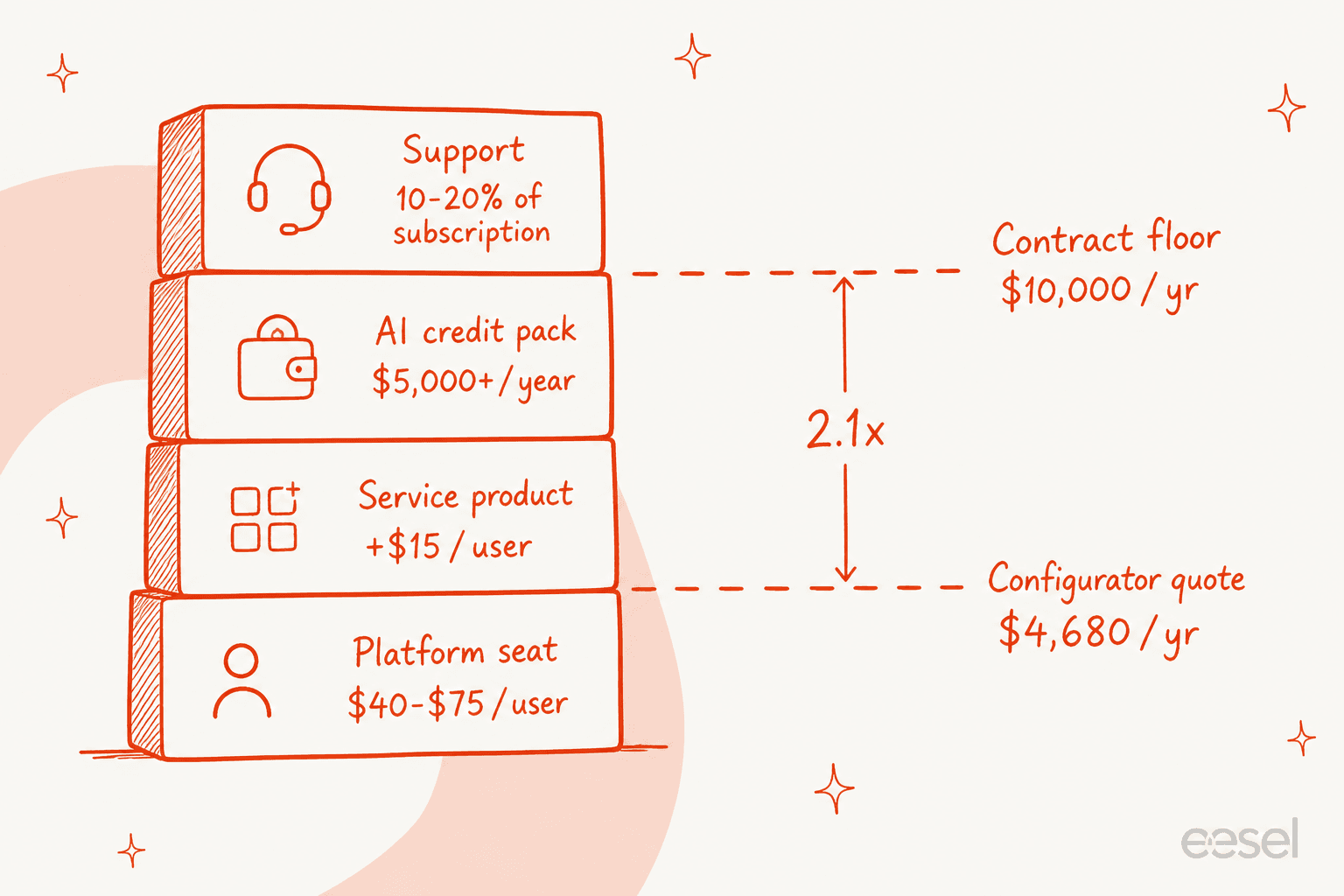
The three-year term is the other half of it. Creatio's own configurator quotes its default service configuration at $4,680 a year, the floor is $10,000, and the commitment is three of those. Whatever you sign, you are signing for something like $30,000 minimum before a single ticket moves.
None of that is unusual for enterprise software. But it is the kind of number that pushes teams into comparing AI against offshore support instead of against another platform. Worth naming what you can do about it, too. One move I have watched work came from a CFO at a large SaaS buyer, who treated it as ordinary vendor practice rather than a special ask: demand two months of reduced pricing through the implementation ramp, on the grounds that you are getting no value while you are still configuring. Blunt framing, and correct, and it applies to any tech vendor. On a three-year term with unpublished implementation costs, that is probably the most useful sentence in this whole article.
The AI meter: a price with no unit
Here is where a pricing post has to be careful, because what Creatio has done is both better and worse than what its peers do.
Better: it publishes real numbers. Pega publishes no price at all. Appian publishes tiers with no dollar figure, then caps AI Actions at 200,000 to 1,000,000 per month without ever giving a rate per action. Salesforce sells Flex Credits and never publishes what one credit costs. Against that field, a public table saying 500,000 credits costs $5,000 is a real act of transparency, and Creatio deserves credit for it.
Worse: the unit is undefined. Creatio's pricing page calls an AI Credit "a single, universal unit for all AI consumption across every model, modality, and provider." Then a site:academy.creatio.com "AI Credits" search comes back with zero results. The documentation site never once uses the word "credit" for AI billing. What the docs do discuss is a different unit, AI Actions, and nothing on either property maps one onto the other.
The AI Actions definition is the useful one here, and it comes from Creatio's own FAQ:
"AI Action in Creatio.ai is one completed interaction of an AI Agent with the large language model (LLM), similar to an API call. It includes prompt preparation, LLM call, receiving a response, and returning the result into workflow. [...] If an AI Agent executes multiple LLM calls during a task, for example, retrieve CRM data, summarize, and generate a final response, each LLM call counts as a separate AI Action."
So a single visible answer can be many billable actions. On the company's own forum, a Creatio staff member spelled out exactly how many:
"If you ask Creatio AI to create a draft of an email, Creatio AI performs several steps: 1. Search for available skills. 2. Read the skill prompt and available actions. 3. Read data from the page. 4. Check system settings to confirm that the message can be sent. 5. Generate a draft message and display it in the chat (the only step visible to the user). 6. Perform additional actions, such as opening a card, etc. Steps 1-4 are not visible in the user interface, but they also consume tokens."
The customer who started that thread had already measured it:
"During testing, we have found a very high average token consumption (between 20,000 and 50,000) and am concerned about how much each interaction 'costs' in tokens and that will limit our usage."
A second person in that same thread put their whole rollout on hold over it: "found massive usage tokens consumption for little use. Unless OpenAI and Azure AI Integration price lowers, for now, use of AI is on hold, until we can plug to other LLMs" (Damien Collot, Creatio Community).
I recognise that conversation. I once watched a buyer hit 200 interactions in a single test day, then immediately ask what that meant at 9,000 interactions a month. Right question. A credit-denominated rate card cannot answer it. And it is why Creatio's own best-practices doc ships a section titled "Reduce the amount of AI actions spent," which advises merging data reads, deactivating unused agents, and coaching users to keep conversations short, since long ones "increase context size and AI action usage very quickly." A vendor telling developers to economise on a unit whose price they cannot calculate is the whole problem in one page.
The bundled allowance is a demo, not a working budget
The Creatio.ai page says "all AI features are included in the base software license, with no hidden fees." That is true, of the features. The consumption bundle it points at is a one-time grant of 10 AI Actions per user on Growth, 20 on Enterprise, 30 on Unlimited.
One-time, for the whole life of the license. Set that against the FAQ's own warning that one chat request can take more than one action, and a Growth seat's bundled AI is about enough for a single honest test.
The volume curve runs backwards
The last oddity is the shape of the pack ladder itself. Normally you buy more, the unit gets cheaper. Here the bundled per-credit price rises as the packs get bigger:
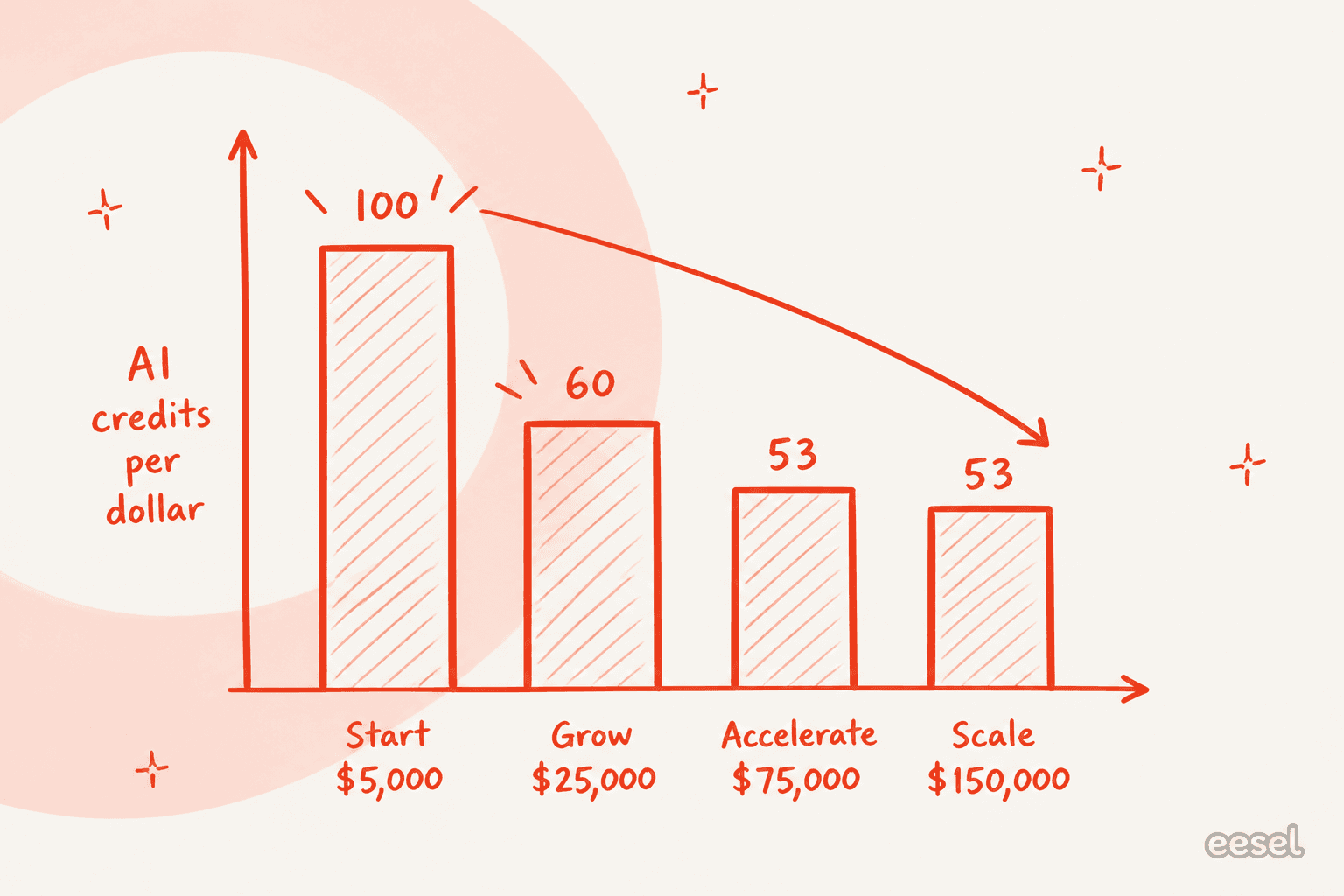
At Start, 100 credits per dollar. At Scale, 53. Which is an 87.5% increase in unit price between the smallest published pack and the largest one.
The top-up rate meanwhile moves the other way, $5,000 per 500,000 credits on Start down to $4,300 on Scale. So the two curves cross, and on the published numbers the arithmetic gets awkward:
| Credits you need | Buy the matching pack | Buy Start plus 500K top-ups | Difference |
|---|---|---|---|
| 1,500,000 | Grow, $25,000 | $5,000 + 2 × $5,000 = $15,000 | $10,000 cheaper |
| 4,000,000 | Accelerate, $75,000 | $5,000 + 7 × $5,000 = $40,000 | $35,000 cheaper |
| 8,000,000 | Scale, $150,000 | $5,000 + 15 × $5,000 = $80,000 | $70,000 cheaper |
I would not call that a loophole. The page publishes no cap on top-up volume and no rule against it, which in my experience usually means an unwritten one exists somewhere. Treat it instead as the sharpest question you can put to a Creatio rep: what is the real ceiling on Start top-ups, and why would anyone buy Scale?
One more gap worth knowing about. The "Additional AI Credits" row renders as $0 per year on every pack card, which reads like a free allowance but is really just an empty quantity field. No documented overage rate exists at all. Creatio's guidance is to go and negotiate a move to a bigger package with customer success.
The $12 seat cannot work a ticket
Creatio's cheaper seat classes look like the obvious lever for holding cost down on a big support org. Read the exclusions before you budget around them.
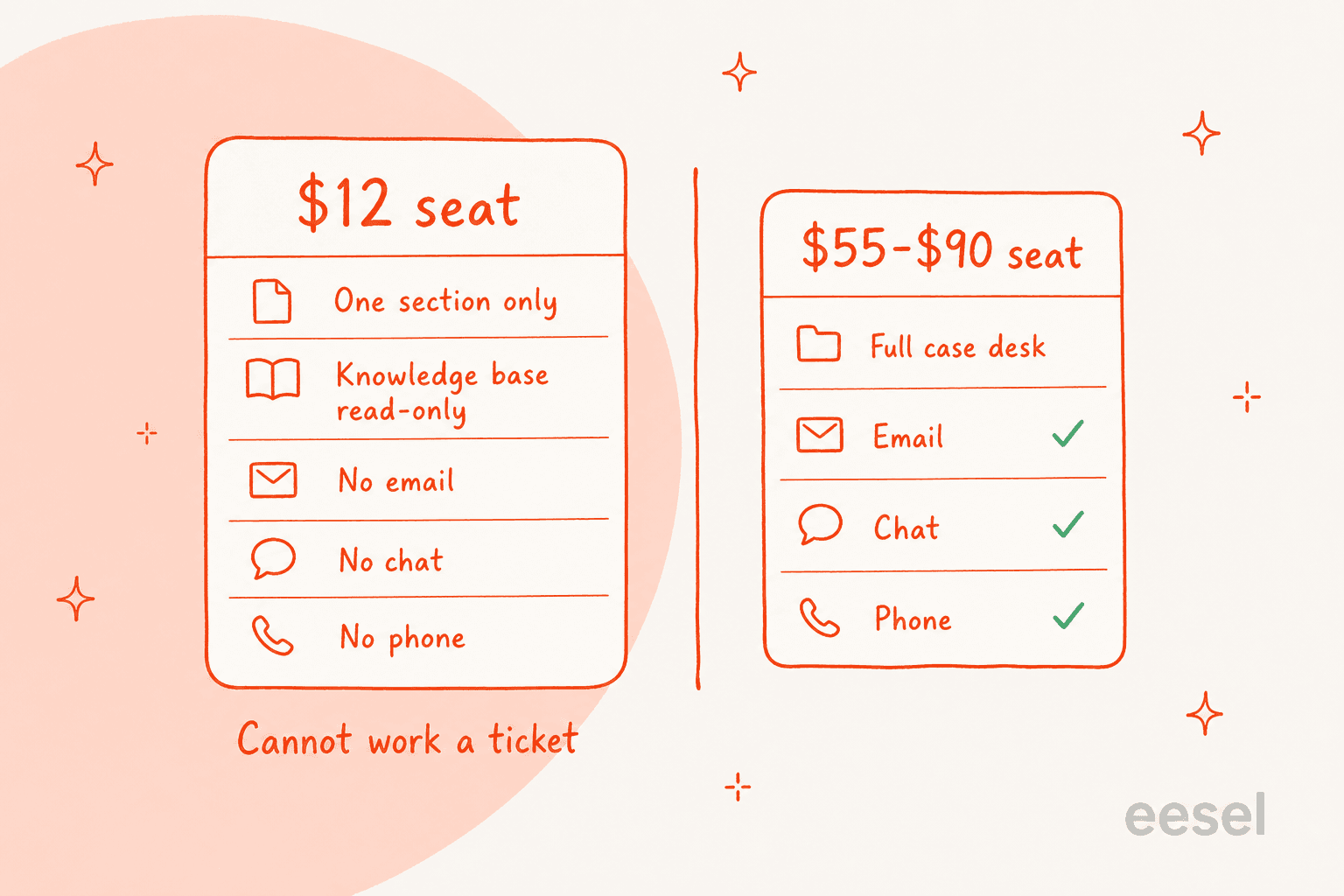
All three $12 seat types exclude phone, email, and chat. Limited internal users get one product section on top of that, plus read-only access to the knowledge base. Mobile-only users get no web interface at all. External B2B portal users get sections, but no channels.
So the cheap seat is a viewer, not an agent. Anybody who actually replies to a customer needs a full platform seat plus the Service product, which is $55 on Growth or $90 on Enterprise, per person, per month, before a single AI credit. The $12 tier suits the finance analyst who opens case data once a week. It does nothing for the person sitting on the queue. If seat maths is what drives your evaluation, run the agent cost comparison first.
The B2C portal has its own missing pieces. Portal users get no analytics, no column or filter configuration, and they cannot see each other's records, which makes it a data-access surface and not a community. Worth knowing if self-service deflection is part of your business case.
On channels, the marketing copy says "voice, chat, and digital channels." The setup guide is more specific about what is native: Facebook Messenger, Telegram, WhatsApp, and the Ada AI chatbot, with SMS and MMS arriving as a separate integration. Instagram, Apple Messages, Slack, and Teams do not appear on that list. Everything else routes through the Creatio Marketplace, where app prices are not published.
The queue mechanics underneath are well documented and sensible, for what that is worth. Two routing rules, either to all agents or to whoever has the fewest chats in progress. A five-minute accept timeout, after which the chat reassigns and the agent flips to inactive. Then a configurable concurrency cap, and a completion timeout that auto-closes idle chats. If you have done ticket triage in a dedicated helpdesk it will feel familiar enough, though the handoff rules are yours to build rather than configure.
On Growth, hitting a limit costs you a tier
The plan comparison page carries a set of hard caps that apply to Growth only. The interesting part is what happens when you hit one of them.
| Limit | Growth | Enterprise | Add-on available? |
|---|---|---|---|
| Database storage | 1 GB / user | 2 GB / user | Yes, price unpublished |
| Business process elements | 50,000 / month / environment | Uncapped | No |
| OData REST API calls | 10,000 / license / day | Uncapped | No |
| Webhook and custom web service calls | 10,000 / license / day | Uncapped | No |
| Functional and organizational roles | 50 | Uncapped | No |
| Environments | 2 | 3 | n/a |
| On-premise deployment | Not available | Available | n/a |
Creatio's own wording on the process-element cap is direct: "The service has no add-ons. If you want to use more elements, upgrade your subscription plan."
That is a forced tier upgrade, not an overage charge. A 20-person team on Growth that trips the 50,000-element ceiling does not pay for the extra elements. It moves every seat from $40 to $75, an 88% jump across the whole seat line to fix one meter. For a no-code automation platform whose entire pitch is that business users build lots of processes, a monthly element cap is a strange place to put the cliff. A no-code support agent billed per ticket has no equivalent ceiling to trip.
Three prices for the same license
This is the finding I did not expect. It came out of checking whether Creatio publishes real rates on the official marketplaces, the way most quote-gated vendors quietly do.
The AWS Marketplace listing for Studio Creatio locks its prices into contract dimensions, billed annually per user across 12, 24, or 36-month terms:
| AWS dimension | Cost / 12 months | Per month |
|---|---|---|
| Creatio Studio Growth user license | $300 | $25 |
| Creatio Studio Enterprise user license | $660 | $55 |
| Creatio Studio Enterprise User License | $900 | $75 |
| Creatio Studio Unlimited user license | $1,020 | $85 |
| Product Sales / Marketing / Service | $180 each | $15 each |
Two things there. First, $25, $55, and $85 are the previous rate card, the same three numbers G2 records as Creatio's legacy tiers. Direct rates today are $40 and $75, so the marketplace listing is carrying old prices at a 33% to 36% discount. Second, that same table holds both the old $660 Enterprise dimension and a new $900 one, sitting side by side, so the before and after of a single license is readable in one screen.
And it is not only AWS. Creatio's own Sales Enterprise editions comparison page still runs its arithmetic on the old card: "'Enterprise' platform plan: $55 per user/month, 'Sales' product: $15 per user/month … ($55 + $15) × 12 months = $840 per user/year." The current pricing page makes that same bundle $1,080.
| Source | Enterprise + one product, per user / year |
|---|---|
| creatio.com/products/pricing | $1,080 |
| creatio.com competitor comparison | $840 |
| AWS Marketplace | $840 |
Three Creatio-controlled or official surfaces, two answers, as of 25 August 2026. The comparison page matters twice over, since it benchmarks Creatio's $840 against three rivals at $1,260, $1,800, and $2,100 per user per year. At the real $1,080 that gap is a lot narrower than the page argues. If you are buying, price it through AWS and then ask why the numbers differ.
One useful wrinkle from the Sales Creatio listing: the dedicated VPC license runs about 17% cheaper than shared public cloud on every edition, because you absorb the AWS infrastructure bill separately. Also worth knowing, all Creatio seats are named-user with no concurrent option, and cloud and on-site licenses are not interchangeable.
Outside the US, Creatio publishes country-mapped cards instead of currency conversions, and the floor moves along with them: £32 / £61 per seat with a £8,300 minimum in the UK, AU$64 / AU$120 with an AU$16,000 minimum, ¥7,200 / ¥13,500 with a ¥1,800,000 minimum.
What a 25-seat support team actually pays
Published figures only, on Enterprise plus Service, bought direct:
| Line | Cost / year |
|---|---|
| 25 full seats × ($75 + $15) × 12 | $27,000 |
| AI Credits, Start package (the smallest published) | $5,000 |
| Business Support at 10% | $3,200 |
| Year one total | $35,200 |
| Committed across the standard 3-year term | ~$105,600 |
Then there is the list of things that estimate cannot include, because Creatio publishes no rates for them: implementation and onboarding, storage add-ons, marketplace apps, a dedicated cloud instance, a custom domain, and the Governance Application at $50 per user per month, which on its own would add $15,000 a year at this size. More than half the seat cost again.
So that is roughly $117 per agent per month before implementation, for 25 agents, on a three-year commitment. Whether it is good value comes down to a question with nothing to do with price at all: are you buying a service desk, or a platform? The help desk versus service desk distinction is the cleanest way to settle that.
If you need one system where sales, marketing, service, and a handful of custom internal apps all share a data model, and you have someone who will own the no-code layer, then this is a coherent number, and the analyst record backs it up.
Creatio was named the only Visionary in the 2026 Gartner Magic Quadrant for CRM Sales Platforms, and the only Leader in the 2024 Forrester Wave for low-code citizen developers. The company says quarterly bookings reached 255% of prior-year results. Howdens deployed to 7,000 users across 800 depots in 12 weeks, and that is a real number for an enterprise rollout.
But if all you need is AI on a support queue, you are paying platform prices for a slice of the platform, plus a credit meter you cannot forecast, on a term you cannot exit early. AI customer service software layered onto the helpdesk you already run gets the same outcome without the platform decision attached.
The biggest line item is the one nobody publishes
Every number in this article so far is a licence number. Not one Creatio property publishes an implementation figure, and the AWS Marketplace professional services listing is private-offer only. So I went looking for what buyers actually spent, and the answer is consistent enough to be worth planning around.
The recurring theme is that no-code does not mean no developers.
"Creatio will try and sell you on its nocode functionality, but in reality there's a lot of code involved. To get it to do anything decent, you'll need to learn about web hooks, coding HTML and JavaScript to get data in the thing from your website landing pages. You'll need to know C# to do mostly anything interesting with the process builder, and JavaScript to get anything beyond mega basic functionality from freedom UI."

That is a critic. Here is a satisfied Capterra reviewer confirming the same underlying fact, without framing it as a complaint: "The framework was build in .NET, so certain customizations and scripts are build either in c# (server side code) or javascript (client side code)" (Rommel B., Capterra). Two people who disagree about the product agreeing on the technical requirement is about as solid as community sourcing gets.
Then there is who you hire to do that work.
"Creatio looks good on paper but the partner ecosystem is thin and finding people who know it well is rough."
A thin partner bench prices the consultants, and consultants on a three-year platform build are not a rounding error against a $35,200 licence line. Budget for it explicitly. It is the single largest unpublished number in a Creatio quote.
Timelines, at least, look reasonable when it goes well. One Capterra reviewer reported "the first phase completed in 2 months only and the second deployment finished in 3 months" (Vladlen M., Capterra), and Howdens reached 7,000 users in 12 weeks.
The three-year term, read two ways
The most interesting thing I found is that the same contract fact is a selling point to one buyer and a dealbreaker to another.
A Salesforce implementer, unprompted, in a Salesforce migration thread:
"I implement salesforce for a living, but you should look at Creatio. They are 1/3 of salesforce and have an unlimited model So it's one number all in for 3 years."
And a low-code buyer, comparing the same platform against Zoho One:
"Would try zudy.com. Best integration and low cost. Creatio requires a 3 year commit, Zoho makes you buy modules plus users."
Same commitment, opposite verdict. The split is not really about Creatio. It is about whether you want predictability or optionality. If you know your headcount and process footprint for three years, one locked number is a genuine advantage and the implementer above is right. If you are still figuring out what your support workflow should look like, three years is a long time to be sure.
Creatio pricing vs the alternatives
The useful comparison here is not feature-by-feature. It is what unit each vendor bills the AI in, because that is the line that varies by an order of magnitude, and the one that surprises people at renewal.
| Platform | Entry price | Top published tier | How the AI is billed | Min seats | Price public? |
|---|---|---|---|---|---|
| Creatio | $40 / user / mo | $75 + $15 per product | Annual credit packs, $5,000 to $150,000; credit-to-work rate unpublished | 5, plus $10,000 / yr floor | Partly |
| Zoho CRM | Free, 3 users | $40 / user / mo Enterprise | Bundled into the tier, no separate meter | None | Yes |
| Zendesk | $19 / agent / mo | $115 Suite Professional | $1.50 per automated resolution committed, $2.00 pay-as-you-go | None | Yes |
| HubSpot Service Hub | Free, 2 users | $150 / seat / mo Enterprise | Credits at $9 per 1,000; Customer Agent is 50 credits per resolved conversation, so $0.45 | None | Yes |
| Salesforce Service Cloud | $25 / user / mo | $550 Agentforce 1 Service | Flex Credits, 2.5M per org per year bundled at top tier; unit price unpublished | None | Partly |
| Pega | Not published | Not published | Not published | None stated | No |
| Appian | Not published | Not published | AI Actions capped 200K to 1M / month, no rate per action | None stated | No |
| eesel | From $299/mo (500 credits) | $1,899/mo for 5,000 credits, more on request | 1 credit = 1 ticket or chat | None | Yes |
A few things fall out of that table. Zendesk's AI pricing and HubSpot's are the only two where you multiply ticket volume by a published number and land on your bill. Creatio, Salesforce, and Appian each sell a credit or action unit whose conversion into work is not public anywhere. Pega publishes nothing at all, which at least has the virtue of being obvious about it. For the fuller picture, our AI customer service cost guide works through the units side by side.
There is a second axis worth noting, because it is where per-outcome pricing bites. A model billed per resolution charges you more when the AI gets better, and more again when your volume spikes. I ran that arithmetic for a customer once. At roughly 1,000 tickets a month with an 80% resolution rate, per-resolution pricing came to about $792 a month; a Black Friday month at 4,000 tickets came to $3,168. A flat per-ticket rate keeps November identical to March. Creatio's credit packs are prepaid annually, so they are a third shape again: you commit the spend up front and carry the forecasting risk yourself, which is the worst of both when you cannot size the unit.
I have run the same teardown on ServiceNow's AI cost, if that platform is on your shortlist too. And Salesforce buyers should read the Agentforce numbers before they start comparing tiers.
Still deciding? The best AI support tools roundup is the faster read, and the Aisera breakdown covers the nearest agentic-platform comparison.
What buyers actually rate it
Worth saying plainly, since a pricing teardown can leave a lopsided impression: people who buy Creatio mostly like it. It scores 4.6 out of 5 across 359 reviews on G2, and 4.7 out of 5 across 150 reviews on Capterra, where 121 of the 150 are five stars.
| Capterra dimension | Score |
|---|---|
| Overall | 4.7 |
| Customer Service | 4.7 |
| Ease of Use | 4.6 |
| Features | 4.6 |
| Value for Money | 4.6 |
A 4.6 on value for money is a real signal. It argues the sticker shock in this article lands softer once teams are live and using the no-code layer for things they would otherwise have bought separately.
The counterweight, taken from the most recent low-scoring review at the time of writing, is about operational reliability and not price:
"Horrible telephony reliability (Velvetel) and terrible support SLA. Media server errors caused a 4+ hour total outage for our telemarketing team. Support provided no ETA, no workaround, and only sent useless boilerplate replies."

One review is one review, and it sits against 121 five-star ones. Still worth reading next to the support pricing above, because that reviewer's escalation experience is exactly what the free "AI Support" tier does not cover. If phone is load-bearing for your team, price in Business or Premium support from day one instead of discovering the difference mid-outage.
Try eesel for the support half
Most people searching Creatio pricing are not out to replace a CRM. They want AI answering tickets, and Creatio came up because it says it does that too.
If that is you, the honest framing is this: Creatio is a platform decision, AI support is a layer decision, and the two do not have to be the same purchase. eesel sits on top of whichever helpdesk you already run, Zendesk, Freshdesk, Gorgias, Front, Help Scout, HubSpot, Salesforce, or Jira Service Management, learns from your past tickets and your help center, then starts drafting or resolving. It reads like an AI teammate more than a chatbot, which is the distinction the AI agents versus chatbots piece unpacks. First agent live inside 30 minutes. No platform migration, no three-year term.
Pricing is the part that matters for this post. One fixed monthly price, from $299 for 500 credits, $499 for 1,000, $999 for 2,500 and $1,899 for 5,000, where 1 credit is one ticket or chat, whatever the outcome. No seats, so that analyst who only reads case data costs nothing. No platform fee either. If you run out, you can turn on overage with a monthly cap you set yourself, at $0.80 per extra credit. Pay a year upfront and you get two months free. The free plan is 100 credits, no card.
And the thing I would point at, given everything above: you can see exactly what you spent it on.

Every ticket and chat is a line item you can click into. Task volume, trigger events and approval usage all report per agent, which is the difference between a bill you can audit and a credit balance you just watch fall. Those same reports carry the support metrics you would otherwise be building by hand, and they feed quality review on what the agent actually sent.

One more thing worth doing before you commit budget anywhere, us included. Ask any AI support vendor to run against your own historical tickets and show you what it would have said, scored against what your team actually sent. We build that in as a simulation because we have watched confident-sounding bots give wrong answers on live queues, and a dry run over real tickets is the only thing that catches that in advance. If a vendor cannot do it, you are buying on a demo.
Try eesel free, or see the pricing in full.
Frequently Asked Questions
How much does Creatio cost per user?
What is Creatio's minimum contract?
Is Creatio's AI included in the license or priced separately?
What is Creatio's pricing for small teams?
Can you buy Creatio cheaper than the list price?
What happens if you run out of Creatio AI credits?
Does Creatio have a free plan?
Is Creatio worth it for a customer service team?


Article by
Rama Adi
Rama is a software engineer at eesel AI with two years of experience writing about B2B SaaS, AI tools, and customer support technology. Based in Bali, Indonesia, he brings a developer's perspective to product comparisons — cutting through marketing copy to what the integrations and APIs actually do.