What "AI for HubSpot Service Hub" actually means
There are two very different things people mean when they search for AI for HubSpot Service Hub, and getting them mixed up is how teams end up with a tool they regret.
The first is HubSpot's native AI, branded Breeze. This lives inside HubSpot, shares the Smart CRM record, and needs nothing extra to connect. The second is a third-party AI layer: a separate product that connects to Service Hub through its API and works on top of your existing inbox. Native AI is the least friction to switch on; a third-party layer almost always gives you more control, better automation, and friendlier pricing.
The reason the second category exists at all is that HubSpot's own AI carries three real limits. It only answers from content you've hosted in HubSpot (knowledge base, pages, files, public URLs). It's locked to Professional and Enterprise tiers. And it runs on a usage-based credit system that, going by the threads we read, surprises people on the bill. So the honest framing for this post is: start with what Breeze does well, then decide whether a layer on top earns its place.
How we picked
We weighted four things: does it genuinely connect to HubSpot Service Hub (not just "HubSpot" the CRM), how much of the work it can actually take off your team's plate, how predictable the pricing is, and what real users say once they're past the demo. We pulled pricing from each vendor's own pages and sentiment from Reddit and G2 rather than aggregator listicles. Where a tool is enterprise-only or quote-only, we say so plainly instead of pretending we have a number we don't.
Here's the shortlist before we get into each one.
| Tool | Best for | How it connects to HubSpot | Pricing model | Entry price | Free option |
|---|---|---|---|---|---|
| eesel AI | A third-party AI layer on top of Service Hub | Native HubSpot integration + 100+ others | Flat per-resolution, no seats | $0.40 / resolution | $50 free credit |
| HubSpot Breeze | Teams all-in on HubSpot | Native (built in) | Per-resolution credits + paid seat | ~$0.50 / resolution | 28-day agent trial |
| Tidio (Lyro) | SMB and ecommerce | HubSpot app integration | Per Lyro conversation | ~$0.50 / conversation | Free + 7-day trial |
| Forethought | Mid-market and enterprise on an existing stack | API + ticketing connector | Platform fee + outcome-based | Quote only | No (proof-of-value) |
| Ada | Very high-volume enterprise CX | HubSpot app via API key | Volume-based, annual | Quote only | No |
| Aisera | Cross-functional enterprise (IT + CX) | Integration hub via API | Annual enterprise contract | Quote only | No |
| Zapier | Automating around HubSpot | 9,000+ app connectors incl. HubSpot | Per task + add-ons | $19.99 / month | Free 100 tasks |
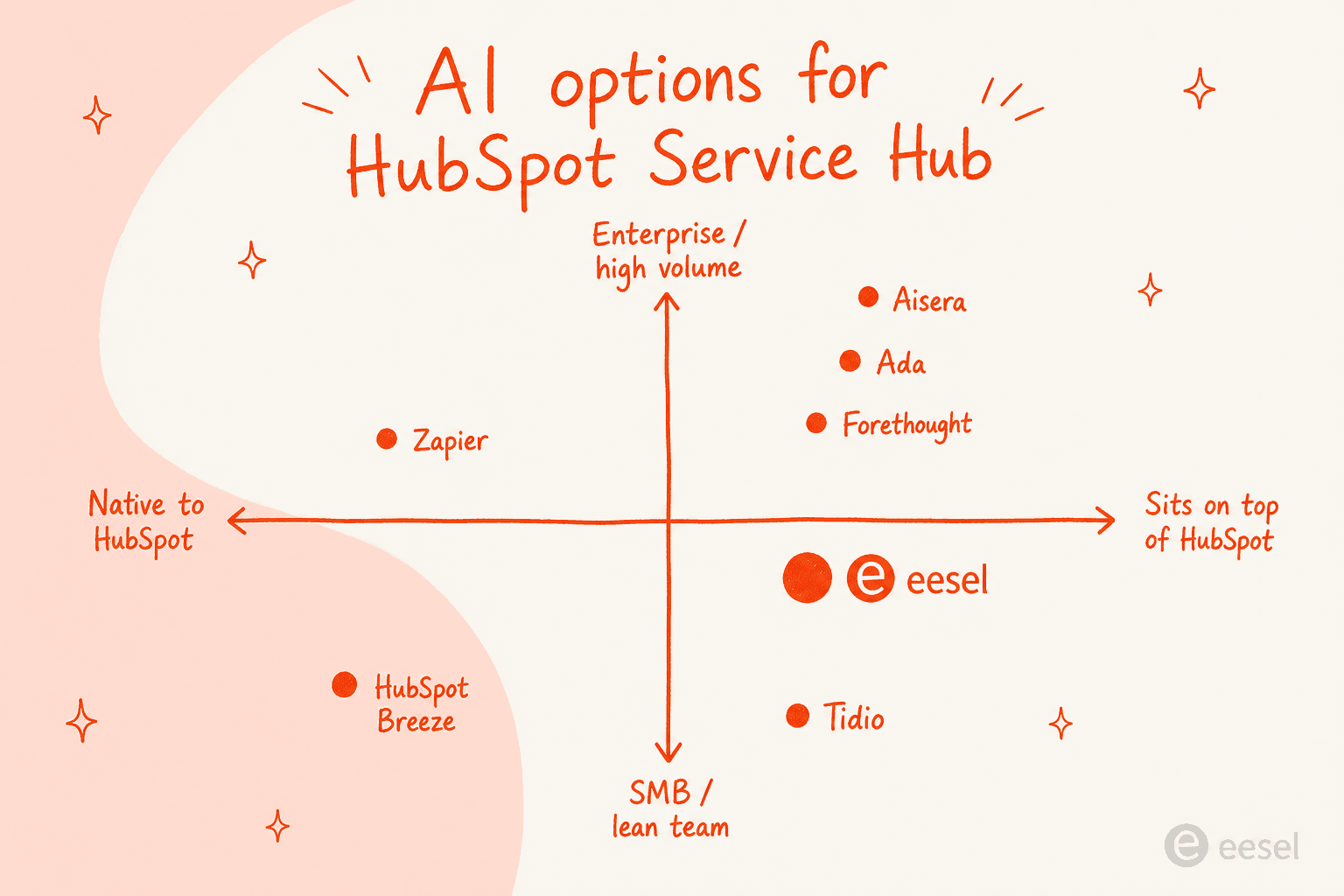
A quick orientation before the deep dives. Roughly, the more you want to stay native and the smaller your team, the more Breeze or Tidio make sense; the more you want a serious AI layer on top of HubSpot at any size, the more eesel, Forethought, Ada, or Aisera come into play.
1. eesel AI - the best third-party AI layer for HubSpot Service Hub
Best for: teams that want real automation on top of HubSpot without switching helpdesks or paying per seat.
We'll be upfront: eesel AI is our product. We're putting it first because for the specific job this post is about, layering AI onto Service Hub, it's the option we'd reach for, and we'll show our working so you can disagree.
eesel is an AI teammate that lives inside the tools you already use. It connects to HubSpot through a native integration (it's listed in HubSpot's own app marketplace), and unlike Breeze it isn't limited to HubSpot-hosted content. It trains on your past tickets, your macros, your help center, and connected sources like Google Docs, Confluence, or Slack, so it has a fuller picture of how your team actually answers things. The pitch is closer to onboarding a new hire than configuring a bot: you brief it in plain language and it gets to work.
Standout features
- A helpdesk AI agent that drafts replies, resolves tickets end-to-end, and escalates the edge cases, working inside HubSpot rather than in a separate console.
- Training on years of historical tickets and existing docs, so it answers in your voice from day one, not just from whatever you've published in your knowledge base.
- A simulation mode that replays the AI against your past tickets before it goes live, so you can see the likely resolution rate and exactly what it would have said, instead of guessing.
- Granular control over which topics it handles and which it hands to a human, so you can start with a slice of volume and scale as trust builds.
Pricing. Flat usage-based: $0.40 per resolution (a ticket or chat counts as one task, regardless of how many back-and-forth messages it takes), with no per-seat fees and no platform fee on self-serve. You start free with $50 of usage and a $250 default monthly cap you can adjust, and agents pause at the cap so there are no surprise invoices. Full numbers are on the pricing page.
Our take: if you're staying on HubSpot but want the AI to do more than answer from your published articles, this is the layer we'd pick, and the flat, capped pricing is the antidote to the credit anxiety that comes up again and again with the native option below. It's not the right call if you want everything in one vendor and are happy with HubSpot's content-only answers, in which case Breeze is the simpler buy. For a head-to-head, we wrote up eesel AI vs HubSpot Breeze separately.
2. HubSpot Breeze - the native option
Best for: teams that are already all-in on HubSpot and want zero extra integration work.
Breeze is HubSpot's built-in AI layer, and for Service Hub it splits into two pieces worth separating. There's the Customer Agent, the autonomous chatbot that resolves tickets, and Breeze Assistant / Copilot, the in-app helper for your human reps. Because it's native, it shares the Smart CRM record and needs nothing to connect, which is its single biggest advantage.
Breeze Customer Agent
The Customer Agent handles inbound conversations across chat, email, voice, and social. On each conversation it decides, based on confidence, whether to answer with a cited source, ask a clarifying question, or hand off to a human. It can also take configured actions like resetting a password or booking a meeting, and it draws on your HubSpot knowledge base, pages, files, public URLs, and CRM context.
HubSpot's own numbers are strong: in its April 2026 announcement it said the Customer Agent "already resolves 65% of conversations and cuts resolution time by 39%, across more than 8,000 customers." Customer stories on the product page back that up, with Sticos reporting it handles 91% of initiated chats at a 75% resolution rate. Worth remembering these are vendor-published figures, not independent benchmarks.
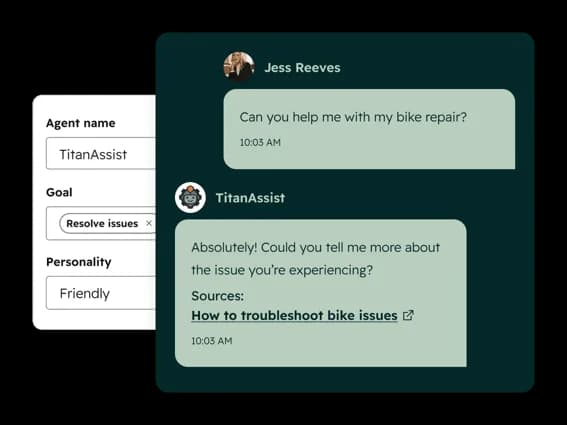
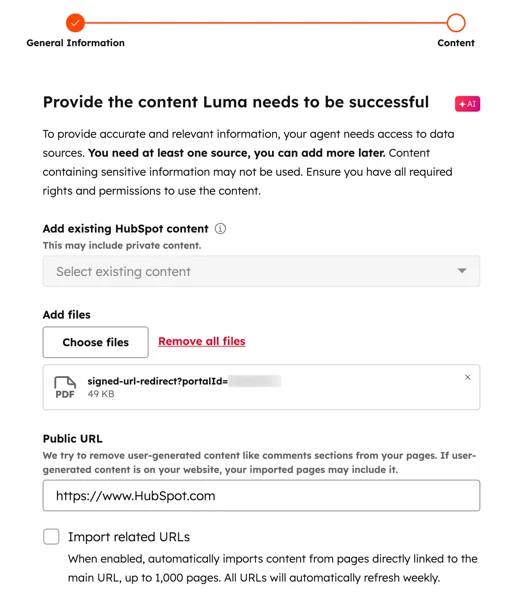
Setup runs under Service > Customer Agent: you name it, pick a personality, point it at content sources, set actions and handoff rules, then test before deploying.
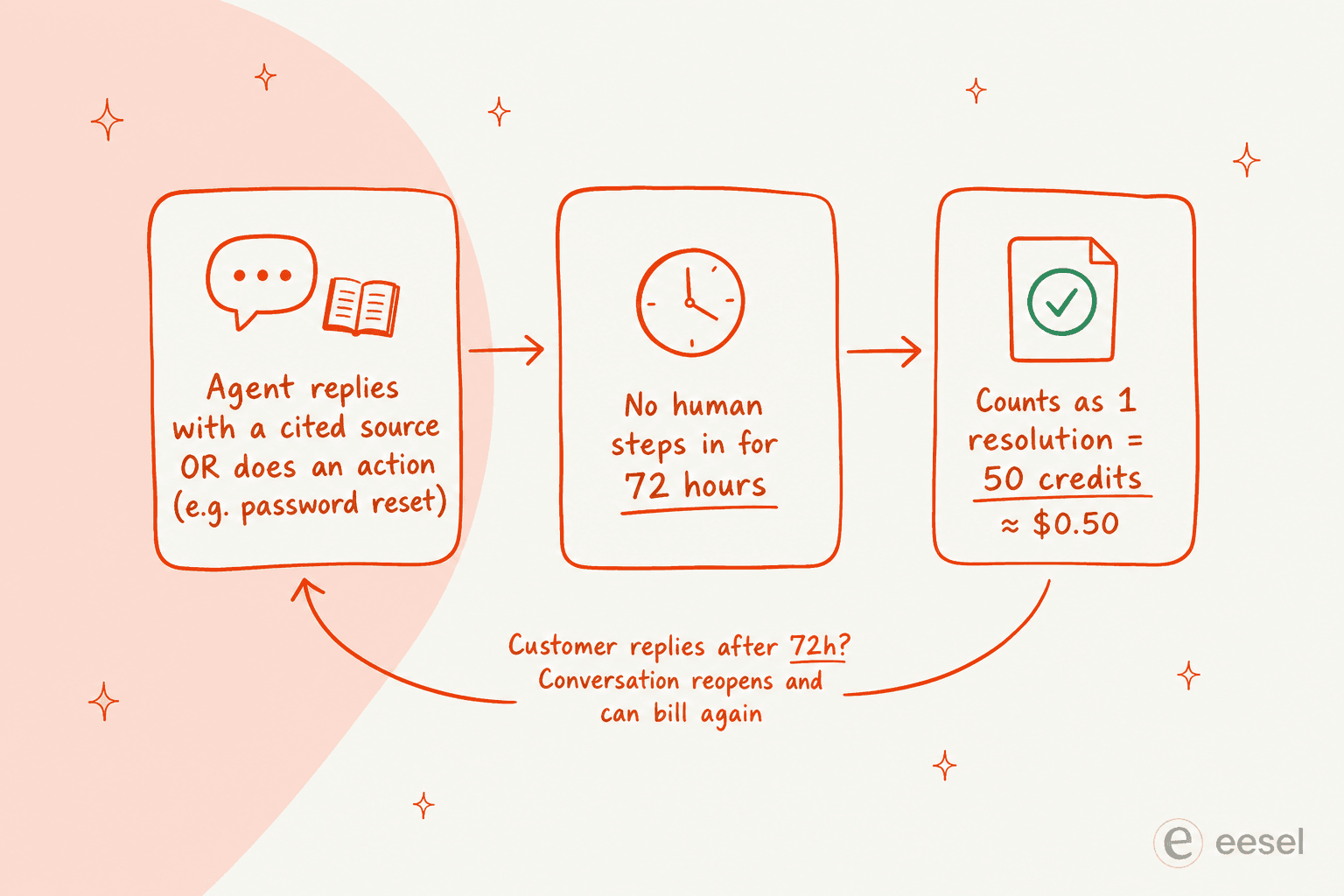
The catch is the billing, and it's worth understanding before you switch it on. Since April 2026 the Customer Agent uses outcome-based pricing: about $0.50 per resolved conversation (50 HubSpot Credits). But "resolved" has a specific definition. A conversation counts as a resolution when the agent posts at least one reply that cites a source or performs an action, and no human steps in within 72 hours. If a customer replies after that 72-hour window, the conversation reopens and the clock resets, which can produce more than one billable resolution on the same thread.
That model, plus HubSpot's credit system in general, is where the sentiment turns. One user summed up the frustration on the r/hubspot AI-credit thread:
"Their credit-based pricing model is completely broken and not customer-friendly. We just activated the Data Agent and immediately received the following email with an invoice: 'Upgrades are applied for the rest of your subscription, and you can only downgrade at renewal on 28 February 2028.' Once you upgrade, there is no easy way to downgrade… it almost feels like a scam."
u/lina6600, r/hubspot, "Anyone else burned by crazy AI-credit usage?"

Breeze Assistant and the Knowledge Base Agent
For your human team, Breeze Assistant (the HubSpot Copilot) is the genuinely-liked piece. It summarizes ticket threads, drafts replies, and answers questions about your CRM data with citations, and it's included on every edition, free tiers included.
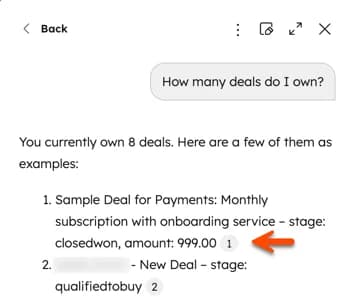
A HubSpot team member described it well on the "Breeze AI - Yay or nay?" thread:
"Breeze assistant, the artist formerly known as co-pilot, is effectively chat GPT + HubSpot context. It's helpful when you're inside HubSpot and you need guidance on how to do something, or you want it to do things for you like build workflows or lists."
u/nicholas-holland (HubSpot), r/hubspot, "Breeze AI - Yay or nay?"
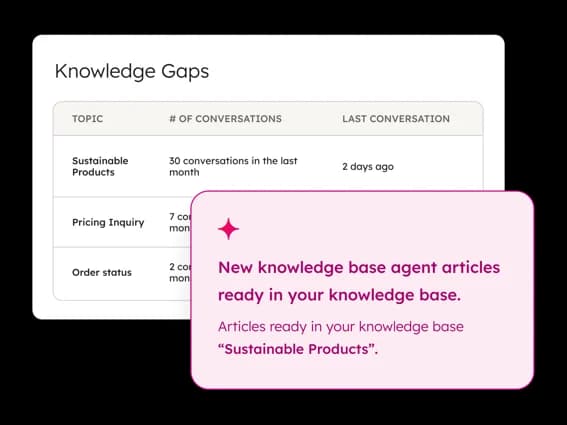
There's also a Knowledge Base Agent in beta that turns resolved conversations into draft self-service articles and flags gaps ("you're getting 30 conversations a month about X and have no article on it"). It's a real time-saver, with one big caveat the community keeps raising: it's only as good as your ticket data.
Pricing. Service Hub runs from a free tier up through Professional (around $90/seat/month) and Enterprise (around $150/seat/month), with one-time onboarding fees of $1,500 and $3,500 respectively, per HubSpot's Service pricing page. The Customer Agent only works on Professional and above and consumes credits at ~$0.50 per resolution; Breeze Assistant is included on all tiers.
Our take: if HubSpot is your whole world, Breeze is the path of least resistance and the Assistant alone is worth turning on. But the content-only knowledge, the Professional-tier gate, and the credit billing are real ceilings, and they're exactly why this post exists. We dug into whether it's worth it in our HubSpot Breeze AI review.
3. Tidio (Lyro AI) - best for SMBs and ecommerce
Best for: smaller teams and online stores that want an affordable AI chatbot with a HubSpot connection.
Tidio is a customer service platform built for SMBs and ecommerce brands, and its AI agent, Lyro, is the relevant piece here. Lyro is powered by Anthropic's Claude, learns from FAQ uploads and website scraping, and integrates with HubSpot alongside Shopify, Messenger, and WhatsApp. Tidio claims a 67% average resolution rate and backs it with a money-back guarantee if you don't hit 50%, which is a confident, concrete promise most rivals won't make.
Standout features
- Lyro AI agent with a stated 67% resolution rate, plus a 50% money-back guarantee.
- Lyro Smart Actions for backend tasks like order updates and lead qualification, with MCP support.
- Strong ecommerce footing: a 4.8/5 Shopify App Store rating across 1,300+ reviews, and native Shopify actions on higher tiers.
Pricing. Standalone Lyro starts around $32.50/month and bills roughly $0.50 per Lyro conversation on paid plans; there's a free tier (50 lifetime Lyro conversations) and a 7-day trial. The jump to the Plus tier (from $749/month) is steep, which is the main thing to watch as you scale. Details in our Tidio pricing breakdown.
Our take: for a small support or ecommerce team that wants something affordable and quick to launch, Lyro is a solid pick and the guarantee is reassuring. It's less suited to complex B2B support or large knowledge bases spread across many systems. If you're weighing it up, we compared the field in the best Tidio alternatives.
4. Forethought - best for mid-market and enterprise on an existing stack
Best for: larger support orgs that want agentic AI but are committed to their current helpdesk.
Forethought is an enterprise AI platform built around a multi-agent system: Solve (the customer-facing agent), Triage (classification), Assist (the agent copilot), and Discover (insights). Its HubSpot connection lives inside the Solve agent and routes through HubSpot's ticketing API, so it can create and update tickets while sitting on top of your stack. The company's strongest pitch is that it's helpdesk-agnostic: you don't switch tools to add it.
Standout features
- A multi-agent system that reasons and takes actions, not just deflects, with a Browser Agent for legacy systems that lack APIs.
- Helpdesk-agnostic by design: it integrates with 70+ connectors including HubSpot, Zendesk, and Salesforce.
- Headline benchmark claims of up to 98% resolution rate and a 55% average reduction in first response time, from its 2025 CX report.
Pricing. Forethought publishes no public pricing. Its model blends a platform-access fee with outcome-based pricing, and there's no free trial, only a proof-of-value engagement on your own data. Secondary sources peg it in the mid-five to low-six-figure annual range, but the company doesn't confirm that.
Our take: a strong fit for a mature support org that wants serious agentic automation and is staying on HubSpot (or Salesforce) for the long haul. The lack of public pricing and the no-trial, sales-led motion make it a heavier buy than eesel or Tidio, so it suits teams with a real procurement process rather than anyone who wants to be live this week.
5. Ada - best for very high-volume enterprise CX
Best for: large consumer brands resolving hundreds of thousands of conversations a year.
Ada is a Toronto-based enterprise platform that calls its category "Agentic Customer Experience." It's a standalone AI layer built around a multi-LLM Reasoning Engine, and it connects to HubSpot through a dedicated app (you paste a HubSpot API key in Settings > Integrations) for contact sync, ticket creation, and conversation logging. It's omnichannel and multilingual out of the box, with a strong push into voice agents through 2026.
Standout features
- Multi-LLM orchestration via its Reasoning Engine, rather than betting on one model.
- Playbooks for multi-step SOPs and Coaching, where you review past conversations and the agent applies the notes automatically.
- Unusually strong compliance posture, including AIUC-1 (an AI-specific certification) and zero data retention with LLM providers.
Pricing. None published. Ada gates itself to enterprises, stating on its pricing page that it's "a great fit for companies with at least 300,000 annual customer service conversations." Pricing is volume-based and sales-led, with no free trial or self-serve signup.
Our take: if you're a large consumer brand at genuine scale, Ada is a serious contender and the compliance story is best-in-class. For anyone below that 300k-conversation floor, it's simply not aimed at you, and a flat-priced layer like eesel will be both cheaper and faster to stand up. Ada's HubSpot integration also leans toward CRM and contact sync rather than being a full Service Hub helpdesk agent, so check the fit against your exact workflow.
6. Aisera - best for cross-functional enterprises
Best for: big organizations consolidating IT, HR, and customer service onto one AI platform.
Aisera is an enterprise AI platform that's cross-functional from day one, spanning IT, HR, finance, and customer service through a Universal Agent that orchestrates domain-specific agents. It connects to systems like HubSpot through its integration hub, though its center of gravity is firmly in IT service management and internal support rather than CX alone. In November 2025, Aisera was acquired by Automation Anywhere, so its roadmap is increasingly bundled into that platform.
Standout features
- A Universal Agent orchestrating IT, HR, finance, and customer service agents from one platform.
- An open-standards orchestration backbone (Aisera Unify) built on A2A, MCP, and AGNTCY for connecting third-party agents.
- An LLM gateway supporting its own model plus OpenAI, Claude, or Google, with enterprise governance via its TRAPS framework.
Pricing. No public pricing. Both its pricing and demo pages return errors; the motion is contact-sales with annual enterprise contracts scoped by volume.
Our take: Aisera makes sense when the buyer is an IT or transformation leader purchasing for the whole company, not just a support team. For a customer-service team of 50–500 seats on HubSpot, it's almost always too heavy and too broad a buy, and you'd get to value faster with a CX-focused tool. Include it on the shortlist only if "AI across the whole org" is the actual mandate.
7. Zapier - best for automating around HubSpot
Best for: teams that want to wire HubSpot into AI workflows and other apps without code.
Zapier is the odd one out here, and deliberately so. It isn't a support agent; it's the automation glue. HubSpot is one of its most popular integrations among 9,000+ apps, and with Zapier Agents and Chatbots you can build AI-driven workflows that read from and write to HubSpot, route leads, trigger replies, or sync data across tools. If your gap is "connect HubSpot to the rest of our stack" rather than "resolve tickets autonomously," this is the category you want.
Standout features
- 9,000+ app integrations (more than any rival), with HubSpot as a top connector.
- Zapier Agents and Chatbots for building AI workflows that take actions across your tools.
- Zapier MCP, which exposes 66,000+ triggers and actions to AI clients like Claude and ChatGPT.
Pricing. A free tier covers 100 tasks/month; the Professional plan starts at $19.99/month (750 tasks), Team at $69/month, with Agents (from $33.33/month) and Chatbots billed separately. The thing to watch is task multiplication: every step in a multi-step workflow counts as a task, so costs can climb fast at volume, a recurring theme across G2 and Reddit.
Our take: indispensable as connective tissue, but don't mistake it for a customer service AI. Pair it with one of the agents above rather than expecting it to resolve tickets on its own. For teams that mostly need automation plumbing, though, it's hard to beat.
What 1,000 resolved conversations a month actually costs
Pricing pages are abstract, so here's a concrete scenario: you're automating 1,000 support conversations a month and want a rough monthly bill. The units aren't identical across tools (HubSpot bills per resolution, eesel per task, Tidio per Lyro conversation), so treat this as directional, not a like-for-like quote.
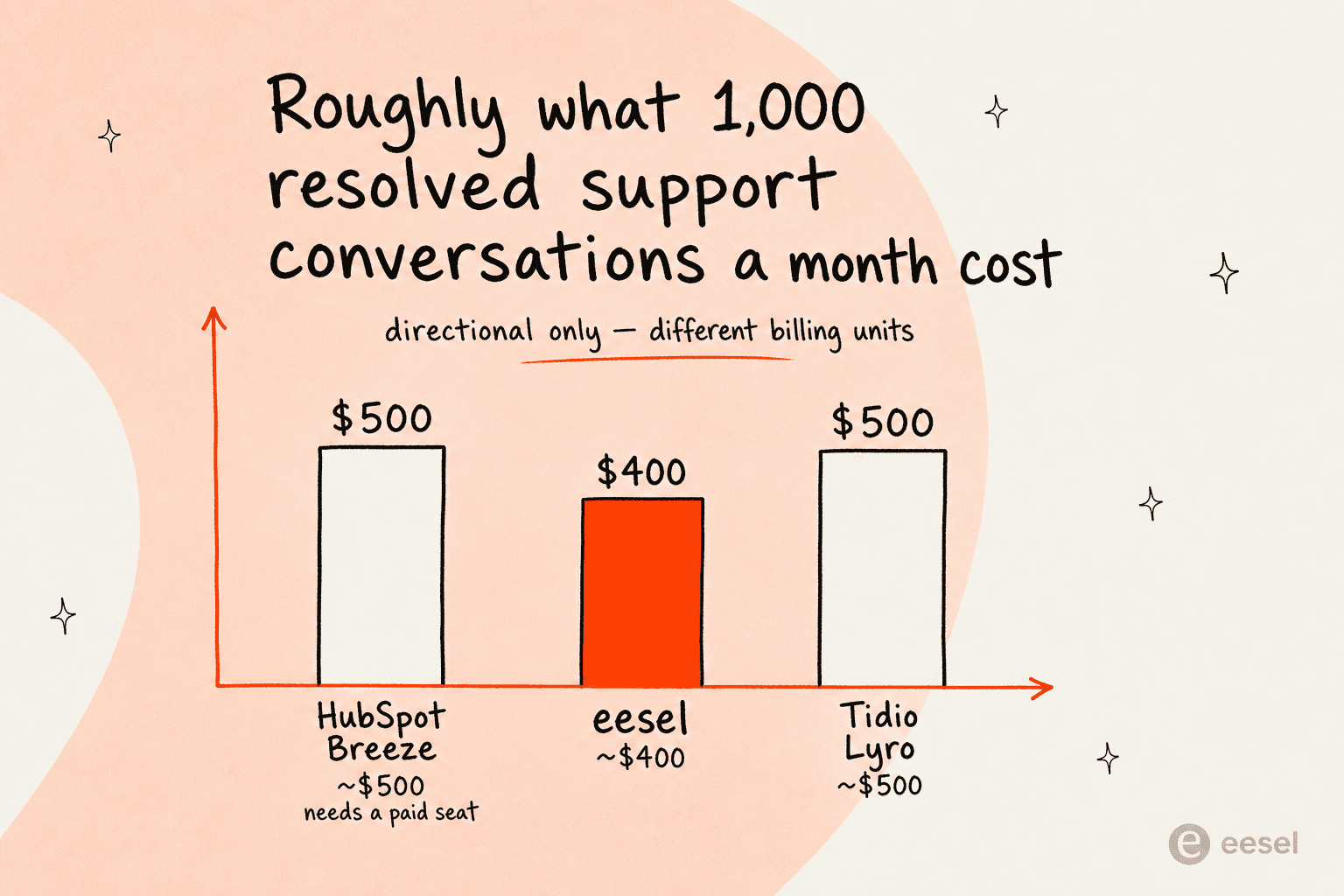
At ~$0.50 per resolution, HubSpot's Customer Agent runs about $500/month for 1,000 resolutions, on top of the Professional seat you need to use it at all. Tidio's Lyro lands in similar territory at roughly $0.50 per conversation. eesel comes in around $400 at $0.40 per resolution, with no seat fee layered underneath. The bigger difference isn't the headline number, it's predictability: with a flat per-resolution price and a hard spend cap, you know the ceiling, whereas the credit model is where the bill-shock stories come from.
It's the kind of math that drives the "split the stack" pattern we kept seeing, where teams keep a lean core and bolt on fixed-price tools to escape overages. As one user put it on the AI-credit thread:
"Long term, predictable cost per lead or per conversation beats fancy AI features you're scared to turn on."
u/medazizln, r/hubspot, "Anyone else burned by crazy AI-credit usage?"
If cost is your main lens, our roundup of the cheapest AI apps for helpdesk and the best customer service AI platforms go deeper on value.
How to choose
The decision usually comes down to a few honest questions. If you're a small team or ecommerce store and want something cheap and fast, Tidio is a fine starting point. If you're a large enterprise resolving hundreds of thousands of conversations or consolidating IT and CX together, look at Ada or Aisera. If you want native simplicity and you're already deep in HubSpot, Breeze is the least friction, just go in with eyes open about the credit billing and the content-only knowledge.
But if you want the most automation for the least friction and the most predictable bill, the answer for most HubSpot teams is a third-party layer that connects natively, trains on everything you already have, and charges a flat rate. That's the gap we built eesel to fill. The wider HubSpot Service Hub AI alternatives guide has more if you want to keep comparing, and is HubSpot Service Hub AI worth it? tackles the native question head-on.
Try eesel for HubSpot Service Hub
eesel AI gives your HubSpot Service Hub an AI teammate that resolves tickets, drafts replies, and answers from everything your team knows, not just your published articles. It connects through HubSpot's native integration, trains on your historical tickets and docs in minutes, and lets you simulate performance on real past tickets before going live, so you're never guessing at the resolution rate.

The best part for anyone burned by credit billing: it's a flat $0.40 per resolution with no per-seat fees and a spend cap you control. You can start free with $50 of usage, no credit card required, and see what it does with your own HubSpot data before you commit. Try eesel.
Frequently Asked Questions
What is the best AI for HubSpot Service Hub?
How much does HubSpot's Breeze Customer Agent cost?
Is there a free AI for HubSpot Service Hub?
Can I add AI to HubSpot Service Hub without switching helpdesks?
What happens to my HubSpot bill if AI usage spikes?


Article by
Riellvriany Indriawan
Riell is a designer and writer at eesel AI with about two years of experience researching CX platforms, AI chatbots, and helpdesk software. She combines her design background with a sharp eye for how these tools actually look and feel in practice — making her comparisons unusually visual and user-focused.