How I picked these (and what I learned running AI on live queues)
A quick note on where I'm coming from, because it shapes the verdicts. My team has spent the last three-plus years putting AI agents on live support queues, across thousands of real tickets and customer rollouts. One of the first things you learn is that a confident-sounding bot is dangerous: I've watched AI give a clean, well-written, completely wrong answer. That's why every rollout we do now gets simulated against historical tickets before it ever replies to a real person, and it's doubly important on social, where the reply is public.
So I rated these eight tools on the questions that actually matter when you're the one answering DMs at 6pm:
- Does the AI resolve, or just suggest? This is the big one. Assistive AI drafts a reply; autonomous AI reads the message, pulls the customer's data, and answers.
- Which channels does it actually cover? Instagram, Facebook, X, TikTok, WhatsApp, plus email and chat.
- How is it priced, and what scales the bill? Per seat, per contact, or per resolution.
- How safely can you go live? Can you test against real history and control when the AI hands off to a human?
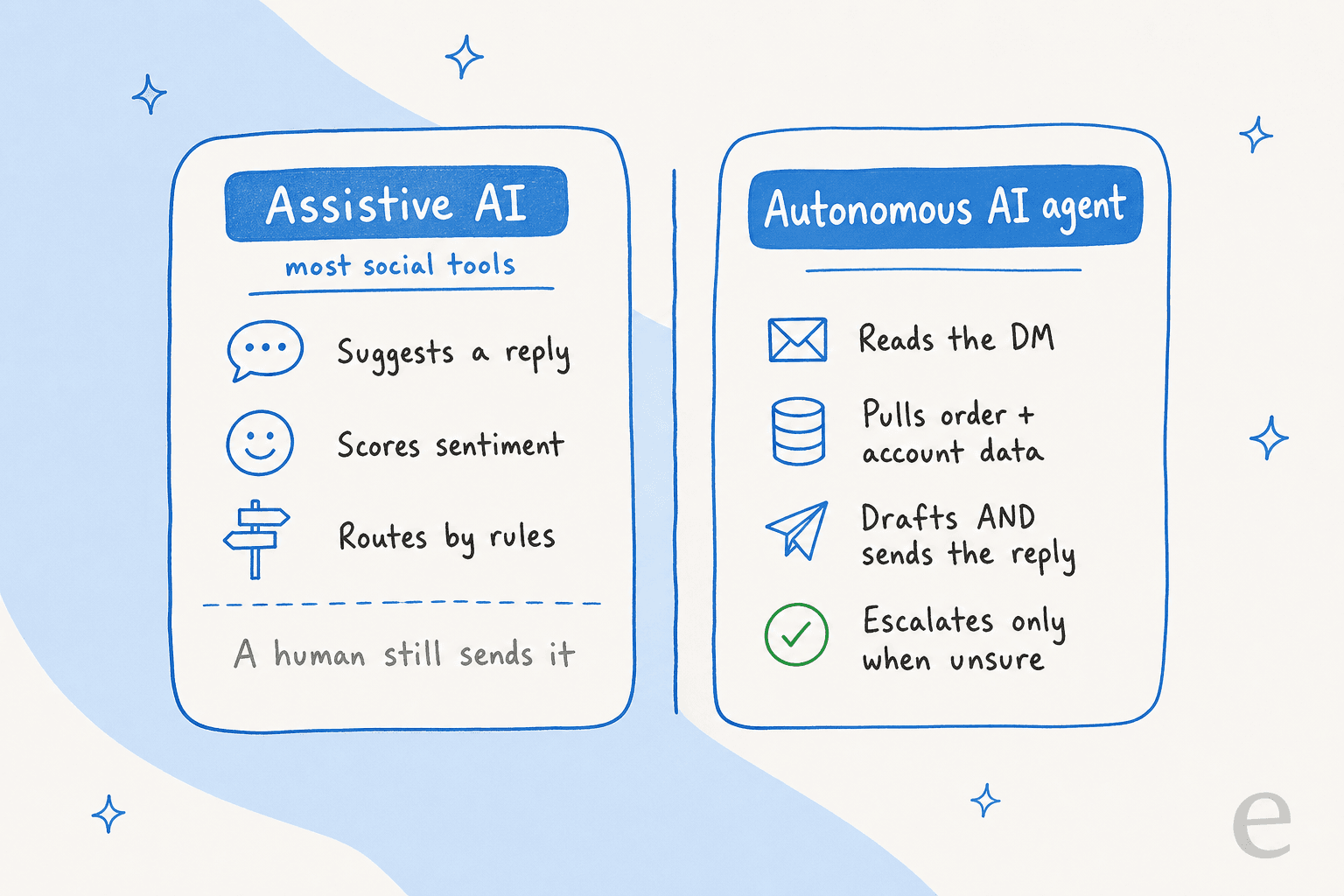
The 8 best AI tools for social media support at a glance
| Tool | Best for | AI type | Channels | Pricing model | Starting price | Free option |
|---|---|---|---|---|---|---|
| eesel AI | AI that resolves DMs on your existing stack | Autonomous agent | Helpdesk + IG, FB, WhatsApp, SMS, chat, email | Per resolution (usage) | $0.40 / ticket | $50 free credit, no card |
| Sprout Social | Marketing-led teams doing social care | Assistive (suggest/route) | IG, FB, X, TikTok, LinkedIn, YouTube | Per seat | $79 / seat / mo | 30-day trial |
| Sprinklr | Enterprise, 25+ channels, regulated brands | Agentic + assist | 30+ voice/social/digital | Quote-based | ~$199 / user / mo (Social self-serve) | 30-day trial |
| Gorgias | Shopify and ecommerce social DMs | Autonomous AI Agent | IG, FB, TikTok, WhatsApp, SMS, email, chat | Per ticket + per AI resolution | $10 / mo | Trial |
| Zendesk | Large orgs unifying social into tickets | Autonomous AI agents | Social messaging + email, chat, voice | Per seat + per resolution | $19 / agent / mo | 14-day trial |
| Respond.io | WhatsApp-first and messaging-led support | AI Agents (Growth+) | WhatsApp, IG, TikTok, FB, email, voice | Per active contact | $79 / mo (1,000 MACs) | 7-day trial |
| Hootsuite | Budget social inbox for small teams | AI chatbot (Enterprise) | IG, FB, X, TikTok, LinkedIn, WhatsApp | Per seat | $99 / user / mo | 30-day trial |
| Freshchat | Freemium entry point with a real free tier | Freddy AI Agent (add-on) | Web chat, IG, FB, WhatsApp, SMS, LINE | Per seat + per AI session | $0 (up to 10 agents) | Free plan |
Three big patterns jump out of that table, and they're the whole story of this category.
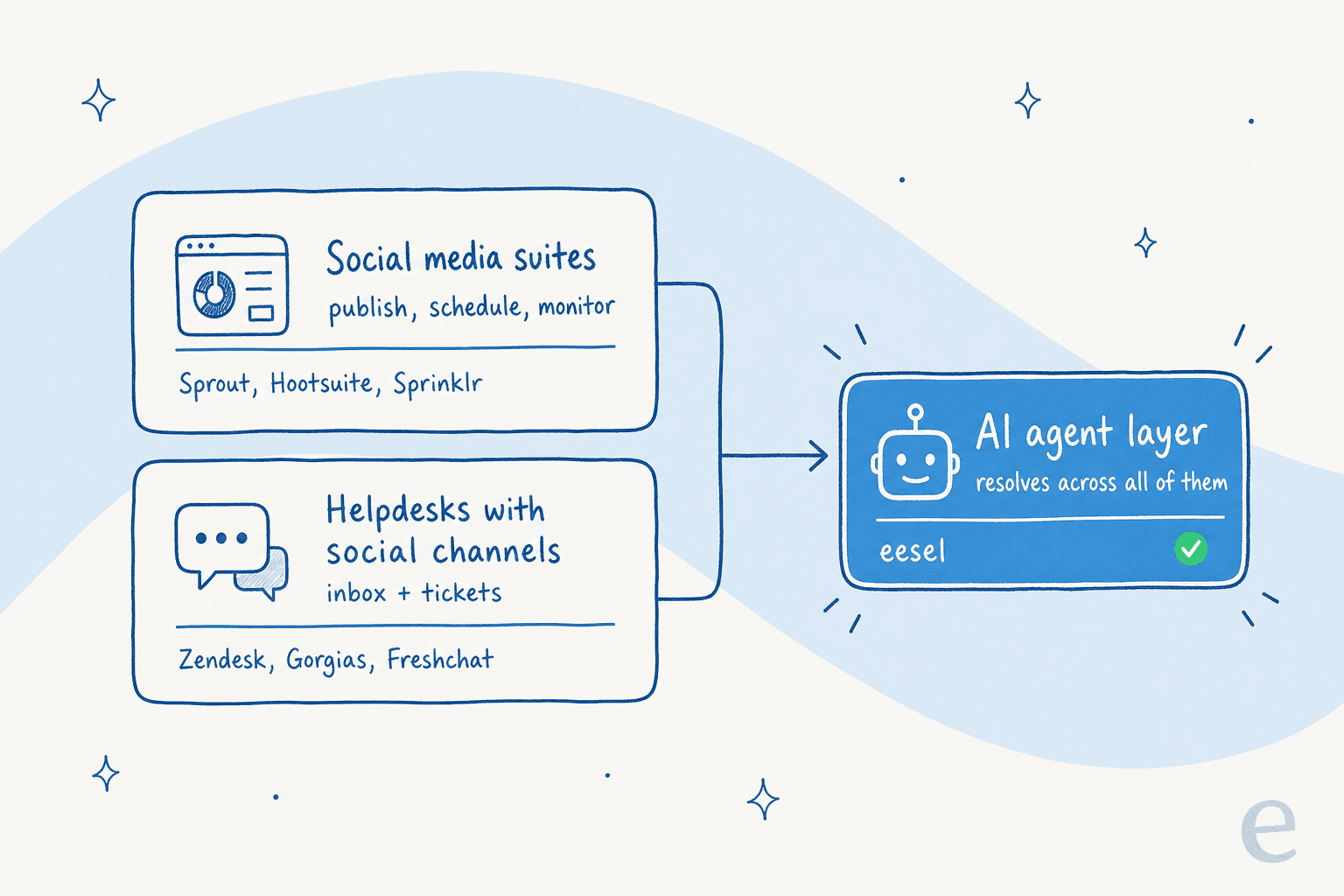
First, the tools split into three families: social media suites built for publishing (Sprout, Hootsuite, Sprinklr), helpdesks that happen to pull in social channels (Zendesk, Gorgias, Freshchat, Respond.io), and an AI agent layer that sits on top of whatever you already run (eesel). Second, the AI ranges from "suggests a reply" to "resolves the whole conversation," and the marketing copy rarely makes that obvious. Third, the billing model decides who this gets expensive for. Let's get into each.
1. eesel AI: best for AI that actually resolves DMs on your existing stack
Best for: support teams who already use a helpdesk and want AI to resolve social conversations, not just draft replies.
I'll get my own bias out of the way: I work on the team at eesel. But the reason it leads this list isn't loyalty, it's that it solves the actual problem most of these tools dodge. Social media tools were built to publish. eesel was built to resolve.
eesel is an AI agent that plugs into the helpdesk and channels you already run, learns from your past tickets and help docs, and then drafts, triages, and autonomously answers conversations. Because the helpdesks it connects to (Zendesk, Gorgias, Freshdesk, Front) already pull Instagram, Facebook, and WhatsApp messages into one inbox, eesel can resolve a social DM with the same brain it uses on email and chat. It also connects directly to messaging channels like WhatsApp and SMS.
What makes it credible for public social replies specifically:
- It learns from solved tickets, not just your help center. That means it answers the way your team actually answers, in your brand voice, across 80+ languages.
- Simulation mode lets you run the agent against thousands of past conversations before going live, so you see its real resolution rate and catch wrong answers in private, not in an Instagram comment thread.
- Confidence-based routing means it only answers what it's sure about and hands the rest to a human with full context.
That last point is the one buyers care about most. One ops lead at a DTC supplements brand running ~7,000 Gorgias tickets a month put the objection perfectly on a call with us. He said the AI will never answer 100% of questions, but if it just replies "sorry I don't know this," he can't go check all 7,000 tickets to see whether it actually got them right. What he needed was an AI that only handles the tickets it's confident about, and leaves the rest alone.
That's exactly the design. On real rollouts that approach lands: eesel resolved 73% of tier-1 requests for Gridwise in the first month, and Smava runs a fully automated Zendesk agent on 100,000+ tickets a month.
Pricing: usage-based, starting at $0.40 per resolution, with no per-seat fees and no platform minimum on the standard plans. You start with $50 of free credit, no credit card. Annual commitments of $300+/month get 25% off, and Enterprise adds a $1,000/month platform fee for SSO, higher knowledge limits, and a dedicated engineer.
Pros:
- Resolves conversations end to end, not just suggestions.
- Plugs into your existing helpdesk in minutes, no migration.
- Usage pricing means you pay for outcomes, not headcount.
- Simulation mode de-risks going live on public channels.
Cons:
- It's the AI layer, not a social publishing or scheduling suite, so you still need an inbox underneath it.
- Heaviest value shows up when you already have ticket history to learn from.
My take: if your goal is to answer social DMs with AI rather than just speed up a human, this is where I'd start, because it's the only tool here whose whole job is resolution. Pick something else if what you actually need is a scheduling-and-publishing calendar.
2. Sprout Social: best for marketing-led teams doing social care
Best for: teams where social media lives in marketing and customer care is one job among publishing, listening, and analytics.
Sprout Social is one of the most polished social suites out there, with a 4.4-star rating across roughly 6,900 G2 reviews. Its support story is "Social Customer Care," built on a Smart Inbox that consolidates messages, mentions, and reviews across networks, plus case management, routing, and CSAT reporting.
On the AI side, be clear-eyed about what you get. Sprout's AI is assistive: it can enhance a draft reply, analyze sentiment, and auto-route cases by topic or keyword. Its agentic "Trellis" AI is aimed more at marketing intelligence than autonomous ticket resolution. The human still sends the reply.
The other catch is where the support features sit. Sentiment in the Smart Inbox and helpdesk integrations are gated to the Advanced tier at $399 per seat per month, and listening is a separate paid add-on. That cost is the dominant theme in user reviews:
"Sprout is a great tool, no doubt. However, being too pricey hurts the growing teams. Especially the features they are providing."

Pricing: per seat, billed annually. Essentials $79, Standard $199, Professional $299, Advanced $399, Enterprise custom. (pricing)
Pros:
- Clean, well-liked interface and strong reporting.
- Genuine social customer care features (cases, routing, CSAT).
- Excellent for combined marketing-and-care teams.
Cons:
- AI suggests and routes, it doesn't resolve.
- Per-seat pricing climbs fast for growing teams.
- The features care teams need are gated to the $399 tier.
My take: a great fit if social media is a marketing-owned function and care is part of that remit. If you're a lean support team that just needs DMs answered, you're paying for a publishing suite you won't use.
3. Sprinklr: best for enterprise scale across 25+ channels
Best for: large, often regulated brands that need one platform unifying social, voice, chat, and digital at scale.
Sprinklr is the enterprise heavyweight. Its Unified-CXM platform spans 30+ channels, including 25+ social channels, and it's genuinely the back end that big brands run their social support on. As one Reddit user noted, "Sprinklr is the chat app that Verizon and Visible use internally to interface with customers across platforms." It carries real AI depth too: autonomous AI Agents, Agent Copilot, and conversational analytics across 100% of conversations.
The trade-offs are the classic enterprise ones: complexity and cost. The third-party read is consistent, powerful but heavy, with a steep learning curve and a price that pushes smaller teams away:
"Leaving sprinklr after months of struggling with their product and support. Their CX and social media features just aren't up to par with what they charge."
Pricing: mostly quote-based. Sprinklr publishes no enterprise pricing page; the one public number is the Sprinklr Social self-serve plan at around $199 per user per month, though that figure dates to a 2023 launch and is worth re-confirming with sales. (self-serve)
Pros:
- True omnichannel coverage at enterprise scale.
- Deep AI and analytics, including autonomous agents.
- Proven on the largest, most demanding support queues.
Cons:
- Steep learning curve and heavy setup.
- Quote-only pricing, expensive for smaller teams.
- Occasional reliability complaints at scale.
My take: if you're a global brand managing millions of conversations across dozens of channels, Sprinklr earns its keep. For everyone smaller, it's more platform than you need, and the AI resolution it offers can be added far more cheaply on top of a lighter helpdesk.
4. Gorgias: best for Shopify and ecommerce social DMs
Best for: ecommerce brands, especially on Shopify, whose social DMs are really order questions in disguise.
Gorgias is an ecommerce-first helpdesk that unifies email, chat, SMS, WhatsApp, Instagram, Facebook, and TikTok into one inbox, with order data sitting right next to each conversation. For a Shopify store, that context is the whole game: when an Instagram DM asks "where's my order," Gorgias already knows. It claims to power conversations for 40% of Shopify brands.
Its AI Agent is one of the genuinely autonomous ones here, pre-trained on ecommerce conversations and able to handle returns, edit orders, and recommend products. Worth noting it resolves on email and chat first, with social pulled into the same inbox for agents.
Pricing: ticket-based, not per seat. Starter from $10/mo, Basic from $50, Pro from $300, Advanced from $750, Enterprise custom. The AI Agent is a usage add-on at $0.90 per automated resolution on annual plans ($1.00 monthly), and each AI interaction also counts as a billable ticket. (pricing)
Pros:
- Native Shopify order data inside every conversation.
- Genuinely autonomous AI Agent for ecommerce tasks.
- Social DMs sit next to order and revenue context.
Cons:
- Roughly 3x the cost of generic helpdesks at similar volumes.
- Double-billing (AI resolution plus the ticket it counts as) adds up.
- Overkill if you're not selling physical products.
My take: for a Shopify brand, this is the most natural home for social support, and if you want to go deeper on its AI, my team broke down Gorgias AI pricing separately. If you'd rather not pay the AI add-on premium, eesel layers an agent onto Gorgias for a usage rate, which is one of the more common setups I see.
5. Zendesk: best for large orgs unifying social into tickets
Best for: established support orgs that want every social message to become a tracked ticket alongside email, chat, and voice.
Zendesk is the default for a reason: it turns social DMs into structured tickets through its messaging product, and routes them through the same workflows, SLAs, and reporting as everything else. Its AI story is strong on paper, with autonomous AI agents (now Forethought-powered) that claim up to 80% automation, and it reports 4.8B resolutions delivered across 22,000+ teams.
The thing to watch is the pricing model. Zendesk layers a seat price, plus per-resolution AI billing, plus $50/agent/month add-ons like Copilot. The entry price most people quote ($19) includes no AI at all, and the surprise-bill pattern is a real complaint. If you want the detail, we mapped how Zendesk licensing works.
Pricing: Support Team $19/agent/mo (no AI), Suite Team $55, Suite Professional $115, Enterprise custom, all billed annually, with AI agents billed separately per automated resolution. (pricing)
Pros:
- Mature, every social message becomes a trackable ticket.
- Huge integration marketplace (1,800+ apps).
- Genuinely autonomous AI agents available.
Cons:
- Layered pricing is easy to underestimate.
- The cheapest plan has no AI.
- Native AI can be expensive for the resolution quality you get.
My take: if you already live in Zendesk, the smart move usually isn't paying for native AI per resolution at Zendesk's rate. It's putting a dedicated AI agent on top of Zendesk that learns from your back-catalog of tickets and resolves social and email together. That's a setup I see win on both cost and quality.
6. Respond.io: best for WhatsApp-first and messaging-led support
Best for: B2C teams where most conversations happen on WhatsApp and other messaging apps, often with a sales angle.
Respond.io is a WhatsApp-first omnichannel inbox that unifies WhatsApp, Instagram, TikTok, Facebook Messenger, voice, and email into one thread, with native lead and CRM management. It's a WhatsApp Business Solution Provider, so there's no markup on WhatsApp fees, and it layers AI Agents that qualify leads, recommend products, and route chats. It reports 10k+ brands and a 4.8 G2 rating across 400+ reviews.
The standout is the billing model: you pay per Monthly Active Contact, not per seat, which suits high-volume messaging teams. AI Agents require the Growth plan or above.
Pricing: by Monthly Active Contacts. At 1,000 MACs: Starter $79/mo, Growth $159/mo, Advanced $279/mo, Enterprise custom. WhatsApp/Meta fees are billed separately at cost. (pricing)
Pros:
- Built around WhatsApp and messaging, not bolted on.
- Per-contact pricing fits high-volume conversational teams.
- No markup on WhatsApp message fees.
Cons:
- Lighter as a traditional help desk (tickets, SLAs).
- AI is gated to Growth and above.
- Strong on sales conversations, thinner on complex support.
My take: if WhatsApp is your primary channel and conversations lean commercial, Respond.io is a sharp fit. For deeper support resolution across help docs and past tickets, I'd still want an AI agent that learns from your full history sitting on top.
7. Hootsuite: best budget social inbox for small teams
Best for: small teams that need a single inbox for comments and DMs without an enterprise contract.
Hootsuite is the veteran, 18 years in and 25M+ users, with an inbox that pulls public comments and private DMs across Facebook, Instagram, WhatsApp, LinkedIn, X, TikTok, and Threads into one place. It added AI under the OwlyGPT brand (formerly OwlyWriter), plus AI smart replies and a generative AI chatbot that it claims cuts workload by 80%.
Two caveats. First, the real support automation, the AI chatbot, smart replies, and Salesforce integration, lives behind the Advanced Inbox and Enterprise tiers; the Standard plan is a bare inbox. Second, and a little ironic for a tool sold partly on customer care, Hootsuite's own support has drawn complaints since recent layoffs:
"Anyone having issue with Hootsuite? They have had layoffs and support/ticketing have had noticeable changes. Anyone else?"
Pricing: Standard $99/user/mo, Advanced $249/user/mo, Enterprise custom. The AI chatbot is Enterprise-only. (pricing)
Pros:
- One inbox across a wide set of networks.
- Familiar, mature, broad integration library.
- Reasonable entry point for publishing plus light care.
Cons:
- AI resolution features gated to the top tiers.
- Recurring price-vs-value and reliability complaints.
- Reports of degraded first-party support.
My take: fine as a social inbox for a small team that mostly publishes and occasionally replies. As an AI support engine, the good parts are locked behind Enterprise, which undercuts the budget appeal.
8. Freshchat: best freemium entry point
Best for: small teams that want a real free tier and a path to add AI later.
Freshchat, part of Freshworks, is the messaging layer of the broader Freshdesk suite, and its headline draw is a genuine free tier for up to 10 agents. It unifies web chat, email, Facebook, Instagram, WhatsApp, SMS, and LINE into one workspace, and its Freddy AI Agent can run autonomous self-service across those channels.
The watch-out is that the free plan is website chat and email only; social channels start on the Growth tier. And Freddy AI is a separate add-on billed per 24-hour session, which can make costs hard to predict.
Pricing: Free (up to 10 agents), Growth $19/agent/mo, Pro $49, Enterprise $79, billed annually. Freddy AI Agent is $49 per 100 sessions after a 500-session free trial. (pricing)
Pros:
- Real free tier for up to 10 agents.
- Omnichannel including social and WhatsApp on paid plans.
- Clear upgrade path into the wider Freshworks suite.
Cons:
- Social channels require a paid plan.
- Session-based AI billing is hard to forecast.
- Upsell pressure toward Freshdesk Omni.
My take: the best way to dip a toe in without spending money, especially if you already use Freshworks. If you outgrow the free tier, compare the Freddy AI add-on cost against putting a usage-priced agent on top, because the session billing adds up quietly.
How to actually choose: the pricing model matters more than the sticker
The single most useful filter isn't the feature list, it's how the tool charges you, because that's what decides whether it stays affordable as your social volume grows.
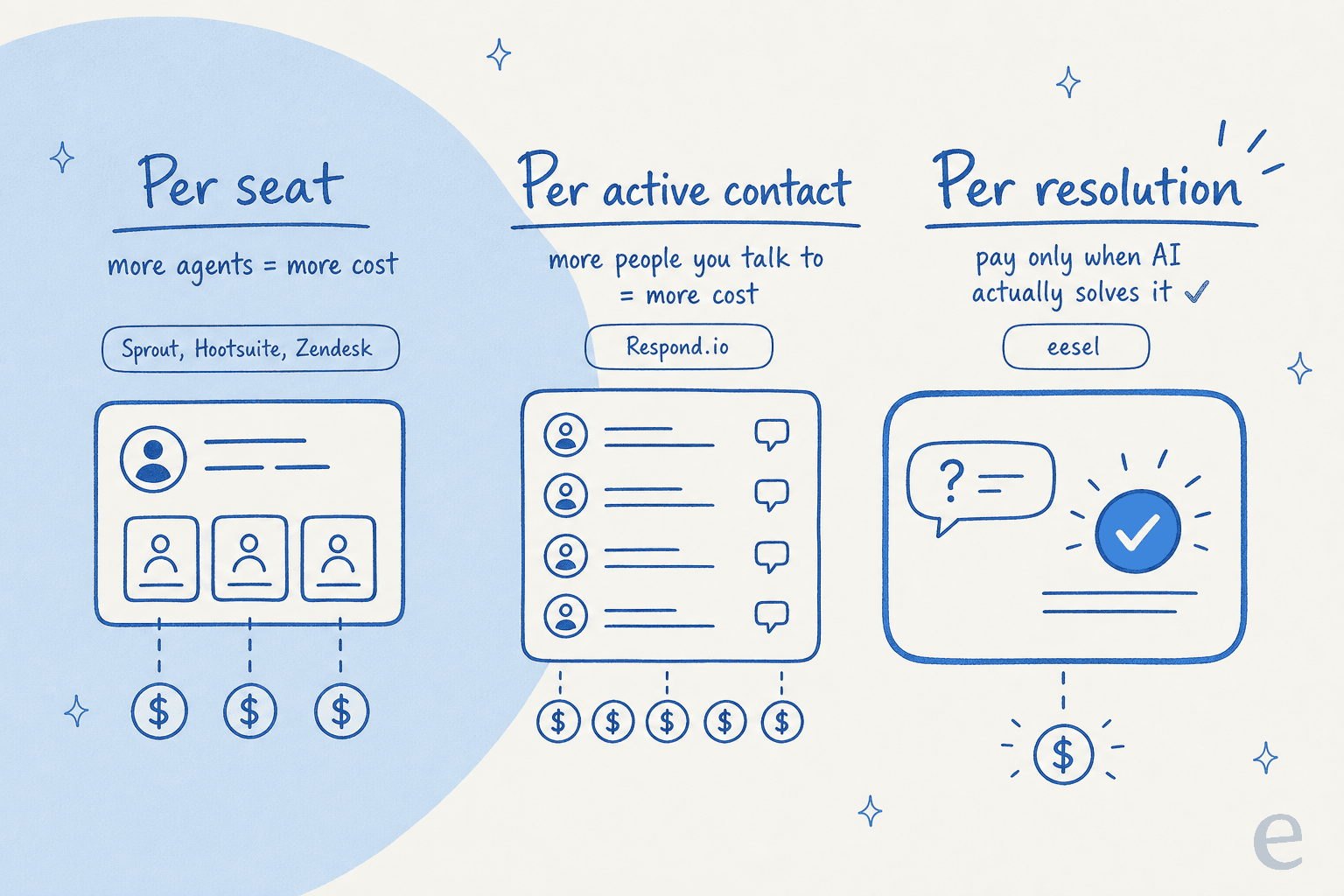
- Per seat (Sprout, Hootsuite, Zendesk's base): every new agent costs more, whether or not they're busy. Predictable, but it punishes you for growing the team, and it's the number one complaint in reviews of the social suites.
- Per active contact (Respond.io): you pay for the people you talk to. Great for high-volume messaging, but the bill tracks reach, not resolution.
- Per resolution / usage (eesel, Gorgias' AI add-on): you pay when the AI actually solves something. This aligns cost with value, which is why I lean toward it, though it means modeling your volume rather than reading one sticker price.
A quick worked example. Say you've got a five-person social care team handling 3,000 conversations a month. On a per-seat suite at $199 a seat, that's roughly $1,000/month before any AI does real work. Put a usage-priced agent on the helpdesk you already have, let it resolve even half of those 3,000 conversations, and you're paying for outcomes that would otherwise eat a person's entire week. That's the math that moves teams.
Try eesel for social media support
If you've read this far, you've probably noticed the gap: most social tools were built to publish, and the AI inside them mostly suggests. eesel AI was built to resolve. It plugs into the helpdesk and channels you already run, learns from your past tickets and help docs, and answers Instagram, Facebook, WhatsApp, and chat conversations in your brand voice, escalating cleanly to a human when it isn't sure.

The part that matters most for public channels: you can simulate the agent against thousands of your real past conversations before it replies to anyone, so you see its true resolution rate and fix the gaps in private. It sets up in minutes, there are no per-seat fees, and you can start free with $50 of credit, no credit card. If you want AI that handles the DMs instead of just drafting them, that's the one I'd try first.
Frequently Asked Questions
Can AI really answer customer DMs on Instagram and Facebook automatically?


Article by
Riellvriany Indriawan
Riell is a designer and writer at eesel AI with about two years of experience researching CX platforms, AI chatbots, and helpdesk software. She combines her design background with a sharp eye for how these tools actually look and feel in practice — making her comparisons unusually visual and user-focused.