

Turning on a Zendesk AI agent is a configuration flow in Zendesk, followed by testing and rollout. The cost is the part that decides the project: AI agent usage is metered per resolved conversation, not per seat, and Zendesk now publishes the rate on its own pricing page at $1.50 per automated resolution on a committed pack, $2.00 pay-as-you-go. Your plan includes 5 to 10 resolutions per agent per month; everything past that bills.
So the rollout decision comes before the setup one. A 10-agent team on Suite Professional at 6,000 verified resolutions in a 30-day month pays $1,150 in seats and up to $8,850 a month in resolutions on a committed pack, about $10,000 all-in, and closer to $12,950 if you never sign one. The AI line is the bill, and the seats are the rounding error.
Zendesk’s new AI agents experience removes the Essential/Advanced packaging distinction. Older accounts may still have Essential agents to migrate; legacy functionality is scheduled for removal in December 2026.
Setup is a six-step admin flow inside the Zendesk Admin Center, but the real work is upstream: a clean help center is the single biggest input to how often the agent actually resolves anything. Get that right and you'll land in the 50-80% deflection range customers like Babbel and TeamSystem cite. Get it wrong and you'll join the ProductLab Conference 2025 statistic: only about 10% of AI agents built in the prior six months were still in use.
For a separate support teammate that works in Zendesk, eesel CLI lets you inspect and configure eesel from a terminal, script, or coding agent. The same setup remains visible in the dashboard. It does not manage Zendesk’s native AI agent; the walkthrough below explains the distinction.
What "Zendesk AI agent" actually means in 2026
Older documentation distinguishes Essential and Advanced. The new experience makes the advanced capabilities available across Suite and Support plans; Copilot remains a separate, agent-facing product.
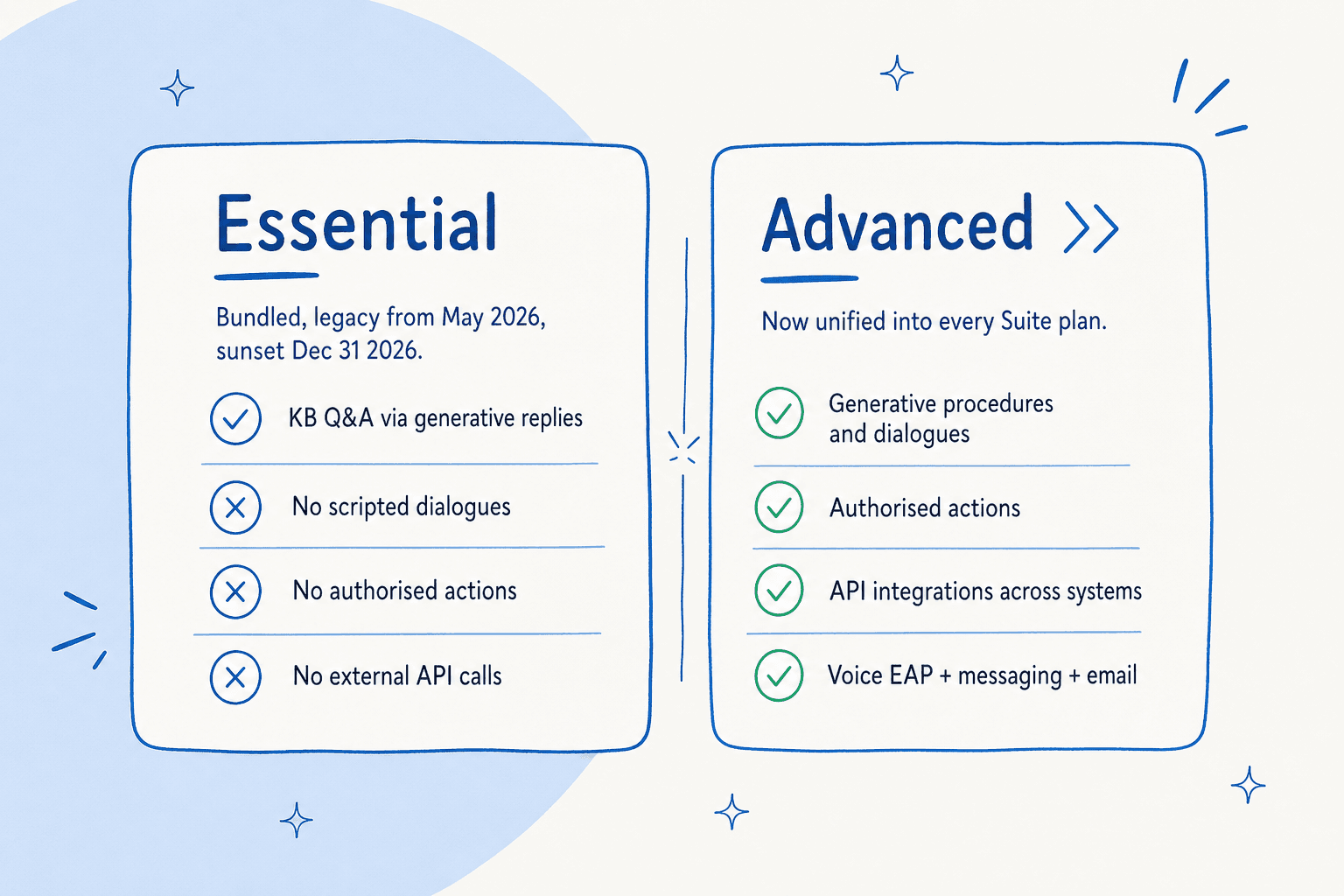
AI agents - Essential is the legacy knowledge-based experience. Existing customers should use Zendesk’s migration guidance to move to the new AI agents experience.
Capabilities previously sold as AI agents - Advanced include:
- A visual dialogue builder with branching block types (AI agent message, customer message, conditional, integration, carousel, escalation)
- Generative procedures, flexible goal-oriented flows the agent adapts in real time
- Authorised actions the agent can take inside Zendesk and connected systems (update a ticket field, look up an order, trigger a refund)
- An integration builder for third-party API calls mid-conversation
- Native fluency in 80+ languages, with generative replies extending to 100+
The expanded-access rollout began in May 2026. Access to capabilities and metered resolution usage are separate: including the former in a plan does not make the latter unlimited.
Don't confuse AI agents with Copilot. AI agents are the customer-facing autonomous bot. Copilot is the agent-facing assistant: it drafts replies for your human team, surfaces relevant macros, and (with Auto Assist on) takes follow-up actions in Zendesk and connected systems like Shopify, Jira and Slack. Different products, different bills.
Where Zendesk AI agents fit in the broader Suite
The product page positions AI Agents as the autonomous front line, with three companion products picking up where they hand off:

The four pillars Zendesk markets together as the Resolution Platform:
| Surface | What it does | Who it's for |
|---|---|---|
| AI agents | Autonomous customer-facing resolution across messaging, email, voice, and any other platform via Forethought | Customers, end users |
| Copilot | Agent-side reply drafting, ticket summaries, Auto Assist actions, Admin Copilot | Human support agents and admins |
| Intelligent Triage | Auto-classify every ticket by intent, entity, sentiment, and language | Routing, automation, reporting |
| AutoQA / Zendesk QA | Score 100% of conversations against your rubric, instead of the historical ~2% manual sample | QA and CX leaders |
The pitch, "service that improves with every resolution", is the Resolution Learning Loop: every conversation feeds back into the system to refine decisions and raise automation rates over time. Zendesk publishes some heavy headline numbers behind it: 80%+ automation, 82% lift in agent productivity, 5.5 hours saved per admin per week. Whether you actually hit those depends almost entirely on knowledge-base hygiene and how willing you are to invest in setup, which brings us to the cost question.
How much do Zendesk AI agents really cost?
This is where most teams get a nasty surprise. The headline price is the per-agent monthly Suite fee, but for AI that's just the cover charge.
The Suite plan ladder
All prices are per agent / month, billed annually. From the official pricing page:
| Plan | Price (annual) | AI features included |
|---|---|---|
| Support Team | $19 | None (legacy ticketing only) |
| Suite Team | $55 | AI Agents (Essential), Knowledge Base, Action Builder |
| Suite Professional | $115 | Above + AI writing tools, App Builder, basic Admin Copilot |
| Suite Enterprise + Copilot | Contact Sales | Above + full Copilot, Intelligent Triage, generative voice, sandbox |
The Copilot add-on, when not bundled with Enterprise, is $50 per agent / month on top. So is the Workforce Engagement Bundle, and so is the Contact Center add-on. A 10-agent Professional team that turns on Copilot is already at $1,650 / month before any AI usage gets metered.
The "automated resolution" billing unit
Here's where it gets interesting. AI agent usage isn't bundled into the seat price, it's metered separately as automated resolutions. Each plan ships with a baseline allowance per agent per month, and anything above that bills as overage. In May 2026, Zendesk restructured the resolution model into three tiers:
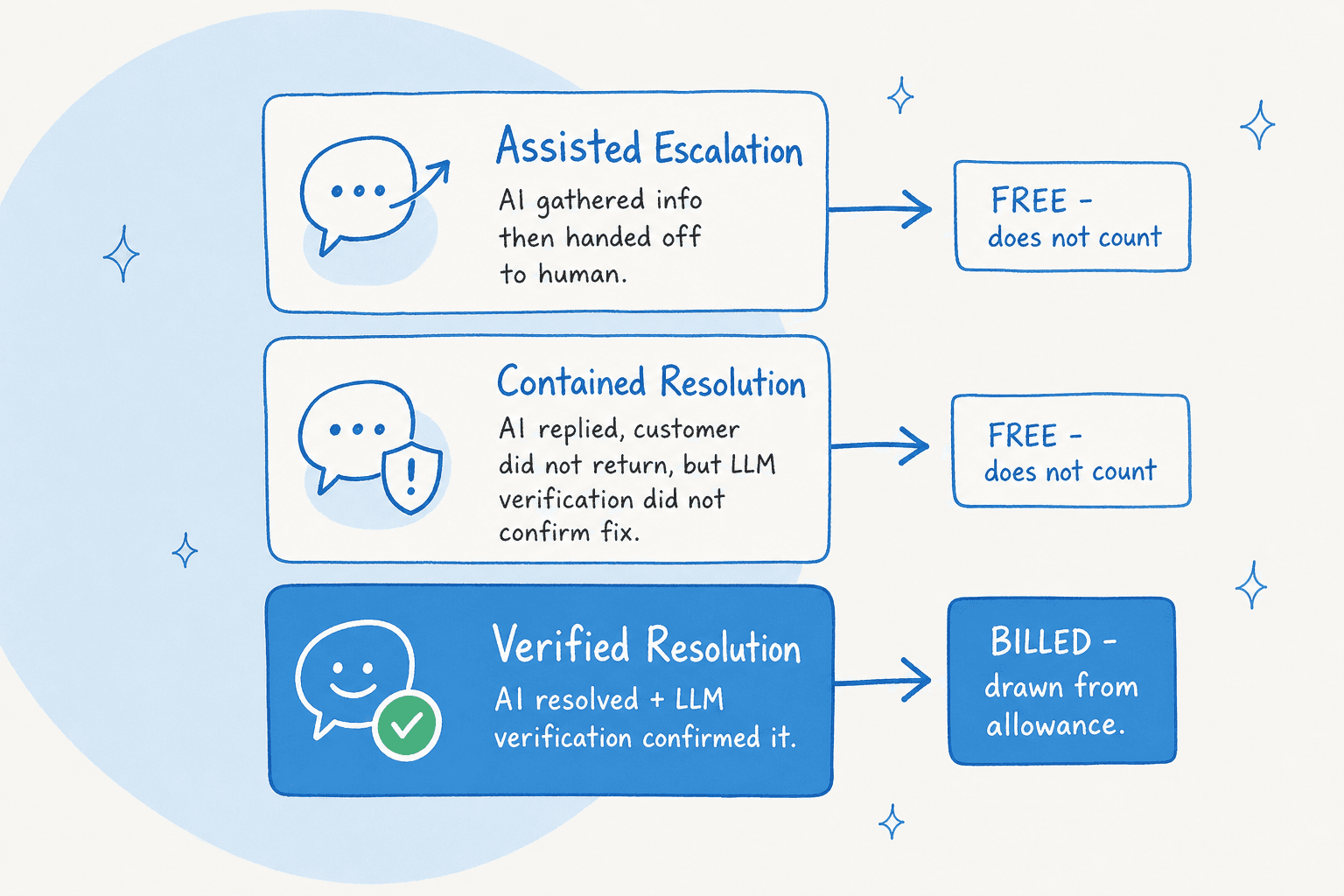
- Assisted Escalation, where the AI gathered information or routed the customer but a human ultimately resolved the ticket. Free, doesn't count.
- Contained Resolution, where the AI replied, the customer didn't follow up, but the system's LLM verification step didn't confirm the resolution as satisfactory. Free, doesn't count.
- Verified Resolution, where the AI resolved the issue and LLM verification confirmed it. Billed, draws from your allowance.
This is a meaningful improvement on the older model, where 72 hours of customer silence would book a resolution regardless of whether the AI had actually helped. As one commenter put it on the Zendesk automated-resolutions help article before the change: "If a client just leaves a conversation, it doesn't mean that it is resolved. I'm surprised that you're going to charge $1.5 per such conversation."
The per-resolution rate, now published
This used to be the hardest number to get: for most of the pay-per-resolution era the rate was quoted by your account executive, and every cost guide (including an earlier version of this one) had to triangulate it from customer contract math. That changed. As of an August 2026 check, the rate sits on the Zendesk pricing page itself: $1.50 per automated resolution on a committed pack, $2.00 pay-as-you-go, identical across Support Team, Suite Team, and Suite Professional. It's easy to miss because it lives in the Compare all plan features table rather than on the plan cards, which is why card-level scrapes kept reporting it as unpublished.
The included allowance is 5 automated resolutions per agent per month on Support Team and Suite Team, 10 on Suite Professional, capped at 10,000 per year. Suite Enterprise stays quote-only.
The published figures also settle the long-running community estimate. Here's the most-cited Reddit thread on the model:
"From what I can see in regards to this new 'Automated Resolution' pricing model, we'll be paying about $1.50-$1.20 per resolution."

And the abandonment-rate take from the same r/Zendesk community:
"No, it's just terrible and a rip off. You can't even export the data on like what people ask the bot so you can sort it or manipulate it how you want. We stopped using it because ARs are a rip off, and it's a rushed product to get into the AI hype."
What it actually adds up to
A 10-agent team on Suite Professional, running roughly 200 AI conversations a day, at the rates Zendesk publishes today:
- Base plan: 10 × $115 = $1,150 / month (annual billing; $149 / agent / month if you pay monthly, so $1,490)
- Included automated resolutions: 10 per agent = 100 / month, free
- Billable resolutions: ~6,000 conversations / month, so 5,900 above allowance if every one of them clears LLM verification
- On a committed pack at $1.50: $8,850 / month. Pay-as-you-go at $2.00: $11,800 / month
- Total: about $10,000 / month committed, $12,950 pay-as-you-go, and the AI line is roughly 8x the human seat cost.
Two things move that number a lot. Verification is the first: Assisted Escalations and Contained Resolutions are free, so a bot with a thin help center behind it bills less and resolves less, while a well-fed one bills close to the ceiling above. The second is signing a committed pack at all, which is a flat 25% off the pay-as-you-go rate.
That's the math behind multiple Capterra reviewers calling the configuration "a full time job in the backend":
"Pricing is a bit of a con and setting up add ons can add more to it and could feel like a full time job in the backend."
Vibhore S., Logistics Lead, Health/Wellness/Fitness, 6-12 months of use, 5/5 overall, value-for-money 3/5, Capterra Zendesk Suite review, April 10, 2026.

A few cost levers worth knowing:
- Committed usage packs. Committing to a volume buys the $1.50 rate instead of the $2.00 pay-as-you-go one. You need volume forecasting to size the pack: over-buying wastes capacity, under-buying leaves you on the higher rate.
- Pause, don't cap. Zendesk's only overage control is pause the AI entirely. There is no soft-cap, no per-month ceiling, no spend alert that throttles instead of cuts.
- Auto-billing since January 2026. Overage now auto-bills every Verified Resolution above commit, with no cap, no grace period, and no prior-month warning. This is the most-cited cost surprise in 2026 reviews.
How to set up a Zendesk AI agent, step by step
The current setup flow lives in the AI agents workspace which you can access from Zendesk Admin Center. Source: Zendesk's own Getting started with AI agents and Creating an AI agent to automatically resolve customer issues docs.
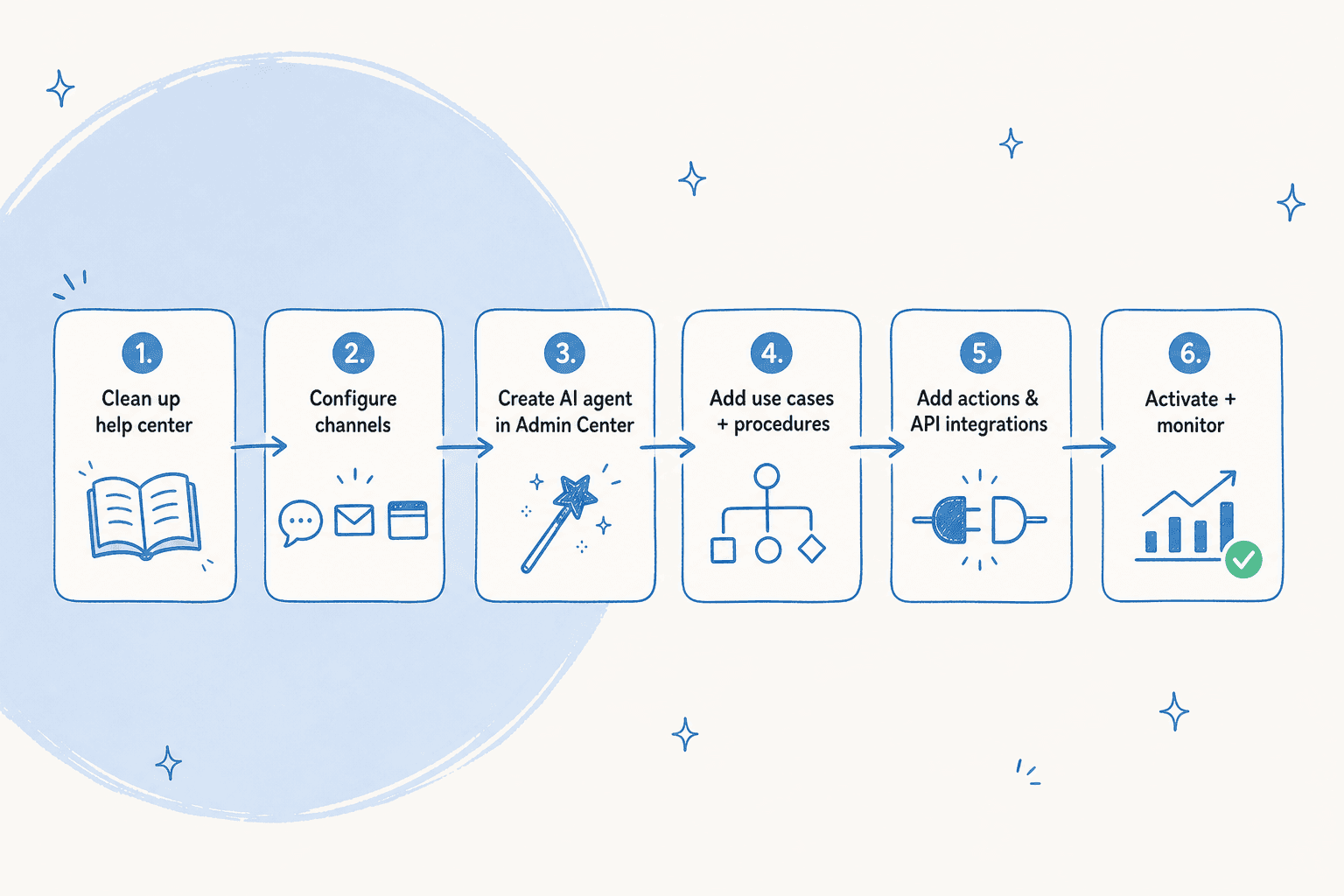
Step 1 - Get your help center in shape
This is the single highest-leverage step and also the one teams want to skip. AI agents draw their answers from your connected knowledge sources, primarily the Zendesk help center and any external KBs you wire in via the web crawler. If the answers aren't already in your articles, the agent has nothing to surface and falls back to either generic replies or a hand-off.
Zendesk publishes two reference passes that are worth doing before you touch the agent flow at all:
- Best practices for finding customer issues to start your knowledge base, for teams without a help center yet.
- Best practices: preparing your help center for generative AI, for teams with an existing help center that needs a generative-AI pass.
This is the part the community keeps flagging:
"The Co-Pilot stuff is decent, but we found its effectiveness really depends on having a perfectly curated Zendesk knowledge base, which... ours isn't, lol."
Step 2 - Configure the underlying channels
Each AI agent is bound to a single channel type. One agent can serve messaging, another can serve email, but a single agent cannot span both. You need the channel itself configured before the AI agent flow can attach to it:
- Messaging for web, mobile, and social
- Email for ticket forms and inbound mail
- API for headless integrations
- Web form for embedded contact forms
- Voice (EAP) for inbound calls
Only one AI agent can be active per messaging channel and per email address at a time, important if you run multiple brands.
Step 3 - Create the AI agent
In the AI agents workspace, click Create AI agent and pick for Messaging or for Email. The wizard runs across three pages: Knowledge → Personalize → Set up on channel.
3a. Connect your knowledge base.
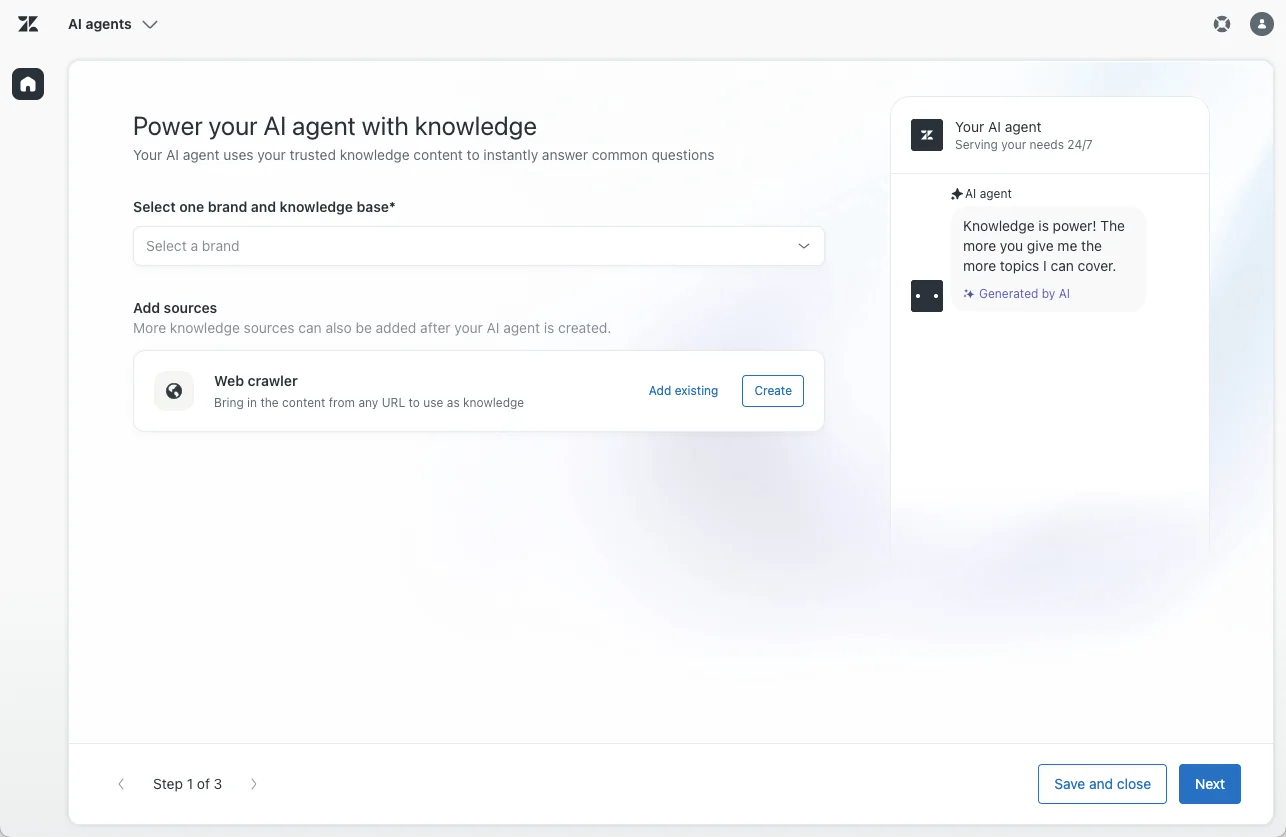
Pick the brand whose help center the agent should answer from. The brand's connected knowledge base auto-attaches. If you also want the agent to pull from public marketing pages or external docs, add a web crawler to index them.
3b. Personalize.
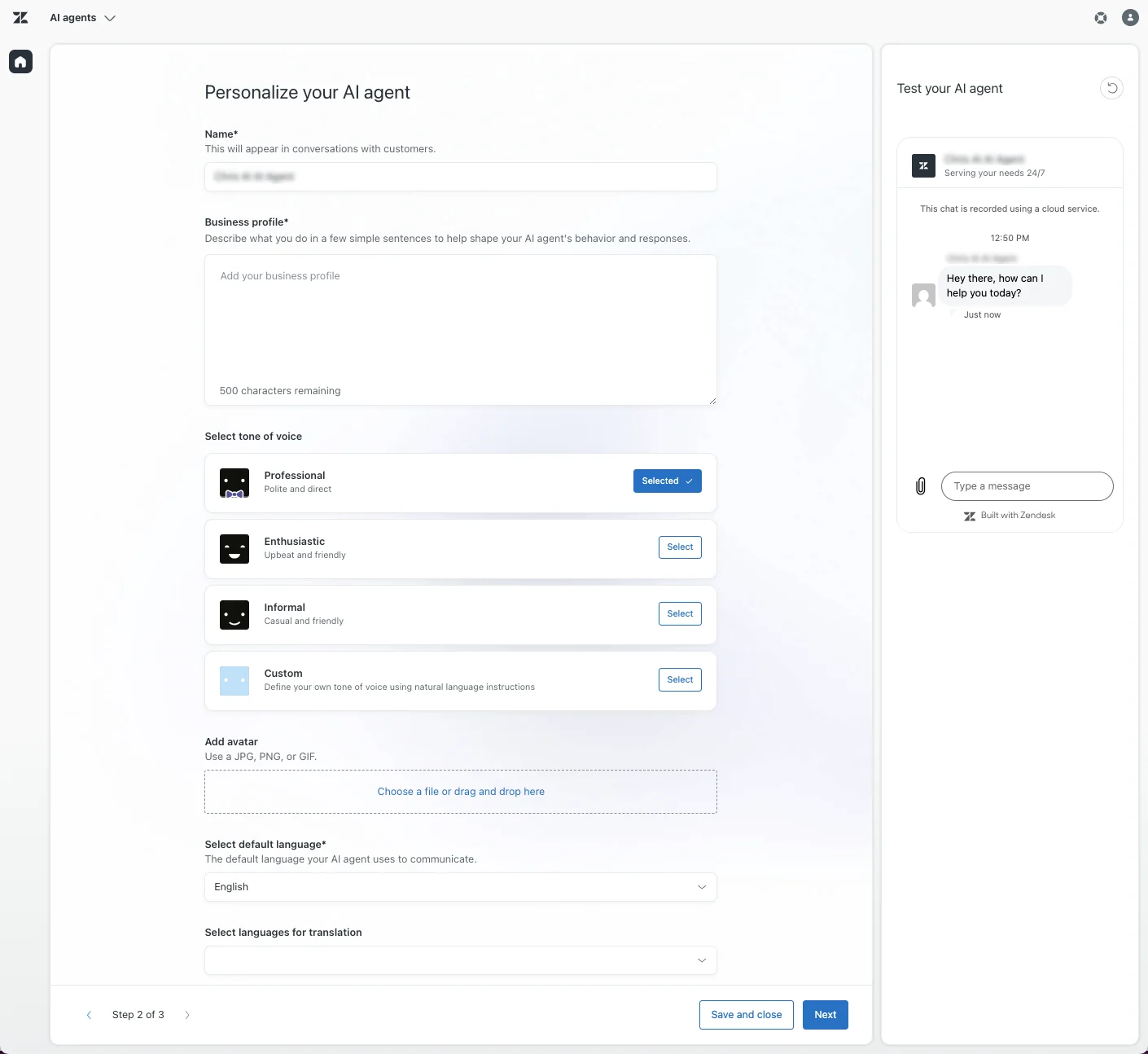
Three things matter here:
- Business profile. One or two factual English sentences describing what your company does. Zendesk explicitly warns against putting instructions or marketing copy here, it destabilises the agent. Keep it boring and descriptive.
- Tone of voice. Pick Professional (the default), Enthusiastic, Informal, or write a Custom style guide.
- Language. Set the default language (used when the customer's locale is unknown) and the additional languages auto-translation should cover.
3c. Set up the system replies.
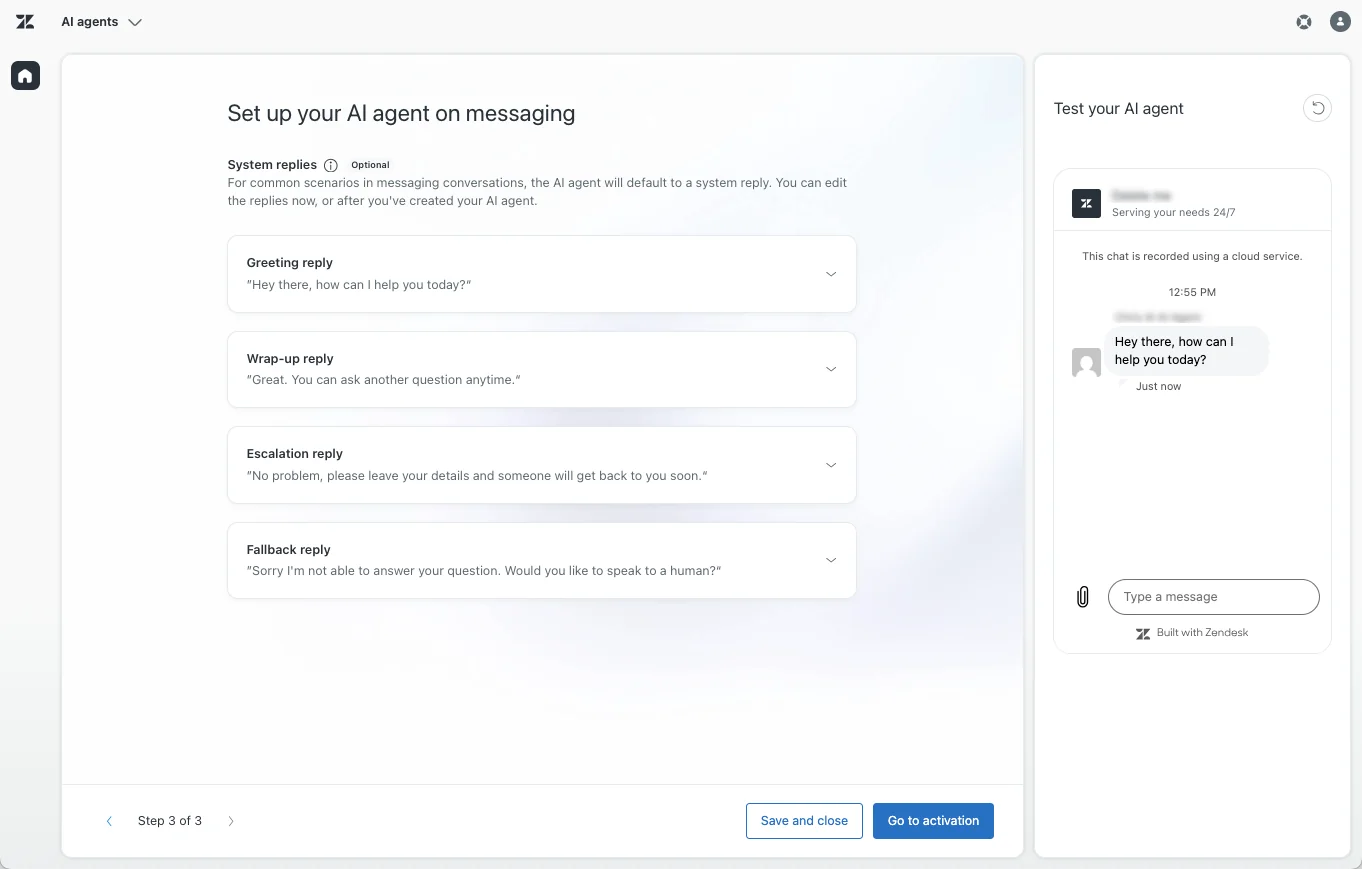
Four messages to customise: the Greeting, the Wrap-up (helpful vs unhelpful variants), the Escalation message, and the Fallback for when no use case matches. Turn on the Collect name, email, and reason for contact toggle if you want the agent to gather context before handing off, it saves your human team a clarification round.
Step 4 - Add use cases, procedures, and dialogues (optional but recommended)
Out of the box, an AI agent answers freeform questions from your connected knowledge sources. To shape conversation flows or trigger actions, you layer in three concepts:
- Use cases, topic buckets (
refund_request,order_status,password_reset) the agent uses to recognise what a customer is asking about and pick the right flow. - Generative procedures, flexible goal-oriented flows that adapt in real time. Less setup, less control.
- Dialogues, scripted branching trees. More setup, more deterministic. Messaging only, email AI agents cannot use dialogues, only procedures.
In Zendesk's own framing: "Procedures require less setup and maintenance, but offer less direct control over very fine details. Dialogues offer a lot of control, but require more setup and maintenance."
The dialogue builder UX is a recurring punching bag on r/Zendesk, one comment described it as "the most annoying interface in the world" (r/Zendesk comment). Worth knowing before you commit to deeply-scripted flows.
Step 5 - Add actions and API integrations (advanced capabilities)
This is where the advanced capabilities earn their keep. Two extras pull the agent beyond chat:
- Actions, discrete operations the agent is authorised to run against your CRM or session data (update a ticket field, look up a customer order, trigger a refund flow).
- Entities, typed slots that capture meaningful values from customer messages (email, order number, IBAN). They drive PII sanitisation and downstream API calls.
- API integrations, third-party system connections built in the integration builder. Used inside the "Integration or action flow" block in a dialogue to retrieve external data and continue conditionally.
Per Zendesk's own docs: "Your AI agent is capable of resolving a wide range of customer requests. However, you can make your AI agent even more effective creating: actions that allow the AI agent to perform actions based on the details of the session or your customer relationship management (CRM) system… API integrations that leverage information from other third-party systems you use during your workflows." This is what separates Advanced from Essential: Essential answers questions, Advanced takes actions.
Step 6 - Activate and monitor
When you're ready, click Go to activation, select the channels the agent should serve, and click Activate on channels. The Reporting dashboard tracks automation rate, resolution outcomes, escalation rate, and surface area for improvement.
Two warnings from the field:
- Wait at least 48 hours of live traffic before reading anything off the dashboard. Smaller samples tell you nothing.
- Set up a manual QA loop on the agent's first ~500 resolutions. A real human reading the bot's replies will catch tone, accuracy, and policy drift the dashboard misses.
Advanced AI agents in practice: dialogues, actions, and the things that bite
The Forethought / Ultimate.ai lineage is what makes Advanced worth the extra setup. The headline feature is the dialogue builder:
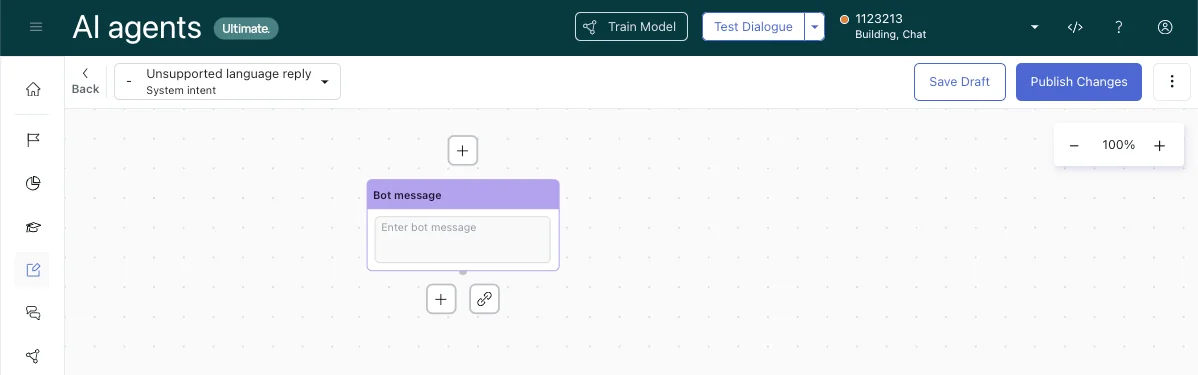
A dialogue is a scripted conversation flow assembled from block types: AI agent message, customer message, generative replies, conditional, integration or action flow, carousel, link to, availability, escalation. Each dialogue is linked to a reply, and each reply is linked to a use case.
A few mechanics worth knowing before you commit:
| Block | Use it for | Watch out for |
|---|---|---|
| AI agent message | Scripted message; supports HTML/Markdown with rich messaging on | Cannot be the only block in a flow |
| Customer message | Captures the customer's reply and branches on it | Cannot be the first block |
| Generative replies | Drops an LLM-generated answer mid-flow | Only as strong as your KB |
| Integration or action flow | Calls out to a third-party system | Needs the integration builder pre-wired |
| Carousel | Up to 10 visual option cards | Messaging only, not available for email |
| Availability | Respects business hours; gates on agent availability | Not for email |
| Escalation | Hand-off to a human; must be the last block in a branch | One of two ways out, the other is fallback |
A handful of constraints catch teams off-guard:
- Email AI agents can't use dialogues. Only generative procedures, only one connected channel email address per agent.
- Transliteration isn't supported. Russian must be Cyrillic, not Latin. Same for any language where the script differs from the local alphabet.
- Generative replies are scoped to messaging and email. Voice is in EAP and behaves differently.
- PII goes through sanitisation before OpenAI sees it.
<EMAIL>,<IBAN>, etc. are placeholdered before requests leave Zendesk. AI agent infrastructure and the OpenAI sub-processor are both EU-hosted under a DPA with SCCs.
What users actually say about Zendesk AI agents
Across G2 (4.3/5 from 6,837 reviews), Capterra (4.4/5 from 4,079 reviews), TrustRadius (8.6/10 from 1,082 reviews), and r/Zendesk, the sentiment splits cleanly along three lines.
What people genuinely like. Intelligent Triage and the AI-assisted ticket routing get praised in the same breath: customers who already have a clean Zendesk instance see real handle-time gains.
"Along with a powerful ticketing system that centralizes customer requests, supports customizable fields and tracks history for personalized support … the overall experience becomes smooth for handling customer requests, escalations and other queries with AI-powered ticketing routing and workflow triggers."
Abhishek R., Project Analyst, Marketing and Advertising, 2+ years of use, 4/5, Capterra review, May 13, 2026.
What people complain about. Onboarding the AI layer is the most-cited issue, even from reviewers who like the broader product:
"I think Zendesk is adding a lot of new features, especially with all of the AI integrations and their copilot. I think that the way that they are set up is a little burdensome to actually onboard."
G2 reviewer (role not surfaced), G2 Zendesk for Customer Service reviews.

And from the same r/Zendesk thread that surfaces in every third-party teardown, the team that pulled the plug:
"It's just terrible and a rip off. You can't even export the data on like what people ask the bot so you can sort it or manipulate it how you want. We stopped using it because ARs are a rip off, and it's a rushed product to get into the AI hype."
The own-goal. Multiple Capterra reviewers cite Zendesk's own AI chat as the case against trusting first-party AI for customer-facing work:
"The area that Zendesk needs to focus on is their own support. With their push to move to AI services, they have a very low bar with their own. First of all, you have to navigate the AI chat that never, and I mean NEVER gets what I'm asking. Then, there is a long wait to speak to a human. Very often, they don't ask clarifying questions and provide a link to an irrelevant article … As the leader of my support team, I would never pay for AI tools that provided this level of support."
Melony Y., Senior Director of Consumer Support, 2+ years of use, 4/5, Capterra review, December 16, 2025.
And the abandonment data point: at the ProductLab Conference 2025, a Zendesk-run live poll showed that only about 10% of AI agents built in the prior six months were still in use. The other 90% had been quietly retired, usually for the same reason: an unclean KB and an under-resourced setup.
Best practices that actually move the deflection rate
Six things separate the teams hitting 50-80% automation rates from the teams hitting 20% and giving up.
-
Spend more time on the help center than on the agent. Every team that hits a good automation rate spends weeks on KB hygiene before they spend hours on the agent. Articles need to be one-issue-per-article, written in customer language, and indexed in the right collections. Check that the relevant pages have been added through supported knowledge sources; a link in an article is not proof its destination has been indexed.
-
Start in draft mode, not autonomous. Run the agent as a suggestion engine for humans for the first two to four weeks. Read its drafts. Fix the wrong ones, but fix them in the KB, not in the agent's prompt. The pattern of bad replies tells you exactly which articles need work.
-
Keep your business profile boring. "We sell shoes online and ship to North America" beats "We deliver world-class footwear experiences that delight every customer." Zendesk's docs flag this explicitly: marketing copy in the business profile destabilises agent behaviour.
-
Use entities for anything you'd ask in a form. Order numbers, email addresses, account IDs, refund amounts: extract them as typed entities, not as freeform text. Entity capture is what makes downstream actions and API calls reliable, and it's also what enables the PII sanitisation layer.
-
Pre-purchase resolution packs once you have volume data. Two months of live traffic gives you a defensible forecast. Buying packs in advance gets you a better per-resolution rate than pure overage, but only after you know your number. Forecasting blind costs more than overage in expectation.
-
Run a real QA loop for the first 500 resolutions. The reporting dashboard gives you aggregate metrics. Reading actual transcripts catches the things aggregate metrics hide: tone drift, hallucinated policies, escalations that should have been resolutions. A junior team member reading 50 conversations a week is one of the highest-ROI things you can do.
The recurring theme: the agent itself is the easy part. The hard part is the boring KB cleanup, the manual QA, and the patience to wait for live traffic to tell you what to fix.
When a marketplace AI agent beats the first-party path
The Zendesk Marketplace currently lists 1,817 apps, with roughly 253 in the AI and Bots category. The marketplace is genuinely useful when first-party Zendesk AI doesn't fit your shape, usually because of pricing, simulation, or platform reach.
Flagship vendors worth knowing about:
| Vendor | Best for | Pricing model |
|---|---|---|
| eesel AI | Teams that want a support teammate they can configure through the dashboard or eesel CLI | Check current eesel pricing |
| Ada | Large CX orgs that want a separate AI platform with its own reasoning engine | Platform pricing on request |
| Forethought Assist | Currently being absorbed into native Zendesk; agent-assist on the marketplace until then | Free to install, platform priced |
| DigitalGenius | E-commerce shops handling refunds, order status, returns via deep API connections | Platform pricing on request |
| Stylo Assist | Zendesk-native AI copilot built by ex-Zendesk employees; 5-star, 200+ installs | Free 14-day trial, then per-seat |
| Macha | Lightweight ChatGPT copilot for drafting and translation; 100+ installs | Per-user paid tiers |
| Aisera | Generative auto-resolution plus 1,200+ pre-built workflows for IT and CX | Platform pricing on request |
| Kaizo | AI-driven QA and agent coaching; 200+ installs | Per-seat paid |
A few worth flagging: Klaus (now native Zendesk QA, acquired Jan 2024), Tymeshift (now Zendesk WFM, acquired June 2023), and Forethought (acquisition completed 2026) used to live here and have since folded into native Zendesk surfaces.
A marketplace option is worth evaluating when its integrations, review process, or operating model fit your team better. Compare it using the same representative tickets and action restrictions as the native agent rather than assuming equal automation rates.
Review a Zendesk rollout through eesel CLI
eesel’s Zendesk integration connects a separate support teammate to your existing helpdesk. eesel CLI provides terminal access to that teammate’s configuration and work. It does not change the native Zendesk AI-agent settings described above.
The CLI operates the same eesel agent and workspace as the dashboard. A support manager can review instructions in the dashboard while a developer uses commands to inspect connections and activity. JSON results also let coding agents such as Claude Code, Cursor, or Codex assist with that work.
Inspect the workspace before connecting more systems
With Node.js 18.17 or newer, log in to the intended workspace:
npx @eesel/cli login
npx @eesel/cli whoami
npx @eesel/cli agents
Replace AGENT_ID with the intended teammate’s ID from the agents output. Before adding a connection, inspect what already exists:
npx @eesel/cli integrations --agent AGENT_ID
npx @eesel/cli automations --agent AGENT_ID
npx @eesel/cli instructions --agent AGENT_ID
Connecting Zendesk may let existing enabled automations act on its tickets. Review their scope and permitted actions before adding the connection; do not assume a teammate is inactive just because it is new to you.
If Zendesk is not connected, start the connection with:
npx @eesel/cli integrations connect zendesk --agent AGENT_ID
The Zendesk integration guide distinguishes public-help-center access from a full connection with tickets, macros, triggers, and actions. A person completes the full connection’s authorization in the browser. For a specific brand, use the staff sign-in and intended brand subdomain; each brand connects separately.
Separate source readiness from answer quality
After setup, inspect status to see connections and whether source content has downloaded. Check the selected help center, macros, and ticket sources. If you add an approved document with files upload, remember that it adds knowledge but does not rewrite standing instructions.
Source counts are useful operational evidence, not a quality score. Test a sample with routine questions, missing details, and cases requiring escalation. Check the answers against approved policy, not only whether the commands succeeded.
Start with a reviewable action
eesel’s Zendesk guide recommends internal-note drafts as a starting point: the teammate prepares a reply and a human reviews and sends it. Automatic ticket work needs a configured automation and permitted actions. Creating an automation can leave it enabled, so review its scope and action settings before creation.
Use the CLI to inspect ongoing work:
npx @eesel/cli automations --agent AGENT_ID
npx @eesel/cli activity --agent AGENT_ID
npx @eesel/cli approvals --agent AGENT_ID
Compare the activity with the actual ticket in Zendesk. Did it leave the intended internal note? Did it escalate the exception? Did another native or third-party automation also reply? Those checks determine whether to expand the rollout.
Give a coding agent a clear task
For example: “Inspect this eesel agent’s Zendesk sources, instructions, and automations. Report missing setup and actions that can send customer replies. Ask before making changes.”
The coding agent can read JSON results and follow up on errors. That instruction to ask first is separate from eesel’s approval process for held teammate actions. CLI chat can invoke actions, so do not treat every chat request as read-only.
For scripts, configure EESEL_API_URL and EESEL_API_TOKEN securely and select the agent explicitly. Use --help for command options. --dry-run prints a write’s server request without sending it; it does not simulate the teammate’s performance.

Try eesel. Once the workspace is ready, inspect the teammate’s configuration through the CLI and plan one internal-note workflow. Review its results before allowing broader actions, and check current eesel pricing separately from your Zendesk plan.
Frequently asked questions
What is a Zendesk AI agent?
A Zendesk AI agent is the customer-facing autonomous bot that lives inside Zendesk Service. It reads incoming messages, pulls answers from your help center, and (using the advanced capabilities, now included in every Suite and Support plan) runs scripted dialogues or generative procedures, takes authorised actions, and calls third-party APIs to resolve tickets end-to-end. The agent-facing complement, Zendesk Copilot, is a separate product - it drafts replies for humans, it doesn't replace them. If your help center isn't clean, neither will deflect much; if you want terminal access to a separate teammate’s configuration, eesel AI is a separate teammate whose setup you can inspect through eesel CLI.
What's the best AI agent for Zendesk?
How much does Zendesk Advanced AI cost?
Zendesk expanded access to the capabilities previously sold as Advanced across Suite and Support plans in May–June 2026. What stays is the usage meter. Zendesk now publishes it: $1.50 per automated resolution on a committed pack and $2.00 pay-as-you-go, above an allowance of 5 to 10 resolutions per agent per month. We break the full resolution-pricing model down in the costs section.
What is a Zendesk marketplace AI agent?
A Zendesk marketplace AI agent is a third-party AI app installed from the Zendesk App Marketplace that plugs into your existing Zendesk account. The marketplace lists roughly 250 apps in the AI and Bots category - flagship vendors include Ada, eesel AI, DigitalGenius, Stylo, and Macha. They install in minutes and bring their own pricing models - usually flat per-ticket or per-seat rather than per-resolution.
What does Zendesk advanced AI pricing look like in real numbers?
For a 10-agent team on Suite Professional ($115 / agent / month annual), seats are $1,150 / month and the plan includes 100 automated resolutions. If 6,000 monthly conversations all qualify as verified resolutions, you have 5,900 above the allowance, which is $8,850 on a committed pack or $11,800 pay-as-you-go. Total: about $10,000 to $12,950 / month, with the AI meter running roughly 8x the seat cost. Both per-resolution rates are on the official Zendesk pricing page, in the compare-features table rather than on the plan cards.