Why teams look for a HubSpot Service Hub alternative
Let's be fair to HubSpot first, because it earns a lot of its reputation. Service Hub runs natively on HubSpot's Smart CRM, so a support rep sees every deal, marketing touch, and past conversation on one record. There's a genuinely free tier for up to two users, and HubSpot cites a 57% increase in ticket close rate and 39% less time closing tickets with its Breeze Customer Agent. If your whole company already runs on HubSpot, the gravity is real.
The friction shows up when you scale. The headline per-seat price is only the first line of the invoice. HubSpot Service Hub pricing is Professional from $90/seat/month and Enterprise from $150/seat/month, but Professional carries a minimum of 3 seats and Enterprise a minimum of 10, plus a mandatory one-time onboarding fee of $1,500 (Professional) or $3,500 (Enterprise). On top of that, AI features draw down HubSpot Credits at roughly $9 to $10 per 1,000, and the Breeze Customer Agent spends 50 of them per resolved conversation.
Independent pricing write-ups keep landing on the same word: confusing. As one 2026 HubSpot pricing breakdown put it, quoting a real user:
"every single sensible feature requires a price from 20€/m to 800€/m"
The same analysis notes that between hubs, seat pricing, onboarding fees, and extra credits, the final number "often ends up far higher than expected." The onboarding fees alone surprise people, because they hit in year one on top of an annual prepayment. An Encharge pricing teardown confirms the exact schedule: "Sales and Service Professional Hubs, $1,500... and for Sales and Service Enterprise, it is $3,500," with "all Professional plans require a yearly commitment."
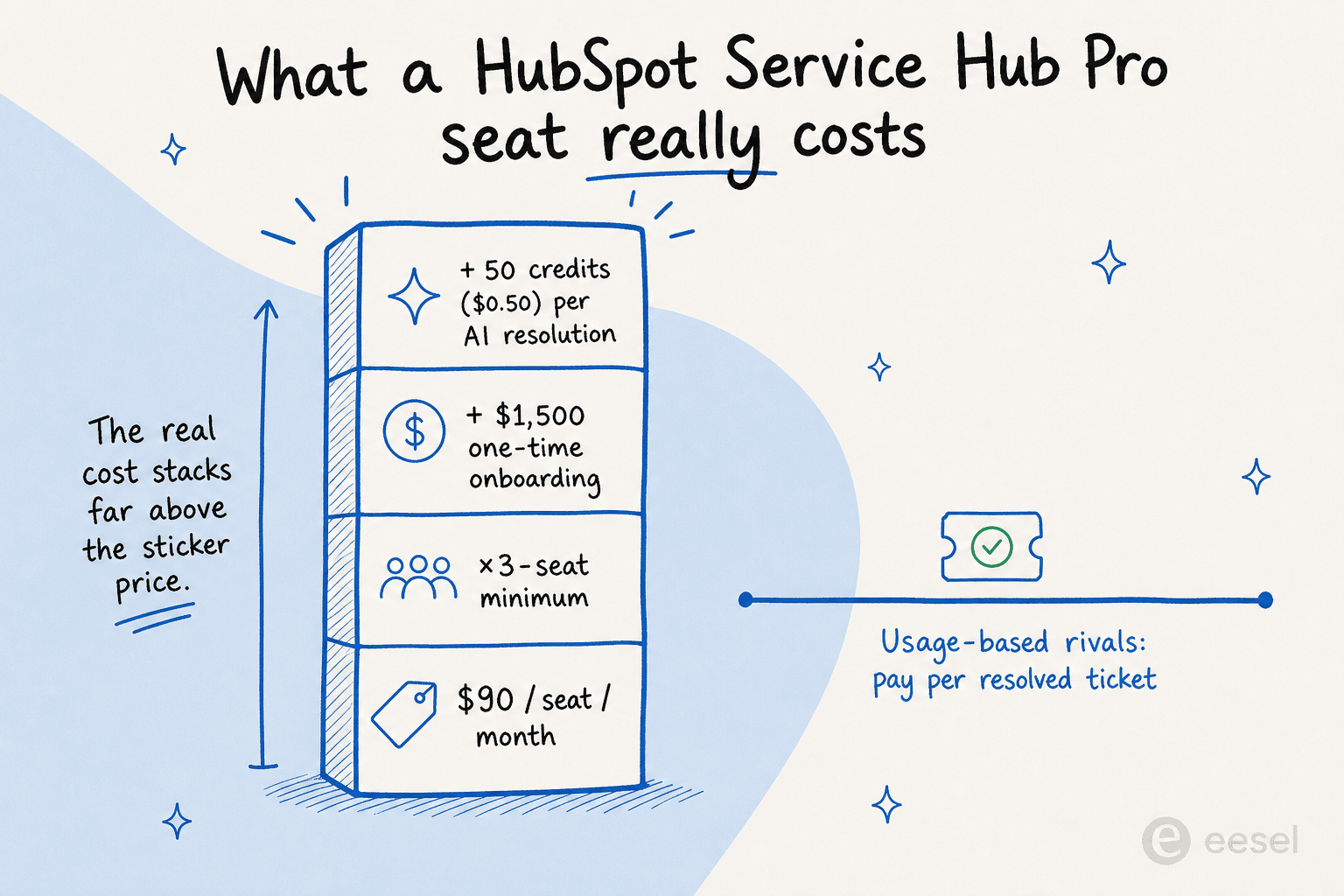
Then there's the AI billing. In April 2026 HubSpot moved Breeze to outcome-based pricing, "from $1.00 per conversation to $0.50 per resolved conversation," which sounds like a win. But analysts were quick to point out the catch. HubSpot counts a conversation as "resolved" when the agent shares a content source or takes an action and there's no human handoff within 72 hours, which, as the same write-up notes, "isn't the same as 'the customer left happy.'" And as SaaStr argued, once resolution rates climb, "per-resolution pricing and per-conversation pricing are almost the same thing."
None of this makes Service Hub a bad product. It makes it an expensive, sticky one, and that combination is what sends teams looking, whether for a cheaper AI helpdesk app or a way to keep HubSpot and just fix the AI. If you want the full verdict on the native AI before you decide, we wrote a separate honest review of whether HubSpot Service Hub AI is worth it.
How we picked these alternatives
We weren't chasing a longer list, we were chasing fit. Every tool here had to clear four bars: a real AI agent (not just canned replies), pricing that's clearer or kinder than HubSpot's seat-plus-credits stack, a path that doesn't demand a six-week migration, and enough public, verifiable user voice to back the claims. We've pulled real pricing numbers, real review quotes, and the actual product surfaces so you're not reading a rewrite of a press release.
One distinction matters before the list. Most of these are help desk replacements: you'd move your tickets, channels, and team onto a new platform. One of them, eesel AI, is an AI layer that runs on top of the helpdesk you already have, including HubSpot itself. Keep that fork in mind as you read, because it changes the size of the decision entirely.
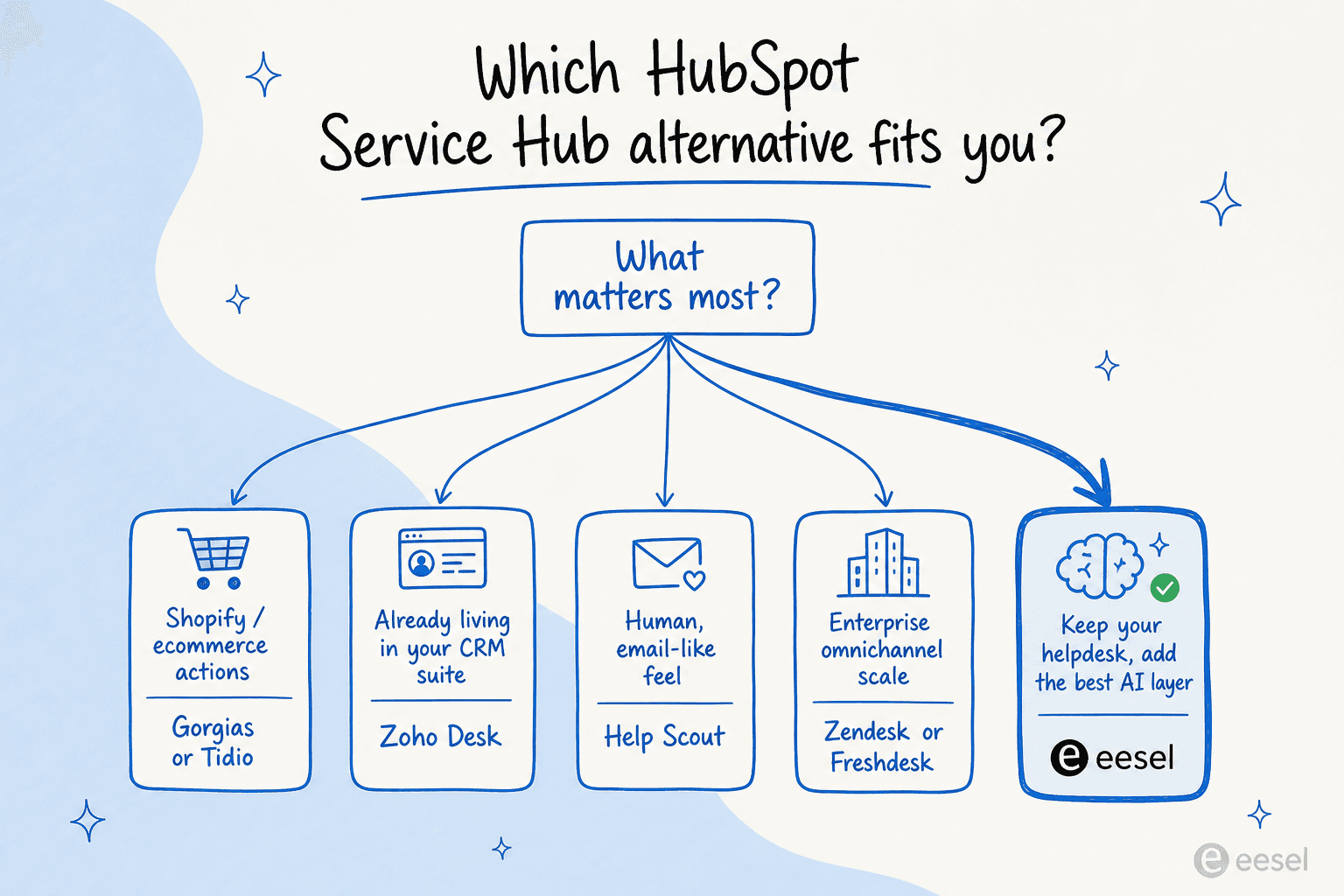
The 7 best HubSpot Service Hub AI alternatives at a glance
| Tool | Best for | Starting price (helpdesk) | AI / automation pricing | Free tier | Standout strength |
|---|---|---|---|---|---|
| eesel AI | Adding AI to your existing helpdesk | No per-seat fee | Usage-based, ~$0.40 per ticket | $50 free trial credit | Sits on top of HubSpot, Zendesk, Freshdesk, Gorgias and more |
| Zendesk | Enterprise omnichannel scale | $19/agent/mo (no AI), $55 for AI | Per automated resolution (sales-gated) | Trial only | Mature platform, 1,800+ integrations |
| Freshdesk | A balanced mid-market AI helpdesk | $19/agent/mo | Freddy: first 500 sessions free, then $49/100 | Free for 1-2 agents, 6 months | Vertical AI Agents, clean workspace |
| Zoho Desk | The lowest flat price | $7/agent/mo (annual) | Zia included; advanced AI on Enterprise | Free Forever, 3 users | Cheapest credible Zendesk-class option |
| Help Scout | Small teams wanting a human feel | $25/user/mo | AI Answers $0.75/resolution | Free up to 5 users | Email-like simplicity, fast to learn |
| Gorgias | Shopify and ecommerce brands | $10/mo (ticket-based) | AI Agent $0.90 per resolution (annual) | Trial only | Deep native Shopify actions |
| Tidio | SMBs that lead with live chat | $24.17/mo | Lyro $0.50/conversation | Free, 50 Lyro chats | Claude-powered Lyro, 67% resolution claim |
Prices are entry points in USD as of June 2026; AI usage stacks on top of most help desk plans. Now the detail.
1. eesel AI: best for adding AI to the helpdesk you already use
Best for: teams that don't want to rip out HubSpot (or Zendesk, Freshdesk, Gorgias, or Front) but do want AI that actually resolves tickets.

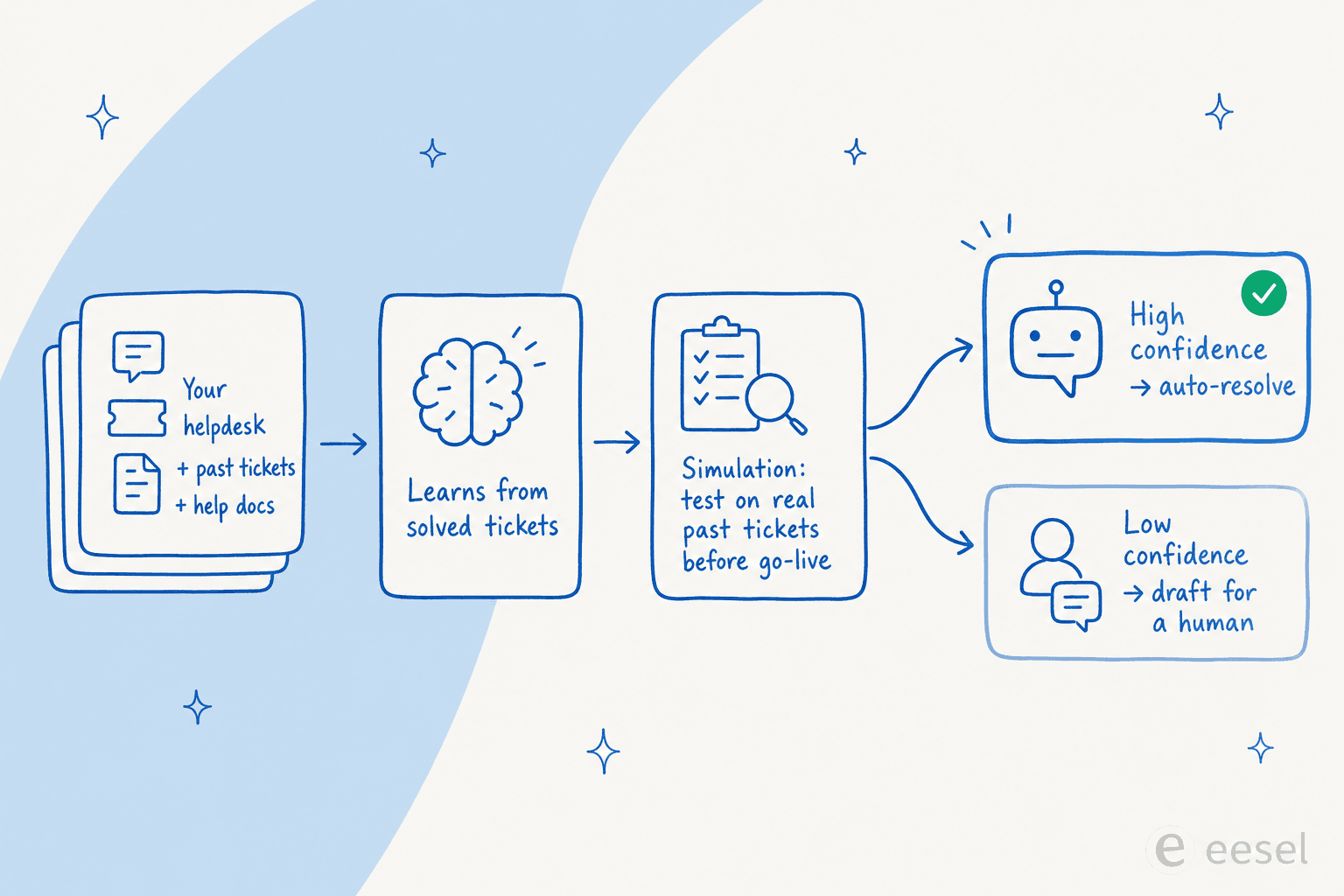
This is the alternative that doesn't make you migrate. eesel AI is an AI layer that plugs into your current helpdesk and learns from your solved tickets, help docs, and macros on day one, then drafts replies, triages, and resolves tier-1 conversations. Because it connects to HubSpot, Zendesk, Freshdesk, Gorgias, Slack, and 100+ other tools, you can leave your existing setup exactly where it is and change only the part that's underperforming: the AI.
The piece that wins deals is control. Instead of firing on every ticket, eesel uses confidence-based routing, so the AI handles what it's sure about and quietly leaves the rest for a human. That maps directly onto the single most common objection we hear from buyers, the fear that an AI will confidently answer wrong. As one CX lead at a DTC supplements brand put it to us, they needed "an AI who is only handling the tickets that it's confident to handle, and all the other ones, leave them alone." Before going live, you can run a simulation against thousands of your past tickets to see projected resolution rates by topic, then close the gaps.
The results show up quickly. Gridwise reported real numbers in a G2 review:
"In the first month, eesel is resolving 73% of our tier 1 requests... Our team implemented and achieved results quickly during our 7-day trial."
Pros:
- No migration: keeps your existing helpdesk and CRM in place.
- Learns from past resolved tickets, not just your help-center articles.
- Confidence-based routing and a simulation mode that de-risks go-live.
- Usage-based pricing with no per-seat fee, no platform fee, and no minimums.
Cons:
- It's an AI layer, not a full ticketing system, so you still need a helpdesk underneath.
- SOC 2 is listed as in progress rather than certified (EU data residency and DPAs are available).
Pricing: Usage-based and transparent: roughly $0.40 per ticket or helpdesk conversation, no per-seat charge, no minimum, with a $50 free-trial credit and no credit card to start. Commit to $300/month for the year and you pay 25% less; Enterprise adds a flat $1,000/month platform fee for SSO, HIPAA, and a dedicated engineer.
Our take: If your real problem is "HubSpot's AI is too expensive or too weak" rather than "HubSpot is bad," this is the lowest-risk move on the list. You change the AI, not the whole stack. Teams replacing the entire platform should read on; everyone else should start here. See exactly how it stacks up against HubSpot's native agent in our eesel vs HubSpot Breeze comparison.
2. Zendesk: best for enterprise omnichannel scale
Best for: larger support orgs that want a mature, omnichannel platform and have the budget to match.
Zendesk is the incumbent's incumbent, now rebuilt around what it calls the Resolution Platform: AI agents, human agents, ticketing, voice, and analytics in one system, with self-improving agents folded in from its Forethought acquisition. It claims 22,000+ AI customers and 4.8 billion resolutions delivered, and it was named a Leader in the 2025 Gartner Magic Quadrant for CRM Customer Engagement Center. With 1,800+ marketplace apps, it bends to almost any workflow.
The catch is the same shape as HubSpot's: the price you quote is rarely the price you pay. The cheap-sounding $19/agent/month Support Team plan has no AI at all; AI agents first appear on Suite Team at $55/agent/month, and the AI itself bills separately per automated resolution on top of seats, with $50/agent/month add-ons like Copilot stacked beside it.
Pros:
- Deep omnichannel coverage (messaging, voice, email, social) and strong reporting.
- Huge integration marketplace and enterprise governance features.
- AI agents you pay for only on successful resolution.
Cons:
- Layered pricing (seats + per-resolution AI + add-ons) is easy to under-estimate.
- Enterprise pricing is sales-gated, and the entry price excludes AI.
Pricing: Support Team $19, Suite Team $55, Suite Professional $115 per agent/month (annual); AI resolutions and Copilot are extra. Full numbers in our Zendesk pricing guide.
Our take: Pick Zendesk if you're a scaling org that needs the breadth and can manage the bill. If you want Zendesk's reliability but not its AI surcharge, this is a classic case for keeping Zendesk and adding eesel on top instead, which we cover in our Zendesk AI alternative piece.
3. Freshdesk: best for a balanced mid-market AI helpdesk
Best for: mid-market teams that want capable AI and a clean workspace without enterprise pricing.
Freshdesk is Freshworks' help desk, built around a central agent workspace it calls the Command Center, and it's trusted by 74,000+ businesses including Klarna and PepsiCo. Its 2025/2026 story is a hard pivot to agentic AI: Freddy AI Agent ships 50+ prebuilt agentic workflows that take action rather than just suggest, and Freshworks cites up to 80% resolution and a sub-3-month payback in its benchmark reporting. It tends to feel less sprawling than Zendesk while covering most of the same ground.
Pricing is friendlier at the door. The standout is a genuinely free tier for 1 to 2 agents for 6 months, with paid tiers at Growth $19, Pro $55, and Enterprise $89 per agent/month. Freddy's Email AI Agent includes the first 500 sessions, then runs $49 per 100 sessions, a usage cost that climbs with volume.
Pros:
- Strong, action-taking Freddy AI agents with a no-code studio.
- Clean unified workspace; good usability ratings on G2 and TrustRadius.
- A real free on-ramp for tiny teams.
Cons:
- Freddy session pricing scales up for high-volume teams.
- Advanced AI and analytics live on the pricier tiers.
Pricing: Growth $19, Pro $55, Enterprise $89 per agent/month (annual); Freddy AI billed per session after the free 500. See our Freshdesk pricing breakdown and, if you're weighing the two incumbents, HubSpot vs Freshdesk.
Our take: Freshdesk is the most balanced full-platform switch on this list for a mid-market team. It's the pick when you want to leave HubSpot entirely but don't want Zendesk's price tag or complexity.
4. Zoho Desk: best for the lowest flat price
Best for: budget-conscious teams, especially anyone already in the Zoho ecosystem.
If price is the whole reason you're leaving HubSpot, Zoho Desk is the obvious first stop. It's a full omnichannel ticketing platform with a Free Forever plan for 3 users and paid editions starting at just $7/agent/month, which Reddit users routinely describe as "almost everything that Zendesk does at like half the cost." Its AI assistant, Zia, spans self-service bots, in-ticket assist, and admin automation, and it's included on supported plans rather than metered per resolution.
The honesty check: Zia is the weak spot. Reddit sentiment is blunt, with users calling it "a trainwreck of unhelpful responses," and the more useful AI features (Answer Bot, sentiment analysis, auto-tagging) are gated to the $40/agent/month Enterprise tier, which "prices out the SMB segment that represents Zoho's core market." There's also a real learning curve, with G2 logging over 100 "learning curve" mentions.
Pros:
- The cheapest credible Zendesk-class help desk, with a true free tier.
- Strong automation (Blueprint, SLAs, routing) praised as excellent value.
- Deep integration with the wider Zoho suite.
Cons:
- Zia's AI quality lags the leaders, and the best AI is Enterprise-only.
- Cluttered UI and a steeper setup than its simpler rivals.
Pricing: Free Forever (3 users), Express $7, Standard $14, Professional $23, Enterprise $40 per agent/month (annual). Details in our Zoho Desk pricing guide.
Our take: Zoho Desk wins on raw cost. If you love the price but find Zia underwhelming, the smart move is to keep Zoho and layer a stronger AI agent on top, which several teams do to compensate. Our Zoho Desk AI review goes deeper on where Zia falls short.
5. Help Scout: best for small teams that want a human feel
Best for: relationship-driven small businesses that want a simple, email-like inbox, not heavyweight ticketing.
Help Scout takes the opposite approach to HubSpot's CRM-everything model: a clean, shared inbox that feels like email, a Docs knowledge base, and the Beacon widget, all learnable in "less than an hour." It's used by 12,000+ companies, and its AI Answers agent resolves about 73% of interactions while the Inbox Assistant drafts and summarizes for agents. For a small team that finds enterprise help desks oppressive, the simplicity is the feature.
Two honest caveats. AI Answers is a usage add-on at $0.75 per resolution, which reviewers flag as a hidden scaling cost (at 1,000 resolutions that's another ~$750/month). And Help Scout's 2025-2026 pricing whiplash, switching from per-seat to per-interaction and then reverting, burned some trust; one Reddit user said they "lost all trust with this flip-flopping on pricing."
Pros:
- Genuinely easy to adopt; the cleanest inbox on this list.
- Free plan for up to 5 users, and a solid AI resolution rate.
- A warm, human support experience by design.
Cons:
- AI Answers pricing stacks on top of seats and adds up at volume.
- Thinner reporting and fewer advanced features; scaling teams can outgrow it.
Pricing: Free (up to 5 users), Standard $25, Plus $45, Pro $75 per user/month (annual); AI Answers $0.75 per resolution. More in our Help Scout pricing guide and the head-to-heads with Zendesk and Freshdesk.
Our take: Help Scout is the friendliest landing spot for a small team leaving HubSpot's complexity behind. Just model the AI Answers cost at your real volume before you commit, and weigh the best Help Scout alternatives if you expect to scale fast.
6. Gorgias: best for Shopify and ecommerce brands
Best for: online retail brands, especially on Shopify, that want AI to drive sales as well as resolve tickets.
Gorgias is the ecommerce specialist, built around native Shopify integration so deep that orders, refunds, and subscriptions can be handled right inside a conversation. It powers support for 40% of Shopify brands, and its AI Agent (pre-trained on 1B+ ecommerce conversations) both deflects support and upsells, with case studies like Orthofeet hitting 56% automation in under two months. Unlike most tools here, Gorgias prices by billable tickets, not seats, which suits lean ecommerce teams with high volume.
The recurring objection is cost. The community rule of thumb is that Gorgias pays off once 40%+ of your tickets need direct Shopify actions, and below that it can feel pricey, especially since each AI Agent resolution is $0.90 (annual) and also counts as a billable ticket. One e-commerce director we spoke with churned after finding she had to hand-train the AI through multiple correction rounds on day one.
Pros:
- Best-in-class Shopify actions; AI that genuinely drives revenue.
- Ticket-based pricing fits high-volume, lean teams.
- Strong automation during peak season.
Cons:
- Expensive unless a big share of tickets need store actions.
- AI resolutions double as billable tickets, so usage compounds.
Pricing: ticket-based, Starter $10, Basic $50, Pro $300, Advanced $750/month; AI Agent $0.90 per resolution on annual plans. See our Gorgias AI pricing breakdown.
Our take: If you sell on Shopify, Gorgias is the most natural fit on this list. If you love it but balk at the AI Agent surcharge, note that eesel also integrates with Gorgias, so you can keep the inbox and run a cheaper, usage-based AI. Start with Gorgias AI for Shopify.
7. Tidio: best for SMBs that lead with live chat
Best for: small and mid-market ecommerce teams whose front door is a live chat widget.
Tidio bundles live chat, a help desk, and an AI agent called Lyro into one SMB-friendly product, trusted by 300,000+ businesses. The interesting wrinkle: Lyro is powered by Anthropic's Claude rather than ChatGPT, and Tidio claims a market-leading 67% resolution rate, backed by a money-back guarantee if you don't clear 50%. Reviewers consistently praise how fast it installs ("no technical knowledge required") and how well Lyro stays grounded in your own content.
The watch-out is pricing complexity at scale. Tidio's model layers billable conversations, Lyro conversations, and Flows visitors, and the jump from Growth to the Plus plan ($749/month) is steep. For a small store it's cheap and quick; for a fast-scaling one, model the usage carefully.
Pros:
- Claude-powered Lyro with a strong, guarantee-backed resolution claim.
- Genuinely fast, no-code setup; 4.8/5 on the Shopify App Store.
- Affordable entry with a real free plan.
Cons:
- Multi-axis usage pricing gets hard to predict at volume.
- Big step up to higher tiers; lower plans are email-support only.
Pricing: Free (50 Lyro chats), Starter $24.17/month, Growth from $49.17/month, Plus from $749/month; Lyro $0.50 per conversation. More in our Tidio pricing guide and the best Tidio alternatives.
Our take: Tidio is the easiest, cheapest entry for a small ecommerce team that lives in live chat. It's the pick when you want AI live today without a project plan, and it pairs well with the wider field of best AI chatbot builders.
So which HubSpot Service Hub alternative should you pick?
Strip away the noise and the decision is mostly about one question: do you want to switch help desks, or just fix the AI?
If you're committed to a full switch, match the tool to your shape. Zendesk and Freshdesk are the safe omnichannel bets for scaling orgs, with Freshdesk the gentler on budget. Zoho Desk wins on flat price, Help Scout on simplicity, and Gorgias or Tidio on Shopify-native commerce.
But here's the reframe worth sitting with: most teams don't actually hate their helpdesk, they hate what the native AI costs or how little it does. If that's you, the cheapest, fastest fix isn't a migration at all. It's keeping HubSpot (or whatever you run) and adding a dedicated AI helpdesk agent on top.
Try eesel

eesel AI is the one alternative here that doesn't ask you to leave HubSpot Service Hub at all. It connects to your existing helpdesk, learns from your past tickets and docs, and resolves the easy conversations with confidence-based routing, so the AI only handles what it's sure about. You can simulate it against thousands of your real past tickets before it ever touches a live conversation, and the pricing is usage-based with no per-seat fees, no minimums, and no onboarding surcharge.
Teams like Gridwise saw 73% of tier-1 tickets resolved in the first month, and the whole thing is self-serve to set up. You can start free with a $50 trial credit, no credit card needed, and see your projected resolution rate before you commit.
Frequently Asked Questions
Why do teams look for a HubSpot Service Hub alternative?
How much does HubSpot Service Hub cost compared to alternatives?
Can I keep HubSpot and still get better AI support?
What is the cheapest HubSpot Service Hub alternative with AI?
Are these HubSpot Service Hub alternatives good for ecommerce?


Article by
Riellvriany Indriawan
Riell is a designer and writer at eesel AI with about two years of experience researching CX platforms, AI chatbots, and helpdesk software. She combines her design background with a sharp eye for how these tools actually look and feel in practice — making her comparisons unusually visual and user-focused.