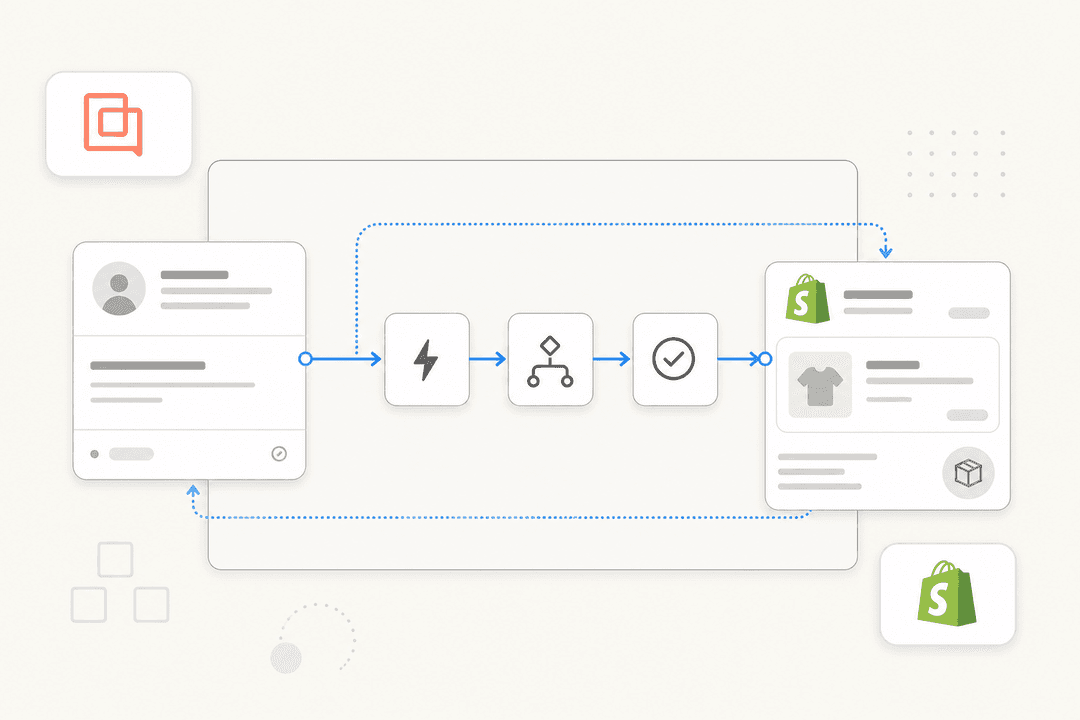
Why Gorgias is the Shopify-first helpdesk
Most helpdesks treat Shopify as one integration among hundreds. Gorgias built the entire product around it. It's Shopify's only Premier Partner for CX, it serves 17,000+ brands, and it claims to have driven over $500M in revenue through support conversations at an average 4.2x ROI. On G2 it sits at 4.6/5 across 560+ reviews, where the two things reviewers praise most are ease of use and, predictably, the Shopify integration.
Shopify's own team will happily say so on the record:
"Gorgias deeply understands ecommerce brands. Its innovative conversational AI and unmatched Shopify integration help businesses harness customer conversations for impactful, scalable results."
Here's the integration page in motion, so you can see how Gorgias frames itself as the ecommerce helpdesk built for Shopify rather than a generic ticketing tool:
If you're weighing it against the usual suspects, that Shopify-native depth is the whole argument. We've covered the Gorgias vs Zendesk for ecommerce debate separately, and the short version is the same one you'll hear on Reddit: Zendesk gets the job done, but you bend your workflow around it, whereas Gorgias bends around Shopify.
What the Shopify integration actually does
The reason Gorgias feels different on a Shopify store is that order data lives inside the ticket, not behind a tab. When a customer messages you, their profile, latest orders, cart, and connected apps (Recharge, Aftership, Yotpo) show up in the sidebar, and you can refund, cancel, duplicate, or edit a Shopify order without ever opening the Shopify admin.
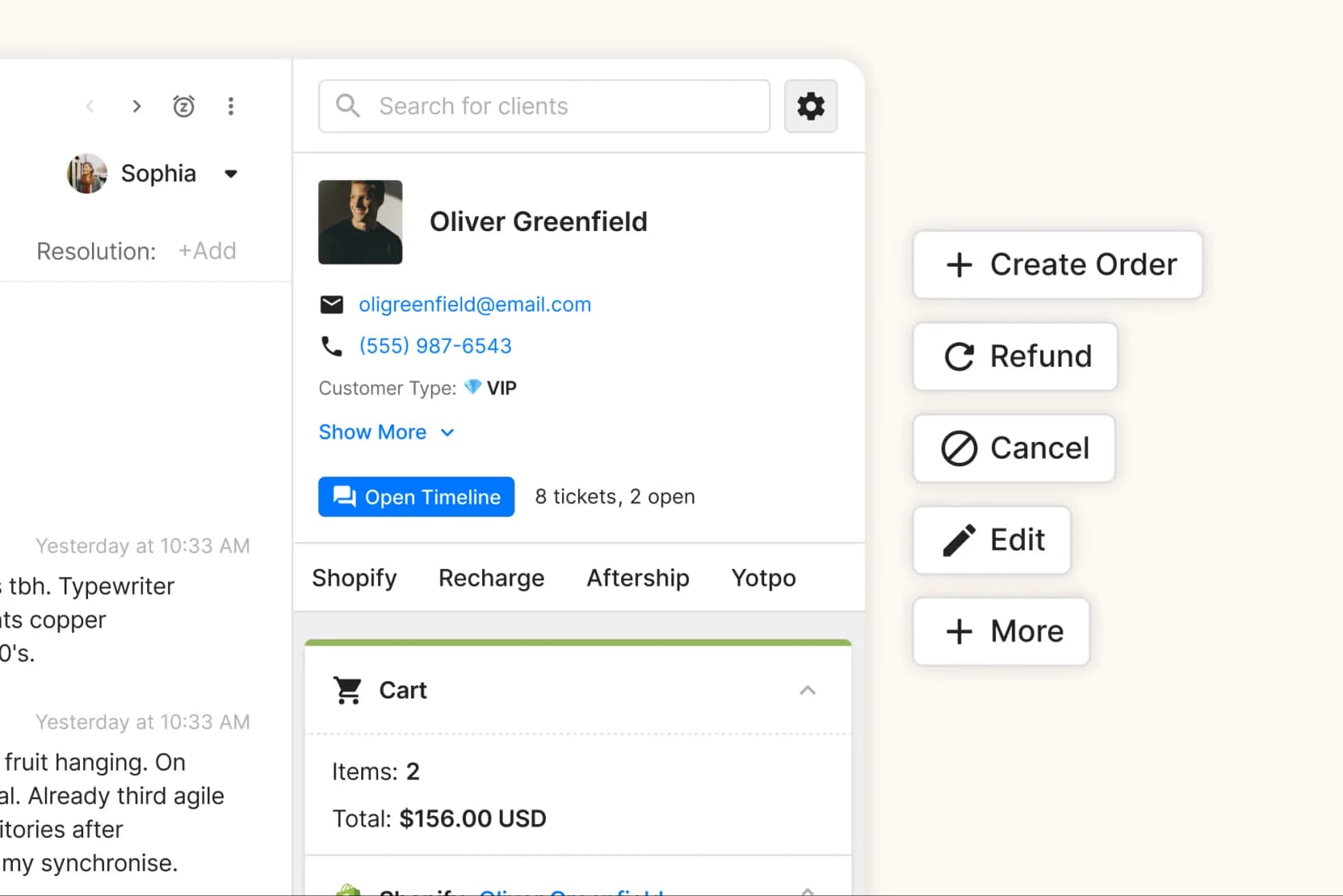
Gorgias organizes its Shopify integration around four jobs:
- Generate revenue. Dynamic product recommendations based on browsing and cart contents, adaptive AI that issues unique discount codes, and chat in checkout to catch customers before they abandon.
- Automate support. Real-time order tracking, time-sensitive order edits before fulfillment, and multi-step updates chained across Shopify and your stack. Gorgias claims up to 60% of support can be automated.
- Drive efficiency. Cancel, refund, duplicate, and edit orders from one tab, prioritize tickets by spend, and manage multiple Shopify brands from a single dashboard.
- Personalize. Rich customer profiles with full order history, customer variables that auto-fill names and order numbers into replies, and voice/SMS with context attached.
The payoff teams talk about is consolidation. One CX leader put a real number on it:
"We used to use Salesforce but Gorgias integrates much better with Shopify and other ecommerce tools. While Salesforce needed heavy development, Gorgias connected to our entire stack with just a few clicks. We save $100k/year by switching."
That's the bar to keep in mind as we go: the value isn't "Gorgias has a Shopify integration." It's that the Shopify order data is wired deeply enough to actually take action on, which is exactly what makes the next sections (setup, order data in replies, the AI Agent) matter.
Setting up Gorgias on your Shopify store
Connecting the two really is a few-clicks job, no developer required. Per the Gorgias Shopify 101 doc, here's the flow:
- In Gorgias, go to Settings → App Store → All Apps → Shopify and click Add Shopify, or start from the listing on the Shopify App Store directly.
- On the Shopify App Store listing, click Add app to install it on your store.
- If you already have a Gorgias helpdesk, enter your Gorgias subdomain and click Find My Account to link the two. If you're new, click Create Your Account instead.
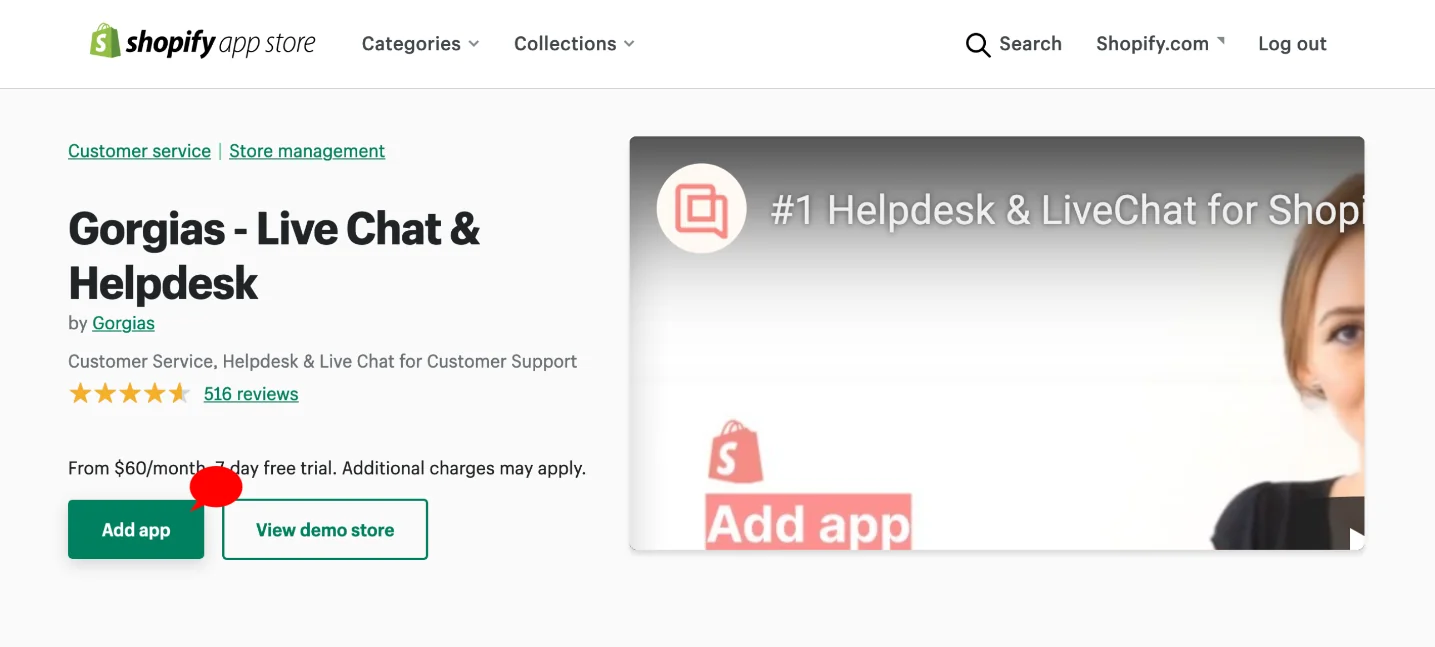
Once connected, every incoming ticket shows the customer's profile and orders in the right-hand sidebar, and that sidebar is the data source for everything else (macros, variables, automations). Selling under several storefronts? You can connect multiple Shopify accounts to one Gorgias dashboard, and multi-store connections are unlimited on every plan, though Gorgias recommends one account per legal entity.
The widget you embed on the storefront is the same Gorgias Shopify chat bubble you've probably seen on hundreds of DTC sites, and it's where live chat, the AI Agent, and self-service order lookups all surface.
Getting Shopify order data into replies
This is where Gorgias earns its keep, and where there's a 2026-specific gotcha worth flagging. There are three ways to get live Shopify order data into a customer reply, and they're not equally future-proof.
1. Macro variables. Gorgias variables auto-populate order and customer data into a saved reply so you're not copy-pasting. Once a store is connected, you build a macro and drop in Shopify variables like {{ticket.customer.integrations.shopify.orders[0].line_items[0].name}} for the first product in the last order, or {{ticket.customer.integrations.shopify.orders[0].total_price}} for the order total. Use orders[0] for the most recent order, orders[1] for the one before, and so on. If the data isn't there, the variable just renders blank.
2. Order Management self-service portal. Shoppers log into a portal inside your chat, help center, or contact form using a one-time code, then track, return, cancel, or report an issue on their own. Gorgias says it can automate up to 30% of live chat ticket volume, but note the requirements: it needs an active AI Agent subscription and is Shopify-only (no BigCommerce or Magento).
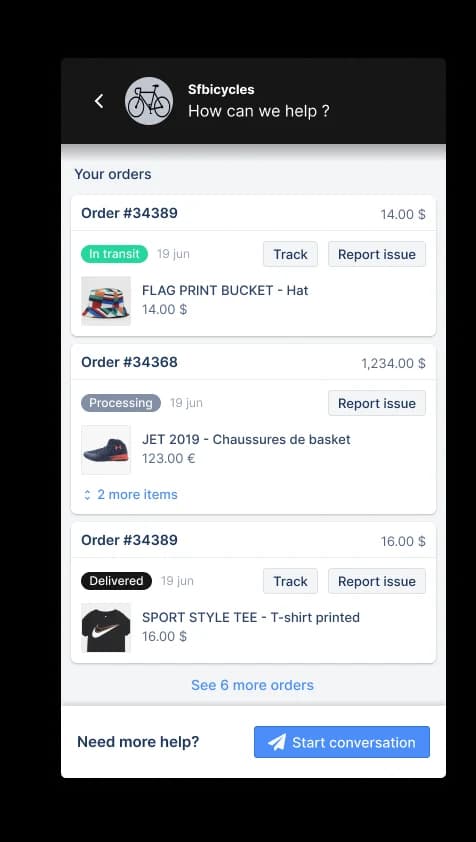
The Track view gives customers a full timeline of order events (shipped, in transit, delivered) synced directly from Shopify, which is what kills most of your WISMO volume:
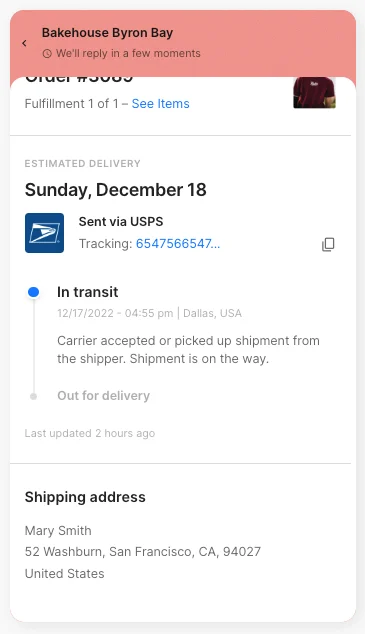
One honest limit: shoppers can't trigger automatic refunds or cancellations here. Those buttons submit a request, and an agent still has to process it.
3. Autoresponder rules (retiring January 30, 2026). The classic WISMO automation was the Send tracking information email rule, which fired a tracking link automatically when a shipping-status ticket came in. Here's the load-bearing detail: autoresponder rules are gone for any account created after September 2024, and older accounts can only use them until January 30, 2026, after which the feature stops working. Gorgias now directs Shopify brands to use the AI Agent instead. If you've been leaning on those rules, this is the year to migrate.
What the Gorgias AI Agent can do for Shopify
The Gorgias AI Agent is the piece that turns Gorgias from "helpdesk with Shopify data" into "helpdesk that acts on Shopify data without you." It runs in two roles from one subscription: a Support agent for post-purchase work (returns, tracking, cancellations) and a Shopping assistant for pre-purchase work (recommendations, sizing, discounts).
Under the hood, getting the vocabulary right matters because it's how you actually configure the thing. Gorgias splits behavior into three building blocks: Skills (a set of WHEN/IF/THEN instructions tied to an intent like "Return / Request"), Actions (the steps that actually do something in Shopify, Recharge, or Loop), and Guidance (reference knowledge the agent retrieves by relevance). An Action only runs when the agent calls it from inside a Skill. Here's the flow end to end:
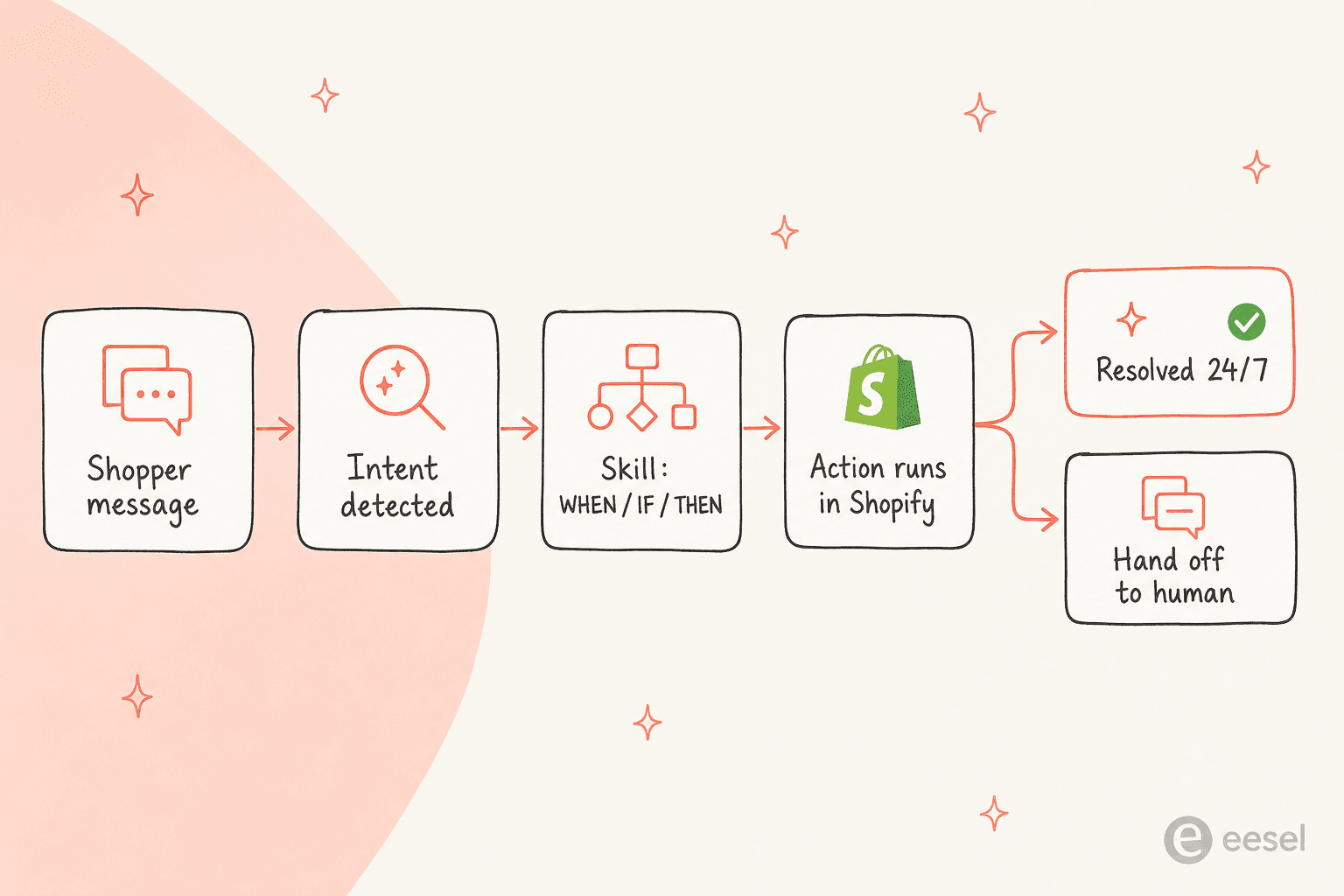
On the support side, the action catalogue covers the high-volume ecommerce requests: track an order, cancel an unshipped order, edit a shipping address, process a return or exchange (with a deep link into Loop Returns), and pause or skip a subscription in Recharge. Anything irreversible (cancelling an order, editing an address, cancelling a subscription) auto-forces a customer-confirmation step before it executes, which is a sensible default.
What's nice is you can see its work. Every AI reply exposes a "Show reasoning" trace so you can audit exactly which Shopify and Recharge lookups it ran before acting:
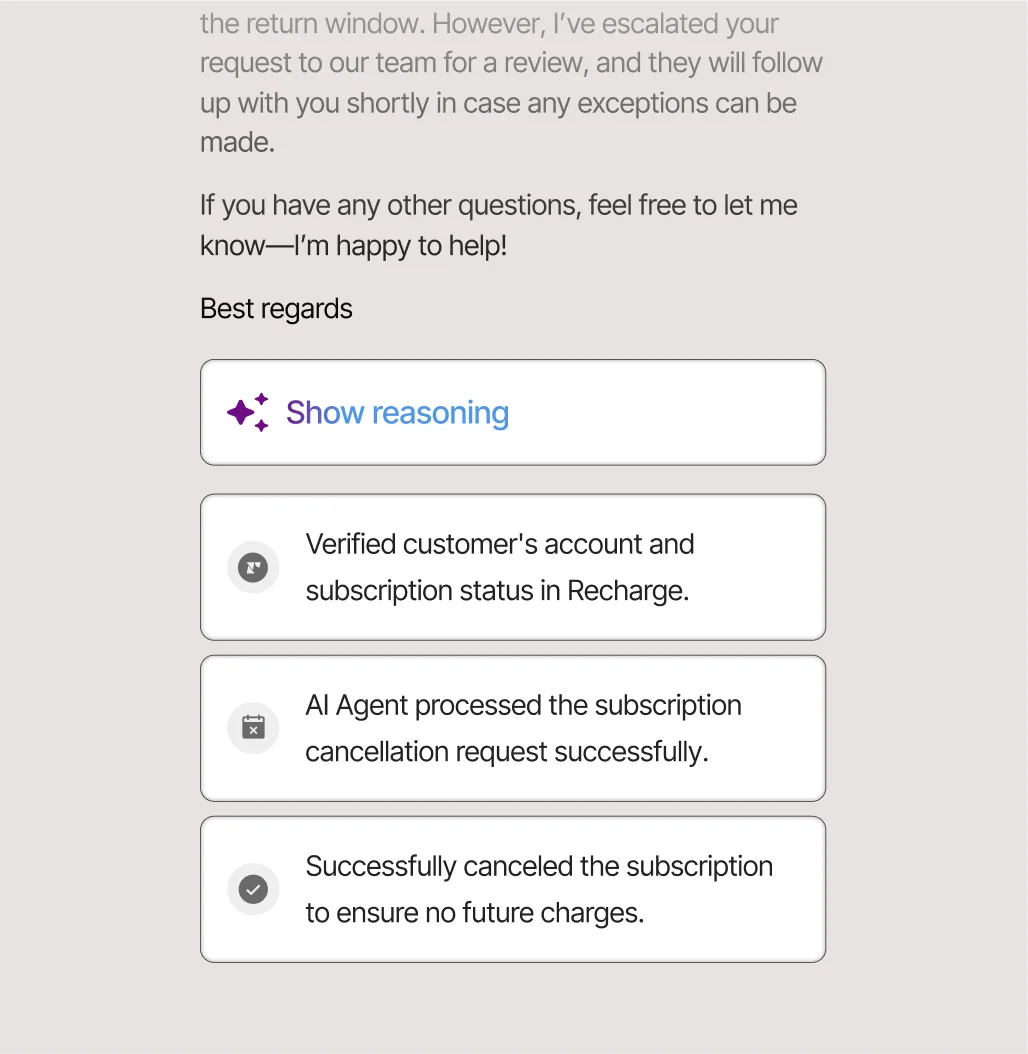
On the shopping side, the assistant uses your live Shopify catalog and the session's behavior to recommend products and answer pre-sale questions:
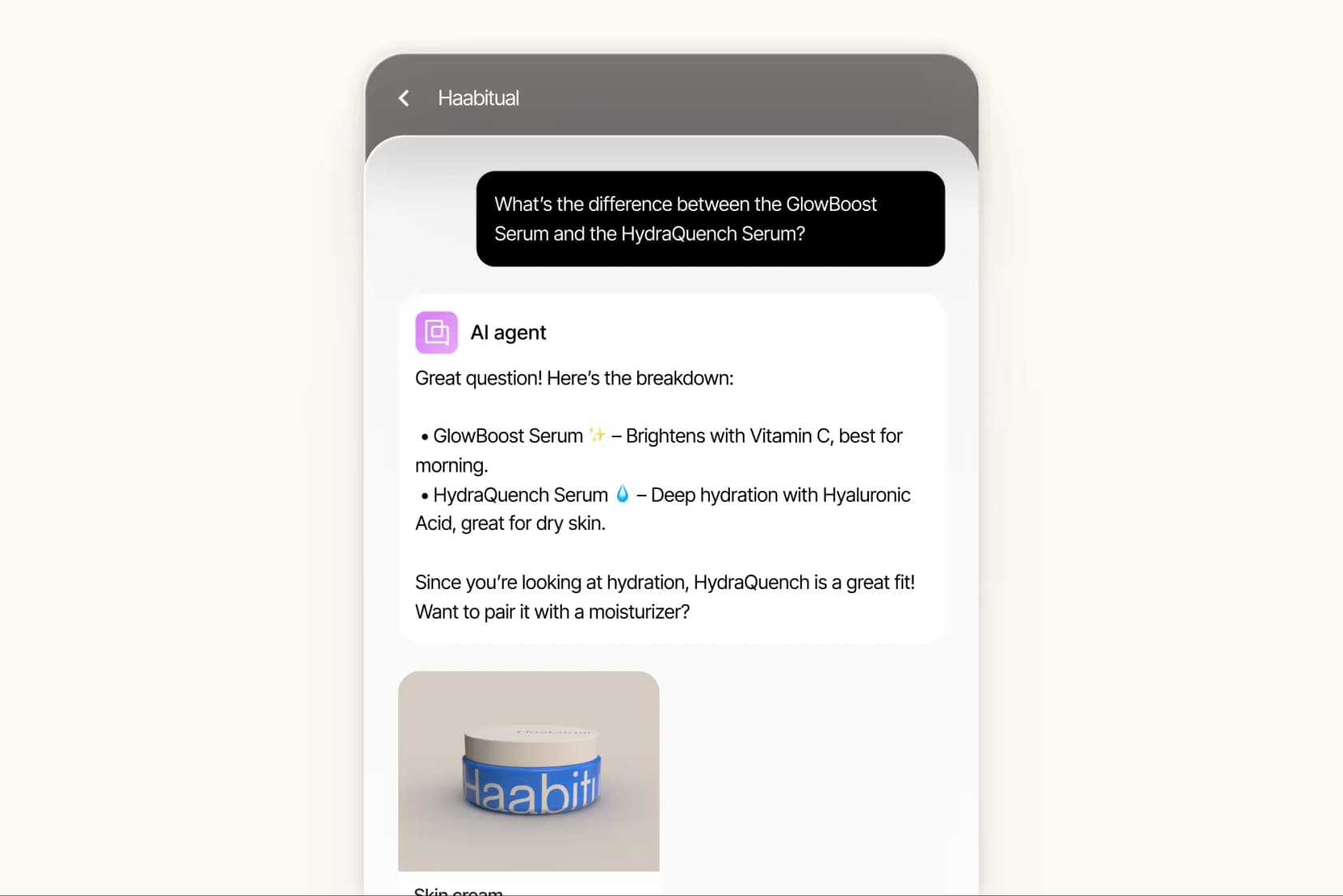
The results brands report are real, and worth quoting with names attached rather than hand-waving at "teams see efficiency gains":
"When we first started with Gorgias, our goal was to hit 30% automation in 30 days. We surpassed that and are now above 50% automation, and we're still climbing."
Orthofeet hit 56% automation in under two months, and Loop Earplugs reports that 70% of customers who get AI article recommendations don't follow up at all. If you want to go deeper on configuration, our Gorgias AI setup guide and notes on refund vs exchange intent detection get into the weeds.
Gorgias pricing for Shopify stores
Gorgias prices on ticket volume, not seats, so adding agents is free but growth costs more. Here are the current plans:
| Plan | Monthly price | Tickets included | Overage |
|---|---|---|---|
| Starter | $10 | 50 | $0.40/ticket |
| Basic | $60 (~$50 annual) | 300 | $40 per 100 |
| Pro (recommended) | $360 (~$300 annual) | 2,000 | $36 per 100 |
| Advanced | $900 (~$750 annual) | 5,000 | $36 per 100 |
| Enterprise | Custom | 5,000+ | $32 per 100 |
Annual billing saves up to 16% (two months free). The thing the table doesn't show is that the AI Agent is a separate add-on, billed per resolved conversation: $1.00 on Starter, $0.90 on every other plan.
And here's the bit that trips people up, because two fees can stack on a single ticket. A ticket that gets any reply (human, rule, or AI) incurs a helpdesk ticket fee. If the AI Agent resolves it without a human within 72 hours, you also pay an automation fee:
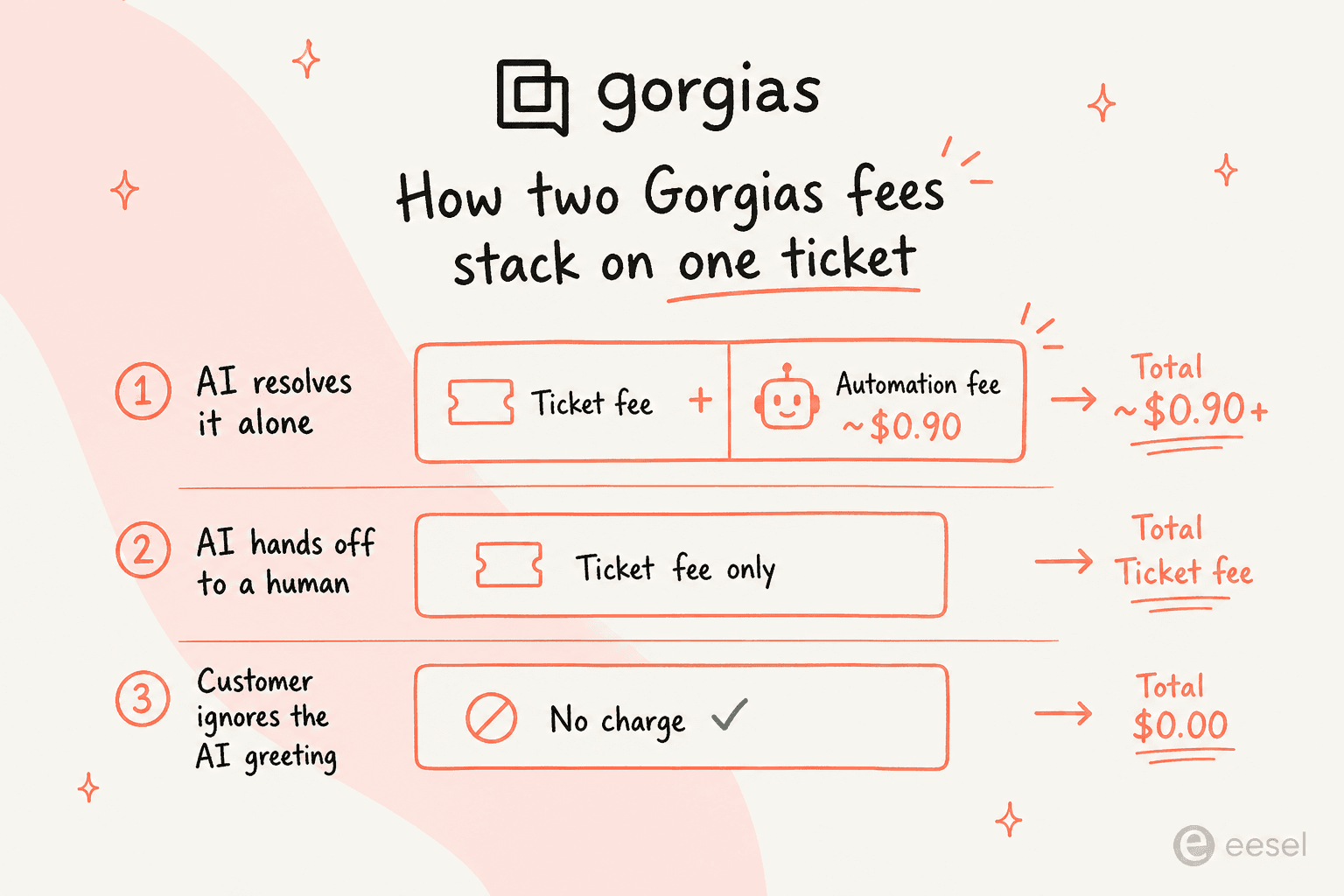
A quick worked example. Say you're on Pro ($360/mo for 2,000 tickets) and the AI Agent fully resolves 1,000 of them. That's the $360 plan fee, plus roughly 1,000 × $0.90 = $900 in automation fees, landing you near $1,260/mo before any overage. For a high-volume store that deflects thousands of WISMO tickets, that can pencil out beautifully. For a small store, it can be a nasty surprise. We run the full math in our Gorgias pricing guide and there's a Gorgias AI pricing calculator if you want to model your own volume.
Is Gorgias worth it for your Shopify store?
The community has converged on a useful answer, and it's not "it depends." On Reddit, where Gorgias is the default Shopify helpdesk everyone compares against, the recurring frame is a single break-even question:
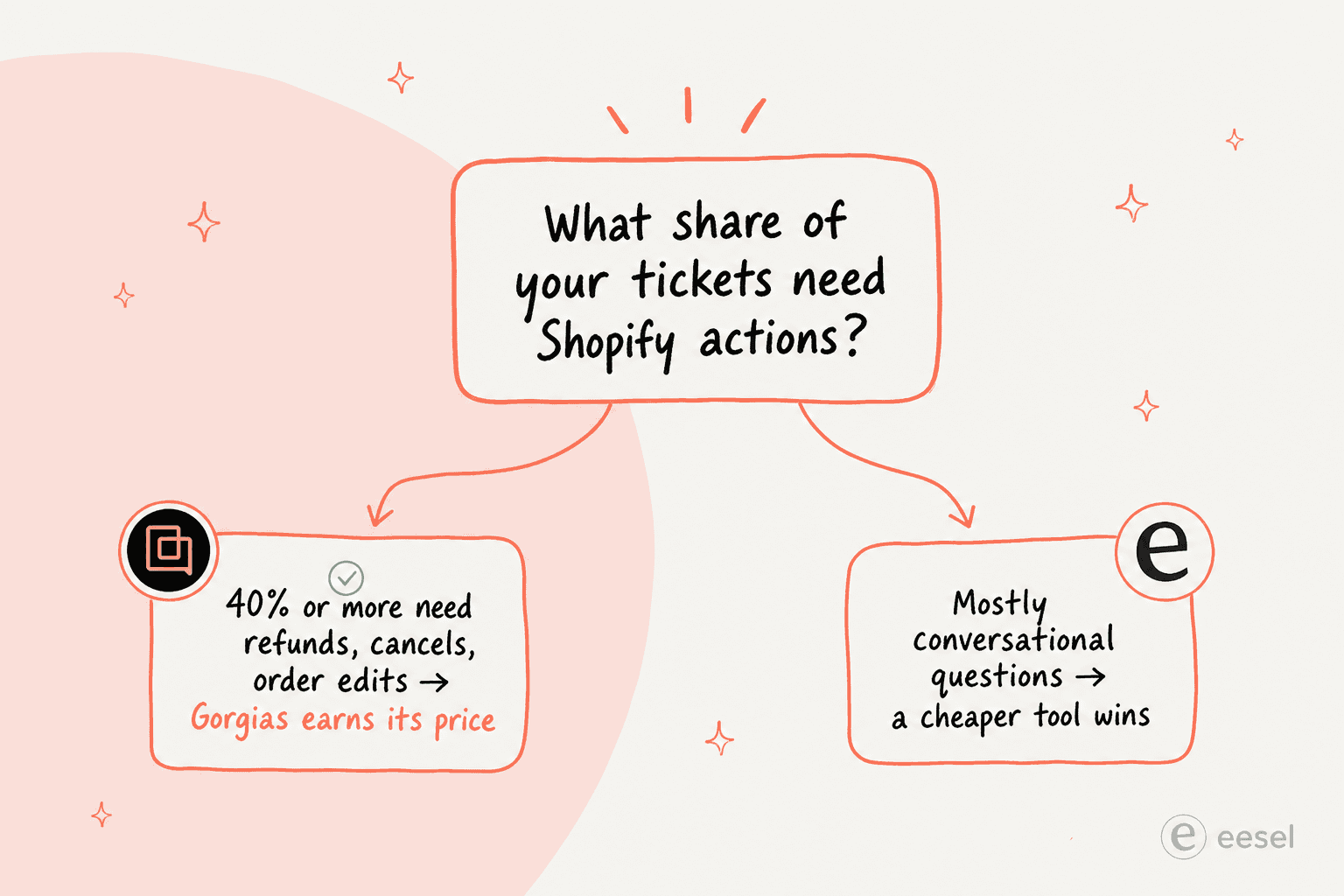
A commenter with a decade in ecommerce put it about as cleanly as anyone:
"I've been around ecommerce for 10+ years and this is honestly how I'd choose: 40%+ tickets need Shopify actions, I'd lean Gorgias. Mostly conversational support, Zendesk is fine."
The objection, just as consistently, is price. At roughly 3x the cost of Zendesk for similar volumes, small teams feel it:
"Gorgias is awesome if you're super deep into Shopify workflows... The downside is the price adds up quick once your volume grows."
So the verdict is refreshingly concrete. If a real chunk of your tickets are refunds, cancellations, address changes, and order edits, the in-ticket Shopify actions save enough agent time to justify the premium. If you're mostly answering "do you ship to Canada?", you're paying for power you won't use, and one of the best Gorgias alternatives will serve you better. Our standalone take on whether Gorgias AI is worth it walks through more scenarios.
Where Gorgias falls short
Being fair about the limits is the most useful thing a guide like this can do, so here's the honest list.
- The AI Agent is Shopify-bound. It's a hard requirement: a connected Shopify store. BigCommerce and Magento brands lean on HTTP-based custom actions instead, and there's one agent per connected store, so multi-brand setups duplicate skills and guidance store by store.
- AI resolution is email, chat, and SMS only. Voice is a separate paid add-on with no AI resolution, and the social DM channels (Instagram, Facebook, WhatsApp, TikTok) are handled by humans and rules, not the AI Agent.
- The 60% ceiling is Gorgias's own number. Marketing caps automation at "60% of email and chat conversations," which by definition leaves ~40% for humans.
- Per-resolution billing compounds. Because the automation fee stacks on the ticket fee, costs scale with success, not just volume. That's the right incentive in theory and an uncomfortable bill in practice.
- It's not plug-and-play. Real configuration means writing Skills, building Actions with conditions and API authentication, authoring Guidance, and reconciling rules so the AI and an autoresponder don't double-reply. Switching an Action to Advanced (HTTP) options is also one-way.
None of these are dealbreakers for a Shopify-heavy brand. They're just the trade-offs you're signing up for, and they're the reason some teams add a lighter AI layer rather than going all-in on per-resolution pricing.
Where eesel fits for Shopify support
If the per-resolution math gives you pause, or you want AI that isn't locked to one platform, this is where eesel comes in. eesel is an AI teammate that works inside the helpdesk you already run, Gorgias included, alongside Zendesk, Freshdesk, email, Slack, and Shopify, so you don't migrate anything to add autonomous support.
Two things make it a natural fit for Shopify stores. First, you brief it in plain language like onboarding a new hire ("handle order-status questions, loop me in on anything over $500 in refunds") instead of building WHEN/IF/THEN skills by hand. Second, the pricing is transparent and not per-resolution: one fixed monthly price (from $299/month for 500 credits, 1 credit per ticket or chat) with no markup that scales with how well the AI does its job. You can also simulate it on your past tickets before going live, so you see your real deflection rate first.
If you're shopping around, our roundups of the best AI for Shopify customer support and the best AI helpdesk for Shopify put eesel in context next to the rest. Or you can try eesel free and point it at your own store to see what it deflects.
Frequently Asked Questions
Is Gorgias good for Shopify stores?
How much does Gorgias for Shopify cost?
How do I connect Gorgias to my Shopify store?
Can the Gorgias AI Agent automate Shopify order tracking?
Is Gorgias worth it for a small Shopify store?
How is Gorgias different from Shopify Inbox?
Can Gorgias manage support across multiple Shopify stores?


Article by
Riellvriany Indriawan
Riell is a designer and writer at eesel AI with about two years of experience researching CX platforms, AI chatbots, and helpdesk software. She combines her design background with a sharp eye for how these tools actually look and feel in practice — making her comparisons unusually visual and user-focused.