


Understanding AI pricing is an important step for busy ecommerce brands. While the potential of AI agents is clear, Gorgias offers a sophisticated pricing model based on "resolutions." This mature approach ensures you are paying for actual outcomes, and with a little planning, it is straightforward to estimate your monthly costs.
This guide provides a detailed overview of the Gorgias AI Agent's pricing structure. We will cover how to calculate potential costs by examining their helpdesk plans, the additional fees for the AI Agent, and how these two costs can apply to a single ticket.
What is the Gorgias AI agent?
Gorgias is a mature, reliable helpdesk platform designed for ecommerce businesses, used by leading brands like Olipop and Reebok to manage customer conversations at scale.
The "AI Agent" is its primary automation feature. It functions as a digital assistant focused on handling common support questions and assisting with sales inquiries.
For support, Gorgias states the AI Agent can resolve up to 60% of common questions, such as order status inquiries and return requests, allowing your team to focus on more complex tasks.
For sales, it acts as a "Shopping Assistant." It can engage with shoppers in chat, provide product recommendations, and answer pre-purchase questions. Through its integration with platforms like Shopify, it can also perform actions like editing an order or issuing a discount code. The feature is divided into a Support Suite for efficiency and a Marketing Suite for revenue generation.
How Gorgias AI pricing actually works
Gorgias uses a tiered pricing model that grows with your business. The first layer is a subscription to a base helpdesk plan, which is based on ticket volume. The second layer is an additional fee for each ticket the AI Agent resolves autonomously.
These fees work together to provide a comprehensive automation solution. As this infographic illustrates, a single ticket resolved by the AI is tracked through both layers to ensure consistent reporting.
Layer 1: Your base helpdesk plan
The foundation of a Gorgias bill is the subscription plan. Users select a tier based on their anticipated monthly volume of "billable tickets."
According to Gorgias's billing documentation, a "billable ticket" is any conversation that receives a response. This includes replies from human agents, rule-based automated responses, and responses from the AI Agent.
Gorgias offers various plans like Starter, Basic, Pro, and Advanced to match different team sizes, each including a specific monthly ticket limit. If you happen to exceed this limit, Gorgias makes it easy to handle extra volume with transparent overage options. For example, the Pro and Advanced plans charge an additional $36 to $40 for every 100 tickets over the allowance, ensuring your customer service remains uninterrupted during busy seasons.
Layer 2: The AI agent automation fee
In addition to the base plan, there is an outcome-based "automation fee" for the AI Agent. This fee is $0.90 per automated resolution on an annual plan, or $1.00 per resolution on a month-to-month plan.
Gorgias defines a billable "automated interaction" as any customer ticket that the AI fully resolves without human intervention within a 72-hour period.
Based on Gorgias's documentation, when the AI Agent resolves a ticket, that interaction costs the ~$0.90 automation fee and it counts as one billable ticket toward the monthly helpdesk plan limit.
This can be summarized in the following table:
| Interaction type | Counts as a billable ticket? | Incurs automation fee? |
|---|---|---|
| Human Agent Replies | Yes | No |
| Rule-based Automation (no AI) | Yes | No |
| AI Agent Resolves Ticket (fully automated) | Yes | Yes |
| AI Agent Hands Off to Human | Yes | No |
| Automated Flow Resolves (no agent) | No | Yes |
As the table shows, Gorgias ensures that every AI-driven success is tracked accurately against your base plan's ticket allowance.
Using a Gorgias AI pricing calculator (and how to create your own)
Gorgias does have a calculator to help you estimate your return on investment, which is a great way to see the value they bring. To get a detailed feel for your monthly bill, you can easily do a bit of math on your own.
The official Gorgias Shopping Assistant ROI calculator
Gorgias provides an official Shopping Assistant ROI calculator on their site. This impressive tool is designed to show you how much extra revenue you might make by using the AI for sales.
To use it, you just plug in your store’s numbers:
-
Monthly Traffic
-
Average Order Value (AOV)
-
Baseline Conversion Rate
The tool then spits out the potential sales lift and your return on investment. It's a fantastic tool for seeing the potential upside of the AI's sales features. To forecast your monthly support automation costs, you can use the simple framework below.
A step-by-step framework to calculate your estimated monthly cost
Let's walk through a simple way you can get a good estimate of your total monthly cost for 2026.
Step 1: Figure out your base plan. Look at your average monthly ticket volume and pick the Gorgias plan that matches your needs. For instance, if you handle about 1,800 tickets a month, you'd likely choose the Pro plan, which gives you 2,000 tickets for $300/month (on an annual plan).
Step 2: Estimate your automation potential. Go through your past support tickets. What percentage are simple, repetitive questions about order status or returns? A common starting point for many successful stores is that 40-60% of questions are automatable. Let's say 50% of your 1,800 tickets (900 tickets) are handled by the AI.
Step 3: Calculate the AI resolution cost. Multiply the number of automatable tickets by the per-resolution fee.
- 900 tickets × $0.90/resolution = $810
Step 4: Add it all up. Now, just combine your base plan cost and your estimated AI resolution cost.
- $300 (Pro plan) + $810 (AI resolutions) = $1,110 total estimated monthly bill.
During a successful flash sale or a holiday rush like Black Friday, your ticket volume and sales will grow together. Here’s a look at how that might look:
| Scenario | Total tickets | Base plan (Pro) | Automatable tickets (50%) | AI resolution cost | Total monthly bill |
|---|---|---|---|---|---|
| Normal Month | 1,800 | $300 | 900 | $810 | $1,110 |
| Black Friday Month | 4,000 | $300 + $72 (overage) | 2,000 | $1,800 | $2,172 |
This shows how Gorgias scales to support your business as you succeed.
Understanding the Gorgias pay-per-resolution model
The pay-per-resolution model is designed for high efficiency.
How costs scale with ticket volume
In this model, costs align directly with your customer engagement. A successful marketing campaign that increases orders often brings more routine inquiries. Each automated resolution for these inquiries is handled by Gorgias, ensuring your human team isn't overwhelmed during high-growth periods.
Defining an "automated resolution"
Gorgias defines a resolution as an interaction where a customer receives an AI response and is satisfied enough that they do not reply within 72 hours. This provides a clear window to ensure the customer's needs are fully met before the resolution is finalized.
An alternative model: A fixed monthly credit plan
An alternative approach is a fixed monthly plan sized to your volume. In this structure, platforms like eesel AI charge one monthly price (from $299/month for 500 credits, with 1 credit per ticket or chat, however long). This can be a complementary option for teams looking for a different way to manage specific parts of their support workflow within the Gorgias ecosystem.
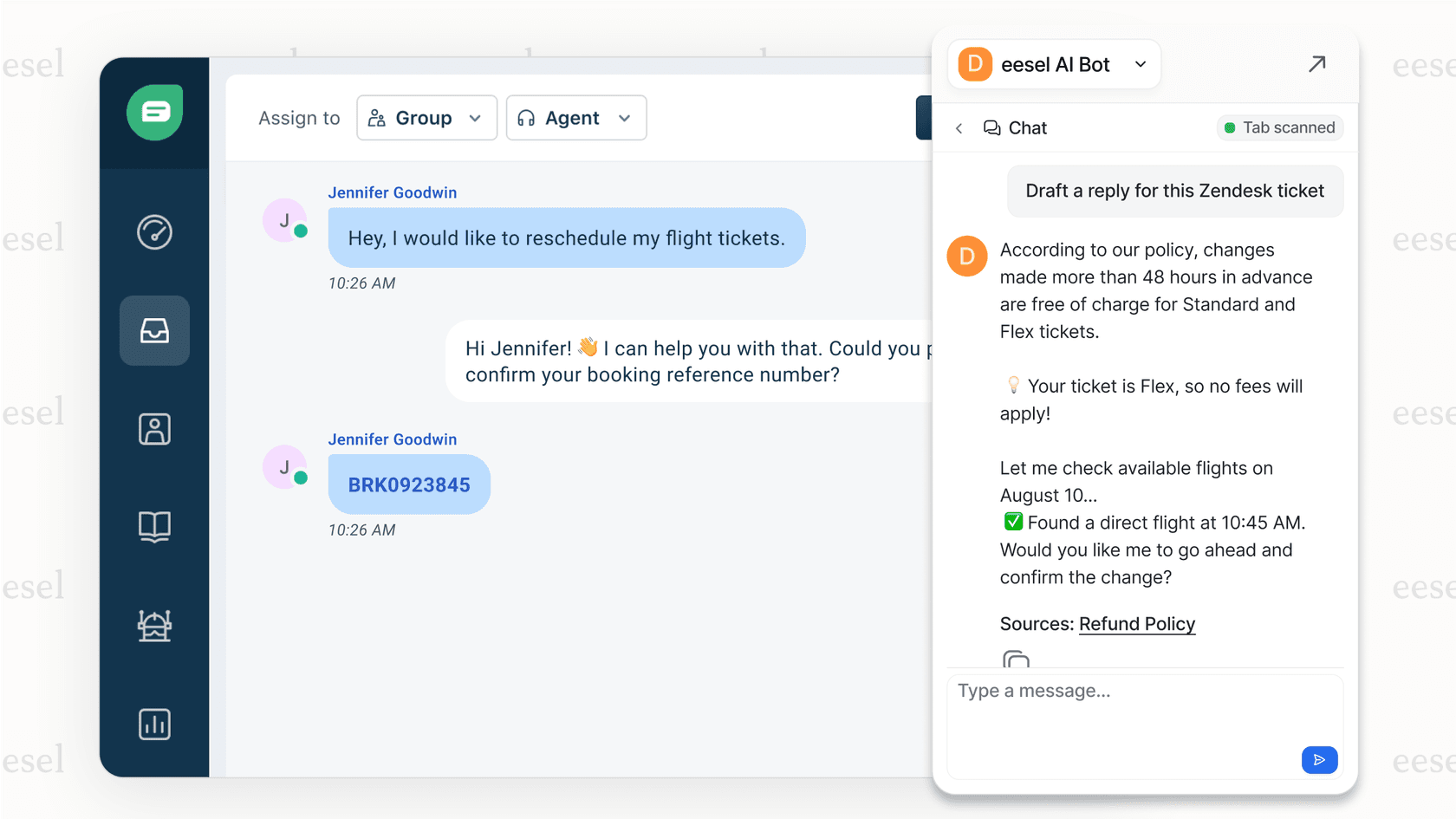
Some tools also allow users to test AI capabilities before full implementation. For instance, an AI Copilot can draft replies for human agents to review and send. This allows a team to evaluate the AI's quality and accuracy with real customer questions as they enhance their Gorgias experience.

Gorgias's full helpdesk and AI pricing plans
To give you the full picture, here’s a breakdown of Gorgias's official pricing plans. The AI Agent is a powerful add-on that brings massive value to these base plans.
| Plan | Monthly price (Annual billing) | Included tickets/mo | Overage cost | Key features |
|---|---|---|---|---|
| Starter | from $10/mo | 50 | $0.40 / ticket | 3 user seats, basic integrations |
| Basic | from $50/mo | 300 | $40 / 100 tickets | 500 user seats, unlimited integrations, Help Center |
| Pro | from $300/mo | 2,000 | $36 / 100 tickets | Everything in Basic + Revenue Statistics |
| Advanced | from $750/mo | 5,000 | $36 / 100 tickets | Everything in Pro + Dedicated email server |
| Enterprise | Custom | Custom | Custom | Custom support & onboarding |
Note: Pricing is based on the official Gorgias pricing page as of 2026. The AI Agent is an add-on. Automated interactions cost ~$0.90 each and also count toward your monthly ticket limit.
Simulating costs for accurate forecasting
In summary, the Gorgias AI Agent uses a robust layered pricing model that combines a reliable base plan with a focused per-resolution fee for automation. This structure is built to scale alongside your business success, providing enterprise-grade features for teams of all sizes.
To accurately project ROI and costs, a simulation can be a useful tool to complement your Gorgias setup. While a spreadsheet-based calculator relies on estimates, a simulation provides a more data-driven forecast.
Platforms like eesel AI offer a simulation mode that works within the Gorgias ecosystem. This feature allows you to run AI on historical support tickets to see how it would have performed. It can show how it would have responded, the percentage of tickets it could have resolved, and the associated credit usage, all without interacting with live customers. This provides a clear picture of how AI can enhance your brand's performance.
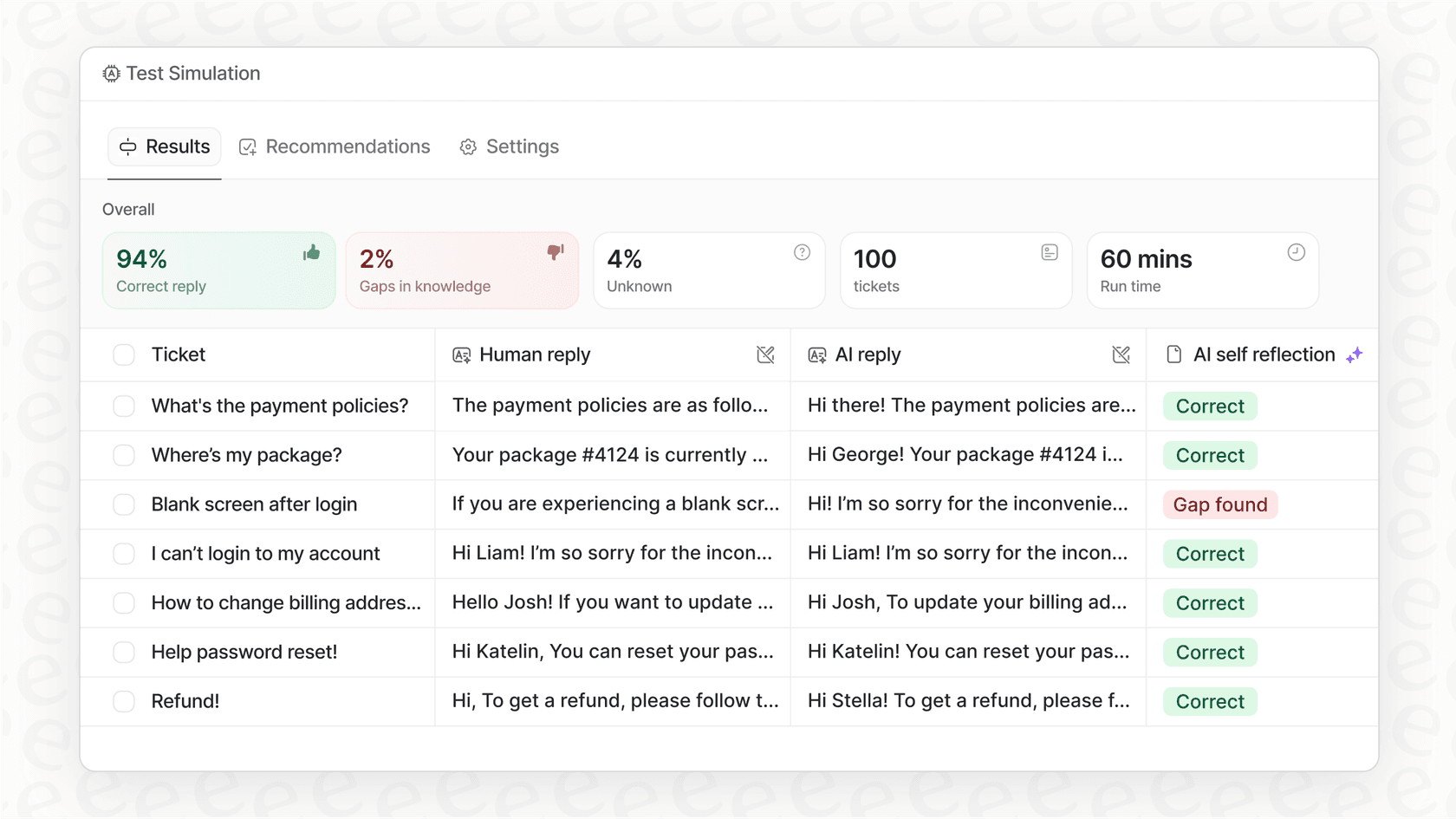
Invite eesel to your team and run a free simulation on your past tickets to see your automation potential and ROI as you grow with Gorgias.
Frequently asked questions
How does the Gorgias AI pricing calculator estimate costs?
The official tool on Gorgias's website does not estimate support costs. It's an ROI calculator that projects potential new revenue from their AI Shopping Assistant. To estimate your real monthly bill, you can build your own calculator based on your plan, ticket volume, and automation rate.
What are the main inputs for a Gorgias AI pricing calculator?
To create your own Gorgias AI pricing calculator, you'll need four key pieces of information: your base helpdesk plan cost, your average monthly ticket volume, your estimated automation rate (what percentage of tickets AI can handle), and the per-resolution fee, which is around $0.90.
Is the official Gorgias AI pricing calculator focused on support costs or sales ROI?
It's focused entirely on sales ROI. The official calculator is designed to show you the potential return on investment you might get from the AI's sales and marketing features, not to help you forecast your monthly support automation bill.
What is a key cost factor to consider when using a Gorgias AI pricing calculator?
A key factor is that AI-resolved tickets can incur two separate charges: the automation fee (around $0.90) and one "billable ticket" from your base plan's monthly allowance. This helps you track all interactions within your plan's limit.
Can I build my own Gorgias AI pricing calculator in a spreadsheet?
Yes, you can. The blog provides a simple four-step framework that works perfectly in a spreadsheet: 1) determine your base plan cost, 2) estimate your automation potential, 3) calculate the total AI resolution cost, and 4) add it all together for your estimated monthly bill.
How does a simulation compare to a standard Gorgias AI pricing calculator?
A standard calculator relies on estimates, particularly for the automation rate. A simulation tool, such as the one offered by eesel AI, uses your historical support data to provide a data-backed forecast of costs and performance, removing the need for guesswork before implementation.