

Most Shopify stores install a live chat widget expecting a shortcut for customer questions. The Gorgias chat bubble handles questions well, but the reason it's used by 40% of the top 1,500 Shopify brands isn't the widget itself. It's what opens on the support side when a customer clicks it.
Every Gorgias chat opens alongside the customer's complete Shopify profile: order history, cart contents, subscription status, past tickets, pulled in automatically. Agents don't ask for an order number. They don't switch tabs. When a refund needs to happen, a cancellation needs to go through before the package ships, or a discount code needs generating, those actions happen right there inside the chat. That's the product you're actually evaluating when you look at the Gorgias chat bubble.
What the Gorgias Shopify chat bubble actually is
The Gorgias chat bubble is a floating widget that appears in the lower corner of your Shopify storefront. Visitors click it, a conversation starts, and depending on your setup, they connect with a human agent, the AI Agent, or both.
What makes it distinct from a generic live chat tool is the view on the support side. Every chat opens alongside the customer's complete Shopify profile -- order history, current order status, previous tickets, customer tags -- without any manual lookup. Agents aren't copying order numbers from a second tab. The context is already there when the conversation starts.
The widget feeds into Gorgias's unified inbox alongside email, SMS, Instagram, Facebook, TikTok, and WhatsApp. One view, all channels. Shopify context is present on every conversation regardless of which channel the customer used.
Chat is available on all Gorgias plans, starting at $10/month. The AI Agent on chat is included on every plan and charged per resolved conversation.
How it connects to Shopify
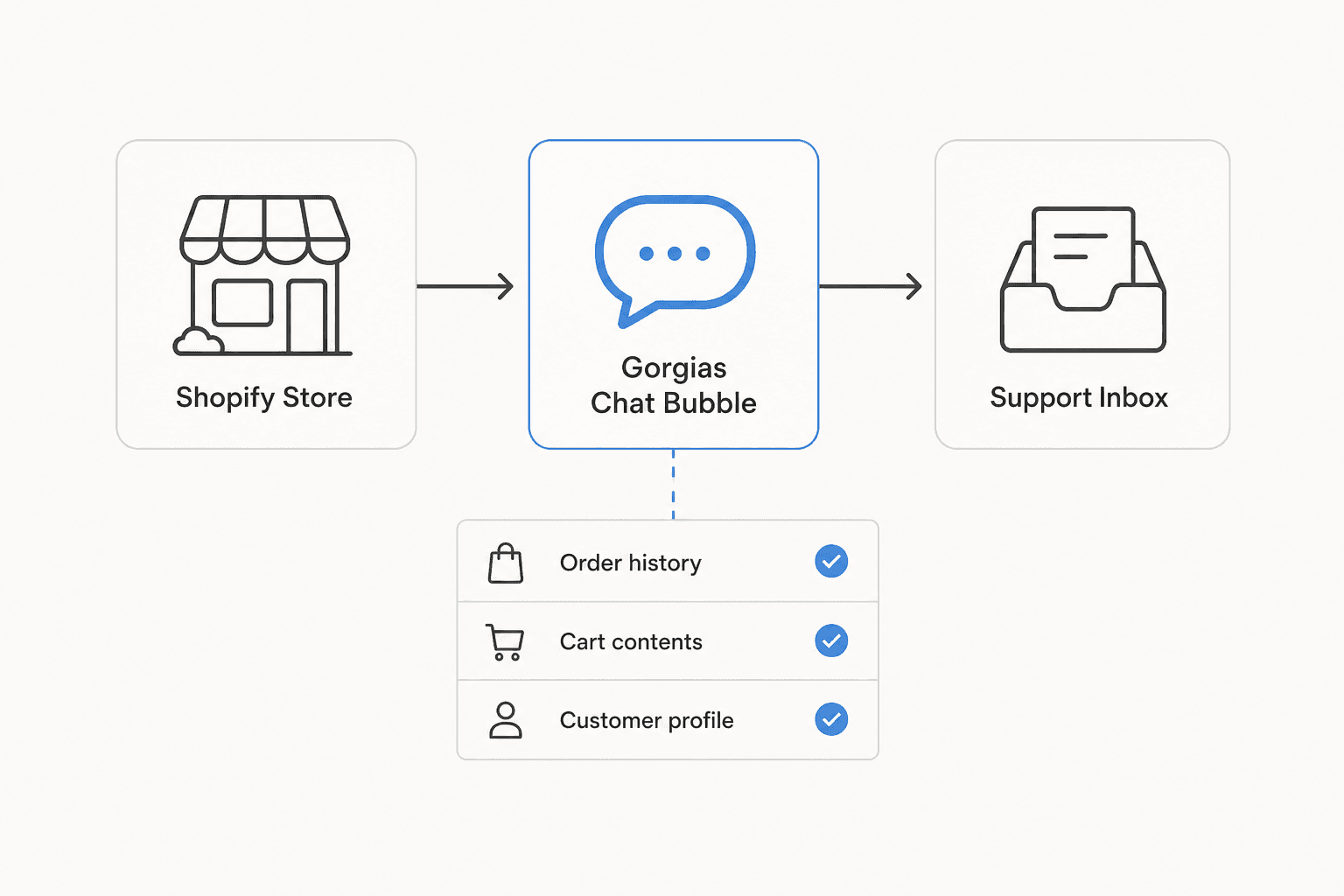
The Shopify connection isn't just a data display. From inside a Gorgias chat, agents can create, duplicate, edit, cancel, and refund Shopify orders without leaving the helpdesk. They can generate discount codes, share product recommendations, and handle time-sensitive requests in real time.
That last piece is worth sitting with. Cancellation-before-fulfillment is a timing problem. A customer who asks to cancel at 8pm on a Friday either gets someone who can act immediately, or gets a reply that turns into a return after the package ships. Gorgias agents can cancel the order from inside the chat, without opening Shopify in another tab. For brands that ship same-day or next-day, this is where the integration earns back its cost.
"Gorgias deeply understands ecommerce brands. Its innovative conversational AI and unmatched Shopify integration help businesses harness customer conversations for impactful, scalable results."
Matt Cohn, Office of the President at Shopify
Multi-store setups are also supported. Multiple Shopify stores connect to a single Gorgias inbox, which helps brands running separate storefronts across regions or sub-brands consolidate their support without multiple tool subscriptions.
The AI Agent on chat
Gorgias has two distinct AI modes on chat, and the difference matters more than the marketing page makes it obvious:
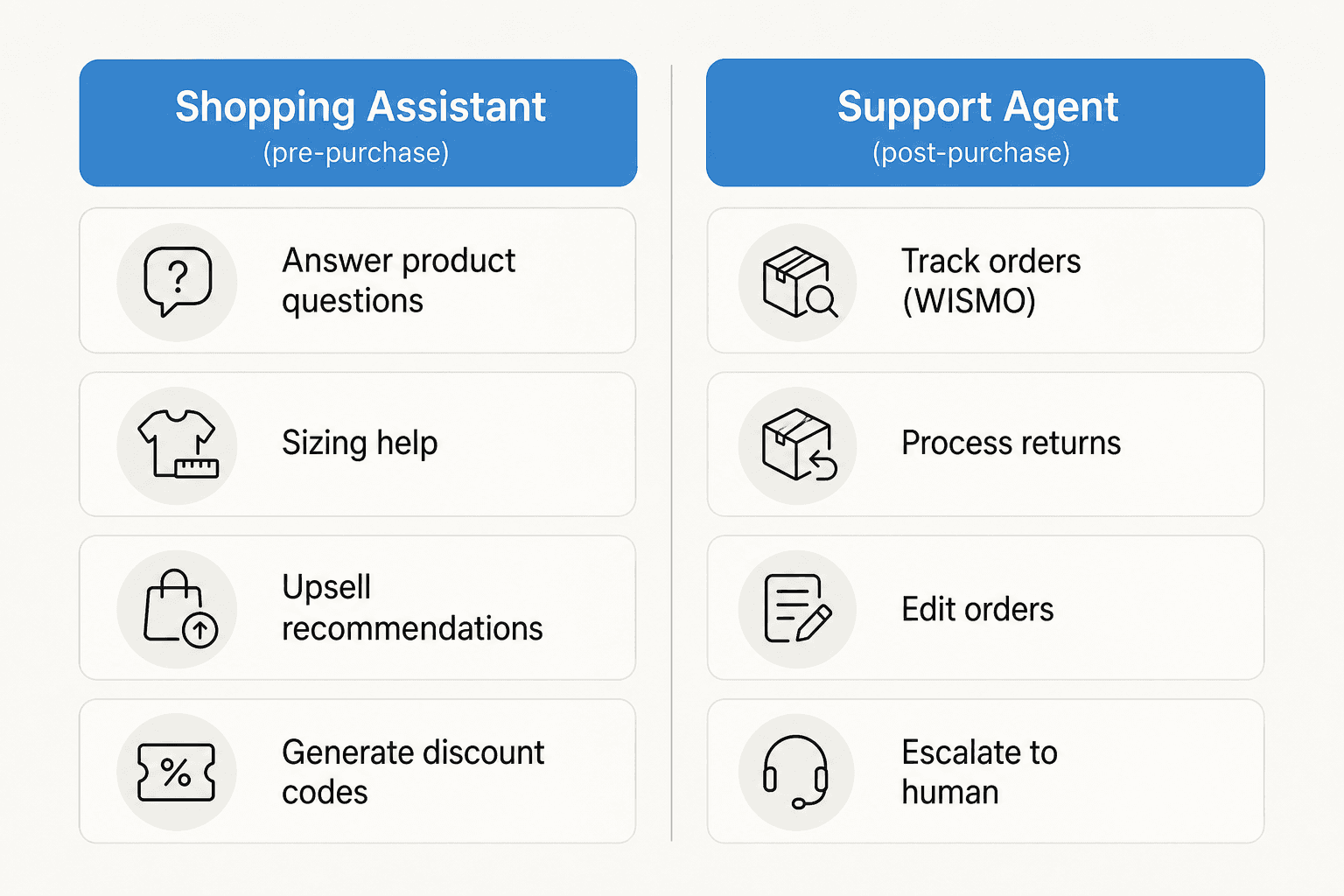
Shopping Assistant (pre-purchase) activates before the order. It answers product questions, gives sizing guidance, makes personalized recommendations, and can generate discount codes to nudge hesitant buyers. It draws on cart contents, browsing history, and your product catalog in real time.
Support Agent (post-purchase) handles everything after the order ships: tracking, returns, order edits, subscription changes, FAQs. Critically, it doesn't just answer questions about these -- it takes the actions directly. Processing a return request, editing an order, generating a refund. No human needs to log in.
Both run 24/7. The automation numbers from real deployments are meaningful: Orthofeet hit a 56% automation rate within two months of enabling AI Agent. That figure is achievable because the AI can read and write Shopify data in real time -- not just generate text responses -- which is the difference between actually resolving a ticket and just answering a question about it.
"When we first started with Gorgias, our goal was to hit 30% automation in 30 days. We surpassed that and are now above 50% automation, and we're still climbing."
Courtney Bajek, Customer Service Lead, Orthofeet
The technical foundation behind this: a direct OpenAI partnership, proprietary ecommerce-tuned prompt engineering, cascading prompt orchestration that draws from the live conversation, customer shopping history, your help center, and your product catalog simultaneously, and 100+ ecommerce integrations that let it take real action across Shopify, Recharge, Klaviyo, and others. It's a more purpose-built system than a generic LLM wrapper.
How to set it up on Shopify
Setup is quick once you've decided to proceed. No developer needed, no theme editing.
-
Install Gorgias from the Shopify App Store. The app connects your Shopify store to Gorgias and handles the widget script injection automatically.
-
Connect your Shopify store inside the Gorgias dashboard. Multiple stores can be connected to the same inbox from this step.
-
Enable the chat widget in Gorgias settings. The bubble appears on your storefront immediately after.
-
Customize the widget -- color, greeting message, availability hours, response time messaging. This takes roughly 10 minutes.
-
Set up chat campaigns (optional). These are proactive messages triggered by visitor behavior -- a message when someone lingers on a product page, a discount offer when they hit checkout. Glamnetic's CX team called their discount-via-chat campaign "the most successful of all our campaigns."
-
Enable the AI Agent on chat (optional). This adds the per-conversation charge. A sensible approach: turn it on for low-risk query types (WISMO, return policy FAQ) first, measure the automation rate, then expand.
What Gorgias actually costs
Gorgias charges by ticket volume, not seats. Unlimited users on every plan -- only the monthly ticket count determines which tier you need.
| Plan | Monthly price | Tickets/month | Overage cost | AI Agent |
|---|---|---|---|---|
| Starter | $10 | 50 | $0.40/ticket | $1.00/resolved conversation |
| Basic | $60 | 300 | $40/100 tickets | $0.90/resolved conversation |
| Pro | $360 | 2,000 | $36/100 tickets | $0.90/resolved conversation |
| Advanced | $900 | 5,000 | $36/100 tickets | $0.90/resolved conversation |
| Enterprise | Custom | 5,000+ | Custom | $0.90/resolved conversation |
Annual billing saves up to 16% (two months free). One important caveat on the Starter plan that most overviews skip: it caps at 3 user seats. If you have 4 or more support staff, you're on Basic at $60/month regardless of your ticket volume.
A worked example with AI Agent turned on:
A store on Basic ($60/month, 300 tickets included) that handles 300 chats per month, with 150 resolved autonomously by AI:
- Basic plan: $60
- AI Agent: 150 x $0.90 = $135
- Total: $195/month
The billable ticket definition is worth knowing: any conversation that receives a response from a human agent, a Rule, or the AI Agent counts. Newsletters, spam, and auto-responders don't.
A 7-day free trial with no credit card required is available on all plans.
What Shopify merchants say
The community consensus on Gorgias is unusually consistent for a tool at this price point. Teams that chose it for the right reasons are genuinely happy. Teams that chose it for the wrong ones notice the premium.
The sharpest framing we found comes from a decade-long ecommerce veteran in a r/CRM comparison thread:
"I've been around ecommerce for 10+ years and this is honestly how I'd choose: 40%+ tickets need Shopify actions -- I'd lean Gorgias. Mostly conversational support -- Zendesk is fine."
u/cavalry18 (r/CRM)

From the same thread, a user managing a brand with heavy Instagram and Facebook DMs:
"If a meaningful chunk is WISMO, address changes, cancels, refunds, exchanges, Gorgias usually feels worth it because the agent can do the work inside the ticket with Shopify context right there."
u/cavalry18 (r/CRM)
The pricing concern is real but predictable:
"Gorgias is awesome if you're super deep into Shopify workflows... The downside is the price adds up quick once your volume grows."
u/ShoddyPut8089 (r/CRM)
A long-term user who noted early chat friction but stayed:
"We're using Gorgias. Was a bit irritated by a few things related to chat initially, but they have constantly improving the product and the support is pretty good. I like the Shopify integrations, tags and the automations / saved replies... Gorgias won on cost and Shopify integration. I'm very happy to have email, form, chat, phone, WhatsApp and overall I would say we are nailing customer support / sales as a result."
u/Available_Ad4135 (r/ecommerce)
On G2, Gorgias holds 4.6/5 from 560+ verified reviews, with consistent praise for Shopify integration and ease of navigation. G2's own comparison against Shopify Inbox gives Gorgias the edge specifically on advanced AI capabilities for text generation and summarization.
When it's worth it (and when it isn't)
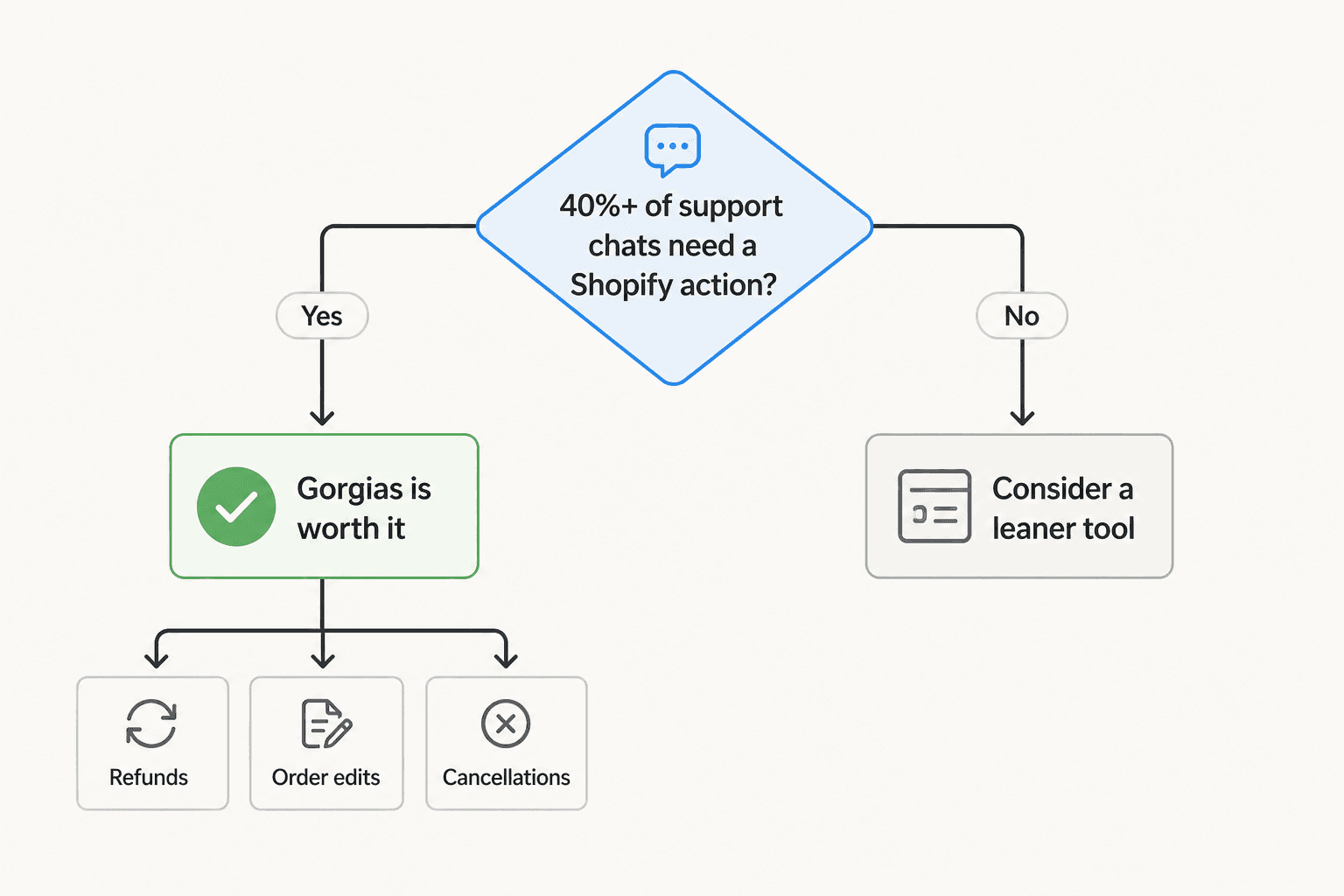
The 40% rule from the community is a useful starting point, but what sits underneath it matters more than the percentage.
Worth it when:
- A substantial share of your chats require a direct Shopify action: refunds, cancellations, order edits, discount code generation, address changes
- You run multiple Shopify stores and want a single inbox across all of them
- You want AI automation that can actually take action in Shopify (not just generate text responses), and your volume makes the $0.90/resolved conversation rate pay off
- You're handling multiple channels alongside chat -- email, SMS, Instagram DMs -- and want Shopify context on all of them, not just the chat widget
Worth reconsidering when:
- Most of your chat volume is informational: "where's my order," return policy questions, order status lookups
- You have fewer than 4 agents and are cost-sensitive -- Basic at $60/month is a harder sell if ticket volume is low or unpredictable
- You're a new store still figuring out your support volume (the 7-day trial is the right first move)
There's one thing the straight 40% rule misses: non-WISMO tickets aren't just more frequent for some teams -- they take significantly longer per resolution. A return that needs a Shopify action, a billing dispute, a cancellation-before-fulfillment -- each can run 5-10x longer to resolve without the order context already in front of you. If those tickets make up 20% of your volume but 60% of your agent time, the math looks very different.
"What's usually overlooked is that most teams optimize for handling tickets faster, not for reducing them."
u/Andrutex (r/ecommerce)
That's the shift Gorgias's AI Agent is designed to enable: reducing ticket volume by resolving things autonomously, not just routing them faster.
Try eesel AI
If your team is already on Gorgias and evaluating the AI Agent, eesel AI integrates directly with Gorgias and can layer AI automation into your existing support workflow. Where Gorgias's AI Agent charges $0.90-$1.00 per resolved conversation, eesel's pricing is one fixed monthly price starting at $299/month for 500 credits (1 credit per ticket or chat) -- with 100 free credits to start and no credit card required.
For Shopify stores not yet on Gorgias, eesel's native Shopify integration lets you deploy an AI agent that handles order lookups, product questions, and customer self-service directly from your store -- without committing to a full CX platform before you know your support volume.