


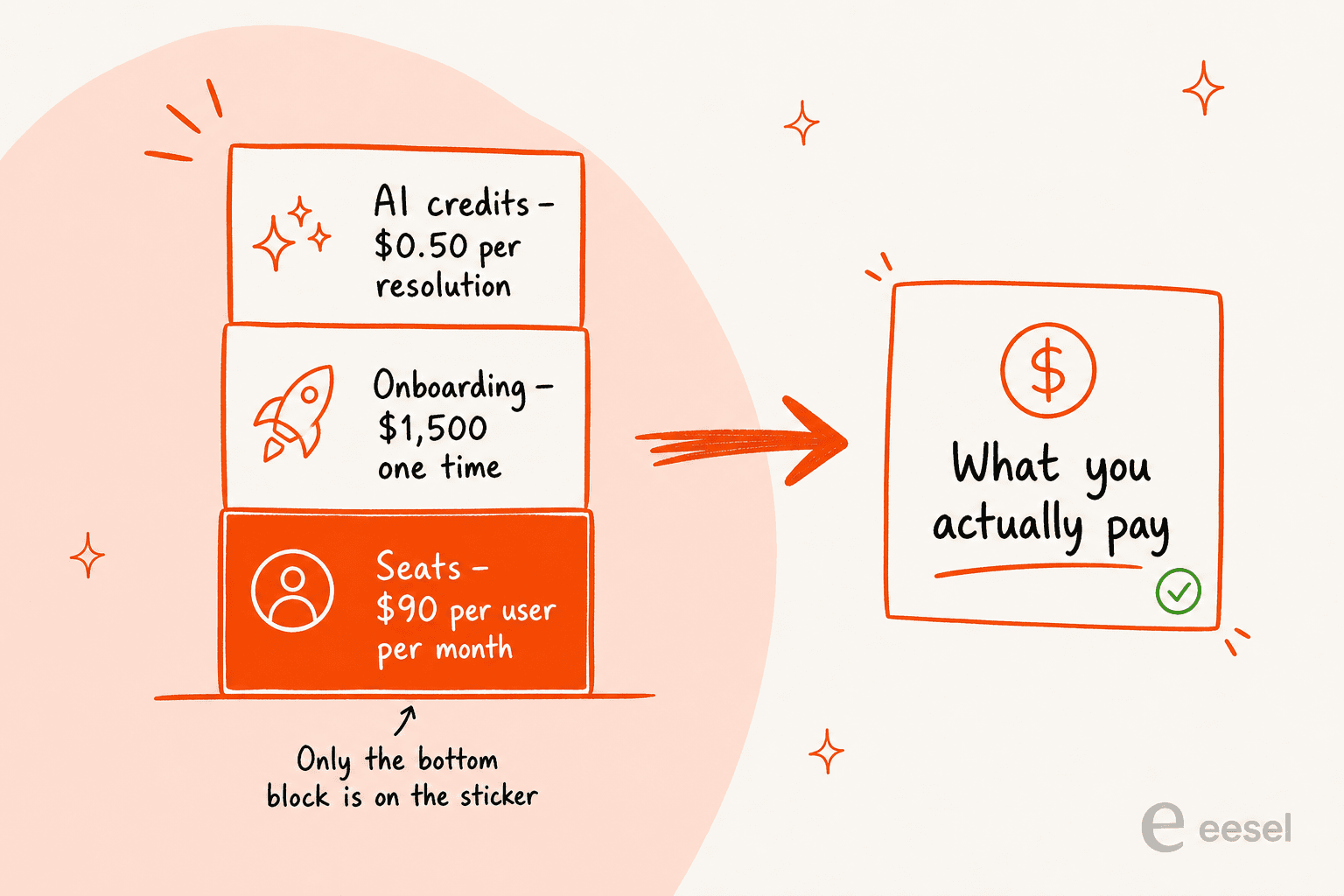
HubSpot customer service software is Service Hub, and the seat price on the pricing page is not the price you pay. Want the full product, meaning the help desk workspace, the knowledge base, the AI agent? That's Professional, at $90/mo/seat on an annual commit, plus a required $1,500 one-time onboarding fee. Then there's a second bill sitting on top of that one, usage-based this time: HubSpot Credits.
The credit math is the part buyers miss. The Breeze Customer Agent costs 50 credits ($0.50) per resolved conversation. Professional includes 3,000 credits, which buys exactly 60 AI resolutions a month before overage kicks in, roughly two a day, and that pool is shared with every other Breeze action. Run dry and the agent stops taking new conversations, across every channel, until your reset date.
If you already live in HubSpot CRM it's a good product, because support ends up sitting on the same record as sales and marketing, and no bolt-on really replicates that. Hard sell if you don't. And when the AI is the thing you want more than the CRM, you can add an agent to Service Hub without buying more seats: eesel connects through HubSpot's own OAuth flow in about half an hour, learns from your past HubSpot tickets, and runs on one fixed monthly price instead of per seat.
What HubSpot customer service software actually is
I should say where I'm standing first. I work on eesel, and I've spent years putting AI agents onto live support queues, HubSpot ones included. So this is a specific vantage point rather than a neutral one. I've watched what happens when demo numbers meet a real backlog, which is why I'd rather show you the arithmetic here than the marketing page.
Here's one from my own side of the table. In early 2026 eesel lost a rental marketplace doing 10,000 tickets a month, and the reason was narrow, also a little embarrassing: the HubSpot ticket-history learning wasn't built yet. They wanted the AI trained on what their own team had already answered inside Service Hub. I couldn't give it to them. So the team went and built it, and that lost deal is why I now read HubSpot's support docs more closely than most people would enjoy.
Now the product itself. HubSpot Service Hub is the customer-service arm of the wider HubSpot platform, which is to say it was never designed as a standalone helpdesk. It runs on the same Smart CRM that Marketing, Sales, Content and Data run on, so every ticket shows up already carrying the deal stage, the prior conversations, the marketing touchpoints. Platform-wide, HubSpot reports 306,000 customers across 135+ countries. Service Hub on its own holds a 4.4/5 from 2,917 reviewers on G2.
What's inside it:
- A help desk workspace with omnichannel intake (email, live chat, phone, SMS, WhatsApp, social), macros, team spaces, SLA management, and routing with capacity limits.
- Agent Hub, the new name for Breeze Agents as of this year, which houses the Customer Agent, the Knowledge Base Agent and everything else.
- A knowledge base plus a customer portal, with search-gap analytics attached.
- Retention tooling: a Customer Success Workspace, health scores, and surveys for NPS, CES and CSAT.
If it's the wider platform you're weighing up and not just the support slice, the HubSpot CRM review covers that ground, while the HubSpot AI guide maps every AI surface across the hubs. Shopping specifically for live chat? Start with the HubSpot chatbot breakdown instead.
The pricing, in full
This is what most people came for, so I won't bury it. Service Hub bills per seat, per month, across four tiers, and there's a separate usage-based credit layer funding the AI on top. Every number below was checked against the live pricing page on 27 July 2026.
| Tier | Price | Included credits | Onboarding fee | What you actually get |
|---|---|---|---|---|
| Free | $0/mo, up to 2 users | - | None | Ticketing, shared inbox, live chat with HubSpot branding, 3 canned snippets, 10 dashboards. No help desk workspace, no knowledge base, no AI agent. |
| Starter | $7/mo/seat (commit monthly) / $20 pay-monthly | 500 | None | Branding removed, up to 2 ticket pipelines, conversation routing, 500 calling minutes, 5,000 canned snippets, 30 dashboards. No routing workflows. |
| Professional | $90/mo/seat (commit annually) / $100 pay-monthly | 3,000 | $1,500 one-time | Everything above plus Agent Hub, Breeze Customer Agent, Help Desk Workspace (50 spaces, 500 macros), Customer Success Workspace, knowledge base (1 base, 2,000 articles), customer portal, surveys, 15 pipelines, up to 300 routing workflows, 750 transcription hours. |
| Enterprise | $150/mo/seat (sales-quoted, billed annually) | 5,000 | $3,500 one-time | Everything above plus skill-based routing, conditional SLAs, customer journey analytics, conversation intelligence, knowledge base (100 bases, 10,000 articles), 100 spaces, 100 pipelines, 1,000 workflows, 1,500 transcription hours. |
Three things in that table quietly change the arithmetic, so they're worth pulling out.
The commit toggle behaves differently on each tier. Starter's $7 is a commit-monthly rate set against a $20 pay-monthly rate, so a 65% gap. Professional's $90 is a commit-annually rate against $100, a 10% gap. Which means the discount that looks generous on the cheap plan has mostly evaporated by the time you reach the plan you'd actually buy.
The onboarding fees are required, not optional. The pricing card footnote flags both the $1,500 and $3,500 fees as required, in HubSpot's own words. On a five-seat Professional account that fee on its own works out to a third of your first year's seat spend.
Everything you probably want starts at Professional. Help desk workspace, knowledge base, AI agent, routing workflows: all Professional+. Starter will point tickets at the AI agent, though it can't build workflow routing at all. The honest entry price for HubSpot customer service software is $90 a seat plus $1,500, not $7.
To sanity-check any of that against the rest of the market, the Zendesk pricing and Freshdesk Pro pricing breakdowns run the same method.
Work out your own number
Seats, credits and onboarding never add up the same way for any two teams. So here's a calculator rather than another worked example. Plug in your headcount and a rough AI volume.
What surprises people is what happens once AI volume climbs. At 400 resolutions a month on Professional, the credit overage has stopped being a rounding error, and it starts competing with the seat line instead. I don't mean that as a criticism of the pricing. It's simply the shape of it: HubSpot sells you seats, then sells you outcomes on top.
How the AI actually gets billed
This needs a section of its own. The word "resolution" is doing a lot of work in HubSpot's pricing, and it doesn't mean what most support leads assume it does.
HubSpot's own definition lives in the Customer Agent documentation: a conversation bills as resolved once the agent has posted at least one reply that shares a content source or performs an action, and no handoff to a human happens within 72 hours of the last message. It bills too when a lead is marked qualified, partially qualified, or not qualified.
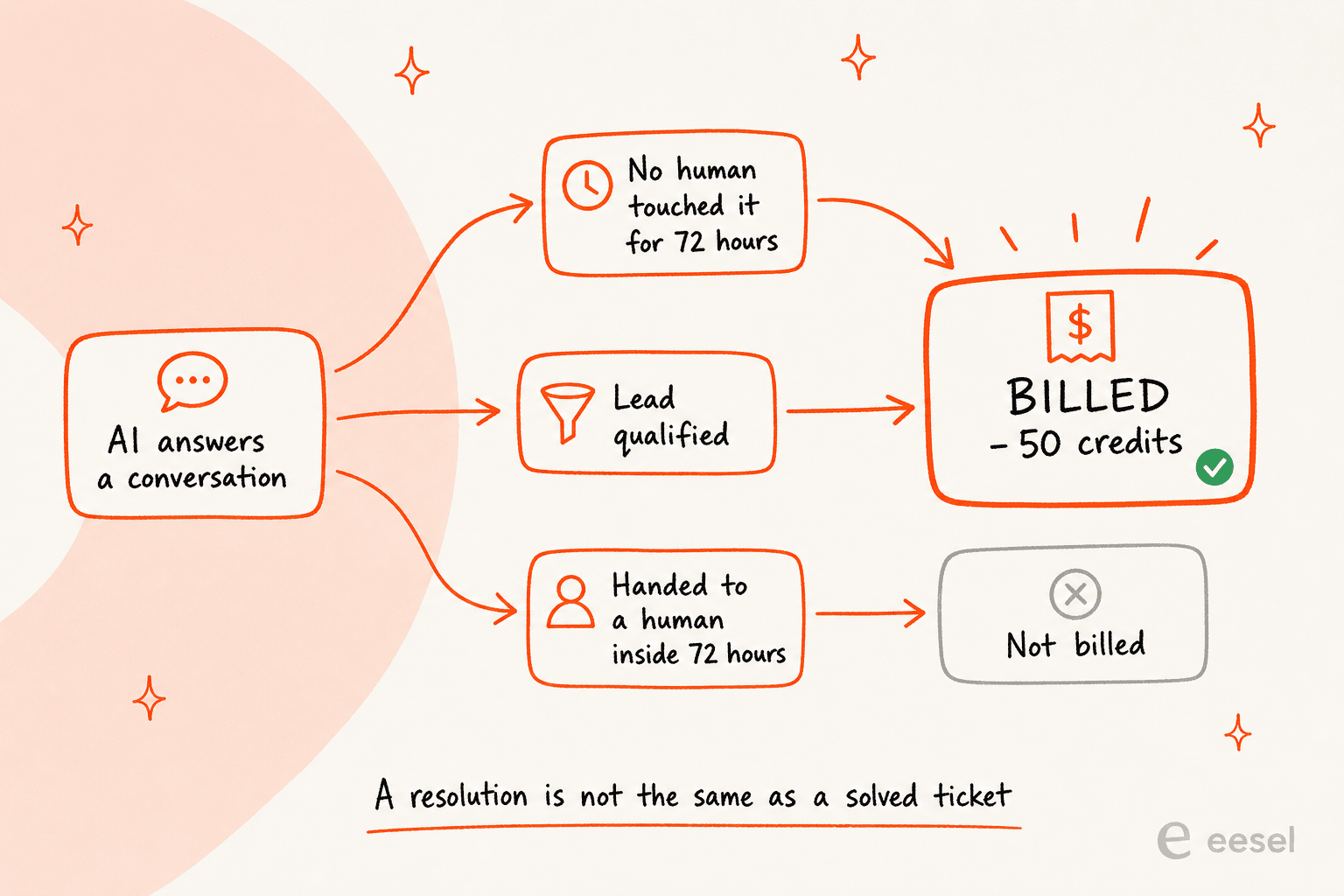
Read it carefully and three things fall out.
A conversation your agent mostly handled but escalated at hour 70 costs you nothing, which is generous. A conversation where the AI answered confidently and the customer quietly gave up costs fifty cents, which is less so. And the status freezes at the 72-hour mark, so later live-agent messages, transfer requests and negative feedback won't un-resolve it, and an unhappy conversation still bills. Reopen an email thread after the window closes and it can bill a second time.
The billable unit is absence of human handoff, not customer satisfaction. When you're comparing vendors, that distinction matters more than the headline rate does. It's the same trap the AI resolution rate piece digs into.
One more thing before you model any of this: HubSpot's own numbers disagree with each other. Today the pricing page claims 70%+ of conversations resolved automatically and 39% faster resolution. The Customer Agent product page, meanwhile, claims 54% (top teams hitting 90%), 30% faster, and an 8% higher close rate. Same vendor, two live pages, two sets of figures. I'd model on the lower set.
The named customer results are more useful than the averages anyway. The Knowledge Society reports the agent resolving 70-80% of email tickets, with time-to-close falling from 16+ hours to under 10. Sticos reports it handling 91% of initiated chats at a 75% resolution rate.
If it's the mechanics you want and not the economics, there's a deeper walkthrough of the Breeze Customer Agent setup, plus a separate one on its escalation guardrails.
The full Breeze AI review carries the verdict. And if you'd rather turn parts of it off than tune them, switch off covers that too.
Five things the pricing page doesn't tell you
I went through HubSpot's own help documentation instead of its marketing pages, and these are the five I'd want to know about before signing anything. None of them are scandals. Every one of them changes a rollout plan.
1. Running out of credits switches the agent off, silently. HubSpot's deploy documentation is explicit about it: if your credits run out, the agent temporarily stops being assigned to new conversations across all connected channels, until your next reset date or until you buy more. Credits reset monthly, and they don't roll over. Automatic credit upgrades are the default behavior rather than something you opt into, which, in practice, means your alternative to a silent shutoff is a bill that grows on its own.
2. Skill-based routing is Enterprise-only, but capacity limits aren't. Teams routinely assume the two arrive together at Professional. Ticket capacity limits do. Skills don't. So if your routing plan depends on "send billing questions to the people who know billing," you're looking at a $150/seat feature. The AI ticket routing guide covers what you can build below that line.
Related, and worth knowing: a skill-routing rule that matches but finds no eligible person leaves the ticket unassigned instead of falling through to the next rule. Handoff also keys off agent availability rather than chat widget availability, so the Team only option will happily escalate into an empty room at 2am. Read it alongside the handoff best practices guide.
3. Professional SLAs key off exactly four properties. Priority, team, source and pipeline. No custom properties, and no associated-object properties either. Conditional SLAs that combine properties sit at Enterprise. Worse, SLA rules never re-evaluate, so escalate a ticket's priority mid-flight and it keeps the original, slower target forever. The SLA management guide covers how to design around that.
4. Non-knowledge-base content sources re-sync weekly. Fix a wrong price on a website page, and the agent can carry on quoting the old one for up to seven days. If your product changes fast, the knowledge base has to be the source of truth, not your marketing site.
5. Every agent in a routing or handoff rule needs a paid seat. No seat, not routable. Combine that with per-seat pricing and the true cost of "just adding the part-time weekend person to the escalation rota" turns out to be a full monthly seat.
Smaller ones exist as well. Help desk has no mobile app. A customer agent can never be deleted once created, only paused. And knowledge base imports cap at 400 articles per run.
The knowledge base, which is where most reviews go quiet
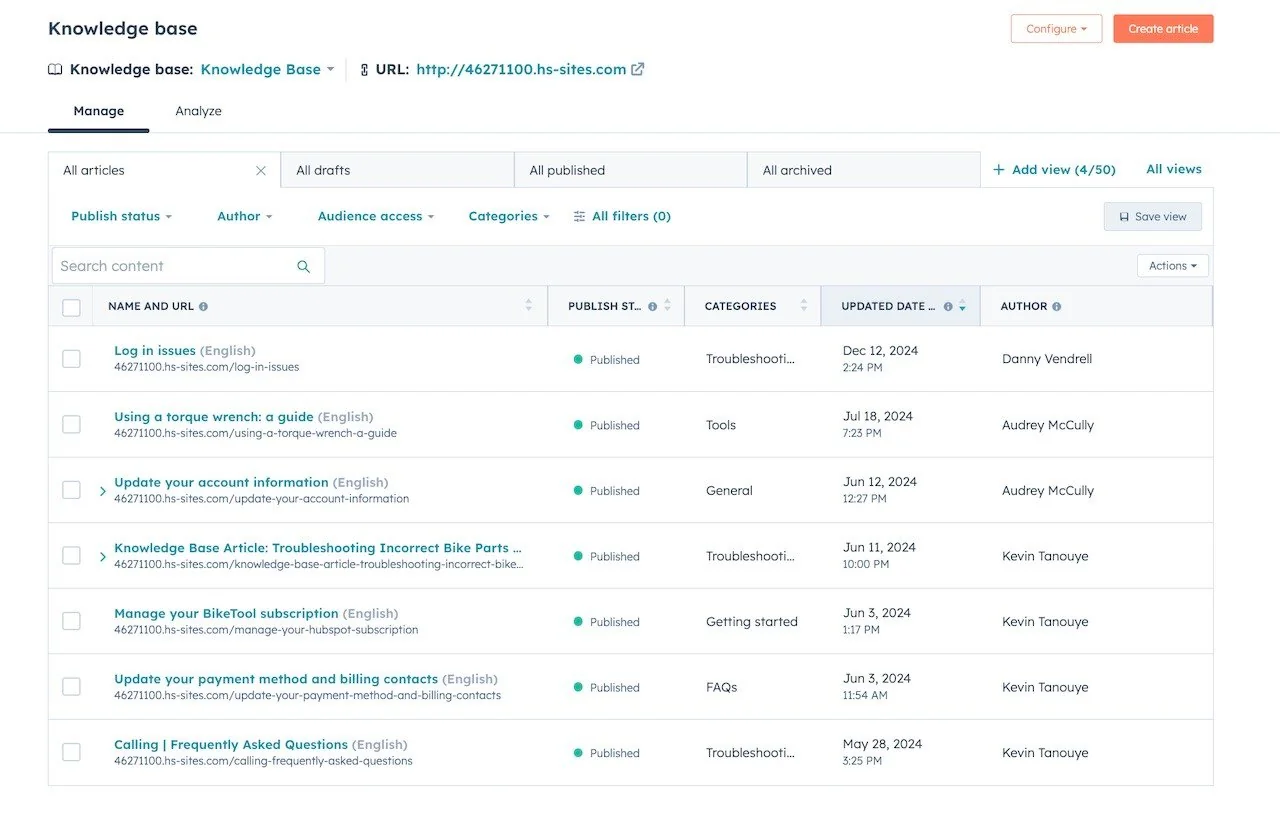
The knowledge base is Professional+, and it's doing two jobs at once. It's the customer-facing help center. It's also the content the Customer Agent answers from. Get it wrong and both halves suffer for it.
Managing articles is fine. You get publish status, categories, per-article authorship, plus multi-language publishing with per-language URLs.
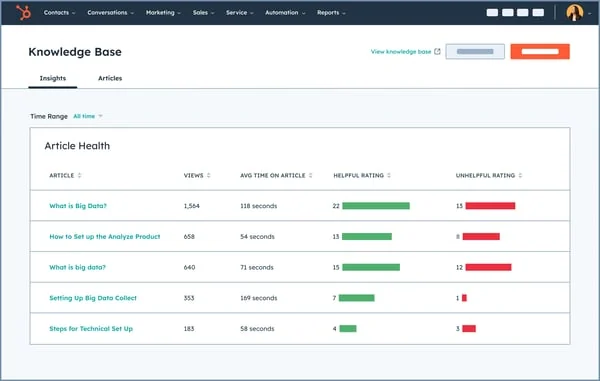
The analytics are better than I expected them to be. The Insights tab tracks article views, average time on article, and helpful versus unhelpful ratings per article. That's the raw material for actually finding content gaps instead of guessing at where they are.
Customization is where it thins out. This is the most consistent product complaint across the reviews, too. You edit the help center through HubSpot's theme editor: colors, typography, and a layout panel holding text, image, button, divider and social-link blocks.
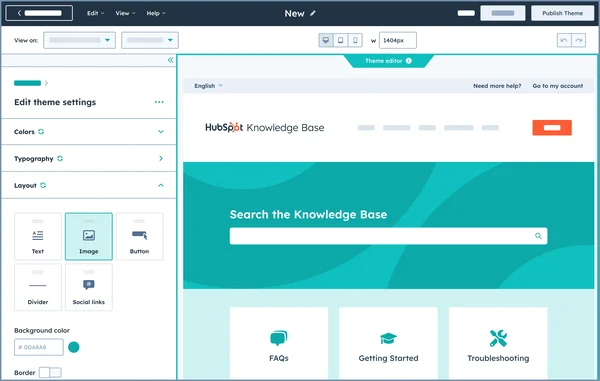
That covers brand colors and a logo. What it doesn't cover is a custom information architecture, and teams migrating over from a purpose-built docs platform notice inside a day. The published result is clean, though recognizably a HubSpot help center:
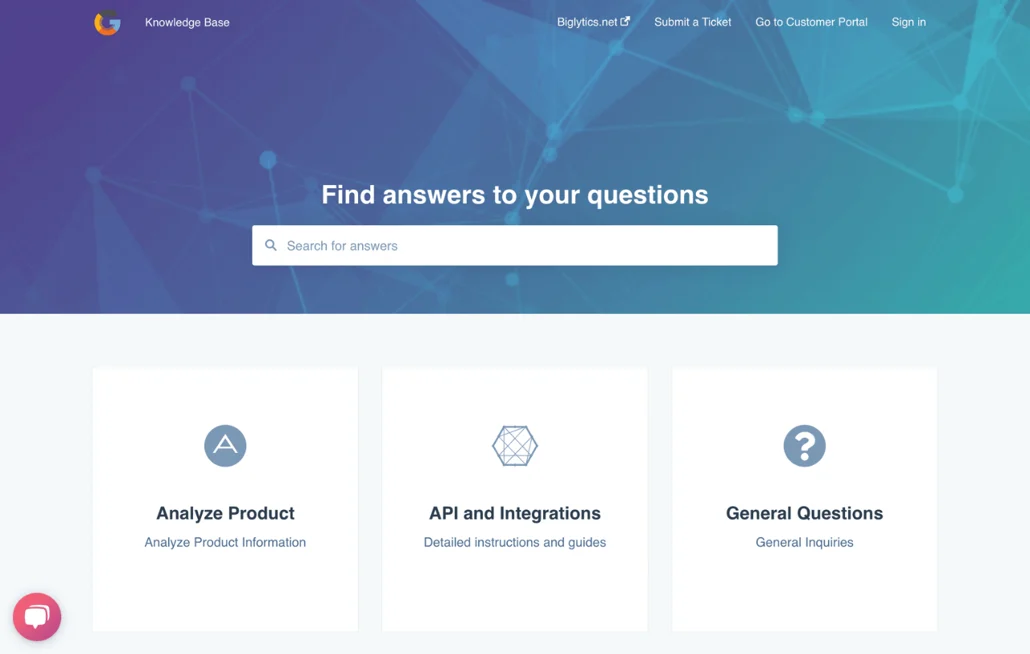
The caps bite differently depending on your team shape. Professional gives you exactly one knowledge base and 2,000 articles; Enterprise gives you 100 bases and 10,000 articles account-wide. A single knowledge base becomes a real constraint the moment you sell multiple products, or serve multiple brands out of one account. The guides on ticket deflection and building an internal knowledge base go deeper on making that content actually deflect.
What users actually say
Something about HubSpot's reviews took me a while to understand, and it turned out to be the most useful signal in the whole research pile.
Service Hub scores 4.4/5 on G2 across 2,917 reviews, 64% of those five stars, and 4.4/5 on Capterra. HubSpot the company scores 1.5/5 on Trustpilot across 1,140 reviews. Those two readings aren't contradictory; they're measuring different things. G2 and Capterra reviewers are rating the software they use daily. Trustpilot reviewers are rating the contract.
The product half of that reads warm, and specific:
"What I like most about HubSpot Service Hub is the ability to centralize ticket management and customer service on a single platform. It allows for efficient tracking of each case, improves response times, and maintains organized communication with customers."

"I like that HubSpot Service Hub is really customizable. Previous CRM systems we used were rigid, and we needed a third-party coder to make changes. With HubSpot Service Hub, we can handle customizations in-house without a lot of external assistance."
The cost complaints, worth flagging, are about scaling rather than the sticker. Nobody says it's expensive to start:
"Additionally, pricing has become difficult to justify compared to alternative solutions in the market. The Knowledge Base page customization options are also quite limited, especially for companies that want more flexibility in branding and user experience."
The contract half is where the tone turns sharp. On Hacker News, one founder described what the startup discount actually looked like in practice:
"We got the startup "90% discount" from Hubspot but what they don't tell you is that it's 5 users plan which you are locked in to. Then they lock you on to min 5 users for sales for the next two years where you are spending up to $500 per month which you cannot break out of."

At the other end of the market, meanwhile, the onboarding fee lands as its own line item on the invoice:
"Pay $25,000 for your subscription received no services and a bill for $7000 for on boarding. Absolute scam of service. 45 days later they said we are 1/2 way through a year subscription and the can't do anything."

I'd take any individual Trustpilot review with the usual caution, since people rarely post there when things go fine. The pattern across them is consistent enough to plan around, though: multi-year terms, auto-renewal at increased prices, onboarding invoiced separately. Read the term length before you read the feature list.
One gap is worth naming honestly. I couldn't find a single credible community account of anyone running the Breeze Customer Agent end to end. The closest real voice I found describes AI as an assistant, not a deflection engine:
"The AI features add extra value by helping summarize interactions and highlight next steps. When reviewing past support requests, the summaries make it quicker to understand the context and required action. This saves time and improves clarity while working."
That absence is itself data. HubSpot's AI summaries are clearly landing with real users. Autonomous resolution, as far as public voices go, is still mostly HubSpot's own case studies doing the talking.
Where HubSpot is the right call, and where it isn't
After the tiers, the docs and the review sentiment, the decision comes down to two axes. How many support seats you're paying for, and how much AI volume you're pushing through them.
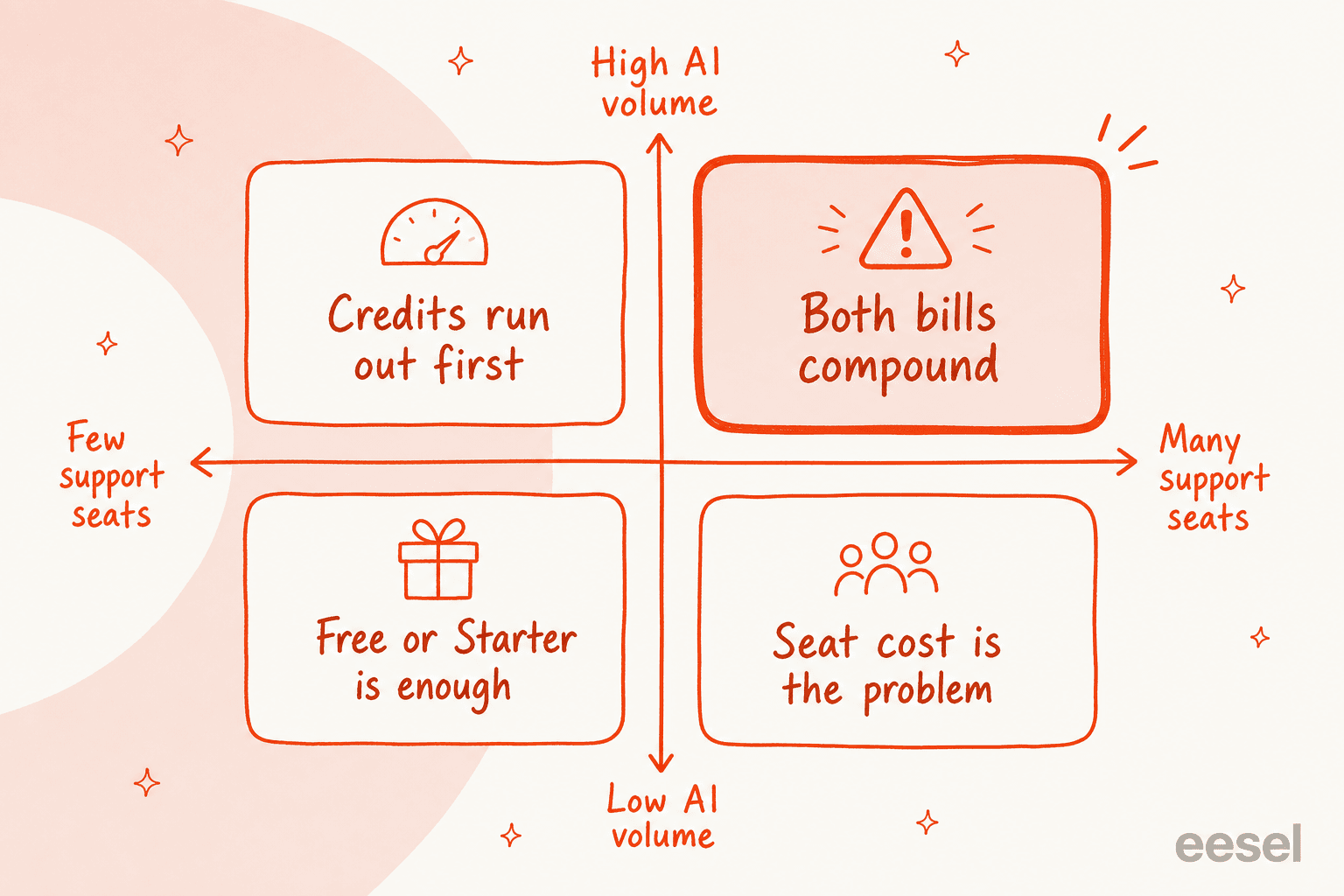
Buy it if you're already on HubSpot CRM and your support team stays small enough that per-seat pricing doesn't compound on you. The unified record is the real product here. A five-person team on Professional at $450/mo, support sitting on the same record as the deal, is a defensible purchase, and the reviewers who love it are almost all in this bucket.
Think hard if you're at fifteen-plus support seats. That's $1,350/mo before any AI, for a helpdesk whose differentiator is a CRM you're already paying for anyway (the HubSpot CRM pricing piece has that half of the bill). Run the numbers against HubSpot vs Zendesk with your real seat count plugged in.
Skip it if you're not on HubSpot CRM. You'd be buying a mid-priced helpdesk whose main advantage simply doesn't apply to you. Start from the best AI helpdesk software roundup instead, or the Service Hub AI alternatives list. Ecommerce queues should look at Gorgias alternatives first, because the shape of the work is different there.
Then there's the most common case of all: you like HubSpot as a helpdesk, but the AI economics don't work. That's rarely a reason to migrate. It's a reason to change what sits on top of it.
Layering AI on HubSpot without buying more seats
I'm openly biased in this section, so take it accordingly, and go check the numbers yourself.
eesel joins HubSpot Service Hub as a real agent rather than a chat widget bolted onto the side. It reads HubSpot tickets, drafts and sends replies, adds internal notes, updates ticket properties, moves tickets through pipelines, and pulls live CRM contact data into every answer it gives. You authorize it through HubSpot's own OAuth flow. From there it imports your past tickets, knowledge base articles and snippets on its own.
None of that is set-and-forget, and the choice is deliberate. Every task the agent runs shows up in reports, with what triggered it and how many of its actions needed a human to approve or reject them, so you can see whether the autonomy you granted is holding up before you widen it any further.

A few things make it a different trade than adding Service Hub seats:
- It is priced by volume, not per seat. From $299/month for 500 credits (1 credit per ticket or chat) on eesel pricing, with no platform fee and no per-agent charge. If your workload scales with volume rather than headcount, the bill does the same.
- You simulate before you go live. Run it against your historical HubSpot tickets, see coverage by theme, find the gaps, fill them, then re-run. eesel built that step in because I've watched confident-sounding bots quietly give wrong answers, and that's the same failure mode the AI hallucinations guide walks through.
- It learns from resolved tickets, rather than only help docs. Which is precisely the gap that cost eesel that rental-marketplace deal, and precisely why it exists today.
The receipts: 85%+ average tier-1 resolution out of the box within a week, across 500+ clients and 80+ languages. EntryLevel runs multiple agents triaging and answering HubSpot tickets, after replacing their previous chatbot. Ecosa runs 24/7 multilingual support across a HubSpot helpdesk, on 522 knowledge items.
It isn't the right answer for everyone. Two-person team, low volume? The free HubSpot tier plus a decent customer service chatbot will do fine, and you should keep the money. An AI layer earns its keep when resolution volume, not headcount, is what's hurting you, which tends to be the same moment a ticket backlog starts eating your week.
You can try eesel free with 100 credits and no credit card, then simulate it against your own HubSpot history before it ever touches a live ticket.