
AI ticket routing for HubSpot Service Hub: how it works

Riellvriany Indriawan
Written by

Riellvriany Indriawan

Katelin Teen
Reviewed by

Katelin Teen

Last edited June 17, 2026

Expert Verified
Illustration of AI routing support tickets in HubSpot Service Hub

What ticket routing actually does

Routing is the step between a ticket arriving and an agent answering it: deciding who, or what, handles it. Get it right and the billing question lands with billing, the urgent one jumps the queue, the Spanish ticket goes to a Spanish speaker. Get it wrong and tickets bounce between agents, first-response times balloon, and your SLAs slip.
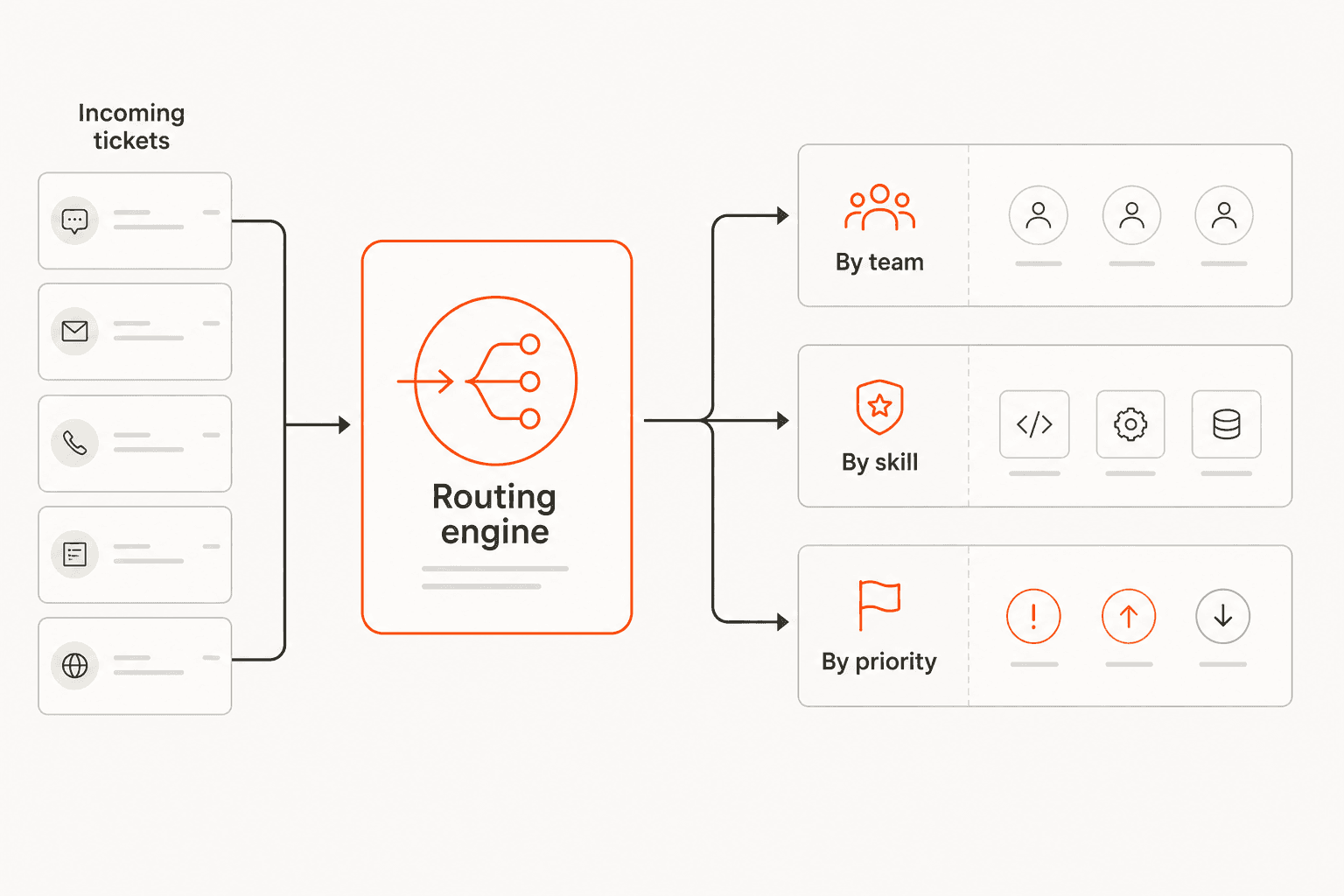
A ticket routing diagram: incoming tickets enter a routing engine that sends each to the right destination by team, by skill, or by priority

The thing to understand about routing is that the logic deciding the destination is what separates a good system from a frustrating one. Routing by a fixed rule is easy. Routing by what the customer actually needs is hard, and it's where HubSpot draws its pricing line.

How HubSpot Service Hub routes tickets

Service Hub is HubSpot's help desk, running natively on the Smart CRM so support works off the same customer record as sales and marketing. Ticket pipelines and basic routing are available across tiers, with simple ticket automation starting at Starter.
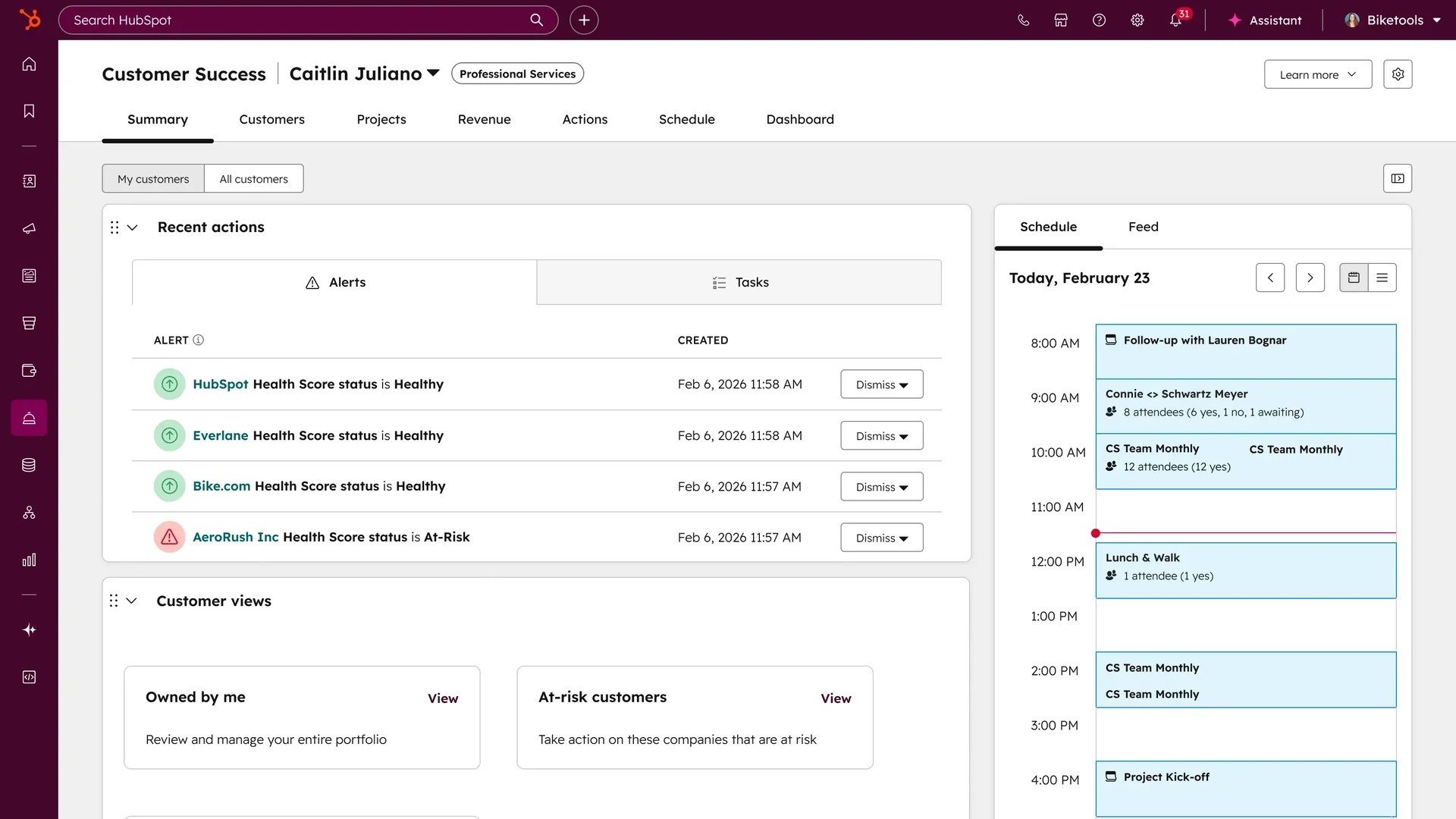
The HubSpot Service Hub customer success workspace, showing alerts, customer views, and schedule, as taken from HubSpot

Here's the catch worth knowing before you buy, though: the routing that actually reads more than a keyword is gated to the top tier.
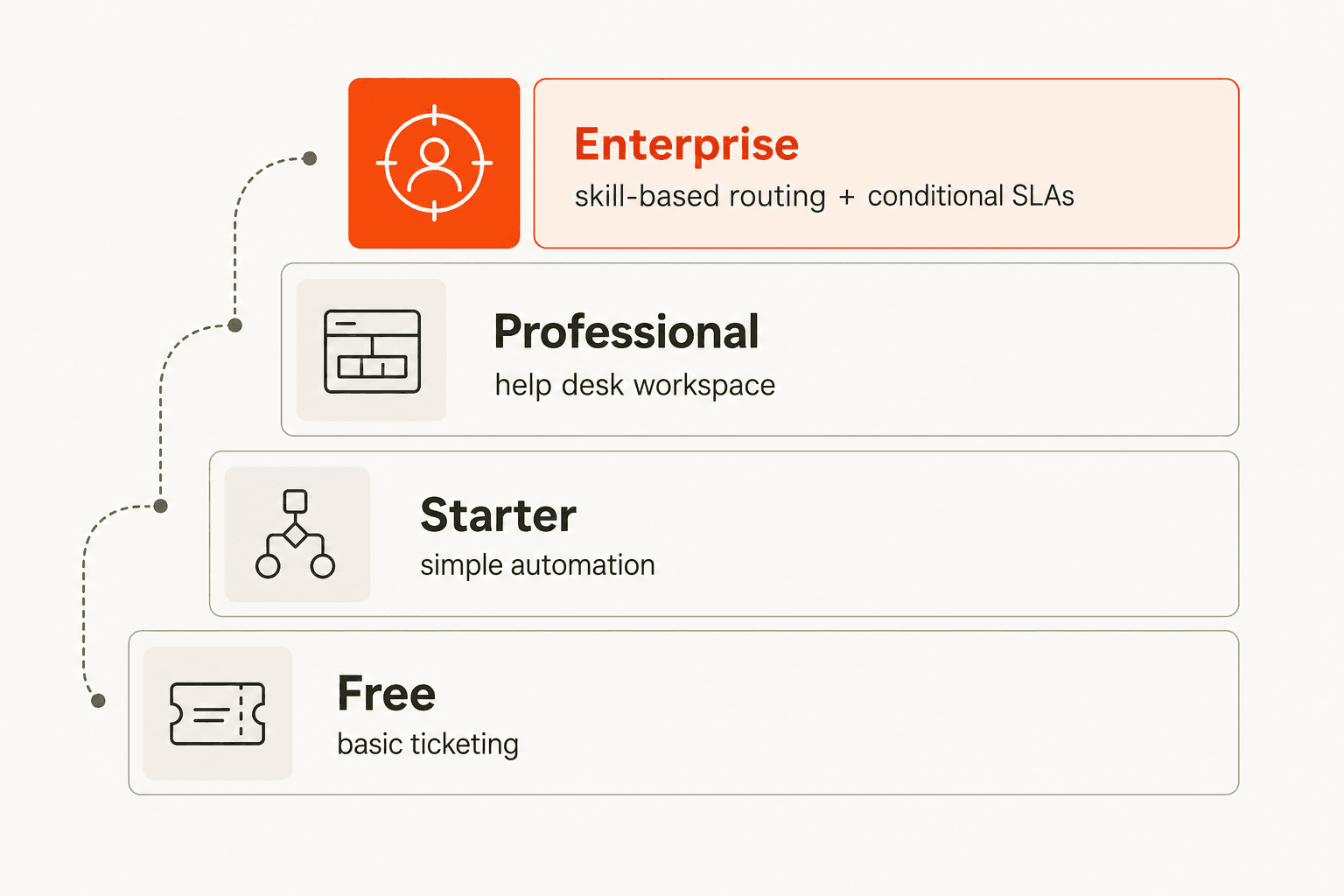
A tier ladder of HubSpot routing: Free gives basic ticketing, Starter simple automation, Professional a help desk workspace, and Enterprise skill-based routing plus conditional SLAs

Skill-based routing and conditional SLAs live on Enterprise. So if you're on Professional and want to route by an agent's actual skills or language, you're either upgrading or building workarounds with workflows. For a lot of teams that's the moment the "Service Hub is affordable" story gets complicated, the routing they wanted is an Enterprise line item.

Where Breeze AI fits (and where it doesn't)

HubSpot's AI brand is Breeze, and the Breeze Customer Agent is good at what it does: resolving email and live-chat inquiries 24/7, with HubSpot claiming 70%+ of conversations resolved automatically and a 57% increase in ticket close rate after six months, which is why teams weigh it against a dedicated HubSpot AI chatbot. There's also a Breeze Knowledge Base Agent that turns resolved tickets into help articles.

But notice the gap: Breeze is built to resolve tickets, not to route them. It's a deflection and answering engine, not a triage engine. The intelligent-routing job, reading an incoming ticket's intent and sending it to the right place, isn't what Breeze is for, and it's not bundled into the lower tiers. For more on the broader suite, our Breeze Customer Agent breakdown goes deeper.

How to get AI-driven routing on any tier

This is the gap a layered AI agent fills. Instead of upgrading to Enterprise for skill-based routing, you connect an AI agent to your existing Service Hub that reads each ticket's intent and handles the triage.
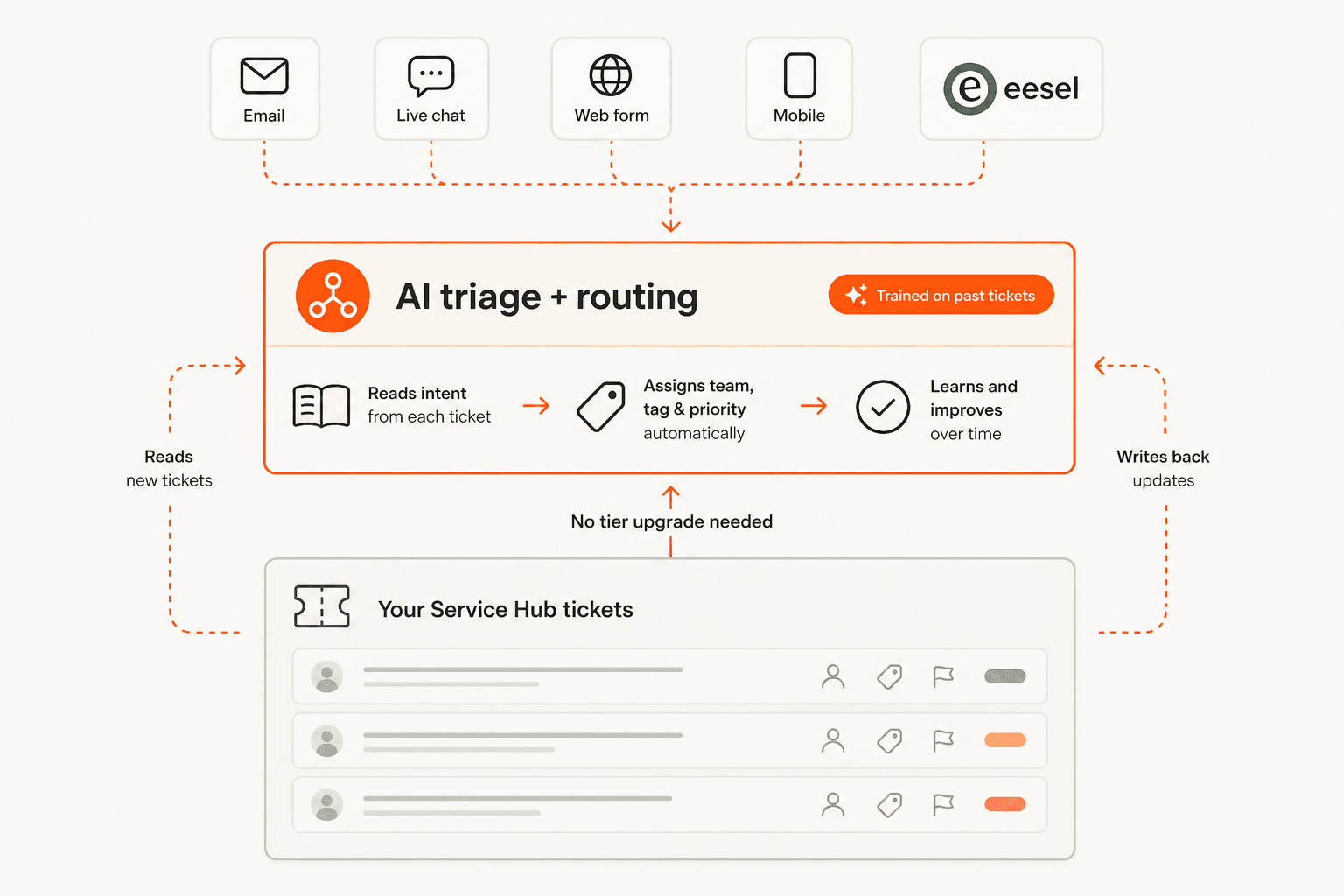
An AI triage and routing layer on top of existing Service Hub tickets, reading each ticket's intent and writing back the right team, tag, and priority

eesel AI is built for exactly this. It connects to HubSpot, reads incoming tickets, and applies tags, routing, and priority by what the ticket actually means, not by keyword rules, on whatever plan tier you're on. Because it trains on your own resolved Service Hub tickets, it learns your real categories rather than making you spell out every rule. And the part I'd never skip: it has a simulation mode, so you run it against your historical tickets and see exactly how it would have routed them before it touches a live one.

What good AI routing looks like

The pattern I'd recommend is to let the AI triage and route, and keep a human in the loop on the replies until you trust it. Route confidently, answer cautiously. That keeps control where it belongs while still removing the read-to-sort tax that eats your team's mornings, and it's the escalation-friendly way to build trust before handing the AI more autonomy. It also pairs naturally with ticket deflection once routing is solid.

Try eesel

If skill-based routing being Enterprise-only is the thing standing between you and a tidy inbox, eesel AI adds AI-driven routing on top of any Service Hub plan. It connects to HubSpot, trains on your past tickets, and routes by intent, with a simulation so you can prove the accuracy first.

The eesel AI dashboard showing AI triaging and routing tickets on a connected helpdesk

It's transparent pay-as-you-go pricing with $50 of free usage to start. Try eesel and run a routing simulation on your own HubSpot tickets.

Frequently Asked Questions

Does HubSpot Service Hub have AI ticket routing?
It has ticket routing across all tiers, but the AI-grade version, skill-based routing and conditional SLAs, is locked to the Enterprise plan. On lower tiers routing is rule-based. For intent-aware routing on any tier, teams add a layer like eesel AI. See our Service Hub AI review for more.
What's the difference between rule-based and AI ticket routing?
Rule-based routing fires on conditions you define, like 'subject contains refund'. AI routing reads what a ticket is actually about and routes by intent, so it catches the cases your rules miss. It's the difference between keyword matching and understanding, and it matters most for tagging and prioritisation.
How much does HubSpot Service Hub cost?
There's a free tier for up to 2 users, Starter from $7 per seat per month (annual), and Professional and Enterprise above that. Skill-based routing requires Enterprise, so the cost of 'smart' routing is really the Enterprise upgrade. Our Service Hub alternatives piece compares the options.
Can I add AI routing to Service Hub without upgrading to Enterprise?
Yes. A layered AI agent connects to your existing Service Hub, reads each incoming ticket, and applies tags, routing, and priority by intent, regardless of your plan tier. eesel AI integrates with HubSpot and trains on your own past tickets.
Will AI route tickets accurately in HubSpot?
Accuracy comes from training data. An agent trained on your own resolved Service Hub tickets learns your real categories and routing logic, and a good one lets you simulate against past tickets first so you see the routing accuracy before it goes live. That's the safe way to roll out any AI support workflow.

Share this article

Riellvriany Indriawan

Article by

Riellvriany Indriawan

Riell is a designer and writer at eesel AI with about two years of experience researching CX platforms, AI chatbots, and helpdesk software. She combines her design background with a sharp eye for how these tools actually look and feel in practice — making her comparisons unusually visual and user-focused.

Related Posts

All posts →
Illustration of AI drafting and sending automatic replies inside Kustomer
Customer Support

Kustomer AI auto-reply: how it works and what to expect

How Kustomer's AI auto-reply works, the difference between Concierge and Envoy, the real numbers behind it, and the trade-offs to weigh before you switch it on.

Riellvriany IndriawanRiellvriany IndriawanJun 18, 2026
Illustration of AI sorting incoming support tickets in a Help Scout inbox
Customer Support

AI ticket triage for Help Scout: a practical guide

Help Scout's native AI is built to answer tickets, not triage them. Here's how AI ticket triage for Help Scout actually works, and how to add it without leaving your inbox.

KiraKiraJun 18, 2026
Illustration of support tickets moving safely from one helpdesk to another during a migration
Customer Support

How do I switch helpdesks without losing ticket history?

A practical 2026 guide to switching helpdesks without losing ticket history: what to export, how to map it, and the migration you might not even need to do.

KiraKiraJun 18, 2026
Illustration of Gladly's Sidekick AI resolving customer conversations
Customer Support

Gladly AI deflection: does the anti-deflection platform actually deflect?

Gladly markets itself against 'deflection bots', but its Sidekick AI resolves tickets autonomously. Here's what Gladly AI deflection really is, what it costs, and the trade-offs.

KiraKiraJun 18, 2026
Illustration of an AI agent deflecting customer support tickets in Dixa
Customer Support

Dixa AI deflection: how Mim deflects tickets and what it costs

How Dixa's AI deflection works through its Mim agent, the flat-rate pricing angle, where it's gated, and how to think about deflection on your own terms.

Rama Adi NugrahaRama Adi NugrahaJun 18, 2026
Illustrated hero banner for a roundup of the best helpdesk tools for startups in 2026
Customer Support

The best helpdesk tools for startups in 2026 (a hands-on list)

A hands-on list of helpdesk tools for startups in 2026, with real pricing, free tiers, and a clear pick for every stage from your first ten tickets to your first thousand.

KiraKiraJun 15, 2026
Banner image for Zendesk vs Hiver in 2026: Which helpdesk is right for you?
Customer Support

Zendesk vs Hiver in 2026: Which helpdesk is right for you?

Evaluating Zendesk vs Hiver? This 2026 comparison breaks down the architecture, hidden costs, and AI capabilities of both platforms.

Amogh SardaAmogh SardaApr 28, 2026
Chatbot analytics dashboard with ticket themes bar chart, resolution rate gauge, and CSAT score panel
Customer Support

Chatbot analytics guide: how to track and improve chatbot performance

A practical guide to chatbot analytics: the 8 metrics that actually matter, industry benchmarks for each, and a feedback loop that turns data into real improvements.

Quinela WenskyQuinela WenskyMay 15, 2026
Illustration of a support dashboard measuring whether an AI support agent is working
Customer Support

How do I know if my AI support is working?

A practical way to tell if your AI support agent is actually working: the five numbers to watch, the green flags, the red flags, and where to look.

KiraKiraJun 18, 2026

Ready to hire your AI teammate?

Set up in minutes. No credit card required.

Get started free