
What ticket deflection actually means in Service Hub
Deflection is simple to define and easy to measure wrong. A ticket is "deflected" when a customer gets their answer without a human agent touching it: they found the help article, the portal answered them, or the AI agent resolved the chat. The metric you care about is the share of incoming volume that resolves this way, because every deflected ticket is an agent hour you get back.
In HubSpot Service Hub, deflection happens across three surfaces that feed into one another. Here is the flow at a glance:
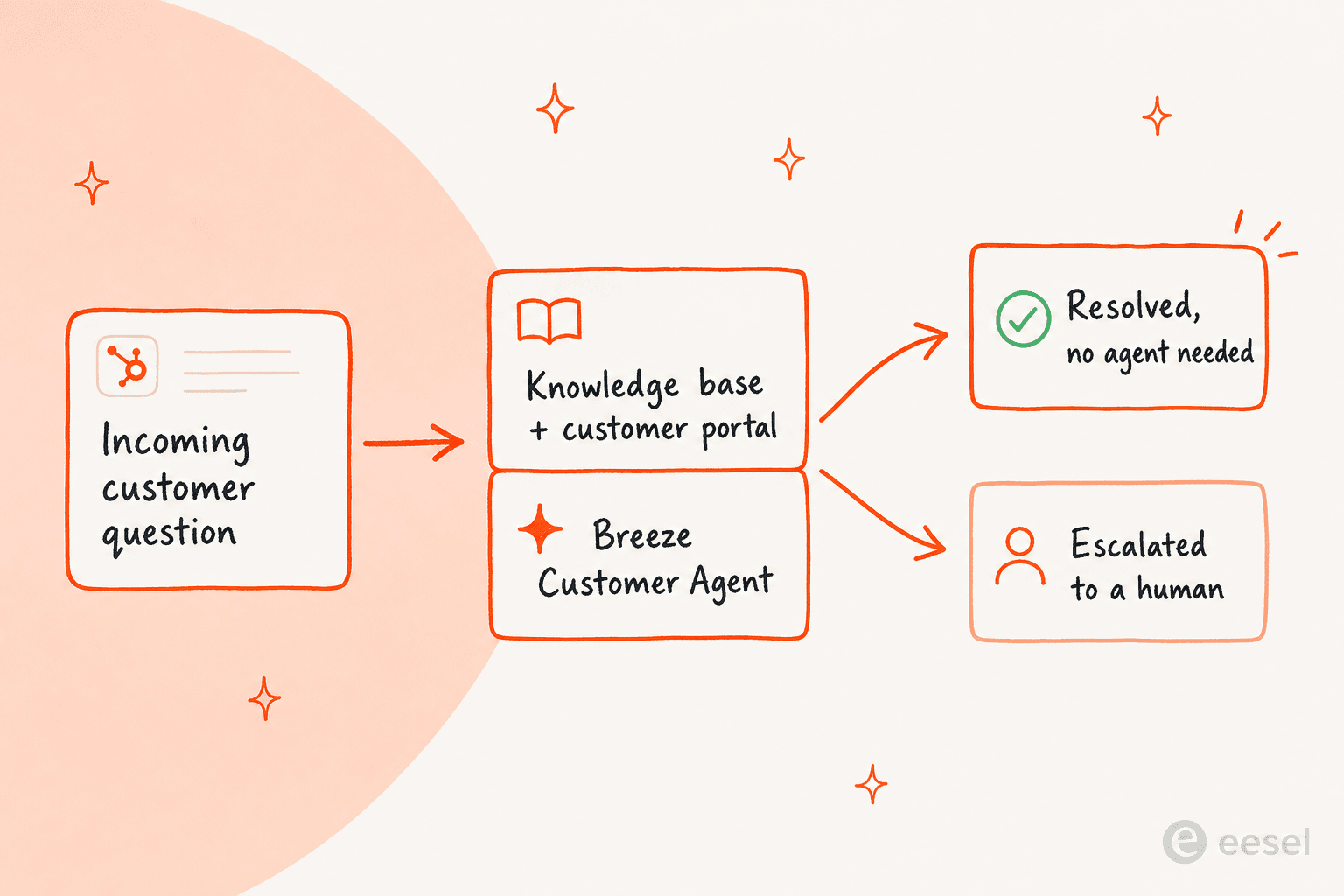
The aim is to push as much volume as you safely can into that top "resolved" outcome, and to make the handover to a human clean when deflection is not the right call. Let's look at each surface.
The native tools HubSpot gives you for deflection
Knowledge base and customer portal
The foundation of any deflection strategy is content the customer can find on their own. HubSpot's self-service knowledge base lets you publish help articles that are searchable from your site and surfaced inside chat. It pairs with a secure customer portal where logged-in customers can track their own tickets instead of emailing to ask for a status update.
The thing to flag up front: the knowledge base is a Professional-tier feature, so it starts at $90/seat/month, with one knowledge base and up to 2,000 articles. Enterprise lifts that to 25 knowledge bases and 10,000 articles. If you are on Starter, self-service deflection through a HubSpot knowledge base is not on the table yet, which surprises a lot of small teams.
Breeze Customer Agent
This is HubSpot's AI deflection engine. The Breeze Customer Agent answers email and live-chat inquiries 24/7 by drawing on your knowledge base and connected content, and hands off to a human when it cannot help. You give it a name, a goal, and a personality, point it at your sources, and it starts resolving conversations with citations back to the articles it used.
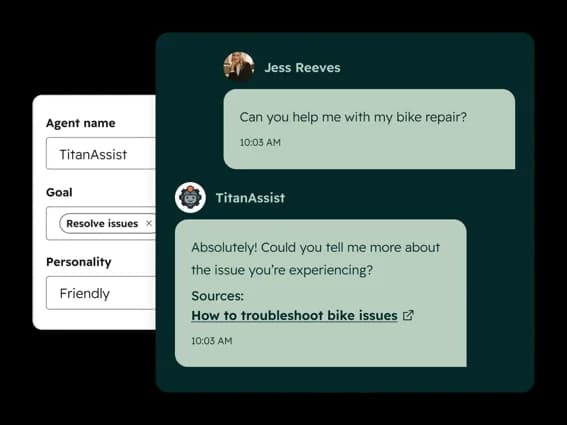
HubSpot's own numbers are genuinely strong here. The company says Breeze Customer Agent already resolves about 65% of conversations across 8,000+ customers and cuts resolution time by 39%. If your knowledge base is in good shape, that is a serious dent in tier-1 volume. We dug into the wider AI suite in our HubSpot Breeze AI review if you want the full picture.
Breeze Knowledge Base Agent
Deflection is only as good as your content, and the gap nobody has time to close is the article that was never written. The Breeze Knowledge Base Agent (in beta) watches resolved conversations, spots topics customers keep asking about that have no article, and drafts new ones to fill the gap.
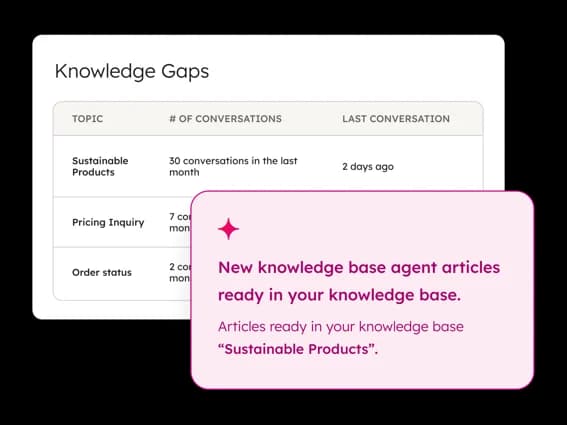
It is a smart loop: the more the agent deflects, the more it learns about what is missing, and the better your self-service gets. This is the same instinct behind good AI ticket classification work, where the system tells you where your knowledge has holes.
How to set up ticket deflection in HubSpot Service Hub
If you are on a Professional plan or above, here is the practical order of operations to get deflection running.
- Audit your top ticket reasons first. Pull your last few months of tickets and group them by topic. The handful of reasons that make up most of your volume are your deflection targets. There is no point automating an answer nobody asks for.
- Build or clean up the knowledge base articles for those topics. Each high-volume reason needs a clear, current article. This is the unglamorous step that decides whether everything downstream works, so do not skip it.
- Turn on the customer portal so logged-in customers can self-serve ticket status and history rather than opening a "where's my ticket" conversation.
- Configure the Breeze Customer Agent. Give it a name and a goal like "resolve issues," set the tone to match your brand, connect your knowledge base as its source, and choose the channels it answers on (chat and email). HubSpot's chatbot setup flow walks through the screens.
- Test before you let it loose. Run real questions past the agent and check both the answer and the citation. Get the handover rules right so anything outside its confidence lands with a human cleanly.
- Watch the Knowledge Gaps report and keep feeding it. Deflection is not a set-and-forget project. The gaps report tells you what to write next; treat it as a standing backlog.
For the full click-by-click version, our Service Hub AI chatbot integration guide goes deeper than we can here.
What deflection actually costs in Service Hub
This is where teams get tripped up, because the sticker price and the real cost are different numbers. Self-service deflection rides along with your seats, but AI deflection is metered separately through HubSpot Credits.
| Plan | Price (annual) | Knowledge base | Breeze Customer Agent | Included credits | One-time onboarding |
|---|---|---|---|---|---|
| Free | $0 (up to 2 users) | No | No | - | - |
| Starter | from $7/seat/mo | No | No | 500 | - |
| Professional | from $90/seat/mo | 1 KB / 2,000 articles | Yes | 3,000 | $1,500 |
| Enterprise | from $150/seat/mo | 25 KBs / 10,000 articles | Yes | 5,000 | $3,500 |
The credit model is the part to understand. HubSpot Credits cost $9 per 1,000 on an annual commitment ($10 monthly), and each resolved Customer Agent conversation costs 50 credits, which works out to about $0.50. Professional's 3,000 included credits cover roughly 60 resolutions a month before you start paying extra; Enterprise's 5,000 cover about 100. Past that, deflection is pay-as-you-go on top of your seats.
Now the catch worth circling. HubSpot moved Breeze to "pay per resolution" in 2026, which sounds great, until you read how a resolution is defined.
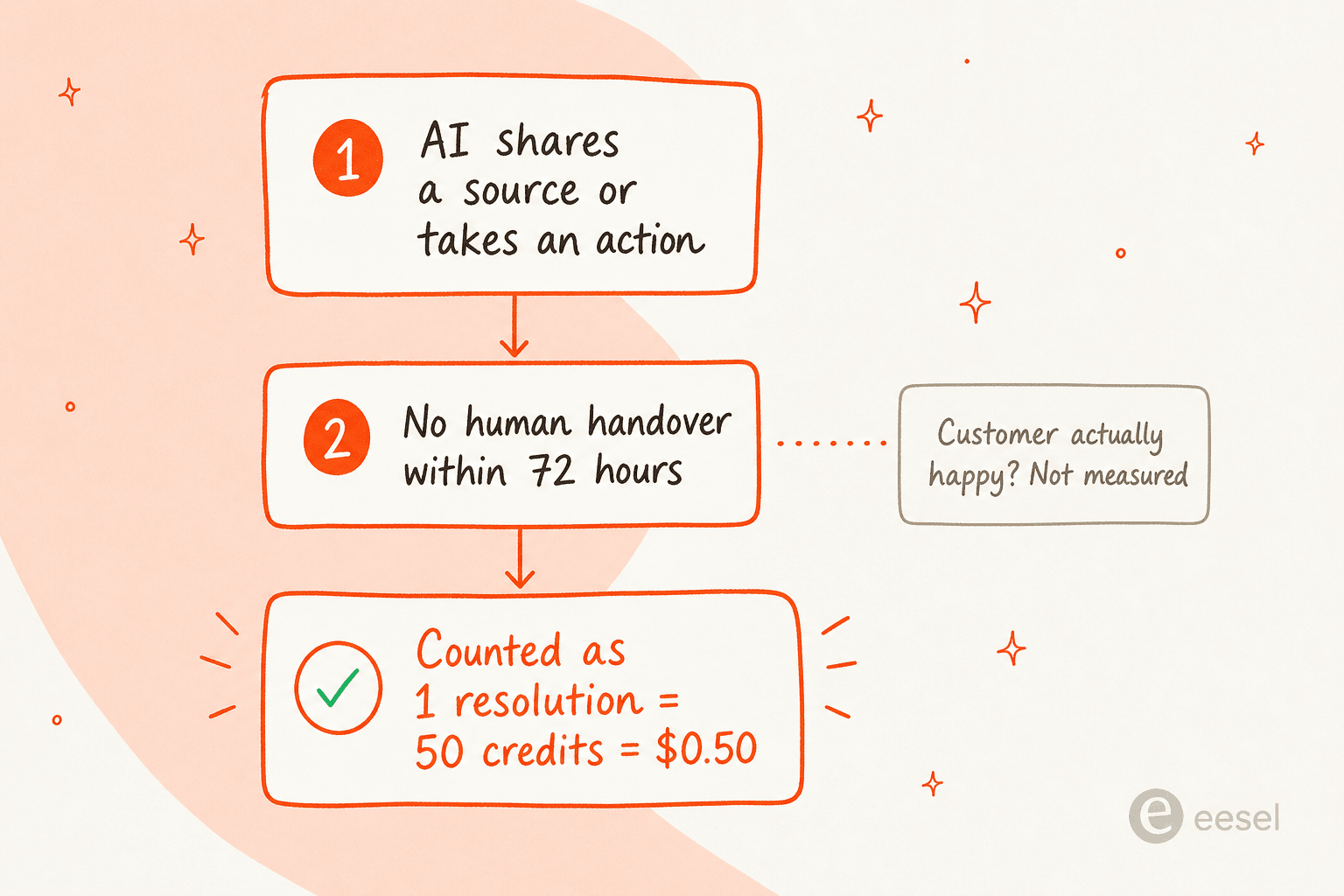
As the team at Resolve247 points out, a conversation counts as resolved "when the AI agent either shares a content source or performs an action and there's no human handoff within 72 hours." Their blunt read is that "'resolved' by HubSpot's definition isn't the same as 'the customer left happy.'" The 72-hour window can also rack up multiple billable resolutions if a customer comes back with separate issues.
And the analysts are not fully sold that per-resolution pricing changes much. SaaStr's take is sharp: "When resolution rates hit 90%, you're paying for 9 out of 10 attempts. At that point, per-resolution pricing and per-conversation pricing are almost the same thing."
None of this makes Service Hub a bad choice. It makes it a choice you should price out at your real volume, onboarding fees and all, before assuming the headline seat price is the whole bill. We get into this more in our HubSpot AI ticket automation review.
Where native deflection hits its limits
Two patterns come up again and again when teams outgrow the native setup.
The first is cost as you scale. HubSpot's pricing is famously hard to pin down. As one 2026 pricing analysis put it, "figuring out HubSpot pricing can feel like trying to solve a puzzle," with seat minimums, onboarding fees, and credits stacking on top of each other. For a small team, the jump from Starter to the Professional tier (where deflection actually lives) plus a $1,500 onboarding fee is a real hurdle, not a rounding error.
The second is control. Deflection only works if you trust the AI to answer, and most teams are not comfortable letting an AI auto-reply to everything on day one. This is the single most common worry we hear, and a CX lead at a DTC supplements brand put it about as well as anyone:
"The AI will never be able to answer 100% of the questions... I need an AI who is only handling the tickets that it's confident to handle and all the other ones, leave them alone."
That instinct is correct. Good deflection is not "automate everything," it is "automate the safe stuff, route the rest." When deflection works, it looks like this real exchange from an SEO tool's website chat, where the AI answered two how-to questions and then handed straight over the moment the customer asked to talk to a human. The customer never felt stuck, and the agent only saw the conversation that actually needed them.
The native Breeze setup gives you some of this, but the granular controls (which exact ticket types to exclude, how confident the AI must be before it replies, and the ability to prove the deflection rate before you flip it on) are where a dedicated layer pulls ahead. If you are weighing options, our roundup of HubSpot Service Hub AI alternatives and our best customer service AI comparison are good next reads.
A more controllable way to deflect tickets
This is the part of the post where we are biased, so take it with that grain of salt, but it is also genuinely how we would approach deflection if control and predictable cost mattered to us.
eesel AI is an AI support layer that connects to HubSpot (and Zendesk, Freshdesk, Gorgias, Front, Slack, and 100+ other tools) and handles deflection without you leaving your existing helpdesk. Three things make it a different shape from the native Breeze setup.
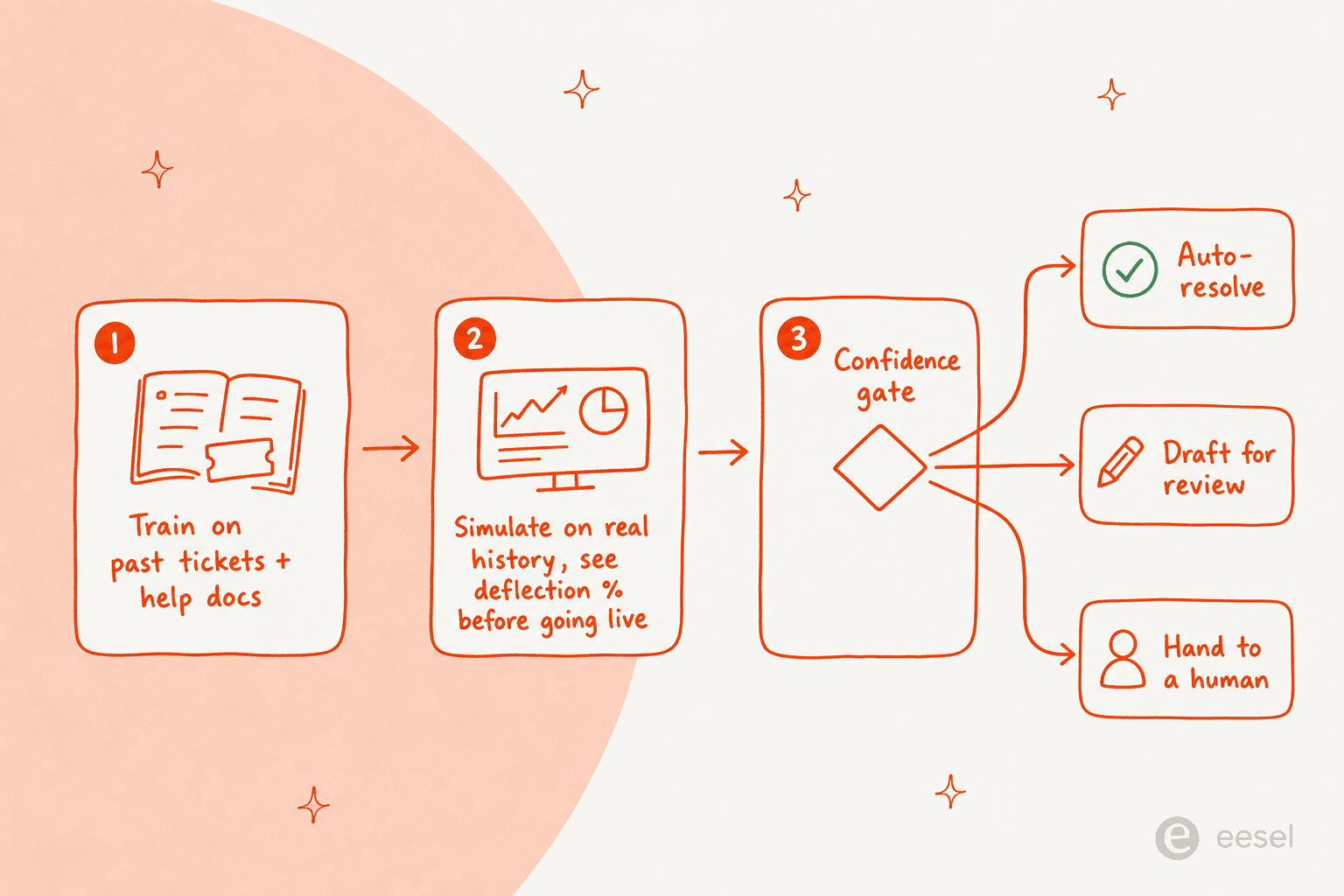
It learns from your solved tickets, not just your help center. A lot of your best answers live in past ticket resolutions, not in published articles. eesel trains on that history on day one, so years of resolved conversations become usable knowledge immediately, alongside your docs.
You can simulate the deflection rate before going live. Instead of turning the agent on and hoping, you run it against thousands of your past tickets in a simulation, see exactly what it would have deflected and where it would have struggled, fill the gaps, and only then go live. That is the answer to "what deflection rate will I actually get," before you have spent anything.

Confidence-based routing keeps you in control. You decide which ticket types the AI touches and how confident it has to be before it replies on its own. Low-confidence cases come back as a draft for a human, not a wrong answer sent to a customer. This is exactly the "only handle what it's confident about" behaviour that CX lead was asking for, and it is why fixing a chatbot that answers incorrectly starts with routing, not better prompts.
On cost, eesel is usage-based: from $0.40 per ticket the AI handles, with no per-seat fees, no platform fee, and no minimum (pricing). A team deflecting 1,000 tickets a month pays around $400, and you are never billed for tickets your human agents handle. Compared with stacking seats, credits, and onboarding fees, the math is a lot easier to predict, which matters when you are comparing AI agent versus human agent cost.
It is not magic, and the same honesty applies: deflection still depends on your content being decent, and no tool resolves 100% of tickets. But the results show up fast when the setup is right. Gridwise, a gig-economy analytics app, saw eesel resolve 73% of its tier-1 requests in the first month, with the rollout done during a 7-day trial.
Try eesel for HubSpot ticket deflection
If you are running HubSpot Service Hub and want to deflect more tickets without the per-seat and per-credit puzzle, eesel AI plugs into your existing setup, trains on your past tickets and help docs, and lets you simulate the deflection rate before a single customer sees it. You stay in control of what the AI answers and what it routes to a human, and you pay per ticket handled rather than per seat.

You can connect it and run a simulation on your own ticket history in an afternoon. Start free at eesel.ai, or see how it stacks up against the native tools in our eesel AI vs HubSpot Breeze comparison.
Frequently Asked Questions
What is ticket deflection in HubSpot Service Hub?
How much does HubSpot Service Hub ticket deflection cost?
How do I set up the Breeze Customer Agent for deflection?
What counts as a resolved conversation in HubSpot?
What is a good ticket deflection rate to aim for?


Article by
Alicia Kirana Utomo
Kira is a writer at eesel AI with a Computer Science background and over a year of hands-on experience evaluating AI-powered customer service tools. She focuses on breaking down how helpdesk platforms and AI agents actually work so that support teams can make better buying decisions.