What ticket deflection actually means in HubSpot
Ticket deflection is the strategy of resolving a support query before it ever becomes a ticket a human has to touch. The customer gets their answer instantly, from an AI agent, a knowledge base article, or an automated workflow, and your team only sees the things the AI couldn't handle.
On a HubSpot Service Hub helpdesk, that usually means the Breeze Customer Agent intercepting a live-chat or email question and answering it from your help content, so the conversation closes without ever creating work for a rep.
So far, so good. Here's the part most deflection content skips: the headline deflection number and the number of customers you actually helped are not the same thing. After a few years of watching this play out on real queues, I've learned to distrust a deflection rate the moment someone quotes it without a re-contact rate next to it.
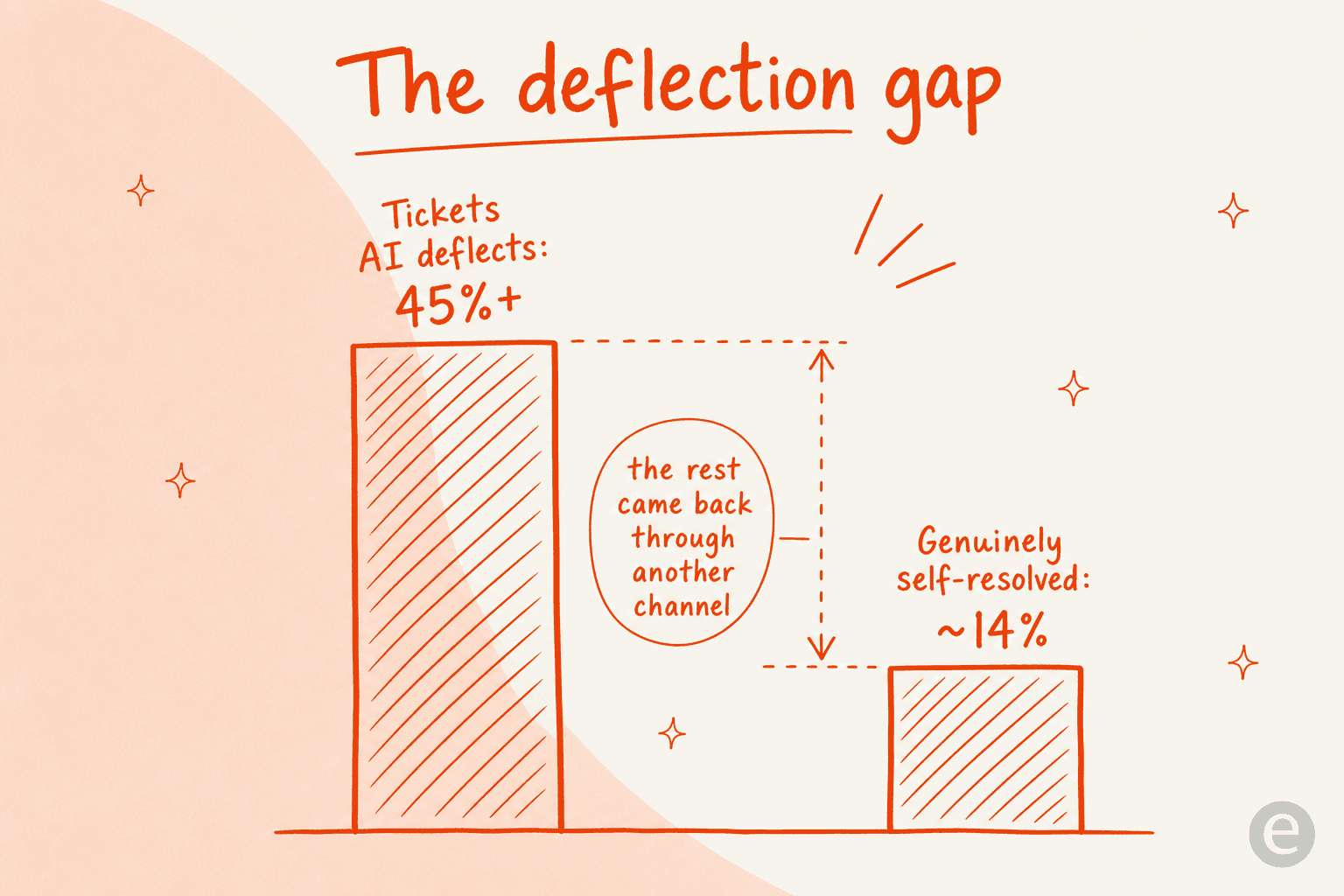
The data backs the suspicion. Gartner has found that while AI deflects more than 45% of queries, only around 14% reach genuine self-service resolution. The other ~31% are "false deflections", tickets that were suppressed, not solved, where the customer either gave up or came back through another channel. Most teams overestimate their real deflection by 15-25%, according to analysis of 50+ practitioner discussions by Corebee.
It gets sharper. In one 100,050-interaction study cited by Corebee, AI bots were 37% more likely to move an issue away from resolution than a human when the underlying knowledge base was inadequate. So the goal for HubSpot deflection isn't "deflect more." It's "resolve more, and measure it honestly." Keep that straight and everything else in this guide follows.
How AI ticket deflection works on a HubSpot helpdesk
Under the hood, every modern deflection agent, Breeze included, runs roughly the same loop. It's worth understanding because it tells you exactly where deflection breaks.
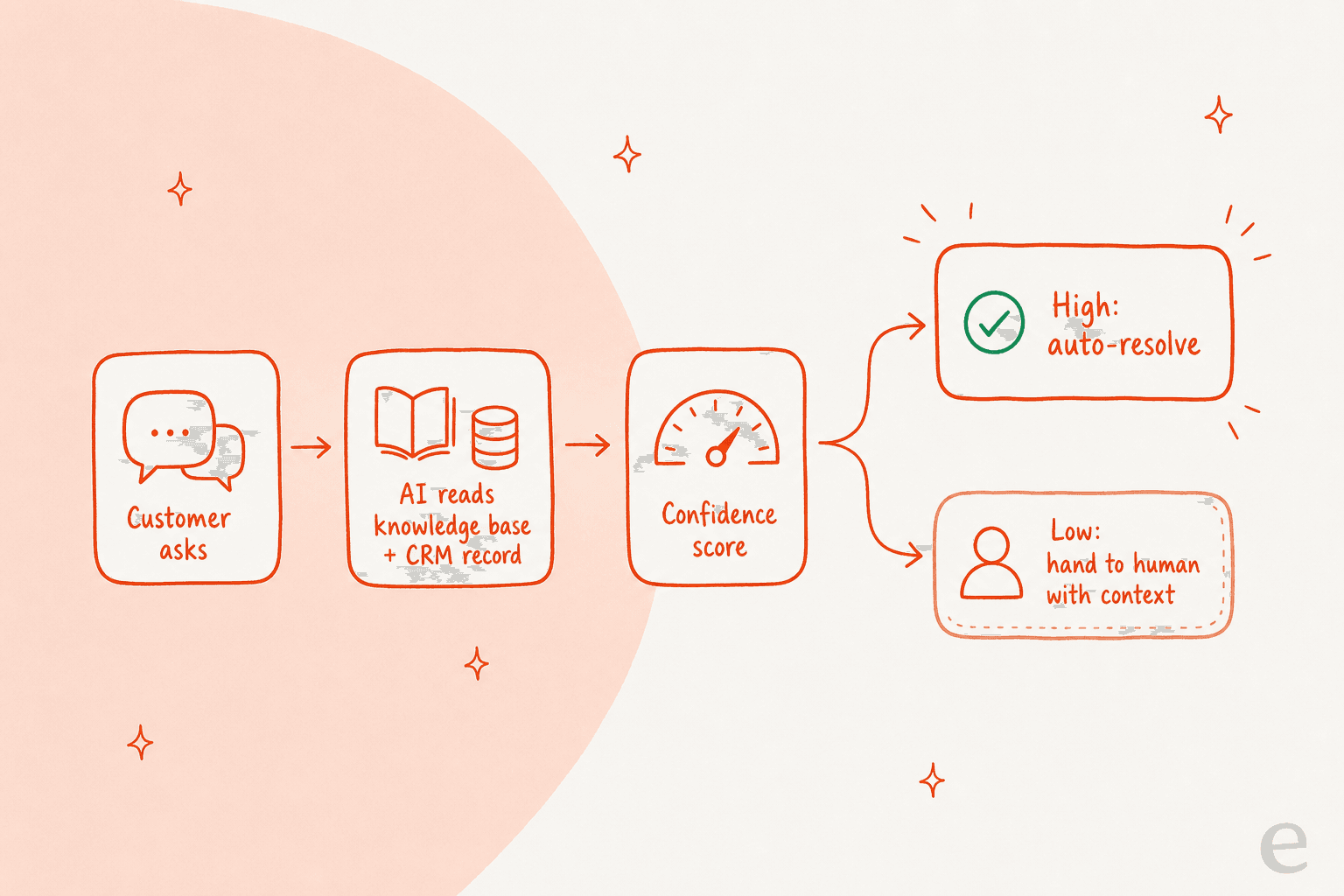
- The customer asks. A question comes in via chat, email, or a help widget.
- The AI reads your knowledge. It uses retrieval-augmented generation, a fancy way of saying it searches your knowledge base and past resolutions for the most relevant content, then grounds its answer in what it found rather than making things up.
- It pulls CRM context (if it can). This is where HubSpot's Smart CRM should shine, the agent can look at the contact record, deal stage, or past tickets to personalize the answer instead of reciting a generic article.
- It scores its own confidence. High confidence means auto-resolve. Low confidence should mean escalate.
- It either resolves or hands off. A clean handoff carries the full context to a human so the customer never re-explains themselves.
The quality ceiling of this whole loop is set by step 2, not by the AI model. As both ClarityArc's production analysis and our own experience confirm, knowledge base quality is the single highest-impact variable in deflection. A brilliant model on top of stale, fragmented docs produces confident, wrong answers, which is worse than no bot at all. Deep integrations (CRM, billing, order data) add another 20-30% to deflection quality, because most real questions need account-specific context, not a generic FAQ.
HubSpot's native option: the Breeze Customer Agent
If you're on HubSpot, the Breeze Customer Agent is the path of least resistance. It's HubSpot's AI support agent, built to resolve email and live-chat conversations 24/7 from your help content. HubSpot says it already resolves 65% of conversations across 8,000+ customers and cuts resolution time by 39%, which, taken at face value, is a respectable number.
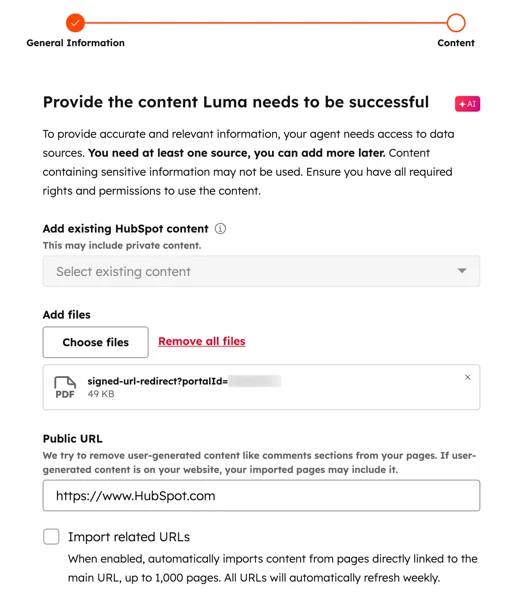
Setting it up is genuinely straightforward, which is the best thing about staying native. You name the agent, give it a personality, and point it at your knowledge.
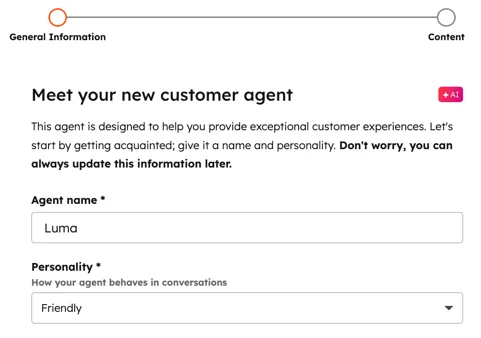
Then you feed it content sources, existing HubSpot articles, uploaded files, and public URLs it can crawl and refresh.
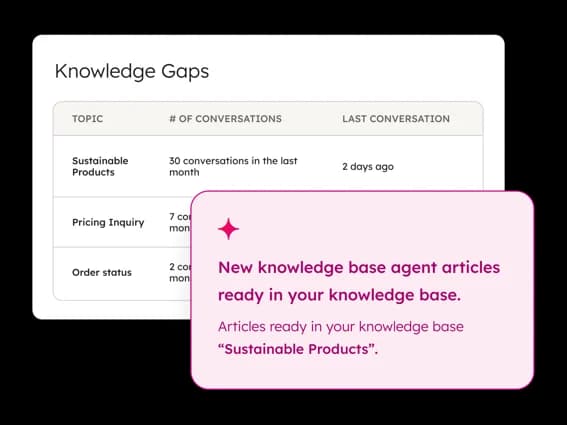
There's a nice closed loop here too. The Breeze Knowledge Base Agent spots topics customers keep asking about that you don't have articles for, then drafts new ones to fill the gap, which is exactly the "treat every escalation as a knowledge signal" discipline that makes deflection compound over time.
Credit where it's due: for a team already living in HubSpot, that's a clean starting point, and I'd rather a team turn this on than keep drowning in tier-1 email. (Quick disclosure: eesel AI integrates with HubSpot and competes with Breeze on exactly this use case, so weigh my take accordingly. I've tried to keep the facts straight and sourced.) For a fuller look, our Breeze Customer Agent overview and honest Breeze AI review go deeper than I can here.
What native deflection actually costs on HubSpot
This is where a lot of teams get surprised. Breeze deflection isn't a flat feature, it stacks three costs: the seat, the onboarding fee, and metered credits.
| Plan | Price (annual) | One-time onboarding | Included HubSpot Credits | Breeze Customer Agent? |
|---|---|---|---|---|
| Free | $0/mo (up to 2 users) | - | - | No |
| Starter | from $7/seat/mo | - | 500 | No |
| Professional | from $90/seat/mo | $1,500 (required) | 3,000 | Yes |
| Enterprise | from $150/seat/mo | $3,500 (required) | 5,000 | Yes |
All figures from HubSpot's Service pricing page. The Customer Agent is gated to Professional and above, so the real entry price for native deflection is a Professional seat plus a mandatory $1,500 onboarding fee in year one, before a single ticket is deflected.
On top of seats, deflection burns HubSpot Credits at $9-$10 per 1,000. In April 2026 HubSpot moved Breeze to "outcome-based" pricing: 50 credits per resolved conversation, down from $1.00 per conversation to about $0.50 per resolution. Professional includes 3,000 credits (~60 resolutions/month); after that, you're paying per resolution.
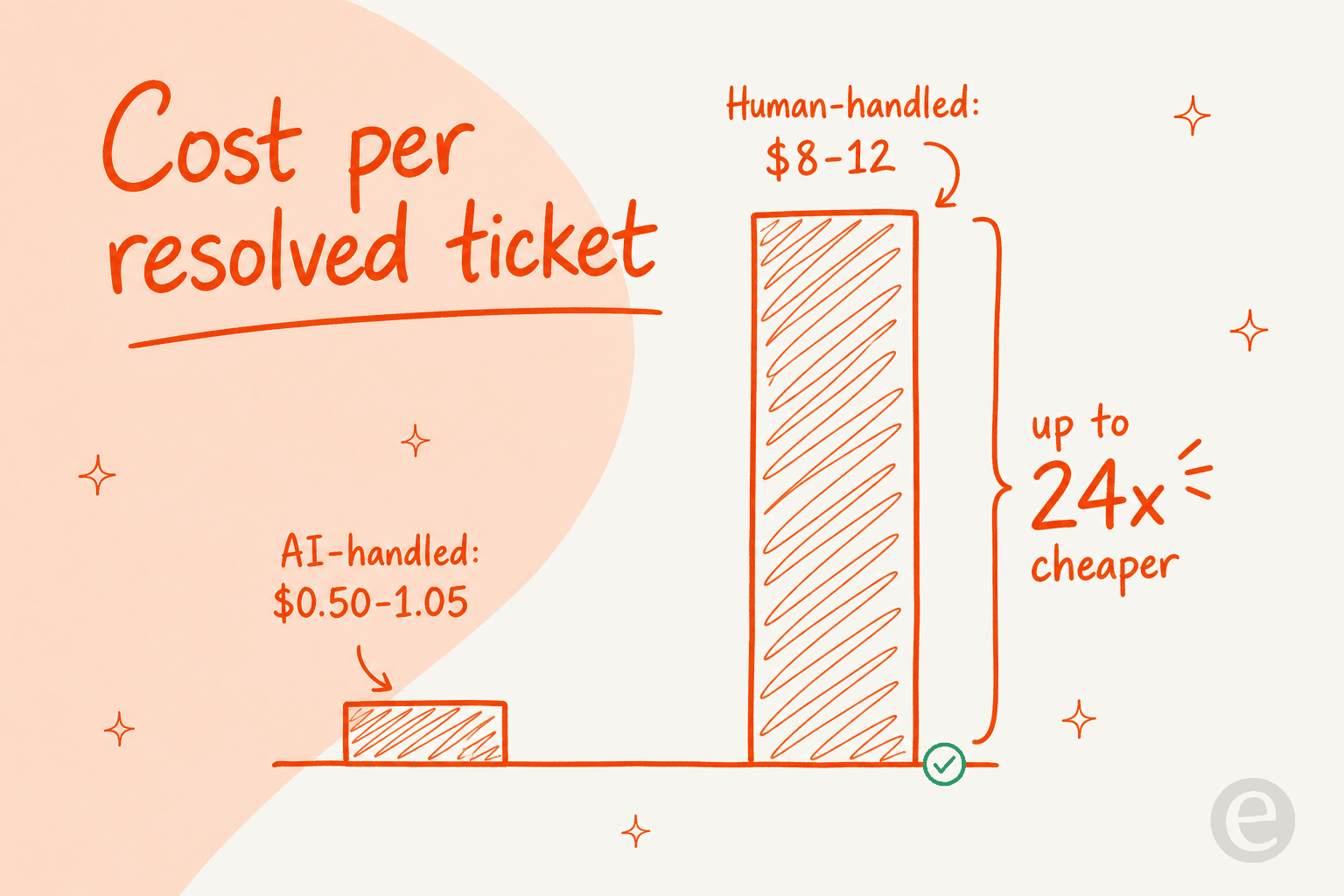
Even at $0.50, the economics of deflection are compelling on paper, because the human alternative is brutal. AI-handled tickets average $0.50-$1.05 each; human-handled tickets average $8-$12, a 12x to 24x difference per interaction (Gartner and Forrester data, via theStacc).
But "resolved" is doing a lot of work in that per-resolution price, and it's worth reading the fine print before you model your savings.
Where HubSpot deflection hits a ceiling
I like Breeze as an on-ramp. I'm less keen on three things that tend to bite once you scale past the FAQ layer.
1. "Resolved" is defined generously. HubSpot counts a conversation as resolved when the agent shares a source or takes an action and there's no human handoff within 72 hours. As the team at Resolve247 put it:
"'resolved' by HubSpot's definition isn't the same as 'the customer left happy.'"
A customer who got a wrong answer and gave up in frustration counts as a resolution, and you pay 50 credits for it. The 72-hour window can also count a single back-and-forth as multiple resolutions. This is the false-deflection problem from the top of the article, baked straight into the billing model.
2. It's knowledge-base-bound by default. Native Breeze is strongest at answering from help articles. The deflection that actually moves the needle, "where's my order," "change my subscription," "reset this for me," needs the agent to read and act across systems, not just recite docs. That's ticket automation, and it's a different muscle than article retrieval.
3. You can't test it on your real tickets before you go live. This is the one that costs people. You configure the agent, flip it on, and then discover how it handles your actual edge cases, in front of customers. After watching a confident-sounding bot quietly give wrong answers on a live queue, this is the part I'd never skip again. You want to know your true deflection and accuracy on historical tickets before it touches a real customer.
For the full pros-and-cons, our HubSpot AI ticket automation review and is HubSpot Service Hub AI worth it get into the weeds. The short version: native Breeze is fine for FAQ deflection, and stretches thin where deflection gets valuable.
How to actually get real deflection on HubSpot
Whether you run native Breeze or a layer on top, the framework for real (not suppressed) deflection is the same. This is the part I'd tattoo on the wall.
Lead with knowledge base quality. Well-structured, current docs increase genuine resolution by 15-25%, per ClarityArc. Mine your closed tickets weekly for gaps. If you do nothing else, do this, it's the highest-leverage hour you'll spend. Our guide to training AI on your knowledge base has the playbook.
Start narrow. Pick two or three high-volume, well-documented query types and nail them completely before widening scope. High-complexity intents rarely break 25% deflection no matter the vendor, so don't point the bot at your hardest tickets on day one. A bit of ticket triage up front, even just tagging and routing, beats trying to auto-resolve everything.
Wire in real context. Connect order data, billing, and the CRM record so the agent can answer account-specific questions, not just generic ones. On HubSpot the CRM is right there, use it.
Set confidence thresholds, then respect them. The whole game is letting the AI handle only what it's sure about and cleanly escalating the rest. The most useful thing a customer ever told me on this was, paraphrasing a DTC supplements support lead: the AI will never answer 100% of questions, so I want one that only handles the tickets it's confident about and leaves the rest alone. That instinct is exactly right.
Make escalation seamless. Every handoff should carry full context so the customer never repeats themselves. And never use the bot as a bouncer. The single best warning I've read on deflection, from Corebee's discussion synthesis:
"Optimizing for ticket deflection with AI almost ruined our churn rate. Stop using bots as bouncers."
Measure resolution, not deflection. Track re-contact rate within 48 hours and true resolution, not just the headline deflection number. If you only watch one number, watch how often "deflected" customers come back. Our guide to customer service KPIs lays out which ones matter.
Get these six right and you can hit a real 60%+ on HubSpot. Skip them and you'll hit a fake 80% that quietly churns customers. The companies that get to genuine 70-87% deflection, the Grammarlys and Bilts of the world, did it through KB quality, integration depth, and tight scope, not a better model.
Try eesel for HubSpot ticket deflection
This is the part where the disclosure from earlier earns its keep. eesel AI is an AI support agent that connects to HubSpot (and Zendesk, Freshdesk, Gorgias, Front, Slack, and 100+ other tools) and runs deflection on top of your existing setup, billed per resolution rather than per seat.

Two things make it our answer to the ceiling above. First, eesel trains on your past tickets, not just your help-center articles, so it learns how your team actually answers, the thing native KB-bound agents miss. Second, simulation mode replays your historical tickets against the AI before it goes live, so you see your real deflection and accuracy by topic, find the gaps, fix them, and only then flip the switch. No deflecting onto live customers to find out it doesn't work.
It shows up in the numbers. One gig-economy analytics team on Zendesk put it plainly:
"In the first month, eesel is resolving 73% of our tier 1 requests... Our team implemented and achieved results quickly during our 7-day trial."
Kim Simpson, Gridwise (source)
You configure it in plain English, tell it when to step in, what tone to use, and what to leave alone, and it stays fully under your control with confidence-based routing.

If native Breeze feels limited or you'd rather not gate deflection behind a Professional seat and onboarding fee, you can try eesel free, connect HubSpot, and run a simulation on your own tickets in an afternoon. Or browse the full HubSpot AI alternatives roundup first, no hard feelings.
Frequently Asked Questions
What is AI ticket deflection in HubSpot?
How much does HubSpot ticket deflection cost?
Does HubSpot count a 'resolved' conversation the way I would?
How do I improve my HubSpot ticket deflection rate?
Can I add AI ticket deflection to HubSpot without upgrading to Professional?
Will AI deflection hurt my customer satisfaction?
What are the best alternatives to HubSpot's native deflection?


Article by
Alicia Kirana Utomo
Kira is a writer at eesel AI with a Computer Science background and over a year of hands-on experience evaluating AI-powered customer service tools. She focuses on breaking down how helpdesk platforms and AI agents actually work so that support teams can make better buying decisions.