

What you need before you start
You don't need engineers or a data-science team. You do need four things:
- A place your customers already ask questions. A help desk (Zendesk, Freshdesk, Gorgias, HubSpot, Help Scout), an AI chatbot for your website, or a Slack channel for internal support.
- Knowledge the bot can read. Your help center, your knowledge base, your saved macros, and ideally a pile of past resolved tickets. This is the single biggest predictor of how good your bot will be.
- A rough sense of your ticket mix. Which questions repeat? Refunds, order tracking, password resets, "where is my order" (WISMO)? The repetitive stuff is what a chatbot handles first.
- A decision on the type of bot you're building, which is the next section.
That's really all of it. Everything else is configuration.
Rule-based vs AI: which kind of chatbot are you building?
Before any building happens, get clear on which of two very different things you mean by "support chatbot."
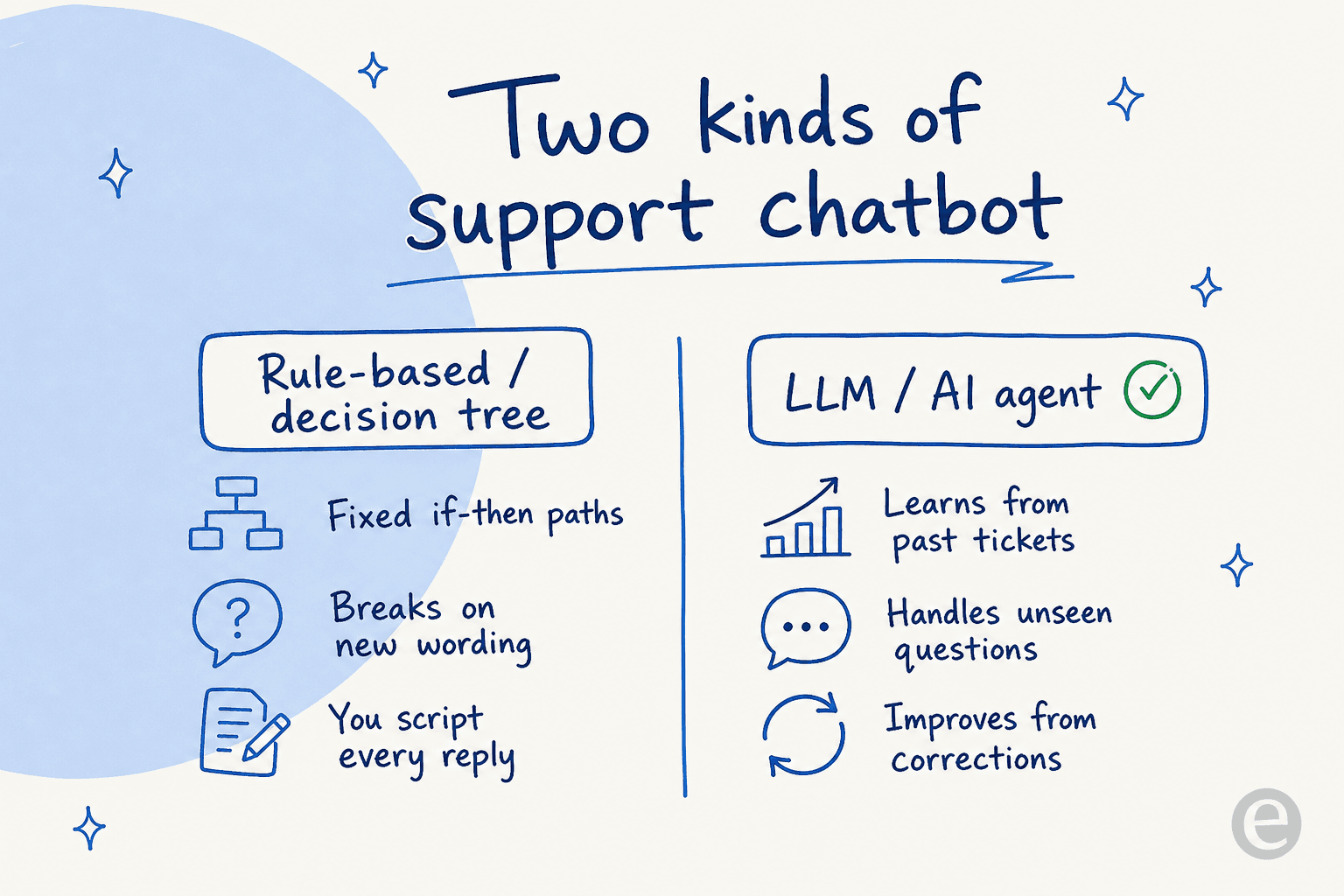
A rule-based chatbot is a decision tree. You define if-then paths ("if the user clicks Billing, show these three options"), and the bot follows the script. It's predictable and cheap, but it breaks the moment a customer phrases something you didn't anticipate, and you have to author every branch yourself.
An AI agent (built on a large language model, the same tech behind conversational AI) reads your knowledge and past tickets, then generates answers to questions it has never seen phrased that way before. It handles messy, real-world wording, and it improves as you correct it. The trade-off is that it needs guardrails so it doesn't answer confidently when it shouldn't, which we'll cover.
For a handful of ultra-predictable flows, rule-based is fine. For actual support volume, most teams now reach for an AI agent, and the reasoning is laid out well in our comparison of an AI agent vs a rule-based chatbot. If you're still shortlisting tools at this stage, our guide to the best AI chatbot for customer service is a good companion read. The rest of this guide assumes you're building the AI kind, because that's the one people mean when they say "support chatbot" in 2026.
The five steps to build a support chatbot
Here's the whole path at a glance. Each step maps to a section below.
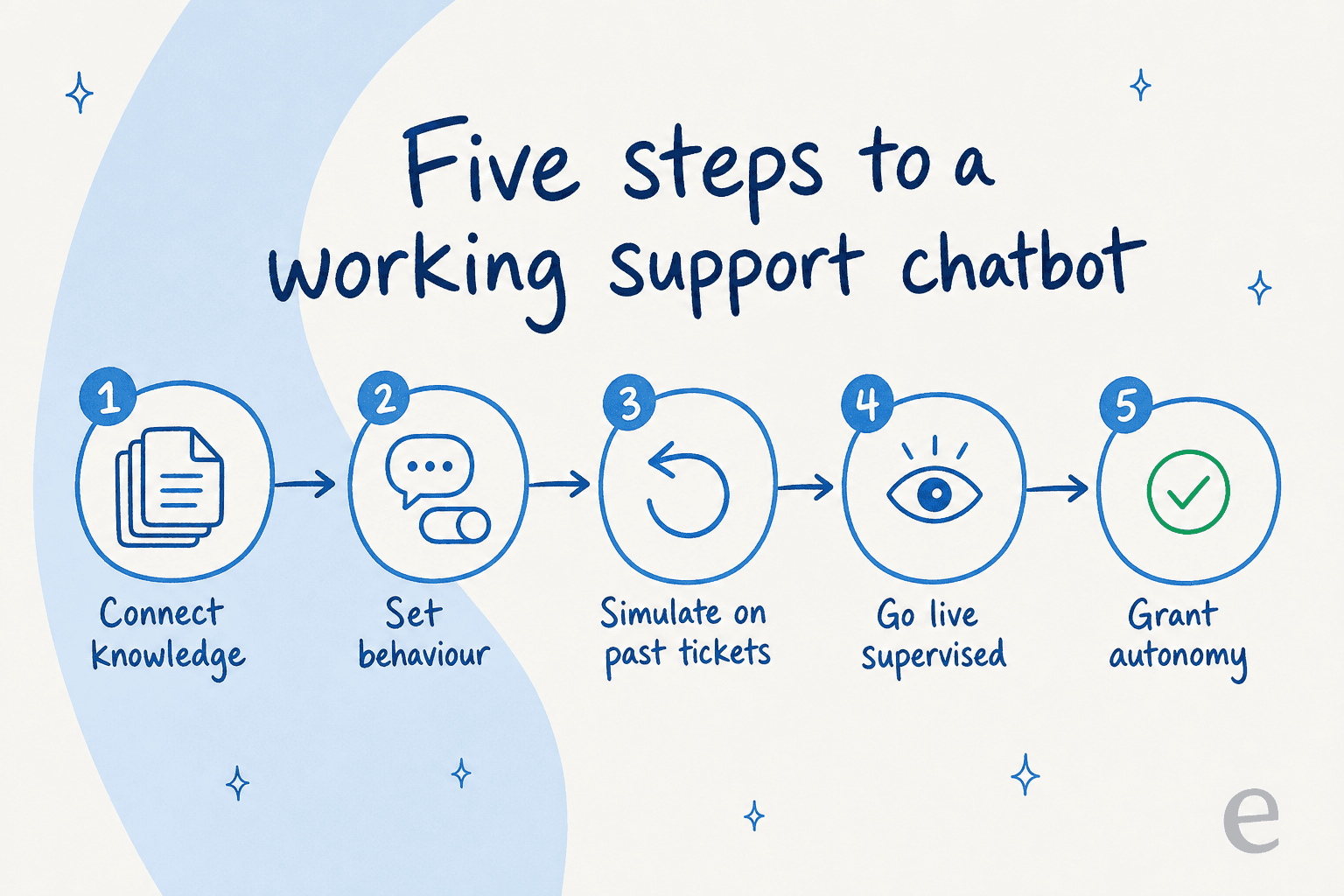
Step 1: Connect your knowledge sources
A support chatbot is only as good as what it can read. The mistake I see most is teams pointing the bot at a thin, out-of-date help center and then wondering why the answers are generic.
Connect three layers of knowledge, in order of value:
- Past resolved tickets. This is the gold. It teaches the bot how your team actually answers, in your voice, including the exceptions your help docs never wrote down. A bot trained on solved tickets outperforms one trained only on help-center articles, because it learns real resolutions rather than idealized documentation.
- Your help center and knowledge base. The official source of truth. If you don't have one yet, a good AI knowledge base is worth building in parallel.
- Macros, saved replies, and internal docs. The canned answers your agents already lean on. One UK support team I worked with drove 56 resolved conversations from just 9 synced macros in the first stretch, purely because those macros captured their most common answers cleanly.
The goal is coverage. Every source you connect closes a gap where the bot would otherwise have to guess or escalate. Good AI customer service software pulls from your existing help desk, docs tools like Notion and Confluence, and past ticket history without you exporting anything.

Step 2: Set the bot's behaviour and tone
Now you decide how the bot acts. This used to mean intent trees and dialogue flows. With an AI agent, it's closer to briefing a new hire: you describe, in plain language, when it should jump in, what tone to use, what it must never do, and when to escalate to a human.
The behaviour rules that matter most for a customer service chatbot:
- Tone and voice. Match your brand. If you say "Hey there" not "Dear valued customer," tell it so.
- Scope. What topics it answers directly vs. hands off, whether that's async tickets or live chat. Billing disputes and cancellations often belong with humans early on.
- Escalation triggers. Angry customer, legal/refund threshold, low confidence: route to a person.
- Actions it can take. Look up an order, tag a ticket, apply a refund under a set amount. This is where an AI ticketing setup turns from "answers questions" into "does work."
Being able to configure all of this by chatting with the tool, rather than filling in dozens of settings pages, is one of the quiet reasons the newer platforms are faster to stand up.

Step 3: Simulate on past tickets before going live
This is the step almost every guide skips, and it's the one that saves you. Before the bot talks to a single customer, run it against a big batch of your historical tickets and read what it would have said.
I push hard on this because I've watched a confident-sounding bot quietly give wrong answers in production, and it erodes customer trust faster than a slow reply ever would. Simulation turns that risk into a spreadsheet you can read before launch:
- Coverage by theme. What percentage of past tickets would it have resolved, broken down by topic?
- Where it fell short. The themes where it had no answer, so you know exactly which knowledge gaps to fill.
- A realistic forecast. A grounded estimate of your ticket deflection rate before you spend a cent on live traffic.
Then you fill the gaps, re-run, and repeat until the numbers look right. When we ran this for Gridwise, the agent resolved 73% of tier-1 requests in the first month, and that number wasn't a surprise on launch day because simulation had already shown it.

Step 4: Launch supervised, then watch
Don't flip the switch to full autonomy on day one. Launch the bot in copilot mode: it drafts replies, a human reviews and sends. This does two things at once. Customers get accurate answers, and every human edit becomes a correction the bot learns from.
Watch the right metrics during this window: how often agents send the draft unchanged (a proxy for trust), resolution rate, and CSAT on bot-drafted replies. If agents are barely editing the drafts, you're ready to graduate. If they're rewriting everything, go back to Step 1 and close the knowledge gaps. Our guide on AI copilot for customer service covers this phase in depth.

Step 5: Grant autonomy as trust builds
Once the drafts are reliable on a category, let the bot auto-resolve that category. Start narrow (order status, password resets), keep humans on everything else, and expand as confidence data proves each new topic is safe.
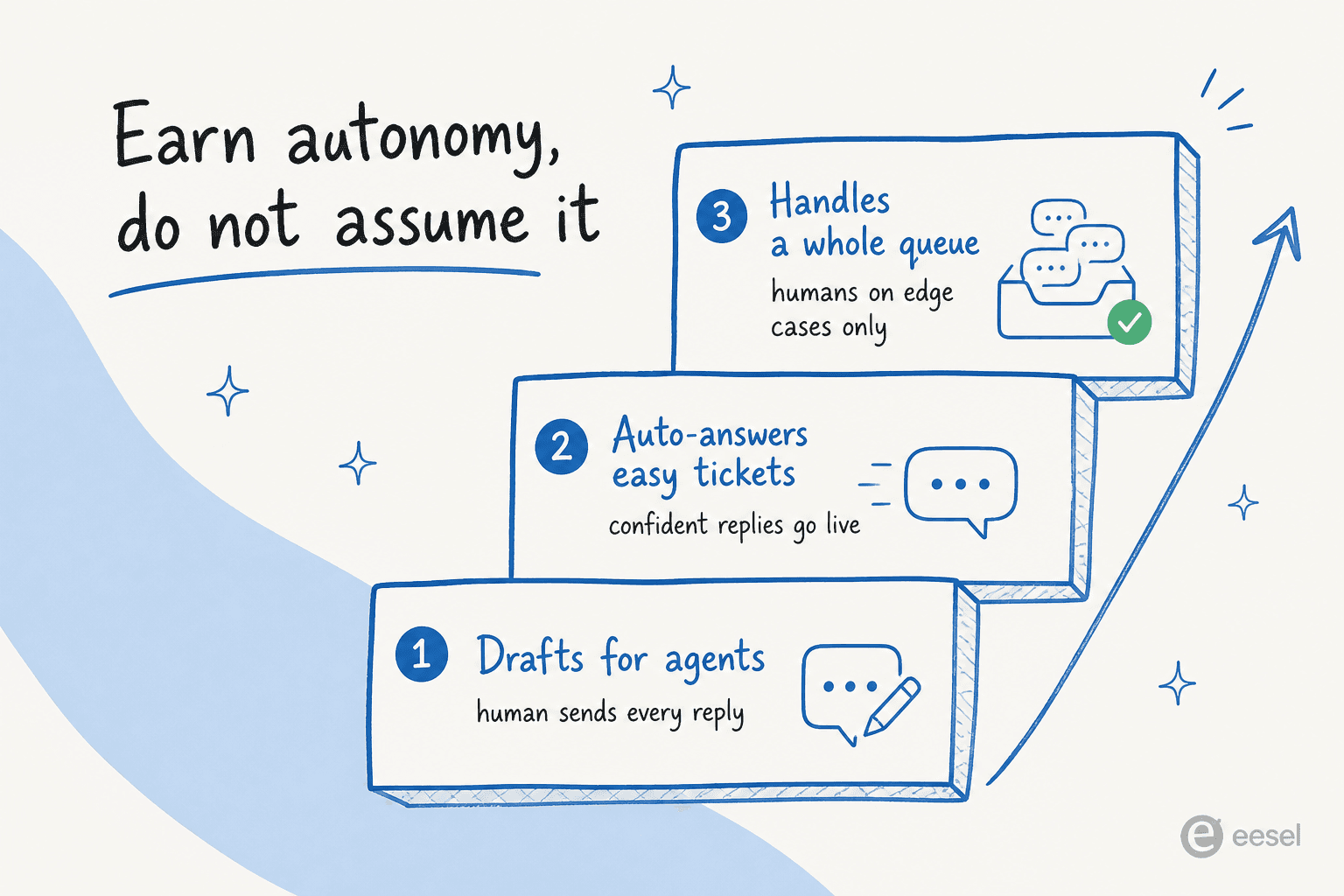
The key mechanism here is confidence-based routing: the bot answers autonomously when it's confident and the topic is approved, and falls back to a human draft when it isn't. That's what lets you scale coverage without scaling risk, and it's the trait that separates the strongest AI agent examples from bots that flame out. It's the same pattern whether the bot lives in Zendesk, Gorgias, or a website widget.
How much will a support chatbot actually save you?
Before you build, it helps to know the prize. The math is simple: a chunk of your tickets are repetitive, a chatbot resolves most of those, and each resolved ticket is time your team gets back. Plug in your own numbers.
Treat the output as a ceiling, not a promise. The honest version of this number only comes from Step 3, where you simulate against your tickets. But it's a useful gut-check on whether building a support chatbot is worth your time. For most teams past a few hundred tickets a month, it clearly is.
Common mistakes when building a support chatbot
The five steps are simple. Here's where teams still trip, drawn from watching a lot of rollouts:
- Launching without simulation. The cardinal sin. You can't know your resolution rate from a demo. If a vendor won't let you test on your own tickets before you pay, that's a red flag, not a minor gap. It's also the root of most chatbot problems.
- Thin knowledge. Pointing the bot at a stale help center and skipping past tickets. The bot can only answer what it can read.
- Full autonomy on day one. Skipping the supervised window means customers become your QA team. Earn autonomy through the ladder above.
- No escalation path. A bot with no graceful handoff to a human traps frustrated customers. Design the handoff before launch.
- Measuring the wrong thing. Counting chats handled instead of tickets resolved. Volume looks good on a dashboard and tells you nothing about whether customers got helped. If you want models to copy, our roundup of customer service chatbot examples shows what "resolved" looks like in practice.
- Over-scripting an AI bot. Trying to control an LLM agent with hundreds of rigid rules fights the tool's main strength. Give it good knowledge and clear guardrails, not a decision tree.
Avoid these six and you're ahead of most teams that have shipped a bot this year.
Try eesel
If the five steps sound like a lot of moving parts, that's exactly the problem eesel is built to collapse. It plugs into your existing help desk (Zendesk, Freshdesk, Gorgias, HubSpot, Help Scout, Slack, and 100+ integrations), learns from your past tickets and help center on day one, and lets you configure behaviour by chatting with it rather than building flows. It's a regular on our roundup of the best AI helpdesk software for exactly that reason.
The part I'd point you to first is the simulation: you can run the agent over thousands of your historical tickets and see your projected resolution rate before going live, which is the difference between hoping a chatbot works and knowing it will. Pricing is one fixed monthly price, from $299/month for 500 credits (1 credit per ticket or chat) with no per-seat fees, and there's a free plan with 100 credits, so you can build and simulate a support chatbot without talking to sales.

Building a support chatbot in 2026 isn't a coding project anymore. It's connecting the right knowledge, setting clear behaviour, testing honestly, and letting the bot earn its autonomy. Do those in order and you'll ship something that actually resolves tickets, not just deflects them into a dead end.