Customer support can feel like you're constantly running on a treadmill. Your team gets bogged down answering the same questions day in and day out, while customers are left waiting. The usual solution is to hire more people, but that gets expensive, fast. It’s a classic catch-22.
An AI chatbot can help by handling repetitive work, freeing up your team to focus on more complex issues. The only problem? The market is flooded with options, and it’s tough to figure out which tools are genuinely effective and which are just marketing hype.
That’s why I tested the top platforms. This isn't a review based on feature lists alone. It’s a hands-on review of the 6 best AI customer service chatbots for 2026, designed to help you find the right one for your business.
What is an AI customer service chatbot?
An AI customer service chatbot is a program that uses artificial intelligence to chat with customers in a way that mimics human conversation. It uses natural language processing (NLP), which lets it understand what people are asking, even if their grammar isn't perfect or they don't use specific keywords.
This is a significant step up from older, rule-based chatbots. Those could only follow a very strict, pre-written script. If you asked a question in a slightly different way, they would respond with, "Sorry, I don't understand." It was often a frustrating experience. To illustrate the difference, the following infographic breaks down how modern AI chatbots compare to their rule-based predecessors.
Today’s AI chatbots understand the context of a conversation, learn from past chats, and can tackle much more complicated problems. You'll see them on websites, answering questions on social media, or even handling emails to give customers instant support, 24/7. For ecommerce, a Shopify AI chatbot can handle product questions and order inquiries. They're less like a clunky vending machine and more like a helpful new member of the team.
How we chose the best AI customer service chatbots
To look beyond the marketing claims, I decided to focus on what really matters when you’re adding an AI tool to your team’s workflow. I examined these tools closely to see how they would actually perform for a busy team.
Here’s the criteria I used to put this list together:
-
Ease of setup: How fast can you get it working without a developer? I was looking for tools that are truly self-serve.
-
AI quality and control: How good are the answers? And just as important, how much control do you have over the AI's personality, tone, and what it’s allowed to do?
-
Integration depth: Does it connect easily with the tools you already use every day, like your help desk, Slack, or Google Docs, with no need to migrate to a new platform? A tool that operates in a silo can be a significant limitation.
-
Safety and trust: How does the tool help you roll it out without the risk of it providing incorrect information to a customer? I gave extra points to platforms that let you start with a human in the loop.
-
Value for money: Is the pricing clear and fair? I looked for transparent models without unexpected fees.
The 6 best AI customer service chatbots in 2026
After putting them all to the test, here are the top 6 platforms that stood out.
1. eesel AI
Instead of thinking of eesel AI as just another chatbot, it’s better to think of it as an AI teammate. It’s designed to be onboarded, not just installed. You invite it to your existing tools like Zendesk, point it to your knowledge sources like Google Docs or Confluence, and it starts learning from your past conversations and documents immediately.
Why it's on the list: A key feature of eesel AI is its collaborative design. You don't have to fully automate from the start. It begins with the eesel AI Copilot, which works alongside your human agents, drafting replies for them to review, edit, or approve. This allows teams to get value from day one with reduced risk. Its simulation feature is also notable. You can test the AI on thousands of your past tickets to see exactly how it would have performed, giving you a clear picture of its potential before it ever talks to a live customer. For teams that have rolled it out fully, it can autonomously resolve up to 81% of conversations.

Pros and Cons: The main pros are the fast, no-code setup and the gradual rollout that builds trust. You can customize its entire persona and the actions it can take just by writing in plain English. On the other hand, because it’s so flexible, setting up very complex, multi-step custom actions might take some planning to get just right.
Pricing:
-
Team: Starts at $239/month (billed annually) for up to 1,000 AI interactions.
-
Business: Starts at $639/month (billed annually) for up to 3,000 AI interactions, unlocking features like training on past tickets and the fully autonomous AI Agent.
-
Custom: Custom plans are available for enterprise needs.
2. Zendesk

As the gold standard in the customer service world, Zendesk offers a powerful AI that comes pre-trained on billions of real customer service interactions. This means it can understand customer intent effectively from the start, without needing a ton of your own data.
Why it's on the list: Zendesk is built for large teams that need a mature solution that can handle scale with ease. It offers world-class support across every channel you can imagine (email, chat, voice, social) and pulls it all into a single, unified workspace. Their visual Flow Builder also makes it simple to map out chatbot conversations without having to write code, while their marketplace offers an impressive ecosystem of integrations.
Pros and Cons: A major plus is the powerful, pre-trained AI and its unmatched reliability. Zendesk offers tiered plans to match different team sizes, ensuring you can access enterprise-grade features as you grow. While advanced features like the AI Copilot are available as add-ons, this ensures teams only pay for the specific high-level capabilities they need.
Pricing: The Suite Team plan starts at $55/user/month (billed annually). Zendesk also offers a powerful AI Copilot add-on for $50/agent/month, providing teams with advanced automation functionality.
3. Freshchat
Freshchat, part of the Freshworks family, is made for teams that have to manage conversations coming from multiple channels. It brings chats from your website, WhatsApp, Instagram, and more into one inbox. Its AI assistant, Freddy, is there to automate responses and point customers to self-service articles.
Why it's on the list: Freshchat's platform is well-suited for managing a true multichannel support strategy. Freddy AI helps by taking the first look at incoming chats, figuring out what the customer needs, and either answering directly or sending it to the right agent. This helps keep everyone organized and focused.
Pros and Cons: The interface is clean and easy to use, and its multichannel support is excellent. A consideration is that many of the best AI features are available as paid add-ons. You might sign up for a plan and later find that the Freddy AI Copilot is an additional cost.
Pricing: There’s a free plan for up to 10 agents. Paid plans start at $19/agent/month for the Growth plan, but the Freddy AI Copilot add-on is an additional $29/agent/month.
4. Tidio
Tidio is a platform that mixes live chat with AI chatbots, making it a great entry point for small businesses. Their AI, Lyro, is designed to handle a good portion of common customer questions, and you can get started at a lower price point.
Why it's on the list: Tidio’s price and ease of use are its main attractions. It offers a free plan to get you going, and its visual "Flows" builder has a simple drag-and-drop interface that lets anyone build a chatbot without any technical skills. It’s a great way to try out AI automation without a huge commitment.
Pros and Cons: The main pros are the price and the user-friendly builder. It avoids per-seat pricing, which can be helpful for small teams. The trade-off is that it lacks some of the more advanced, robust features you’d find in enterprise-grade tools like Zendesk, such as voice support or deep API integrations.
Pricing: There's a free plan with 50 conversations per month. The Starter plan begins at around $24/month (billed annually) for 100 conversations. The Lyro AI add-on starts at $32.50/month for 50 AI-powered conversations.
5. Ada
Ada is an AI-first platform built for large, global companies that need to automate support in multiple languages and at a massive scale. For more details on costs, see our Ada CX pricing breakdown. It's a no-code tool designed to handle a huge volume of conversations from the get-go.
Why it's on the list: If you’re a global brand, Ada is a platform to consider. Its natural language processing engine is powerful and supports over 50 languages. It can use automatic translation for a quick setup or allow for custom translations to make sure your brand's voice is consistent in every market.
Pros and Cons: The scalability and multilingual support are significant advantages, making it a good fit for international companies. Points to consider include the lack of transparent pricing, as you have to ask for a custom quote, and some users have noted that its analytics aren't as exhaustive as other leading enterprise platforms.
Pricing: Custom pricing is available upon request.
6. Forethought
Forethought is an AI agent platform that works on top of the help desk you already run. It connects to more than 70 helpdesks, knowledge sources, and other tools, including Zendesk, Salesforce, Freshworks, Gorgias, Confluence, Notion, and Guru, so its AI agents can answer from the help center and docs you already maintain.
Why it's on the list: Forethought is built for teams that want AI agents on more than one channel. Its Team plan covers AI agents for chat and mobile, and the Professional plan adds email, voice, and Slack, plus custom handoff models. Every plan includes custom actions, multilingual support, and AI QA, which scores support tickets against a rubric. The Enterprise plan adds knowledge gap detection and AI article creation, which looks at real ticket and chat data to find questions your help center doesn't answer yet.
Pros and Cons: The main pros are keeping your current help desk, a long integration list, and built-in QA scoring. Points to consider are that none of the plans have public prices, and instead of a self-serve free trial, Forethought runs a Proof of Value with you on your own data.
Pricing: Every plan is quote-only. Forethought describes its pricing as a blend of platform access fees and an outcome-based cost, with optional paid add-ons.
At a glance: Comparing the top AI customer service chatbots
Here’s a quick summary to help you compare the options side-by-side.
| Tool | Best For | Key Differentiator | Pricing Model |
|---|---|---|---|
| eesel AI | Collaborative AI & fast setup | Human-in-the-loop by default & simulation on past tickets | Per interaction |
| Zendesk | Enterprise scale & pre-trained AI | AI trained on billions of real conversations | Tiered plans + add-ons |
| Freshchat | Multichannel communication | Unified inbox for web, social, and email | Per seat + bot sessions |
| Tidio | Small businesses & affordability | Conversation-based pricing and easy visual builder | Per month (conversation-based) |
| Ada | Global & multilingual support | Advanced NLP and support for 50+ languages | Custom |
| Forethought | Keeping your current help desk | AI agents for chat, email, voice, and Slack with 70+ integrations | Platform fee + outcome-based (quote only) |
How to choose the right AI chatbot
Picking a tool is one thing, but making it work for you is another. After testing all these platforms, a few key lessons became obvious. Here’s what to look for.
Start with a human in the loop
One concern with AI is that it might provide incorrect information and impact your brand's reputation. Going from zero to full automation overnight can be a risk. A prudent way to implement AI is to pick a tool that lets you start with a supervised rollout. Look for a platform where the AI can draft replies for your human agents to approve, edit, or reject. This way, you build trust, prevent mistakes, and the AI learns from real-time feedback. This is a core part of how the eesel AI Copilot works.
Test with simulations before going live
You shouldn't have to use your real customers as test subjects. An approach of enabling the tool and hoping for the best is unpredictable. A more effective way is to find a tool with a simulation mode. This lets you run the AI on your past support tickets to see exactly how it would have responded to real questions. You get a clear forecast of its performance, resolution rate, and ROI before it ever interacts with a single customer. This is a feature that eesel AI provides.
Ensure the chatbot learns from your business context
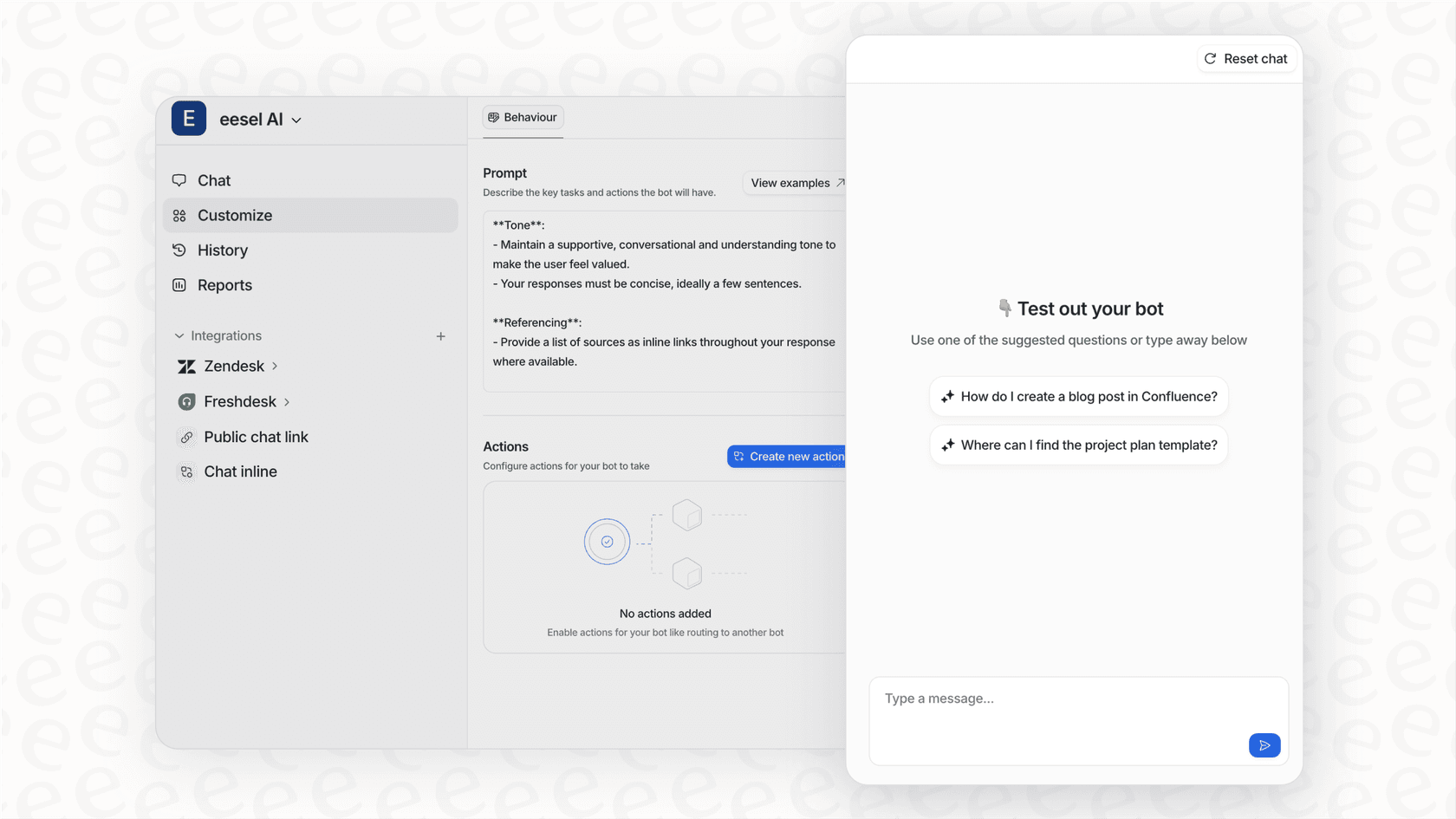
A generic AI has no knowledge about your specific refund policy, your brand's unique tone of voice, or niche issues. To get answers that are genuinely helpful, you need an AI that can learn from your company's information. Look for platforms that can connect to and train on your past support tickets, internal wikis, help center articles, and other documents, so every answer is grounded in your own help center rather than generic web knowledge. Platforms like eesel AI can plug into all your scattered knowledge sources to give you answers that sound like they came from your best agent.
Look for scalable pricing
It's helpful to look for pricing models that are easy to track and align with your business goals. Scalable structures, like those offered by Zendesk, allow you to start with the essentials and add more advanced functionality as your team grows. Alternatively, a pay-per-interaction model can make it easy to track your direct ROI.
For those interested in a more hands-on approach, building your own chatbot is also an option. The video below provides a full tutorial on how to create a customer support AI bot from scratch, giving you an inside look at the technology that powers these tools.
Finding the right AI teammate
Choosing the right AI customer service chatbot isn't about finding a piece of software to automate away problems. It’s about finding a partner that fits into your team's workflow and makes everyone's job easier. The best tools feel less like a robot and more like a smart, always-available teammate.
Instead of just looking for a tool to deflect tickets, think about it as hiring your first AI employee. Look for one you can onboard, train, work with, and trust to represent your brand. When you look at it that way, the choice becomes clear: you want a platform that is mature, reliable, and capable of growing with you.
Ready to see what a true AI teammate can do? You can invite eesel AI to your help desk and see it start drafting replies on your real tickets in just a few minutes.
Frequently asked questions
How much does an AI customer service chatbot typically cost?
The cost varies widely depending on the platform and your needs. Some tools, like Tidio, offer affordable monthly plans based on conversation volume. Enterprise-level solutions often have custom pricing, while platforms like eesel AI use a predictable per-interaction model.
How long does it take to set up an AI customer service chatbot?
It can range from a few minutes to several weeks. Modern, no-code platforms like eesel AI can be connected to your help desk and knowledge sources to start working almost immediately. More traditional or complex enterprise systems might require more planning, configuration, and developer involvement.
Can an AI customer service chatbot handle complex customer issues?
While they are getting smarter, their main strength is handling common, repetitive questions. The best systems are designed to recognize when an issue is too complex or sensitive and will seamlessly hand the conversation over to a human agent with full context, ensuring the customer gets the right help without frustration.
What makes an AI customer service chatbot different from a regular chatbot?
The key difference is intelligence. Regular chatbots are rule-based and follow a strict script, so they can't handle questions they haven't been explicitly programmed for. An AI customer service chatbot uses natural language processing (NLP) to understand context, learn from conversations, and provide more flexible and accurate answers, much like a human would.
How can I ensure my AI customer service chatbot provides accurate and safe answers?
The best way is to choose a platform with built-in safety features. Look for tools that let you start with a "human-in-the-loop" model, where the AI drafts replies for your team to approve. Also, features like simulation modes, which test the bot on your past tickets before it goes live, are invaluable for building trust and ensuring quality.
Does an AI customer service chatbot integrate with other tools like Zendesk or Slack?
Yes, integration is a critical feature. Top platforms are built to connect with the tools your team already uses, including help desks like Zendesk, CRMs, and internal communication apps (Slack). This creates a smooth workflow and ensures the chatbot has access to the information it needs.