


The knowledge base itself is almost never the expensive part. What costs money in 2026 is two other things: the plan tier that unlocks it, and the separate AI meter that reads it. Those are also the two you cannot change later without a migration.
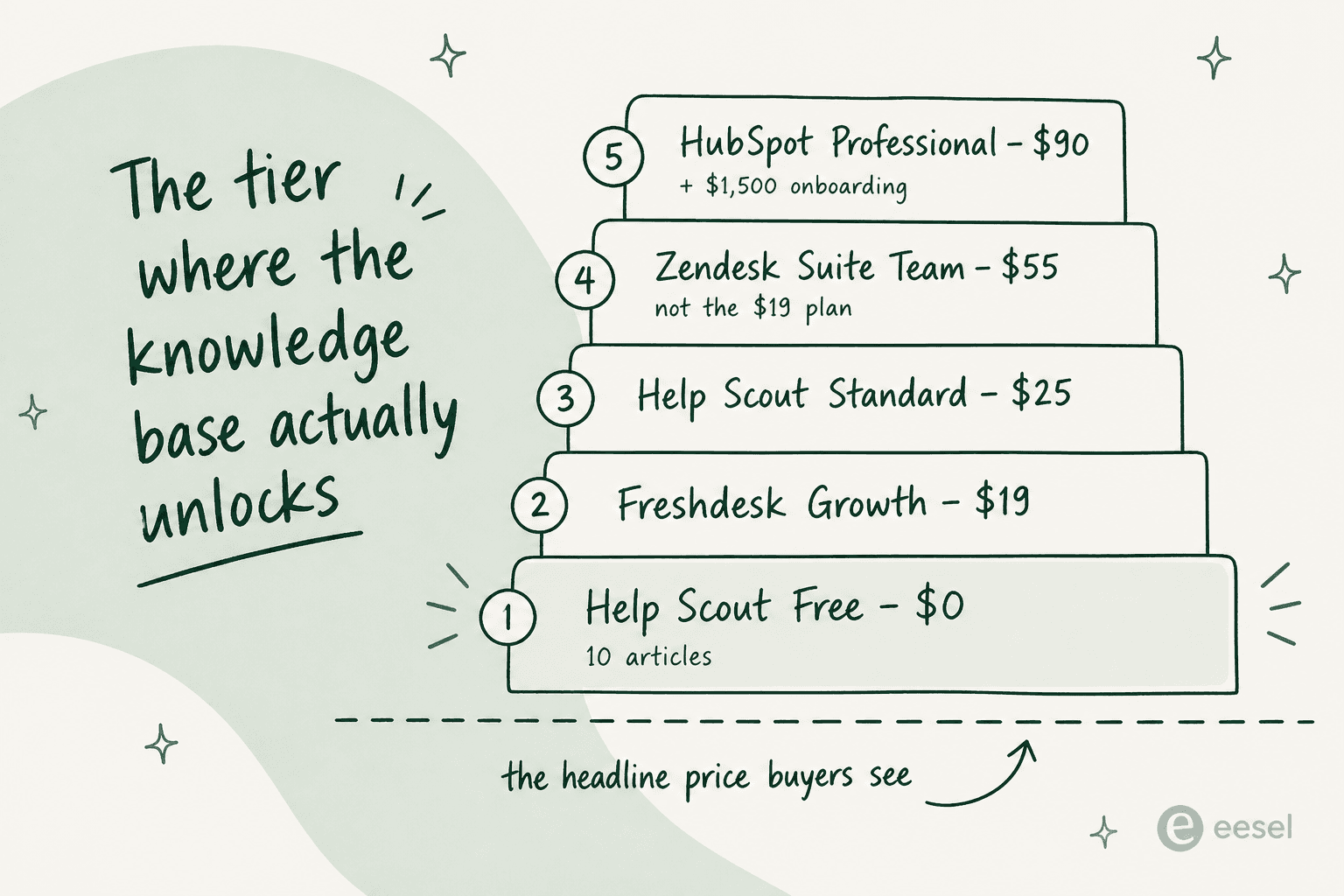
Three numbers, to make it concrete. Zendesk's $19 entry plan does not include a knowledge base at all. Knowledge Base only shows up on Suite Team at $55 per agent per month. HubSpot is worse in terms of the gap: free and Starter both leave the Knowledge base row blank, so the real floor is Professional at $90 a seat, and there is a required $1,500 onboarding fee sitting on top of that. Help Scout is the one mainstream helpdesk that ships a real knowledge base on its $0 plan. It caps it at 10 articles.
My picks, quickly. Document360 when a docs team owns the content. Helpjuice when you want the bill to stop moving with headcount, and Freshdesk for the cheapest helpdesk KB that is still credible. Gorgias if you sell on Shopify. Then there is the case nobody shops for: your articles already exist and the actual problem is that nobody trusts the AI reading them. That one is eesel, which sits on the help center you already have instead of asking you to move it.
What I actually checked, and why this list looks different
I have spent two years on how support content ranks and gets found, and the last stretch of that inside eesel, where I get to watch what happens after a company points an AI agent at its own help center. The second part is really where this post comes from. Every price below came off the vendor's own pricing page in the last week of July 2026. Where a vendor renders its monthly figures client-side, I have said so, rather than reverse-engineering a number out of a "save 20%" badge.
The angle here is deliberately narrow. Most roundups of knowledge base management grade these tools on their editor, and the editor is the least differentiated part of the whole category in 2026, they all do categories and search, custom domains, article feedback. What actually separates them is the commercial shape underneath. Where does the knowledge base sit in the price list. What unit does the AI bill in. And whether you can get your content out again if you leave.
One story from the eesel side reframed the whole category for me. A support manager came in because their AI agent kept giving confusing answers, and the assumption in the room was that the model was at fault. It was not. Their entire knowledge base had been written for administrators, while the tickets were arriving from end users. The content was accurate and well organised, and it was answering a different question than the one being asked. No amount of software fixes that. No comparison table would have caught it either.
So that is the honest frame for everything below: the tool decides your cost structure, not your answer quality. Answer quality gets decided by who owns the content.
How to pick, in four questions
1. Where do your articles live today? If they already sit inside a helpdesk, moving them is usually the worst option on the table. Gorgias, for one example, does not offer direct export at all, you have to ask their support for a data dump.
2. Who writes them? A support team writing between tickets wants the KB right there inside the helpdesk, which is a different shape from an internal knowledge base for staff. A technical writer maintaining versioned product docs wants a real authoring tool, and will be miserable in a helpdesk editor. The sole technical writer maintaining 2,000+ articles in Zendesk Knowledge (formerly Guide) put it plainly:
All that said, ZD is horrible as a TW tool.

3. What is the AI billed in? Sessions, resolutions, interactions, and then credits and tokens, these are not the same unit, and the distance between them is bigger than the distance between the rates.
4. Does the price scale with agent headcount? A help center gets read by customers, not by agents, which makes per-seat pricing on a KB a structural mismatch. One Zendesk admin made this exact argument while shopping around:
For the help center, if you are considering moving elsewhere and don't want to be building a custom solution, I would suggest going with a dedicated knowledge base builder like HelpCenter.io as the price would not be per user.
Work through those four and the shortlist collapses fast. If your shortlist is really about the AI rather than the publishing, AI knowledge base tools is the closer list. The widget below just does it for you.
Which knowledge base should you actually be shopping for?
Pick the sentence that sounds most like your team.
Stay put, and check the tier. Migrating a help center off a helpdesk costs more than it saves, and Gorgias has no self-serve export at all. Confirm your plan actually includes the KB first: Zendesk puts it on Suite Team $55/agent, not the $19 plan, and HubSpot puts it on Professional $90/seat.
The real upgrade is usually the AI layer on top, not the publishing tool underneath.
Document360, or Helpjuice. A helpdesk article editor will fight a technical writer on versioning, reuse and localisation. Document360 is quote-gated so budget a sales call; Helpjuice publishes flat rates from $249/mo for 30 users, with the AI suite starting at $449/mo.
Help Scout Free, then Freshdesk. Help Scout is the only mainstream helpdesk with a real KB at $0, capped at 10 articles and 100 contacts a month. When you outgrow that, Freshdesk Growth at $19/agent is the cheapest credible paid KB, and it includes 500 Freddy sessions per account.
Gorgias. Ten help centers on every plan from $40/mo, and existing articles are automatically part of the AI agent's knowledge with no re-import. Two gotchas: knowledge does not pool across multiple Shopify stores, and automated interactions run $0.85 to $1.00 each depending on plan.
Guru, if you can get a quote. Guru now publishes no price of any kind and has no self-serve signup, so budgeting means a sales call. What you get for it is verification: a named owner per card and a daily agent review that flags stale content.
The comparison table
Prices below are the vendor's own published figures as of 31 July 2026. "KB unlocks at" means the cheapest plan whose feature list actually names a knowledge base or a help center.
| Tool | Best for | KB unlocks at | Billing unit | AI meter | Free tier with KB | Article cap | Self-serve signup | Export | Compliance published |
|---|---|---|---|---|---|---|---|---|---|
| eesel | AI on an existing KB | n/a (layer, not a publisher) | Fixed monthly credit plans | Bundled | Trial | n/a | Yes | n/a | SOC 2 Type II certified |
| Document360 | Docs teams | Quote only | Quote only | Eddy, in the quote | No | Not published | Trial only | Yes, PDF export | SOC 2 Type II, ISO 27001:2022, GDPR |
| Helpjuice | Flat pricing at scale | $249/mo (30 users) | Flat, by user bucket | In the $449 tier | No | Not published | 14-day trial | Not published | SOC 2, GDPR |
| Zendesk | Big support orgs | Suite Team $55/agent | Per agent seat | Per automated resolution, rate unpublished | No | Unlimited | 14-day trial | Yes, API | Extensive |
| Freshdesk | Cheapest credible KB | Growth $19/agent | Per agent seat | $0.49 per Freddy session | No | Unlimited | 14-day trial | Yes, API | Extensive |
| Help Scout | Starting from zero | Free, then $25/user | Per user seat | $0.75 per resolution | Yes, 10 articles | 10 on Free | Yes | Yes, API | Extensive |
| HubSpot | CRM-centred teams | Professional $90/seat | Per seat + credits | ~$0.50 per resolved conversation | No | 2,000 on Pro | Yes | Yes, API | Extensive |
| Gorgias | Shopify stores | Starter $40/mo | Per ticket + per interaction | $0.85 to $1.00 per interaction | No | 10 help centers | Yes | Support request only | Extensive |
| Guru | Internal knowledge | Quote only | Quote only | In the quote | No | Not published | No | Not published | SOC 2 Type II, HIPAA, GxP |
| Crisp | Flat per workspace | Essentials $95/mo | Per workspace | $25 credit pool ≈ 450 chats | No | None published | Yes | Not published | GDPR |
Two of those columns are doing more work than they look. Self-serve signup tells you whether you can evaluate the thing at all without entering a sales cycle, and two of the ten fail it outright. Export tells you what leaving is going to cost.
1. eesel
Best for: teams whose articles already exist somewhere and whose real problem is the AI reading them.
Fair warning up front, since it decides whether the rest of this section is even relevant to you: eesel is not knowledge base software. It does not publish articles or host a help center, and it will not give you an editor. What it is, is the AI layer that sits on top of whatever knowledge base you already run, plus your past tickets, your Google Docs and Confluence pages, your macros.

I put it first anyway, because it is the option most buyers in this category never even consider, and quite often it is the correct one. If you are shopping for online knowledge base software because the help center is fine but the bot sitting on top of it keeps embarrassing you, then replacing the publishing tool solves nothing at all.
Features. It connects to Zendesk and Freshdesk on the helpdesk side, and to Confluence, Notion, Google Docs and Slack for everything else, then trains on both the articles and the resolved tickets. Every rollout is simulated against your historical tickets before it goes live, a step that exists because I have watched confident bots quietly give wrong answers. You write behaviour in plain language rather than building a flow chart.

Pros. No migration, so the help center stays where your customers and the search engines already find it. It reads past tickets as well as articles, and the tickets are usually where the answer to "what do we actually tell people" is hiding. Fixed monthly pricing by credits, with no per-seat fee.
Cons. If you do not have a knowledge base yet then this is simply the wrong first purchase. It will not write your articles, host them, theme them or version them, and it cannot rescue content that was written for the wrong audience in the first place.
Pricing. From $299/mo for 500 credits (1 credit per ticket or chat), no seat fees. Free plan with 100 credits, no sales call needed.
My take: the right pick when the content exists and the trust does not. Skip it if you are still deciding where to write your first article. One real number for scale, from a permissioned customer in the mobility space:
In the first month, eesel is resolving 73% of our tier 1 requests... results quickly during our 7-day trial.
Kim Simpson, Gridwise
2. Document360
Best for: a docs or technical writing team that owns the content properly.
Document360 is the strongest pure knowledge base platform on the list, and the one I would put in front of a technical writer without apologising first. It bills itself as intelligent knowledge base software where humans and AI work together, and it does mean the authoring half of that sentence: category manager, workflow builder, snippets and variables, a glossary, scheduled publishing, interactive decision trees, PDF export.
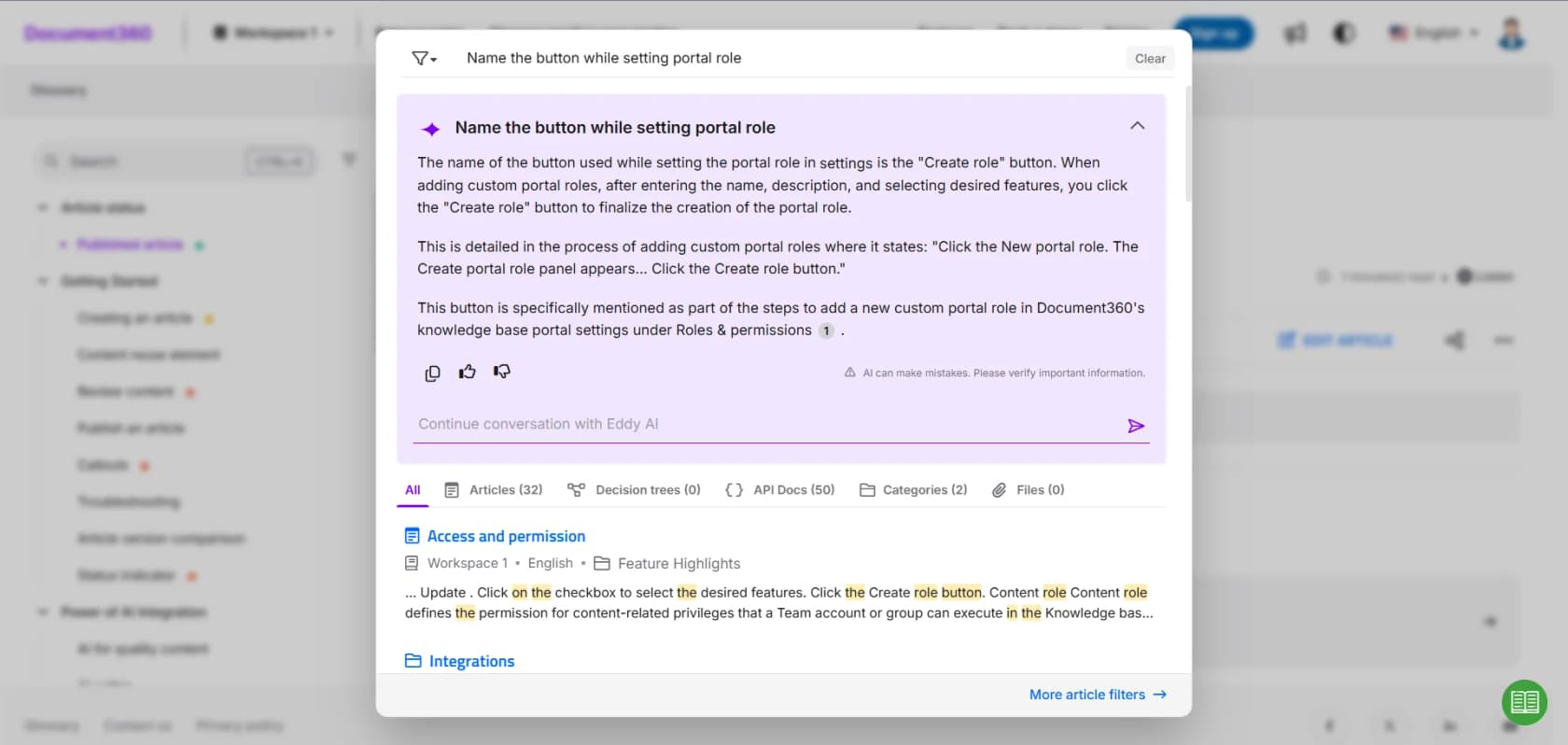
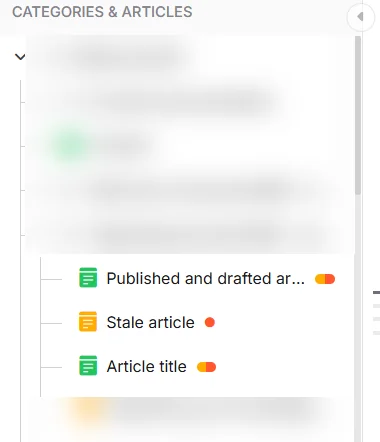
Features. Eddy is the AI layer. That covers AI search which cites every source, an AI chatbot, a writing agent that drafts from videos and files, and an MCP server exposing your knowledge base to ChatGPT, Claude and Copilot. The bit I like most is the unglamorous one: the category tree marks stale articles inline, so the decay is visible while you work instead of surfacing in a quarterly audit that nobody runs.
Pros. Real authoring depth, 60+ connectors, and the strongest published compliance set of the standalone tools: SOC 2 Type II, ISO 27001:2022 and GDPR. Rated 4.7/5 on G2 across 1,400+ reviews. Named customers include McDonald's, NHS and Puma.
Cons. As of my check, the pricing page publishes no tiers and no numbers whatsoever, it is a three-step configurator that routes every buyer into sales. If you have seen a "$149/month Document360" figure somewhere else, that figure is stale. You can still start a trial without a card. You just cannot budget without a call.
Pricing. Custom quote only. The AI Premium Suite is folded into the quote rather than priced as a line item.
My take: the pick when documentation is somebody's actual job. Skip it if you need a number for a spreadsheet this week.
3. Helpjuice
Best for: teams who want the knowledge base bill to stop moving when headcount does.
Helpjuice has been at this since 2011, and it prices unlike anything else here, flat monthly rates by user bucket, not per seat. That one decision is the reason it belongs on a shortlist even when the feature list looks fairly conventional.
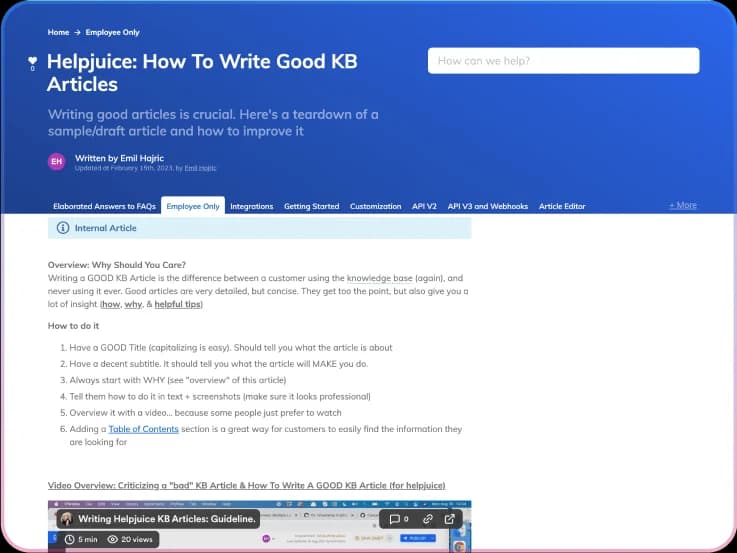
Features. Swifty AI answers from your articles, either on your own site or on the KB itself. AI Writer drafts from bullet points or from existing tickets, and the one-click AI translation covers 40+ languages. Every plan includes a handcrafted design, meaning Helpjuice skins the KB for you instead of handing over a theme picker. There is a Chrome extension too, which turns any web page into an article.
Pros. Flat pricing, real localisation, and a customer list that punches above the tool size: WHO, Hertz, John Deere, Bank of America. Serves public help centers and internal wikis from the same product, which is unusual.
Cons. The $249 tier is a non-AI knowledge base. AI Writer, AI Search and Swifty all sit behind the $449 plan, and so does SSO. Storage scales only modestly across the tiers (12GB up to 38GB), so what you are really buying with each step is user count and AI access.
Pricing.
| Plan | Price | Users | Storage | AI Suite | SSO |
|---|---|---|---|---|---|
| Knowledge Base | $249/mo | 30 | 12GB | No | No |
| AI-Knowledge Base | $449/mo | 100 | 24GB | Yes | Yes |
| Unlimited AI-Knowledge Base | $799/mo | Unlimited | 38GB | Yes | Yes |
My take: the best-value pick above roughly 15 agents, because that is where flat pricing starts beating per-seat. Below that, a helpdesk KB is cheaper.
4. Zendesk
Best for: large support orgs already committed to the ecosystem.
Zendesk's knowledge product is Zendesk knowledge, still widely called Guide by everyone, and it is the most-deployed help center on this list. It is also the one whose pricing surprises people the most, so let me be direct on it.

The cheapest Zendesk plan is Support Team at $19 per agent per month. Its feature list covers email, ticketing, routing, dashboards and automations, and no knowledge base. Knowledge Base appears one tier up on Suite Team at $55. So the real cost of a Zendesk help center is 2.9x what the entry price implies. My full Zendesk pricing breakdown walks the rest of the ladder.
Features. Multi-brand help centers, article version history, content blocks, an AI-badged knowledge feature at Suite Team, and the best analytics of any helpdesk KB here, including the ticket-to-search ratio, which tells you the point where people give up on self-service. If you are building one, my Zendesk knowledge base basics guide covers the setup, and there is a longer walkthrough on building an AI knowledge base in Zendesk.
Pros. Deep integration between articles and tickets, mature APIs, a large app ecosystem. Agents can also draft articles straight from resolved tickets without leaving the workspace.
Cons. Two specific ones, both from people maintaining it daily. Content Blocks have no variable support, so multi-brand teams cannot build usable templates:
For example, we have multiple "brands" but the content blocks can't be reused with any variables to account for that. It's only the exact text even after you add the block you can't edit it for just that article, only the entire block across the site. So we can't build any templates that would actually be useful.
And the AI rate is unpublished. Zendesk names the unit (automated resolution), the allowance (15 per agent per month on Enterprise, 10 on Professional, 5 on Team) and the annual cap of 10,000, but not the price. You are asked to budget for overage without a rate.
Pricing. Support Team $19, Suite Team $55, Suite Professional $115 per agent per month paid yearly. Enterprise is quoted. If that ladder is what pushed you to look around, Zendesk AI alternatives covers the switch.
My take: stay if you are already on it and on Suite Team or above. Do not buy Zendesk for the knowledge base alone.
5. Freshdesk
Best for: the cheapest knowledge base you can defend in a budget review.
Freshdesk gates the knowledge base behind having a paid plan at all, rather than behind some mid-tier, and that is what makes it the cheapest credible entry here. Customer portal and knowledge base both sit in the Growth bullet list, at $19 per agent per month billed annually.
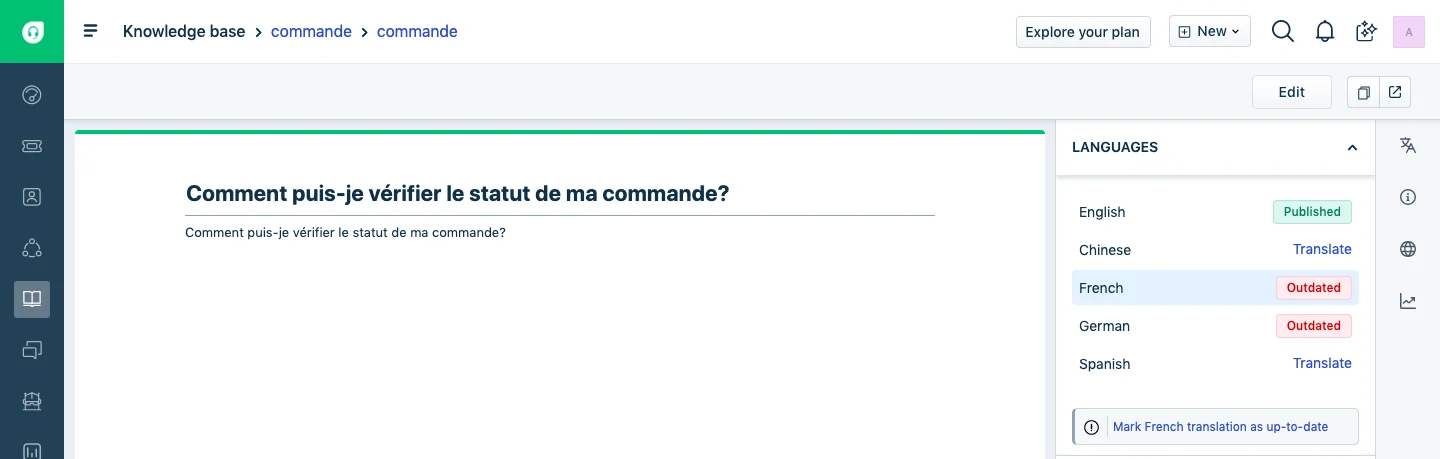
Features. Multi-language articles carrying an explicit Outdated flag per locale, which is visible above and more useful than it sounds. Solution folders with visibility rules. Freddy AI Agent with the first 500 sessions included, and worth to note here, that 500 is per account and not per agent, unlike Zendesk's allocation. My walkthrough on enabling Freddy AI covers turning it on, and Freddy on your knowledge base covers what it reads.
Pros. Lowest real entry price of any helpdesk KB here. That Outdated translation flag is also the only built-in staleness signal I found anywhere on a mainstream helpdesk. Freddy's included allowance is generous for the bottom of the range.
Cons. The free plan is gone. Freshdesk published a $0 tier for two agents until fairly recently, the pricing page now lists three plans and not one of them is free, and the old free-helpdesk landing page 404s. Your free paths are a 14-day trial that starts you on Enterprise and then suspends the account when it ends, or the Free Program (up to 2 agents for 6 months). Reviewers flag the tier ladder as well:
The design is maybe not the best, like add-ons feature requires expensive plans. The software can feel expensive and slow when handling large ticket volumes.

Pricing. Growth $19, Pro $55, Enterprise $89 per agent per month billed annually. Freddy AI Agent is $49 per 100 sessions past the included 500; Freddy Copilot is a separate $29 per agent per month add-on, Pro and Enterprise only.
My take: the value pick for a small team that needs a real help center this quarter. The gotcha to price in is that Copilot and Agent are two different add-ons.
6. Help Scout
Best for: publishing your first ten articles without a purchase order.
Help Scout is the honest one on pricing, and Docs is the name of its knowledge base product. The Free plan really does include a live Docs site with 5 users on it, which is rarer than this category's marketing suggests.
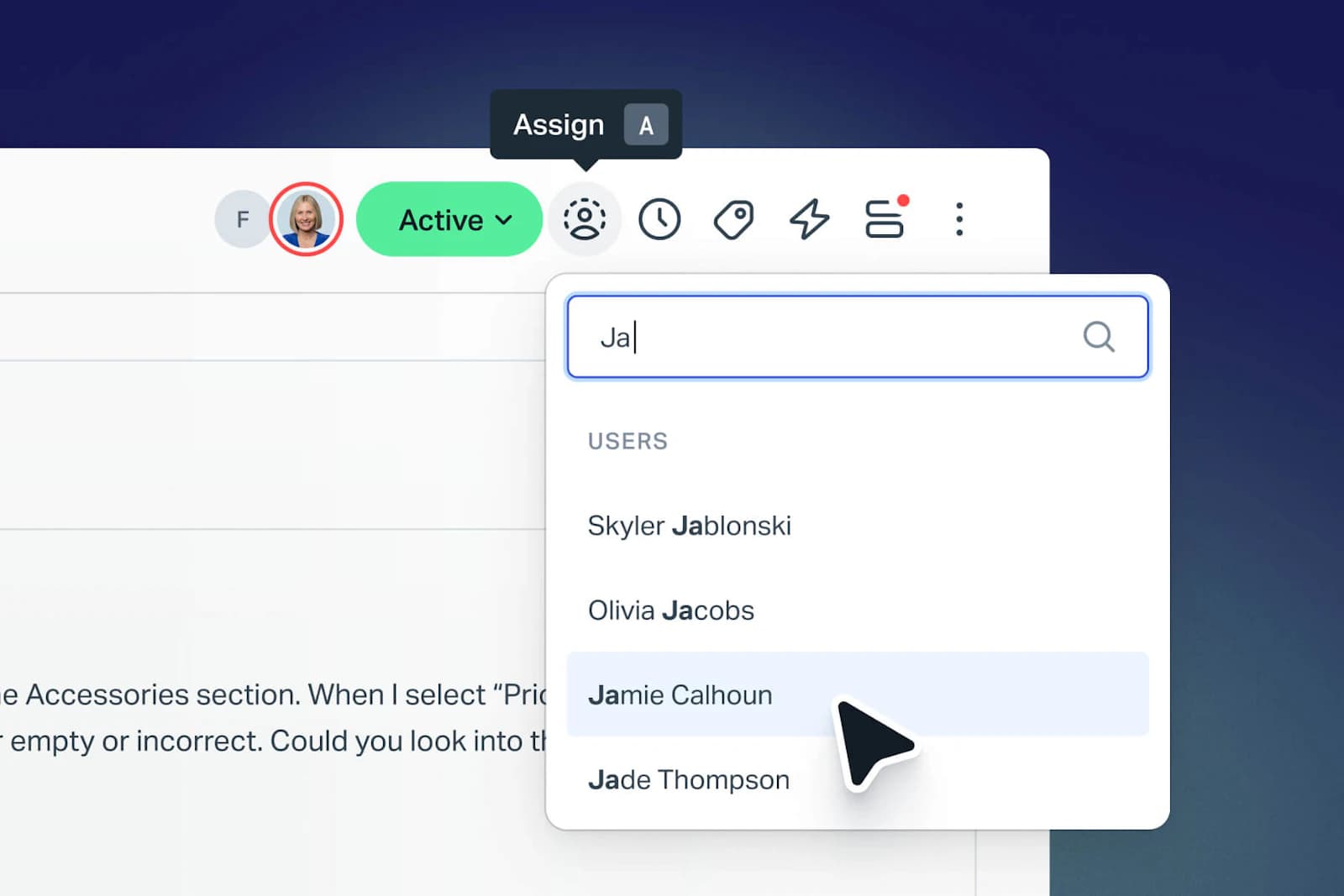
The catch sits in the article cap rather than the site count. 10 articles on Free, unlimited on every paid plan. Ten articles is a starter FAQ, not a customer support portal. Contacts get capped at 100 a month on Free too, where a contact means anyone who got a reply from your team or had their question resolved by the AI.
Features. Branded Docs sites with search, multiple knowledge bases from Standard upward, and AI Answers sold as a separately metered add-on. My look at the Help Scout AI approach covers how the assistant is positioned.
Pros. Free entry that actually works, transparent add-on pricing, and a monthly spend cap you can set on AI so the meter cannot run away from you. There is a three-month unlimited free trial of AI Answers from account creation, which is the most generous AI trial on this list by a distance.
Cons. Extra Docs sites run $20 a month each paid annually, so multi-brand gets expensive in a way that per-seat pricing tends to hide. The Pro tier at $75 per user is demo-only.
Pricing.
| Plan | Price | Users | Docs sites | Articles | Contacts |
|---|---|---|---|---|---|
| Free | $0 | 5 | 1 | 10 | 100/mo |
| Standard | $25/user/mo | up to 25 | 2 | Unlimited | Unlimited |
| Plus | $45/user/mo | up to 50 | 3 | Unlimited | Unlimited |
| Pro | $75/user/mo | Unlimited | 5 | Unlimited | Unlimited |
AI Answers is $0.75 per resolution on all three paid plans, with no included allowance.
My take: the best place to start from zero, and a fine place to stay under 25 agents. If ecommerce is your world, Help Scout alternatives is worth a look first.
7. HubSpot Service Hub
Best for: teams where the CRM is already the centre of gravity.
HubSpot Service Hub has the widest gap on this list between what "free" implies and what a knowledge base actually costs. Service Hub Free is real, and it is $0 for up to two users. The Knowledge base row in its comparison table is blank. Starter's is blank as well. The KB starts at Professional.
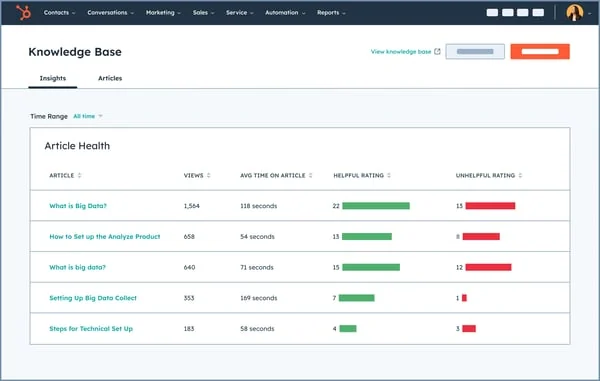
That Article Health view is the best-looking KB analytics screen in the whole roundup, and it is a reason to want Professional rather than a consolation prize for having paid for it.
Features. One knowledge base per account with up to 2,000 articles on Professional; 100 knowledge bases and 10,000 articles once you are on Enterprise. Private KB access groups, and Breeze customer agent answering out of your articles. My guide to HubSpot knowledge base software covers the setup, while Service Hub ticket deflection covers what to expect from the AI layer.
Pros. Articles, tickets and contact records all live in one object model, so the reporting joins cleanly. The seat minimum is one, which means there is no legacy five-seat block to buy through.
Cons. The real first-year number is the problem. Professional is $90 per seat per month billed annually, plus a required one-time $1,500 onboarding fee, so one seat is $2,580 in year one. The credit model also gets misread: Professional's 3,000 HubSpot Credits look generous until you divide by the 50 credits it takes to resolve one conversation, which is 60 AI resolutions a month. Credits reset monthly, do not roll over, and are shared across products rather than added together.
Pricing. Free $0 (no KB), Starter $20/seat monthly (no KB), Professional $90/seat annual, Enterprise $150/seat. Credits are $0.010 each pay-as-you-go or $10 per 1,000-credit pack.
My take: worth it if you are already running HubSpot as your CRM and the reporting join is the point. Hard to justify as a standalone knowledge base purchase.
8. Gorgias
Best for: Shopify and ecommerce stores.
Gorgias has the tightest link between help center articles and the AI agent of anything here, and for a store that is worth more than editor polish is. Existing help center articles are automatically part of your knowledge, no re-import step involved.
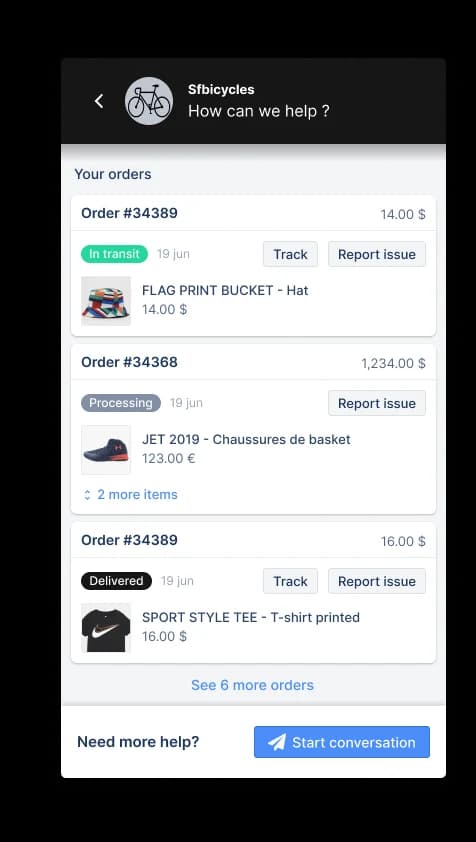
Features. Ten help centers on every self-serve plan, unlimited on Enterprise. Articles carry a visibility setting, where Unlisted articles are reachable by URL but excluded from search engines, which is how Gorgias documents building an internal knowledge base out of the same product. Beyond articles, the knowledge store holds guidance (reference notes written for the agent), synced URLs, uploaded documents and Shopify product data.
The detail worth stealing regardless of vendor: Gorgias states plainly that guidance carries the most weight, and that contradictory content produces inconsistent answers. Their own example is a help center article saying the return window is 30 days while a guidance note says 14.
Pros. There is no gap between publishing an article and the AI knowing about it. Version history covers articles, guidance and skills alike, and import works from CSV, Zendesk, HelpDocs and Re:amaze. My Gorgias knowledge base guide covers the setup end to end.
Cons. Three real ones. Knowledge does not pool across multiple Shopify stores, so a multi-store merchant ends up maintaining parallel libraries. There is no direct export either, you file a support request instead. And proactive knowledge-gap detection is Enterprise-only.
Pricing. Starter $30/mo for 30 automated interactions, Basic $27 for 30, Pro $171 for 190, Advanced $477 for 530. Each automated interaction is billed at $0.85 to $1.00 depending on plan, and helpdesk tickets meter separately at $0.40 (Starter, Basic) or $0.36 (Pro, Advanced). Full detail in my Gorgias AI pricing breakdown, and Gorgias alternatives if the interaction rate is the blocker.
My take: the default for a Shopify store, and the only tool here where I would not bother evaluating the KB separately from the AI. Watch the $1.50 interaction rate at scale.
9. Guru
Best for: internal knowledge that has to be provably current.
Guru is the internal-facing pick, and 2026 changed what it actually is. The AI product is called Knowledge Agents, and the answers land where people already work, Slack, a Chrome side panel, specific Guru pages, plus external tools via MCP.
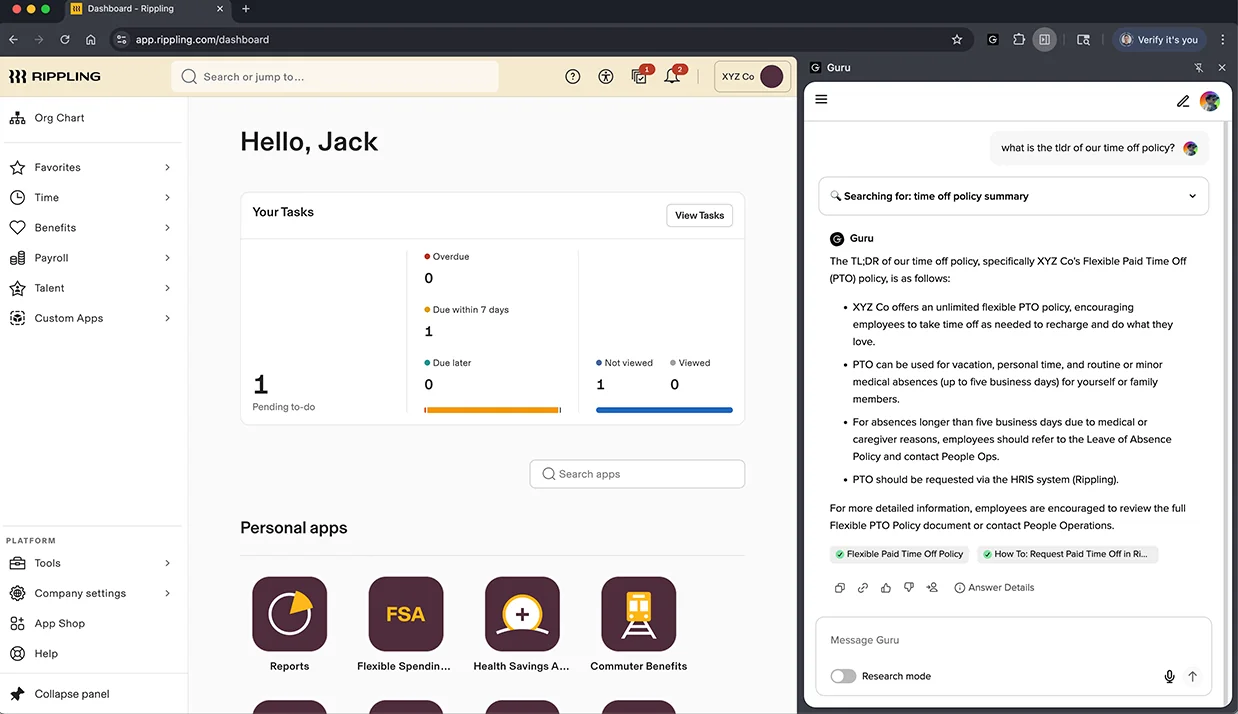
Features. Verification is the differentiator here, and it has been rebuilt. The classic model was a calendar timer, a card expires at 30, 60 or 90 days and then nags a human. The 2026 model is behavioural instead. "Does not expire" became the default for cards in collections created after January 2026, and a Knowledge Agent now reviews content once a day using rules like "thumbs-upped 5+ times this month, verify". Every decision lands in a quality log with a confidence level attached, and any of them can be overridden.
Pros. The strongest published compliance set here, SOC 2 Type II, HIPAA, GxP, and 100+ integrations. Then there is the MCP positioning, which makes Guru the governed layer sitting behind your other AI tools rather than a competitor to them.
Cons. Two hard ones. Guru now publishes no price of any kind, no per-seat rate, no floor, not even a "starting at". And there is no free trial and no self-serve signup, so you cannot create a workspace without going through sales first. There are also some quiet limits on the verification story. A 7-day cooldown runs before content gets re-reviewed. External content must have been used in an answer before it is eligible for review at all. Auto-unverify is off by default, which means most workspaces get the optimistic half of the loop without the pessimistic half.
Pricing. Quote only, with a services engagement attached. The only concession named publicly is a nonprofit discount.
My take: the pick when a wrong internal answer is a compliance event. If you just want a team wiki, Confluence, Guru and Slite compared is a better starting point, and Bloomfire vs Guru covers the nearest rival.
10. Crisp
Best for: small teams who resent per-seat pricing.
Crisp is the only tool here that is priced per workspace rather than per seat, and that shape is basically the whole argument for it.
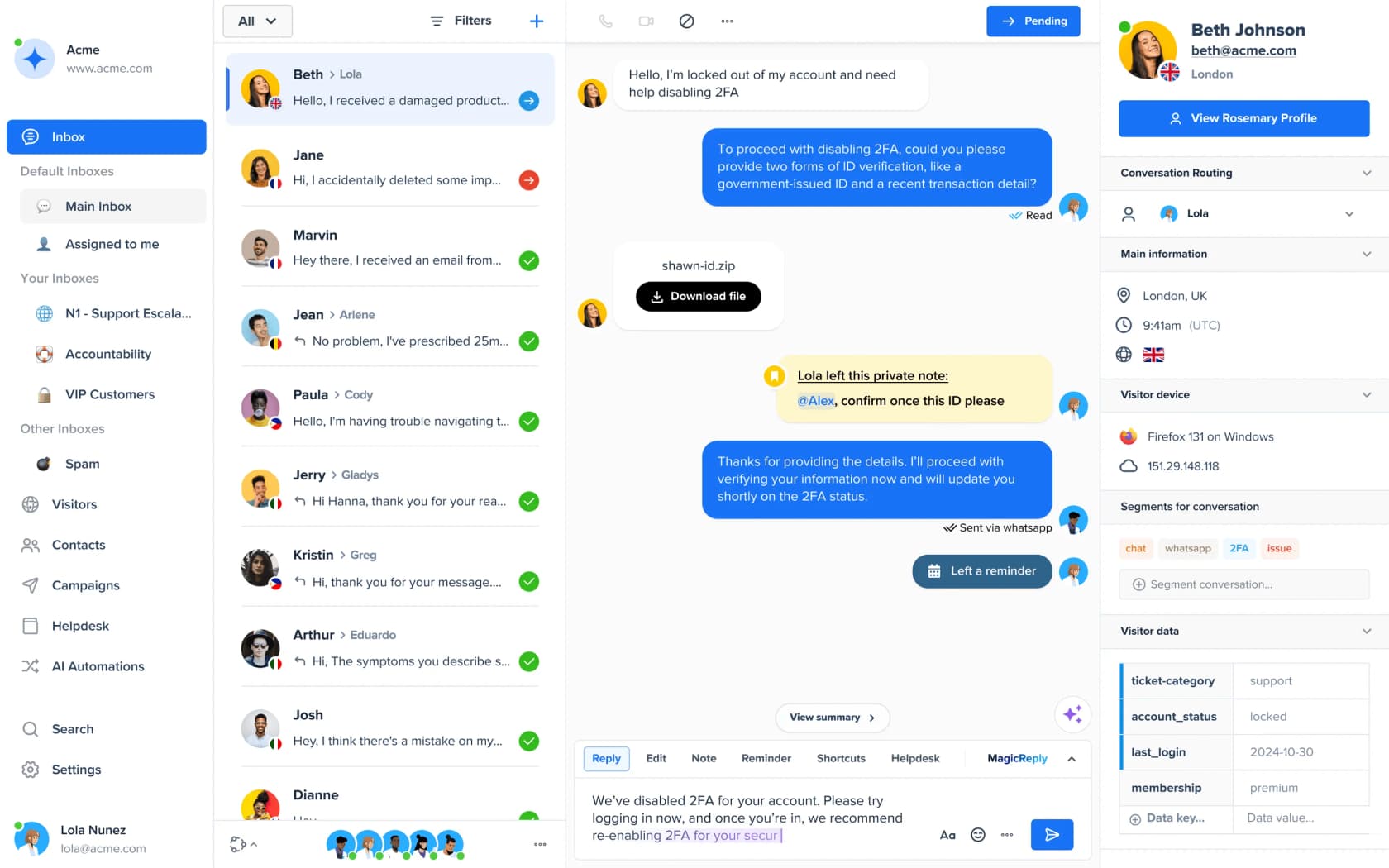
Features. A public help center connected to your workspace, articles written in Crisp Markdown, shareable straight out of the inbox mid-conversation. Customisation goes further than most, custom domain, injected HTML/CSS/JS, and a documented reverse-proxy route so you can serve the thing at yoursite.com/help. Hugo is the AI agent, and Crisp confirms Hugo is not trained on your inbox conversations. My write-up on the Crisp AI chatbot has more.
Pros. A flat $95 a month covers 10 agents, and at that size it beats every per-seat option on the list. Crisp publishes no article cap and no storage cap either. It rejects consumption billing on conversations outright too, asking on its own pricing page why it would bill on consumption when everyone is already used to unlimited plans.
Cons. The knowledge base is Essentials-only, so your entry price is $95 a month flat rather than the $0 or $45 tiers people find first. Multilingual here is a container and not a translation engine, Crisp's own docs say articles are not translated automatically, and each language has to be reviewed and localised by hand. AI credits get quoted in dollars of included spend alongside approximate conversation counts, so there is no stated per-conversation rate anywhere.
Pricing. Free $0 (2 seats, no KB), Mini $45 (4 seats, no KB), Essentials $95 (10 seats, KB, $25 AI credits ≈ 450 chats), Plus $295 (20+ seats, $75 credits ≈ 1,350 chats). My Crisp pricing breakdown has the rest, and Crisp alternatives if the Essentials gate is the blocker.
My take: the best per-dollar help center for a team of 5 to 10. Above that, the seat bands stop being an advantage.
The part nobody prices: two bills, not one
Here is the structural thing I want you to walk away with. At every helpdesk I checked, the knowledge base is a plan feature that comes with your seats, and the AI reading it is a separate meter. Two bills, and the second one is the variable.
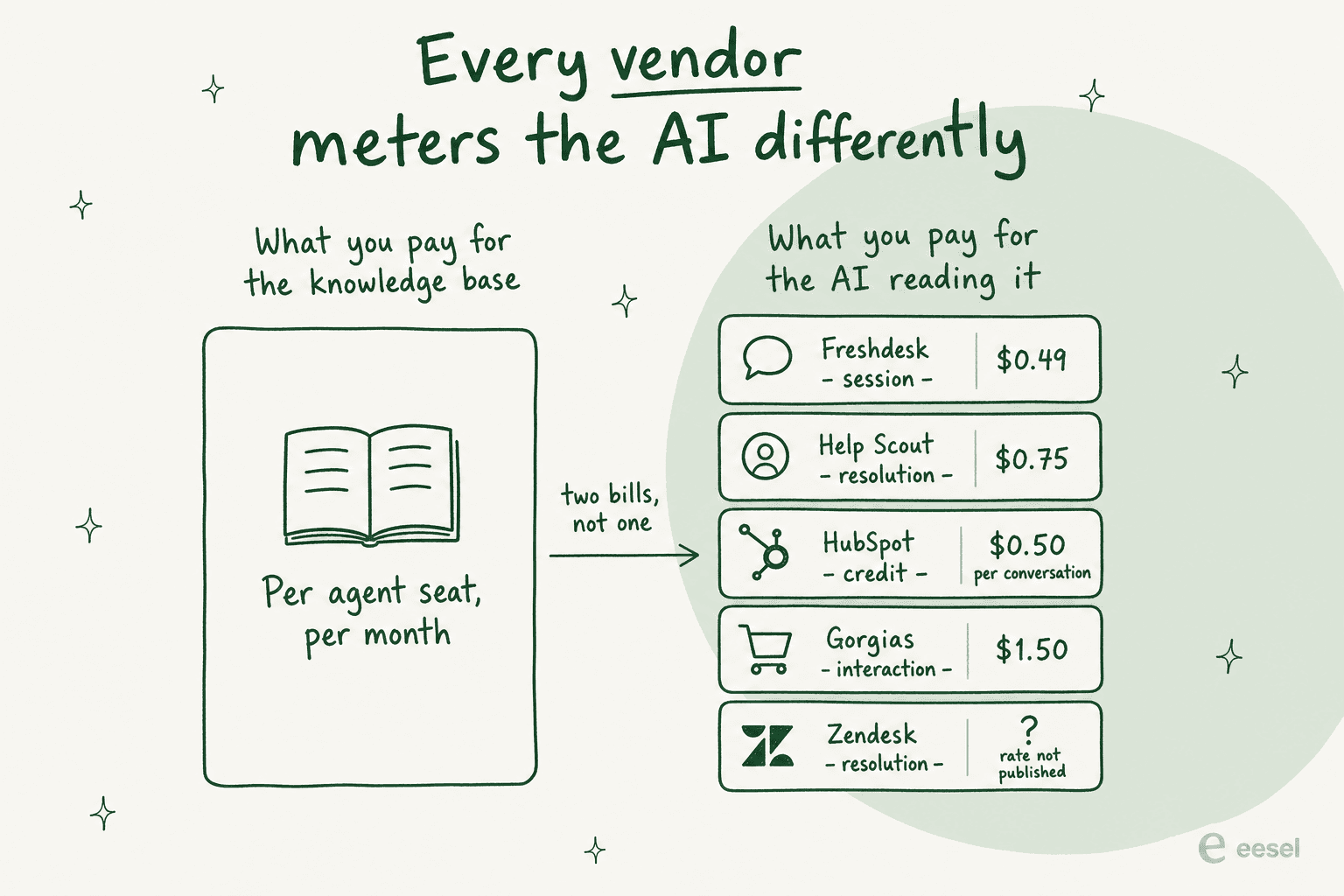
Look at the units, not the rates. A session is a conversation which may or may not end in an answer. A resolution is an outcome. An automated interaction is one single exchange, so a chatty customer burns through several of them, and a credit is an abstraction sitting on top of all three. Comparing $0.49 against $0.75 against $1.50 across units like that is comparing nothing at all.
Two specific traps are worth naming here. HubSpot's 3,000 Professional credits sound generous right up until the 50-credit-per-resolution maths turns them into 60 resolutions a month. And Zendesk publishes the unit, the per-agent allowance, the 10,000-per-year account cap, but not the rate, while still telling you to factor in expected resolutions above your allowance.
The failure mode that no tool on this list fixes
Every thread I read while researching this landed on the same thing in the end, and it is not a software problem.
I run a small team, and we have an internal wiki for processes, FAQs, and troubleshooting. The problem? No one updates it. People keep asking the same questions in Slack instead of checking the wiki.
A Zendesk consultant in another thread gave the cleanest one-line diagnosis of why these governance plans fail: weekly reviews are great in theory but rarely survive contact with real workloads. Then a comment about a Fortune 50 wiki added the detail that makes it urgent rather than just annoying. It is the top search results that are five years stale.
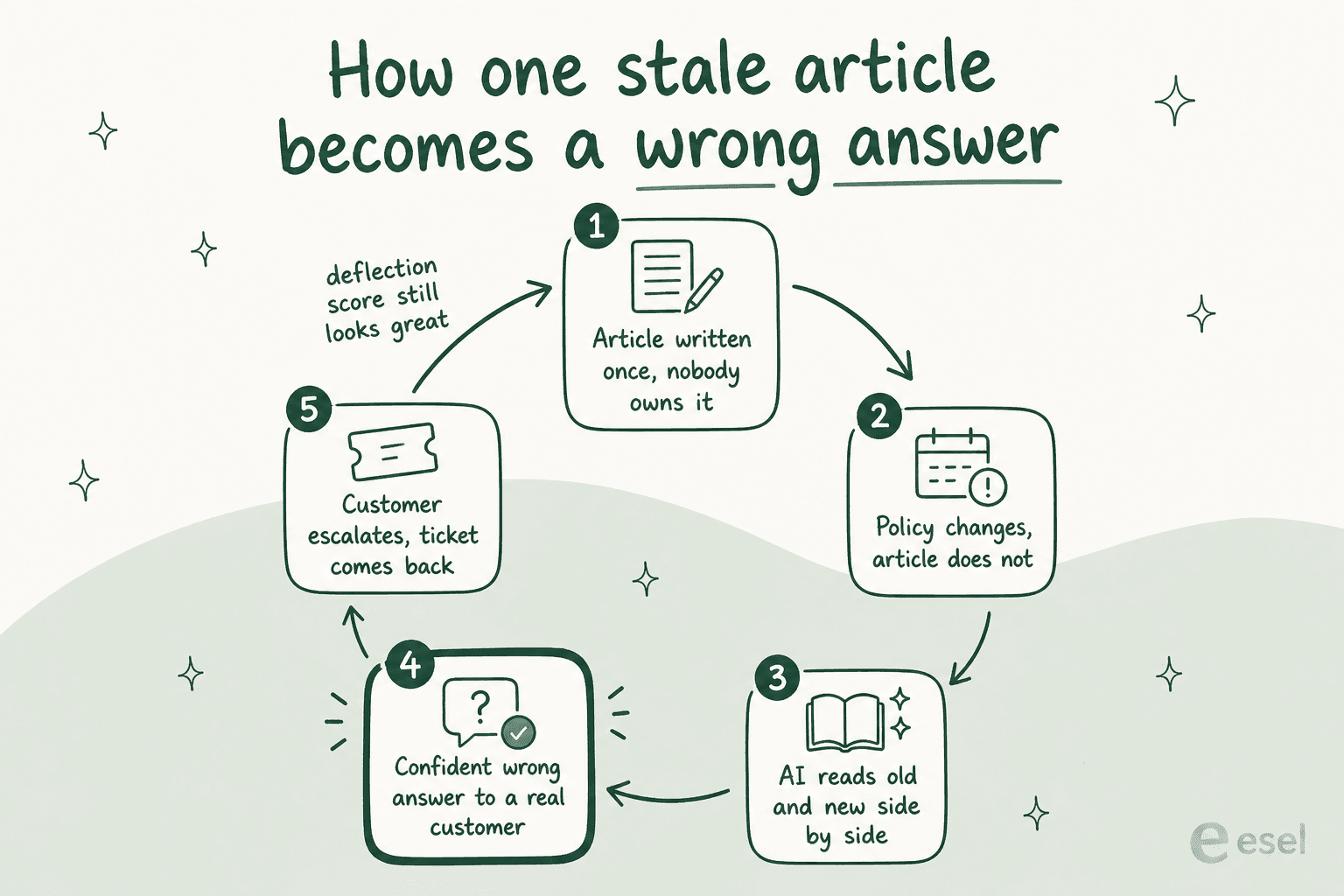
Put an AI agent on top of that and staleness stops being a documentation problem, it becomes a wrong-answer problem, because the model cannot tell old content from new. I have watched this play out on live accounts. Paying customers whose bot confidently answered real customers on topics where the knowledge base had nothing relevant to say at all. Another team's bot cheerfully confirmed it supported vehicle models that were not in their database, and the reason was one article saying the company supported all models.
The sharpest version of this I found came from someone who had actually run a bake-off themselves:
the AI solutions that work are the ones with access to real customer context - account history, product usage, previous conversations. the ones that fail are basically a chatbot sitting on top of your help docs, giving technically correct answers to the wrong question. we tested three different tools last year and the difference was always the same: context depth determined quality, not model sophistication.
Three things that actually work here, and none of them is a purchase:
- Give every article a named owner. Guru's whole verification model is built on this, and you can copy it in any tool with a custom field.
- Use search misses, not a calendar. This is the same instinct behind good self-service design. A Zendesk moderator made the case well: search misses show you a customer pain point that is about to become a ticket, and search hits on unreviewed articles show you what to fix first. That beats a review cadence nobody keeps.
- Write the negative case. It matters more once an AI agent is reading, not a human. If product A has a feature and product B does not, say so in product B's article. Otherwise the AI reads across and invents it, which is a real, reproducible failure a practitioner described in detail.
If you want a deeper pass on the maintenance side, my guide on ticket deflection goes further than I can here, and so does the note on deflecting FAQs with AI.
Try eesel
If you got to the bottom of this and your conclusion is "our help center is fine, the AI on top of it is the problem", that is the case eesel was built for.

eesel reads the knowledge base you already run, plus the past tickets where your team's real answers are living, and it drafts or auto-resolves from both. You keep your current help center, your URLs, your SEO. Before anything goes live it runs against your historical tickets so you can see what it would have said, which is the only honest way to find out whether your content is good enough, before a customer finds out for you. Fixed monthly pricing from $299 for 500 credits (1 credit per ticket or chat), no seat fees, and a free plan with 100 credits to try without a call.
Where it is not the right answer: if you do not have a knowledge base yet, go buy one of the ten above first. eesel makes good content work harder. It cannot invent content that was never written in the first place.