

Every knowledge base vendor advertises a language count. It is the least useful number on the page. What the money buys is the right to create translations; the translations themselves stay your problem. Zendesk needs Suite Growth or higher, and since Growth is no longer on the public price list, the cheapest plan you can actually buy online is Suite Professional at $115 per agent per month. Freshdesk gates it at Pro, $55 per agent per month, and then hands you no machine translation of articles at any price. Zoho Desk unlocks the same feature at US$23. Its free translation engine covers 15 languages though, not the 52 locales the docs list.
The question that really decides how this goes is a much smaller one. What happens when somebody edits the English article? Zendesk flags nothing. Freshdesk makes an agent remember to click "Mark other translations as outdated" every single time, forever. Zoho pins each translation to a version number, then lets the master drift on ahead of it. Helpjuice does track it, and it re-bills the entire article when you re-sync.
The other route: stop mirroring the whole library. I build AI agents at eesel, so multi-language is not an edge case for us. Smava, one of Germany's largest fintech lenders, runs a fully automated Zendesk agent handling over 100,000 support tickets a month entirely in German. The agent supports 80+ languages out of the box and it learns from your past tickets, which is why most teams translate the twenty articles humans actually read and let the agent carry the rest of the queue. Free to try, and the bill follows ticket volume (from $299 a month for 500 credits) rather than language count.
What "multilingual" actually means on a pricing page
Four different things get sold under one word. They do not arrive together.
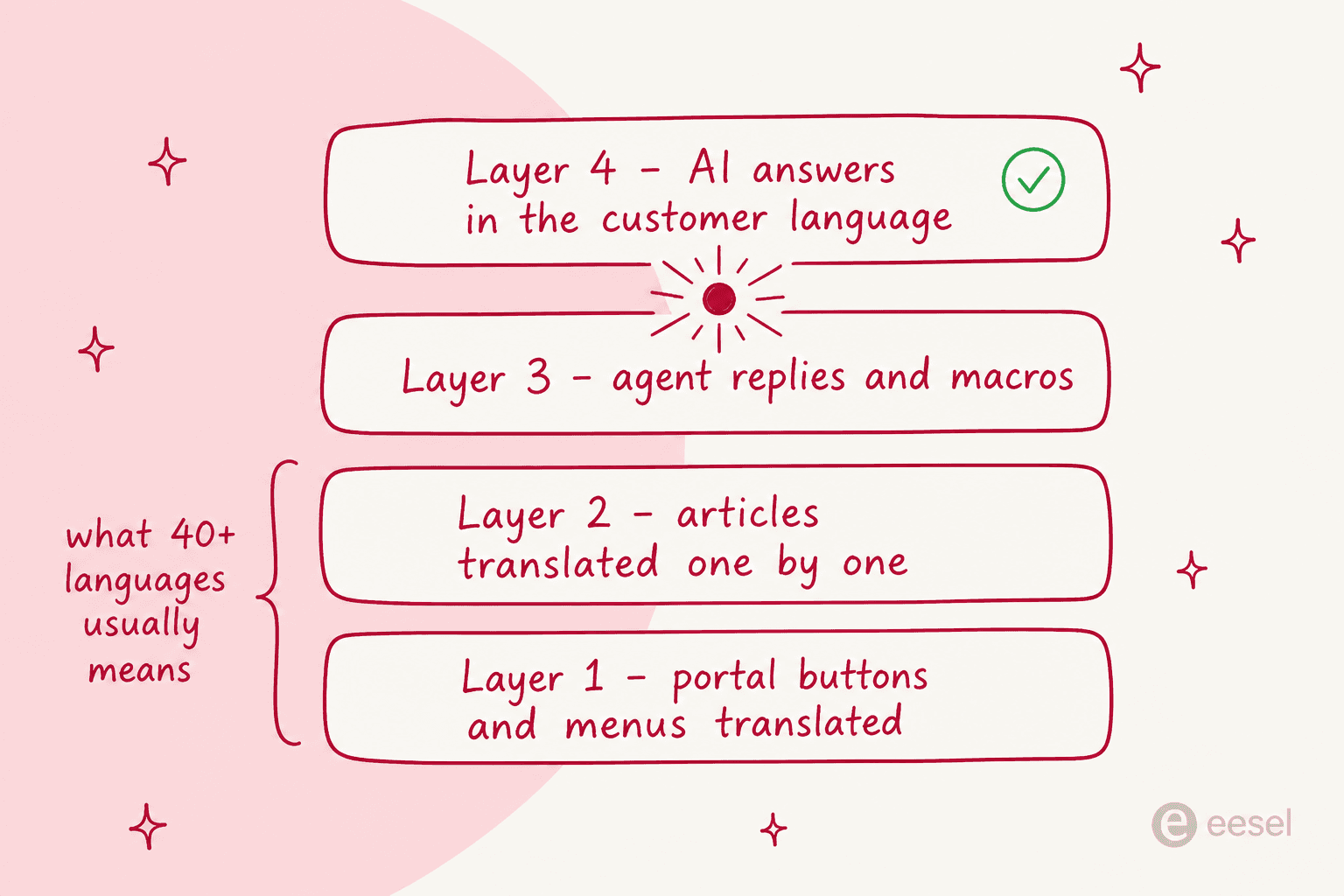
Layer 1 is the chrome. The search box, the "Was this article helpful?" prompt, the navigation. Zendesk ships these strings for 36 main help center languages plus four variants. Outside that list, the built-in text only shows up translated if a crowd-sourced translation happens to exist.
Layer 2 is your articles, translated one at a time, by a person or else by a machine. This is the actual work. It is also the part that turns a knowledge base into a standing commitment instead of a project with an end date.
Layer 3 is the ticket side: macros, canned replies, automated emails, plus whatever you have built for multilingual live chat. Zendesk calls this dynamic content. It behaves better than the knowledge base does, because editing the default version flags every variant as potentially out of date. The help center gets no such courtesy.
Layer 4 is the answer layer: an AI agent replying in whatever language the customer wrote in. On how these layers interact, Zendesk's own docs are unusually blunt. Its AI agents fully support 80 languages for generative replies but auto-translate their scripted replies into only 29, and at answer time the bot does not translate your knowledge base. So a French shopper gets a fluent French reply grounded in English articles, clicks through to the help center, and hits a dead page.
When a vendor says "40+ languages," they nearly always mean layers 1 and 2. Layer 2 is the one you pay for in headcount. Layer 4 is the one that decides whether layer 2 ever has to be complete. If that split is new to you, our primer on AI knowledge base benefits is a good detour.
How I compared them
I went through each vendor's own docs and pricing pages instead of their feature grids, looking for five things: the real language count, whether machine translation is included or metered, which plan unlocks multilingual content, what the tool does when the source article changes, and whether a missing translation degrades gracefully or just breaks. Prices are the annual-commitment figures published in USD as of July 2026. Where a vendor's marketing number and its own documentation disagree, I went with the documentation, and I say so.
The 9 tools at a glance
| Tool | Best for | Content languages | Machine translation | Plan that unlocks it | Source-edit tracking | Missing translation behaviour |
|---|---|---|---|---|---|---|
| eesel AI | Answering in the customer's language without mirroring the library | 80+ for replies | Not applicable, answers natively | From $299/mo (500 credits) | Not applicable, no mirrored copies | Answers from source knowledge |
| Zendesk Knowledge (formerly Guide) | Large multi-brand help centers | 36 + 4 variants | AI translate button, per article | Suite Growth+, in practice $115/agent/mo | Manual Flag action | Page error on enabled locales |
| Zoho Desk | Budget multilingual with translation included | 52 locales | Zia free, Google or Unbabel with your key | Professional, US$23/user/mo | Version-pinned, no flag on auto languages | Falls back to default language |
| Freshdesk | Human translation with portal auto-detection | 47 | None, at any tier | Pro, $55/agent/mo | Manual "mark as outdated" button | Language hidden until you unhide it |
| Document360 | Documentation-first localization | 57 locales, 50 machine-translatable | Azure Translator, 1 credit per character | Quote only, no public price | Manual status toggle | Stale translation served anyway |
| Helpjuice | Metered auto-translation with review gates | ~50 distinct | Built in, $0.00015 per character | Every plan, from $249/mo | Status flips to "Verify Translation" | Language switcher only shows what exists |
| Guru | Internal knowledge answered in the reader's language | 1 stored, 7-8 translatable | AI Assist, no meter published | Quote only, no public price | None, translations are ephemeral | Not applicable |
| Wiki.js | Free self-hosted multilingual wiki | Namespaced locales, no cap | None | Free, self-hosted | None | Namespace simply has no page |
| Docusaurus | Developer docs translated in git | Locale folders, no cap | None, git or Crowdin | Free, self-hosted | None | Depends on host rewrite rules |
Translation debt: the cost that never appears on the pricing page
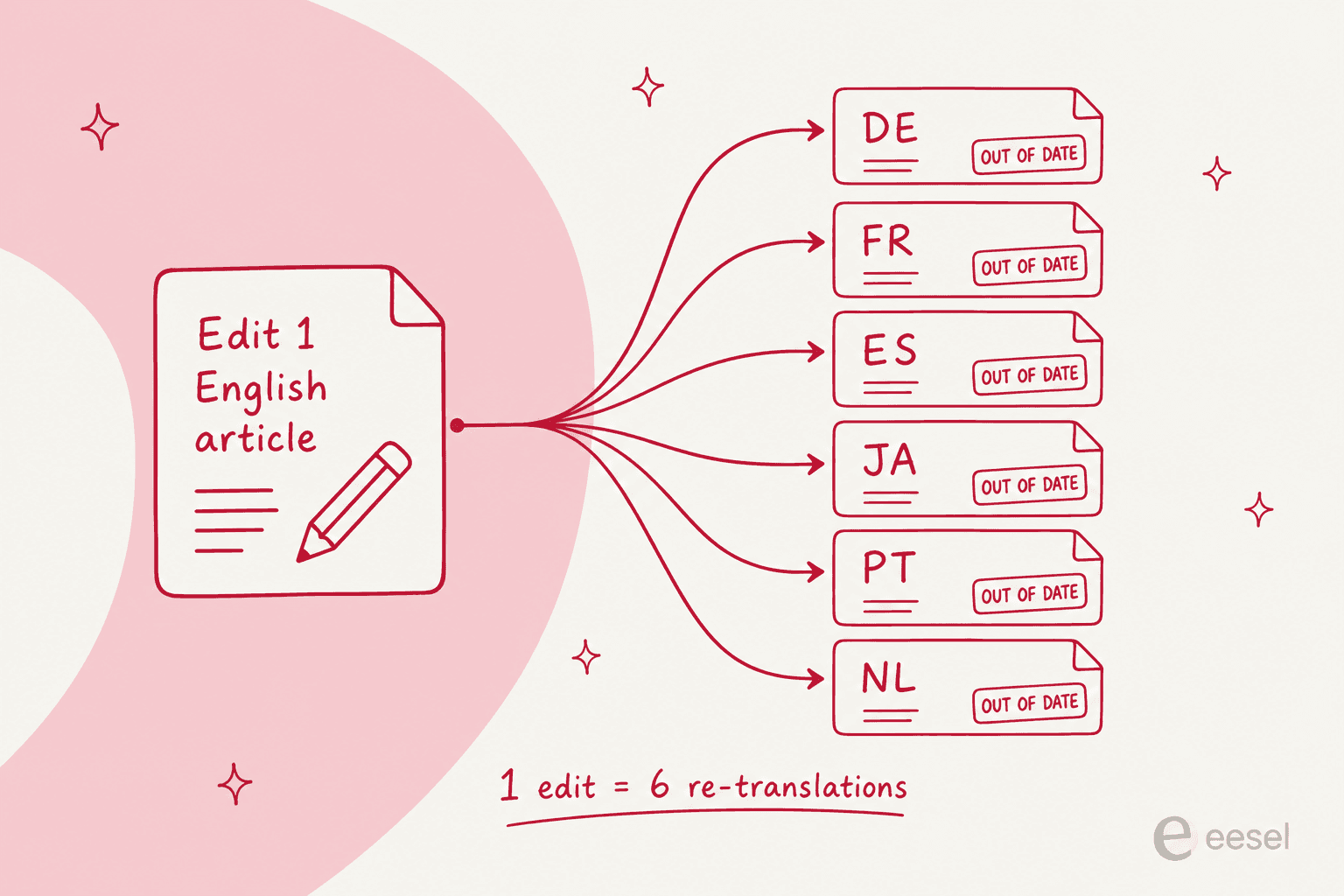
Here is the part nobody models before signing. A knowledge base is not a one-time translation job. It is a subscription to re-translating everything you edit, forever, multiplied by the number of languages you switched on.
A technical writer running a 600-article help center put the shape of it on Reddit like this:
"The help center currently consists of almost 600 articles available in 4 languages, ranging from simple FAQs to detailed step-by-step instructions."

That is 2,400 documents, and every product change touches some fraction of all four sets. What happens next is the thing every team works out about six months in:
"I regularly discover that some language versions are 3-4 iterations behind the English master."
The drift is a design problem more than a discipline one. Most of these tools simply will not tell you which versions are behind. Plug your own numbers in below and see what a year of keeping up actually costs.
The machine translation bill is rarely the scary column. It is the review hours.
1. eesel AI
Best for: teams whose ticket volume is multilingual but whose docs team is one person.
I work on eesel, so read this section as the inside view and not a neutral review. It belongs first in a roundup about multilingual knowledge base software for one reason: it comes at the problem from the other end. Instead of mirroring your article library into six locales, the AI agent reads whatever knowledge you already have and replies in the language the customer wrote in, across 80+ languages, with no per-language routing rules to keep alive.

How multilingual works: the agent connects to the sources you already keep, help center, Confluence, Notion, Google Docs, SharePoint, PDFs, and your past tickets, then answers in the customer's language. The retrieval side is ordinary RAG over your help center, not a translation pipeline. And because it trains on your real solved tickets, a German queue teaches it how your team actually writes in German, which is the part machine translation of a help center never hands you. Before going live you run it against historical tickets in simulation, look at where coverage is thin per theme, fill the gaps, re-run.
Pricing: one fixed monthly price from $299 for 500 credits (1 credit per ticket or chat) with no per-seat fee and no language surcharge, and a free plan with 100 credits. On the pricing page the word "language" does not appear anywhere, which is sort of the point: adding Japanese does not move the bill. Pay a year upfront and two months are free, and SSO and MFA are available as add-ons from $199 a month.
Where it falls short: it does not publish a localized help center for you. If the reason you want multilingual knowledge base software is organic search in German, or a regulator asking for documentation in the local language, then an AI answer layer replaces none of that and you still need one of the tools below. eesel also publishes no per-language simulation reporting, so coverage by locale is something you infer from your own ticket history instead of reading it off a chart.
My take: pick this when the pain is tickets arriving in five languages. Not when the pain is pages missing in five languages. Smava runs over 100,000 German tickets a month through it, and Gridwise resolved 73% of tier-1 tickets in the first month, neither of them with a translated article library behind it.
2. Zendesk Knowledge
Best for: large multi-brand help centers where translation is a funded, staffed program.

How multilingual works: Zendesk Knowledge stores one source article plus a translation object for each locale, all sharing the same URL with the locale swapped in. There are 36 main help center languages plus four variants. An AI translate button sits in the article editor, on by default, one article and one language per click. A bulk "translate my knowledge base" action is documented nowhere.
Two behaviours will bite you. First, a translated article whose parent section is untranslated is invisible to readers: published, indexed in the admin, and still unreachable, because the help center cannot display orphan articles. So translate categories first, then sections, then the articles. Second, a locale you have enabled but not translated returns a page error rather than falling back to English, and Zendesk's own configuration guide spells that out with a French example. A locale you never enabled redirects cleanly. Which means enabling a language before the content exists is worse than doing nothing at all.
Support teams notice the quality gap as well:
"We have tried using the auto-translate function Zendesk provided but found that the automatic translation is very unsatisfactory."
Pricing: a multi-language help center needs Suite Growth or above. Growth no longer appears on the public price list though, so the cheapest plan you can actually buy is Suite Professional.
| Zendesk plan | Price (annual) | Multi-language help center |
|---|---|---|
| Support Team | $19/agent/mo | No |
| Suite Team | $55/agent/mo | No, single help center only |
| Suite Professional | $115/agent/mo | Yes |
| Suite Enterprise | Talk to sales | Yes |
| Copilot add-on | $50/agent/mo | Adds AI features on top |
Where it falls short: editing the English article flags nothing at all. Marking a translation stale is a manual Options then Flag action, on each one, which is exactly the kind of discipline nobody sustains past month two. The irony: Zendesk's ticket-side dynamic content does auto-flag variants when the default changes. The knowledge base, where staleness actually reaches customers, does not.
My take: the strongest API story here (there is a translations/missing endpoint built for coverage audits), and the best fit if you have a translation agency plus a release process to hang off it. If the plan is "we'll click translate when we remember," then the parent-page trap and the silent staleness will punish you for it. Our multi-language help center walkthrough covers the setup, and our notes on multi-brand help centers cover the case where each brand needs its own locale set.
Worth flagging separately: Zendesk can also auto-translate incoming messages on the ticket side, which solves a different half of the problem than the help center does. Still getting the basics in place? Start with Zendesk help center basics.
3. Zoho Desk
Best for: the cheapest route to a multilingual help center with machine translation included.
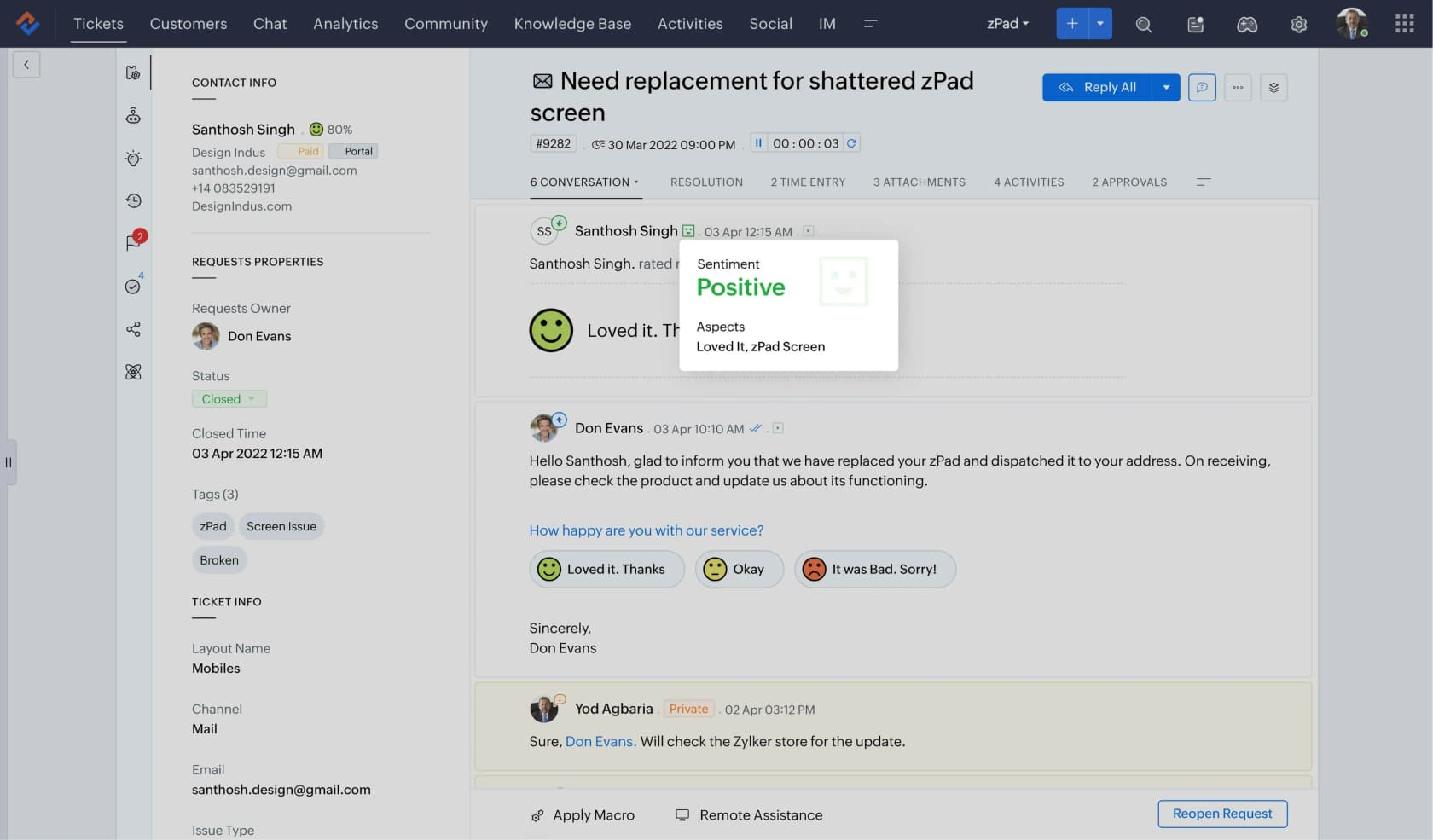
How multilingual works: Zoho Desk publishes 52 selectable locales and lets you set Translation Type to Manual or Automatic at the account level. Automatic runs through one of three engines, and here is the detail worth reading twice: Google Translate and Unbabel both need your own API key, which means a second bill from a second vendor. Only Zia, Zoho's own AI, is self-contained, and Zia translates 15 languages against the 52 locales the help center advertises.
Auto-translated output lands as a draft that a human then publishes, per article, per language. Categories, sections and sub-sections are never auto-translated, so the navigation stays a manual job even when you are on full auto.
Pricing: Professional is the gate. It is also where Zia first appears, so the multilingual gate and the free-engine gate happen to be the same tier.
| Zoho Desk plan | Price (annual) | Multilingual help center |
|---|---|---|
| Express | US$7/user/mo | No |
| Standard | US$14/user/mo | No |
| Professional | US$23/user/mo | Yes |
| Enterprise | US$40/user/mo | Yes |
Where it falls short: two things, mainly. Translations are pinned to the version they were requested at, so editing the master to 2.1 leaves every translation happily serving 2.0 until somebody asks for a new run. Then the "Mark as outdated" safety net explicitly does not apply to languages that are auto-translated only, which is precisely the set most at risk. Zoho also will not read the browser language to pick a help center locale, so first-time visitors land in your default language and switch by hand.
My take: best value on this list by a distance, roughly 2.4x cheaper than Freshdesk at the tier that unlocks the same feature, and with machine translation Freshdesk does not sell at any price. Just budget around the fact that Zia's 15 languages are the free part, and go check whether your locales sit inside it. Our Zoho Desk AI review and notes on Zia language support go deeper, and there is a roundup of AI integrations for Zoho Desk if you want to bolt something on top.
4. Freshdesk
Best for: teams doing human translation who want the portal to pick the reader's language automatically.
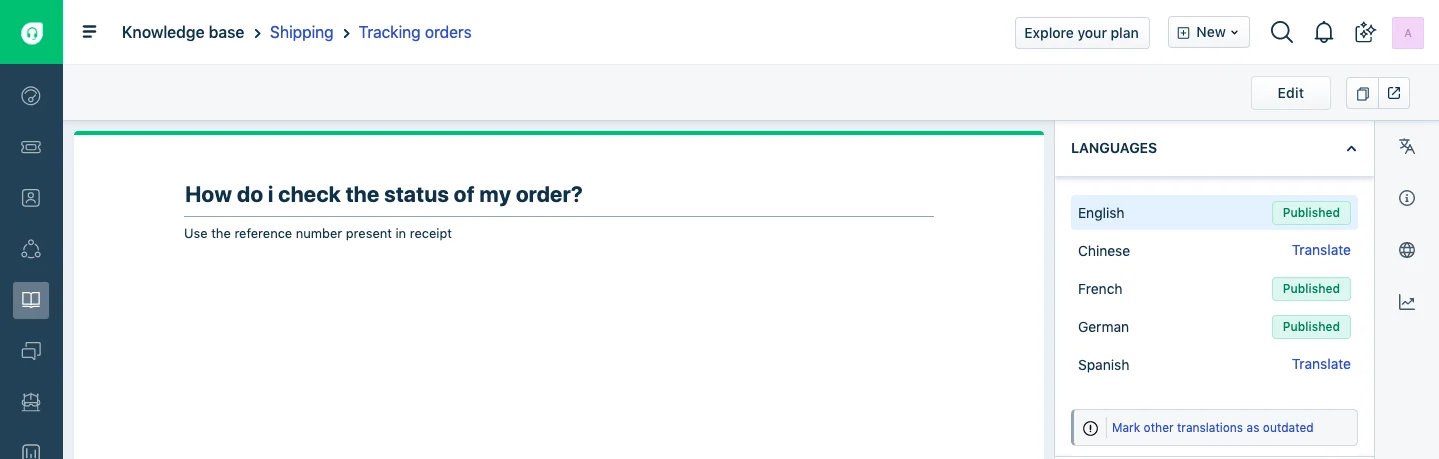
How multilingual works: Freshdesk supports 47 languages for solution articles, four of them knowledge-base-only, and there is no cap on how many you enable. The portal behaviour is the best on this list. It detects the reader's language from their login or browser, and every language you add stays hidden from customers by default until you flip an eye icon, so a locale can be staged privately until the content is ready.
Then there is the thing to know before you buy: Freshdesk has no machine translation of knowledge base articles at any plan level. Every translation gets typed by a person into a blank canvas. The only assistance on offer is a read-only "Show Master" pane, showing the source article beside your draft. Freddy's Live Translate handles ticket conversations in real time, not articles.
Pricing: the jump is a steep one, because multilingual sits two tiers up.
| Freshdesk plan | Price (annual) | Multilingual help desk |
|---|---|---|
| Free | $0 | No |
| Growth | $19/agent/mo | No |
| Pro | $55/agent/mo | Yes |
| Enterprise | $89/agent/mo | Yes |
| Freddy AI Copilot | +$29/agent/mo | Add-on, ticket translation |
Where it falls short: propagation is a button somebody has to remember. After editing the master you click "Mark other translations as outdated," and Freshdesk's own documentation says plainly that you perform this action each time you update the primary article. Skip it once and the French version keeps serving last quarter's refund policy, with no warning anywhere. There are per-language "outdated" and "untranslated" list views for catching drift after the fact, which is useful, but the flag only exists if someone set it in the first place.
My take: pick Freshdesk for multilingual only if the translators are already on payroll. Paying $55 an agent for the right to hand-write 47 language versions is a strange deal sitting next to Zoho at $23 with an engine included. If you are on it already, our guide to multilingual reply templates is the cheap win, and the Freshdesk knowledge base API is how teams script the translation shuffle. More in our roundup of AI automation apps for Freshdesk.
5. Document360
Best for: documentation teams that want localization treated as a first-class feature rather than a checkbox.
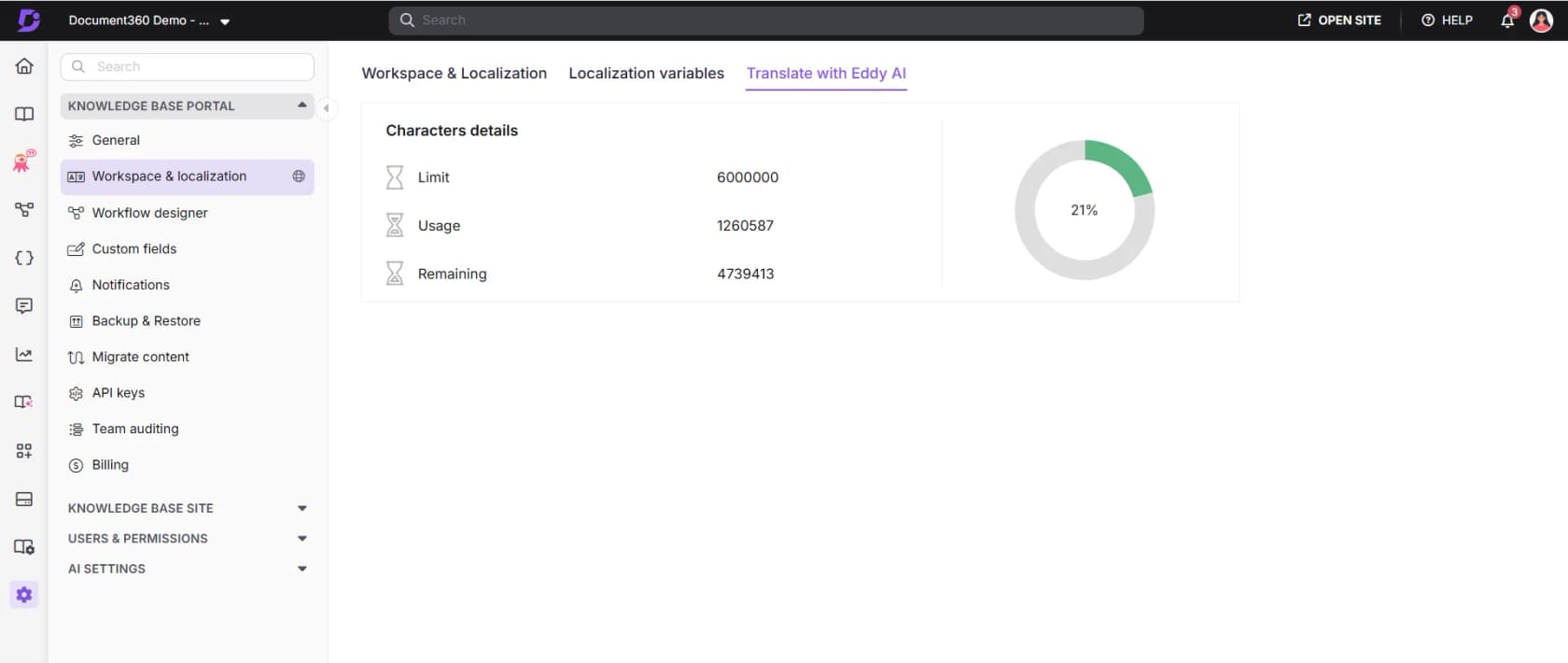
How multilingual works: Document360 lists 57 locales inside one single workspace, so adding a language replicates your structure across every article at once instead of spinning up a parallel project. Machine translation is branded Translate with Eddy AI and underneath it runs on Microsoft Azure Translator, covering 50 of those locales. Billing is one credit per translated character, credits pooled at project level and renewed annually, overage chargeable. Neither the allowance nor the overage rate is published anywhere, so the only way to see your balance is from inside the product.
The fallback rule is the sharpest design decision on this list, and it cuts the wrong way. Fallback to English happens only when a translation was never published. Per the multilingual FAQ, if the article is already published in a secondary language, that version is always shown even when it is outdated. The failure mode, then, is not a missing page. It is a confidently served wrong one, and the documented fix is to unpublish the stale translation by hand.
Pricing: fully quote-gated. No tiers and no dollar figures on the pricing page, and the number of languages is named as one of the drivers of your quote, alongside team accounts, workspaces and SSO. A 14-day trial, then a sales call.
Where it falls short: source edits trigger nothing automatically, and status is a manual Needs translation toggle. Deleting an article in one language deletes it in every language, which is an alarming default; the safe move is to hide a locale rather than remove it. Translating a Markdown article also converts it, irreversibly, to the WYSIWYG editor.
My take: the most complete localization feature set here, provided you can live without a price you can check for yourself. Compare it against the field in our Document360 vs Helpjuice piece, the Document360 pricing breakdown, and our look at Document360 AI.
6. Helpjuice
Best for: teams that want machine translation with a real review gate, and can stomach per-character billing.
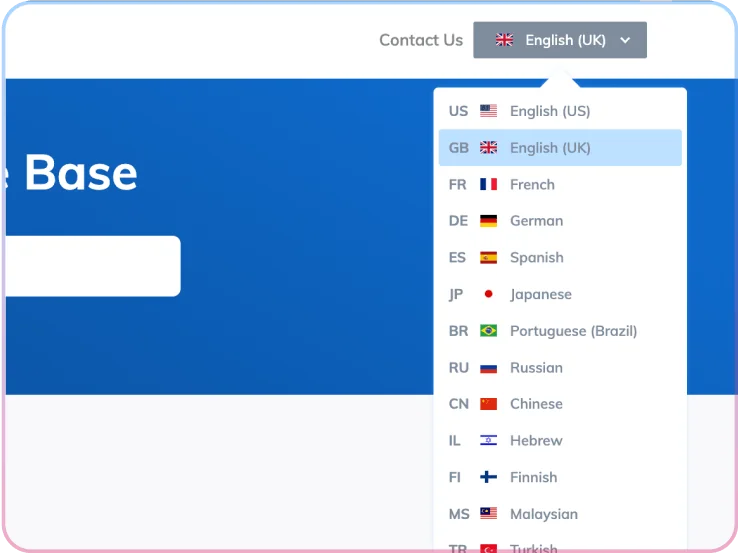
How multilingual works: Helpjuice runs one knowledge base with a default language and linked sibling articles per language, plus a front-end switcher that moves a reader between the two instead of dumping them back on a homepage. Worth knowing: its own numbers disagree with each other. The pricing page says 40+ languages, the docs say over 50, and the language codes table lists 83 rows, eleven of which are regional English variants.
The workflow is the best-designed of the bunch. Auto-translate sets the article to "Verify Translation," which is the same status an edit to the original triggers, so the review gate is the default and not an afterthought. A side-by-side view puts the untouched original next to the editable translation. A Protected Terms list keeps brand and product names from being translated into nonsense.
Pricing: localization is not gated at all, it sits in the cheapest plan, but the translation itself is metered separately on top.
| Helpjuice plan | Price | Users | Localization |
|---|---|---|---|
| Knowledge Base | $249/mo | 30 | Yes |
| AI-Knowledge Base | $449/mo | 100 | Yes, plus AI Suite |
| Unlimited AI-Knowledge Base | $799/mo | Unlimited | Yes, plus AI Suite |
| Auto-translation | $0.00015 per character | 30 free translations first | Text only, markup excluded |
Where it falls short: the meter shapes the workflow in ways that will annoy you. Syncing is manual by design, and Helpjuice says why outright: automatic syncing "could result in unexpected charges (for example, if you publish multiple times to fix small typos)." Worse, a sync retranslates the entire article rather than the changed sections, so a one-word fix on a 40,000-character page re-bills all 40,000 of them. Retranslating also overwrites any human edits in that language, recoverable only out of revision history. And adding a language still does not translate your theme, buttons or navigation: that needs a Customization Request handled by Helpjuice's team.
My take: the honest choice if you want machine translation with guardrails, and the pricing is unusually explicit about a cost every other vendor buries. Just do the arithmetic in the calculator above before you switch on a sixth language. Our Confluence vs Helpjuice comparison covers the wider product, and our roundup of knowledge retrieval tools covers what sits on top of it.
7. Guru
Best for: internal knowledge that a multilingual workforce reads, rather than a public localized help center.
How multilingual works: mostly it does not, and that is deliberate architecture rather than an oversight. Guru has no language variants of a Card and no linked translations, no language switcher either. The interface itself is English only, and Guru's own documentation suggests customers translate the UI by adjusting their Chrome browser settings.
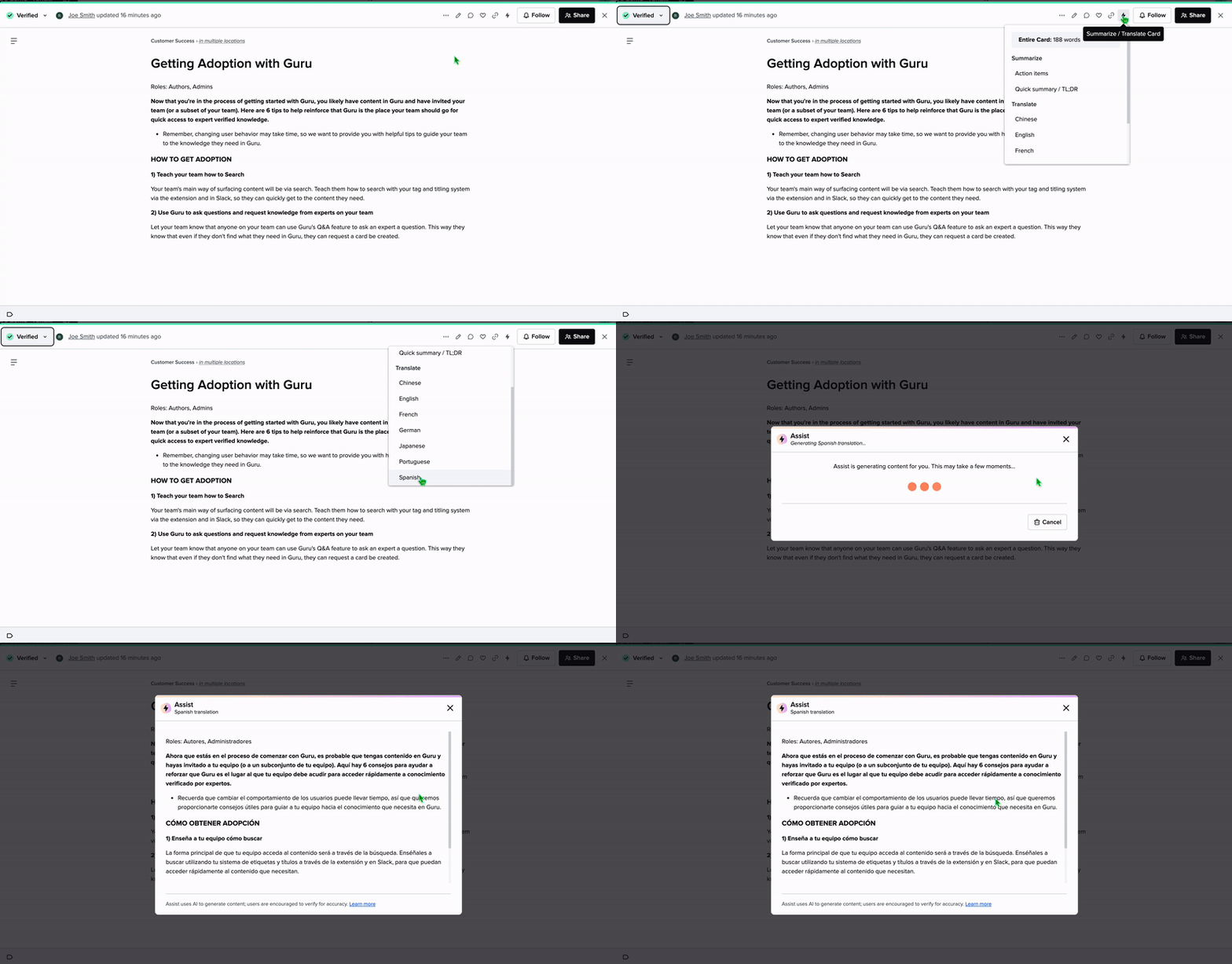
What it has instead is AI sitting on top of a single-language corpus. AI Assist translates a Card for a reader on demand, into 8 languages by the reader-facing doc and 7 by the author-facing one, while Enterprise Search answers in the same language as the question. For an internal knowledge base read by staff in Warsaw and São Paulo, that is often the right trade to make.
Pricing: none is published. As of July 2026 the pricing page carries zero dollar figures and a "Book a call" button, with the FAQ describing Guru as "not just a per-seat tool."
Where it falls short: the translation is ephemeral. Nothing is stored, versioned or tracked, and there is no staleness concept at all, because no persistent translation exists to go stale. In the author flow, "Replace text" overwrites the source Card, which is a dangerous button to have on a shared knowledge base. Assist also caps at 3,000 words and ignores files, images and embedded video. That widely repeated "100+ languages" figure could not be found on any Guru-owned page, so treat it as unverified.
My take: a good fit for internal enablement, a poor one for a public multilingual help center. Our Guru review has the full picture on the product. For what it costs and where it sits in the category, see our Guru pricing notes and our guide to knowledge management software.
8. Wiki.js
Best for: a free, self-hosted multilingual wiki where you control the whole stack.
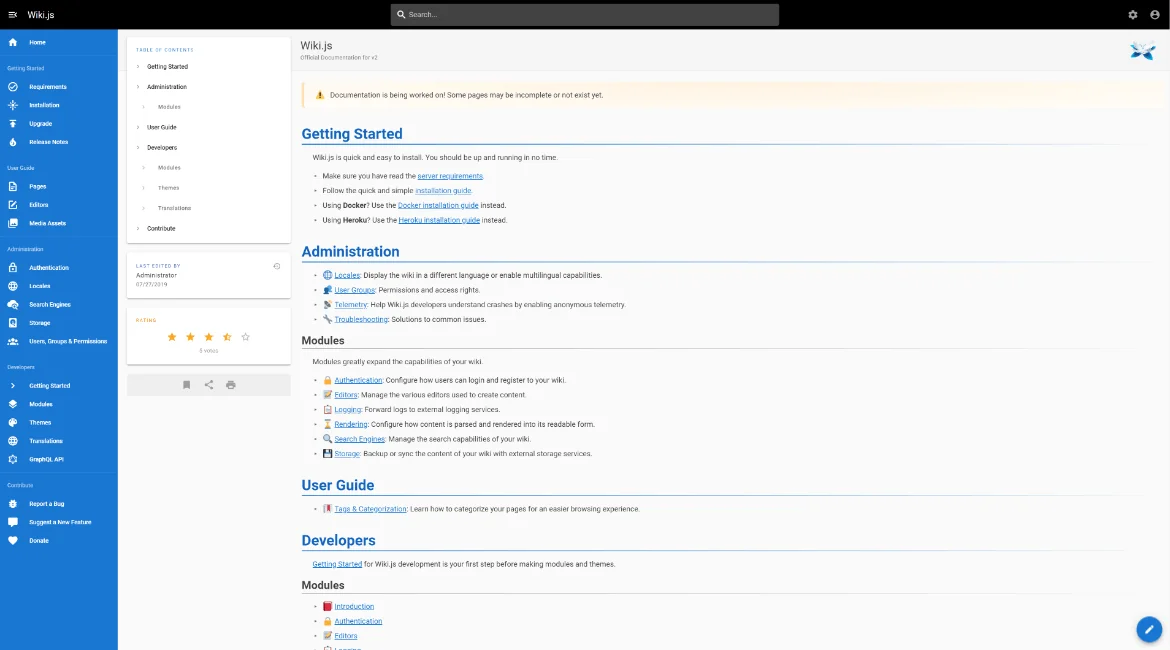
How multilingual works: Wiki.js keeps two things apart. UI locale packages are downloadable community translations of the interface, English only on a fresh install. Content multilingual is its own separate feature, called Multilingual Namespacing, toggled in Admin then Locales, and it makes the locale a namespace segment in the page path.
Pricing: free and open source. The costs are a server, a database, and your own time.
Where it falls short: the documentation for the actual feature is missing. The official section on writing an alternate locale version of a page is literally marked TODO, and that page was last edited back in 2020, so the core multilingual how-to has been unwritten for roughly six years. No machine translation, no translation-management integration, and no staleness tracking of any kind either.
My take: fine if you are technical, running it anyway, translating a handful of pages by hand. Not a serious answer for a customer-facing support portal in five languages, because everything the previous six tools do to keep versions honest is something you would be building yourself.
9. Docusaurus
Best for: developer documentation where translations live in git next to the code.
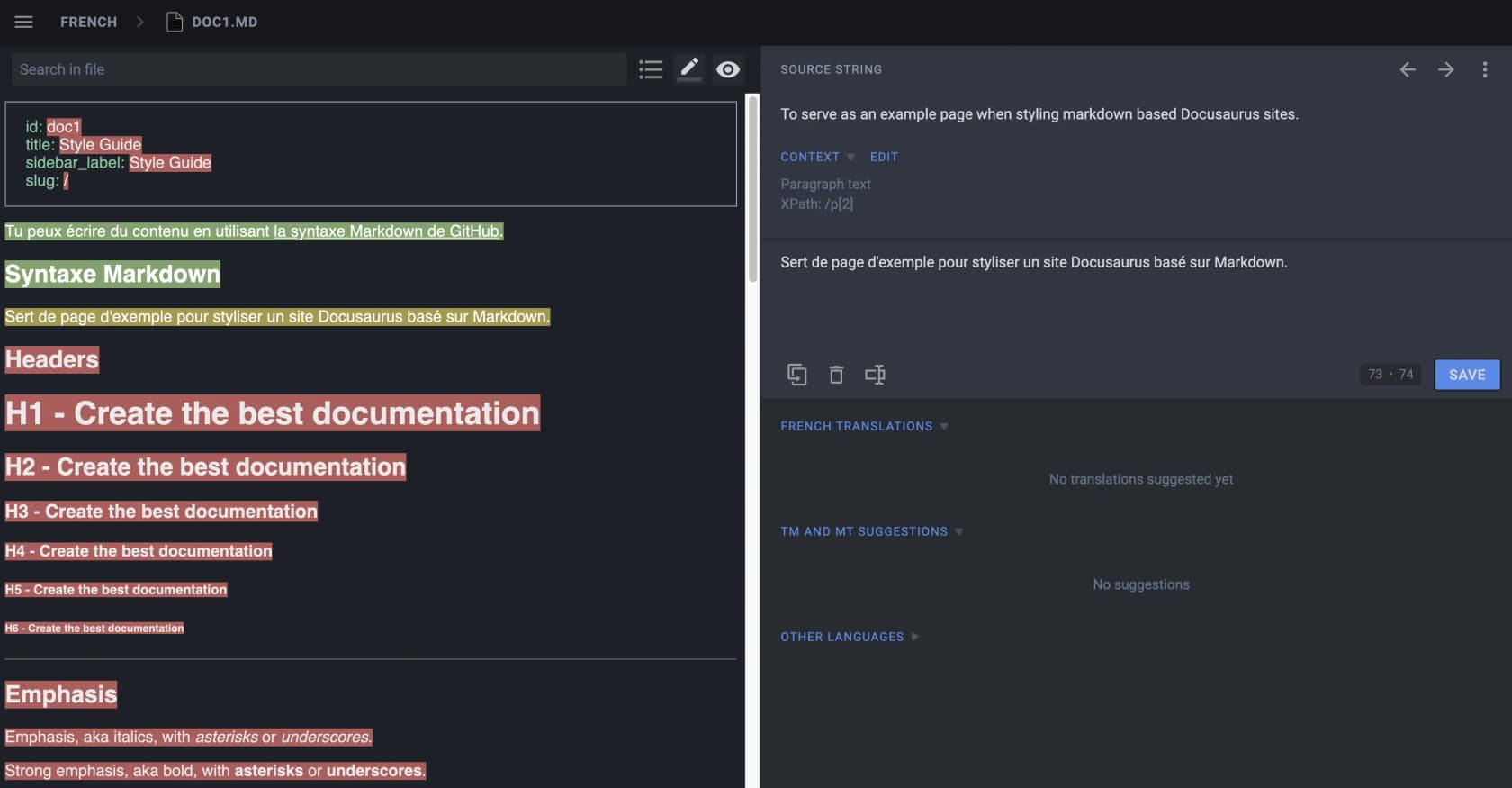
How multilingual works: Docusaurus uses a filesystem convention: every translated file sits under website/i18n/[locale]/, Markdown pages as whole documents and interface strings as JSON files scaffolded by a write-translations command. Each locale then builds into its own static site, so the output is properly separate rather than switched at runtime. Localized routes default to a /fr sub-path, and the per-locale URLs are what generate hreflang tags.
Pricing: free. You pay in build minutes instead, since every locale is a full extra build, plus translator time and a translation-management subscription if you route through Crowdin.
Where it falls short: no machine translation, and no staleness tracking whatsoever. Translated pages are copied files, so editing the English source quietly ships a stale French page: no banner, no status view, no flag. Docusaurus is upfront that it does not care how you manage translations, which is a reasonable stance for a build tool and a hole for a knowledge base. Untranslated routes fall back to English only if your host rewrites them, and some static hosts cannot do that.
My take: the best answer on this list when your docs already live in a repo and the translations already go through a translation-management system. The worst one if you were hoping the tool itself would tell you what is out of date.
Two ways to be multilingual, and only one of them scales
Every tool above sits on one side of the same architectural choice.
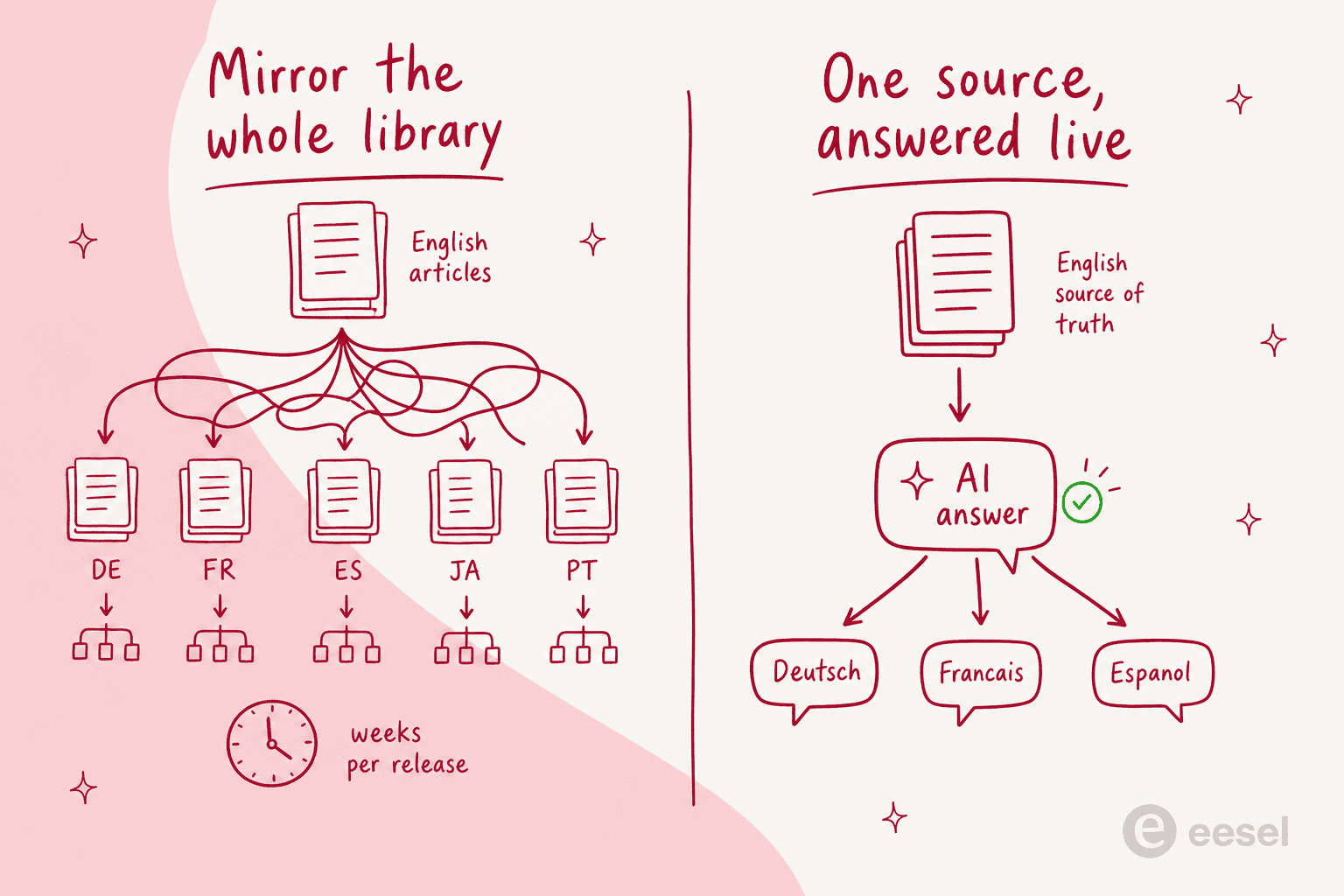
Mirror the library. Every article exists in every language, and the sync problem is yours forever. This is the right call when localized pages are the product: organic search in German, a regulator who wants local-language documentation, a market where one machine-flavoured sentence costs you the sale. Teams that make it work treat translations as build output and not as source content, exactly the way one documentation lead described it:
"The merge to
livetriggers the build system, which builds the English website first and also triggers translation into the other (up to 19) languages. The translated content is a publishing artifact; we don't store it is as translated source content in GitHub."
Answer live. One source of truth, plus an AI agent that replies in whatever language the customer used. This is the right call when the volume sits in the inbox rather than in search, which is where most support teams actually are. It is not magic though, and results do vary by language: one team running AI support across five languages and twelve hotel properties reported about 55% of guest inquiries handled by AI, ranging from 62% in English and French down to 41% in Portuguese, a 21-point spread on the same product. Another practitioner in that same thread put his finger on why:
"For new languages, the challenge is less translation and more tone and cultural nuance, especially on voice."
Most teams need both, in some specific ratio. Translate the twenty articles carrying your search traffic and your legal exposure, keep those honest, then let the answer layer handle the long tail of tickets in Portuguese and Japanese that would never have justified a translated page anyway. Same logic behind a good self-service setup: fix the few pages everyone lands on, automate the rest of the queue.
What I would actually do
Choosing today? The short version: Zoho Desk at US$23 is the best value if you want a translated help center on a helpdesk, Document360 is the strongest pure localization product if you can get a quote you like, and Helpjuice is the most honest about what machine translation costs. Zendesk earns its price only when you have a translation program and an API to drive it. Freshdesk at $55 with no machine translation is the hardest deal to justify in 2026.
If the underlying helpdesk is being picked at the same time, our roundups of top helpdesk software and the best AI helpdesk software narrow the field, and our breakdown of a help desk system explains where the knowledge base fits into all of it.
And before enabling a sixth locale, ask what happens on the day somebody edits the English source. If the answer is "an agent remembers to click a button," then what you bought is a maintenance liability wearing a feature's clothes. Want to see the alternative first? Connect an AI agent to the knowledge you already have and look at how much of your non-English queue it clears before you translate anything else. Our guide to ticket deflection is the sensible next read. After that, the roundup of the best AI knowledge base tools covers the shortlist, and our post on AI hallucinations covers the risk everyone asks about.
Try eesel for multilingual support
If the reason you are shopping for multilingual knowledge base software is that non-English tickets keep piling up, start at the answer layer instead of the article library. eesel plugs into Zendesk, Freshdesk, Gorgias, Help Scout and the rest in a few minutes, reads the help center and the past tickets you already have, then replies in the customer's language across 80+ languages with nothing to configure per locale.

Run it in simulation against your real ticket history first, so per-theme coverage is visible before a single customer ever talks to it, then roll it out to a slice of the queue. Plans start at $299 a month for 500 credits, with no seat fees, no language surcharge, and a free plan of 100 credits. If your German queue looks anything like Smava's, that is the fastest multilingual win on the table this quarter.