


Deflection is the pitch for every customer support knowledge base. The number underneath it is much smaller than the one on the case-study page. HDI and MetricNet put the average self-service completion rate at 10.4%, while vendors advertise 30% to 95%. Which editor you happen to like, then, barely matters. What matters is which tool tells you what customers searched for and could not find, and how fast that gap becomes an article.
The field splits hard on that test. Failed-search reporting ships with Zendesk, Zoho Desk, Help Scout, and HelpCrunch; Freshdesk and Re:amaze have none, and point you at Google Analytics instead. Ticket conversations turn into real draft articles at exactly one vendor, Zoho Desk. Then there is the AI layer that reads all those articles, metered six different ways across these ten tools, from $0.08 a conversation at volume up to $0.85 a resolution. Zendesk publishes the unit and the allowance, but never the rate.
When your articles are broadly fine and the answers are not, an AI layer over the help center you already run costs less than a migration does. That is the slot eesel sits in: it reads your existing help center plus your past tickets, answers or drafts inside your help desk, and shows you the topics it could not cover. From $299/month for 500 credits (1 credit per ticket), no seat fees.
The number this whole category is sold on
Start with the honest benchmark. It reframes everything that comes after it. HDI's Metric of the Month reports out of MetricNet's benchmarking database: worldwide, the average self-service completion rate for service desks is 10.4 percent, ranging from zero at desks with no self-service at all up to a high of 55 percent. The 2018 pass of the same metric put it at 8.9%. Both carry the same caveat, that the vast majority of self-resolved incidents are password resets.
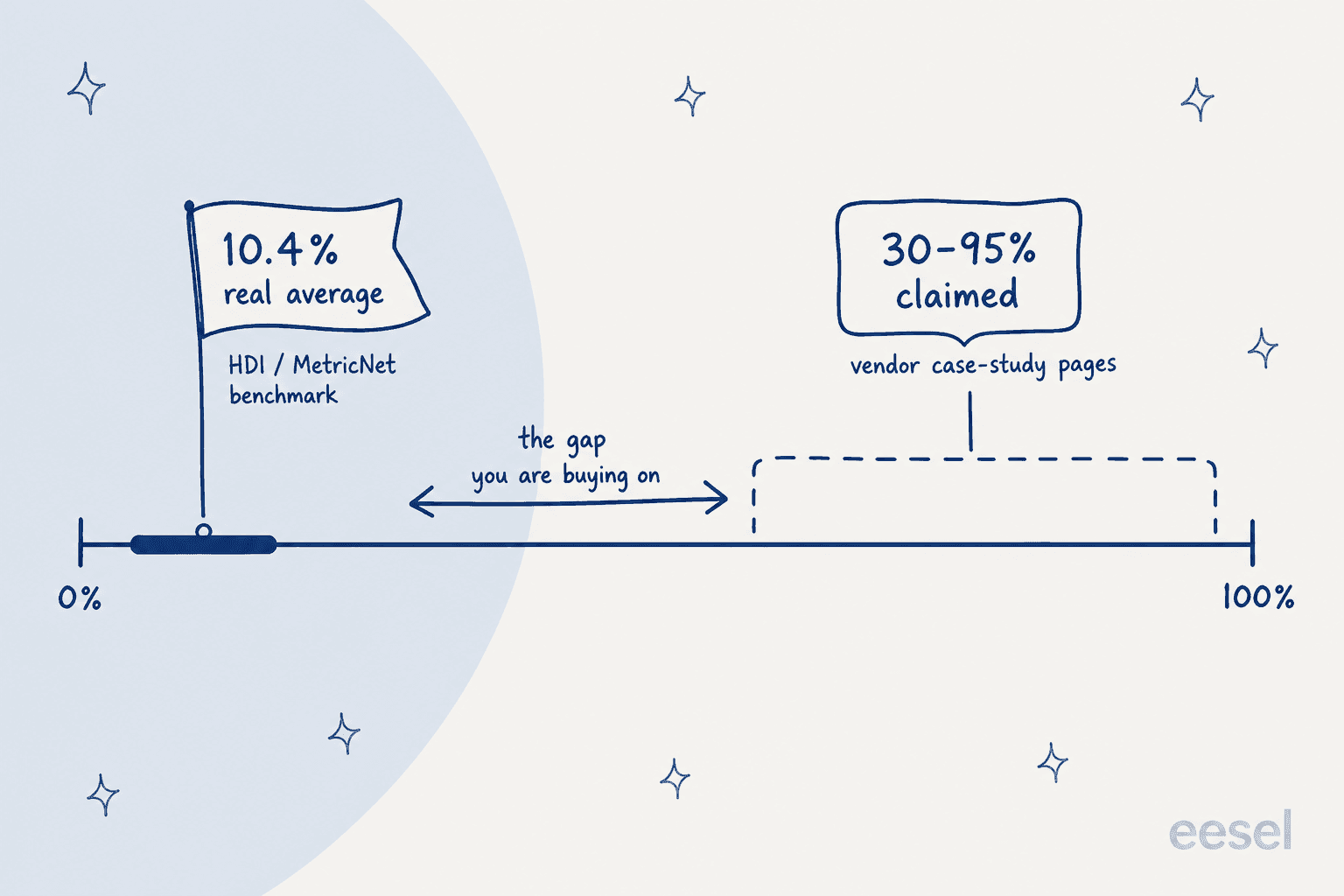
Now set the vendor numbers beside it. Zendesk's knowledge page cites Squarespace at a 95% self-service success rate, and Tesco moving from 30 percent to 73 percent over three years. Its AI agents page cites an 80% automation rate at TeamSystem and 66% at Hello Sugar. None of that is fabricated. None of it is the median outcome either, and buying as though it were is how a help center project ends up judged a failure eighteen months in.
Two more mechanics from the HDI pages are worth carrying into any purchase. The first: deflection makes the remaining queue more expensive, because as low-handle-time incidents move to self-service, the average complexity and handle time of what agents still touch goes up. The second is a ceiling on the whole idea. MetricNet's rule of thumb says a user should not spend more than 10 minutes trying to self-resolve, since past that the lost productivity costs more than the deflection saved, measured against a level-1 incident cost of about $22 in North America.
That is the real design constraint. A help center is not trying to answer everything; it is trying to answer the repetitive things fast and hand the rest over cleanly. Which is why the feature I care about most is such an unglamorous one: the report that shows what people searched for and found nothing.
How I compared these
I am an engineer at eesel, and most of my time goes to the retrieval side of this problem. So my bias runs toward what happens after a customer types a question, rather than toward how nice the editor is. Every plan gate, price, and limit below comes from the vendor's own pricing page or docs, checked in July 2026, and I have linked the page each fact came from.
Five criteria, ordered by how much they actually decide the purchase:
- Which plan first unlocks a public help center. Not the entry price, the price of the plan that includes the thing you are buying.
- Failed-search reporting. Does the tool tell you what customers searched and did not find, and where does that report live?
- Ticket-to-article capture. Can a resolved ticket become a draft article without a copy-paste session?
- The AI billing unit. Per session, per resolution, per conversation, per credit, per ticket, or seat-gated with no meter at all. They are not interchangeable.
- Multilingual reality. Languages supported, and whether the tool actually translates anything.
I also stayed inside tools that sit next to a queue, which makes this list overlap with our help desk software roundup while staying narrower than it. One category is left out on purpose: tools that only host articles, with no connection to a ticket queue. If an agent cannot cite an article mid-conversation, what you have is an internal knowledge base, not customer support software.
The 10 tools at a glance
| # | Tool | Best for | Plan that unlocks a public KB | Failed-search report | Ticket → article | AI billing unit | Multilingual | Year one, 1 seat |
|---|---|---|---|---|---|---|---|---|
| 1 | eesel | Answering off the help center you already have | Sits on top of yours | Gap reporting by topic | Drafts into gaps it finds | From $299/mo (500 credits) | 80+ languages | No seat fee |
| 2 | Zendesk | Articles that live inside the ticket | Suite Team $55/agent | Yes, 390-day retention | Launcher only | Unit published, rate not | 36 languages | $660 |
| 3 | Zoho Desk | Real ticket-to-article conversion | Standard $14/user | Yes, failed keywords | Yes, 1-10 threads | Seat-gated, no meter | 52 locales | $168 |
| 4 | Freshdesk | Cheap paid help center with suggestions | Growth $19/agent | None | BCC to a draft | $0.49 per session | 47, no translation | $228 |
| 5 | Help Scout | Content-gap reporting, real $0 start | Free (10 articles) | Yes, dedicated table | None | $0.75 per resolution | Per-site only | $0 |
| 6 | HubSpot | Knowledge base on the CRM | Professional $90/seat | Article health only | No | $0.50 per resolution | Add-on | $2,580 |
| 7 | Document360 | Governance and review cycles | Quote-gated | Not verified | Via Zendesk app | 1 credit per question | 57 locales | Quote |
| 8 | Helpjuice | Big multilingual library, no seat maths | $249/mo flat | Not verified | No | Metered per character | Every plan | $2,988 |
| 9 | Re:amaze | Ecommerce FAQ tied to a shared inbox | Basic $29/member | None | No | $0.85 per resolution | One brand per language | $348 |
| 10 | HelpCrunch | Failed-search reporting on a small budget | Basic, entry plan | Yes | No | $0.29 to $0.08 per conversation | Unlimited, Pro+ | Slider-priced |
Year-one figures cover the seat cost of the qualifying plan for a single user, plus any mandatory one-off fee, before AI usage. Treat them as a floor rather than a quote.
Choose the thing that is actually blocking you. One answer, no email required.
The loop, not the editor
This took me an embarrassingly long time to see. Every one of these tools sells you on the article editor, and the editor is basically a solved problem by now. What differs between them is how much of the loop the tool can see.
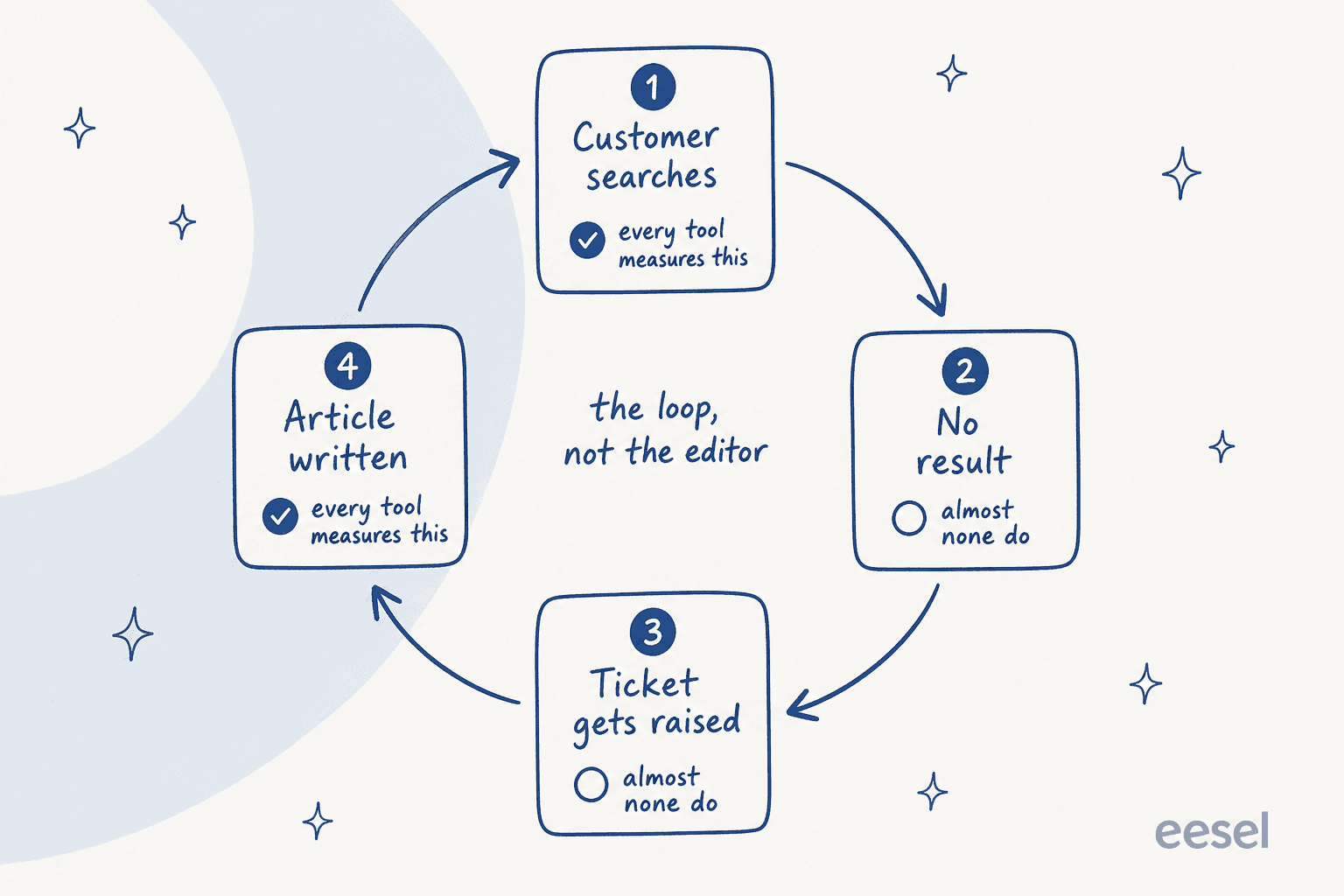
Four steps to the loop. A customer searches. The search returns nothing useful, so they raise a ticket. Somebody then writes the article that would have prevented it. Step one gets measured by every tool here, and step four is available everywhere. It is steps two and three, the ones that actually tell you what to write next, where the field thins out to four names: Zendesk, Zoho Desk, Help Scout, and, unexpectedly, HelpCrunch.
A Zendesk moderator said it better than any vendor page does:
"one root cause for us is the lack of author/owner engagement. adoption and compliance with review and verification schedules is to use the KB analytics to show searches - both hits and misses. misses might be compelling to introduce new article since it shows a customer pain point that becomes a support ticket."

That is the whole argument for weighting failed-search reporting above the editor. A miss is a named, dated request for an article a customer already went looking for. It is also the input that turns knowledge base management into a routine instead of an annual audit.
1. eesel: best for answering off the help center you already have
Best for: teams whose articles are broadly fine and whose answers are not.

Putting eesel first needs a caveat, because it is not a help center product. Your articles do not get hosted here. It connects to the help desk and the docs you already run, learns from resolved tickets as well as published articles, and answers or drafts from there, across 100+ integrations and 80+ languages.
It belongs in a knowledge base roundup because of the loop above. eesel surfaces the topics your help center does not cover, then drafts articles into those gaps, so gap analysis and writing land in the same place rather than in a quarterly audit nobody runs. Before any of it goes live, simulation replays your historical tickets, so you see coverage by theme and fix the misses first.
That habit exists because of a specific scar. On one rollout, a B2B technical support team watched a bot confirm that we support your car model for brands that were not in their database, because the knowledge base said we support all models. The article was not wrong, exactly. It was written at a level of generality the AI could not safely resolve. Confidence thresholds, citations on every answer, a hard decline-to-answer fallback: all of it came out of cases like that one.
Where it falls short: eesel will not give you a help center if you do not already have one. Articles still need somewhere to live, which means a Zendesk or Zoho Desk or Help Scout underneath. It is the wrong pick too if what you want is a human-authored content workflow with staged approvals and sign-off. That is Document360's job, further down this list.
Pricing: one fixed monthly price from $299 for 500 credits, with 1 credit per ticket or chat, no seat fees and no platform fee. The free plan includes 100 credits without a card. Pay a year upfront and get two months free. SSO and MFA are an add-on from $199 a month, and HIPAA is available on request.
My take: pick this when the constraint is answer quality rather than article hosting, and above all when your plan-jump quote comes in bigger than your AI budget. Gridwise resolved 73% of tier-1 requests in its first month after a seven-day trial, and its help center never moved anywhere. If you are still choosing what runs underneath, our help desk system guide covers that half of the decision.
2. Zendesk: best when articles have to live inside the ticket
Best for: teams where agents cite, link, and flag articles mid-conversation.
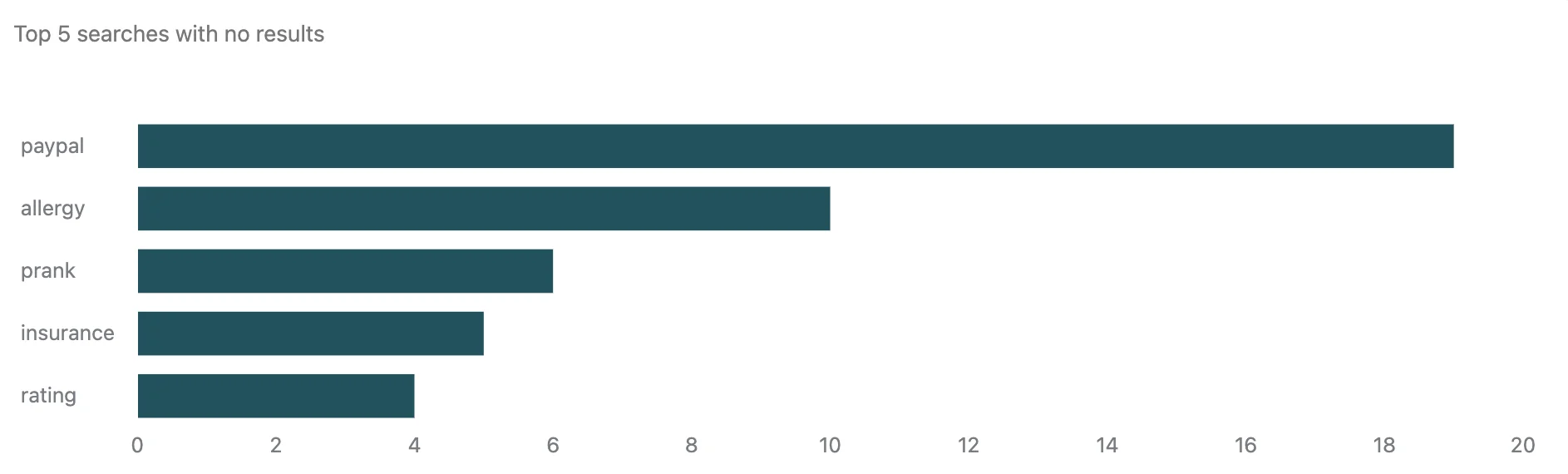
Zendesk Knowledge (formerly Guide) has the deepest knowledge base instrumentation in this list, and it is very good. The Explore search dashboard reports total searches, searches with no results, average click-through, and tickets created, plus a per-query table showing average results and how many tickets each search led to. Two limits get stated outright: 390 days of retention on the Search dataset, and blank-query events excluded.
The in-ticket side is the other half. From the Knowledge context panel, agents search, link, quote, and pin content, and they can flag a paragraph for update, which spawns a ticket carrying the article link, the source ticket, and the inline comment. That ticket auto-assigns to the article owner on Enterprise; everywhere else it sits unassigned.
Where it falls short: two places. The in-ticket create button is a launcher rather than a converter, and Zendesk says so plainly: information from the ticket is not automatically populated in the article. Then the plan maths bite. The knowledge base itself starts at Suite Team $55 an agent, but in-ticket article creation and flagging need Suite Growth or above, so the plan that gives you a help center is not the plan that gives you capture. Guide is a weak authoring environment as well, which the people who live in it say better than I can:
"I have lots of experience with Zendesk Guide and yes it's true, it's very clunky if you're using it as a writing/content management system. It was designed to allow support agents to quickly create knowledge base articles. That's the beauty of Zendesk, the help articles integrate with the ticketing system."
Pricing: Suite Team $55 an agent a month for the knowledge base, Suite Growth or higher for in-ticket creation and flagging. AI agents ship on every plan with 5, 10, or 15 automated resolutions per agent per month depending on tier and a 10,000-per-year account cap, but the rate past that is not published on the automated resolutions doc.
My take: the best choice on this list if your agents really do work knowledge inside tickets, and a poor one if your help center is a content project. Budget for Growth rather than Team, or you will buy a knowledge base without the capture loop. Our Zendesk AI breakdown covers the automation layer, and Zendesk vs Help Scout is the comparison most teams at this size are actually running.
3. Zoho Desk: best real ticket-to-article conversion
Best for: teams that want resolved tickets to turn into drafts without a rewrite.
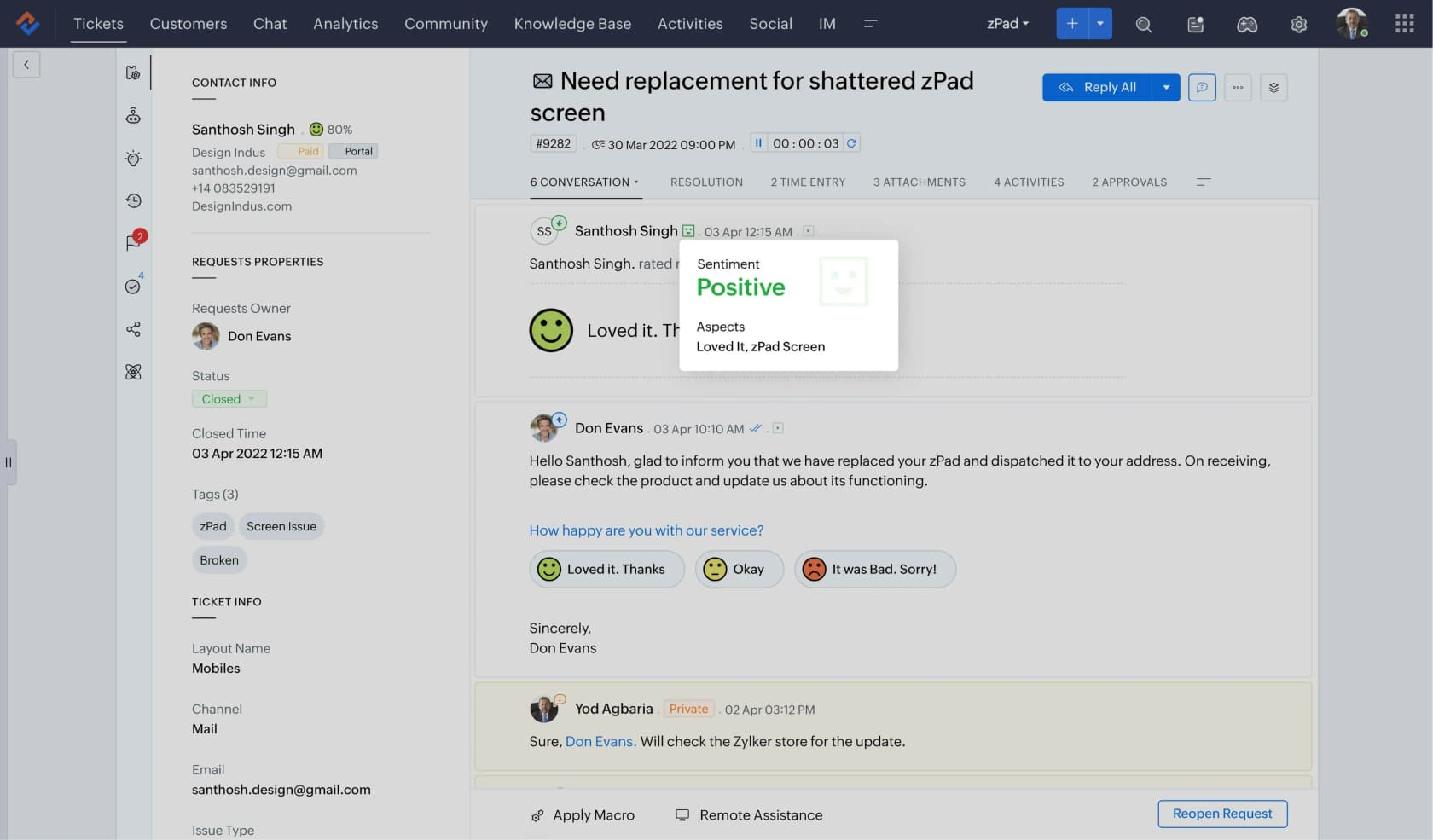
Zoho Desk is the honest outlier on price, and the only tool here that truly converts. Ticket to Article sits in the Zia menu inside a ticket: pick the conversations to include, click Generate Article, and a draft lands in the knowledge base with agent-only permissions to review and publish.
The limits are documented rather than discovered later, which I appreciate. Between one and ten conversations per article. No attachments. Single ticket only, no combining. It is department-specific too, so an article can only be generated in the department the ticket lives in. And no PII or issue-specific customer detail is sent to the model or included in the article.
Reporting holds up as well. The knowledge base dashboard splits search keywords into Popular and Failed, and failed here means the customer searched and no article came back. Per article, you get views split by agents, registered users, and anonymous users, plus a Used in Ticket count showing how often agents actually cited it.
Where it falls short: the free plan's article store is agent-only, so a public help center means Standard. Zia's language coverage runs narrower than the platform's, 15 languages against 52 locales, and auto-translated languages sit outside the outdated-flag system entirely. The portal has no browser-language detection.
Pricing: Standard at $14 a user a month, per Zoho Desk pricing, unlocks the public help center and the Answer bot. Full Zia is Professional at $23, and Zia Actions plus prebuilt Desk agents are Enterprise at $40. There is no per-resolution AI meter, which is unusual here; Zia is seat-gated, with a 30 million token monthly allowance on Zoho's own models.
My take: the best value on this list, full stop. It is the pick I would make for a team under twenty agents that wants the loop closed without a mid-tier jump. The catch: seat-gated AI gets expensive in the other direction once your headcount grows past the volume the meter would have charged you for.
4. Freshdesk: best cheap paid help center with article suggestions
Best for: teams who want agent-side article suggestions on a low seat price.
Freshdesk's strength is the read side. The Solution Article Suggester drops a Freddy Suggests card under the ticket description, with a confidence score per article, and from there the agent can insert the full text, insert a link, or open it in a new tab. Freshdesk states its own preconditions honestly: suggestions only work on new tickets from email or web, and Freddy performs best once the knowledge base holds at least 25 articles.
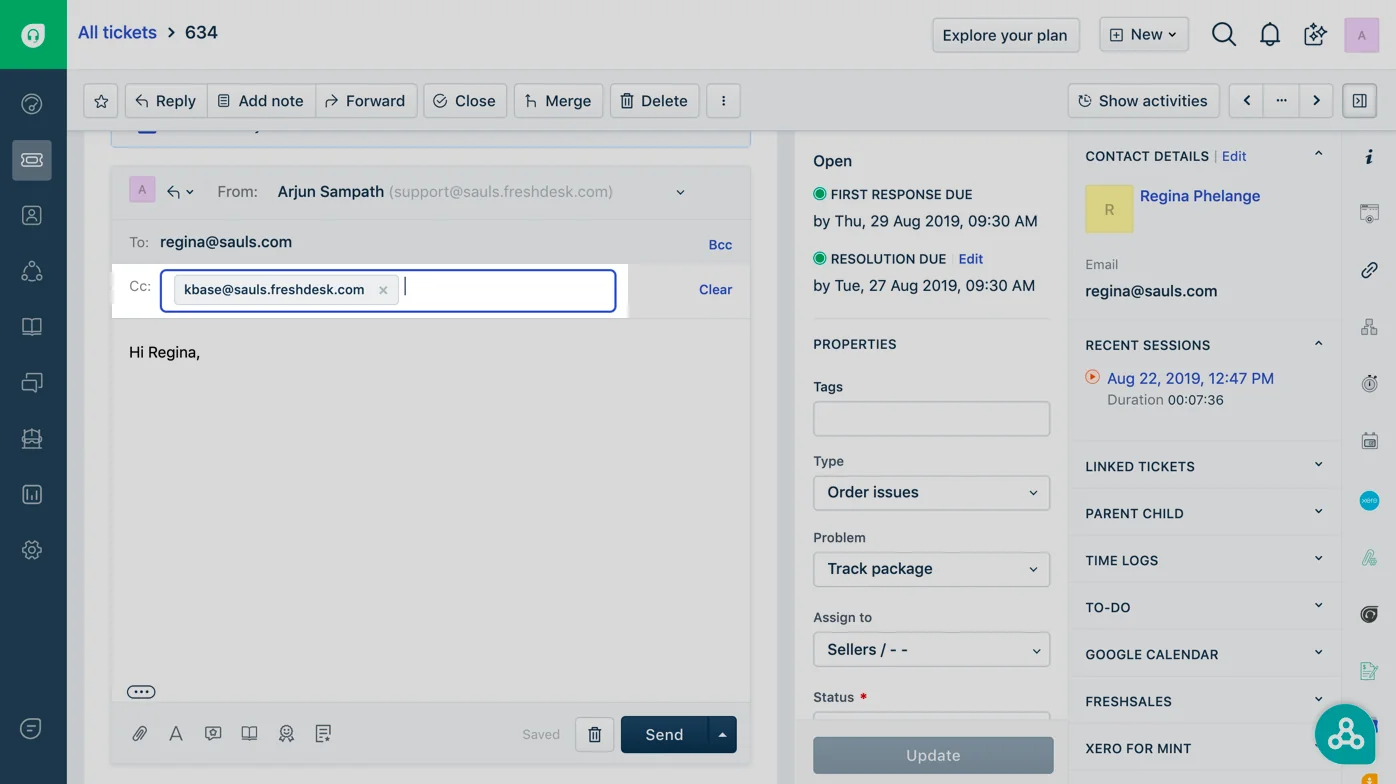
Capture is a BCC trick, and it works on every plan. Add kbase@yourcompany.freshdesk.com to the BCC field of a reply and a knowledge base draft appears under Drafts. Freshdesk is upfront about the output being unformatted, so you will want to tidy it later.
Where it falls short: the reporting gap is the real problem here. Freshdesk ships article views, votes, a Suggested count, and curated reports for most viewed and least viewed. What it does not ship anywhere is a search-terms or failed-search report, and its own docs send you to the Google Analytics app for what customers are looking for. Its own knowledge base page concedes limited user analytics for knowledge base sessions. Multilingual is a container rather than a service: 47 knowledge base languages, zero machine translation at any tier, and propagation handled by a manual "mark other translations as outdated" button.
Pricing: the free tier is gone, so the knowledge base starts at Growth $19 an agent billed annually, and multilingual articles need Pro at $55. Freddy AI Agent is $49 per 100 sessions, or $0.49 each, with the first 500 sessions included per account rather than per agent. The Solution Article Generator is a Freddy Copilot add-on on Pro and Enterprise only, sold through your account manager.
My take: good value when your buying criterion is agent-side suggestions. Poor value when it is knowing what your customers cannot find. Pairing it with a layer that reads the same articles is the common fix, which our Freshdesk automation guide walks through.
5. Help Scout: best content-gap reporting, and a real $0 start
Best for: small teams who want the gap report before they want the platform.
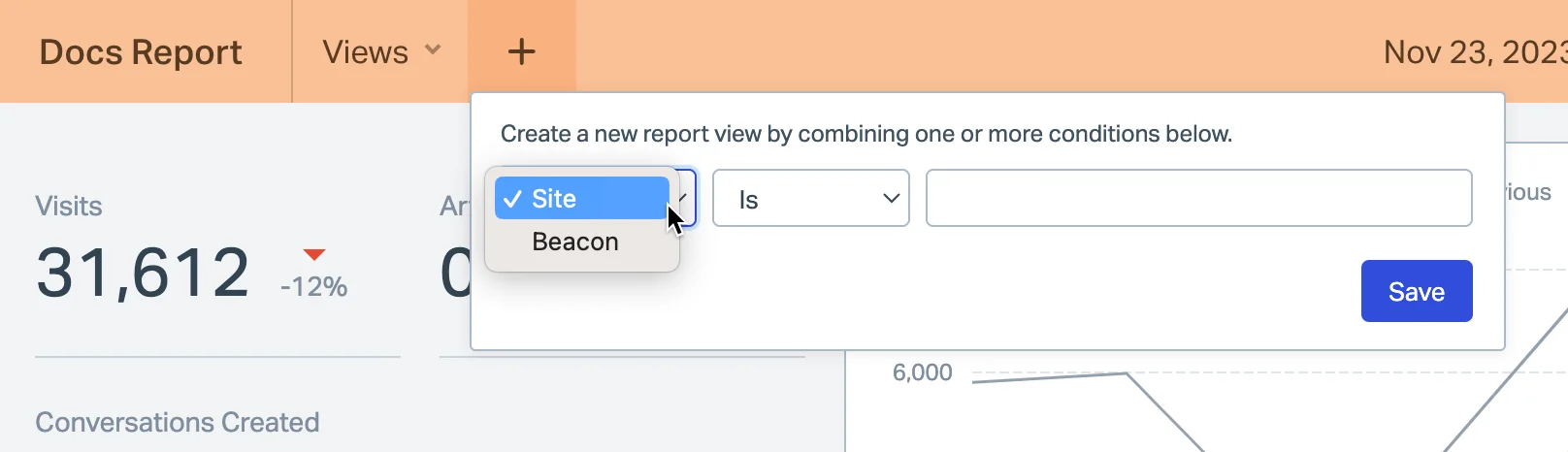
Help Scout's Docs report is the cleanest expression of the idea in this whole roundup. Failed searches gets a first-class table, not a widget you have to build yourself, and Help Scout markets it under exactly the right name: content gaps, showing what customers are looking for but cannot find. The report carries visits as well, plus articles viewed per visit, conversations created from Docs or the Beacon, and article ratings with published thresholds, where a happy face means 80% or more positive.
The remediation path is documented too. How to fix failed searches publishes the actual relevancy ranking, highest to lowest: exact keyword, exact title, partial title, keywords, body. Keywords sit at the top, and they are entered per article, so a failed search often turns into a two-minute keyword fix instead of a new article.
Where it falls short: two blind spots, both stated on the report page itself. Searches your agents run from the Docs bar inside the reply editor are not included, and API searches get excluded too, so the report describes customers only. There is no ticket-to-article path at all either: a reply can become a saved reply, never a Docs article. And AI Assist is an editing tool, six operations on text you highlight, rather than a generator.
Pricing: the free Docs plan is real and capped at 5 users, 1 site, and 10 articles, which is enough to validate that anyone reads your help center at all. Paid plans start at Standard $25 a user, with report history capped at 2 years on Standard and lifetime on Plus and Pro. AI Answers is $0.75 per resolution on all three paid plans, with no included allowance and a settable monthly spend cap.
My take: the tool I would hand a five-person team that has never measured self-service. Start free, watch the failed searches for a month, then let the data pick your next move. Our Help Scout AI breakdown covers where its automation stops.
6. HubSpot Service Hub: best if the knowledge base must sit on the CRM
Best for: teams already committed to HubSpot who want articles beside contact records.
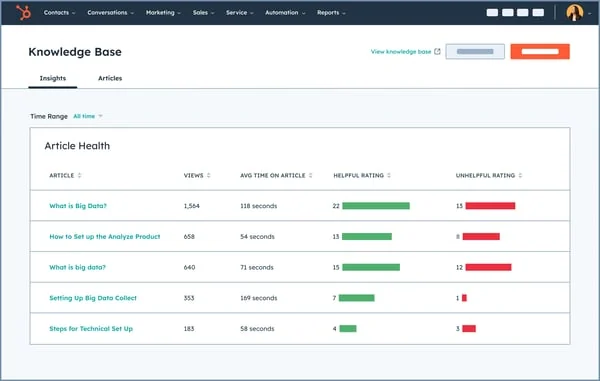
The real advantage here is context. Articles, tickets, and the contact record live in one object graph, so a support reply can carry order history and lifecycle stage without an integration. Knowledge Base Insights gives you a per-article health table with views, time on page, and helpful votes, which makes a decent maintenance surface.
Where it falls short: the price ladder, and the credit maths. On Free and Starter the knowledge base row is blank, so a public help center means Professional. Breeze's customer agent then bills at 50 credits per resolved conversation, which at HubSpot's published credit rate works out to $0.50. Professional includes 3,000 credits a month, so here is the arithmetic that matters: 3,000 credits is 60 AI resolutions a month, about two a day, shared across every Breeze action and every Hub you own, with no rollover. Run out, and the agent quietly stops taking new conversations across every channel until reset.
Pricing: Professional at $90 a seat a month committed annually, plus a required one-time $1,500 onboarding fee, which is $2,580 in year one for a single seat. Enterprise is $150 a seat with a $3,500 onboarding fee. Credits are $9.00 per 1,000 on annual terms.
My take: worth it only when the CRM tie is doing real work for you. On knowledge base merits alone it is hard to justify at four times Zendesk's entry point. If you are already on HubSpot, read our Service Hub deflection breakdown before you model the AI line, and our HubSpot AI knowledge base guide for the setup side.
7. Document360: best for governance and review cycles
Best for: teams whose actual problem is that nobody maintains the articles.
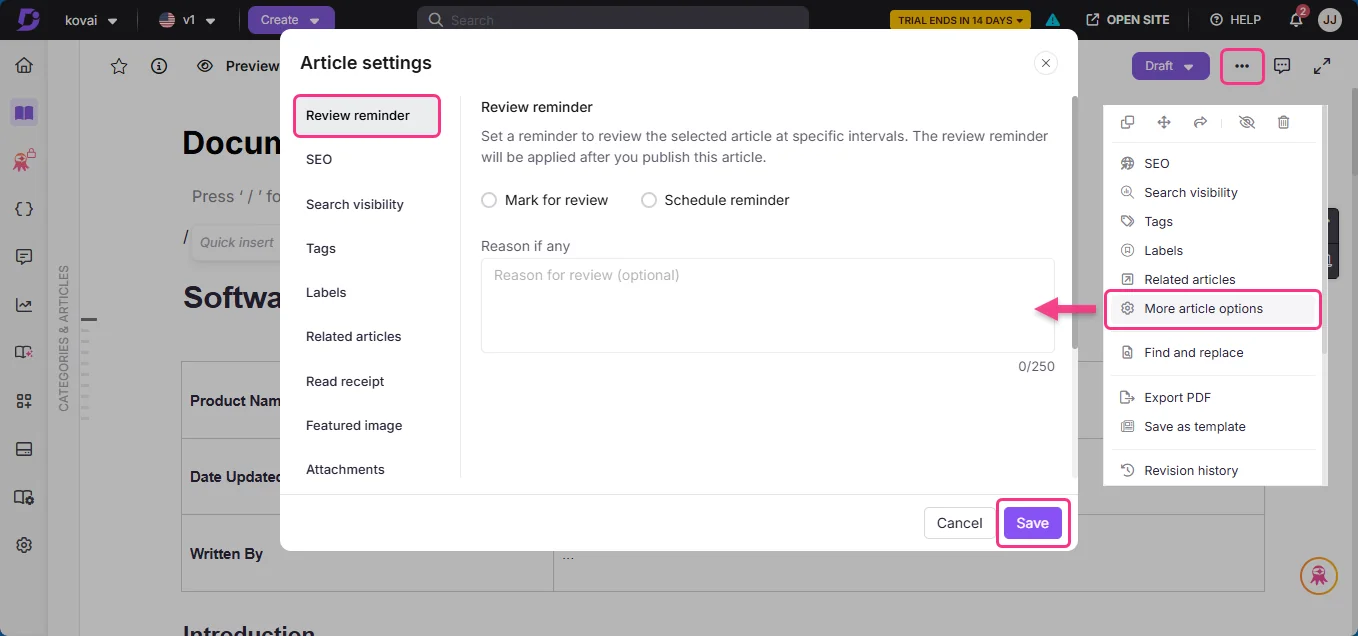
This is the only tool in the list that treats article decay as a product problem rather than a discipline problem. Review reminders, workflow states, version history, scheduled recurring reviews: all built in. That matters, because the most-supported finding in all the community research is that maintenance plans die on contact with real work:
"Weekly reviews are great in theory but rarely survive contact with real workloads."
Document360's Zendesk app is also the deepest help desk integration any standalone knowledge base ships: auto-search on the ticket title, up to five suggested articles, insert full content, Eddy-drafted replies, and create a draft article from the ticket. Localization covers 57 locales, 50 of them machine-translatable through Azure Translator behind Eddy AI. That is the widest coverage in this list, and one reason it keeps showing up in knowledge base management shortlists.
Where it falls short: pricing went fully quote-gated in 2026, so any per-seat figure in an older roundup is stale. The trial runs 14 days, and you cannot buy AI credits during it, which makes evaluating the AI half awkward. The AI unit is coarse: one Eddy credit per question asked, with top-ups by emailing support. A published-but-outdated translation is always served, too, with fallback only if a locale was never published.
Pricing: quote only, via a three-step lead form. There is no free plan and no published tier.
My take: the right answer once your library is large enough that decay, not coverage, is the failure mode. Choosing between it and a wiki-style tool? Our Confluence vs Guru vs Slite comparison covers the neighbouring category.
8. Helpjuice: best big multilingual library with no seat maths
Best for: large help centers where per-seat pricing has become the problem.
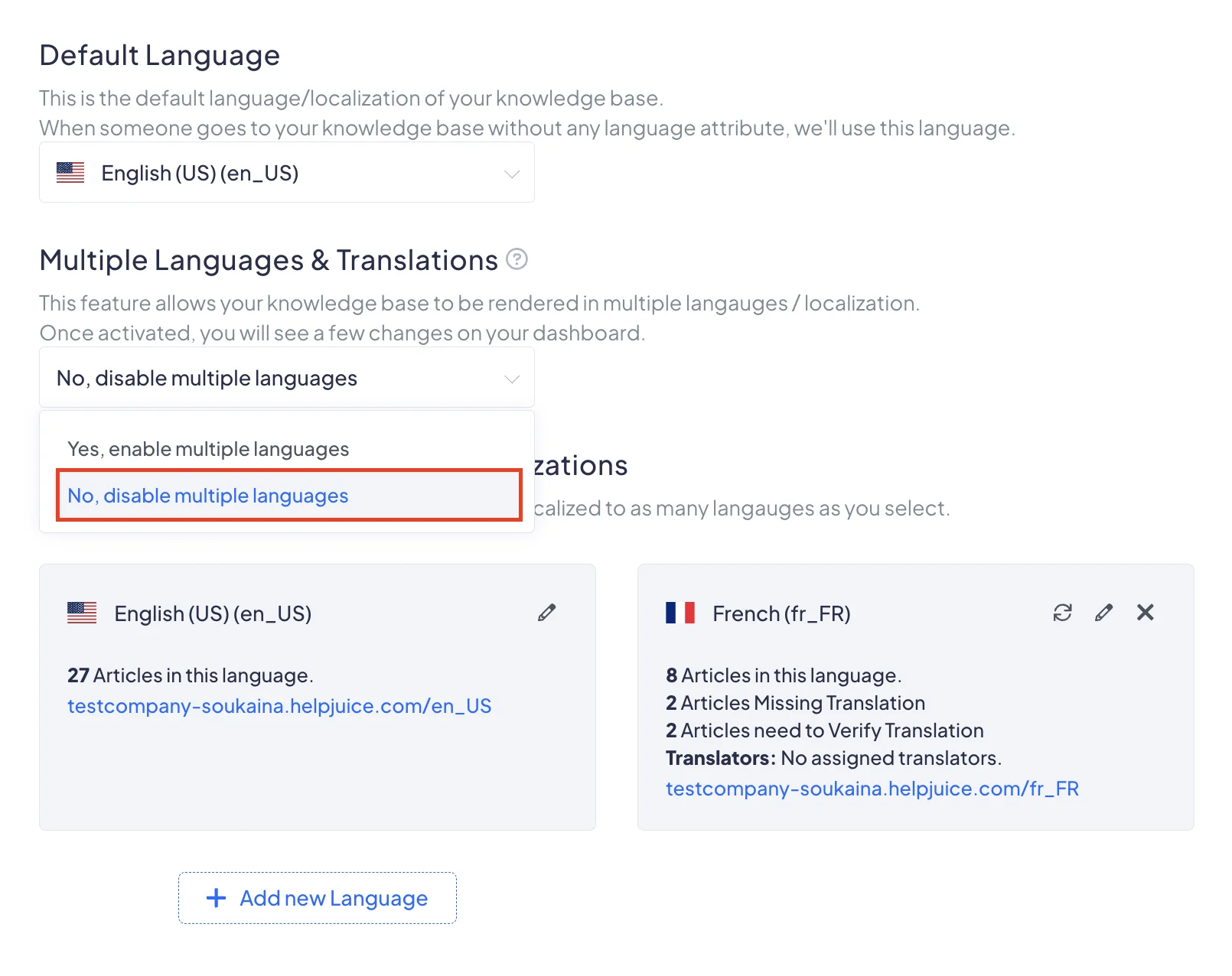
Helpjuice's pitch is simple, and for the right team it is correct: flat pricing, unlimited authors, localization on every plan from the entry tier up. If thirty people occasionally edit articles, the seat maths at Zendesk or HubSpot get silly fast, and a flat rate stops the bleeding.
Where it falls short: the floor is high, and the translation meter has teeth. Auto-translate bills at $0.00015 per character after 30 free translations, and a sync retranslates the whole article, overwriting human edits made to that locale. Theme and navigation strings need a customization request instead of a settings toggle. There is no meaningful ticket-side integration story here either, so agents end up leaving one tool to reach another.
Pricing: from $249 a month, which is $2,988 in year one, with AI features starting at $449 a month.
My take: the flat-rate escape hatch, not the default. Pick it when author count is your cost driver and the library really is large. Skip it under a few hundred articles, where the same money buys a lot of Zoho Desk seats.
9. Re:amaze: best ecommerce FAQ tied to a shared inbox
Best for: Shopify and BigCommerce stores that want the FAQ next to order context.
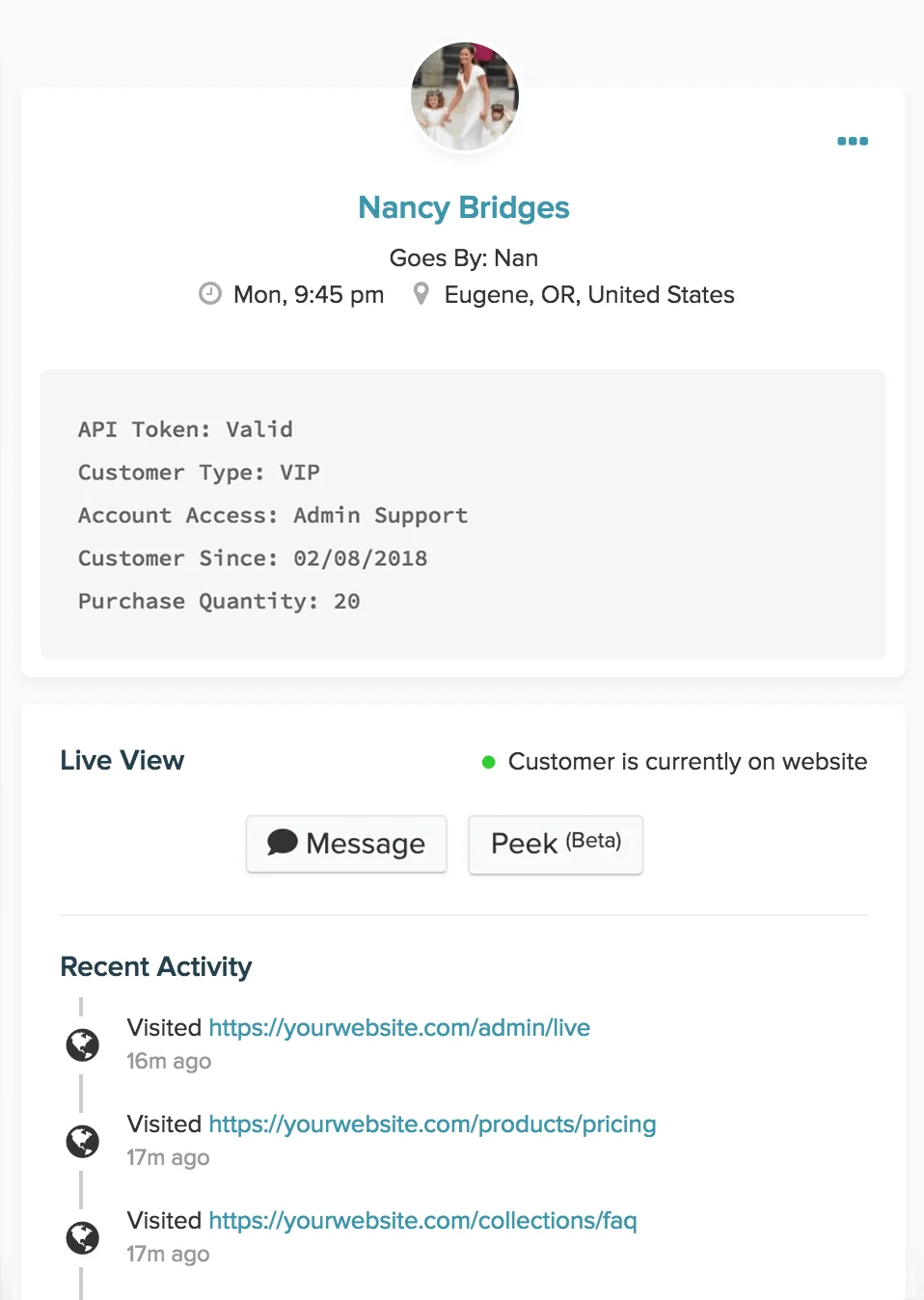
Re:amaze, now owned by GoDaddy, bundles a shared inbox, live chat, chatbots, an FAQ site, and status pages. Its centre of gravity is ecommerce. The FAQ product is competent rather than remarkable, and its real value is proximity: an agent answering a where-is-my-order question has the order data and the article in the same window.
Where it falls short: no failed-search report exists anywhere in the product, so content-gap tracking means dropping your own Google Analytics snippet into the FAQ site. Article translation does not exist either, only interface localization and message translation, which makes multilingual a matter of one brand per language, and therefore Pro rather than Basic. The AI allowance is small enough to be a rounding error at real volume: 5, 10, and 20 included resolutions per user per month across Basic, Pro, and Plus, then $0.85 each, the highest published unit rate in this roundup. Article edit history is Plus-only.
Pricing: Basic $29 a member, Pro $49, Plus $69, with 10% off annually, plus a flat $59 a month Starter plan with unlimited seats capped at 500 responded conversations. The AI Agent is flagged beta.
My take: a reasonable all-in-one for a store under a hundred tickets a day, and a costly one above that. If you are weighing it against the obvious ecommerce alternative, our Gorgias alternatives roundup covers the same shortlist from the other direction.
10. HelpCrunch: best failed-search reporting on a small budget
Best for: early-stage teams who want a branded help center, a chat widget, and a real gap report.
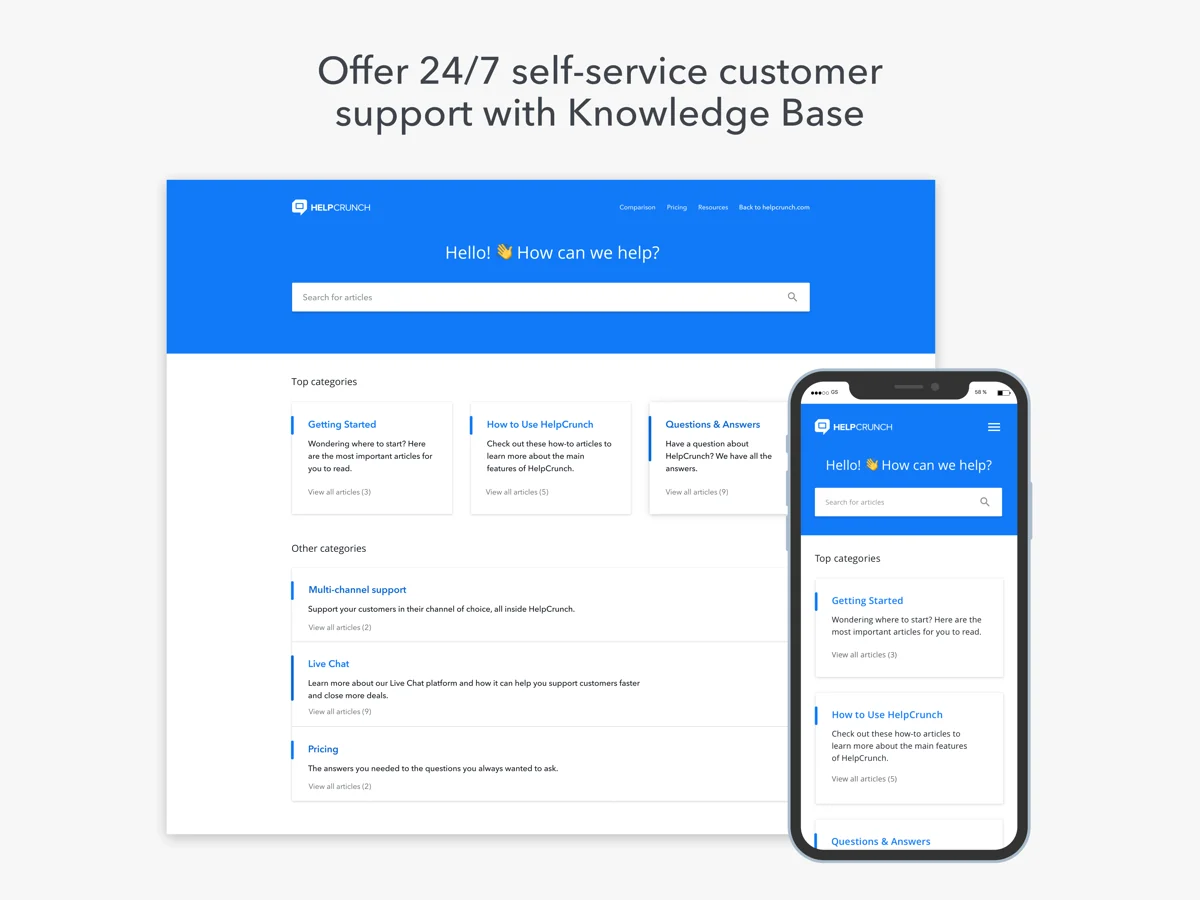
HelpCrunch surprised me. The public knowledge base sits on the entry Basic plan rather than a mid-tier, and it ships an actual Failed Searches report under Reports, listing each query and how many times it came back empty. That puts a small chat-first tool in the same three-name group as Zendesk and Help Scout on the criterion I care most about, at a fraction of the price. Its chatbot also surfaces contextual articles inside the widget, the pattern that works on a small site: answer in the chat, link the article, escalate if it misses.
Where it falls short: the pricing model is two-dimensional, scaling on both seats and monthly email volume through on-page sliders. The headline number therefore tells you very little about your real bill, and the figures are rendered client-side rather than published in the page. Multilingual needs Pro, because Basic is single-language. There is no ticket-to-article path, and every plan gets one knowledge base per account, so multi-brand help centers are out.
Pricing: three plans, Basic, Pro, and Unlimited, with 20% off annual billing. The AI layer is billed per AI conversation, with 50 included on Pro and 100 on Unlimited, and extensions running from $29 per 100 conversations down to $0.08 each at very high volume. Watch the second meter: knowledge base articles count as AI data sources, 200 included on Pro, so a library past 200 articles hits a limit before a single AI conversation is billed.
My take: the best value on the gap-reporting criterion, and the pick I would give a startup that needs chat and a help center on one bill. You will outgrow it once the slider maths get unpleasant, or when a second brand shows up. Our HelpCrunch knowledge base guide goes deeper on setup.
Six meters, one question
This is where the comparison gets truly confusing, and where I would spend the most modelling time before signing anything. Every tool here bills for the AI layer that reads your articles, and no two of them use the same unit.
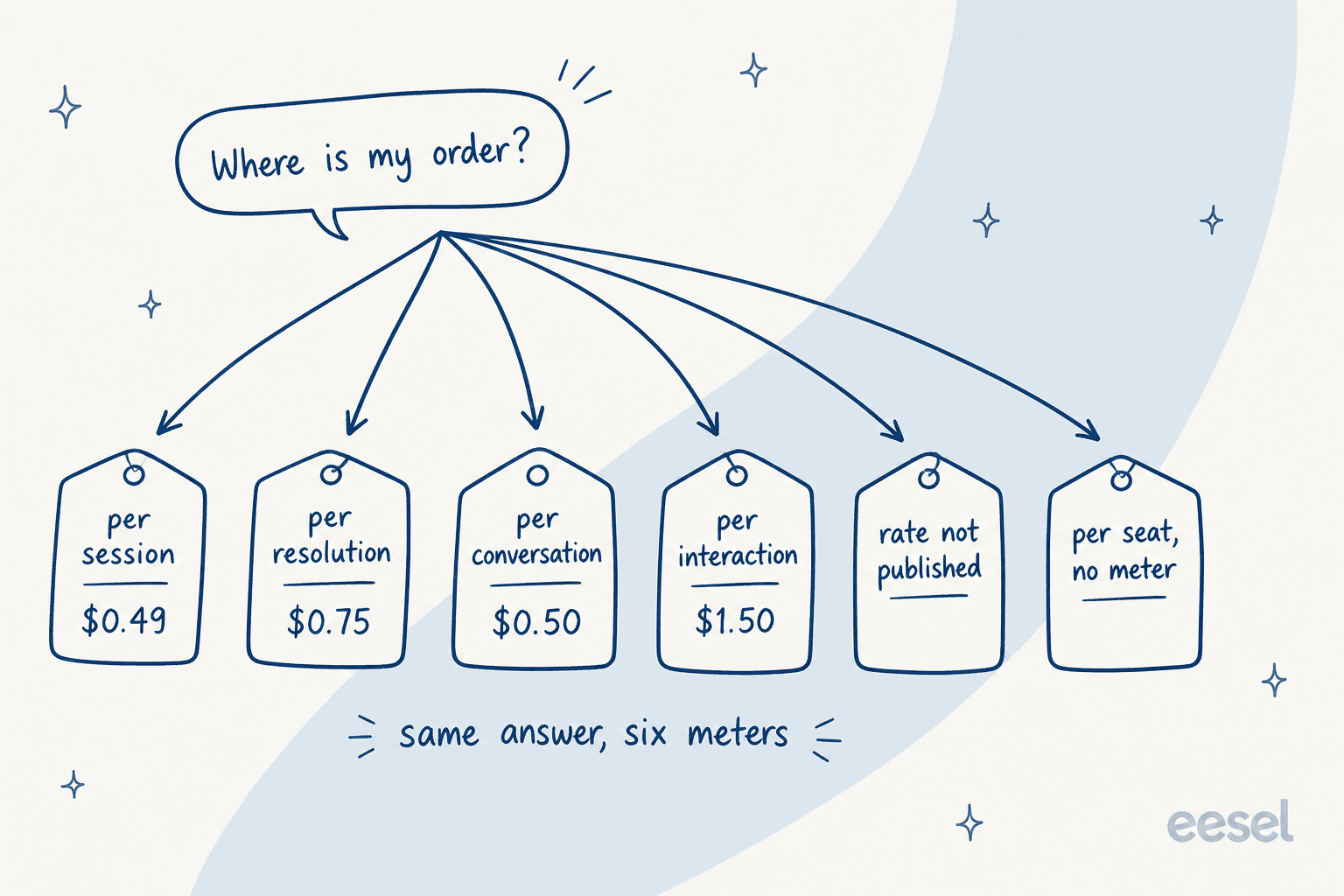
| Vendor | AI unit | Published rate | Included allowance |
|---|---|---|---|
| Freshdesk | Session | $0.49 ($49 per 100) | 500 per account, all tiers |
| Help Scout | Resolution | $0.75 | None, spend cap available |
| HubSpot | 50 credits per resolution | $0.50 | 500 / 3,000 / 5,000 credits, no rollover |
| Re:amaze | Resolution | $0.85 | 5 / 10 / 20 per user |
| Zendesk | Automated resolution | Not published | 5 / 10 / 15 per agent, 10k a year cap |
| Zoho Desk | None, seat-gated | n/a | 30M tokens a month |
| HelpCrunch | AI conversation | $0.29 down to $0.08 | 50 on Pro, 100 on Unlimited |
| eesel | Ticket or chat (1 credit) | From $299/mo for 500 credits | 100 free credits |
For a sense of how wide the spread gets outside this list: Gorgias publishes $0.85 to $1.00 per automated interaction, about twice Freshdesk's session rate for what a customer would describe as the same event.
Two things stand out. Zendesk publishes the unit, the per-agent allowance, and the annual cap, but never the price, which makes a like-for-like model impossible without a sales call; a figure circulating in the comment thread on Zendesk's own doc is customer commentary, not a rate. HubSpot's credit pool is the other one, the most often misread, because 3,000 credits sounds generous until you divide by 50.
A resolution is also not a resolution. HubSpot counts one when the agent replied citing a source and no human took over within 72 hours; the status freezes at that point, so an unhappy conversation still bills, and a reopened email thread can bill again. Read each vendor's definition before you compare rates, otherwise you are comparing prices on different products. Our AI resolution rate guide unpacks how these definitions differ.
Where this actually goes wrong
Three failure modes show up over and over. A nicer editor fixes none of them.
The articles are written for the wrong reader. Common, and almost invisible from the inside. On one call, a support manager described a knowledge base written entirely for administrators while the tickets all came from end users, which produced confusing answers no matter which tool was doing the answering. The content managed to be accurate and useless at once. Failed-search reports catch this faster than a content audit does, because the vocabulary mismatch shows up directly in what people typed. It is the cheapest thing to fix in a customer support portal too, since the articles already exist.
Nobody owns maintenance, so the top results rot. The strongest thread in the community research stays remarkably consistent on this:
"This. Top searches on my Fortune 50 company wiki reference docs that are at least five years old and completely irrelevant."
Note which articles rot: the ones people actually reach. That points to scheduled review on high-traffic articles specifically, rather than a full audit you will never finish.
AI amplifies whatever the articles already say. Most roundups skip this point, and it is the one that decides whether your AI project works:
"depends entirely on what you're measuring. if you measure 'did we deflect tickets' then sure, most AI CS tools look great in the first month. but if you measure 'did the customer actually get their problem solved' the numbers look very different. the AI solutions that work are the ones with access to real customer context."
A practitioner in the Zendesk subreddit described the mechanism precisely: their bot claimed product B had an attribute it did not, because only product A's doc mentioned the attribute, and nothing stated the negative case. Contradictions and omissions a human reader glides past turn into confident wrong answers. That is the single biggest predictor of whether an AI knowledge base chatbot works for you. Our guide to AI hallucinations in support covers the prevention side.
What I would actually do
Starting from nothing with price as the constraint, Zoho Desk at $14 a user is the pick. It is the only mainstream help desk that gives you a public help center, failed-keyword reporting, and real ticket-to-article conversion on its entry paid plan. Help Scout's free Docs plan is the zero-dollar way to test whether anyone reads your articles at all before you commit, and our free knowledge base options cover the rest of that tier.
If you already run a help desk and the articles exist, resist the migration. The plan jump that unlocks better knowledge features usually costs more than the AI layer that would fix retrieval across what you have now, and migrations lose formatting, redirects, search history. Measure failed searches for a month first. That report tells you whether your problem is coverage or retrieval, and those two need different purchases.
And whatever you buy, set the target somewhere the benchmark supports. A team going from no self-service to 20% completion has beaten the industry average twice over. A team told to hit 80% will declare a good project a failure. Our ticket deflection guide covers how to set that number honestly, and self-service solutions covers the channels around it.
Try eesel on the help center you already have
If your articles are decent and the answers still come out wrong, that is a retrieval problem, and moving platforms will not fix it. eesel connects to Zendesk, Freshdesk, Zoho Desk, Help Scout, and a hundred other tools, reads your published articles alongside your resolved tickets, and answers or drafts inside the help desk your team already lives in.
The part that matters for this list: it shows you the topics it could not answer, then drafts articles into those gaps. Simulation replays your historical tickets before anything reaches a customer, so you see coverage by theme first instead of finding out from a bad review. From $299 a month for 500 credits with no seat fees, and the free plan has 100 credits without a card.
Try eesel or book a demo if you want someone to run the simulation against your own ticket history.