


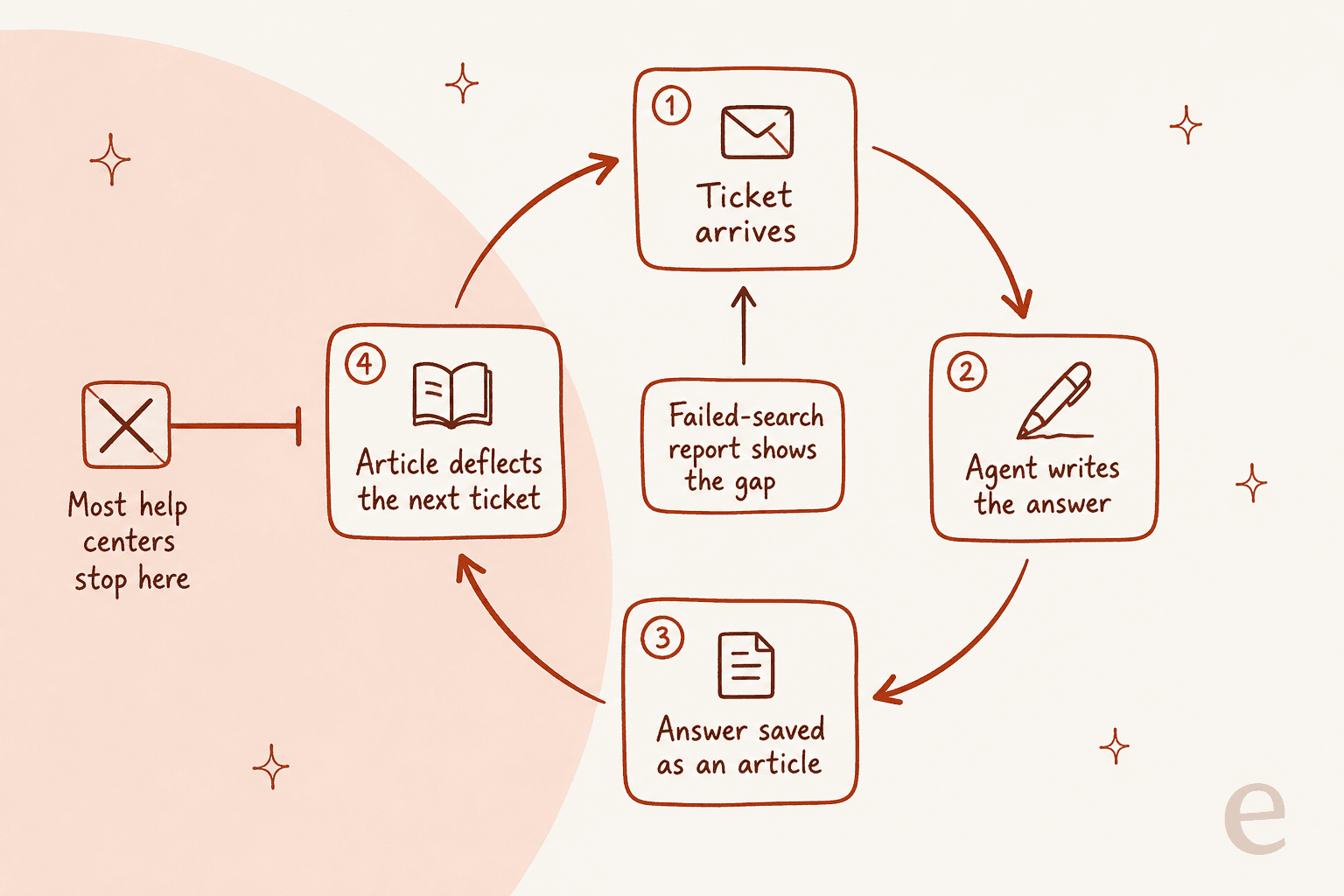
Every help desk will sell you a knowledge base. Almost none of them sell you the loop that keeps it alive, which is the part that actually decides this. The editor is not the variable. The variable is whether a ticket can become an article, and whether the tool tells you which article to write next.
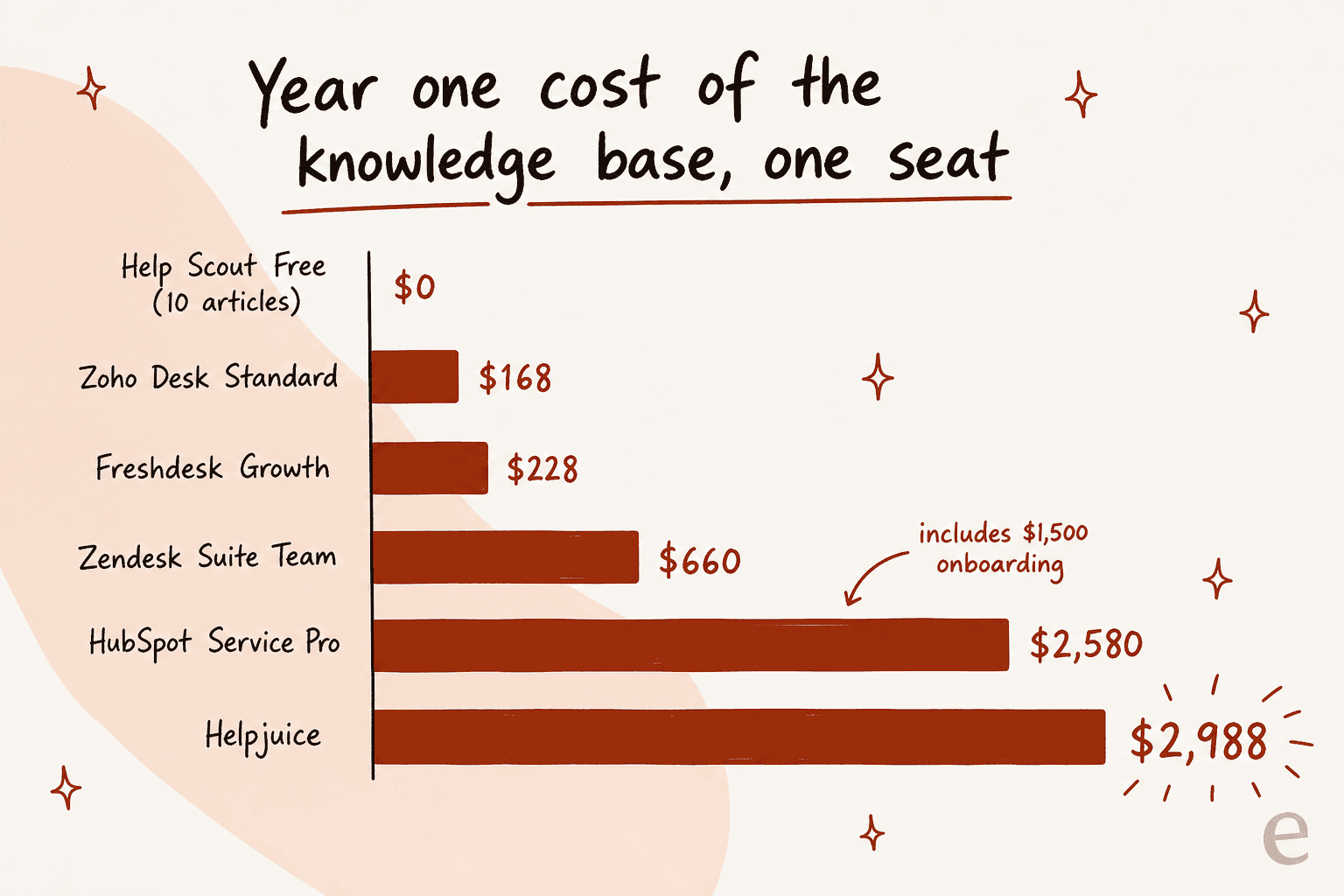
On price, the pattern is boring and consistent: the knowledge base sits one plan above whatever you were first quoted. Zoho Desk gives you a public help center plus a KB-reading Answer bot at $14 a user, Freshdesk at $19, Help Scout at $25, and Zendesk at $55, which is nearly three times the $19 headline. HubSpot's knowledge base is $90 a seat plus a required $1,500 onboarding, so year one is $2,580 for one person.
Then there is a third bill. The AI that reads the knowledge base is metered separately almost everywhere, and no two vendors use the same unit: Freshdesk bills sessions, Help Scout resolutions, HubSpot credits, Gorgias interactions, Crisp dollars of credit, Zendesk automated resolutions with the rate unpublished.
I have spent the last three years putting AI agents onto live support queues at eesel. The failure I see most often is not a bad model. It is a bot answering from a help center nobody had touched in a year. If your articles are already decent, the cheaper move is usually to keep the help center you have and put a better reader on it, from $299 a month for 500 credits with no seat fees.
How I compared these
I pulled every price and feature claim from the vendor's own pricing page, help center, or product catalog on 30 and 31 July 2026, then checked the four things that actually change your week:
- Where the knowledge base starts. Which plan, and what that costs in year one for one seat.
- Ticket to article. Can an agent turn the thing they just wrote into an article without leaving the ticket, and does the ticket's text come with it?
- Failed-search reporting. Does the tool show you the terms customers searched and got nothing for?
- The AI meter. What unit the AI is billed in, and whether the rate is published at all.
I left internal wikis out of scope, since internal knowledge base tools are a different purchase, and stuck to help centers customers can read. Community quotes come from Reddit, G2 and Hacker News threads I read in full. Where a commenter works for a vendor, I say so.
The 10 tools at a glance
| Tool | Best for | KB starts at | Free KB? | Ticket to article | Failed searches | AI unit and published rate | Year one, 1 seat |
|---|---|---|---|---|---|---|---|
| eesel | Answering from the help center you already have | No seat fee | No, it hosts nothing | Drafts articles for uncovered topics | Gap analysis in simulation | Credit (1 per ticket or chat), 500 for $299 a month | From $3,588 |
| Zendesk | Deep reporting inside the agent workspace | Suite Team $55/agent | No | Launcher only, text not carried | Yes, Explore | Automated resolution, not published | $660 |
| Freshdesk | The cheapest paid help center with article suggestions | Growth $19/agent | No | BCC kbase@ for a rough draft | No | Session, $49 per 100 | $228 |
| Zoho Desk | Real one-click ticket to article | Standard $14/user | Agent-only on Free | Yes, Zia converts the thread | Yes, failed keywords | None published | $168 |
| Help Scout | Content-gap reporting and a $0 starter site | Free, 10 articles | Yes, 10 articles | No path | Yes, dedicated table | Resolution, $0.75 | $0 to $300 |
| HubSpot | Teams whose KB must sit on the CRM | Professional $90/seat | No | No native converter | Article health, not searches | Credit, $0.50 per resolution | $2,580 |
| Gorgias | Shopify stores | Every plan, from $40/mo | No free plan | Article recommendations from tickets | Enterprise only | Interaction, $0.85-$1.00 | $480 |
| Crisp | Small teams that hate per-seat pricing | Essentials $95/mo flat | No | No | No | Credits, $25 ≈ 450 chats | $1,140 |
| Document360 | Governance and review cycles | Quote only | Trial only | No | In Eddy analytics | Bundled in the AI suite | Not published |
| Helpjuice | Big multilingual help centers, no seat maths | $249/mo flat | No | No | In analytics | Bundled from $449 | $2,988 |
Prices are annual-billing list rates checked on 30 and 31 July 2026. Year one is one seat where billing is per seat, and the flat fee where it is not.
The three bills hiding behind one knowledge base
Buyers price a help desk knowledge base as one line. It is almost always three lines. There are the seats, then the tier that unlocks the help center, and then the meter running on the AI that reads it. Plug your own numbers in below.
Two numbers in there surprise people. HubSpot's 3,000 included credits sound generous until you divide by the 50 credits per resolution, which is 60 AI answers a month. And Zendesk is the only vendor here that tells you the unit, the per-agent allowance and the annual cap while declining to publish the rate.
1. eesel: best for answering from the help center you already have
Best for: teams whose articles are fine and whose answers are not.

eesel is not a help center product, and that is the point of putting it first. It connects to the help desk and the docs you already run, learns from past tickets as well as published articles, and answers or drafts from there. Setup is measured in minutes rather than a migration, across 100+ integrations and 80+ languages.
The part that matters for this list is the loop. eesel finds the topics your help center does not cover and drafts articles to fill them, so the gap analysis and the writing land in the same place. Before anything goes live, simulation replays your historical tickets so you can see coverage by theme and fix the misses first. That habit exists because of a scar: I have watched paying customers, including a Danish solar-energy provider, whose bot invented answers and sent them to real customers when the knowledge base had no match. Confidence-based routing and a hard decline-to-answer fallback came straight out of that.
Where it falls short: if you do not have a help center yet, eesel will not host one for you. You still need somewhere for articles to live, and a Zendesk or Zoho Desk or Help Scout underneath. It is also the wrong tool if you want a human-authored content workflow with approvals and staged reviews.
Pricing: one fixed monthly price on the Teammate plan, with 1 credit per ticket or chat however long it runs and no seat fees or platform fee. The free plan is 100 credits with no card. Paid batches are 500 credits for $299 a month, 1,000 for $499, 2,500 for $999 and 5,000 for $1,899. Paying a year upfront gets two months free. SSO and MFA are an add-on from $199 a month.
My take: pick this when the constraint is answer quality rather than article hosting. Gridwise resolved 73% of tier-1 requests in the first month after a seven-day trial, and none of that required moving the help center. If you are still deciding what to run underneath, my help desk system guide covers that half.
2. Zendesk: best when the help center has to live inside the ticket
Best for: support orgs that need knowledge reporting as serious as their ticket reporting.

Nobody has put more knowledge tooling into the agent's actual screen. The Knowledge panel sits in the ticket, agents search it, link or quote articles into the reply, request an article from whoever owns that area, and flag a specific paragraph as wrong. Flagging spawns a ticket that carries a link to the article, a link to the source ticket and the inline comments, and on Enterprise plans it auto-assigns to the owner. That is the only true article-ownership workflow in this roundup.
Reporting is the other reason to pick it. Explore's Knowledge dashboard has a whole Search tab, and its most useful widget is the least glamorous one.
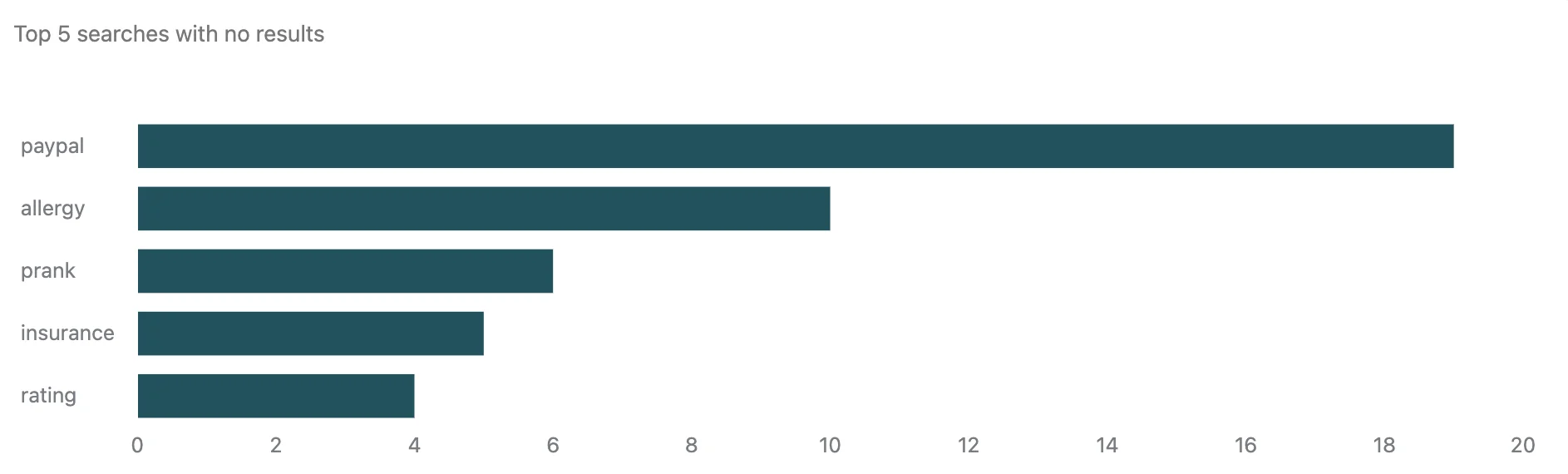
A Zendesk moderator put the practical use of that report better than any vendor page does, and it is the same habit behind training AI on a KB:
one root cause for us is the lack of author/owner engagement. adoption and compliance with review and verification schedules is to use the KB analytics to show searches - both hits and misses. misses might be compelling to introduce new article since it shows a customer pain point that becomes a support ticket.

Where it falls short: three things. Creating an article from a ticket does not carry the ticket over, and Zendesk says so plainly: "Information from the ticket is not automatically populated in the article." You copy and paste. Second, in-ticket article creation needs Suite Growth or higher, so the $55 plan that finally gives you a knowledge base does not give you the capture loop. Third, as a writing environment it is thin. A technical writer maintaining 2,000+ articles in Guide summed it up:
I have lots of experience with Zendesk Guide and yes it's true, it's very clunky if you're using it as a writing/content management system. It was designed to allow support agents to quickly create knowledge base articles. That's the beauty of Zendesk, the help articles integrate with the ticketing system, so if your company's support team uses ZD, that might be something you should deeply consider before bailing on it.
Pricing: the cheapest Zendesk plan is Support Team at $19 an agent a month, and it has no knowledge base. Knowledge Base appears on Suite Team at $55, so $660 a year for one agent. AI agents ship on every Suite plan with an allowance of 5 automated resolutions per agent a month on Team, 10 on Professional, 15 on Enterprise, capped at 10,000 a year per account, with the overage rate unpublished.
My take: worth the $55 if your agents will use the Knowledge panel every day, because that is where Zendesk earns its money back. If you only wanted a public help center, you are paying a ticketing premium for it. My Zendesk knowledge base walkthrough and the notes on article view analytics go deeper, and Zendesk AI alternatives covers the exits.
3. Freshdesk: best cheap paid help center with article suggestions
Best for: small teams that want a customer portal and article suggestions without a $55 seat.
Freshdesk puts the customer portal and knowledge base on its cheapest paid plan, which is the friendliest gate of any mainstream help desk. Agents get Freddy's article suggestions inside the ticket, each with a confidence score, and can insert either the full article text or a link.
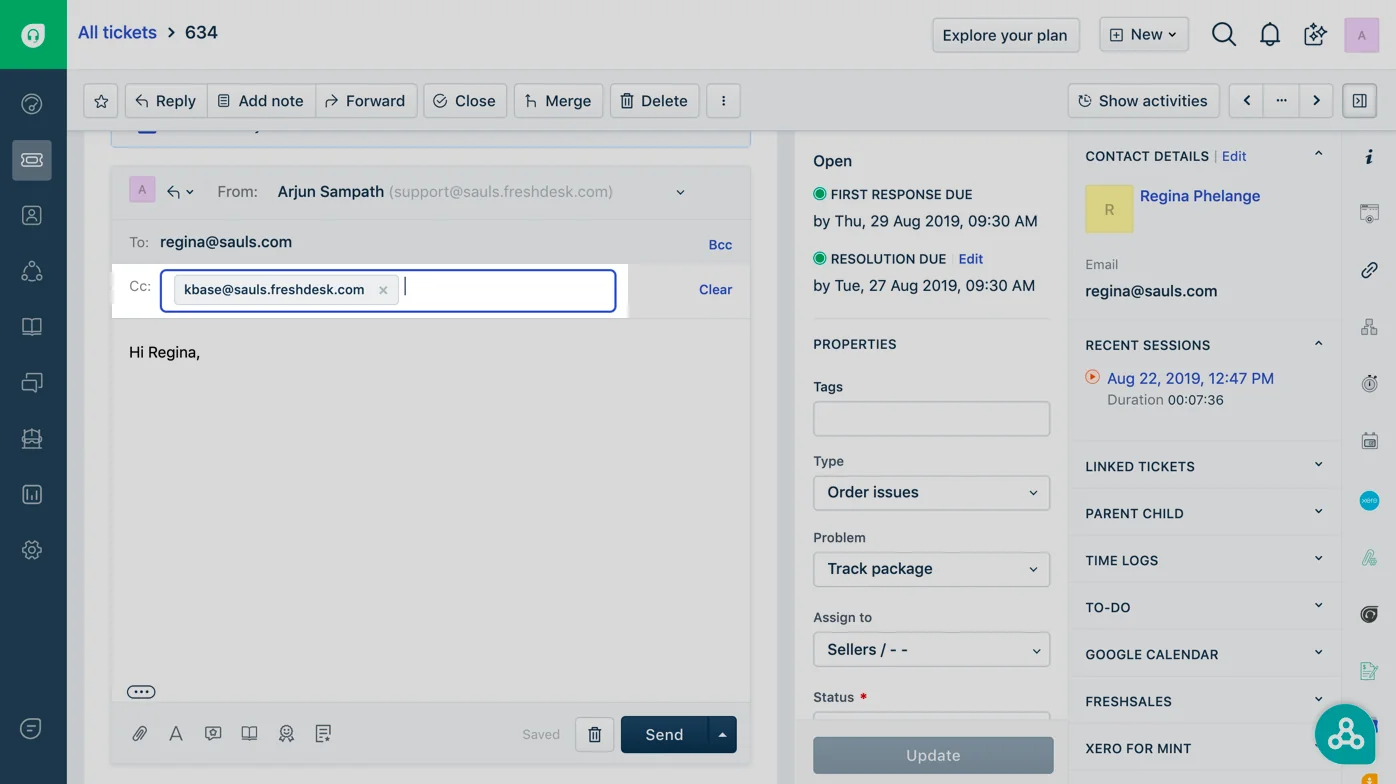
The ticket-to-article path is the oddest design in this roundup and I have a soft spot for it: you add kbase@yourcompany.freshdesk.com to the reply, hit send, and a knowledge base draft appears in Drafts. It works on every plan, and Freshdesk is honest that what lands is rough: "When you have sufficient time, you can take a look at these drafts and turn them into properly-formatted Knowledge Base articles."
Where it falls short: two real gaps. The Solution Article Generator, the thing that actually writes articles for you, is a Freddy AI Copilot add-on on Pro and Enterprise only, sold through an account manager. And there is no failed-search report anywhere in Freshdesk's knowledge base analytics. Its own docs point you at the Google Analytics app to find out what customers searched for, which means the single best signal for what to write next lives outside the tool. Article suggestions also only fire on tickets from email and web, and Freddy needs at least 25 articles to be much use, which is a real floor if you are still building out the FAQ bot side of things. A G2 reviewer flagged the wider pattern:
The design is maybe not the best, like add-ons feature requires expensive plans. The software can feel expensive and slow when handling large ticket volumes.

Pricing: Growth $19 an agent a month billed annually, Pro $55, Enterprise $89, with no free plan left in 2026. Freddy AI Agent includes 500 sessions once per account, then $49 per 100. Copilot is a further $29 an agent.
My take: the best value on this list if you accept the reporting ceiling, and the wrong pick if you plan to run the help center on data. Pair it with Freshdesk article recommendations, and see Freshdesk Pro pricing before you assume Growth is enough.
4. Zoho Desk: best real ticket-to-article conversion
Best for: teams who want the answer they just wrote to become an article in one action.
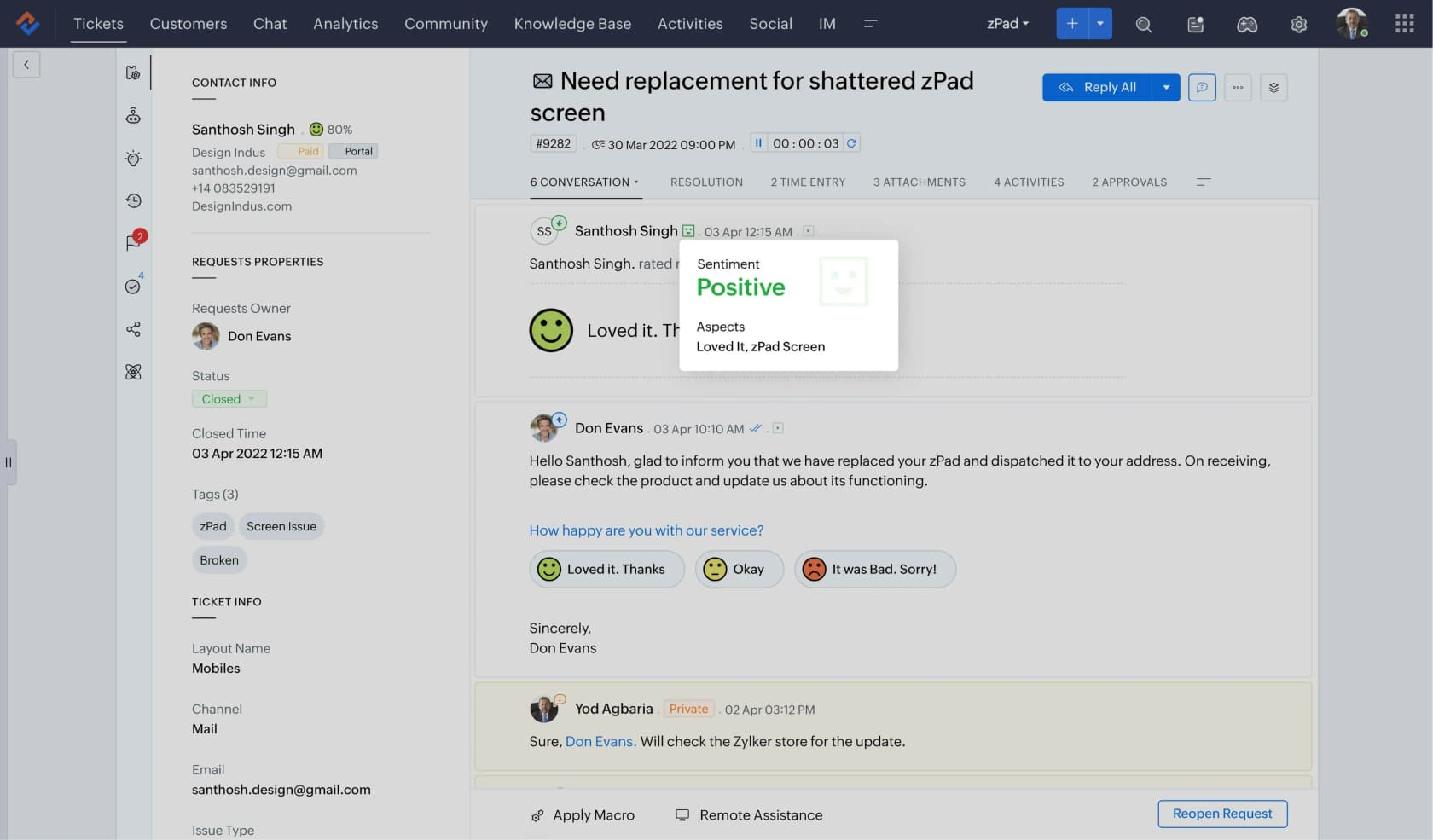
Zoho Desk is the only tool here that converts the conversation itself. Open the ticket, click Zia then Ticket to Article, pick between one and ten threads or comments, and a draft article lands in the knowledge base with agent-only permissions for review. No PII goes to the model and none ends up in the article.
The analytics are quietly strong too. Every article shows views split by agents, registered users and anonymous readers, plus a Used in Ticket count so you can see which articles agents actually lean on. The knowledge base dashboard splits search terms into popular and failed keywords, so the "what do I write next" question has an answer in the product.
Where it falls short: the conversion has real edges. One ticket only, one department only, no attachments, and you cannot append a later conversation to an article you already generated, you regenerate it. The free plan's article store is agent-only, so a public help center starts at Standard. And the AI story is tiered rather than metered: the KB-grounded Answer bot is on Standard, full Zia is Professional at $23, Zia Actions and the prebuilt Desk agents are Enterprise at $40, and bot chat inside the ASAP widget is Enterprise-only even though the widget starts at Standard.
Pricing: Express $7, Standard $14, Professional $23, Enterprise $40 per user a month billed annually. Standard is where the public knowledge base and the Answer bot live, so $168 a year for one user, the cheapest real help center on this list.
My take: if your team writes articles from tickets and nobody has time to reformat drafts, this is the pick, and it costs less than a third of Zendesk. Read training Zia on your knowledge base and the Zoho Desk Zia Answer Bot notes for what the bot can and cannot do, plus the best AI for Zoho Desk if you want more than Zia.
5. Help Scout: best content-gap reporting, and a real $0 starter
Best for: small teams who want to see what customers could not find.
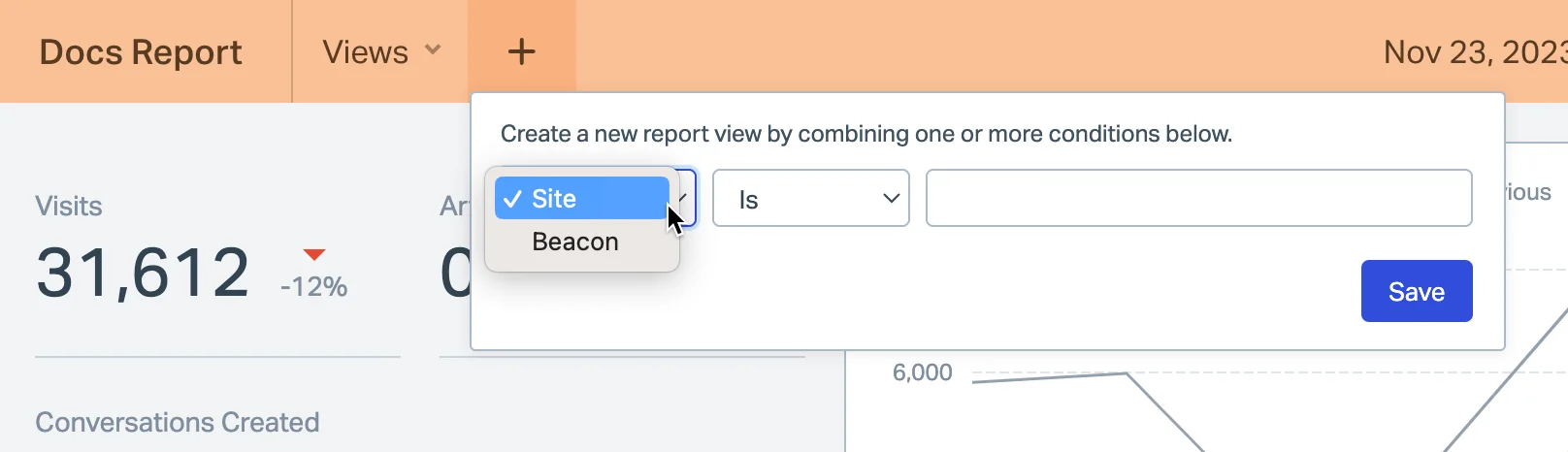
Docs is the friendliest editor in this group and the free plan actually publishes: 5 users, 1 Docs site, 10 articles. The reason to take Help Scout seriously, though, is its Docs report, which treats content gaps as a first-class metric rather than a buried widget. Failed searches sit in their own table next to visits, articles viewed per visit and conversations created.
Help Scout also publishes its search relevancy order, which almost nobody does: exact keyword, exact title, partial title, keywords, then body. Knowing keywords outrank body text changes how you fix a failed search in about thirty seconds.
Where it falls short: there is no ticket-to-article path at all. The reply editor inserts a Docs link, and you can save a reply as a saved reply, but never as an article. AI Assist only edits text you have already highlighted, six operations, nothing that drafts from a ticket. The Docs report has two blind spots Help Scout states outright: searches your agents run from the reply editor are excluded, and API-served views only count if you call the update-view endpoint. The 10-article free cap is a starter FAQ, not a help center, and it will not carry an email help desk for long.
Pricing: Free ($0, 10 articles, 100 contacts a month), Standard $25 a user a month with unlimited articles and 2 Docs sites, Plus $45, Pro $75. Extra Docs sites are $20 a month annually. AI Answers is a separate $0.75 per resolution with a three-month unlimited trial and a spend cap.
My take: the best reporting-to-effort ratio here, and the only vendor whose free tier gives a real live help center. If your content is thin, that $0.75 per resolution is money spent amplifying thin content, so fix the failed searches first. More in Help Scout's AI approach and the best AI for Help Scout.
6. HubSpot Service Hub: best if the knowledge base must sit on the CRM
Best for: companies already running HubSpot who want articles tied to contact records.
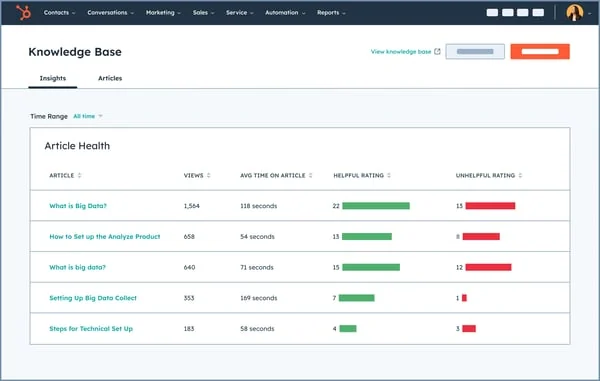
The Article Health table is the nicest article-level view in this roundup: views, average time on article, and helpful against unhelpful ratings side by side, so a badly-rated article that everyone reads is impossible to miss. Everything is joined to the CRM, so you can see the customer, the ticket and the article in one record.
Where it falls short: the price, and the shape of it. The knowledge base row is blank on Free and blank on Starter. It starts at Professional at $90 per seat a month annually ($100 monthly), and the plan card carries a required one-time $1,500 onboarding fee, so year one for one seat is $2,580. Professional caps you at 1 knowledge base and 2,000 articles. There is no native ticket-to-article converter either, and Breeze credits do not roll over and are shared across Hubs rather than added up, so the knowledge retrieval side is metered tighter than it looks.
Pricing: Free and Starter have no knowledge base. Professional $90 per seat a month annually plus $1,500 onboarding, Enterprise $150 plus $3,500. Included credits are 500 on Starter, 3,000 on Professional and 5,000 on Enterprise, at 50 credits per resolved conversation and $0.010 a credit after that.
My take: justified when the CRM join is the point, and hard to justify otherwise, because $2,580 buys a lot of help center elsewhere. See HubSpot knowledge base software for the full breakdown and Service Hub ticket deflection for what Breeze does to that number.
7. Gorgias: best help center for a Shopify store
Best for: ecommerce teams who want articles and AI answers wired to store data.
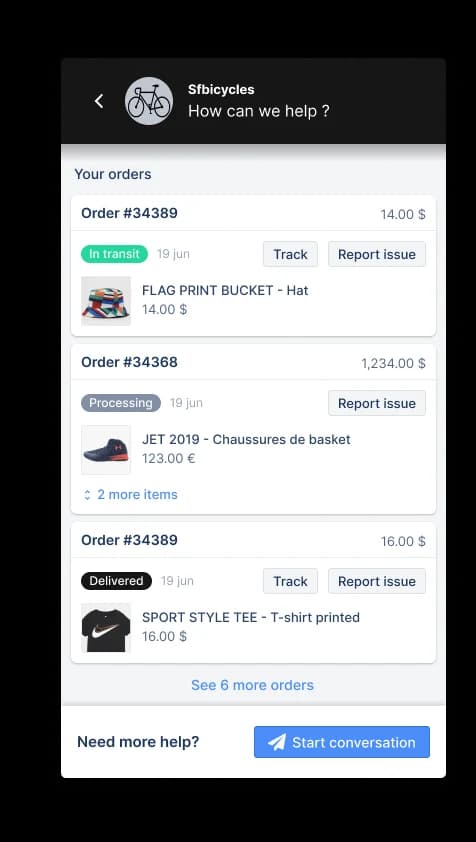
Gorgias inverts the usual gate: 10 Help Centers on every plan including the $40 Starter, unlimited on Enterprise, and the AI is what you pay for. The article-to-agent link is the tightest of any vendor here. Existing help center articles are automatically part of the agent's knowledge, you can write and publish new ones directly from the Knowledge page, and the setup wizard proposes article topics built from your own ticket data.
One detail worth stealing regardless of vendor: Gorgias states that guidance, the short reference notes you write for the agent, carries more weight than help center articles, and warns what happens when the two disagree. If an article says the return window is 30 days and a guidance note says 14, the agent will not answer the same way twice.
Where it falls short: knowledge does not pool across multiple Shopify stores, each store gets its own library. Import works from Zendesk, HelpDocs, Re:amaze and CSV, but there is no self-serve export, you file a support request for a data dump. Proactive knowledge-gap detection is Enterprise-only, and the one-page layout caps font size at 16px with no heading styles.
Pricing: Starter $40 a month, Basic $90, Pro $550, Advanced $1,430, plus a quote-only Enterprise tier. Tickets meter at $0.40 each on Starter and Basic, $0.36 on Pro and Advanced. AI Agent is a separate line inside each plan ($30, $27, $171, $477) with 30, 30, 190 and 530 automated interactions included, each interaction priced at $1.00, $0.90, $0.90 and $0.85.
My take: the best help center per dollar for a Shopify store, as long as you model the $0.85-$1.00 interactions before you switch the agent on. My Gorgias AI pricing calculator does that maths, and is Gorgias AI worth it has the honest version of the answer.
8. Crisp: best flat-rate help center for a small team
Best for: teams under about ten people who refuse to do per-seat maths.
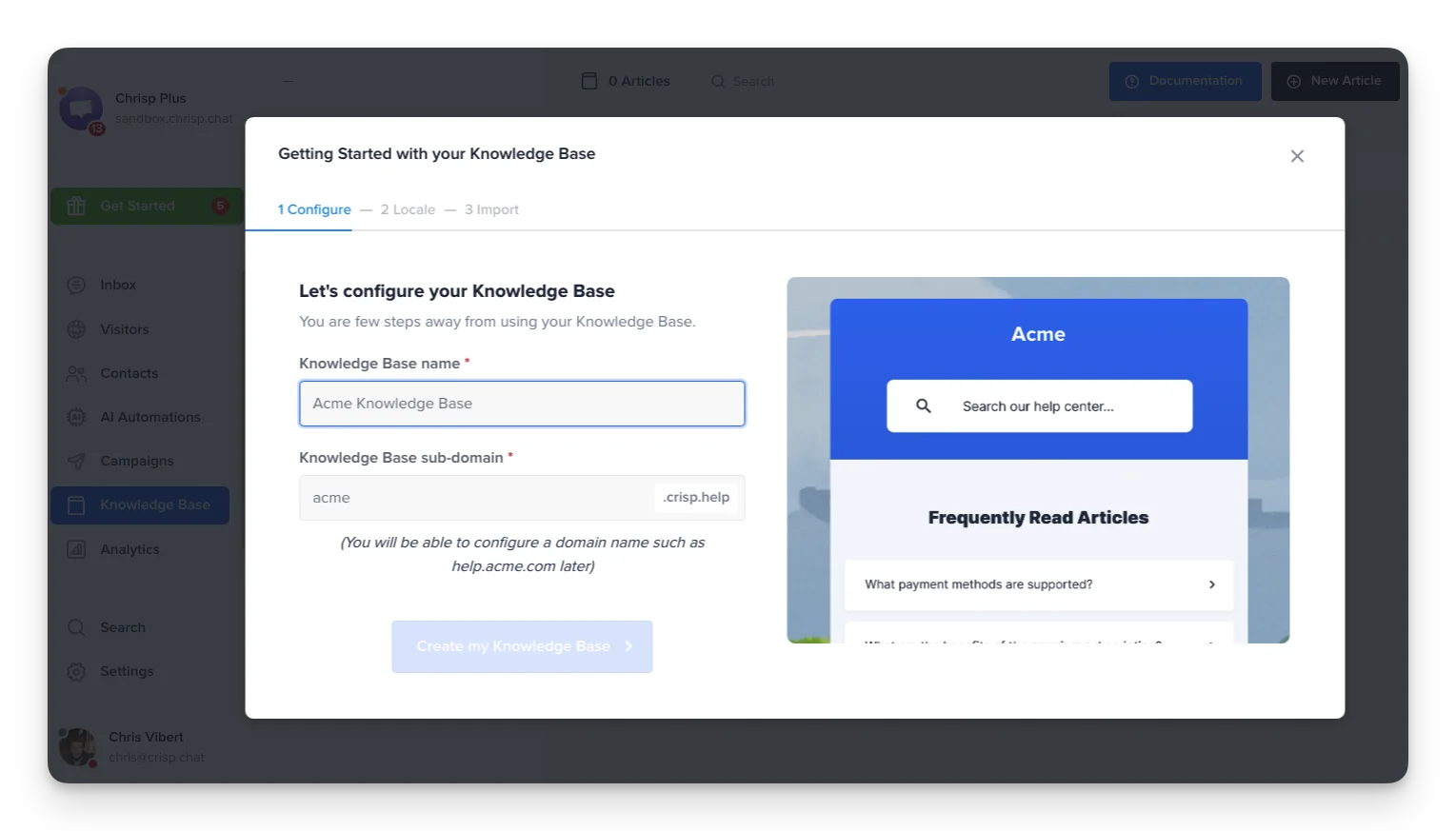
Crisp charges per workspace, so $95 a month covers ten seats and the help center that comes with them. Articles are written in Crisp Markdown, shared straight into a live conversation from the inbox, and the site takes a custom domain or even a reverse-proxy route so it can live at yoursite.com/help. Sitemap and SEO metadata are in the plan table, which matters more than teams expect: a help center that ranks answers questions before the chat widget ever opens, which is half of FAQ deflection done for free.
Where it falls short: the knowledge base is Essentials and up, so the free and $45 plans do not have one, and $95 flat is more than a five-seat Zoho Desk. Multilingual is a container rather than a translation engine, and Crisp says so: articles "are not translated automatically, so each language should be reviewed and localized manually". There is no ticket-to-article flow and no failed-search report. AI credits are quoted in dollars of included spend ($25 is roughly 450 conversations on Essentials) rather than a published per-conversation rate.
Pricing: Free $0 (2 seats, no knowledge base), Mini $45 (4 seats, no knowledge base), Essentials $95 (10 seats, knowledge base, $25 AI credits), Plus $295 (20+ seats, $75 credits, extra agents $10).
My take: the flat fee is the whole argument, and it is a good one below ten agents. Above that, per-seat tools with better reporting win. See Crisp pricing and the Crisp AI chatbot writeup.
9. Document360: best for governance and review cycles
Best for: teams whose problem is stale content rather than missing content.
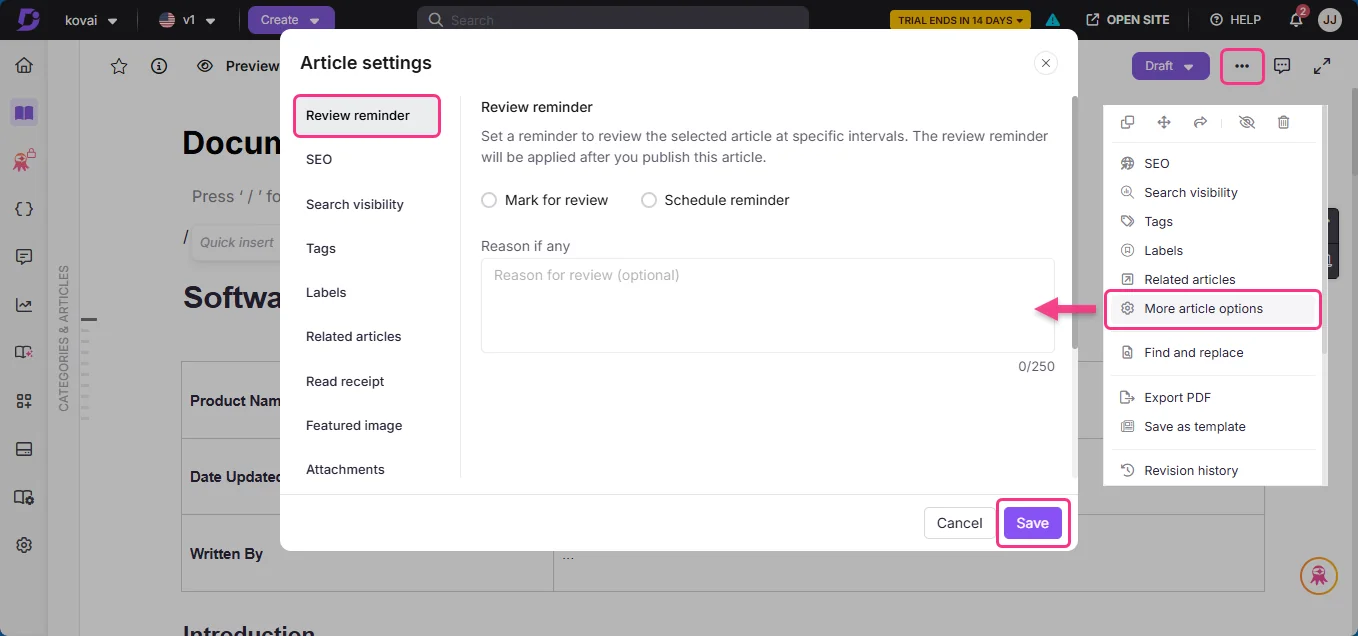
Document360 is a documentation platform rather than a help desk, and it is on this list for one feature the help desks mostly lack: article-level review reminders. You can mark an article for review with a reason, or schedule a recurring reminder, and the category tree shows published, draft and stale states at a glance. Eddy, the AI layer, answers from the content and shows its sources in the portal, in the same shape as the other AI documentation assistants I have tested.
Where it falls short: it does not do ticketing, so it sits beside your help desk rather than replacing it, and the article-to-ticket link is whatever the integration gives you. Pricing is now a quote configurator with no public tiers at all, which makes budgeting a sales call. Anyone quoting you a Document360 monthly price from a 2025 roundup is reading a page that no longer exists.
Pricing: not published. The page asks what you are building and routes to sales; a free trial is offered separately. AI features are bundled into the AI Premium Suite inside that quote.
My take: worth the sales call if you have a documentation team and a staleness problem, and skippable if you have three agents and no writer. My knowledge base management guide covers the review cadences you would be buying.
10. Helpjuice: best big multilingual help center with no seat maths
Best for: larger teams publishing in several languages who want one predictable bill.
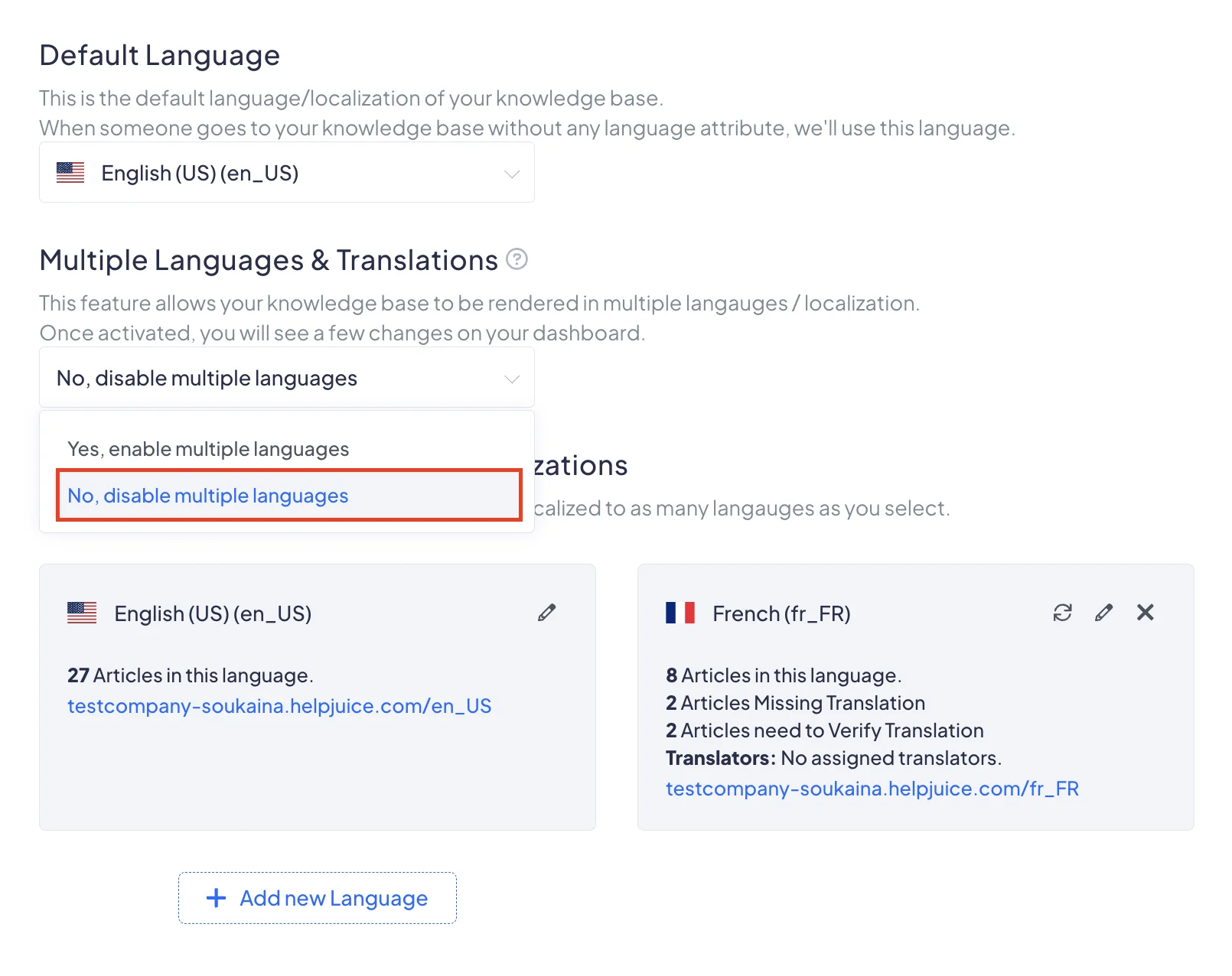
Helpjuice charges a flat monthly fee by user band, not per seat, and includes a handcrafted design and one-click translation into 40+ languages on every tier. What I like in the screenshot above is the honesty of the counters: articles missing translation and articles needing verification are tracked per language, which is exactly the debt a multilingual help center accrues and usually hides.
Where it falls short: the entry tier is $249 a month and has no AI at all, so the AI Suite means $449. It is a standalone knowledge base, so there is no ticket-to-article path from your help desk, and no ticketing either. At small headcounts the price per person is brutal compared with a $14 Zoho Desk seat.
Pricing: Knowledge Base $249 a month (30 users, 12GB), AI-Knowledge Base $449 (100 users, 24GB, AI Suite, SSO), Unlimited AI-Knowledge Base $799 (unlimited users, 38GB).
My take: buy it for the flat bill at 50 or 100 people, not for the features at 10. If multilingual is the driver, my multilingual knowledge base comparison and the multilingual live chat piece are the closer look.
Where help centers actually rot
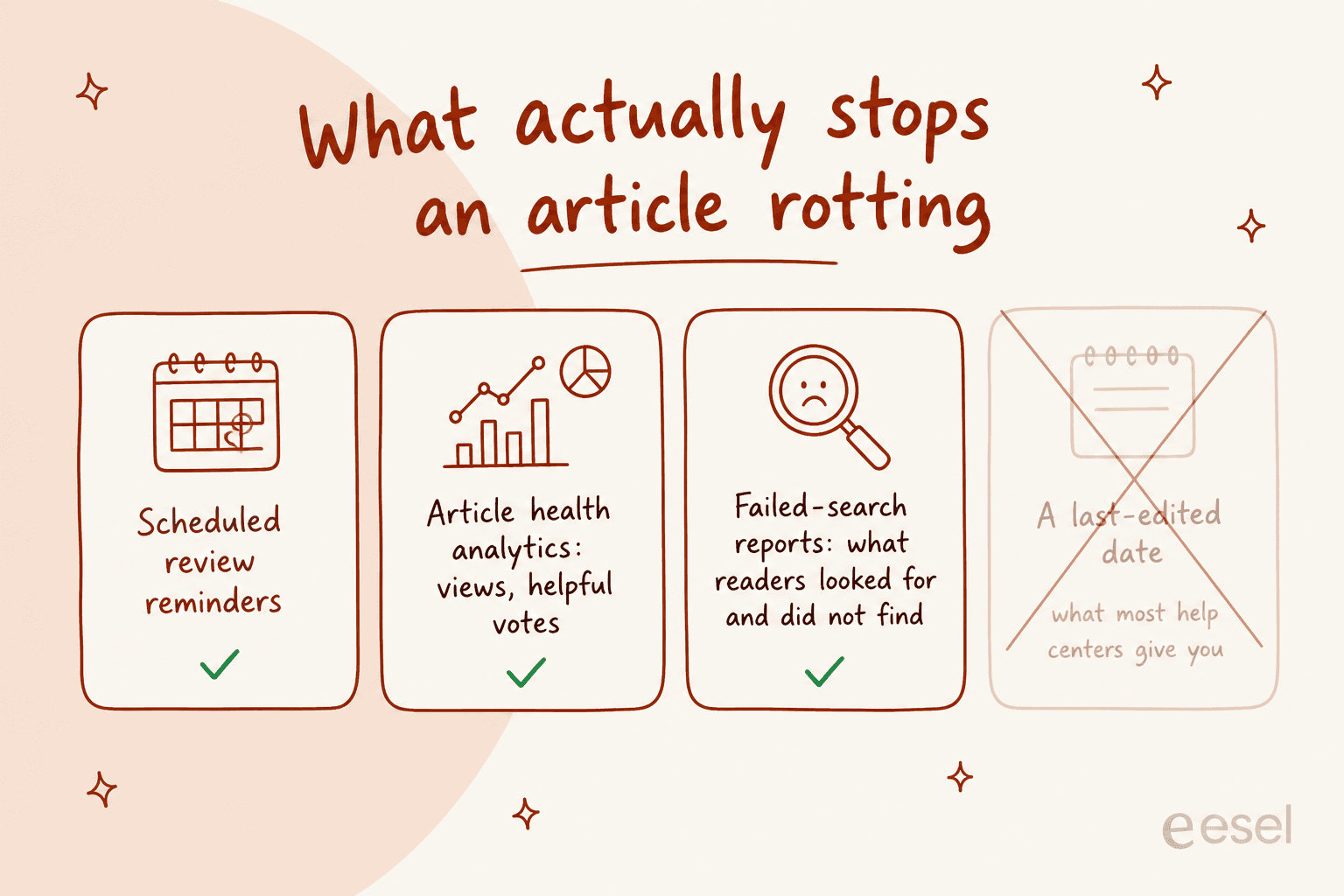
Every thread I read while researching this landed on the same thing, and it was never the tooling. The knowledge base has no owner. The review cadence dies quietly some time in month two, and then the results sitting at the top of the search page are the oldest content in the whole system.
A Zendesk consultant in a thread about a cluttered knowledge base said the quiet part:
Weekly reviews are great in theory but rarely survive contact with real workloads.
The reason this matters more in 2026 than it did in 2019: the rot now has a megaphone. A bot cannot tell an old article from a new one, so stale content converts directly into wrong answers. Here is that failure in its most concrete form, from someone running a Zendesk bot on their own docs:
if product A has attribute x but product B does NOT have attribute x, we need to specify that in product B docs, else my chatbots are saying that product B does have attribute X (I assume it's reading from Product A doc).
Which is why the deflection number your vendor quotes is the least interesting number in the deal. A support lead who tested three tools put it better than any case study:
if you measure 'did we deflect tickets' then sure, most AI CS tools look great in the first month. but if you measure 'did the customer actually get their problem solved' the numbers look very different... the ones that fail are basically a chatbot sitting on top of your help docs, giving technically correct answers to the wrong question.
That gap between deflected and solved is the whole game, and it is why AI knowledge management beats buying a bigger model, and it is why I would rather run a rollout against historical tickets first and find out where the answers are wrong before customers do. If you want the mechanics of that, AI ticket deflection and self-service solutions cover the setup, and CSAT covers measuring the half that deflection hides.
What I would actually do
Pick on the loop, not the editor.
- You already have a help center with reasonable articles. Do not migrate. Put a better reader on it, close the gaps it finds, and spend the budget on answer quality. That is the AI knowledge base chatbot route, and it is the cheapest of everything on this page.
- You are buying a help desk and the knowledge base has to come with it. Zoho Desk at $14 if you want articles written from tickets, Zendesk at $55 if you need agent-side knowledge workflows and real reporting, Freshdesk at $19 if price is the constraint and you accept there is no search reporting.
- You are on Shopify. Gorgias, and model the $0.85-$1.00 interactions first.
- You are ten people who hate seat maths. Crisp at $95 flat.
- Your problem is stale content, not missing content. Document360's review reminders, or borrow the idea and put a recurring review on the twenty articles that get the most views.
Whatever you end up choosing, the first week of work is the same: pull the failed searches, write the top five missing articles, and delete anything that contradicts something newer. The wider payoff of that housekeeping is covered in AI-powered knowledge base benefits. No tool on this list does that part for you, and it is worth more than the tool choice.
Try eesel on the help center you already have
If your help desk is fine and the answers are the problem, that is the gap eesel was built for. It plugs into Zendesk, Freshdesk, Gorgias, HubSpot, Help Scout or Front in a few minutes, learns from your published articles and your solved tickets, drafts the articles your help center is missing, and answers only when it is confident enough, leaving the rest for a human.

Run it in simulation against your last few thousand tickets first, see the coverage by theme, then decide. Plans start at $299 a month for 500 credits (1 credit per ticket or chat) with no seat fees, and the free plan is 100 credits with no card. If you would rather see it on your own queue, book a demo or read how to build an AI helpdesk first.