


A help desk system is four layers wearing one login: the channels requests arrive on, the ticket data model that stores them, the routing and automation that moves them, and the knowledge layer that answers them. Vendors compete loudly on the first layer and quietly differ on the other three, which is why two desks that look identical in a demo behave nothing alike in month three.
In 2026 there is a fifth layer, and it has its own meter. The AI sitting on top of your desk is billed separately from your seats, and the unit varies wildly: 1 credit per ticket on a fixed monthly plan (eesel, from $299 for 500), $0.49 per 24-hour session, $0.75 per resolution, $0.85 to $1.00 per automated interaction, or, in Zendesk's case, a unit with no published price at all. The rate is the small decision. The unit is the big one.
I build the AI layer at eesel, which means I spend my week inside other people's help desk systems. The number I keep coming back to is from a real-traffic trial we ran in March 2026 for a German online jewelry retailer doing about 1,000 tickets a month on Zendesk and Shopify: 93% triage accuracy and 100% spam detection, but only 12% of drafts good enough to send untouched and a 7% factual error rate. Both halves are the point. A help desk system is not one purchase, it is a set of layers you can be strong in and weak in at the same time, and you should know which is which before you sign.
What a help desk system actually is
Strip the marketing away and a help desk system is a queue with opinions. Requests arrive from somewhere, get converted into a record with a state, get pushed toward whoever should own them, and get answered using something the company already wrote down. That is it. Everything else is configuration.
The four layers matter because they fail independently:
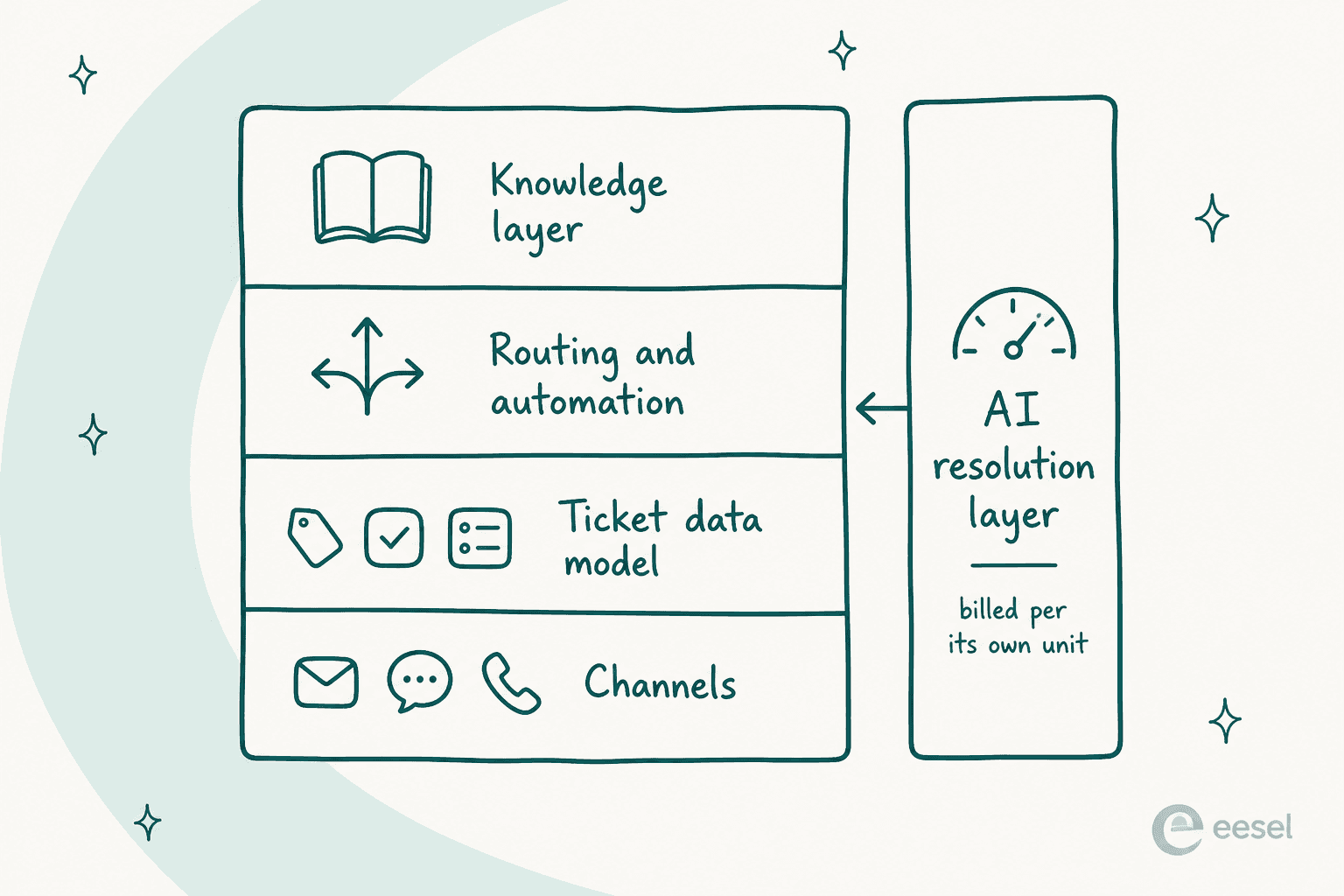
- Channels are the intake. Email, chat widget, phone, social, an internal Slack request. This is the layer every vendor puts on the homepage, and the layer that differentiates the least, because everyone has all of them now. It is worth reading up on real omnichannel support software if your volume is actually split across five channels, but for most teams two channels carry 90% of the load.
- The ticket data model is the record itself: statuses, priorities, types, custom fields, and the rules about which of those you are allowed to change. This is where systems differ most and where nobody looks during a trial.
- Routing and automation decides who gets what and when it escalates. It is wired into SLAs more tightly than most buyers realise.
- The knowledge layer is the help center, the internal wiki, the macros. It is the raw material for both your agents and any AI you bolt on, and it is almost always the weakest layer in the building.
Then the AI layer, which is not really a fifth layer so much as something that reaches into all four and charges you by its own clock.
Layer one: the ticket data model, where systems quietly disagree
Every vendor will tell you their desk does statuses. None of them do statuses the same way, and the differences bite about six weeks in.

Zendesk ships six standard statuses (New, Open, Pending, On-hold, Solved, Closed) and hides two behaviours in them that surprise people. On-hold is an internal status the requester never sees, so a customer watching a parked ticket sees "Open" and wonders why nobody is working it. And closure is not the agent's to give: "tickets can't manually be set to Closed", an automation does it four days after Solved, and if you deactivate the closing automations the platform closes them at 28 days anyway. The full walk-through lives in our Zendesk ticket lifecycle guide.
Freshdesk ships four (Open, Pending, Resolved, Closed) and defines the split more honestly than anyone else: its field documentation says Resolved means done "according to the agent" and Closed means done according to the customer, with a 72-hour auto-close if the customer never says so.
Jira Service Management stacks three objects (request type on work type on workflow) and renames statuses on the way to the portal, so your internal "Waiting for Customer" shows up as "Requester Action Needed". HubSpot has no status field at all: a ticket is a CRM record on a pipeline, and pipeline stages are simply labelled as statuses.
| System | Standard statuses | Who closes the ticket | The footgun |
|---|---|---|---|
| Zendesk | 6 (New, Open, Pending, On-hold, Solved, Closed) | An automation, 4 days after Solved, 28-day hard cap | Deactivating the Priority field silently kills every SLA target |
| Freshdesk | 4 (Open, Pending, Resolved, Closed) | Customer, or auto-close 72h after Resolved | Priority is hard-coded and cannot be edited, because SLAs depend on it |
| Zoho Desk | Configurable per department | Agent or workflow | SLA dashboards start at Professional, one plan above where you can set SLAs |
| Jira Service Management | Workflow-defined, dual-named to the portal | Workflow transition plus a Resolution value | Skip the request type and "your requests won't have access to all" features |
| HubSpot Service Hub | Pipeline stages, 4 by default | Stage change, which also clears Close date on reopen | Category and Language properties are Enterprise-only |
Two details from that table are worth their own sentence. In Zendesk, if you deactivate the Priority field because your team never uses it, the ticket fields reference warns that "Zendesk SLA targets will not apply". And in Freshdesk, if you change or delete a dropdown choice already in use, "the value of that field will be changed to null" on every existing ticket. Neither of those warnings appears on a pricing page.
Custom statuses look like the escape hatch and mostly are, with a catch: Zendesk lets your account hold up to 100 ticket statuses but the picker only displays the first ten active ones, so status 11 onward exists for automations and nobody else.
The reason this layer matters more than its demo time suggests: your status model is your backlog number. Here is what that looks like when the model and the reality drift apart.
"I was going through our queue today and found 90 tickets where we responded, asked for more information from the customer but then never heard back from them. They just sit there inflating our numbers and that honestly doesn't look good for management. We have been called before for unresolved open tickets so this is a big deal."

Ninety of two hundred open tickets were not backlog, they were the customer's turn. Another operator in the same corpus cut one group's backlog 54% purely by auto-closing anything idle past five days. No new tool, no new headcount, one automation on top of an honest status model. If you are staring down a queue like that, our guide on clearing a ticket backlog walks the same move.
Layer two: routing, priority and SLA are one system, not three
Buyers evaluate routing as a convenience feature. It is actually the layer that decides whether your SLA means anything, because in most desks the SLA policy reads directly off the priority field.
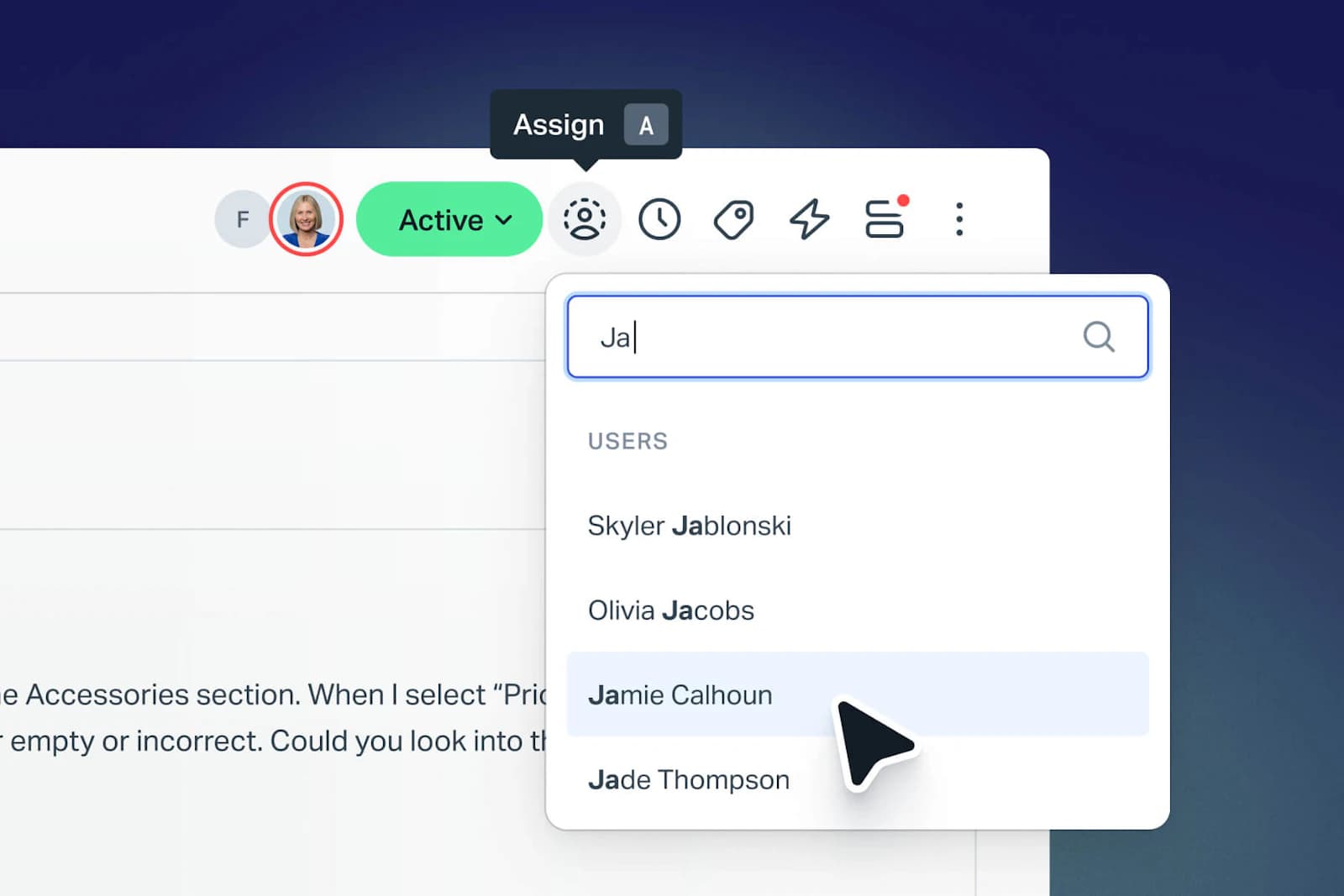
Freshdesk is explicit about the coupling in its field documentation: priority "cannot be edited and is hard-coded into our systems because it is directly tied to the SLA Policies functionality". Jira Service Management ships five priorities with prose definitions attached, so Highest literally means "This problem will block progress" rather than whatever the requester felt that morning. That prose is doing real work, because the alternative is what happens when you let requesters grade their own urgency.
"Dealt with this decades ago. It was scrapped quickly because as you might imagine it was abused to death. It really didn't bother me though. I still got the same number of tickets and just slogged through them. When people got mad because we were missing SLAs we just replied there was nothing we could do now that all tickets were priority."
The practical rule I would follow: priority is set by a rule, never by a requester, and the rule reads from things the requester cannot inflate, such as plan tier, order value, keyword match or channel. That is exactly the work AI ticket classification does well, and it is a cheaper first automation than a full agent, because a mis-tagged ticket costs you a re-route while a mis-answered one costs you a customer. If you are wiring this up from scratch, our guides on support ticket triage and SLA management cover the rule design.
One more thing to check in a trial: whether the automation engine can act on time as well as events. The difference between a desk that can say "if nothing has changed in 48 hours, escalate" and one that only fires on updates is the difference between an SLA you enforce and an SLA you audit afterwards. Our breakdown of Zendesk automations shows where those limits sit in practice.
Layer three: the knowledge layer, and the deflection number nobody prints
This is the layer I would spend trial time on, because it is the one every vendor overstates by roughly a factor of five.
Vendor pages advertise self-service deflection between 30% and 95%. The measured number from HDI and MetricNet's benchmarking database is that the average self-service completion rate worldwide is 10.4%, ranging from zero to 55 percent, and the same research notes that the vast majority of self-resolved incidents are password resets.
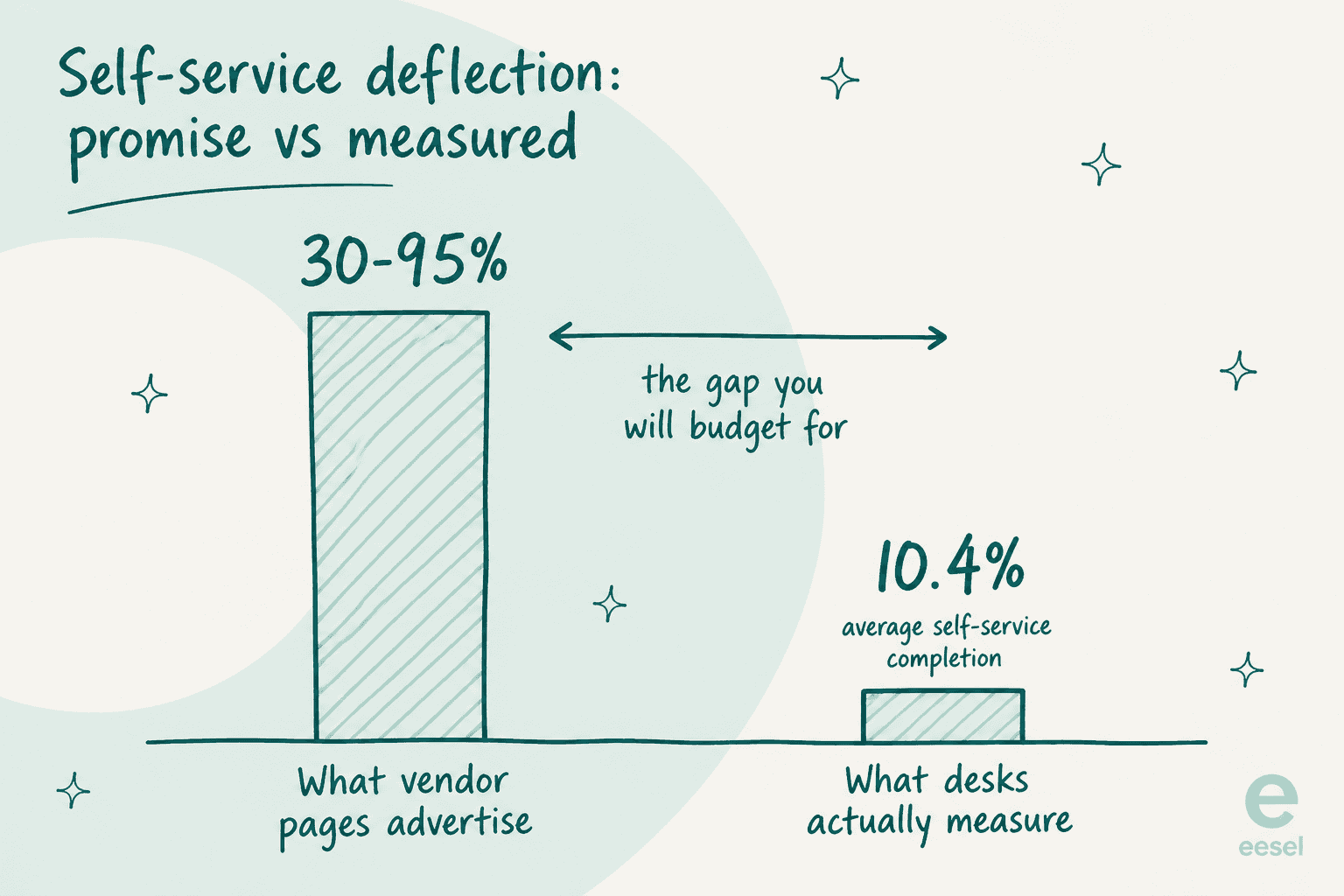
There is a second-order effect in the same paper that changes how you should budget. Deflection removes the easy tickets first, and the same HDI paper notes that "the average complexity and the average handle time of the incidents that continue to be handled by live agents will increase". Your cost per remaining ticket goes up even as your total volume goes down. Any business case that models deflection as a flat percentage off your current cost per ticket is wrong in a direction that will embarrass you at the next budget review.
The reason self-service underperforms is rarely the software. It is that the knowledge layer rots.
"I run a small team, and we have an internal wiki for processes, FAQs, and troubleshooting. The problem? No one updates it. People keep asking the same questions in Slack instead of checking the wiki."
My favourite line in that whole corpus comes from a sysadmin thread on AI service desks: "My internal knowledge base doesn't have information from my internal knowledge base." That is a retrieval problem dressed as a content problem, and it is the single best predictor of whether an AI layer will work on your desk, because the AI is reading the same shelf your agents are ignoring.
Here is the part I would rather not publish, and the reason I trust our own rollout process. We have had paying customers, including a Danish solar-energy provider, whose bot fabricated answers and sent them to real customers when the knowledge base had no match. One asked about solar-cell subscriptions and got confidently invented terms. Another customer's bot answered a question with "Oxygen (periodic table)". An AI with a thin knowledge layer does not go quiet, it goes creative, which is why every rollout we run now gets simulated against historical tickets before it touches a live queue and why a hard decline-to-answer threshold is not optional. If you are evaluating anything in this category, our write-up on AI hallucinations in support is the checklist I would hand you, alongside our guide to knowledge base training.
Practical trial test for this layer, which takes an afternoon: pull your twenty most common questions from last month, search each one in the vendor's help center search and in your own internal knowledge base, and count how many return the right article in the top three results. Whatever that number is, it is your deflection ceiling, not the 80% on the pricing page. Our ticket deflection guide covers what to do with the gap.
Layer four: reporting, the one you cannot fix later
You can work around a clumsy status model. You can bolt automation on from outside. You cannot invent a reporting layer that the vendor did not build, and this is where plan gates hurt most.
The cheapest plan that lets you build a custom report, per agent per month on annual billing:
| System | Custom reports start at | What you get below that | The catch |
|---|---|---|---|
| Gorgias | Every plan | Not applicable | Revenue report needs Pro, $471/mo, plus a connected Shopify store |
| Zoho Desk | $14 Standard | FCR and response-time dashboards | Capped at 50 custom reports; SLA dashboards wait until $23 |
| Freshdesk | $55 Pro | Prebuilt reports only | No real-time dashboard on any plan |
| HubSpot Service Hub | $90 Professional | Prebuilt dashboards | Reports refresh about every two hours; extra capacity is $200/mo per pack |
| Zendesk | $115 Suite Professional | Prebuilt dashboards on $55 Suite Team | UI data export is off until you ask support to enable it |
| Front | $105 Enterprise | Basic, then advanced analytics | CSAT and scheduled reports need $65 Professional |
| Help Scout | Never | Filters and saved views | Its own docs say custom reports are not possible in the app |
That Help Scout row is not a typo. Asked directly whether you can build your own reports, Help Scout's reporting docs answer "Not in the app", and point you at the Inbox API, Zapier or a third-party BI tool. It is an honest answer, and for a lot of teams it is fine. It is only a problem if you bought the plan expecting the "custom reports" row on the pricing page to mean report building, when it means saved filter views.
Two more gates worth knowing before you commit. Zendesk's UI data export is Growth and above, and even then its export documentation says "the account owner must contact Zendesk Customer Support to enable data exports". And Zendesk's live dashboards are being retired: from 25 January 2027 prebuilt live dashboards, live data components and the ability to create live dashboards leave Explore entirely, with the replacement real-time dashboards capping historical lookback at 30 days.
The human cost of a weak reporting layer looks like this, from a support lead who has built dashboards in a real BI tool:
"I have never found anything as complex as Zendesk explore.
I've worked with ThoughtSpot building dashboards, reports and exports but omg Zendesk, you are taking so much of my time!!!!!!!!
I have recently moved jobs where I worked with the platform Dixa and at my new job, I launched Zendesk - I have the most basic set up on Zendesk ever but the Explore setup is BREAKING ME."
And the workaround is always the same shape:
"The reports and automations can be somewhat difficult to navigate. We ended up just exporting all of our tickets every month and creating our own reports through Power query in Excel."

A director of client care spending a day a month in Power Query is a real line item. Price it. Our guides to customer service KPIs and Zendesk reporting cover which numbers are worth the fight.
The AI layer has its own meter, and the unit beats the rate
This is the newest part of a help desk system and the part where I see the most money quietly leak. Every vendor now sells an AI agent. Almost none of them meter it the same way, and the unit determines your bill far more than the headline rate does.
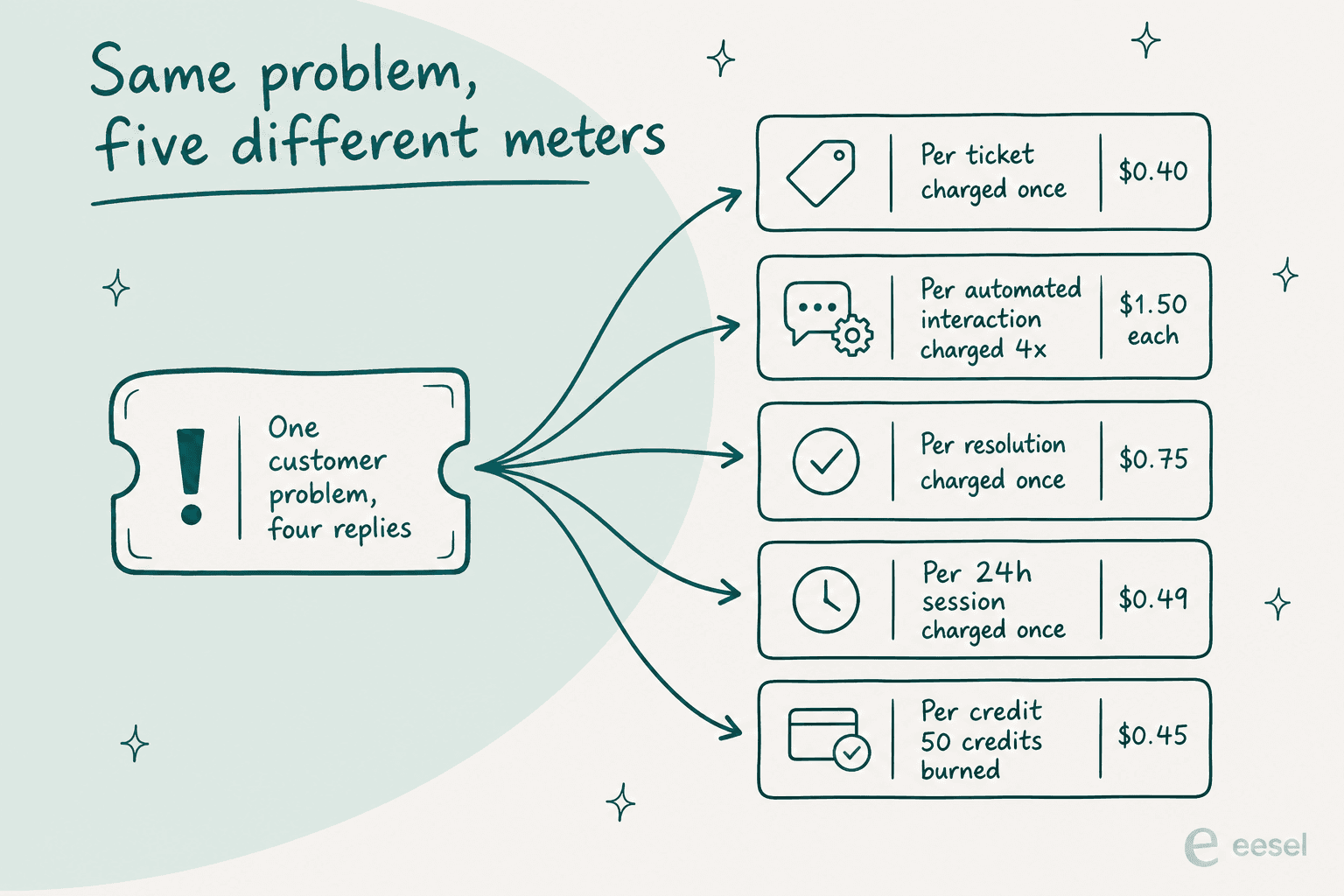
| System | Billable unit | Rate | What that unit actually counts |
|---|---|---|---|
| eesel | Credit: 1 per ticket or chat handled | From $299/mo for 500 credits | One credit per ticket, however many replies it takes |
| Freshdesk | 24-hour Freddy session | $0.49 after 500 free | Bills the attempt, not the outcome; 500 sessions included once per account on Growth, Pro and Enterprise |
| Help Scout | Conversation resolved without a human | $0.75 | Escalations and "I still need help" clicks do not count |
| HubSpot | 50 credits per resolution | $0.45 at $9 per 1,000 credits | Professional's 3,000 credits is about 60 resolutions a month |
| Gorgias | Automated interaction | $0.85 to $1.00 | 190 included on Pro, then $0.90 each; the headline says "pay only when it resolves", the meter counts interactions |
| Jira Service Management | Assisted conversation, or resolution | From $0.30, or $1 per resolution | An escalated conversation still bills |
| Zendesk | Verified automated resolution | Not published | Confirmed by LLM evaluation 72 hours after the reply |
A few of those deserve unpacking. Freshdesk's session definition covers all interactions in a 24-hour window, so a customer who asks four questions across a day burns one session, but a customer who asks once and leaves burns one too, resolved or not. Help Scout is the strictest in the buyer's favour: one resolution per conversation, and it does not count if the customer escalates or clicks "I still need help", plus a monthly spend cap that auto-disables the AI when you hit it. Zendesk rebuilt its model in May 2026 into three tiers and only bills the top one, a verified resolution, which is a fairer definition than the old one. It also publishes no dollar figure for it, so you cannot model your bill from public information.
That definitional argument is where the anger actually lives, not in the per-unit price:
"Complete trash lol, stuff I used to get free now counts as an AR. Most of the ARs are abandoned chats. There's no dispute resolution process. Complete scam. I used to like Zendesk but since trying the new bot and now this I have little good will left"
The counterweight I would put beside every deflection promise came from a CX lead at a supplements brand running about 7,000 tickets a month on Gorgias and Shopify. We lost that deal, and the reason was fair:
"The AI will never be able to answer 100% of the questions, but if it tries and just answers 'sorry I don't know this,' I cannot go and check all my 7,000 tickets to see if the AI actually made a good answer, then the point is a little bit gone. I need an AI who is only handling the tickets that it's confident to handle and all the other ones, leave them alone."
That is the requirement, stated better than any vendor states it. Confidence-based routing with a real decline path is the feature, and volume is the vanity metric. Our guides on AI to human handoff and handoff best practices are the design work behind it, and improving resolution rate is the follow-through.
Where it does go right, the numbers are worth the trouble. Gridwise, a gig-economy driver-analytics app running on Zendesk, resolved 73% of its tier-one requests in the first month after a seven-day trial, and their support lead's summary was that responses were simple to fix and adjust. The honest framing is that tier-one is where this works. Nobody's AI is closing your escalations.
What a help desk system costs at your volume
Sticker prices are unhelpful here because two meters run at once: seats and AI. Put your own numbers in.
Two notes on how to read it. The Zendesk row is Suite Professional at $115 plus the Copilot add-on at $50, which is the configuration most teams actually buy, and its AI line stays blank because the rate is not public. The eesel row is the AI layer only, sitting on whatever desk you already pay for, so compare it against the AI line of the others rather than against a full desk.
Two honest observations from playing with that. Zoho Desk usually comes out cheapest, because Zia is bundled from Professional at $23 with no per-resolution meter at all, and that is a real advantage rather than an artefact. What you are trading is ceiling: Zia is assistive and gated by plan, so check our Zoho Desk AI review before assuming it clears your tier-one queue.
The other observation is that seat-priced desks stop being the dominant cost line as soon as the AI meter gets busy, which is the whole reason a fixed credit plan with no seat fee behaves differently at scale. And notice which row cannot be filled in at all. A system whose AI price you cannot look up is a system you cannot budget for, which matters more than whether the rate turns out to be good.
Hosting, residency and the uptime SLA almost nobody signs
If you are procurement-adjacent, this is the section that saves you a renegotiation. Two patterns repeat across the whole category.
First, region is usually set at signup and painful to change. Freshdesk's security documentation states the hosting region "can only be selected at the time of account creation", and a move is an email to support with no published timeline. Zoho assigns your data centre at signup from your IP, does not replicate across regions, and its migration policy reserves the right to delete the old data 14 days after the old account is deactivated.
Zendesk's Data Center Location add-on is free on Suite Professional and above but "not automatically activated", and until it is, the hosting policy says Zendesk "makes no commitments on the Hosting location" of your data. Help Scout is US-only, full stop, hosted on AWS in the United States with no EU option.
Second, the uptime number on the marketing page is usually not in the contract. Zendesk's Customer Agreement warrants nothing about interruption; the 99.9% figure attaches only to Premier Support on qualifying plans and covers five products, not Explore or Talk. Freshworks publishes no uptime percentage for Freshdesk at all. Help Scout's terms of service provide it "as is and as available". Front's May 2026 agreement contains no service-level section. Zoho is the outlier that publishes a real company-wide 99.9% monthly commitment, which works out to about 43.8 minutes of allowable downtime a month.
Neither of these is a reason to walk away from a good system. They are reasons to ask the question during the trial, when you still have leverage, instead of after the incident.
Migration: what your old system will not hand over
The last thing worth knowing before you choose is what leaving costs, because it shapes how much the choice matters. Ticket history technically exports. Usefully, it often does not.
"I have exported my historical tickets to XML but not going to work. First my tickets are a mess. They are not properly organized, tagged, or anything. Lot of the info chatGPT would need to understand is in custom fields which are not labeled in any export."
Unlabelled custom fields in the export is the specific failure, and it has a second cost: past tickets are the best training material for any AI layer, so a messy export weakens both your migration and your automation at the same time. Add the plan gates around export (Zendesk's is off until you ask, Zoho's caps at 1,000 records per batch below Standard) and the practical answer for a lot of teams is that changing the layer that is failing beats changing the whole system.
That is worth saying plainly because it cuts against the way this category is usually sold. If your data model is fine and your reporting is fine and the thing that is broken is that nobody answers 300 repetitive tier-one emails a week, you have an AI-layer problem, not a help desk problem. Our roundups of help desk solutions and top helpdesk software are the right reading if you do need to move, or enterprise helpdesk options if the pressure is scale.
How I would choose in 2026
Four questions, in this order, because they are ordered by how hard each one is to fix later.
- Can it report what you are measured on? Write down the three numbers your boss asks for. Then check which plan builds them, whether export is on by default, and how long history is retained. This is the least reversible layer, so it goes first. Start from our customer service KPIs list if the three numbers are not obvious.
- Does the data model fit how you actually work? Count the statuses you need, check who is allowed to close a ticket, and confirm whether priority is yours to set or hard-wired to the SLA engine. Then read the field limits, since ticket fields are where the customisation ceiling lives.
- Is the knowledge layer good enough for the AI you plan to buy? Run the twenty-question search test above. A 10.4% industry average is not a vendor failure, it is a content and retrieval failure, and no meter fixes it.
- What is the AI unit, and can you look up its price? Per ticket, per session, per resolution, per interaction, per credit. Then model it at your volume, not the vendor's example. If the rate is not published, treat that as a finding.
Notice that price is not on the list. Seat prices across the mid-market cluster tightly enough that they rarely decide anything, while the AI meter can swing your bill by 4x on identical volume. Spend your negotiation there. Our comparisons of AI helpdesk software and the cheapest AI helpdesk apps go deeper on that layer specifically.
If this is your first pass, AI help desk basics is the primer. For internal IT rather than customer support, start with AI IT help desk tools and our take on IT service management AI.
Try eesel on the help desk system you already run
Most of the teams I talk to do not need a new help desk system. They need the tier-one layer of the one they have to stop consuming their whole week.

That is the layer eesel is. It connects to Zendesk, Freshdesk, Gorgias, Help Scout and the rest, reads your existing help center and past tickets, and answers the tickets it is confident about while leaving the rest alone. Pricing is one fixed monthly plan with no seat fees, at 1 credit per ticket it handles, so routing 200 of your 1,000 monthly tickets to it fits inside the 500-credit plan at $299 a month rather than a platform upgrade. And because the whole objection in this space is "will it invent something", every rollout is simulated against your historical tickets before it replies to anyone live.
Free to try, and it plugs into the desk you already run rather than asking you to leave it.