

Buying a support ticket system takes an afternoon. Making it actually hold takes a week of config, and the order you configure it in decides what you can measure a year later. Fields come before statuses, statuses before automations, reporting is the layer you cannot go back and fix, a report can only group by a field that already existed the day the ticket was created.
Three things nobody tells you at the demo. Your open count is not your backlog. On one r/helpdesk thread, 90 of 200 open tickets sat waiting on a silent customer. Closure is mostly not yours to give either, since Zendesk closes tickets by automation four days after Solved and caps everything at 28 days. And the report you actually want, the custom one, turns out to be a plan gate: $14 per user on Zoho Desk, $55 on Freshdesk, $115 on Zendesk, and not available at any price on Help Scout.
I work eesel's own support queue, and the AI layer is the part I'd set up last and trust the least on day one. We have watched a customer's bot invent an answer about solar-cell subscriptions and send it straight to real people, which is why every rollout now gets simulated against historical tickets before it ever touches a live queue. Done that way, it works: Gridwise had 73% of tier-1 requests resolved in its first month, on the desk it already ran.
What a support ticket system actually is
A support ticket system, at bottom, is the thing that turns a conversation into a record. An email, a chat, a WhatsApp message and a web form all land in the same place, pick up a number, an owner, a status and a clock, and they stay there until someone closes them.
That sounds obvious, until you actually compare it with the shared inbox it's replacing. In an inbox the state of a request lives in someone's head, or in whether the thread looks read. In a ticket system, the state is a field, full stop. That single change is what makes routing, SLAs, reporting and any kind of automated ticket resolution possible, because software can read a field and it cannot read a hunch.
The pieces you're actually paying for:
- Channels in. Email, chat widget, a customer portal, WhatsApp, phone, and increasingly an API from your own app.
- A ticket data model. Fields, statuses, priority, type, tags. This is the part everyone under-thinks.
- Routing and SLA. Who gets it, in what order, and by when.
- A knowledge layer. The help centre, plus the macros and saved replies your agents actually use.
- Reporting. Whether you can answer "what happened last month" without exporting to Excel.
- An AI layer, now standard, and metered on its own bill.
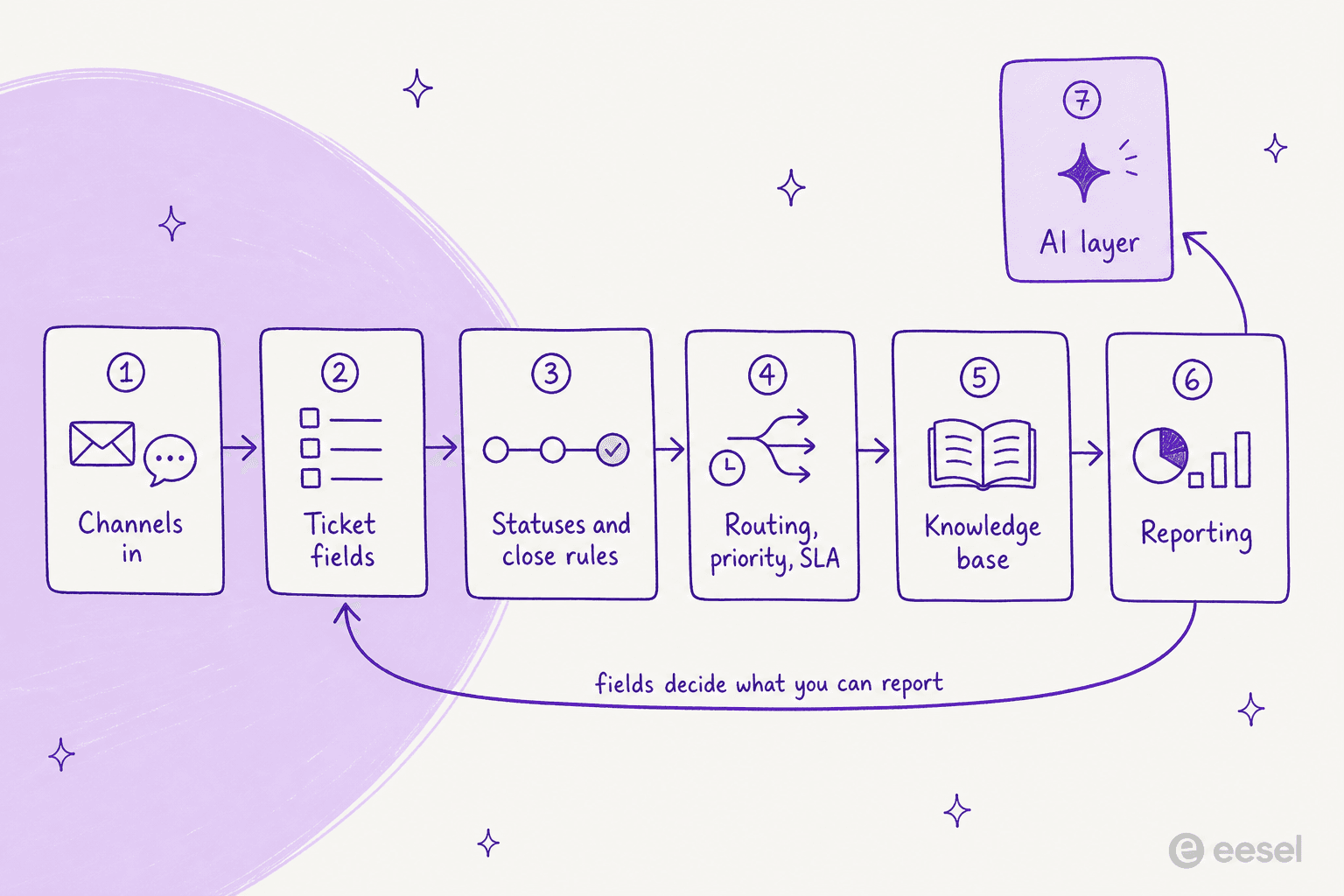
The loop in that diagram is the part that bites later. Fields decide what you can report on, and reporting is where you find out, six months down the line, that you never captured the one field you actually need now.
The signal that you have outgrown the shared inbox
Volume is honestly the worst signal to go by here. I've seen two-person teams at 40 emails a day who genuinely didn't need a desk, and five-person teams at 200 who needed one a year earlier than they got it. The real triggers are structural, not numeric.
You need a support ticket system the moment a request has to survive one person being away, when two agents keep replying to the same customer, when someone starts asking you for numbers you can't produce, or when you promise a response time to a customer in writing. That last one is the hard line, really. An SLA without a timestamped record is just a wish.
There is a quieter trigger too, which is when the incumbent stops fitting. This review is the cleanest version of it I have read:
"Zendesk is very configurable, though I struggle to think of what I like about Zendesk. I found the reporting tool in particular to be very difficult to use. Their AI offerings felt bolted on versus integrated, and their integrations didn't work particularly well. Support was not timely. Pricing was not competitive. This is why we moved to another tool."

Four separate reasons in one breath, and not one of them is "it cannot store a ticket". That's what outgrowing a desk actually looks like in practice, and it's worth reading before you commit to a platform for the next five years. If you're at that point already, our help desk software roundup and the ticketing system software comparison are the shortlists I'd start from.
Set it up in this order
Every failed rollout I've seen skipped step two and jumped straight to automations. Here's the order I'd follow, and what to actually decide at each stop.
Step 1: channels, and one place they all land
Turn on the channels you can actually staff, not just the ones on the feature list. Every channel you switch on is a queue somebody has to watch, and the cost per contact differs wildly depending on which one. HDI's 2021 numbers put self-help at $2.37 a ticket, web submit at $15.07, chat at $15.72, email at $16.13, voice at $17.19 and walk-up at $37.52, a spread the source itself calls "100X".
Two practical rules here. Route everything into one queue, even when it arrives from five different places, because a second queue is just a second backlog nobody checks on a Friday. And on email specifically, send an acknowledgement with the ticket ID in the subject line right away, that ID is what keeps a reply attached to the correct record instead of opening a duplicate one. That mechanic is basically the whole difference between a thread and a ticket, and we pulled it apart in our guide to email help desk software.
Step 2: fields, before anything else
Fields are the schema of your whole operation. Zendesk's standard set is Requester, Follower, Assignee, CCs, Share, Subject, Description, Status, Type, Priority, Tags, Approval status, Resolution type, Resolution tier and Channel group, with Subject capped at 255 characters and Description doubling as the first comment, per its ticket fields documentation. Freshdesk ships 11 default fields that cannot be deleted.
Two traps worth knowing about before you start adding your own:
- Deactivating a field can silently break something else. Turn off Zendesk's Priority field and, in Zendesk's own words, "SLA targets will not apply". Turn off Type and every ticket defaults to Incident.
- Editing a dropdown destroys history. Freshdesk is blunt about it: "If you change or delete a dropdown choice that is in use on an existing ticket, the value of that field will be changed to null."
Custom fields are also a plan gate, worth knowing up front. Freshdesk starts them at Growth with per-type caps, 80 single-line text fields, 10 multi-line, 80 dropdowns, rising on Pro and Enterprise. Decide on the handful you'll actually report on, name them once, and resist the urge to add a new field for every edge case. Tags exist for the long tail anyway, and ticket tags are far easier to prune later than a dropdown somebody already built a workflow on top of.
Step 3: statuses, and the two rules about closing
Statuses are where vendors quietly disagree with each other, and where most queues end up rotting. Nobody's "open" means the same thing as yours.

Zendesk runs six statuses (New, Open, Pending, On-hold, Solved, Closed), and three of its rules tend to catch people off guard. New is a one-way door, since "after changing the status from New to another status, you can't change the status back to New". On-hold stays invisible to the customer, who still sees Open. And "tickets can't manually be set to Closed" at all, closure is an automation: four days after Solved by default, with a hard cap where tickets close 28 days after being solved, and any rule that tries to stretch past that "won't be honored".
Freshdesk keeps four statuses and draws the line a bit differently, Resolved means done "according to the agent" and Closed means done "according to the customer", with an auto-close 72 hours after Resolved. Jira Service Management runs two names for one state, so an internal "Waiting for Customer" shows up to the requester as "Requester Action Needed". HubSpot doesn't even have a status field, really, only pipeline stages that get called statuses by default.
Here's the same conversation, told in four different desks. Pick yours:
Status translator
The same waiting-on-the-customer ticket, in four support ticket systems.
- Statuses: New, Open, Pending, On-hold, Solved, Closed (plus In Progress on accounts created after 13 Feb 2024).
- Waiting on the customer: Pending. It resets to Open automatically the moment the customer replies.
- Hidden state: On-hold is internal, and the requester still sees Open.
Closing: automation only, four days after Solved by default, hard-capped at 28 days. A reply to a Solved ticket reopens it; a reply to a Closed one spawns a follow-up ticket.
- Statuses: Open, Pending, Resolved, Closed. These four cannot be deleted.
- Waiting on the customer: Pending, which exists specifically to pause the SLA timer.
- Custom labels: internal "Waiting on Customer" can display as "Awaiting your reply", from the Growth plan up.
Closing: Resolved is done according to the agent, Closed is done according to the customer, with an auto-close 72 hours after Resolved.
- Statuses: a workflow per work type. The default space ships Waiting for Triage, Waiting for Support, Waiting for Customer, Resolved.
- Waiting on the customer: internal "Waiting for Customer" shows to the requester as "Requester Action Needed".
- Separate axis: resolution is its own field (Done, Won't do, Duplicate, Known error, Hardware failure).
Closing: there is no published auto-close. A work item without a request type loses access to JSM features, so the request type is not optional.
- Statuses: none as a fixed field. A ticket is a CRM record on a pipeline, and stages are called statuses by default.
- Default pipeline: New, Waiting on contact, Waiting on us, Closed.
- Owner type: tracked separately as Human rep, Customer Agent or Rule-based bot.
Closing: Close date is set when a ticket moves to a closed stage, and cleared again if someone reopens it. Extra pipelines need Starter and up.
The reason this matters beyond trivia is that your reporting inherits these definitions, whatever they are. If "open" in your desk includes every ticket sitting on a silent customer, your backlog number is fiction, and someone will eventually manage you against it anyway.
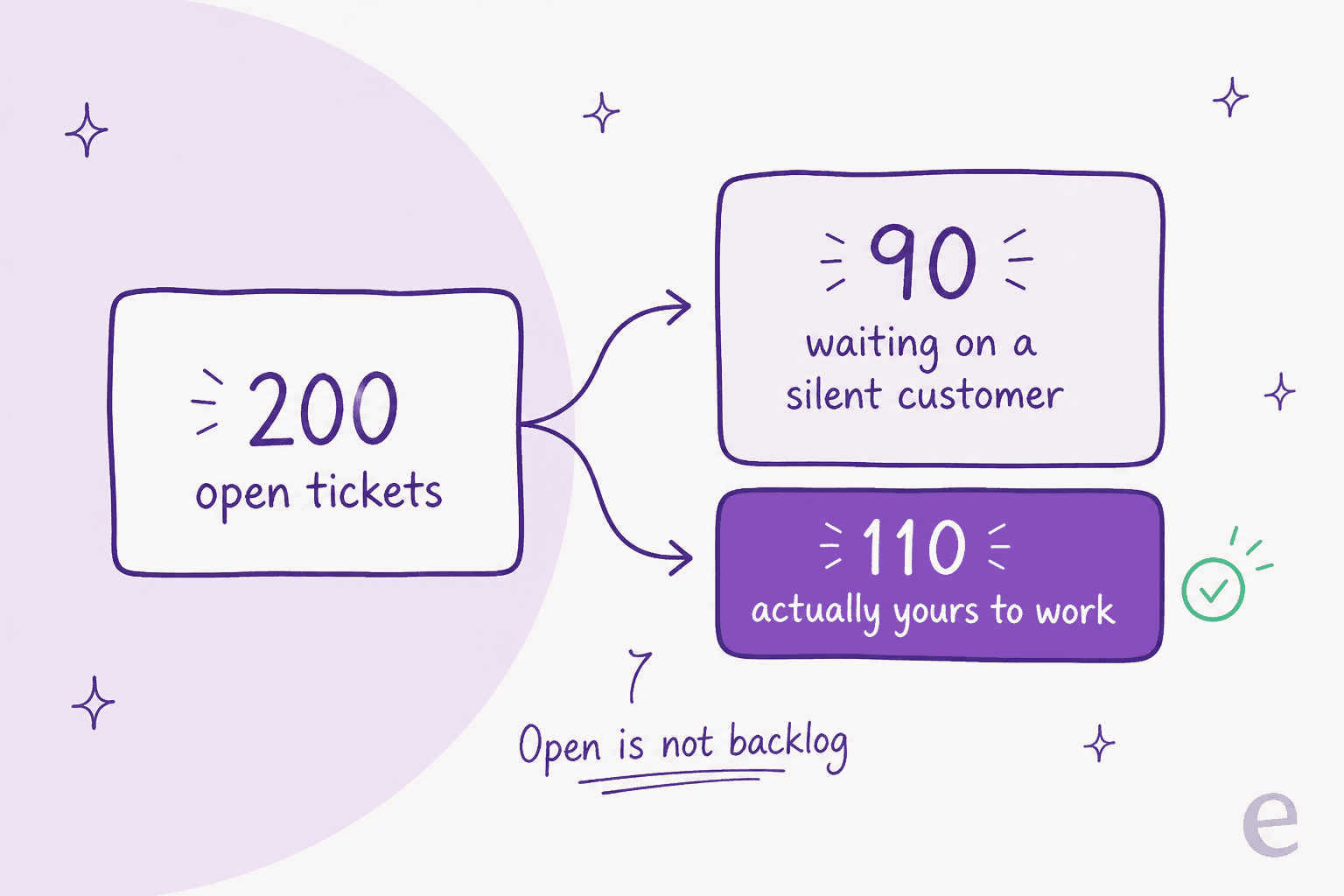
That split isn't hypothetical, by the way:
"I was going through our queue today and found 90 tickets where we responded, asked for more information from the customer but then never heard back from them. They just sit there inflating our numbers and that honestly doesn't look good for management. We have been called before for unresolved open tickets so this is a big deal."

The fix is an auto-close rule, plus the discipline to actually trust it. One IT manager wrote on r/ITManagers that auto-closing tickets older than five days "instantly reduced one group's backlog by 54%". Nothing got worse for customers either, since a reply reopens the ticket regardless.
Step 4: routing, priority and SLA are one system
Treat these three as separate settings and, sooner or later, they'll fight each other. Priority feeds the SLA policy, and routing is what decides who's actually watching the clock.
Start with the priority question, it's the one that tends to get political. Don't let requesters set it themselves. This is the top comment on the subject, at 371 upvotes, and it's aged well:
"Dealt with this decades ago. It was scrapped quickly because as you might imagine it was abused to death. It really didn't bother me though. I still got the same number of tickets and just slogged through them. When people got mad because we were missing SLAs we just replied there was nothing we could do now that all tickets were priority."
Set priority yourself, from rules, on things you can actually observe: plan tier, order value, keyword, channel, or a customer who's already replied three times. Freshdesk hard-codes its four priority values precisely because they're "directly tied to the SLA Policies functionality", so really, you're configuring the SLA whether you meant to or not.
Then comes the SLA itself. Pick targets you can hit on your worst week, not your best one, define business hours honestly, and remember Pending exists to pause the clock while the customer is the one blocking things. Freshdesk's multiple SLA policies start on Pro, so on Growth the built-in SLA report exists but you can't segment it by customer or product. If you want the longer version of this, we wrote up SLA management with AI and SLA escalation automations separately.
Routing itself is honestly the easy half: skills or groups, a fallback owner for anything unmatched, and an alert when a ticket sits with no assignee for an hour. If you'd rather that happen without writing dozens of rules yourself, AI ticket routing and ticket prioritisation both read the ticket text instead of working off a keyword list, and ticket classification tags it on the way in.
Step 5: the knowledge base, and the number nobody prints
Every vendor will show you a deflection chart. The honest number is smaller than that. MetricNet's benchmarking database puts the average self-service completion rate at 10.4%, ranging from zero at desks with no self-service to 55% at the top end, and its earlier 2018 pass measured 8.9%, with most of those self-resolved incidents just being password resets.
So a knowledge base is worth building, sure, but it's not worth pretending it'll halve your queue on its own. Build it out of the tickets you actually get, in the words customers actually use. And plan for rot too, because it's basically universal:
"I run a small team, and we have an internal wiki for processes, FAQs, and troubleshooting. The problem? No one updates it. People keep asking the same questions in Slack instead of checking the wiki."
Two things actually help here. Make writing the article part of closing the ticket itself, not a separate Friday project. And put a search layer over everything rather than expecting people to browse for it, which is the whole idea behind an AI knowledge base chatbot.
If your content lives in five different places, the retrieval question matters more than whatever help centre theme you picked, and a tidy internal knowledge base is what makes the rest of it actually work.
Step 6: reporting, the layer you cannot fix later
This is the step people tend to leave until the quarter ends. By then it's too late, a report can only group by a field that already existed.
Worse, the report builder itself turns out to be a plan gate, and the price of that gate isn't small either.
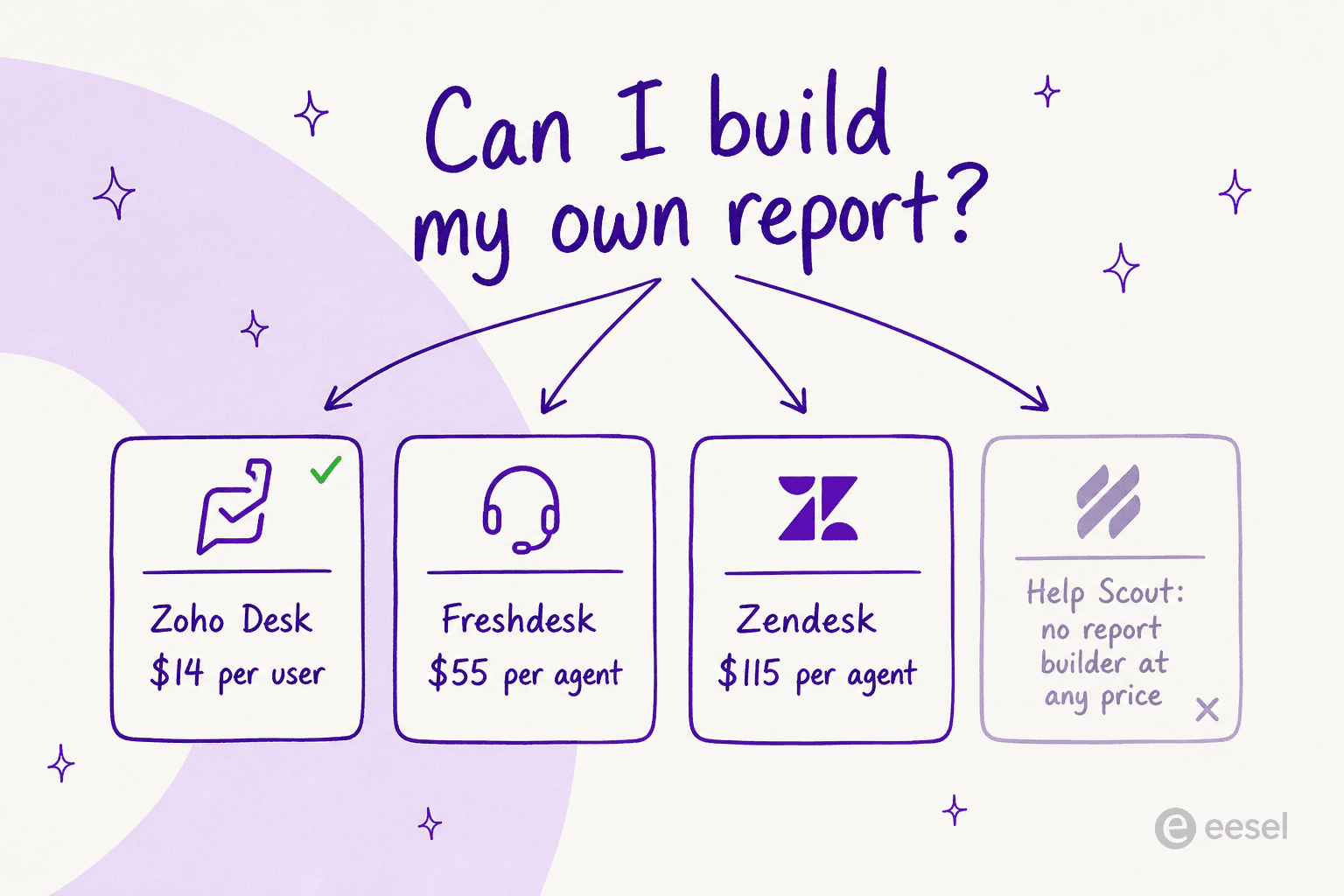
| Desk | Custom report builder starts at | Worth knowing |
|---|---|---|
| Zoho Desk | Standard, $14/user/mo | Capped at 50 custom reports and 10 dashboards; scheduling is Enterprise-only |
| Freshdesk | Pro, $55/agent/mo | No live dashboard on any plan; export and scheduling are Pro and up |
| Zendesk | Suite Professional, $115/agent/mo | Report results truncate at 50,000 rows; UI data export must be switched on by Zendesk support |
| Help Scout | Not available | Docs are explicit: "there isn't a way to customize how calculations are performed nor is there an option to build custom reports" |
| Front | Enterprise, $105/seat/mo | CSAT, scheduled reports and the live dashboard need Professional at minimum |
| Gorgias | All Helpdesk plans | The outlier; only the Revenue report is gated, at Pro plus a Shopify store |
Zendesk's own live dashboards are also on their way out: they're limited to accounts that accessed Explore before 5 May 2026, and on 25 January 2027 prebuilt live dashboards and the ability to create them get removed from Explore entirely.
When native reporting is weak, the workaround is always the same one, and it costs a person's week every month:
"The reports and automations can be somewhat difficult to navigate. We ended up just exporting all of our tickets every month and creating our own reports through Power query in Excel."

Two metrics worth getting right while you're at it. First contact resolution is a quality metric, first level resolution is a cost metric, and HDI is explicit that the two are not interchangeable, net FLR averages 74.3% and only 1.4% of service desks clear 95%. And be careful with one-touch resolution too, Zendesk's own definition counts tickets "with a single agent reply or no replies", which means a spam ticket you just deleted still counts as a win.
On the satisfaction side, CSAT reporting is its own configuration job, worth setting up the same week rather than the quarter after.
The AI layer is a second price list
Every desk now sells AI on top of the seat, and the meters don't agree with each other at all. The unit swings the bill harder than the rate does, honestly, so read the unit first.

| Desk | What it bills | Published rate |
|---|---|---|
| Zendesk | Verified resolution only (AI finished, and an LLM confirmed it 72 hours later) | No public price |
| Freshdesk | A session: every interaction in a 24-hour window, resolved or not | 500 included, then $49 per 100 sessions |
| Gorgias | An automated interaction, resolved or not | $1.00 Starter, $0.90 Basic and Pro, $0.85 Advanced |
| Help Scout | A resolution, one per conversation, void if the customer escalates | $0.75 |
| HubSpot | 50 credits per conversation resolved | $9.00 per 1,000 credits |
| Jira Service Management | An assisted conversation, including ones it escalates | From $0.30, or $1 per resolution for Rovo Customer Service |
| Kustomer | An engaged conversation, not a resolution | $0.60 |
| eesel | A ticket or chat handled, 1 credit each | From $299/mo for 500 credits, no seat fee |
The gap between "resolved" and "engaged" is where the invoices start to go strange. Zendesk's three-tier model, live since 18 May 2026, only bills the verified resolution, which is actually fairer than what came before it, though the change wasn't popular with everyone who lived through the old one:
"Complete trash lol, stuff I used to get free now counts as an AR. Most of the ARs are abandoned chats. There's no dispute resolution process. Complete scam. I used to like Zendesk but since trying the new bot and now this I have little good will left"
The ceiling claims deserve the same scepticism, honestly. Zendesk markets AI agents on its service page as able to "automate up to 80% of interactions", while MetricNet's read of the field is that leading organisations are automating up to 50%. Both can be true at once, on different queues, which is exactly why you test it on yours before you sign anything. We wrote up what a realistic AI resolution rate actually looks like, and what an AI help desk does, if you want the fuller picture.
One more thing I'd insist on, from experience rather than theory. Ask what the AI does when the knowledge base has no answer for it. We've had paying customers, including a Danish solar-energy provider, whose bot filled that gap by inventing claims and sending them straight to real people. A confidence threshold and a decline-to-answer fallback aren't nice-to-haves, they're the difference between preventing hallucinations and generating a whole new category of ticket.
What a ticket costs once it escalates
Volume isn't really what makes support expensive. Escalation is.
MetricNet's cost ladder puts level 1 at $22, desktop support at $62, level 3 at $85, field support at $196 and vendor support at $471, and the key word here is cumulative: a ticket logged at level 1 and escalated to level 2 costs "$62 plus $22, for a total of $84". Those are 2011 dollars, so treat them as ratios rather than a current quote. The ratio is really the point, and it's why maximising first level resolution is, in MetricNet's framing, basically the same thing as minimising total cost.
Two supporting numbers worth keeping in your head here. Agent salaries and benefits make up more than half of a service desk's cost, and roughly two-thirds of total cost ends up being personnel once you count supervisors, QA and trainers. And agent utilisation averages 48%, with the warning that rates approaching 60 to 70% produce "relatively high agent turnover because they are pushing the agents too hard".
So the honest business case for a support ticket system isn't "it saves time on each reply". It's that structure stops tickets from climbing the ladder in the first place: better first-level resolution, fewer reopens, fewer handoffs. Which is also the case for putting AI on the tier-1 band rather than everything at once, and the reason ticket deflection is measured in escalations avoided, not messages sent.
If escalations are already your problem, rather than volume, escalation management is the section of the setup I'd work on first, ahead of anything on the AI shopping list.
What I would check before I signed anything
The demo will show you the agent view. These are the things it won't show you, and they apply whether you're buying your first desk or moving to one of the Zendesk alternatives.
- Can I build the report I need on the plan I am buying? Ask for the exact plan, not the feature name. Save a screenshot of the answer.
- What closes a ticket, and after how long? Confirm the auto-close window and whether a customer reply reopens or creates a new ticket.
- How many statuses can I have, and how many show? Zendesk allows up to 100 statuses but the picker displays only the first 10 active ones.
- What happens to a dropdown value I retire? If the answer is "the field goes null", plan your taxonomy now.
- What is the AI unit, in writing? Resolution, session, engaged conversation or interaction. Then ask what an abandoned chat counts as.
- What does the AI do when it does not know? No confidence threshold means no deal.
- Where does my data live, and can I move it? Zendesk's region add-on is free on Suite Professional and up but "included but not automatically activated", and Freshdesk only lets you choose a region at signup.
- Can I get my history out? Exports are usually fine. Custom fields come out unlabelled, which is a real problem later.
That last one has a cost you only really meet on the way out:
"I have exported my historical tickets to XML but not going to work. First my tickets are a mess. They are not properly organized, tagged, or anything. Lot of the info chatGPT would need to understand is in custom fields which are not labeled in any export."
And one honest note on scope, since the objection is a fair one. A CX lead at a supplements brand running about 7,000 tickets a month told us plainly: "I need an AI who is only handling the tickets that it's confident to handle and all the other ones, leave them alone." If a vendor can't describe how their system decides what to leave alone, that's your answer to question six right there.
Try eesel on the support ticket system you already run
Most teams reading this don't actually need a new desk. They need the desk they already have to stop leaking tier-1 tickets, and that's the job eesel does, as an AI ticketing system layered on top of the one you already run.
eesel plugs into Zendesk, Freshdesk, Gorgias, Help Scout and the rest through their APIs, learns from your past tickets and help centre, and handles the repetitive band on its own while everything else stays with your agents.
Two things make it different from whatever AI is already sitting in your plan. You can simulate the whole thing against your own ticket history before a single customer ever sees it. And the pricing starts at $299 a month for 500 credits (1 credit per ticket or chat handled), no seat fee, and there is a free plan with 100 credits.

It's also the reason I trust the setup order above. When we ran a real-traffic trial for a German jewellery retailer on Zendesk and Shopify, at around 1,000 tickets a month, triage accuracy came out at 93% and spam detection at 100%, while only 12% of drafts went out as written. The triage was ready, the drafting wasn't, and the simulation is what told us which was which before any customer found out. You can start free and point it at your own queue in a few minutes.