


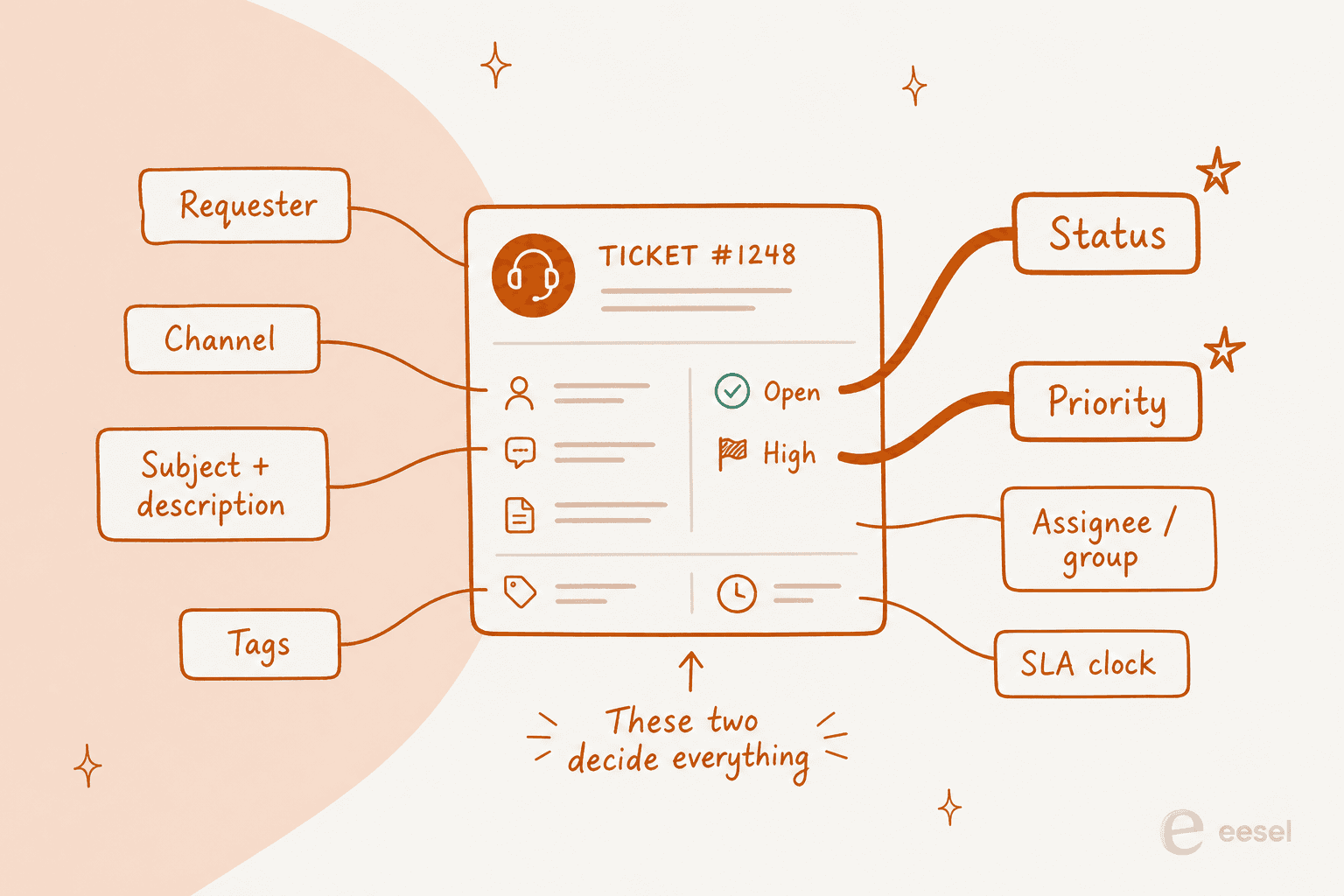
A ticket is a row in a database. That is the whole thing. A record with a clock attached to it, plus a handful of fields (status, priority, who owns it, when the SLA runs out) that end up deciding almost everything about how the request goes. Zendesk ships six statuses. Freshdesk ships four. Jira Service Management shows your customer a different status name than the one it shows you, and HubSpot has no status field at all, just pipeline stages wearing the name.
The bit that gets left out of the definition: most tickets do not die at the end of that lifecycle. They die in the middle. Parked in waiting-on-the-customer, or bounced back through a reopen. One help desk audited its own queue and found 90 of its 200 open tickets were sitting on users who never wrote back. An ITSM lead spotted a 34% reopen rate tucked into the corner of a report headlined "we closed 5,000 tickets this month." Ticket count is the number leadership asks for. It is also the least honest one on the board.
I work eesel's support queue, and eesel has been putting AI on other people's queues for years now. The lesson that keeps repeating is not the one you would expect. Answering faster barely moves anything. What moves it is stopping the repetitive tier-1 questions from ever becoming tickets, then leaving the humans the ones that actually need a human. On one e-commerce inbox I cross-validated against 100 real tickets, 22% of what came in was not a ticket at all, it was spam. Zero false positives catching it.
What a help desk ticket actually is
Someone emails, or fills in a form, or opens a chat, or posts on your WhatsApp number. The help desk creates a record with a unique ID. Every reply after that attaches itself to the same record instead of starting a fresh thread somewhere else.
That is the whole trick, and it is why a ticketing system is a different animal from a shared mailbox. A mailbox gives you messages. A ticket gives you a message plus state, which is to say: who owns it, what stage it is at, how urgent someone decided it was, how long it has been sitting there, and what happened the last time this person wrote in.
Here is the same thing in a real agent workspace, with the interaction history stacked down the right-hand side.

Two fields carry more weight than the rest. Status decides whether anyone is currently working the ticket. Priority decides whether the SLA clock is ticking fast or slow. Get either wrong and the other twelve fields will not save you. It is also worth knowing the difference between a help desk and a service desk before you start arguing about which fields are mandatory, because ITSM teams and customer support teams want very different things from the same record.
The fields every ticket carries
Vendors describe their field sets differently but the shape is consistent. Zendesk's standard field set is Requester, Follower, Assignee, CCs, Share, Subject, Description, Status, Type, Priority, Tags, Approval status, Resolution type, Resolution tier and Channel group. Subject is required and capped at 255 characters, and Description is not a separate field at all: it is literally the ticket's first comment.
Freshdesk ships 11 default fields and will not let you delete any of them, though you can hide them from customers. Its Source field has 13 fixed choices, auto-populated from the channel the ticket arrived on.
A few field behaviours are worth committing to memory because they bite:
- Zendesk's Type field is a one-way door. Once you set it to Question, Incident, Problem or Task, "you can't change it to blank again." Deactivate the field entirely and every ticket silently defaults to Incident.
- Turning off priority turns off your SLAs. Zendesk states it plainly: "If you deactivate the Priority field, Zendesk SLA targets will not apply." Priority is not even a required field, which is a quietly dangerous combination.
- Freshdesk's priority cannot be edited at all. It is "hard-coded into our systems because it is directly tied to the SLA Policies functionality." If you want different labels, you build a custom field and run automations off that.
- Deleting a dropdown value nulls the data. Freshdesk warns that changing or removing a dropdown choice already in use sets that field to null on existing tickets. That is a real reporting footgun.
The AI era has already changed the schema. Zendesk now ships a Resolution tier field with values Assisted escalation, Contained resolution and Verified resolution, and HubSpot's ticket object carries hs_ticket_owner_type with values Human rep, Customer Agent and Rule-based bot. Both vendors have baked "who or what actually handled this" into the core ticket record. That is a bigger signal about where support is going than any product launch.
If you are designing fields from scratch, keep the mandatory ones few. There is a well-worn line from an IT manager on a Reddit thread about ticket fields that captures the trade-off perfectly: "it takes me longer to fill in the ticket then it did to resolve the issue." Every extra required field is a small tax on the person least motivated to pay it.

Ticket status, and the two places tickets go to die
Every vendor has a lifecycle. None of them agree on what it looks like.
| Zendesk | Freshdesk | Jira Service Management | HubSpot | |
|---|---|---|---|---|
| Default statuses | New, Open, Pending, On-hold, Solved, Closed | Open, Pending, Resolved, Closed | Waiting for Triage, Waiting for Support, Waiting for Customer, Resolved | New, Waiting on contact, Waiting on us, Closed |
| Priority values | Low, Normal, High, Urgent | Low, Medium, High, Urgent | Highest, High, Medium, Low, Lowest | Low, Medium, High, Urgent |
| Waiting-on-customer state | Pending | Pending | Waiting for Customer, shown as "Requester Action Needed" | Waiting on contact |
| Auto-close rule | 4 days after Solved; 28-day system cap | 72 hours after Resolved | Not set by default | Not set by default |
| Custom status gate | All Suite and Support plans, up to 100 | Growth plan and up | Any workflow status is editable | Starter and up to add pipelines |
| Separate resolution field | No | No | Yes (Done, Won't do, Duplicate, Known error) | Yes (free-text) |
Three things in that table are worth pulling out.
Solved and closed are not the same thing, and closure is usually not yours to give. Freshdesk draws the sharpest line of the four: Resolved means the ticket is completed "according to the agent," while Closed means it is completed "according to the customer." If the customer never closes it, Freshdesk closes it automatically after 72 hours. Zendesk goes further in its lifecycle docs and says tickets "can't manually be set to Closed" at all; an automation does it four days after solved, and even if an admin kills that automation a 28-day system rule closes the ticket anyway.
Some statuses lie to the customer on purpose. Zendesk's On-hold is "an internal status that the ticket requester never sees. While a ticket is set to On-hold, the requester sees the status as Open." Jira Service Management does the same thing more honestly, mapping an internal "Waiting for Customer" to a portal label that reads "Requester Action Needed."
The custom-status ceiling is theatre. Zendesk lets you create up to 100 ticket statuses, then notes that the picker "will display the first 10 active ticket statuses." Ninety of them are effectively invisible to the agent who has to pick one.
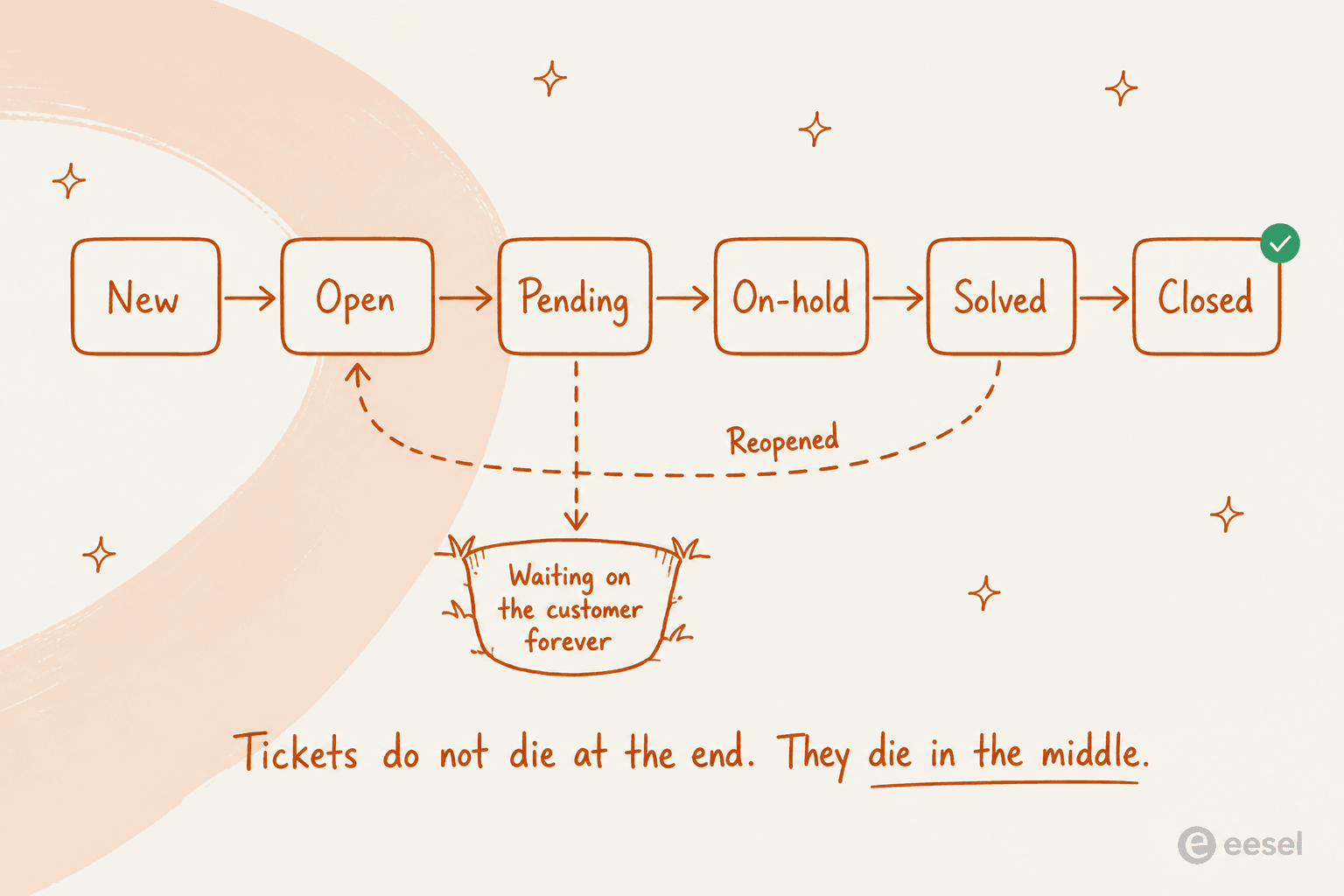
Now the part that gets left out of every "what is a ticket" explainer. Tickets rarely stall at the end of that flow. They stall in the middle, and there are exactly two potholes.
The first is the waiting-on-customer bucket. A help desk lead posted this after auditing their own queue:
"I was going through our queue today and found 90 tickets where we responded, asked for more information from the customer but then never heard back from them. They just sit there inflating our numbers and that honestly doesn't look good for management. We have been called before for unresolved open tickets so this is a big deal.
Tried closing a few out and surprisingly I got complaints from users saying we closed their issue without fixing it, even though, you know, they never replied to us."

Ninety of two hundred. Nearly half the "open" queue was not work at all. The fix is unglamorous and it works: pick an auto-close rule, write it into the reply text so nobody is surprised, and let it run. One IT manager on r/ITManagers reported cutting a team's backlog by 54% by auto-closing pending-customer tickets older than five days.
The second pothole is the reopen. A reply to a solved ticket reopens the same record and, in Zendesk, auto-assigns it straight back to the agent who solved it. A reply to a closed ticket instead spawns a follow-up ticket that references the original. That distinction matters more than it sounds, because it means your reopen rate is only measuring the four-day window between solved and closed. Anything after that shows up as a shiny new ticket.
Priority is not severity
The most common ticket-design mistake I see, by a distance, is letting the requester set the priority themselves.
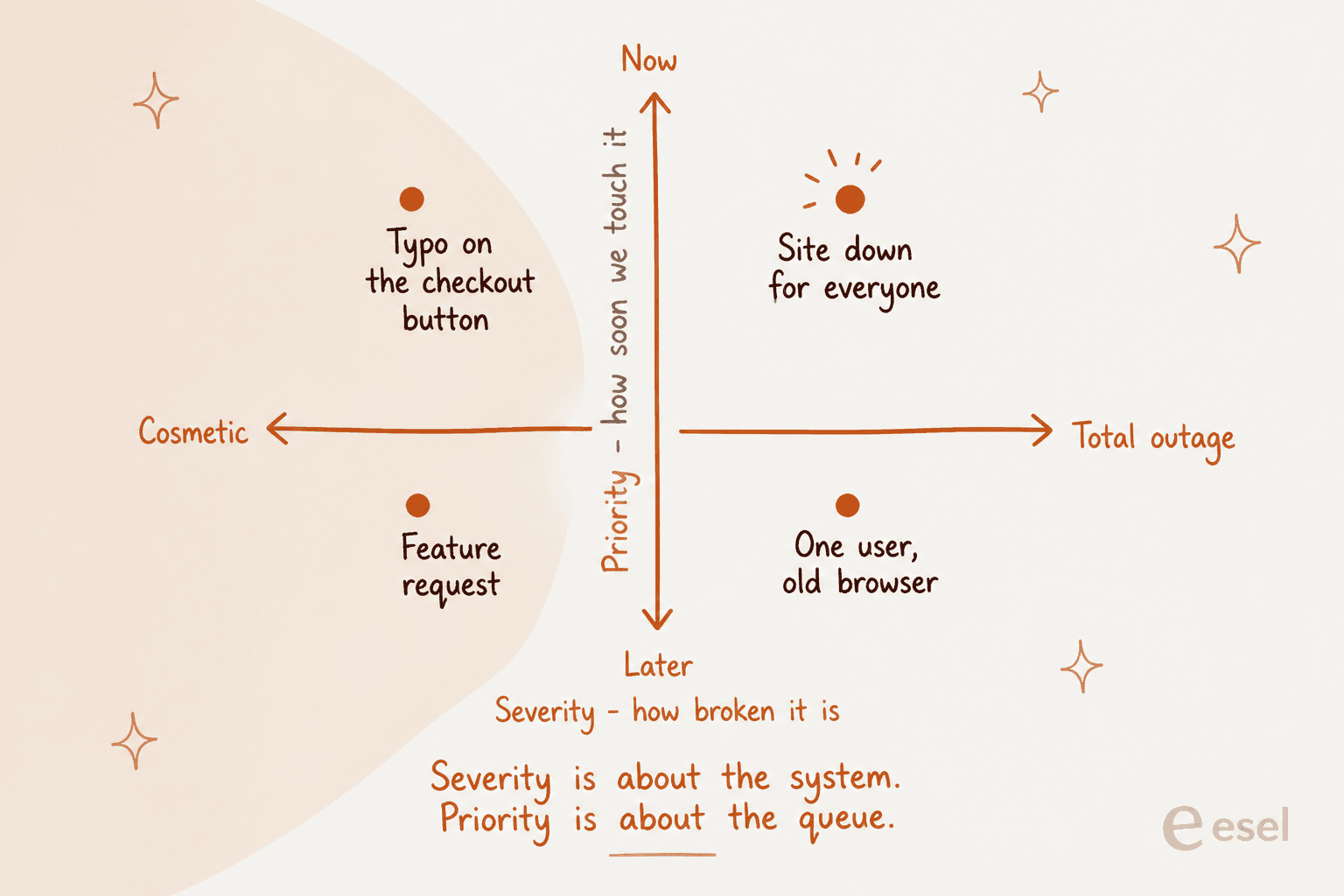
Severity is a property of the system: how broken is the thing. Priority is a property of your queue: how soon your team touches it. They correlate, but they are not the same axis, and the interesting tickets are the ones where they diverge. A typo on a checkout button is cosmetic and belongs at the top of the queue because it leaks revenue every hour. A total failure for one user on a browser you dropped support for last year is severe and can wait until Thursday.
Hand the priority dropdown to the person filing the ticket and the distinction collapses within a quarter:
"Dealt with this decades ago. It was scrapped quickly because as you might imagine it was abused to death. It really didn't bother me though. I still got the same number of tickets and just slogged through them. When people got mad because we were missing SLAs we just replied there was nothing we could do now that all tickets were priority."
That comment pulled 371 upvotes, and the reply underneath it ("if everything is high priority, then nothing is") pulled another 82. It is the most agreed-upon opinion in support operations.
The workable version is to derive priority from things the requester cannot inflate: how many people are affected, whether a workaround exists, whether money or compliance is on the line, and which customer tier filed it. That is a rules problem, and increasingly an AI ticket prioritization problem, because those signals sit in the ticket text rather than in a dropdown.
If you want the mechanics, I have written up intent-based routing separately. Zendesk's own intelligent triage takes a swing at this natively, as does HubSpot's ticket routing.
One more thing worth doing on day one: make sure VIP routing is a rule and not a favour someone remembers to do. And if your team runs SLA policies, check that forwarding or reassigning a ticket does not silently restart the clock, because that is the single most common reason an SLA quietly stops calculating.
The number nobody wants to look at
This is the part I would put on a poster if anyone let me.
Ticket count is the metric every leadership team asks for. On its own it is close to worthless, and arguably worse than worthless, because the quickest way to move the number is to stop fixing things properly.
"The incentive is close tickets, not fix problems. Those only seem the same to someone who hasn't worked in this sort of environment. Support will fight to be the first to grab the password resets, and the person who spends a full day permanently resolving an issue that has affected 2000 users for the last 3 years will be both hated by their colleagues and lectured by management. The more simple, reoccurring problems that continue to exist, the better your stats are. Permanently fixing problems hurts you."
The same thing from the agent's chair, in one exchange:
"I got chewed out once for being at like 75 while everyone else was at 100, and our "top closer" was at like 150. I asked for the reopen rate. They said "Don't worry about that, you just need to get your tickets up." 😂"
And from the manager's chair, with the numbers attached. Chris Hodder, an ITSM practitioner, wrote this up on LinkedIn:
"I once saw a Head of Service proudly show a report: 'We closed over 5,000 tickets this month!' The room was impressed. But I noticed a number hidden in the corner: Reopens were 34%. In other words, a third of tickets weren't solved at all. Just recycled. We reframed the metrics. Stopped chasing volume. Focused on FCR, reopen rates, escalation trends. Six months later, ticket volume dropped 18%. But customer satisfaction? Through the roof."

A third of that queue was the same work coming round again. Six months after the team switched to measuring reopens and first-contact resolution, volume fell 18% on its own, because they were fixing causes instead of clearing rows.
The open-ticket count has the same problem in reverse. A help desk on r/sysadmin got publicly criticised for having over 100 week-old tickets, dug into the list, and found more than 80 of them were sitting with another team entirely. They still counted against the desk that opened them, because that desk created the record.
Two more things about metrics that are worth knowing before your next QBR.
First, be careful with one-touch resolution. Zendesk's own documentation says the calculation "includes solved or closed tickets with a single agent reply or no replies." Tickets nobody ever answered count as one-touch wins. That is not a scandal, it is just a formula, but it does mean the number is flattering you by an amount you should go and measure.
Second, and this caught me out while researching this piece: nobody publishes a reopen-rate benchmark. Zendesk defines the metric and gives you the Explore recipe to build the report. MetricNet publishes benchmarks for cost per ticket, first level resolution, tickets per technician and a dozen others. Neither publishes an industry average for reopens. The single best signal of whether tickets are actually getting fixed is the one the industry has no shared number for, which tells you roughly how many teams are watching it.
For what it is worth, here is what the measured stuff looks like. Freshworks' Freshservice Benchmark Report 2025, drawn from more than 187 million tickets across 10,551 organisations, put average resolution time at 21.96 hours, first response at 9.36 hours, first contact resolution at 74.14% and resolution SLA adherence at 96.16%. MetricNet measures a different thing, and the distinction is worth stealing. In its first level resolution paper, first contact resolution is "a quality metric that strongly affects customer satisfaction," while first level resolution is "a cost metric that strongly influences total cost of ownership." A ticket your level-1 agent researches and calls back about is not first contact resolution, but it is first level resolution, and it saved you an escalation. On that cost measure the average service desk sits at 74.3%, and only 1.4% clear 95%.
So: track reopen rate, resolution rate, first-contact resolution and CSAT together. Track raw closes only as a capacity signal, never as a performance one. And if a dashboard makes a queue look great while the people in it look miserable, believe the people.
What a ticket actually costs you
Cost per ticket is the number that reframes everything, because it is not one number. It is a ladder, and the research firm that popularised the metric has the receipts.
Jeff Rumburg of MetricNet, writing for HDI, published North American cost per ticket broken out by channel. These are 2021 figures, so treat them as ratios rather than today's dollars:
| Channel | Average cost per ticket | Range |
|---|---|---|
| Walk-up | $37.52 | $19.81 to $104.68 |
| Voice | $17.19 | $7.04 to $40.94 |
| $16.13 | $6.29 to $32.40 | |
| Chat | $15.72 | $5.92 to $36.33 |
| Web submit | $15.07 | $5.46 to $29.57 |
| Self-help | $2.37 | $0.74 to $4.18 |
A voice ticket costs 7.3 times what a self-help ticket costs. The source's own framing of the full spread is that it varies "by more than two orders of magnitude (100X) from the lowest cost self-help ticket to the highest cost walk-up ticket."
Escalation stacks the same way, and this is the part most write-ups miss. In an earlier MetricNet paper (2011 data, so again read the ratios), level 1 averaged $22, level 2 desktop $62, level 3 applications and networking $85, field support $196 and vendor support $471. The costs are cumulative, not alternatives: a ticket escalated from level 1 to level 2 costs "$62 plus $22, for a total of $84."
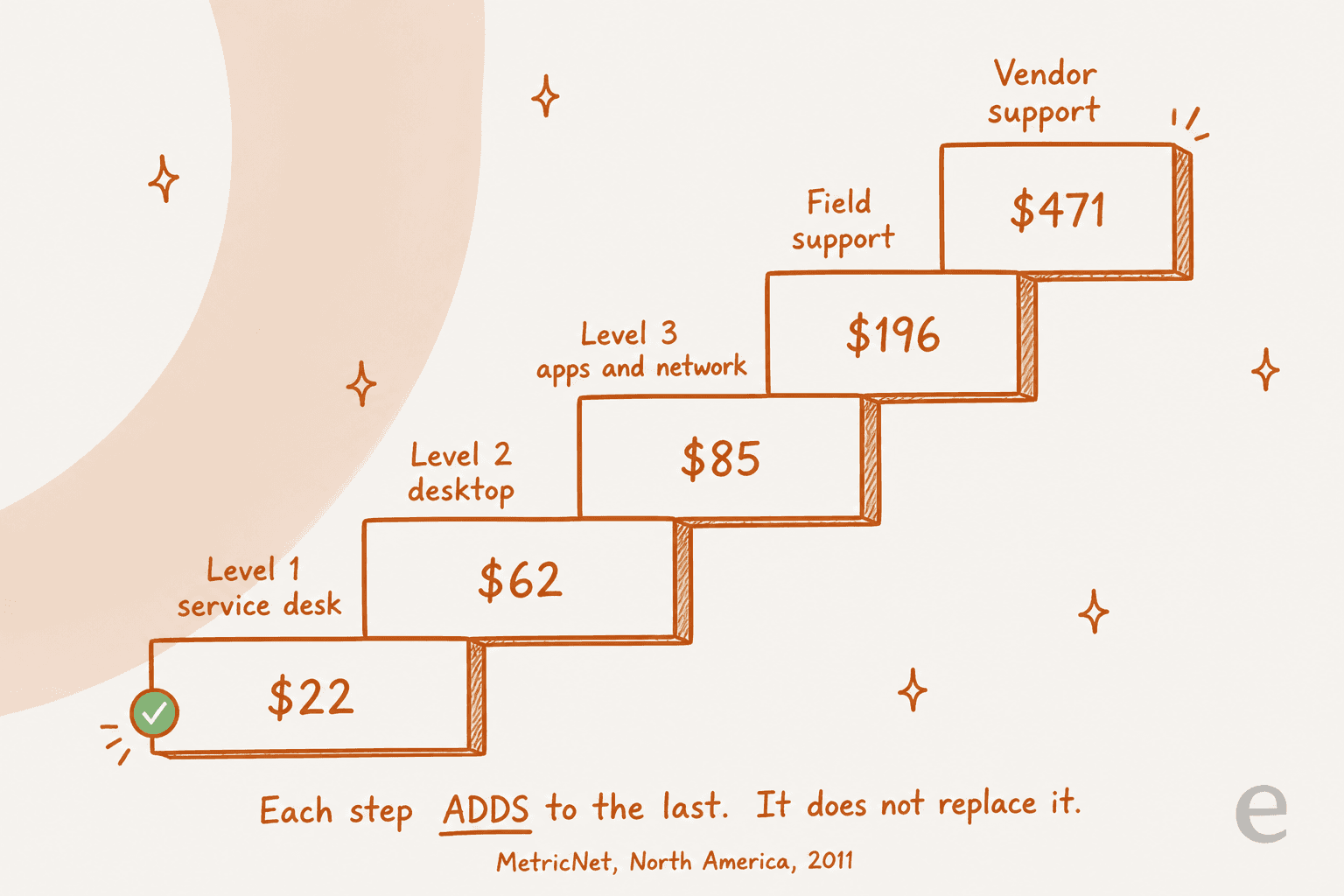
So the lever that moves your support budget is not handle time. It is how far up that ladder the average question travels, and how many of them are the same question wearing a different hat. Which is also why tier-1 deflection and a decent internal knowledge base beat almost any efficiency project you could run on the agents themselves.
Put your own numbers in:
The number that usually surprises people is the third one, not the first. Deflection does not empty your queue. It changes what is left in it, which is the point. If you want the fuller version of this argument, there is more in reducing ticket volume and the deflection guide separately.
The ticket that never got created
There is one more category worth naming, and it does not show up on any dashboard you own. The request that never became a ticket at all, because the person just tapped you on Slack instead.
"Stop answering the messages. They do it because it works."
That is the top comment on a thread with 1.2k upvotes, and it is correct but hard to act on if you are the friendly one. The gentler version from the same thread is a saved reply: "sorry, I am tied up with something at the moment. Can you please open a ticket so I don't forget."
There is a second benefit that a sysadmin in the same thread put better than I could:
"It's amazing how much of a bullshit filter requesting a ticket is for end users.
I had one user whine that I wasn't working on their issue, in spite of multiple emails and messages, and then escalated themselves to my VP. The VP asked for a ticket number, that the user couldn't produce because they never opened one. My VP told them to open a ticket and we'd work on it."
The structural answer is to make ticket creation cheaper than the tap on the shoulder. That means an email address that becomes a ticket, a Slack bot that opens one from a message, a help desk portal that does not demand nine fields, and a chat widget that files the ticket for the customer. Every channel you close pushes volume into the one nobody can measure.
How AI changes the ticket, honestly
I want to be careful here, because this is the point where support content usually goes off a cliff.
AI does not make tickets disappear. What it changes is which tickets end up in front of a person, and what state they are in by the time they get there. Three parts of this work reliably in 2026. The fourth is where the category is still selling something it cannot fully back, and that is the one worth reading twice.
Triage works. Classifying a ticket, tagging it, setting priority and routing it to the right group is a pattern-matching job, and models are good at pattern matching. On one real-traffic trial against a German e-commerce inbox, triage accuracy came in at 93%, and spam detection at 100% with zero false positives on the 22% of that inbox that was junk. That is a category of work nobody enjoys doing and nobody misses. If you want the mechanics, see ticket classification, AI support tagging and spam ticket filtering.
Drafting works, with a caveat. In that same trial the AI's drafts were directionally right 88% of the time, but agents sent only 12% of them as written. They read the draft, kept the facts, and rewrote it to a third of the length in their own voice. That is not a failure, it is what a good helpdesk copilot looks like in practice. The fix is training on the team's own sent replies rather than on the help centre alone.
Full resolution works for a slice. A gig-economy analytics company running eesel on Zendesk resolved 73% of their tier-1 requests in the first month. An internal IT help desk on Jira Service Management sat at 15% deflection with a 55% target. The gap between those two numbers is not product quality, it is how repetitive and how documented the incoming questions are.
Which brings up the thing you should check before believing any resolution-rate number, eesel's included. Ask what the unit is. Vendors are not measuring the same thing:
| What is being counted | Vendor and unit | What it actually means |
|---|---|---|
| Verified resolution | Zendesk | AI handled it, no follow-up, and the conversation passed an LLM check 72 hours later |
| Session | Freshworks | All interactions with the bot in a 24-hour window, billed whether or not it worked |
| Ticket handled | eesel | One ticket or conversation, not per reply |
Zendesk's definition is the most rigorous published one I have seen, and in May 2026 it split into three tiers. Assisted escalation means the AI helped but a human finished. Contained resolution means the AI handled it and the customer went quiet, but the conversation failed the 72-hour verification. Verified resolution means it passed. Only the last one gets billed. That distinction is worth internalising even if you never touch Zendesk, because it means a conversation can look resolved and not be resolved, and most "up to 80%" claims in this category are counting the middle tier.
For a sanity check on the ceiling, MetricNet's own read on AI metrics from April 2025 says leading organisations "are leveraging AI to automate up to 50% of customer interactions." When the independent benchmarking firm's ceiling for the best teams is 50% and the vendor pages say 80%, plan for the 50.
Confidence is the part vendors under-sell. The most common objection I hear is not "will it work," it is "what happens when it is wrong." A CX lead at a DTC supplements brand running around 7,000 tickets a month on Gorgias put it exactly right on a call:
"The AI will never be able to answer 100% of the questions, but if it tries and just answers 'sorry I don't know this,' I cannot go and check all my 7,000 tickets to see if the AI actually made a good answer. I need an AI who is only handling the tickets that it's confident to handle and all the other ones, leave them alone."
That is the correct requirement, and it should be the first question you ask any vendor. An AI that answers everything at 80% accuracy is worse than one that answers 40% of tickets at 98% and leaves the rest untouched, because the second one you can trust without auditing. There is more on AI hallucinations in support and AI-to-human handoff if you are drawing that line now.

A ticket hygiene checklist that actually holds
All of the above collapses into roughly eight rules. These are the ones I would actually fight for in a planning meeting.
- Make priority a rule, not a dropdown the requester touches. Derive it from scope, workaround, revenue and customer tier.
- Pick an auto-close rule and publish it in the reply text. Five days pending-customer is a reasonable default. Silence is not consent, but neither is an open ticket.
- Separate solved from closed and respect the difference. Solved is your verdict, closed is theirs. Do not report on the two as one number.
- Track reopen rate next to every close-count you publish. If you only add one metric this quarter, add this one.
- Keep required fields to the minimum that survives reporting. Every extra field is a tax on the person filing.
- Route the aged tickets by who is actually holding them, not by who created them, or your desk will wear another team's queue.
- Have a one-ticket-per-issue rule and enforce it gently, because reopens for unrelated problems poison your reopen metric.
- Close the side doors. Slack DMs, direct emails and hallway requests are real volume that never shows up in any report.
If your team runs macros or canned responses, audit them against this list once a quarter. Half of a queue's bad hygiene is a macro somebody wrote in 2023 that sets the wrong status.
Try eesel on your ticket queue
If your queue looks like the ones described above (a lot of repetitive tier-1, a pending bucket nobody has audited in months, and a reopen rate nobody has ever measured), that is a fixable shape.
eesel plugs into Zendesk, Freshdesk or Jira Service Management in a few minutes, reads your help centre and your past tickets, and starts by doing the boring half of the job: triaging, tagging, setting priority and drafting the reply as an internal note so a human still presses send. You decide which ticket types it is allowed to touch and how confident it has to be before it answers, which is exactly the control the CX lead above was asking for. When you are ready, you let it resolve the tier-1 slice outright.
On the unit question from earlier: eesel counts 1 credit per ticket handled, not per reply and not per seat, on a fixed monthly plan from $299 for 500 credits. You can also point it at part of the queue only, so if you route 200 of your 1,000 monthly tickets to it, only those 200 use credits. Against $17.19 for the average North American voice ticket in 2021, or $22 for a level-1 IT ticket, that is the arithmetic that makes deflection worth doing at all. Free to try, no sales call.

The one thing I would push back on if you asked me: do not start by pointing AI at everything. Start with the slice you can name, measure it against the reopen rate you now know how to track, and expand from there. That is how the 73% number happened, and it is how the 15% one is climbing.