


A cloud-based ticketing system is help desk software the vendor hosts for you. Every request turns into one record, and that record carries a status plus an owner, with an SLA clock ticking on top of it. In 2026 the seat price is the smallest of the three bills you sign for. There is the per-agent fee. Then a separate AI meter, which counts a different unit at every vendor ($0.49 a session at Freshdesk, $0.85 to $1.00 an automated interaction at Gorgias, $0.75 a resolution at Help Scout). And plan gates as well, on reporting and on data residency, deciding what you can actually see and where your data sits.
Nobody demos the parts you cannot change later. Zendesk's New status is a one-way door. Freshdesk's priority field sits hard-coded to the SLA engine, and then there is Help Scout, which has no report builder at any price. Pick for those. Not for the pricing page.
I have spent the last three-plus years putting AI agents on live support queues at eesel. The scar that shapes this whole guide is a real one. Paying customers, one of them a Danish solar-energy provider, had a bot fabricate answers and send them to real customers in the cases where the knowledge base had no match. So now every rollout gets simulated against historical tickets first, before a single reply goes out. It is also why eesel counts 1 credit per ticket it actually handles and charges no per-seat fee, which means you can route 200 tickets of your 1,000 and only those 200 use credits (the 500-credit plan is $299 a month).
What a cloud-based ticketing system actually is
Strip the marketing off and there is three things stacked here. A record: one ticket per request, which carries a subject and a requester, a status, a priority, plus whatever custom fields you add. A queue: the rules deciding who the ticket lands on, and when the clock starts ticking. And a contract, which is the vendor running the servers, picking the region, publishing (or not publishing) an uptime number, then billing you monthly.
That record is the whole difference between this and a shared mailbox. Which is the comparison most small teams are actually making, and I unpack it properly in shared inbox vs ticketing system. The same record also splits customer-facing from employee-facing setups. The same software runs an internal ticketing system for IT and for HR, then the heavier ITSM ticketing system category piles change management and assets on top of that.
The cloud part is a default now, not a choice. Zendesk is multi-tenant SaaS on AWS, with no self-hosted option at all, per its trust center. Gorgias sits on Google Cloud instead of AWS. Zoho is the odd one out. It runs its own data centers, as primary and secondary city pairs across eight regions plus a separate China region, all listed on Know Your Datacenter.
If what you specifically want is software you host by yourself, that is a different shortlist entirely. My open source ticketing system roundup is the right place to start from.

What "cloud" buys you is real. No upgrade weekends. No capacity planning either, plus a mobile app that works, and a new channel becomes a toggle instead of a project. What it costs you is control over exactly the three things above. The rest of this guide is about the parts of that trade which show up on month four, not on day one.
Cloud ticketing systems compared on the numbers that move
Here is the same set of vendors, lined up on the dimensions that actually differ. Every figure is the annual-billing rate taken from the vendor's own pricing page, as of late July 2026. "Not found" means the vendor publishes no figure I could locate, which is already telling you something. Enterprise ITSM suites are sitting outside this table on purpose, because ServiceNow is a different buying process entirely.
| Tool | Entry paid seat | Plan most teams land on | AI billing unit | AI rate | Custom reports from | Uptime commitment | Data regions |
|---|---|---|---|---|---|---|---|
| Zendesk | $19/agent (Support Team) | Suite Professional $115/agent | Verified resolution | Not published | Suite Professional $115 | 99.9%, Premier Support only | US, EEA, UK, JP, AU (add-on) |
| Freshdesk | $19/agent (Growth) | Pro $55/agent | Freddy session (24h window) | $0.49 after 500 included | Pro $55 | None published | US, EEA, UAE, IND, AU |
| Zoho Desk | $7/user (Express) | Professional $23/user | No public per-resolution rate | not found | Standard $14 | 99.9% company-wide | 8 region pairs + China |
| Help Scout | $25/user (Standard) | Standard $25/user | AI Answers resolution | $0.75 | No report builder at any price | None, service is "as is" | United States only |
| Front | $25/seat (Starter) | Professional $65/seat | Autopilot conversation | From $0.05 | Enterprise $105 | None published | US or EEA, via your rep |
| HubSpot Service Hub | $7/seat (Starter) | Professional $90/seat | Credits, 50 per resolution | $9 per 1,000 credits | Professional $90 | not found | not found |
| Gorgias | $40/mo flat (Starter) | Basic $77/mo (300 tickets) | Automated interaction | $0.85 to $1.00 | All Helpdesk plans | not found | GCP US, EU, Australia |
| Jira Service Management | $25/agent (Standard, 1-15) | Standard $25/agent | Rovo resolution | $1.00 | Standard | not found | not found |
| eesel | No seat fee | Teammate plan, from $299/mo (500 credits) | Credit (1 per ticket handled) | 500 credits for $299 | Included | not found | not found |
Two things jumps out of that table. First one, the cheapest seat and the cheapest month are rarely the same vendor, because the AI meter and also the reporting gate both move the real number. Second, Gorgias and eesel are the only two rows where adding one more person to the team does not change the bill at all.
Work out what a month actually costs
The pricing pages all quote you a seat rate. A month is the thing nobody quotes you. Plug your own volume in below, then the arithmetic runs on the published 2026 rates from the table above.
Run it at 1,000 tickets and 5 agents and the shape of the market shows up immediately. The vendors which look cheap on the seat line are not the ones finishing cheapest on the month. Zendesk's row cannot even be completed, because it publishes the unit but not the price.
The ticket data model is the part you cannot redesign later
Every demo shows you the inbox. Almost nobody is showing you the fields, which is a shame, because the field model is the thing you are still living with on year three.
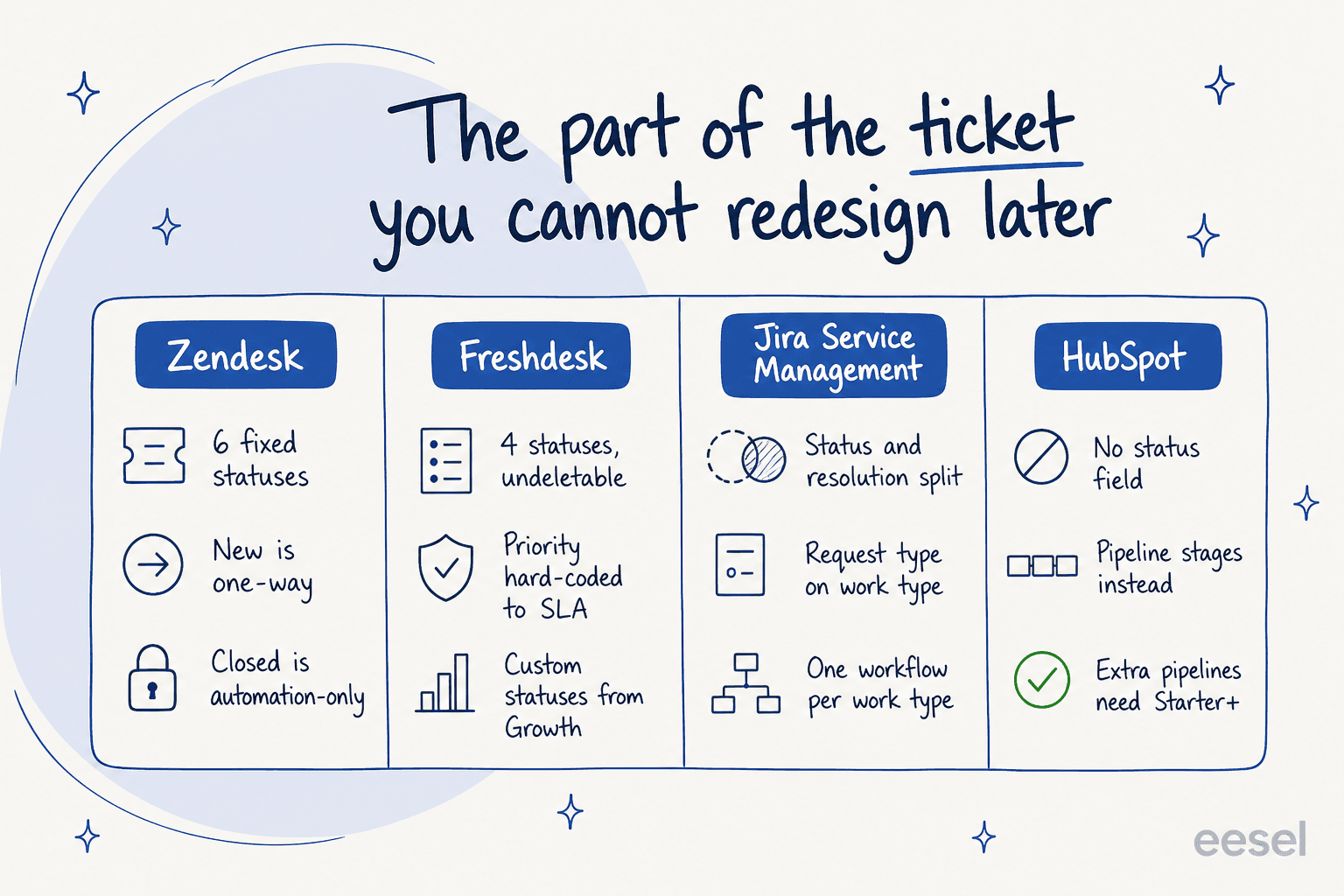
Zendesk ships six standard statuses (New, Open, Pending, On-hold, Solved, Closed), and several of them is one-way. Once you move a ticket off New, the docs are explicit that "you can't change the status back to New". Closed you cannot set by hand either, since closure is handled by an automation, and with the closing automations switched off, tickets close 28 days after being solved on a rule that "can't be changed". Custom statuses exist on all Suite plans and are capped at 100 per account, but only the first 10 active ones show up in the picker, per managing ticket statuses.
Freshdesk ships four statuses you cannot delete, plus a priority field that "cannot be edited and is hard-coded into our systems because it is directly tied to the SLA Policies functionality", per its ticket fields guide. For custom statuses you need Growth or higher. In that same doc there is also a real data-loss footgun: change or delete a dropdown choice which is already in use, and "the value of that field will be changed to null" on the existing tickets.

Jira Service Management models it different, and more strict: a request type sits on a work type, which then sits on a workflow, and Atlassian's own explainer warns that "if you create a work item without a request type, your requests won't have access to all Jira Service Management features". It is the only one here separating status (where the work is) from resolution (how it ended).
HubSpot has no status field in the usual sense at all. A ticket there is a CRM record sitting on a pipeline, and HubSpot's docs note that "for tickets, pipeline stages are called statuses by default, but they are the same as other object stages". Flexible, until the moment you notice extra pipelines need Starter and above, also Category and Language are Enterprise-only properties.
Why this matters on a Tuesday? Because the status model is what decides what your backlog number even means. One support lead put the failure mode better than any vendor doc:
"I was going through our queue today and found 90 tickets where we responded, asked for more information from the customer but then never heard back from them. They just sit there inflating our numbers and that honestly doesn't look good for management. We have been called before for unresolved open tickets so this is a big deal."

Ninety of two hundred "open" tickets were sitting there waiting on a silent customer. The open count was never the backlog. The fix is a pending state plus an auto-close rule, which is exactly the kind of thing you can only build when the status model lets you. One admin in r/ITManagers cut a group's backlog by 54%, just by auto-closing the tickets older than five days.
The same warning applies on priority too. Letting requesters set it sounds democratic, then it ends the way you would expect:
"Dealt with this decades ago. It was scrapped quickly because as you might imagine it was abused to death. It really didn't bother me though. I still got the same number of tickets and just slogged through them. When people got mad because we were missing SLAs we just replied there was nothing we could do now that all tickets were priority."
If you are still shaping out your queue rules, my ticket routing and ticket tagging guides go one level deeper than this section can.
The AI meter is a second bill, and every vendor counts differently
This is the biggest change to cloud ticketing since 2024, and it is also where most 2026 budgets go wrong. Every vendor sells an AI layer now. Every vendor meters it separately from the seats, and no two vendors bill the same unit. Worth to flag that the layer comes in two flavours you should keep apart: the customer-facing agent which closes tickets on its own, and the helpdesk copilot that drafts for a human. They are billed differently and they move different numbers, which is the whole argument in an AI help desk.
Read the definitions first, rather than the numbers:
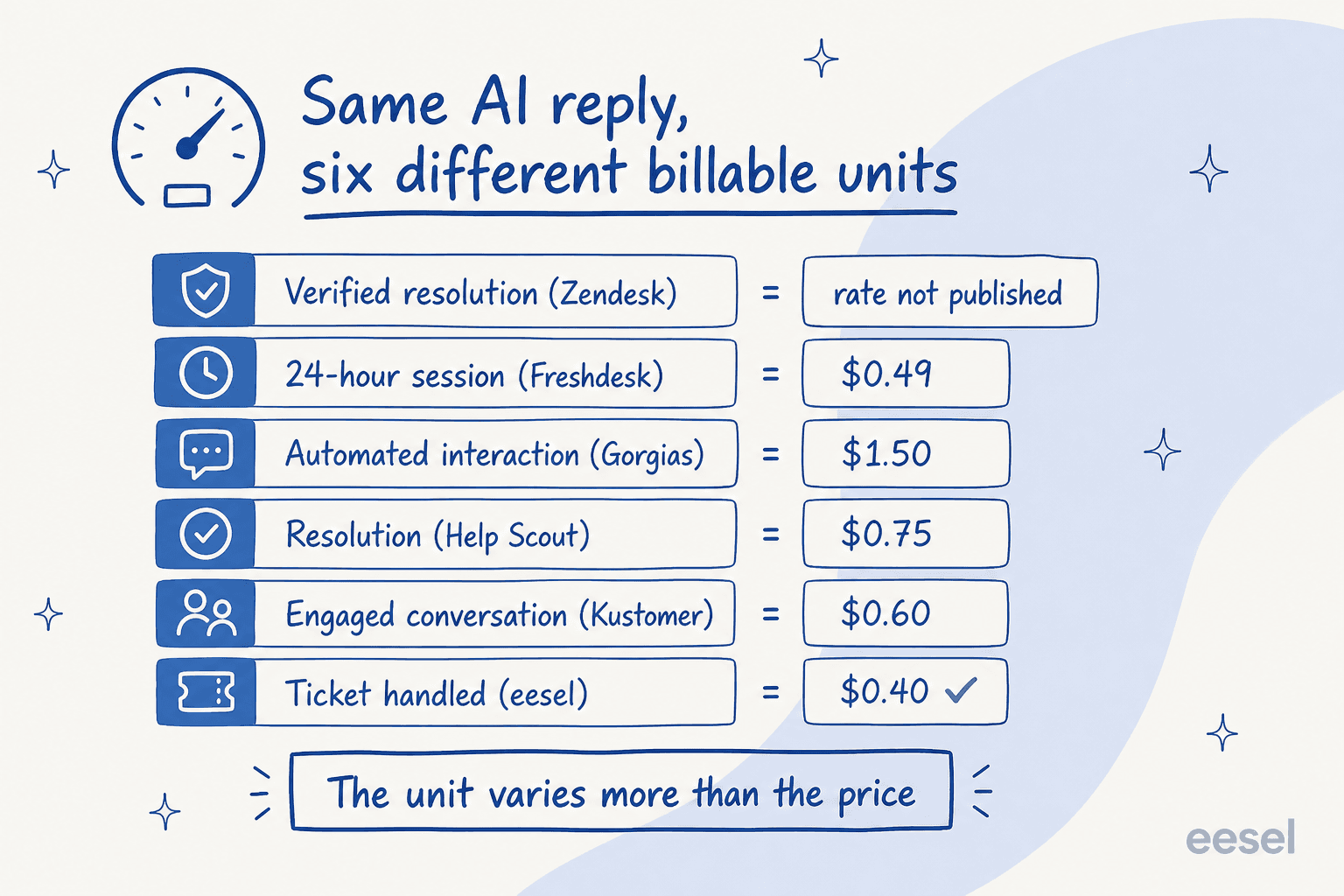
- Zendesk bills the verified resolution. Since 18 May 2026 there is three tiers: assisted escalation (AI helped, human finished) is not billed, contained resolution (AI finished, failed the 72-hour verification) is also not billed, and the verified resolution is billed. Which is a fairer model than the one it replaced. The rate is still not on any public page.
- Freshdesk bills the session, which is defined as all the interactions between a user and the agent inside a 24-hour window. So it bills the attempt, not the outcome. 500 sessions come included on Growth, Pro and Enterprise alike, after that it is $49 per 100 sessions.
- Gorgias bills the automated interaction at $0.85 to $1.00 depending on the plan, plus a second meter on tickets at $0.40 or $0.36 each over the allowance, per its pricing page.
- Help Scout bills the resolution at $0.75, and it is unusually strict on what counts: one per conversation, and not counted when the customer escalates, or searches the knowledge base, asks more questions, clicks "I still need help".
- Jira Service Management runs three meters at once: bundled Rovo credits, then $1 per Rovo Customer Service resolution, and $0.30 per assisted conversation for the virtual agent, where an assisted conversation counts any conversation matched to an intent "regardless of whether the virtual service agent resolves the issue or escalates it".
- eesel uses 1 credit per ticket or conversation handled, not per the reply, on a fixed monthly plan from $299 for 500 credits with no platform fee and no seat fee, on published rates.
The unit is the whole argument here. When Zendesk introduced its automated-resolution model, the complaint was never about the price:
"Complete trash lol, stuff I used to get free now counts as an AR. Most of the ARs are abandoned chats. There's no dispute resolution process. Complete scam. I used to like Zendesk but since trying the new bot and now this I have little good will left"
And at real volume the arithmetic is not small. A B2B SaaS team with two agents and roughly 1,900 tickets a month ran the numbers out loud: "Even at a conservative 50% deflection rate, that's ~$1,425-1,900/month just for AI on top of our existing plan."
Two practical asks for any vendor, before you sign the AI line. First, get the definition of a billable event in writing, including what is happening on abandoned chats and on escalations. Second, ask for a forecasting tool, because metered billing without one is the thing finance objects to. That gap is a live complaint: one admin noted Zendesk still had not shipped an AR forecasting tool months after the model launched.
It is also worth being honest on what the AI layer does not do. From our own trial data, a German online jewelry retailer running about 1,000 tickets a month on Zendesk and Shopify saw 93% triage accuracy and 100% spam detection, but only 12% of the drafts went out as-is, and there was a 7% factual error rate on drafts. The triage was the win. The autopilot was not there yet. If you want the failure modes in detail, I wrote them up in AI hallucinations in support and handing off to a human.
Uptime and residency: the two clauses buyers skip
Here is the part which surprises people who only ever read pricing pages. In cloud ticketing, an availability promise is usually a support-tier upsell, and not a standard term.
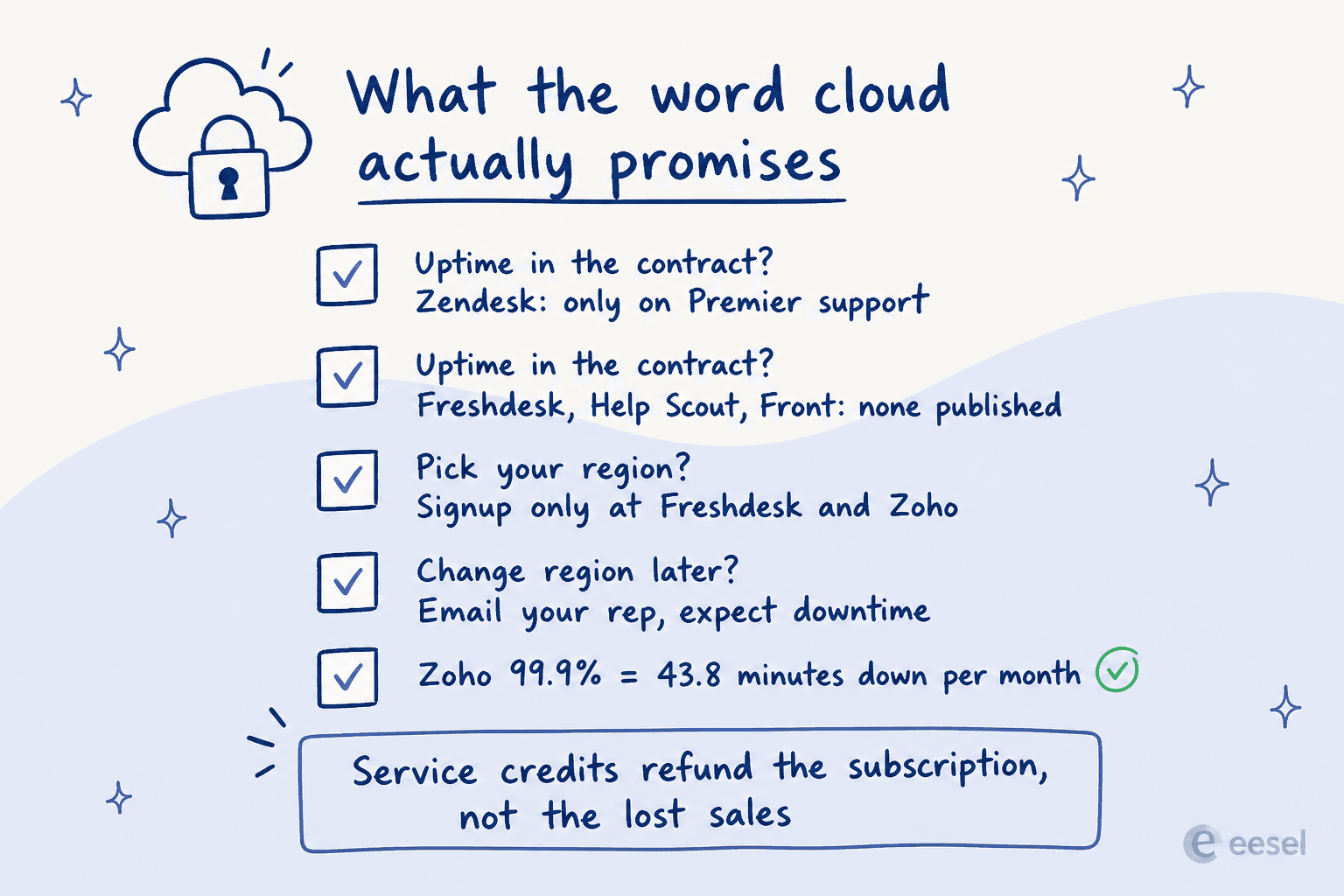
Zendesk's standard customer agreement carries no uptime number at all, and it disclaims that the services will be uninterrupted. The 99.9% figure everybody quotes attaches to Premier Support, which covers exactly five products, with Explore, Talk, WFM and QA sitting outside of the scope.
Help Scout is blunter still, and provides the service "as is" and "as available" in its terms of service. Front's SaaS agreement contains no uptime percentage, and no service-credit regime at all. Freshworks publishes none for Freshdesk either. Zoho is the one publishing a real number: 99.9% monthly, which it spells out as "approximately 43.8 minutes per month" of allowable downtime.
Residency is the same story, only with a signup-time twist. Freshdesk's region "can only be selected at the time of account creation", and moving it later means a support ticket plus an unquoted migration window, per its data storage doc. Zoho assigns the data center at signup and does not replicate across the regions, then gives you 14 days after deactivation before the old account and its data are deleted, per its DC migration guide. Zendesk's regional add-on is free on Suite Professional and above, but it is "included but not automatically activated", and until you activate it, Zendesk "may move the account data of customers who do not have or have not activated the Data Center Location add-on between regions without notice", per the add-on documentation. Front will pick your region for you unless you ask, and even then it says data "may be hosted outside of the chosen region".
A security admin who was working through exactly this on r/sysadmin put the realistic version well:
"And yes, trying to get all your data permanently resident in the EU is nigh impossible if you're using major cloud providers. For example, Microsoft's EU data boundary has a boat load of exceptions."
His closing line is the one to carry into a procurement meeting: you are assessing and managing the risk, not eliminating it. Ask for the subprocessor list. Ask where the backups land, and also what happens on failover, because a regional failover is exactly the moment a residency promise gets tested. Freshworks' own status page has recorded one of those, migrating affected customers out of the MEA region into EU North during an AWS disruption.
Reporting is where the plan gates bite hardest
Nobody switches ticketing systems because of a chart. Everybody complains about the charts.
The gates are steeper than what the pricing pages suggest. Custom report building at Zendesk starts on Suite Professional, which is a $60 per agent per month step up from Suite Team. Zendesk's UI data export is not available on Team plans and it is off by default, so the account owner has to contact support to switch it on. Freshdesk's new report option is only available from Pro onwards, and on any plan Freshdesk has no live dashboard. Zoho Desk switches custom reports on at Standard, but keeps the SLA dashboards for Professional and above. Front puts custom reports behind Enterprise at $105 a seat. Gorgias is the outlier here, shipping dashboards, SLA and CSAT reports, CSV export too, on every helpdesk plan.
Help Scout is the one to know about, because its pricing page implies a thing which its own docs then deny. Asked directly if you can build your own reports, the docs answer "Not in the app", and they point customers to the API, or Zapier, or third-party BI tools. That "custom reports" row on the pricing page means saved filter views.
Even where the builder does exist, usability is a real cost. A support lead who has built dashboards in a proper BI tool still hit the wall:
"I have never found anything as complex as Zendesk explore.
I've worked with ThoughtSpot building dashboards, reports and exports but omg Zendesk, you are taking so much of my time!!!!!!!!"
And when the native layer defeats people, the workaround is always the same one:
"The reports and automations can be somewhat difficult to navigate. We ended up just exporting all of our tickets every month and creating our own reports through Power query in Excel."

A director of client care doing a manual monthly export is a real line item. So before you buy, build the three reports you actually run every week inside of the trial, not after it. My Zendesk reporting and SLA tracking walkthroughs are the fastest way of seeing whether the tool can really do it.
Migration: the tickets move, the structure often does not
Switching cloud ticketing systems is easier than switching on-prem software, and harder than what any vendor's migration page suggests. The tickets themselves export fine. What breaks is everything which gave them their meaning, starting with the ticket tags your reporting is built on, then the custom field labels, the internal notes as well.
"I have exported my historical tickets to XML but not going to work. First my tickets are a mess. They are not properly organized, tagged, or anything. Lot of the info chatGPT would need to understand is in custom fields which are not labeled in any export."
That is a $15M-revenue business which had been on the same system since 2015. Unlabelled custom fields in the export are also the single most common reason why AI training on past tickets stalls after a migration. The model sees the ticket body, and none of the disposition data that made it useful.
The other thing worth to name honestly: a 15-year incumbent can still lose a senior buyer for entirely mundane reasons.
"Zendesk is very configurable, though I struggle to think of what I like about Zendesk. I found the reporting tool in particular to be very difficult to use. Their AI offerings felt bolted on versus integrated, and their integrations didn't work particularly well. Support was not timely. Pricing was not competitive. This is why we moved to another tool."

Four reasons in one breath, and none of them is a missing feature. If you are on that path, my Zendesk alternatives and top helpdesk software roundups cover where those teams end up landing.
What I would check before signing
Six things, in the order I would really check them.
- Build your three weekly reports in the trial. Not a demo of reports. Yours, with your own fields, on the plan you intend to buy. This one kills more shortlists than anything else.
- Get the billable-AI definition in writing. Specifically: abandoned chats, escalated conversations, plus repeat contacts inside the window. The resolution rate you are quoted means nothing until you know what counts as one.
- Export a sample and reimport it somewhere. Check that the custom field labels survive, and the tags and internal notes too, not only the ticket bodies.
- Find the uptime clause in the contract, not the marketing page. If it is tied to a support tier, then price that tier now.
- Confirm the data region at signup, not later. At Freshdesk and at Zoho this is a one-shot decision.
- Count the seats you will have in 18 months. Per-agent pricing compounds. If you expect the team to double, the usage-based options move position on the list entirely.
If the pain that sent you shopping is volume and not software, then fix that one first. A ticket backlog usually responds better to auto-close rules plus a working escalation path than it does to a migration.
The fastest lever on the volume itself is training AI on your knowledge base, rather than adding more seats. IT teams have their own version of this, which I cover in automated IT ticketing.
Worth keeping the deflection promise in perspective as well. Vendors will quote you numbers like Zendesk's "up to 80% of interactions", while MetricNet's benchmarking, which is published through HDI, puts the average self-service completion rate for service desks worldwide at 10.4 percent, ranging from zero up to 55. The honest read is that the gap between those two numbers is mostly setup quality. The way to find out which end you land on is to test on your own historical tickets, before you commit.
Try eesel on the cloud ticketing system you already have
Most teams reading this do not need a new cloud-based ticketing system. What they need is the one they already run to stop eating tier-1 volume.
That is the job eesel does. It connects to Zendesk, Freshdesk, Gorgias, Front and the rest in a few minutes, it trains on your past tickets and your help center and internal docs, then answers or drafts in your voice inside the tool your agents already have open. Two things make it fit this particular guide. First, it runs a simulation against your historical tickets before it touches a live queue, so you see the resolution rate and the wording on your own data first, and that exists because we have watched a confident bot invent answers for real customers. Second, it runs on a fixed monthly price with no seat fee (from $299 for 500 credits, 1 credit per ticket handled), which makes a partial rollout a real option: 1,000 tickets a month with 200 routed to AI fits the smallest paid plan, not a helpdesk plan upgrade.

It is also fair to say where it is not the answer. If you need the AI to attempt every single ticket and produce a confident reply on all of them, that is not how this one is built, and one CX lead at a supplements brand told us exactly that during a deal we lost: "I need an AI who is only handling the tickets that it's confident to handle and all the other ones, leave them alone." That is by design, and it is the right design for anybody who cannot audit 7,000 tickets a month. Gridwise reported resolving 73% of tier-1 requests in the first month after a 7-day trial, which is the shape of result partial-rollout billing is built for.
Start on the pricing page if what you want is the arithmetic, or the Zendesk integration if you want to see it running on the queue you already have.