How Gorgias prices its plans (the part that trips people up)
Before we get to the tier-by-tier breakdown, you have to understand the billing model, because it's different from almost every other helpdesk.
Gorgias doesn't charge per seat. It charges per ticket, and the company is upfront about it: pricing "scales with your growth, not your headcount." A billable ticket is any conversation that receives a response from a human agent, an automation Rule, or the AI Agent. Newsletters, spam, and auto-responders don't count. Each plan comes with a monthly ticket allowance, and you pay an overage rate for anything above it.
So far, so simple. The wrinkle is that two separate fees can land on a single ticket:
- A helpdesk ticket fee, which applies to any ticket that gets at least one reply (human, Rule, or AI).
- An automation fee, an additional charge that applies only when the AI Agent resolves a ticket end-to-end without a human stepping in.
A ticket your team answers costs one fee. A ticket the AI fully resolves costs two. That stacking is the single most important thing to internalise before you compare plans, because it's where the bill quietly grows.
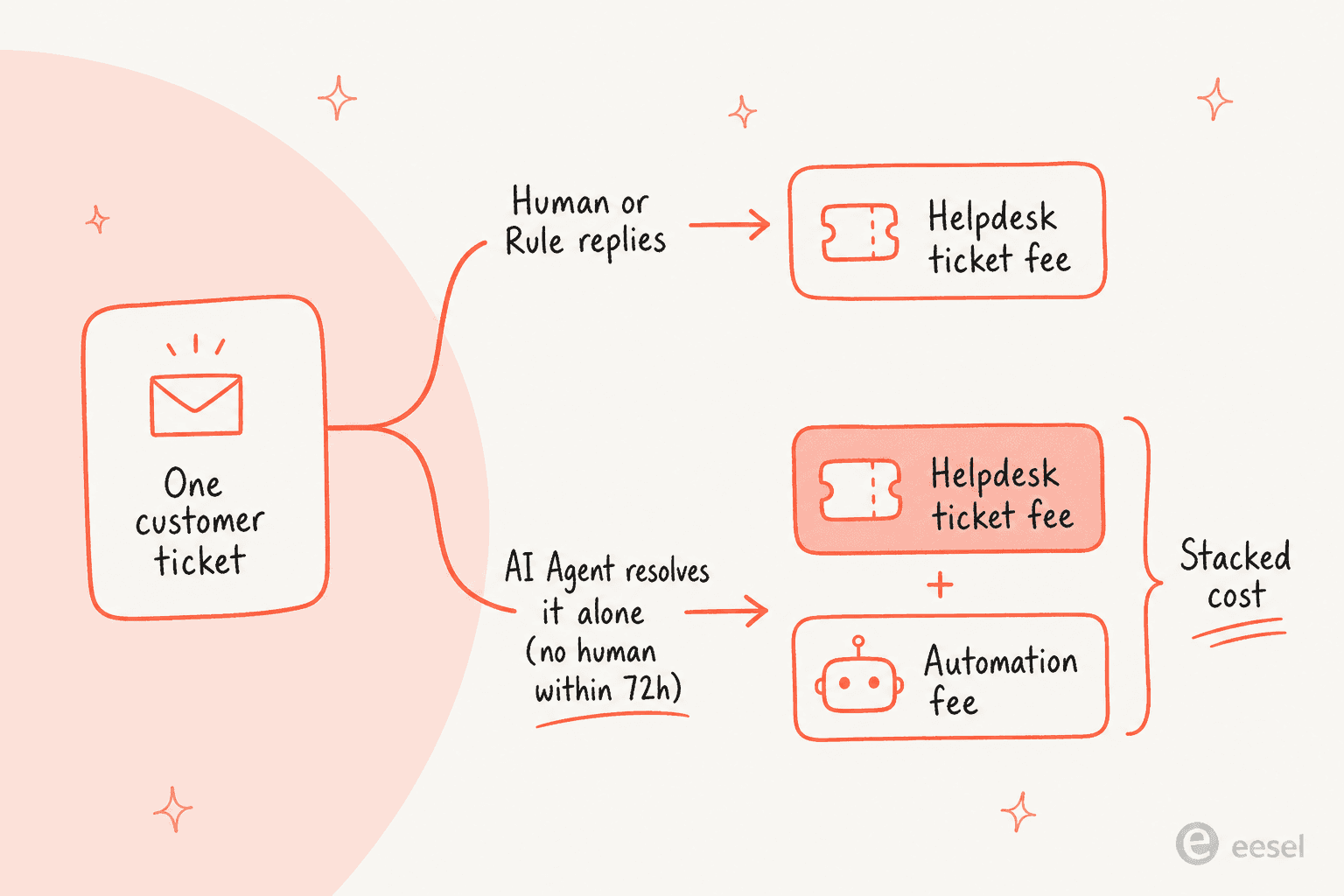
The "resolved" definition matters too: a conversation counts as automated only if the customer doesn't need a human within 72 hours of the interaction. Reply to a shopper, and if they come back unhappy a day later, you're charged the ticket fee but not the automation fee. It's a fair rule, but it makes forecasting your bill harder than a flat per-seat price would. We dig into the mechanics in our Gorgias ticket limit guide.
Here's what the inside of Gorgias looks like once you're working a ticket, and why teams pay the premium: every shopper's Shopify order history, cart, and customer data sits right there in the sidebar.
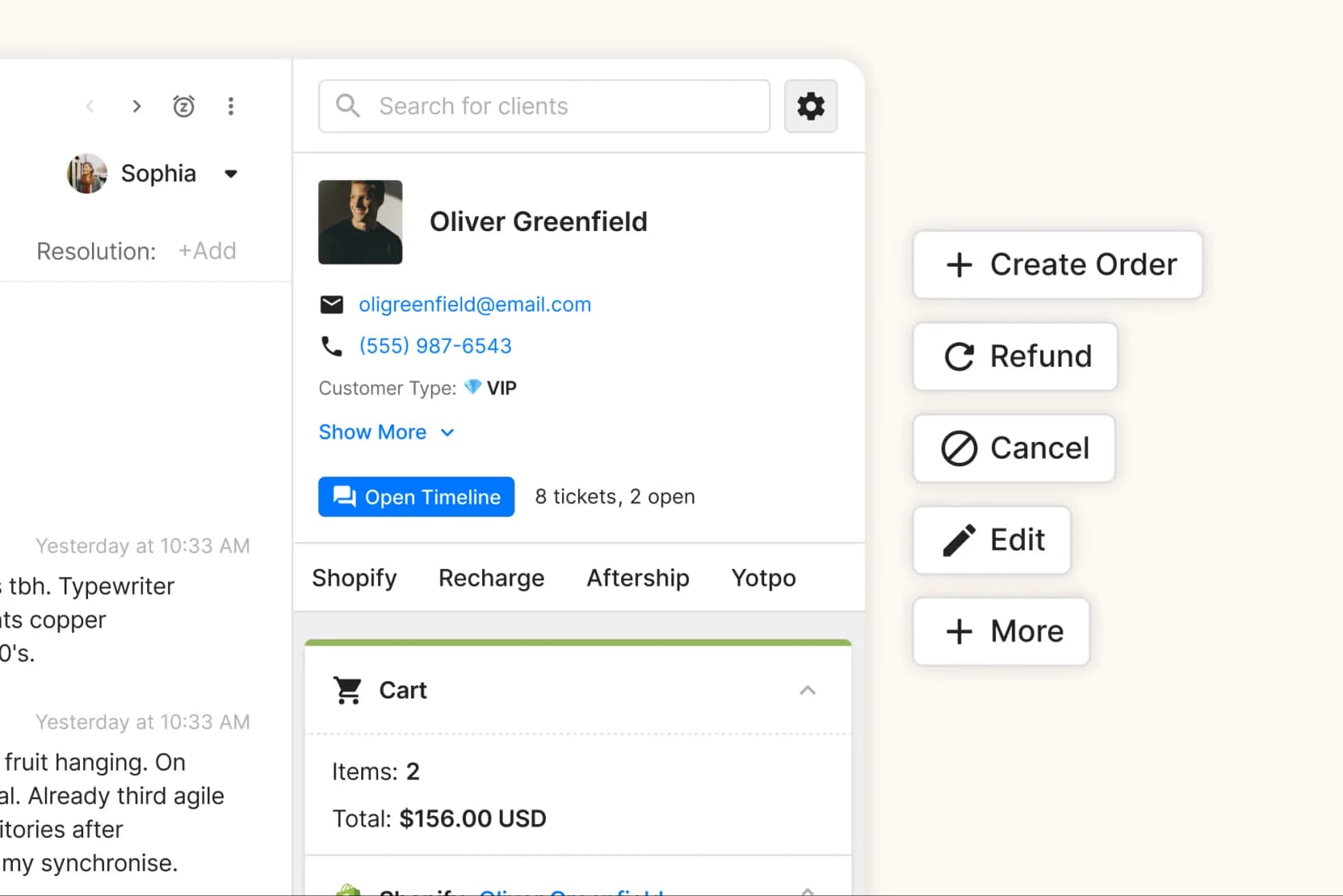
That one-tab view, pulling live data from the Gorgias Shopify integration, is the whole reason brands tolerate volume-based pricing. The question is whether your ticket mix actually uses it.
Gorgias plans at a glance
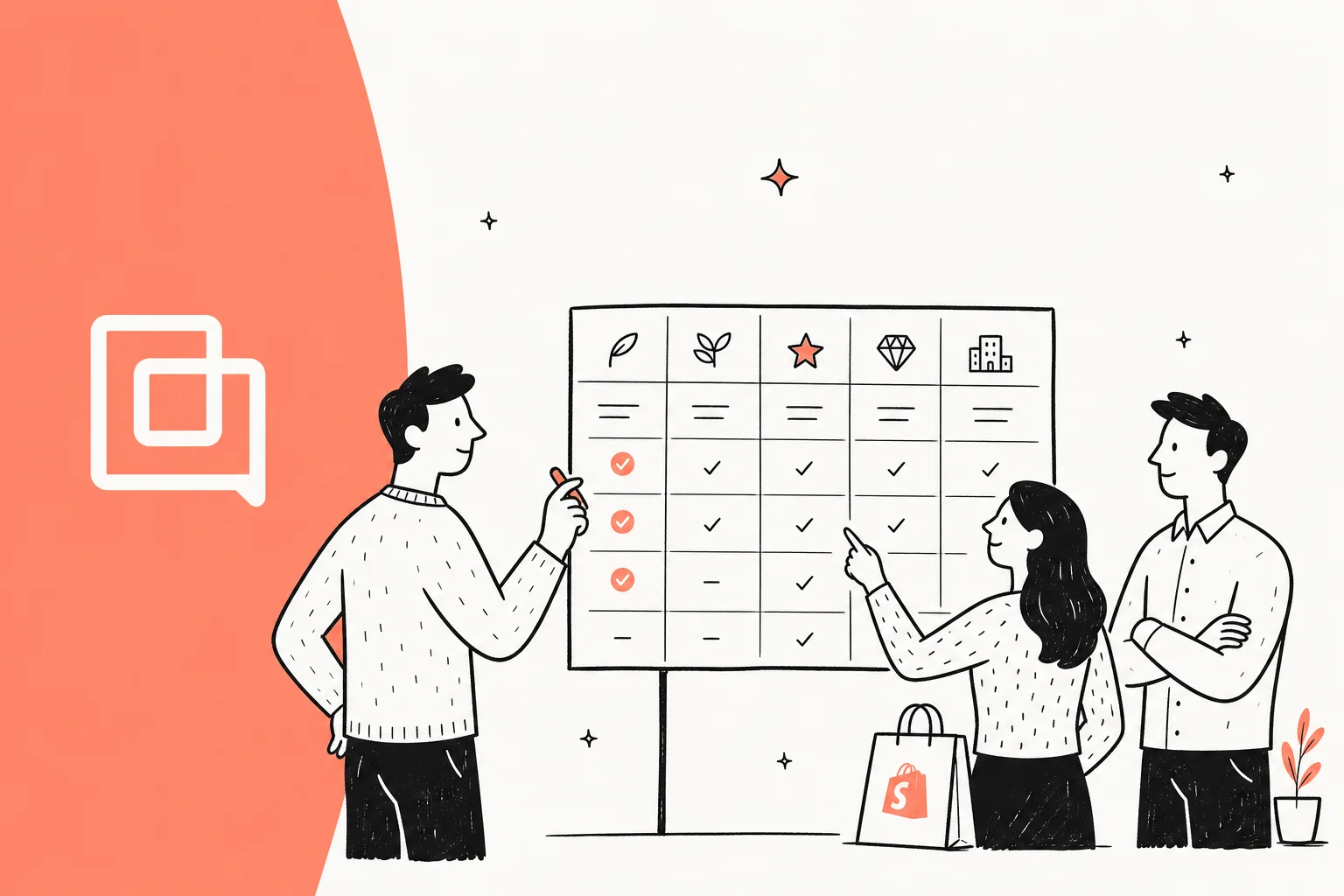
Here's the full comparison across all five tiers. We've gone past price and ticket count to include the dimensions that actually differ between plans, the stuff buyers screenshot before a budget meeting.
| Dimension | Starter | Basic | Pro (Recommended) | Advanced | Enterprise |
|---|---|---|---|---|---|
| Monthly price | $10 | $60 (~$50 annual) | $360 (~$300 annual) | $900 (~$750 annual) | Custom |
| Included tickets/mo | 50 | 300 | 2,000 | 5,000 | Custom (5,000+) |
| Overage rate | $0.40/ticket | $40/100 tickets | $36/100 tickets | $36/100 tickets | $32/100 tickets |
| User seats | 3 | Unlimited | Unlimited | Unlimited | Unlimited |
| AI Agent (per resolution) | $1.00 | $0.90 | $0.90 | $0.90 | $0.90 |
| Annual discount | Not available | Up to 16% | Up to 16% | Up to 16% | Custom |
| Revenue statistics | – | – | ✅ | ✅ | ✅ |
| Dedicated email server | – | – | – | ✅ | ✅ |
| Help centers | Up to 10 | Up to 10 | Up to 10 | Up to 10 | Unlimited |
| API rate limit | 2 req/sec | 2 req/sec | 2 req/sec | 2 req/sec | 4 req/sec |
| SSO, audit logs | – | – | – | – | ✅ |
| Support tier | Standard | Standard | Standard/Specialist | Specialist | Dedicated CSM |
Every plan shares the same omnichannel core: email, live chat, Facebook, Instagram, TikTok, and WhatsApp, plus Gorgias macros, Rules, Views, assignment, and routing. Voice and SMS are paid add-ons on top of any plan. The differences that move the needle are seats (Starter's 3-user cap), revenue attribution (Pro and up), and the enterprise-only security and scale features.
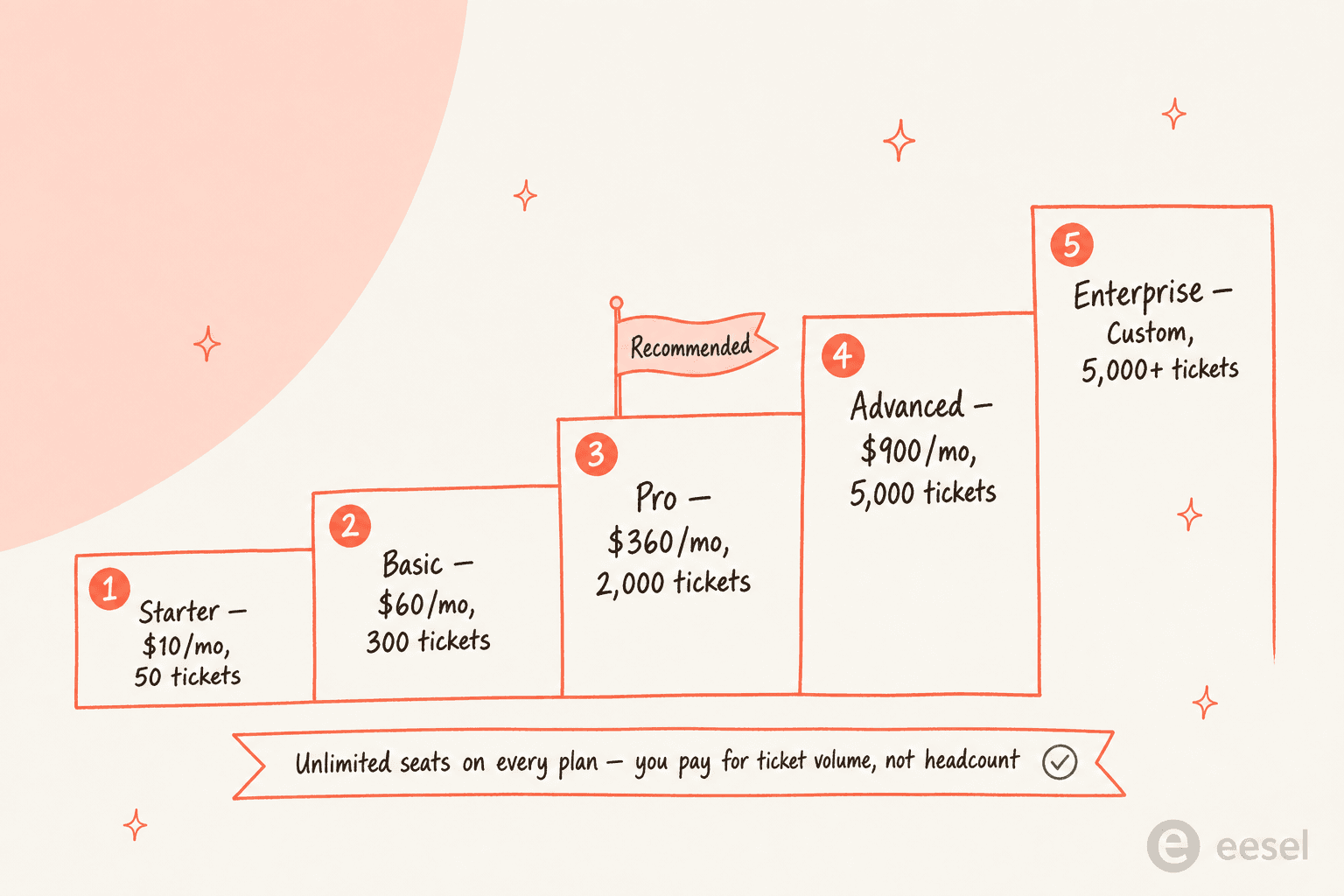
Now let's walk each tier and who it actually fits.
Starter: a trial tier in disguise
Best for: brand-new stores doing a few tickets a week who want to kick the tyres.
At $10/mo for 50 tickets, Starter looks like a steal, and for a store just getting going it can be. You get the full omnichannel inbox, the Shopify integration, and access to the AI Agent. But two limits make it more of an extended trial than a real operating plan: it's capped at 3 user seats (every other tier is unlimited), and it has no annual billing option.
The 50-ticket allowance also disappears fast. Hit 51 tickets and you're paying $0.40 each in overage, the steepest per-ticket rate in the lineup. The AI Agent costs $1.00 per resolution here too, a dime more than every other plan. So the moment you lean on automation or grow past a handful of conversations a day, the economics push you up to Basic.
Verdict: fine for validating that Gorgias fits your workflow, but plan to outgrow it within a month or two. Nobody runs a real support operation on 50 tickets and 3 seats.
Basic: where most small Shopify stores actually start
Best for: small DTC brands handling a few hundred tickets a month with a lean team.
Basic is the first plan that feels like a product rather than a trial. For $60/mo (closer to $50 on annual billing) you get 300 included tickets and, crucially, unlimited users. That seat policy is a real differentiator: you can add seasonal agents, a founder who jumps in occasionally, and your ops lead without touching the bill. We cover the tier in depth in our Gorgias pricing breakdown.
What you don't get yet is revenue statistics, the reporting that ties support conversations to sales (Pro and above). For a small store that mostly wants a clean shared inbox with Shopify context, that's rarely a dealbreaker. Overage runs $40 per 100 tickets, so an occasional busy month won't wreck you.
Verdict: the natural home for most stores under a few hundred tickets a month. If your volume is creeping toward 1,000+, do the math on Pro before you rack up overage at $40/100.
Pro: the plan Gorgias points you to
Best for: scaling brands doing 1,000–2,000 tickets a month that care about revenue attribution.
Pro is the tier Gorgias labels "Recommended," and it's where the platform's revenue story kicks in. At $360/mo for 2,000 tickets, you unlock revenue statistics, so you can see how much money support and chat conversations actually drive. For a brand that treats support as a sales channel (Gorgias's whole pitch), that reporting is the point. Our Gorgias revenue attribution guide explains what those numbers capture.
The per-ticket economics also improve: overage drops to $36/100, and the AI Agent settles to $0.90 per resolution. If you're running Gorgias automation rules and the AI Agent at any real scale, Pro is usually the first plan where the volume allowance and the cheaper unit rates start working in your favour.
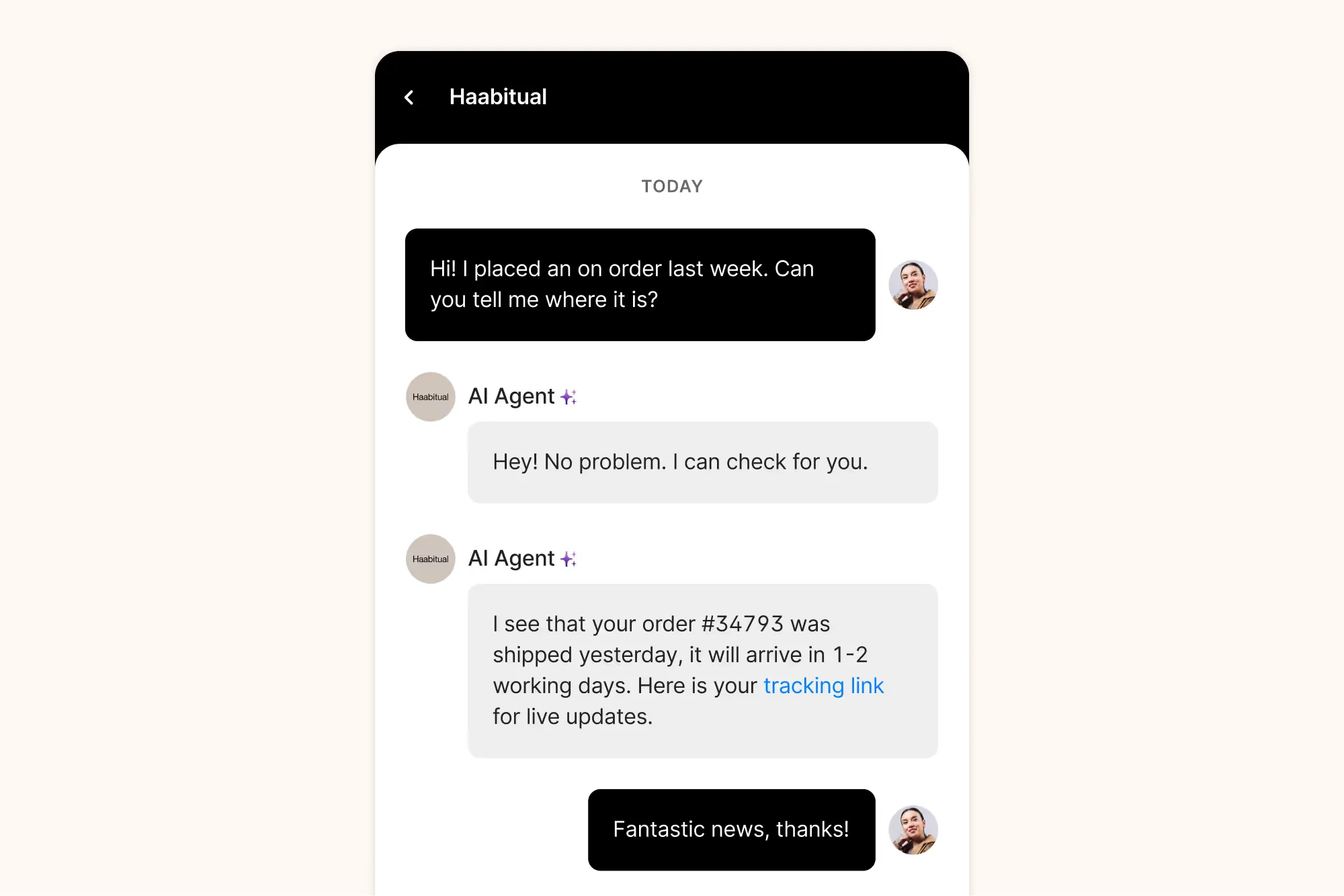
This is also the tier where the Gorgias AI support agent earns its keep, handling repetitive WISMO ("where is my order") questions end to end:
Verdict: the right pick if you're at real volume and want revenue reporting. Just remember the sticker price is the floor, not the ceiling, once AI resolutions start stacking automation fees.
Advanced: deliverability and dedicated support
Best for: higher-volume brands (5,000+ tickets) that send a lot of email and want a faster support SLA.
At $900/mo for 5,000 tickets, Advanced adds two things over Pro: a dedicated email server (better deliverability so your replies don't land in spam at scale) and Specialist Support, Gorgias's mid-tier support track for brands earning $3–20M/year. Overage stays at $36/100, and the AI Agent is still $0.90.
If your inbox is genuinely doing 5,000+ tickets a month, the dedicated email infrastructure is a real, if unglamorous, reason to upgrade. Below that volume, you're mostly paying for headroom you don't need yet.
Verdict: a volume-and-deliverability play, not a feature unlock. Most brands don't need it until email volume is large enough that spam folder placement becomes a measurable revenue problem.
Enterprise: the only tier with serious security and scale controls
Best for: large brands ($20M+/year or $40k+ contracts) with security, compliance, and multi-store needs.
Enterprise is custom-priced and is the only plan that lifts the structural caps the others share. You get unlimited help centers (everyone else is capped at 10), double the API rate limit (4 requests/sec vs 2, which matters for heavy integrations, see our Gorgias API rate limits guide), and the security table stakes large companies require: SSO via Google or Microsoft, granular user permissions, and audit logs. Overage is the cheapest in the lineup at $32/100, and you get a dedicated CSM with 1:1 onboarding.
If you're a smaller brand, none of this applies, and you shouldn't let a sales rep talk you into it. If you're an enterprise with roles-and-permissions and GDPR requirements, this is the only tier that checks the boxes.
Verdict: necessary if you need SSO, audit logs, or multi-brand help centers; overkill for everyone else.
The AI Agent add-on: where the real cost lives
Here's the section that should change how you read every number above. The AI Agent is not included in any plan's price, it's a usage-based automation add-on layered on top, and for automation-heavy teams it can dwarf the base plan fee.
The headline rate: $1.00 per resolved conversation on Starter, $0.90 on every higher plan. A "resolution" is a conversation the AI closes without a human within 72 hours. And remember the stacking rule, a fully automated ticket incurs both the helpdesk ticket fee and the automation fee.
It's worth being fair about what you get for that money, because the AI Agent is capable. It pulls live Shopify data to take real actions, not just answer FAQs. Here it is processing a subscription cancellation end to end, with its reasoning steps shown:
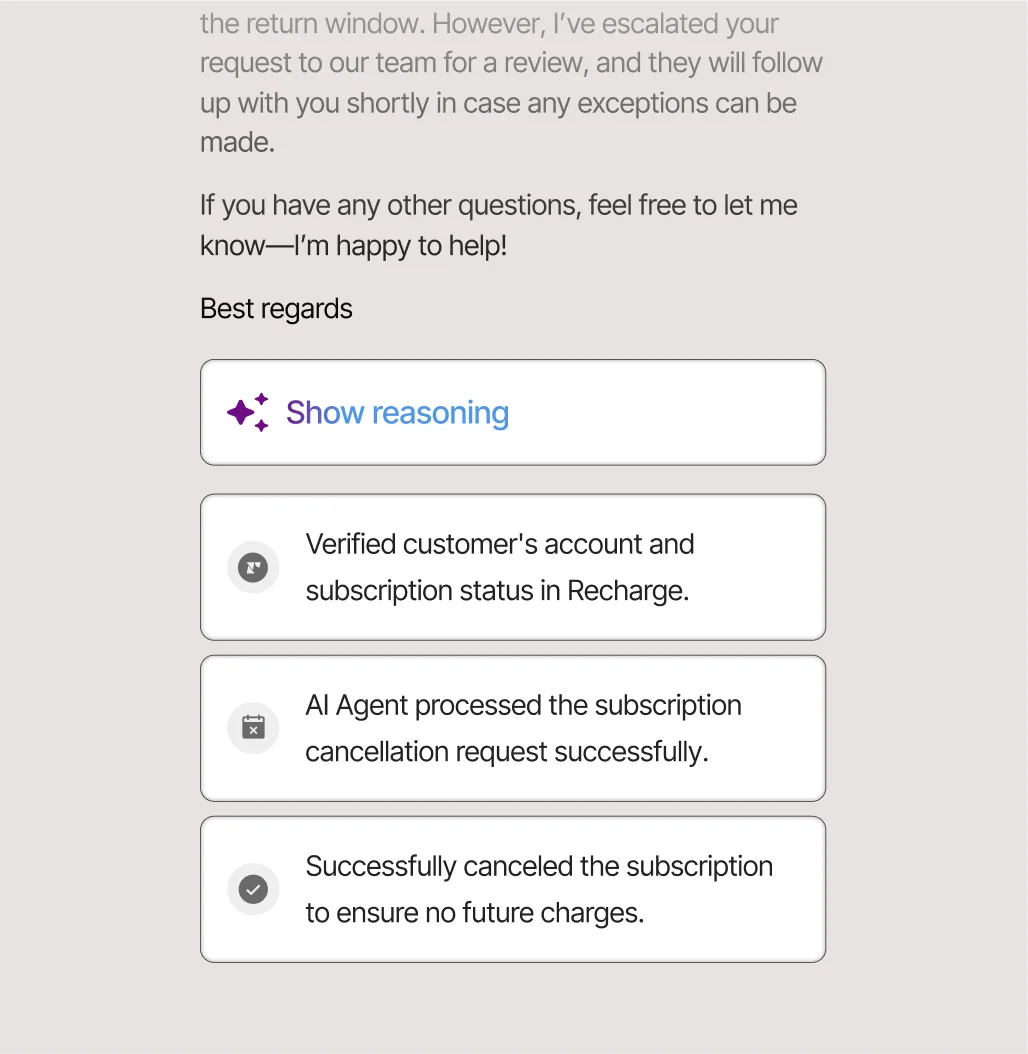
It can also act as a pre-sales shopping assistant, recommending products and answering comparison questions to nudge a sale. The flip side: proactive features are billable too. If a shopper replies to an AI-initiated greeting and the agent completes the conversation, you pay both fees. You're not charged if they ignore the greeting, but it's another line item to watch.
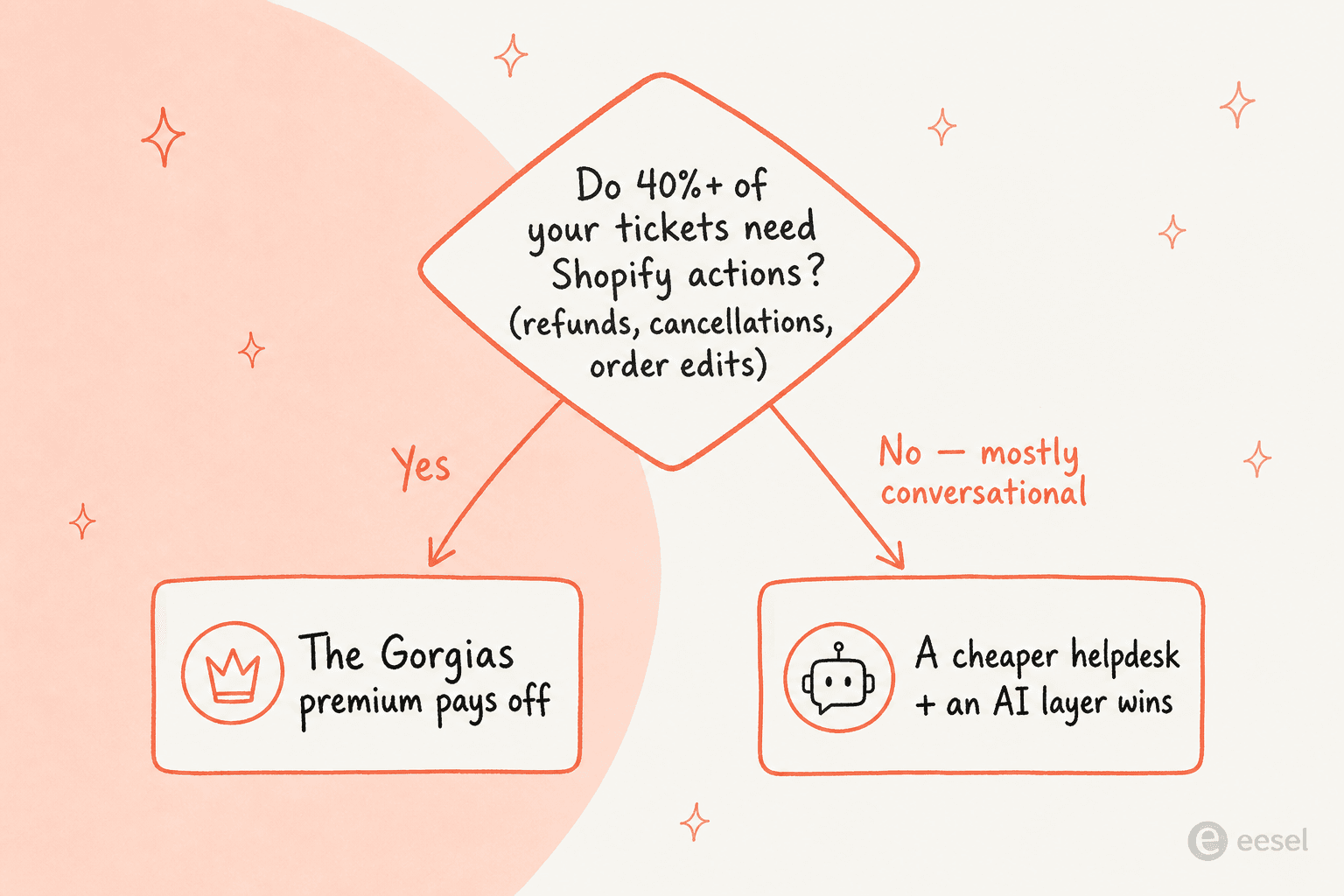
One more limitation worth knowing: the AI Agent ignores your macro library entirely. It generates its own responses, so the macros your human team relies on don't carry over, you're effectively maintaining two answer systems. And it hands over to a human whenever it can't clear a confidence threshold, detects frustration, or can't ground an answer in your knowledge base. Gorgias's own marketing caps automation at "60% of email and chat conversations," which means roughly 40% still needs people.
For a granular cost estimate, our Gorgias AI pricing calculator guide walks through the math. But the short version is: budget the AI as its own line, not a rounding error on your plan.
A worked example: what a real team actually pays
Abstract per-unit pricing is hard to feel, so let's run a realistic scenario. Say you're a growing Shopify brand on the Pro plan doing 2,000 tickets a month, and the AI Agent resolves 40% of them (Gorgias's own stated ceiling).
| Line item | Calculation | Monthly cost |
|---|---|---|
| Pro base plan | 2,000 tickets included | $360 |
| AI Agent resolutions | 800 resolutions × $0.90 | $720 |
| Total | $1,080 |
That $360 sticker becomes roughly $1,080 once the AI is doing the work you bought it to do. The automation is real and the time saved is real, but the headline plan price captured a third of your actual bill. Push automation higher or volume up, and the gap widens.
This is exactly the dynamic the Reddit community keeps flagging. As one operator put it in a thread comparing helpdesks:
"Gorgias is very Shopify-native and easy to get value from but pricing and ticket volume can creep up fast."
u/FriedrichNietzsche69, r/ecommerce

The fix isn't to avoid automation, it's to put the cheapest possible price on each automated resolution. That's where a fixed monthly credit plan (more on that below) changes the arithmetic.
Where teams hit limits on Gorgias
Gorgias is the best Shopify-native helpdesk on the market, full stop, it scores 4.6/5 across 560+ reviews on G2 and powers 40% of the top Shopify brands. But every tool has edges, and these are the ones that send teams looking:
1. Pricing creep at scale. The number-one community objection. Gorgias runs roughly 3x the cost of Zendesk for similar volumes, and the per-resolution AI fees compound it. One Redditor weighing the two was blunt about the threshold:
"I've been around ecommerce for 10+ years and this is honestly how I'd choose: 40%+ tickets need Shopify actions → I'd lean Gorgias. Mostly conversational support → Zendesk is fine."
u/cavalry18, r/CRM
2. It's deeply Shopify-centric. The AI Agent requires a connected Shopify store as a hard requirement, conditions and variables draw from Shopify fields, and you get one agent per store (multi-store brands duplicate setup store by store). If you're on BigCommerce, Magento, or a custom cart, most of the AI value evaporates.
3. AI doesn't cover every channel. AI Agent resolution is documented for email, chat, and SMS, not the social DM channels (Facebook, Instagram, WhatsApp, TikTok) that ecommerce brands lean on heavily. Those are human-and-Rules only.
4. Setup is real work. Configuring the AI means writing Skills, building Actions with API authentication, authoring Guidance, and reconciling Rules so they don't double-reply. Switching an Action to advanced options is one-way, and test actions can mutate real customer data if you're not careful. Our Gorgias AI setup guide covers the gotchas.
The deeper point one Redditor made sticks with us:
"What's usually overlooked is that most teams optimize for handling tickets faster, not for reducing them."
u/Andrutex, r/ecommerce
The real win isn't a faster inbox, it's fewer tickets reaching a human at all, at a price per resolution that doesn't punish you for automating.
Gorgias alternatives worth comparing
If the Gorgias plans comparison leaves you wincing at the AI math, here's where to look, depending on what's pushing you away:
| Alternative | Best for | Pricing angle vs Gorgias |
|---|---|---|
| Zendesk | Conversational, non-Shopify-heavy support at scale | ~3x cheaper for similar volume; weaker native Shopify depth |
| Help Scout | Small teams wanting a simple, clean shared inbox | Flatter pricing; lighter ecommerce tooling |
| Tidio | Stores that lead with live chat and chatbots | Cheaper entry; see our Gorgias vs Tidio comparison |
| Kustomer | Larger brands wanting a CRM-style data model | Enterprise-priced; broader than Shopify |
| eesel AI | Keeping your helpdesk but adding fixed-price AI | From $299/mo (500 credits), no per-resolution stacking |
The pattern across most switches is the same: teams don't hate Gorgias, they hate watching the AI bill scale linearly with success. If the helpdesk itself is fine, the smarter move is often to keep it and bolt a cheaper automation layer on top, rather than rip everything out. We round up the full list in our best Gorgias alternatives guide.
Try eesel for the AI layer Gorgias charges per resolution for
If your problem with Gorgias isn't the helpdesk, it's the per-resolution AI bill, eesel AI is built for exactly that gap. It's an AI teammate that lives inside the helpdesk you already run (Zendesk, Freshdesk, Shopify, email, and 100+ others), reads your past tickets and help docs on day one, and resolves conversations autonomously, without you switching platforms or rebuilding your stack.
The difference that matters for this comparison is the pricing model: eesel charges one fixed monthly price by volume (from $299/month for 500 credits, 1 credit per ticket or chat) with no per-seat fees and no per-resolution surcharge that grows with your success. Where Gorgias stacks a ticket fee plus a $0.90–$1.00 automation fee on every AI resolution, eesel spends one credit per ticket however long it runs, and optional overage has a cap you set, so there are no surprise invoices. You can route just a slice of tickets to start (200 of 1,000 if you like) and scale from there. See the full model on the eesel pricing page.

And because it plugs straight into Shopify, the order-tracking, refund, and WISMO questions Gorgias automates are exactly the workflows eesel handles too, just without tying you to one cart platform or charging you more every time it works:
You can try eesel free on the 100-credit plan, no credit card required, and see how many of your tickets it resolves before you ever touch a Gorgias upgrade.
Frequently Asked Questions
How much do Gorgias plans cost per month?
What does the Gorgias AI Agent add-on cost on top of a plan?
Which Gorgias plan is best for a small Shopify store?
Is Gorgias worth the price compared to Zendesk?
Does every Gorgias plan include unlimited users?
What happens if I go over my plan's ticket limit?
Can I use Gorgias AI Agent without a Shopify store?


Article by
Riellvriany Indriawan
Riell is a designer and writer at eesel AI with about two years of experience researching CX platforms, AI chatbots, and helpdesk software. She combines her design background with a sharp eye for how these tools actually look and feel in practice — making her comparisons unusually visual and user-focused.