


"Jira ticketing system" is not one product, it is two, and picking the wrong one, that's the mistake I watch teams make the most often. Plain Jira gives you a work item and a workflow, nothing more. Jira Service Management is what adds the request types, portal, queues and SLA clock, the pieces that turn that work item into an actual ticket. Atlassian even says the quiet part out loud, in its own docs: a work item without a request type "won't have access to all Jira Service Management features."
The money follows the same split. JSM lists at $25 per agent per month for the first 15 agents, and unlimited requesters get let in free. Plain Jira lists at $9.05 per user, but here it charges for everyone who touches it, agent or not. A 5-agent, 60-requester team ends up paying $125 a month on JSM against $588 on plain Jira. Worth to flag: the headline prices on both pricing pages are blended calculator output for a much bigger company, not what you will actually pay.
Price is not actually the real ceiling here, the model is. Jira has exactly three status categories, and none of them can be customised, so "waiting on customer" has to pretend it's To do, In progress or Done. Every board and every report you build, it inherits that limitation. If what you want is for the queue to actually shrink, not just get prettier dashboards, the lever is deflection at intake, which is where a layer like eesel belongs, it reads your past tickets and Confluence pages and answers first, inside the queue you already have.
Two products, one search term
I build integrations for a living, and Jira is the one product where the API and the marketing site disagree the most. When someone asks me to "connect to their Jira ticketing system," my first question always is which Jira, because that answer changes the auth scopes, the object model, and also the bill.
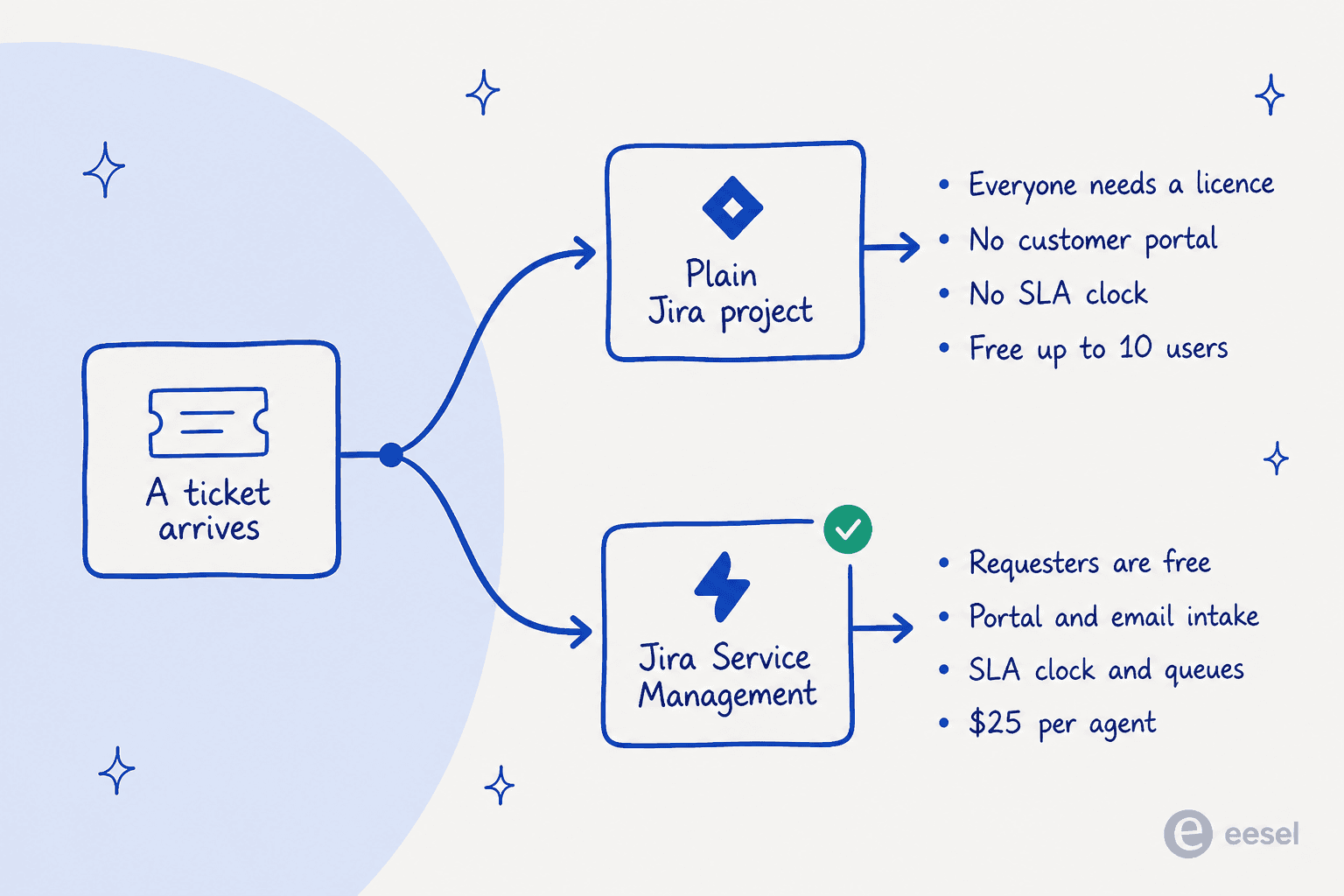
Plain Jira (what used to be Jira Software, before it merged with Jira Work Management in May 2024) is a work tracker, it has boards, backlogs and workflows, but no concept of a customer at all.
Jira Service Management is the service desk built on top of that same engine. It ships the eight ITSM work types that plain Jira lacks, Incident, Problem and Service request among them, plus the portal, queues and SLAs. As of 2026, it's no longer sold on its own though: Atlassian bundles it as "Service Collection" with Customer Service Management, Assets and Rovo, and per the licensing page, "the apps cannot be purchased separately."
One more thing worth knowing before you read any Atlassian doc written after 2025: the vocabulary changed. An issue is now a work item, an issue type turned into a work type, and a project became a space. The old URLs still resolve though, the API fields still say issuetype, and every forum thread you'll find uses the old words still. I catch myself saying issue too, even now. It matters here only because the docs you land on won't match the field names sitting in your integration code.
How a ticket is actually modelled
There is no ticket object in Jira, not really. There is a work item, and that carries a work type. Atlassian's own framing is that work types "distinguish different categories of work" so progress can be tracked on them. That's a project-management sentence, not one about support. The object gets designed around what kind of work is this, and not who is waiting for an answer.
Here is what you actually get by default:
| Space type | Default work types |
|---|---|
| Business | Task, Subtask |
| Software | Epic, Story, Task, Bug, Subtask |
| Service (JSM) | Change, IT help, Incident, New feature, Problem, Service request, Service request with approval, Support |
Notice what's missing from those first two rows, no Question, no Request, no Incident anywhere. A team running support on plain Jira ends up logging every inbound customer email as a generic Task, or worse, as a Bug. It works, in the sense that a spreadsheet also works.
The request type is a wrapper, not a different object
This is mechanic that's worth internalising, because almost every "should we use JSM?" argument I've sat in, it resolves the moment someone draws it out.
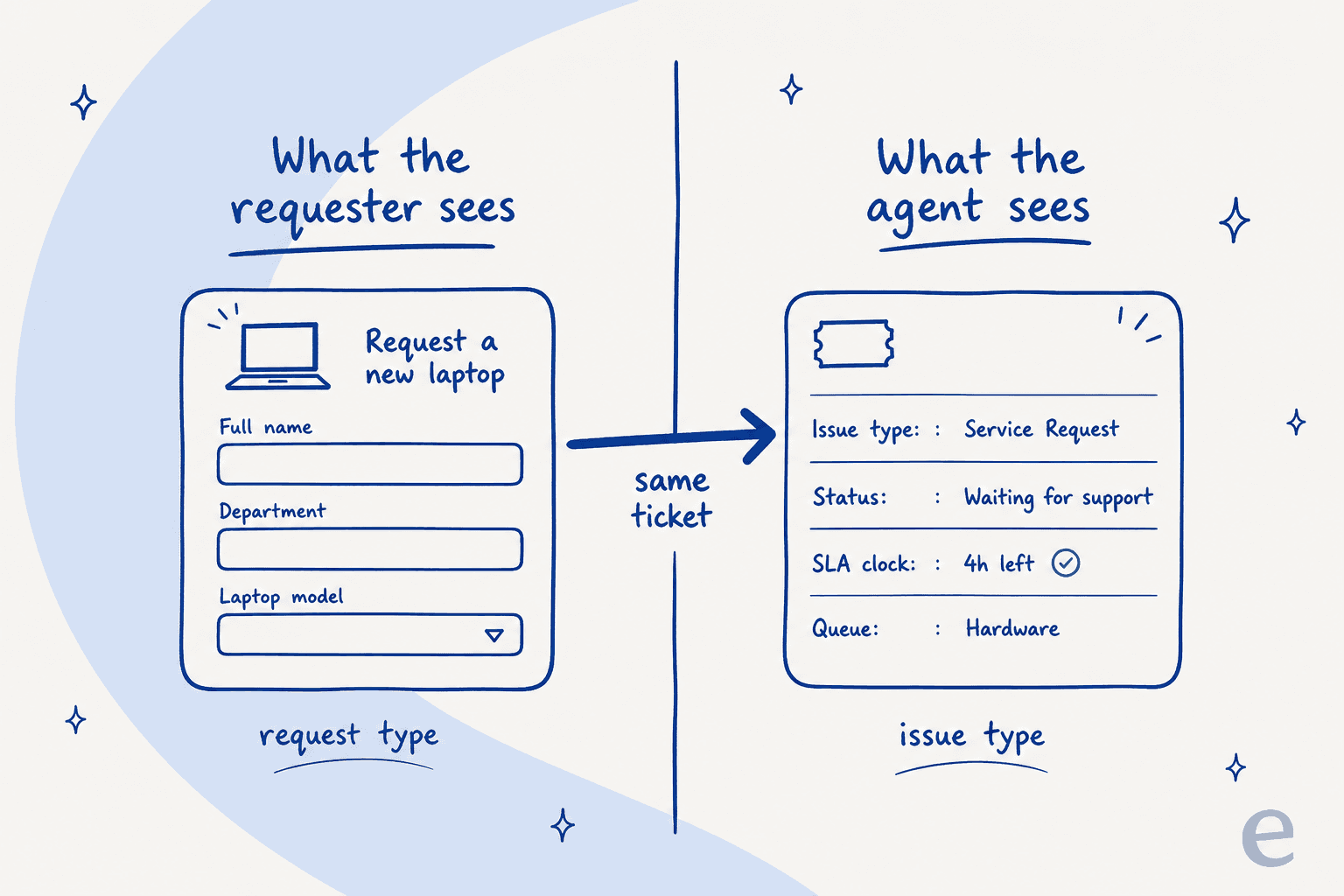
Atlassian puts it plainly: "Every request type in Jira Service Management is connected to a work type." The request type owns the naming, the portal form and the work categories, while the work type owns workflow and the fields. The cardinality runs many request types → one work type → one workflow, this is because each work type maps to a single specific workflow.
So ten customer-facing forms, they can all land on one single work type and therefore one workflow. That's a feature in case your process really is the same underneath, but it turns into a trap when it's not, because splitting the process out means a new work type, a new row in the workflow scheme, and also a Jira admin to do it.
And then the line that should settle the debate for anyone running support on bare Jira:
"If you create a work item without a request type, your requests won't have access to all Jira Service Management features. Work items with a work type only can be found in Queues."
That's Atlassian's own documentation, describing a bare work item as a degraded ticket, basically: no portal form, no request-type queue sorting, no work-category features.
There's a coupling gotcha here too, one that has bitten every single JSM instance I've looked at. The docs are explicit that "if you change the work type of a work item, you'll also need to update the request type to match." When an agent reclassifies, say, a Service request as an Incident, the wrapper just does not follow the object along. Someone's supposed to fix it by hand then, and nobody ever actually does.
What the requester sees
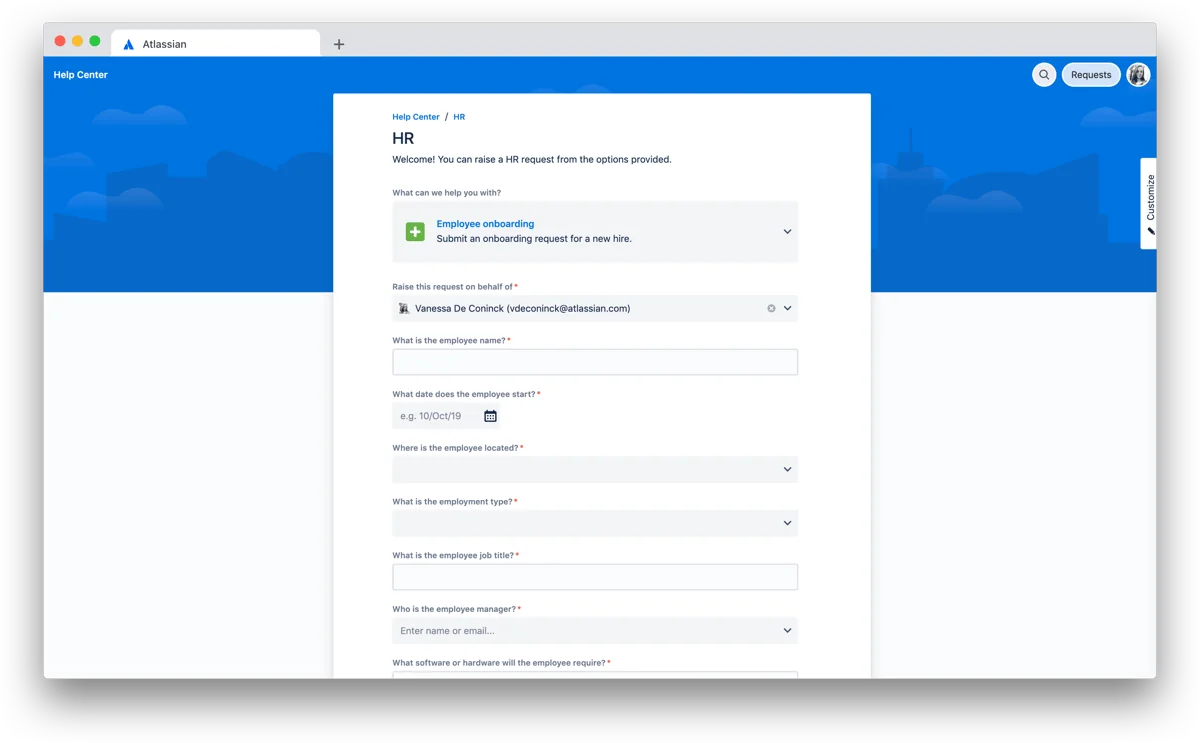
The portal, that's the honest reason to buy JSM at all. Customers land on a help center, pick a request type written in plain language, then fill the form in.
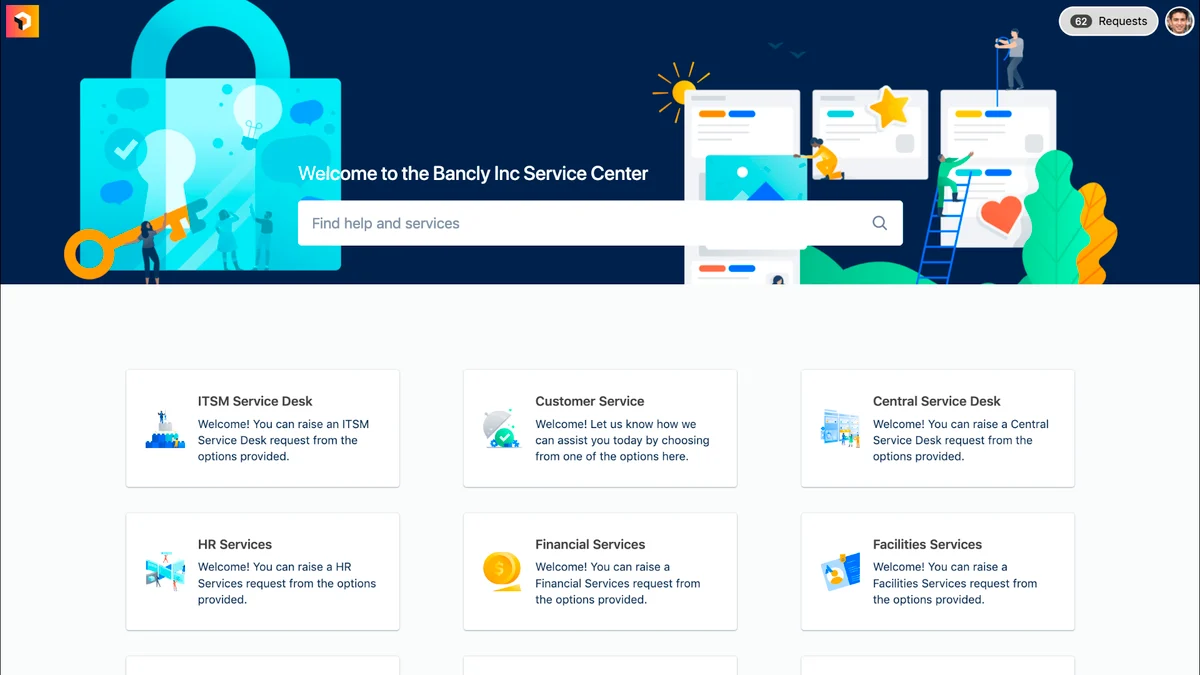
Atlassian's own advice on naming these is good, and also widely ignored: use Get access, not Deploy SSH key, and "break request types down into specific requests without getting too granular" because too many options makes the portal unusable. Every over-engineered service desk I've ever seen, it had 40 request types and one search box that nobody used.
What the agent sees
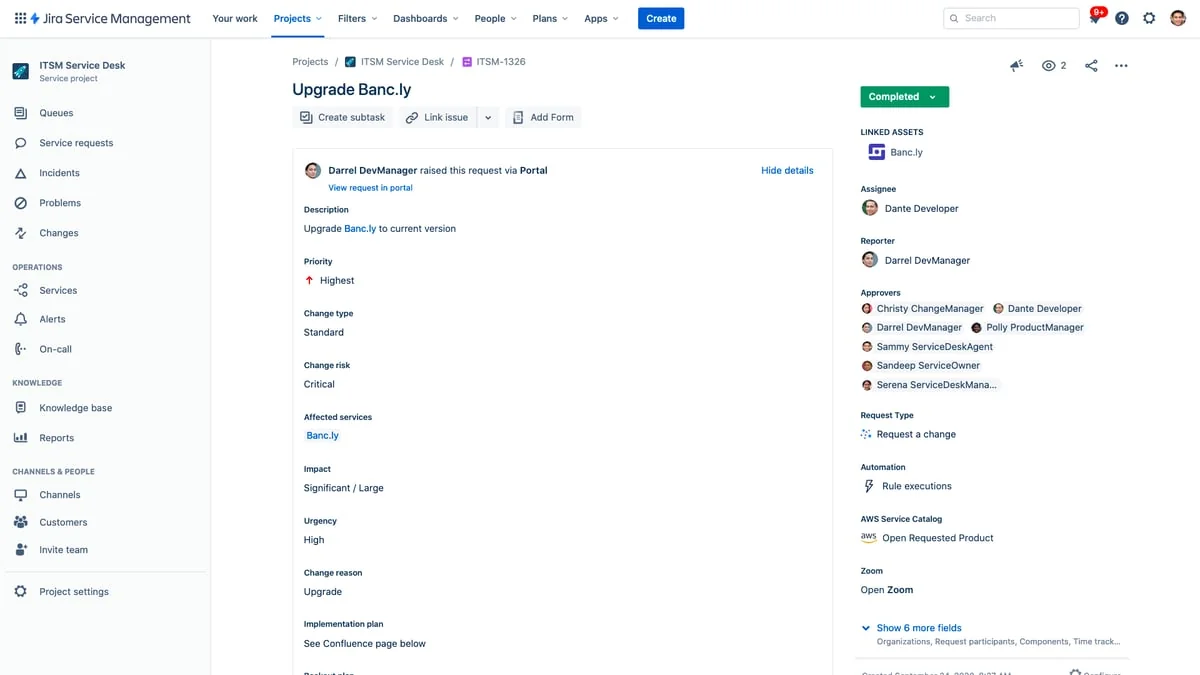
Same ticket, but a completely different surface entirely. The agent view carries the work type, the status, the assignee, the request type, linked assets, and the automation rule executions, with Queues, Incidents, Problems and Changes running down the left rail.
Workflows, and the three-category ceiling
A Jira workflow is "a set of statuses and transitions," nothing else really. Three mechanics decide whether it ends up behaving like an actual support process:
Transitions are one-way. The docs are blunt about it: "to move a work item back and forth, you need two separate transitions." A reopen, the single most common event in any real support queue, is actually a separate object that an admin has to draw from Done back to In progress by hand. It just does not exist by default, not in the direction you'd assume.
Built-in workflows are read-only. You can copy them and edit that copy, which means your very first customisation, it forks you off the defaults for good.
And here's the one that actually constrains your reporting: every status has to belong to one of exactly three categories. To do, In progress, or Done, rendered grey, blue and green, and Atlassian states it directly: "this can't be customized."
Sit with that a second. A support ticket, it spends most of its life waiting, on the customer, on a vendor, on some third-party team. Jira has no waiting category, so your "Waiting on customer" status has to masquerade as either unstarted work, active work, or finished work. Whichever one you pick, every board, every list and every report, they colour and group it that way. Your cycle-time numbers just inherit the lie.
For contrast, Zendesk ships six statuses, On-hold among them, and Freshdesk ships four with an explicit Resolved-versus-Closed split. Jira just was not built for that shape, and no amount of workflow drawing is going to change the category ceiling underneath.
One more thing that tends to surprise people: renaming a status is global. "When a status is renamed, the name will be updated in every workflow (and every space) that uses it," and since reports key off status names, a tidy-up on one team's board can quietly go and break another team's dashboard.
Here's the admin tax, in one sentence: adding a "Waiting on customer" status, or drawing the reopen transition your team's been asking for, requires space admin permissions, and the change lands on every space that's sharing that workflow. It's a Jira admin ticket, not some support-lead toggle.
Queues, SLAs, intake: the parts that make it a helpdesk
These four pieces are what you're actually paying for with Jira Service Management. Each one is capable, and each one has a limit that only shows up around month three, so here's both halves of it.
Queues are saved filters, not destinations
A queue is basically a filter over the space's work items, where incoming requests get sorted by criteria into one focused agent view. You build one by picking the type, status and label from dropdowns, or by dropping into raw JQL under Advanced.
The gotcha's in one sentence of that doc: "You need to be a space admin to create a new queue." An agent who wants their own view has to file a ticket just to get a ticket view. Atlassian's new Rovo shortcut writes the JQL for you, but it still requires the same admin permission and cannot delete queues, so it removes the JQL step rather than the approval step.
Two numbers worth keeping in your head. You get 300 queues per space per work category, a number nobody's ever going to hit. And queue counts stop being real past 999 anyway: the badge just reads 999+ after that. For a team with a genuine backlog, that sidebar number is basically decorative. In-queue search also can't read comments or worklogs, which is exactly where the answer to "have we seen this before?" tends to live.
SLAs are strong, and unforgiving about edits
An SLA is a container of goals, basically, and you can add up to 90 goals to each one of them. Goals combine a JQL scope, a time target and a calendar, and calendars carry a timezone, working days, per-day time slots and holidays, defaulting to 09:00–17:00 until you go and change them.
Three things worth writing on a sticky note before you create one:
- The name is permanent. Atlassian's own wording: "You won't be able to change the name of your SLA once it is created."
- A new SLA applies retroactively, to all relevant work items, both open and closed. Turning one on, it rewrites your history and not just your future.
- Editing a live SLA is destructive. The docs say it plainly, "editing an SLA can cause some open cycles to close, restart, or disappear," and there's a whole KB page that exists just for repairing the fallout.
There's also this lovely piece of small print: avoid assigning the same person as both Reporter and Assignee, because doing that can make SLAs behave inaccurately.
Email intake routes by address, not by content
A service space ships with a cloud email address of its own, and anything sent there just becomes a work item. And senders don't need a licence to create, comment on or transition those items either, which is the free-requester model working in practice.
Routing works per address and is statically configured: one email address maps to one request type, full stop, nothing smarter. There's no content-based triage anywhere in the mail handler. You get 10 addresses per service project, so ten inboxes means ten categories, and anything finer than that is automation you have to write yourself.
The single most damaging line in the whole doc set, is this one, and I've watched it cost a team a whole fortnight of missing tickets: "If additional required fields are added to a request type that's linked to an email address, then work items won't be created." Someone marks just one field required in the portal form, and email intake silently stops dead. No error, no bounce, nothing.
A few other edges worth knowing about: the puller fetches unread mail every minute, anything over 25MB never gets fetched at all (on a custom channel it just sits there unread, with no bounce back to the sender), messages get truncated at 32,767 characters, and auto-replies, bulk mail and delivery-status notifications are dropped rather than queued.
Automation is metered, and the meter is small
Jira Service Management runs three automation engines all side by side: the system flows that ship with the template and never count toward usage, the older legacy automation where the shipped auto-close rule still lives, and modern Jira Cloud automation with the full trigger set. The one worth building your routing on is SLA threshold breached, which fires at a configurable interval before or after a breach.
The budget is where it gets tight:
| Plan | JSM flow runs per month |
|---|---|
| Free | 500 |
| Standard | 5,000 |
| Premium | 1,000 × number of users |
| Enterprise | Unlimited |
Runs reset on the first of every month, and unused runs don't roll over at all. A run counts only if it performs at least one action, and it counts once no matter how many actions it does. Hit the cap, and "your flows will fail to run until usage resets on the first of the following month."
5,000 runs a month is about 165 automated actions a day for the entire service desk. Auto-assignment, auto-reply, escalation and SLA-breach notifications, they all draw from that one same pool. If your plan for handling ticket volume is "we'll automate it," well, Standard runs out long before you do.
What it actually costs
Both Atlassian pricing pages render a calculator, and both of them default to a team that's much bigger than yours. That's honestly the single most useful thing I can tell you about Jira pricing.
The JSM pricing page loads at 75 agents by default and shows $20 and $51.42 per agent. Those numbers are blended progressive rates though. The real list rates for a small team, straight from Atlassian's licensing tables, are $25 Standard and $57.30 Premium. The Jira pricing page does the same trick at 300 users, showing $7.91 and $14.54, when the 1–100 band is actually $9.05 and $18.30. So small teams end up paying roughly 14% more than the Standard headline, and 26% more than the Premium one.
Jira Service Management, monthly list rates
| Agents | Standard | Premium |
|---|---|---|
| 1–3 | Free plan available ($0) | - |
| 1–15 | $25.00 / agent | $57.30 / agent |
| 16–100 | $18.75 / agent | $49.95 / agent |
| 101–250 | $12.55 / agent | $33.25 / agent |
| 251–500 | $8.60 / agent | $22.90 / agent |
| 501–1,000 | $8.25 / agent | $21.20 / agent |
| Enterprise | Annual only, quote-gated | Annual only, quote-gated |
Annual gets billed as a flat amount per band, not per agent: $750/year Standard for 1–3 agents, $2,500 for 6–10, and $19,700 for 51–100. Premium runs $1,700, $5,750 and $51,000 for those same bands.
Plain Jira, monthly list rates
| Users | Standard | Premium |
|---|---|---|
| Up to 10 | Free plan available ($0) | - |
| 1–100 | $9.05 / user | $18.30 / user |
| 101–250 | $7.65 / user | $13.70 / user |
| 251–1,000 | $6.40 / user | $9.55 / user |
Annual for 1–10 users is $900 Standard and $1,850 Premium, flat rate. That works out to $7.50 per user per month, but only if you fill all ten seats, at four seats it's $18.75 instead.
Now go put your own numbers in, because the arithmetic is really where the decision lives:
At the default 5 agents and 60 requesters, JSM comes out at $125 a month against $588 on plain Jira. The requesters, they're the whole story here. The moment people outside your team need to file or follow a ticket, the per-agent model wins by a mile, it is not even close.
The AI bill is three separate meters
This is the part that catches finance teams out most, because none of the three share the same unit.
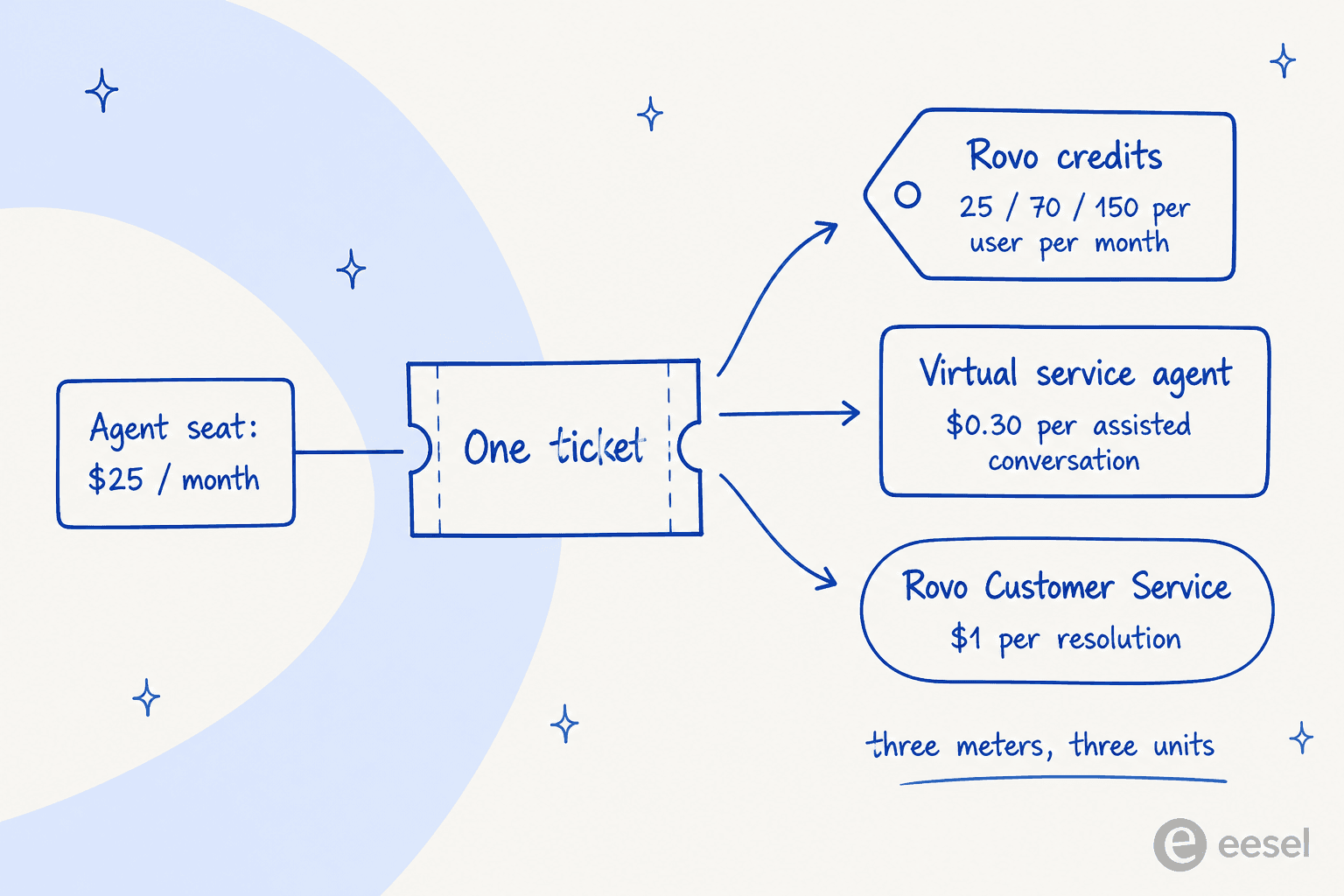
- Rovo credits come bundled with the seat, at 25, 70 or 150 per user per month on Standard, Premium and Enterprise. Twenty-five credits a month is a pretty thin allowance if the plan is answering tickets with it, and the per-credit overage rate for Service Collection Rovo isn't published anywhere.
- The virtual service agent is Premium and Enterprise only, with 1,000 assisted conversations a month included, and $0.30 per assisted conversation above that. Read the definition carefully here: an assisted conversation counts as matched to an intent, whether or not it actually resolved anything. A conversation the bot matched and then escalated to a human still bills.
- Rovo Customer Service is $1 per resolution, on Standard, Premium and Enterprise all alike.
And one billing mechanic that quietly inflates monthly plans: under Maximum Quantity Billing, your bill gets based on the highest seat count assigned at any point during the cycle, and removing seats mid-cycle doesn't reduce that period's bill any. If you flex agents up for a seasonal peak, you pay for the peak.
What running tickets on Jira actually feels like
I could keep on quoting docs, but the more useful signal really is what people say after living in it for a year. The pattern across r/jira, r/sysadmin, G2 and Capterra, it's remarkably consistent, and it's not "Jira is bad." It's more like "Jira is a dev tool in a helpdesk costume, and whether that works depends entirely on how much configuration you're willing to fund."
The fairest positive first, since it's the honest version of things:
"I come from using JIRA Service Management and now use ServiceNow in a different agency.
JIRA was set up properly, suited to the agency; and therefore it was awesome.. however I hear of many businesses where it's not setup properly or configured to the business requirements and work methods."

That conditional's doing a lot of work there, and the structural reason for it comes up again and again:
"JSM was built on top of Jira Software and inherits capabilities that aren't tailored for Service Management."
The sharpest version of this complaint comes from someone who opens by saying they're a big Jira fan, which is exactly why it lands so well. Note the third item there, because that's the three-status-category problem showing up in daily life:
"Jira Service Management misses some basic features of a ticketing system.
You can't combine tickets, you have to mark as a duplicate. […]
Changing status between "waiting for customer" and "waiting for support"? Not inherently there. Needs an automation rule."
Routing's the other one. Queues are JQL filters, not destinations, so there's no native "send this to the third-line queue" action to speak of:
"What I really don't get - and that is my biggest gripe with JSM - is that there doesn't seem to be any routing strategy out of the box. Our customers can enter their request into prepared "boxes" (Request Types). But our agents, who are highly specialised team members, are supposed to look at every ticket and magically know this one is for them? How's that supposed to work?
We get about 2.000 tickets per month!"
And here's a very concrete pricing data point, from an admin sizing an SMB deployment, worth reading right next to the tables above:
"Jira Service Management charges $57 per agent (Premium) plus $5 for SSO (Atlassian Guard). This would add up to $1488 per year. At the moment, this (financially) seems like the most attractive option."
They came back a day later, after actually pricing out the configuration work, and had second thoughts about the effort rather than the sticker price. That two-post arc, it's the whole category in miniature really.
The portal gets its own complaint too, and the cause is precisely that request-type-versus-work-type confusion from earlier. An Atlassian Community writeup put it well: "When we first rolled out Jira Service Management (JSM), our portal was cluttered, confusing, and overwhelming for users. The root cause? A misunderstanding of the difference between Request Types and Issue Types." Getting that one distinction right up front is worth way more than any plugin you'll go buy later.
For balance though, JSM holds 4.3 out of 5 across 988 G2 reviews and 4.5 on Capterra. This isn't a bad product at all. It's a product with a specific shape, and the teams who end up happy are the ones whose shape actually matches it.
Setting one up, honestly
If you've already decided on Jira Service Management, here's the shortest path that doesn't end up a mess:
- Create a service space, not a software one. This is the fork that gives you the eight ITSM work types, queues, the portal and SLAs all at once. Doing it the other way, and bolting a marketplace app on later, is exactly how instances get ugly.
- Write five request types, not forty. Name them in customer language, and resist the urge to model every single edge case. You can always go add the sixth later.
- Turn on email intake and the portal before anything else. Intake's what actually makes it a ticketing system, rather than just a task list.
- Draw the reopen transition on day one. It's not there by default, and the day you find that out is the same day a customer replies into a closed ticket, into the void.
- Decide where "waiting" lives, and write down which of the three status categories it maps to, so at least your reporting stays consistently wrong rather than randomly wrong.
- Connect Confluence before you connect anything clever. Whatever AI you eventually end up putting on this queue, the quality ceiling is your documentation, not really the model.
- Only then look at automation and AI. Watch the rule-run limits closely: Standard is 5,000 rule runs a month for the whole site, pooled together, and a busy queue with auto-assignment and reminders eats through that fast.
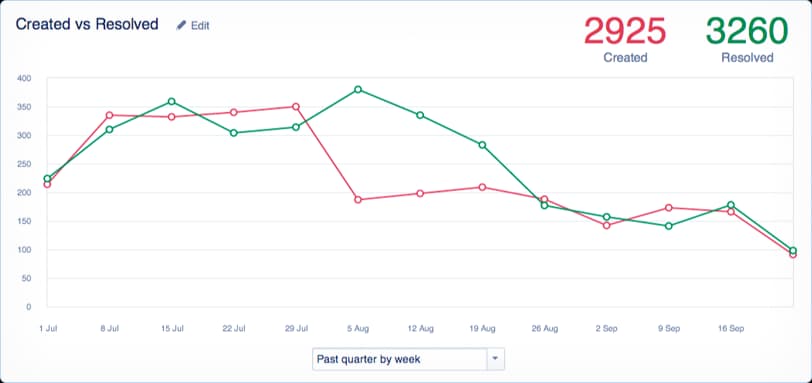
The report above, that's the one worth watching, and it's also the trap. Created-versus-resolved tells you whether you're keeping up. It tells you nothing though about whether the volume needed to exist in the first place. Most teams I talk to, they've spent two years optimising that second number and never once touched the first.
Try eesel on your Jira queue
Which brings me to the honest recommendation here. If your Jira ticketing system is set up properly and it's still growing anyway, the fix isn't another dashboard, or a faster agent, it's answering the repetitive tickets before a human ever even opens them.
That's what eesel does inside Jira, essentially. It trains on your past tickets and your Confluence pages, sits in the queue as a first responder, and hands off anything it isn't confident about. InDebted's Head of IT, Jason Loyola, runs it on their internal IT desk, and the numbers are public: eesel fully deflects 15% of incoming issues today, with 55% as the target as more knowledge gets written back from resolved tickets. His verdict on the setup was three words: "It was quite easy to set up."

Two things I'd flag here, because I would want to know them too. It's a layer on your helpdesk, not a replacement, so if you haven't picked between plain Jira and JSM yet, go and do that first. And it won't fix a documentation problem either, if the answer isn't written down anywhere, no AI is going to invent it out of nothing. Pricing is per interaction rather than per seat though, which at least means it doesn't get more expensive every single time you hire.
You can try it free and just point it at your existing queue, to see what it would've actually handled.